

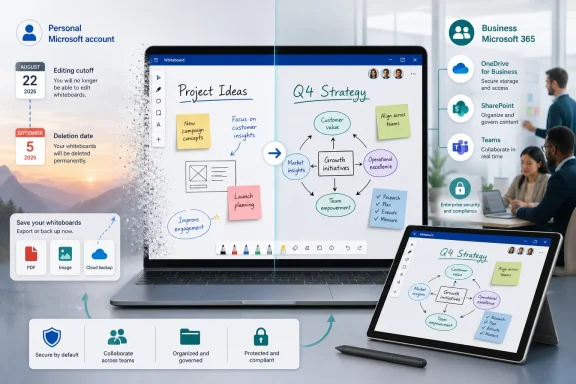
Microsoft Whiteboard is not shutting down on August 22, 2026, but the version available to people using personal Microsoft accounts effectively is. Microsoft is warning those users that they will soon lose the ability to create or edit boards, followed by a brief export-only window and permanent deletion on September 5. The distinction matters: Whiteboard will continue as a Microsoft 365 business and education service, while its consumer-facing experience is being retired as Microsoft consolidates storage around OneDrive for Business.
Microsoft Whiteboard has long occupied an unusual position in the Windows ecosystem. It is a free-form digital canvas designed for handwriting, diagrams, sticky notes, brainstorming, meeting facilitation, and visual collaboration, yet it has served two very different audiences: individuals signing in with personal Microsoft accounts and organizations using Microsoft 365 work or school identities.
That overlap will end soon. According to the retirement warning appearing in the app, personal-account users face two firm deadlines:
A Microsoft 365 work or school identity is different. It is created and managed through an organization, backed by Microsoft Entra ID, and connected to business services such as OneDrive for Business and SharePoint. Whiteboard remains available to supported organizational accounts after the consumer retirement dates.
The more accurate description is that Microsoft is narrowing Whiteboard’s supported account base. The app survives, but it becomes an organizational collaboration product rather than a general-purpose Microsoft account service.
Over time, Microsoft added templates, reactions, images, notes, links, diagrams, collaborative cursors, and other tools. Whiteboard became less like a basic sketchpad and more like a visual workspace integrated into Microsoft 365.
That evolution created pressure to align Whiteboard with the rest of Microsoft 365’s file model. Administrators expect organizational content to work with familiar controls such as retention policies, eDiscovery, data loss prevention, legal holds, storage quotas, and lifecycle management.
Microsoft subsequently made OneDrive the default home for new commercial whiteboards and began moving older organizational boards from Azure storage. The company has described the change as a way to improve security, accessibility, revision history, manageability, and support for future features.
Microsoft’s current Whiteboard documentation explicitly distinguishes personal-account boards from those stored in OneDrive for Business. Rather than build and maintain a parallel consumer implementation of the new architecture, Microsoft is retiring personal Microsoft account support.
Paying for Microsoft 365 Personal or Family does not automatically turn that identity into a Microsoft 365 business account. A consumer subscription should not be assumed to preserve Whiteboard access after August 22.
These accounts can have access to OneDrive for Business and the organizational version of Whiteboard, depending on licensing and administrator policy. Microsoft says Whiteboard on OneDrive for Business is enabled by default for applicable tenants, although administrators can disable it and must ensure that the necessary Microsoft 365 services are provisioned.
That makes checking the active Whiteboard profile essential. A board associated with a personal identity does not automatically become an organizational board merely because the same computer is connected to a business tenant.
Users should inspect the account shown in Whiteboard and repeat the check on every device where they have used the service. Old tablets, Surface devices, secondary Windows installations, and browser profiles may contain access paths that are easy to forget.
The application may remain installed, and existing content may still appear, but the experience will have shifted into a temporary recovery phase. Users should not treat the continued ability to open a board as evidence that it remains safely stored.
Anyone actively using Whiteboard for an ongoing personal project should move to another application before the deadline. Waiting until August 22 could leave the final editable version trapped in a service that only allows viewing and export.
Users should notify collaborators and establish a replacement workspace rather than assuming the shared board can be preserved indefinitely. Exporting an image may save the visible content, but it will not necessarily preserve live collaboration, object-level editing, comments, reactions, history, or permissions.
A cached view is not the same as a supported local file. Users need a deliberate export or migration plan, not an attempt to freeze the client software.
That gives affected users only two weeks between the loss of editing and the stated deletion point. It is a short recovery period, particularly for people who discover the warning late or have accumulated numerous boards over several years.
The practical advice is simple: do not use September 5 as the day to begin exporting. Users should complete the process well before August 22 and verify that the exported files open correctly outside Whiteboard.
Even if some backend retention exists temporarily, relying on it would be risky and could conflict with Microsoft’s deletion commitments. The only dependable copy is one that the user has exported, opened, checked, and stored elsewhere.
This is an important distinction for users who assume that regular activity or a paid consumer subscription grants special protection. The warning does not describe exceptions based on usage frequency.
Create a simple inventory containing the board name, approximate date, purpose, collaborators, and desired destination. This prevents important content from being overlooked during a rushed series of exports.
Boards linked to an active project should move first. They need both a safe archival copy and a new editable home before personal Whiteboard editing ends.
A high-resolution image or supported document export can preserve the overall appearance. However, it may flatten the board into a single non-editable result rather than retaining individual notes, strokes, text boxes, links, and objects.
For complex boards, users should consider saving multiple close-up exports in addition to a full-canvas image. Important text can also be copied into a conventional document, while destination URLs and attachments should be saved separately.
Store at least two copies in different places. For example, keep one in consumer OneDrive and another on a local drive, external storage device, or separate cloud service. The retirement of one cloud service is a useful reminder that synchronization alone is not a complete backup strategy.
Users may need to export the personal board and rebuild or import its content into a new organizational board. Depending on the available format, that process may preserve only the visual result rather than the original editable structure.
Personal journals, family planning, private health notes, independent commercial ideas, and unrelated side projects generally should not be placed in an employer’s Microsoft 365 environment. The organization, not the individual, controls the tenant.
A school Whiteboard may be ideal for current coursework, but it is not necessarily a permanent archive. Graduating users should export important academic boards before their institution disables the account.
Microsoft says new organizational whiteboards are stored as
The new model also makes Whiteboard less of an isolated service. Administrators can use many of the same governance concepts they already apply to Word, Excel, PowerPoint, and Loop content.
Storage integrated with Microsoft 365 can support stronger versioning and recovery capabilities than a standalone synchronized canvas. This reduces the risk that one mistaken editing session destroys the only useful copy of an important board.
SharePoint storage is often a better conceptual fit for team-owned material because it belongs to the group rather than one employee. Microsoft’s movement toward SharePoint-backed storage for Teams channel whiteboards suggests that it recognizes this distinction, but organizations still need to understand where each board lives.
For these users, the retirement removes a Microsoft-provided canvas that worked across Windows, mobile devices, and the web with a familiar personal login.
The loss of personal-account support weakens Microsoft’s first-party story for casual visual ideation on Windows. Journal and OneNote can cover parts of the experience, but neither is a direct replacement for an infinite collaborative board.
Because the Whiteboard change is tied to account classification rather than the household’s overall subscription status, every user should check separately. One family member’s organizational account does not protect boards created by another person’s consumer identity.
For that group, the retirement may increase interest in native, local-first Windows applications. Such tools can be faster, use less memory, and avoid service retirement risks, although they usually sacrifice automatic synchronization and browser-based collaboration.
Administrators should treat Whiteboard as governed Microsoft 365 content rather than an optional drawing utility.
IT teams should verify Whiteboard enablement, OneDrive provisioning, SharePoint settings, and the relevant enterprise application controls. Shared devices, Teams Rooms, and Surface Hubs may require additional attention because their storage and collaboration behavior can differ from standard desktop clients.
Users may see migration status messages or encounter boards that require action. Administrators should review available reporting and PowerShell tools rather than assuming that every legacy canvas has already moved successfully.
They should also document whether a board is stored in an individual OneDrive or a team-connected SharePoint location. That detail can determine who retains access after personnel or membership changes.
Users should test alternatives before the editing cutoff rather than selecting one based solely on screenshots or feature lists.
Its central tradeoff is the absence of a comparable cloud collaboration model. A local-first tool reduces dependence on an online provider, but users must handle file transfer, synchronization, backups, and multi-device access themselves.
Its free tier has limitations, including restrictions on the number of actively editable boards, while broader use requires a subscription. Miro may be more capable than Whiteboard for structured workshops, but its complexity and recurring cost can be excessive for someone who only wants an occasional sketching canvas.
The page-oriented structure can feel restrictive compared with an open canvas. Still, OneNote is a practical Microsoft ecosystem destination for users who value durable notes more than live workshop-style collaboration.
The most important question is not whether an alternative can import a screenshot. It is whether users can retrieve their work in a standard or reusable format if that service later changes its pricing or account policy.
Unless Microsoft states otherwise, the safe assumption is that editing ends on August 22 and deletion follows after September 5, 2026.
Such a tool would also make the retirement more consistent with modern data-portability expectations. A clear manifest listing board titles and creation dates would be particularly useful.
Consumer users should therefore select alternatives based on available products rather than an assumption that Microsoft will reverse course.
Administrators should watch for changes to migration behavior, permissions, external sharing, Teams Rooms support, and the treatment of existing OneDrive-owned boards.
Until then, Windows users must choose between local whiteboard software, more structured Microsoft applications, and third-party collaboration platforms.
Microsoft Whiteboard’s August 2026 change is not the death of the product, but it is a decisive retreat from the consumer market. Personal-account users should export and verify their content now, well before editing stops on August 22 and deletion follows after September 5, while businesses should use the moment to audit storage, ownership, migration, and retention. Whiteboard’s future lies inside the managed Microsoft 365 ecosystem; anyone outside that boundary now needs a new canvas and a more durable plan for protecting what they create.
 Overview
Microsoft Whiteboard has long occupied an unusual position in the Windows ecosystem. It is a free-form digital canvas designed for handwriting, diagrams, sticky notes, brainstorming, meeting facilitation, and visual collaboration, yet it has served two very different audiences: individuals signing in with personal Microsoft accounts and organizations using Microsoft 365 work or school identities.That overlap will end soon. According to the retirement warning appearing in the app, personal-account users face two firm deadlines:
- Starting August 22, 2026, personal users will no longer be able to create or edit whiteboards.
- Between August 22 and September 5, they will retain limited access to view and export existing boards.
- After September 5, 2026, their Whiteboard content will be permanently deleted.
What Microsoft is actually retiring
The warning states that “Microsoft Whiteboard for Microsoft account” is being retired. In Microsoft terminology, a Microsoft account is generally a personal identity used with services such as Outlook.com, Xbox, consumer OneDrive, and Microsoft 365 Personal or Family.A Microsoft 365 work or school identity is different. It is created and managed through an organization, backed by Microsoft Entra ID, and connected to business services such as OneDrive for Business and SharePoint. Whiteboard remains available to supported organizational accounts after the consumer retirement dates.
Why the wording has caused confusion
The in-app message is concise, but screenshots detached from their account context can make the change look like the entire product is closing. That impression is understandable because the warning emphasizes the loss of editing and permanent deletion without leading with a broad reassurance that commercial Whiteboard will remain operational.The more accurate description is that Microsoft is narrowing Whiteboard’s supported account base. The app survives, but it becomes an organizational collaboration product rather than a general-purpose Microsoft account service.
How Whiteboard Reached This Point
Microsoft originally developed Whiteboard as a digital equivalent of the large physical canvas commonly found in conference rooms and classrooms. Its strongest early use cases involved Surface devices, pen input, Microsoft Teams meetings, and real-time collaboration among colleagues.Over time, Microsoft added templates, reactions, images, notes, links, diagrams, collaborative cursors, and other tools. Whiteboard became less like a basic sketchpad and more like a visual workspace integrated into Microsoft 365.
From standalone canvas to Microsoft 365 component
Whiteboard can still be opened as a standalone Windows application or through a browser, but its strategic value increasingly comes from its relationship with Teams, OneDrive, SharePoint, identity management, and organizational compliance controls. A board created during a Teams meeting is not merely a drawing; it can be a shared business record with permissions, ownership, retention requirements, and a defined storage location.That evolution created pressure to align Whiteboard with the rest of Microsoft 365’s file model. Administrators expect organizational content to work with familiar controls such as retention policies, eDiscovery, data loss prevention, legal holds, storage quotas, and lifecycle management.
The legacy Azure storage model
Whiteboard historically stored some content through an Azure-backed service rather than treating every board as a conventional file in a user’s document library. That approach helped Microsoft deliver a synchronized canvas across devices, but it also made Whiteboard content different from Word documents, PowerPoint presentations, and other Microsoft 365 files.Microsoft subsequently made OneDrive the default home for new commercial whiteboards and began moving older organizational boards from Azure storage. The company has described the change as a way to improve security, accessibility, revision history, manageability, and support for future features.
Consumer accounts do not fit the new architecture
The critical complication is that consumer OneDrive and OneDrive for Business are not interchangeable storage systems, even if they share branding and similar user interfaces. OneDrive for Business is connected to an organization’s Microsoft 365 tenant, identity policies, SharePoint infrastructure, and administrative controls.Microsoft’s current Whiteboard documentation explicitly distinguishes personal-account boards from those stored in OneDrive for Business. Rather than build and maintain a parallel consumer implementation of the new architecture, Microsoft is retiring personal Microsoft account support.
The Account Distinction That Determines Access
The future of a user’s Whiteboard content depends primarily on the identity shown in the app, not whether the app came from the Microsoft Store or whether the user pays for a consumer Microsoft 365 subscription. This detail is easy to miss because Microsoft uses similar branding across several unrelated account and licensing systems.Personal Microsoft accounts
A personal Microsoft account typically uses an Outlook.com, Hotmail.com, Live.com, or another personally registered email address. It may also be associated with Microsoft 365 Personal, Microsoft 365 Family, consumer OneDrive storage, Windows sign-in, Xbox, or other consumer services.Paying for Microsoft 365 Personal or Family does not automatically turn that identity into a Microsoft 365 business account. A consumer subscription should not be assumed to preserve Whiteboard access after August 22.
Work and school accounts
Work and school accounts are issued through organizations. They may use a company, university, school district, charity, or government domain and are managed within a Microsoft 365 tenant.These accounts can have access to OneDrive for Business and the organizational version of Whiteboard, depending on licensing and administrator policy. Microsoft says Whiteboard on OneDrive for Business is enabled by default for applicable tenants, although administrators can disable it and must ensure that the necessary Microsoft 365 services are provisioned.
Users signed into both account types
Windows and Microsoft 365 applications often allow several identities to coexist. A person might sign into Windows with a personal account, use Teams with an employer account, and have both identities listed inside an application.That makes checking the active Whiteboard profile essential. A board associated with a personal identity does not automatically become an organizational board merely because the same computer is connected to a business tenant.
Users should inspect the account shown in Whiteboard and repeat the check on every device where they have used the service. Old tablets, Surface devices, secondary Windows installations, and browser profiles may contain access paths that are easy to forget.
What Happens on August 22
August 22, 2026, is the functional retirement date for personal accounts. From that point, affected users will no longer be able to create new boards or change existing ones.The application may remain installed, and existing content may still appear, but the experience will have shifted into a temporary recovery phase. Users should not treat the continued ability to open a board as evidence that it remains safely stored.
Creation and editing stop
The loss of editing means more than disabling the pen tool. Users should expect that adding sticky notes, moving objects, changing text, reorganizing diagrams, importing images, and making other modifications will no longer be supported under a personal account.Anyone actively using Whiteboard for an ongoing personal project should move to another application before the deadline. Waiting until August 22 could leave the final editable version trapped in a service that only allows viewing and export.
Collaboration links may lose their practical value
Shared boards tied to personal accounts are especially vulnerable. Even if a collaborator can still open a link during the limited-access period, the original owner’s loss of editing and the approaching deletion deadline make that link unsuitable as a durable collaboration mechanism.Users should notify collaborators and establish a replacement workspace rather than assuming the shared board can be preserved indefinitely. Exporting an image may save the visible content, but it will not necessarily preserve live collaboration, object-level editing, comments, reactions, history, or permissions.
Installed applications will not bypass the restriction
Because Whiteboard depends on Microsoft’s cloud service and account authorization, keeping an older app package is unlikely to preserve normal access. Blocking application updates or disconnecting a Windows PC from the internet is not a reliable archival strategy.A cached view is not the same as a supported local file. Users need a deliberate export or migration plan, not an attempt to freeze the client software.
The September 5 Deletion Deadline
The second date carries greater consequences. Microsoft’s warning says that personal-account whiteboards will be permanently deleted after September 5, 2026.That gives affected users only two weeks between the loss of editing and the stated deletion point. It is a short recovery period, particularly for people who discover the warning late or have accumulated numerous boards over several years.
Deletion changes the urgency
Many service retirements leave data available for months, place it in read-only storage, or offer an extended administrator recovery window. The message shown to Whiteboard users promises no comparable long-term safety net for personal content.The practical advice is simple: do not use September 5 as the day to begin exporting. Users should complete the process well before August 22 and verify that the exported files open correctly outside Whiteboard.
“Permanently deleted” should be taken literally
Cloud services often maintain internal backups for operational resilience, but those backups are not necessarily available as end-user recovery tools. A statement that content will be permanently deleted means users should not expect Microsoft Support to reconstruct individual boards afterward.Even if some backend retention exists temporarily, relying on it would be risky and could conflict with Microsoft’s deletion commitments. The only dependable copy is one that the user has exported, opened, checked, and stored elsewhere.
Account inactivity is not the only issue
The retirement applies because of account type, not merely inactivity. Someone who opens Whiteboard every day with a personal account remains affected, while an eligible organizational account can continue using the service subject to licensing and administrative configuration.This is an important distinction for users who assume that regular activity or a paid consumer subscription grants special protection. The warning does not describe exceptions based on usage frequency.
How to Preserve Existing Boards
Affected users should approach the retirement as a small data migration project. The goal is not only to copy the visible canvas but also to determine what must remain editable, searchable, shareable, or reusable.Step 1: Inventory every board
Open Whiteboard while signed into the personal account and review the complete board list. Look for old project names, untitled canvases, archived ideas, and boards created from other devices.Create a simple inventory containing the board name, approximate date, purpose, collaborators, and desired destination. This prevents important content from being overlooked during a rushed series of exports.
Step 2: Prioritize irreplaceable content
Not every rough sketch needs to be preserved. Prioritize boards containing original handwriting, planning information, personal research, classroom material, family projects, diagrams, or content that cannot be recreated easily.Boards linked to an active project should move first. They need both a safe archival copy and a new editable home before personal Whiteboard editing ends.
Step 3: Export using available formats
Microsoft Whiteboard has offered export options for producing visual copies of a canvas. The exact choices can vary by client and account, so users should inspect the export menu on the version they currently use.A high-resolution image or supported document export can preserve the overall appearance. However, it may flatten the board into a single non-editable result rather than retaining individual notes, strokes, text boxes, links, and objects.
Step 4: Capture details that an image may miss
Zoomed-out exports can make small handwriting or text unreadable. Large boards may also contain off-screen regions, embedded links, layered objects, or notes whose meaning depends on their location.For complex boards, users should consider saving multiple close-up exports in addition to a full-canvas image. Important text can also be copied into a conventional document, while destination URLs and attachments should be saved separately.
Step 5: Verify and duplicate the archive
Every export should be opened outside Whiteboard. Confirm that text remains legible, the full canvas is present, images are visible, and the file is not corrupted.Store at least two copies in different places. For example, keep one in consumer OneDrive and another on a local drive, external storage device, or separate cloud service. The retirement of one cloud service is a useful reminder that synchronization alone is not a complete backup strategy.
Moving Content to a Business Account
Some users have access to Whiteboard through an employer, school, or organization and may consider moving their personal boards there. That can work for suitable material, but it is not the same as transferring ownership from one account system to another.A new account does not guarantee automatic migration
Signing into Whiteboard with a business identity will not necessarily cause personal boards to appear. The identities belong to separate environments with different storage, ownership, and policy models.Users may need to export the personal board and rebuild or import its content into a new organizational board. Depending on the available format, that process may preserve only the visual result rather than the original editable structure.
Corporate storage is not personal storage
Before moving anything, users should consider whether an employer-managed tenant is an appropriate destination. Company administrators may apply retention rules, monitor sharing, perform eDiscovery, restrict downloads, or delete data when employment ends.Personal journals, family planning, private health notes, independent commercial ideas, and unrelated side projects generally should not be placed in an employer’s Microsoft 365 environment. The organization, not the individual, controls the tenant.
School accounts can expire
Education accounts introduce similar risks. Students often lose access after graduation, a period of inactivity, or a licensing change.A school Whiteboard may be ideal for current coursework, but it is not necessarily a permanent archive. Graduating users should export important academic boards before their institution disables the account.
Why OneDrive for Business Changes Whiteboard
Moving Whiteboard content into the Microsoft 365 file ecosystem gives Microsoft and enterprise customers capabilities that are difficult to deliver through a separate canvas-specific storage service. A board can be governed more like other organizational content.Microsoft says new organizational whiteboards are stored as
.whiteboard files, generally in the OneDrive of the person who creates them. Whiteboards initiated in certain Teams channel scenarios may use the associated SharePoint location, reflecting Microsoft’s broader effort to align ownership with the collaboration context.File-based storage improves governance
OneDrive and SharePoint provide established mechanisms for permissions, retention, legal holds, data loss prevention, quotas, and discovery. These features matter when a whiteboard contains product plans, customer information, incident timelines, architectural diagrams, or decisions made during a regulated business process.The new model also makes Whiteboard less of an isolated service. Administrators can use many of the same governance concepts they already apply to Word, Excel, PowerPoint, and Loop content.
Revision history can make boards safer
Collaborative canvases are easy to change accidentally. Objects can be dragged, deleted, resized, or overwritten during a busy meeting.Storage integrated with Microsoft 365 can support stronger versioning and recovery capabilities than a standalone synchronized canvas. This reduces the risk that one mistaken editing session destroys the only useful copy of an important board.
Ownership remains a complicated issue
When a board resides in the creator’s OneDrive, its lifecycle can become tied to that person’s account. If the employee leaves, loses a license, or has the account deleted, administrators need processes for preserving or transferring important content.SharePoint storage is often a better conceptual fit for team-owned material because it belongs to the group rather than one employee. Microsoft’s movement toward SharePoint-backed storage for Teams channel whiteboards suggests that it recognizes this distinction, but organizations still need to understand where each board lives.
Impact on Personal and Family Users
Consumer Whiteboard users may be a smaller audience than enterprise customers, but they are not necessarily casual users. Digital whiteboards are useful for homeschooling, tutoring, household projects, tabletop gaming, creative planning, remote family discussions, and pen-based sketching.For these users, the retirement removes a Microsoft-provided canvas that worked across Windows, mobile devices, and the web with a familiar personal login.
Windows pen users lose a natural option
Whiteboard has been particularly attractive on Surface devices and other Windows tablets with active pens. It provides a large canvas without forcing the user into the page structure of OneNote or the complexity of a professional illustration package.The loss of personal-account support weakens Microsoft’s first-party story for casual visual ideation on Windows. Journal and OneNote can cover parts of the experience, but neither is a direct replacement for an infinite collaborative board.
Families may not recognize the account warning
A family could have several Microsoft identities connected to the same PC. One person might own the Microsoft 365 Family subscription, while others use individual personal accounts.Because the Whiteboard change is tied to account classification rather than the household’s overall subscription status, every user should check separately. One family member’s organizational account does not protect boards created by another person’s consumer identity.
The change may encourage local-first software
Some personal users do not need real-time collaboration. They want a fast canvas for drawing, explaining, annotating, or preparing an image to share elsewhere.For that group, the retirement may increase interest in native, local-first Windows applications. Such tools can be faster, use less memory, and avoid service retirement risks, although they usually sacrifice automatic synchronization and browser-based collaboration.
Impact on Businesses and IT Administrators
Organizations are not losing Whiteboard on August 22, but the surrounding storage transition still deserves attention. Continued availability does not mean every tenant is configured correctly or that every board will migrate without intervention.Administrators should treat Whiteboard as governed Microsoft 365 content rather than an optional drawing utility.
OneDrive must be provisioned
Microsoft’s documentation indicates that users need appropriate OneDrive storage to create new OneDrive-backed whiteboards. A licensed employee who lacks a provisioned OneDrive may encounter creation or migration failures.IT teams should verify Whiteboard enablement, OneDrive provisioning, SharePoint settings, and the relevant enterprise application controls. Shared devices, Teams Rooms, and Surface Hubs may require additional attention because their storage and collaboration behavior can differ from standard desktop clients.
Older Azure boards may still require migration
Commercial Whiteboard moved to OneDrive as the default for new boards several years ago, but older content could remain in Azure-backed storage. Microsoft has been migrating those legacy boards into OneDrive through a phased process.Users may see migration status messages or encounter boards that require action. Administrators should review available reporting and PowerShell tools rather than assuming that every legacy canvas has already moved successfully.
Lifecycle policies need testing
A.whiteboard file may behave like a Microsoft 365 file for governance purposes, but its collaboration patterns differ from a conventional document. IT teams should test retention, legal hold, sharing, ownership transfer, deletion, and account-offboarding procedures with actual boards.They should also document whether a board is stored in an individual OneDrive or a team-connected SharePoint location. That detail can determine who retains access after personnel or membership changes.
Choosing a Microsoft Whiteboard Alternative
No single replacement fits every affected user. The best option depends on whether the priority is low memory usage, pen input, cloud synchronization, structured notes, real-time collaboration, guest access, or long-term file ownership.Users should test alternatives before the editing cutoff rather than selecting one based solely on screenshots or feature lists.
Markerpad for lightweight local use
Markerpad is a native Windows whiteboard application focused on responsiveness and low resource consumption. It can suit quick sketches, pen input, diagrams, and content that will ultimately be shared as an image through another application.Its central tradeoff is the absence of a comparable cloud collaboration model. A local-first tool reduces dependence on an online provider, but users must handle file transfer, synchronization, backups, and multi-device access themselves.
Miro for collaborative workspaces
Miro is one of the best-known cross-platform visual collaboration services. It offers extensive templates, integrations, presentation tools, and real-time multi-user editing.Its free tier has limitations, including restrictions on the number of actively editable boards, while broader use requires a subscription. Miro may be more capable than Whiteboard for structured workshops, but its complexity and recurring cost can be excessive for someone who only wants an occasional sketching canvas.
OneNote for mixed notes and ink
OneNote is not an infinite whiteboard in the same sense, but it supports handwriting, typing, images, links, embedded material, and synchronization through a personal Microsoft account. It is particularly useful when visual notes need to be organized into notebooks, sections, and pages.The page-oriented structure can feel restrictive compared with an open canvas. Still, OneNote is a practical Microsoft ecosystem destination for users who value durable notes more than live workshop-style collaboration.
Other browser-based and open alternatives
Several collaboration platforms provide whiteboard or diagramming capabilities, while open-source tools can offer greater portability and self-hosting options. Users should investigate export formats, offline behavior, account requirements, free-tier limits, encryption claims, and whether the service can preserve editable objects.The most important question is not whether an alternative can import a screenshot. It is whether users can retrieve their work in a standard or reusable format if that service later changes its pricing or account policy.
Strengths and Opportunities
Microsoft’s decision has legitimate technical and strategic benefits, even though the accelerated consumer retirement will frustrate affected users.- A unified business storage model can improve governance. Whiteboards can participate in Microsoft 365 retention, discovery, compliance, and data protection workflows.
- OneDrive and SharePoint integration can strengthen recovery. File-based storage and revision history create more options for restoring content after accidental changes.
- Teams integration becomes more coherent. Meeting and channel boards can align more closely with organizational identity, membership, and file ownership.
- Microsoft can concentrate development resources. Supporting one enterprise-oriented architecture may make it easier to deliver new Whiteboard features consistently.
- The change highlights the value of portable exports. Users and developers may place greater emphasis on open formats, local copies, and reliable migration tools.
- Native Windows alternatives have an opening. Lightweight applications can compete on speed, offline access, pen responsiveness, privacy, and permanent local ownership.
Risks and Concerns
The strategic logic does not eliminate the costs imposed on personal users. The short interval between read-only access and deletion is the most immediate concern, but it is not the only one.- Users may misread the warning as a total product shutdown. Confusion can lead business customers to abandon a service that remains supported or personal users to ignore a notice they assume is inaccurate.
- The export period is unusually brief. Two weeks is little time for users who miss the initial notification, travel, lose device access, or manage many boards.
- Flattened exports may not preserve editability. Images can save appearance while discarding object structure, links, collaboration metadata, and revision history.
- Consumer Microsoft 365 subscribers may feel excluded. Paying for Personal or Family does not appear to provide the OneDrive for Business architecture that Whiteboard will require.
- Moving personal content into a workplace tenant creates ownership risks. Employers can control, retain, inspect, or delete data stored in their Microsoft 365 environment.
- Cloud dependency remains significant for business users. Organizational Whiteboard still depends on licensing, identity, service availability, and administrator configuration.
- OneDrive ownership can complicate offboarding. Team knowledge stored in one employee’s personal business drive may become difficult to manage when that person leaves.
- The decision weakens Microsoft’s consumer pen ecosystem. Windows tablet users lose a first-party collaborative canvas that was naturally suited to Surface hardware.
What to Watch Next
The immediate priority is the August and September deadline sequence, but several longer-term questions will determine whether the transition improves Whiteboard or simply narrows its audience.Whether Microsoft extends the recovery window
Service retirement dates sometimes change when customer feedback reveals migration difficulties. Users should not count on an extension, but Microsoft’s support documentation and in-app notices remain worth monitoring.Unless Microsoft states otherwise, the safe assumption is that editing ends on August 22 and deletion follows after September 5, 2026.
Whether bulk export becomes available
Exporting boards individually can become tedious for users with large libraries. A bulk download or account-level archive would greatly reduce the chance of accidental loss.Such a tool would also make the retirement more consistent with modern data-portability expectations. A clear manifest listing board titles and creation dates would be particularly useful.
Whether personal OneDrive support returns in another form
Microsoft could theoretically build a consumer Whiteboard architecture based on personal OneDrive, but there is no indication in the retirement warning that such a replacement is imminent. The company’s current direction positions Whiteboard primarily as a work and education collaboration service.Consumer users should therefore select alternatives based on available products rather than an assumption that Microsoft will reverse course.
How SharePoint storage evolves
Whiteboards created in Teams channels increasingly make sense as SharePoint-owned content rather than files attached to an individual employee’s OneDrive. Broader adoption of that model could improve continuity for project teams.Administrators should watch for changes to migration behavior, permissions, external sharing, Teams Rooms support, and the treatment of existing OneDrive-owned boards.
Whether Windows gains another first-party canvas
Microsoft continues to invest in pen, touch, Copilot, OneNote, Journal, and collaborative Microsoft 365 experiences. A streamlined personal canvas could emerge elsewhere, but replacing Whiteboard’s combination of infinite space and real-time collaboration would require more than adding ink to an existing notes app.Until then, Windows users must choose between local whiteboard software, more structured Microsoft applications, and third-party collaboration platforms.
Microsoft Whiteboard’s August 2026 change is not the death of the product, but it is a decisive retreat from the consumer market. Personal-account users should export and verify their content now, well before editing stops on August 22 and deletion follows after September 5, while businesses should use the moment to audit storage, ownership, migration, and retention. Whiteboard’s future lies inside the managed Microsoft 365 ecosystem; anyone outside that boundary now needs a new canvas and a more durable plan for protecting what they create.
References
- Primary source: Windows Central
Published: 2026-07-21T14:29:15+00:00
Microsoft Whiteboard is not shutting down, but you still may lose access next month | Windows Central
Whiteboard is moving to OneDrive for Business, cutting off personal accounts and deleting their boards in September.www.windowscentral.com - Official source: support.microsoft.com
Find and share whiteboards in OneDrive | Microsoft Support
Find and share whiteboards in OneDrivesupport.microsoft.com - Official source: learn.microsoft.com
Manage data for Microsoft Whiteboard - Microsoft Whiteboard | Microsoft Learn
Learn about data retention for Microsoft Whiteboard in Azure and OneDrive.learn.microsoft.com
