

Microsoft’s week of June 9, 2026 brought a mandatory Windows 11 Patch Tuesday update, fresh Insider builds, major inbox-app releases, faster Defender EDR servicing, Edge update-cycle changes, PowerToys 0.100, and an Xbox showcase that put console exclusives back on Microsoft’s public roadmap. The common thread is not volume; Microsoft has always shipped in waves. The story is that Redmond is tightening the cadence of everything it controls, from security components to browser builds to first-party games, while asking users and administrators to trust that speed will not become churn.
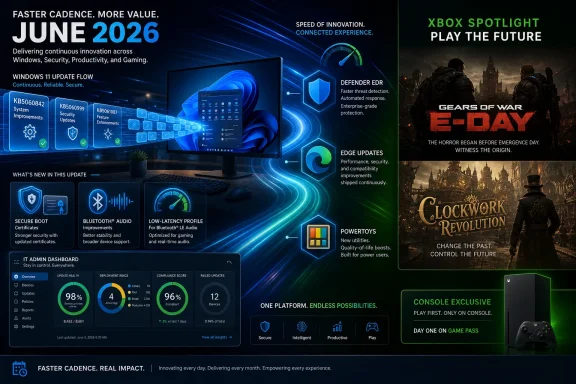
The headline item for gamers was easy to spot: Xbox exclusives are back, at least in a more explicit form than Microsoft has been willing to say lately. Gears of War: E-Day and Clockwork Revolution were positioned as Xbox console exclusives, a notable reversal in tone after years of “play anywhere” messaging that often seemed to dissolve the console’s identity into a services strategy.
But the Windows side told the same story in a different register. KB5094126 for Windows 11 versions 24H2 and 25H2 did more than deliver security fixes. It rolled forward features that touch performance, Bluetooth audio, Secure Boot certificate handling, AI components, and update deployment mechanics. That is a lot to stuff into a monthly security update, and it shows how Patch Tuesday has become both Microsoft’s safety rail and its feature-distribution engine.
Microsoft is not merely updating products. It is redefining the rhythm by which users receive change. Security improvements can arrive outside Patch Tuesday. Edge may move from a four-week to a two-week update cycle. Inbox Windows apps now get dedicated release notes. PowerToys, once a playground for enthusiasts, is mature enough to reach version 0.100 with a reworked Shortcut Guide and more extensible Command Palette.
That rhythm is useful when it closes security gaps faster and frustrating when it turns every week into a mini-migration. For WindowsForum readers, the question is not whether Microsoft shipped a lot this week. It is whether this faster, more modular Microsoft is making Windows easier to live with or simply harder to pin down.
The most eye-catching addition is the Low-latency Profile, a performance-oriented change designed to make interactive moments feel snappier. In plain English, Windows can temporarily bias the system toward responsiveness during short bursts such as launching apps or opening interface elements. That is not the same as a new scheduler revolution, but it is the kind of change users actually notice if it works: less waiting in the tiny gaps where Windows often feels slower than the hardware underneath it.
Shared Bluetooth audio is another consumer-facing addition, and it points to Microsoft catching up with expectations set by phones and tablets. Multi-listener audio has been a convenience feature elsewhere for years. On Windows, where Bluetooth behavior can still vary wildly by adapter, driver, headset, and codec, the real test will be not the feature announcement but the support matrix that follows.
The Secure Boot work is more consequential for IT. Microsoft is using quality updates to broaden the population of devices eligible to receive updated Secure Boot certificates, with targeting based on device confidence signals. That is careful language for a careful rollout. Secure Boot certificate expiration is one of those infrastructure problems that most users should never have to understand, but if it goes wrong, it becomes a boot failure, a recovery call, or a fleet incident.
The update also hardens how Windows processes
For home users, this is invisible until it is not. For managed environments, it is another reminder that firmware, OS servicing, deployment media, and update policy are now fused into a single lifecycle. The days when an administrator could think of Secure Boot as a BIOS setting rather than a living trust chain are gone.
The deployment note around
There is a broader lesson here: Windows servicing is becoming more componentized, but not necessarily simpler. The more Microsoft decouples update streams and pushes targeted changes, the more administrators need observability into what actually landed on which machines. “Fully patched” is no longer a comforting binary state when firmware trust, AI components, app packages, browser channels, and endpoint-detection updates can all move on different tracks.
Decoupling those updates from Patch Tuesday makes operational sense. Defender already exists in a world of frequent intelligence updates, cloud-delivered signals, and post-breach tuning. EDR components living on a more flexible servicing rail aligns the product with how threats evolve.
The trade-off is governance. Security teams generally like faster protection, but endpoint teams want predictability. Moving EDR servicing through Microsoft Update means organizations need to check their rings, deferrals, reporting, and rollback procedures. A security improvement that arrives faster is still software running with deep visibility into endpoints.
This is the Microsoft security bargain in miniature. The company wants to be judged not only by the monthly rollup but by how quickly it can alter the defensive posture of the installed base. That is the right strategic goal. The practical question is whether enterprise tooling keeps pace with the complexity Microsoft itself is adding.
That File Explorer change sounds minor because it is minor. It is also exactly the kind of power-user convenience Windows should be adding more often. File Explorer has spent years absorbing redesigns, ribbon changes, context-menu rewrites, tab support, OneDrive integration, and performance complaints. A simple middle-click behavior is not transformative, but it respects how people actually navigate files.
Beta builds 26220.8680 and 28020.2298 added Screen Tint, improved Widgets, and other refinements. Release Preview builds 26200.8728 and 26100.8728 brought better widgets, new Windows Update controls, point-in-time restore, and additional File Explorer improvements. That spread tells us Microsoft is testing both user-facing features and administrative recovery controls in parallel.
Point-in-time restore is especially worth watching. Windows has long needed better built-in recovery primitives that feel less like archaeological work through restore points, reset flows, and image backups. If Microsoft can make rollback and recovery more predictable without requiring third-party imaging tools, it will matter far more to real users than another AI button.
That creates a documentation obligation. If Paint gains serious image-editing tools, Photos changes its workflow, Camera adds new capture behavior, or Calculator receives functional updates, users deserve to know what changed. Administrators deserve it even more, because inbox apps are often deployed, removed, blocked, or governed differently depending on organization policy.
There is also a trust issue. Microsoft has trained users to expect app changes from the Store, operating-system changes from Windows Update, and feature flags from a more mysterious cloud-control layer. Dedicated release notes do not solve the confusion, but they at least acknowledge that inbox apps are now living products with their own lifecycle.
This is the upside of Microsoft’s modular Windows strategy. The company can improve apps without waiting for a yearly OS release. The downside is that the Windows experience becomes harder to describe. Two users can both say they are on Windows 11 25H2 and still have meaningfully different app capabilities depending on Store updates, staged rollouts, account type, region, and policy.
This distinction matters. Windows runs across a vast hardware ecosystem with OEM utilities, firmware layers, driver stacks, security modules, recovery partitions, and vendor agents all trying to “help.” When those pieces fail, the user rarely cares whether the culprit was Microsoft, Dell, HP, a firmware package, or an OEM support tool.
For administrators, the lesson is boring but durable: OEM utilities are part of the attack surface and part of the reliability surface. They should be inventoried, updated, and controlled like any other privileged software. A support assistant that can break boot behavior is not a harmless convenience app; it is infrastructure.
The Secure Boot timing makes this even more sensitive. As Microsoft pushes certificate updates and vendors issue their own firmware guidance, the edge between OS servicing and device servicing gets thinner. Consumer PCs will muddle through with vendor advisories and recovery instructions. Enterprise fleets need rings, pilot devices, and a willingness to pause OEM updates even when Windows Update itself looks healthy.
At the same time, Microsoft is preparing to shift Edge to a two-week update cadence across platforms, with Extended Stable as the exception. On paper, this is the usual browser-security argument: faster updates, quicker fixes, tighter web-compatibility response. In practice, Edge is not just a browser for many Windows users. It is a PDF viewer, a WebView dependency sibling, an enterprise policy object, an identity surface, and an increasingly AI-branded entry point into Microsoft services.
A two-week cadence raises the stakes for testing. Enterprises that already struggle to validate web apps on four-week browser cycles will need to decide whether Extended Stable becomes the default posture. Consumers will mostly absorb the change silently, unless a favorite extension breaks or a UI experiment lands badly.
Manifest V2 is the more emotionally charged piece because ad blocking is not just a feature preference; for many users, it is a security and usability layer. Microsoft’s silence on Edge’s exact path leaves users in limbo. The company benefits from Chromium’s engine and ecosystem, but it also inherits the politics of Chrome’s extension model.
The responsible way to judge the feature is by policy and transparency, not by branding. If check-ins are voluntary, visible, limited, and clearly governed, they may help hybrid teams coordinate. If they become another opaque signal in productivity scoring, they will deepen the mistrust many workers already feel toward enterprise collaboration suites.
PowerToys 0.100 offers a happier story. The release reworks Shortcut Guide, adds an extension gallery for Command Palette, introduces Dock features, and continues the toolset’s evolution from enthusiast miscellany into a serious productivity layer. PowerToys succeeds because it does not pretend every workflow belongs in Windows proper. It gives power users a sanctioned place for features that are too niche, too experimental, or too opinionated for the default OS.
That separation is healthy. Windows needs fewer forced defaults and more optional affordances. The risk is that PowerToys becomes the place where obvious quality-of-life improvements linger indefinitely instead of graduating into Windows. The best version of this strategy is a pipeline: experiment in PowerToys, harden the winners, then integrate the ones that prove broadly useful.
The strategic signal was sharper: Gears of War: E-Day and Clockwork Revolution are being used to reassert Xbox console exclusivity. That does not erase Microsoft’s broader multiplatform strategy. Minecraft remains everywhere. Microsoft-owned franchises continue to exist across PC, cloud, Nintendo hardware, and in some cases PlayStation. But it does mean Xbox leadership appears to understand that a console without differentiated games is a hard product to defend.
The phrasing matters. Console exclusivity in 2026 does not mean what it meant in 2006. Gears of War: E-Day is still an Xbox-on-PC, cloud, Game Pass, Play Anywhere, and Steam story. The wall is not around the entire Microsoft ecosystem; it is around rival consoles. Microsoft is not retreating from services. It is trying to give the Xbox hardware line a reason to exist within a services-first company.
That is a tricky balance. If every first-party game goes everywhere, Xbox becomes an app strategy with a box attached. If too many games become permanent exclusives, Microsoft leaves money on the table and undermines the cross-platform credibility it has spent years building. This week’s move suggests a selective-exclusives model: keep enough tentpoles close to preserve identity, while letting other franchises roam.
That kind of premium physical package is almost quaint in a Game Pass world, which is precisely why it matters. Microsoft’s services strategy is efficient, but fandom is rarely built on efficiency alone. People form attachments to objects, characters, rituals, limited editions, and platform memories. Xbox has spent years talking like a cloud service; Gears lets it sound like a console brand again.
The risk is overcorrecting. Exclusivity can sharpen identity, but it can also create resentment when players have been conditioned to expect Microsoft games broadly. The company’s best argument is not that exclusives are good in the abstract. It is that a platform needs a coherent reason to buy in, and first-party games remain the clearest reason the console market understands.
The 25th anniversary translucent green Xbox Series X fits the same mood. It is hardware as memory object, not merely hardware as throughput device. That does not solve Xbox’s market-share challenges, but it recognizes something Microsoft sometimes forgets: people do not buy gaming platforms only because a spreadsheet says the content library is efficient.
That contrast is the model. Minecraft goes everywhere because ubiquity is the product. Gears can be used to anchor Xbox because identity is part of the product. Clockwork Revolution can help establish a future-facing first-party catalog because new RPGs need association and investment. Microsoft does not need one rule for every franchise; it needs consistency within each franchise’s purpose.
The same week also brought a 30-minute Fable gameplay video, showing combat, NPC simulation, relationships, and player choice. That is another franchise with deep Xbox associations, but Microsoft has so far treated it less as a platform-policy symbol and more as a quality test. After years of waiting, Fable needs to be good before it needs to be strategic.
The Forza Horizon 6 save-wipe bug and online-mode shutdown over an infinite-money glitch are reminders that live-game operations are messy even for top-tier studios. Every big Microsoft gaming announcement now carries an operational tail: saves, economies, online modes, cross-platform entitlement, cloud support, Game Pass availability, and community response. The showcase is the easy part. The service life after launch is where reputations are made.
Microsoft’s week ends with a familiar contradiction: Windows and Xbox are both stronger when Microsoft behaves like a platform company, but both are easier to love when Microsoft remembers that platforms are lived experiences, not just delivery mechanisms. Faster updates, modular security, richer inbox apps, and selective Xbox exclusives can all be part of a coherent strategy. The next test is whether Redmond can keep the cadence high without making customers feel like the ground is moving under their feet.
 Microsoft’s Week Was Really About Control
The headline item for gamers was easy to spot: Xbox exclusives are back, at least in a more explicit form than Microsoft has been willing to say lately. Gears of War: E-Day and Clockwork Revolution were positioned as Xbox console exclusives, a notable reversal in tone after years of “play anywhere” messaging that often seemed to dissolve the console’s identity into a services strategy.But the Windows side told the same story in a different register. KB5094126 for Windows 11 versions 24H2 and 25H2 did more than deliver security fixes. It rolled forward features that touch performance, Bluetooth audio, Secure Boot certificate handling, AI components, and update deployment mechanics. That is a lot to stuff into a monthly security update, and it shows how Patch Tuesday has become both Microsoft’s safety rail and its feature-distribution engine.
Microsoft is not merely updating products. It is redefining the rhythm by which users receive change. Security improvements can arrive outside Patch Tuesday. Edge may move from a four-week to a two-week update cycle. Inbox Windows apps now get dedicated release notes. PowerToys, once a playground for enthusiasts, is mature enough to reach version 0.100 with a reworked Shortcut Guide and more extensible Command Palette.
That rhythm is useful when it closes security gaps faster and frustrating when it turns every week into a mini-migration. For WindowsForum readers, the question is not whether Microsoft shipped a lot this week. It is whether this faster, more modular Microsoft is making Windows easier to live with or simply harder to pin down.
Patch Tuesday Has Become the Feature Bus
KB5094126 is the center of gravity for the week because it represents the modern Windows update bargain. Microsoft calls it a cumulative security update, and that is true, but the package also inherits non-security work from May’s optional preview updates and pushes visible changes to production machines. For Windows 11 24H2 and 25H2 users, the update moves systems to OS builds 26100.8655 and 26200.8655.The most eye-catching addition is the Low-latency Profile, a performance-oriented change designed to make interactive moments feel snappier. In plain English, Windows can temporarily bias the system toward responsiveness during short bursts such as launching apps or opening interface elements. That is not the same as a new scheduler revolution, but it is the kind of change users actually notice if it works: less waiting in the tiny gaps where Windows often feels slower than the hardware underneath it.
Shared Bluetooth audio is another consumer-facing addition, and it points to Microsoft catching up with expectations set by phones and tablets. Multi-listener audio has been a convenience feature elsewhere for years. On Windows, where Bluetooth behavior can still vary wildly by adapter, driver, headset, and codec, the real test will be not the feature announcement but the support matrix that follows.
The Secure Boot work is more consequential for IT. Microsoft is using quality updates to broaden the population of devices eligible to receive updated Secure Boot certificates, with targeting based on device confidence signals. That is careful language for a careful rollout. Secure Boot certificate expiration is one of those infrastructure problems that most users should never have to understand, but if it goes wrong, it becomes a boot failure, a recovery call, or a fleet incident.
The update also hardens how Windows processes
desktop.ini files, which can affect custom folder icons and localized folder names from downloaded or remote locations. That is classic Windows: a security change buried in a legacy behavior that some users and organizations may have quietly depended on for years. Access to folders is not supposed to be affected, but visual and localization changes can still generate help-desk tickets when users think something has gone missing.The Secure Boot Clock Is Now an Admin Problem
The Secure Boot certificate issue deserves more attention than the average cumulative-update bullet. Certificates used by many Windows devices are set to begin expiring in June 2026, and Microsoft has been pushing updated certificates through Windows Update over recent months. The company says machines that have not yet received newer certificates should continue to start and operate normally, but the fact that this is now part of monthly update messaging tells administrators to pay attention.For home users, this is invisible until it is not. For managed environments, it is another reminder that firmware, OS servicing, deployment media, and update policy are now fused into a single lifecycle. The days when an administrator could think of Secure Boot as a BIOS setting rather than a living trust chain are gone.
The deployment note around
boot.stl is a good example. Microsoft warns that when dynamic updates are applied to an existing Windows image, installation media must include the matching boot.stl file. If it does not, devices may fail to start from the media with error code 0xc0430001. That is not glamorous, but it is exactly the sort of detail that separates a clean deployment from a weekend lost to recovery media.There is a broader lesson here: Windows servicing is becoming more componentized, but not necessarily simpler. The more Microsoft decouples update streams and pushes targeted changes, the more administrators need observability into what actually landed on which machines. “Fully patched” is no longer a comforting binary state when firmware trust, AI components, app packages, browser channels, and endpoint-detection updates can all move on different tracks.
Defender Steps Out of Patch Tuesday’s Shadow
Microsoft’s decision to deliver EDR updates through Microsoft Update is one of the week’s most important security changes, even if it lacks the consumer appeal of a faster Start menu. Endpoint detection and response is only as good as its speed of adaptation. If security logic must wait for a monthly cumulative update, attackers get calendar-shaped windows of opportunity.Decoupling those updates from Patch Tuesday makes operational sense. Defender already exists in a world of frequent intelligence updates, cloud-delivered signals, and post-breach tuning. EDR components living on a more flexible servicing rail aligns the product with how threats evolve.
The trade-off is governance. Security teams generally like faster protection, but endpoint teams want predictability. Moving EDR servicing through Microsoft Update means organizations need to check their rings, deferrals, reporting, and rollback procedures. A security improvement that arrives faster is still software running with deep visibility into endpoints.
This is the Microsoft security bargain in miniature. The company wants to be judged not only by the monthly rollup but by how quickly it can alter the defensive posture of the installed base. That is the right strategic goal. The practical question is whether enterprise tooling keeps pace with the complexity Microsoft itself is adding.
Windows Insider Builds Show the Road Ahead Is More Incremental Than Dramatic
The Insider Program this week did not deliver a single giant reveal. Instead, it showed Microsoft’s current Windows strategy: many small changes, some of them useful, moving through several channels at once. Canary builds 29610.1000 and 28120.2302 were focused on performance improvements and fixes. Dev Channel build 26300.8687 brought File Explorer refinements, including the ability to middle-click folders in the address bar to open them in a new tab.That File Explorer change sounds minor because it is minor. It is also exactly the kind of power-user convenience Windows should be adding more often. File Explorer has spent years absorbing redesigns, ribbon changes, context-menu rewrites, tab support, OneDrive integration, and performance complaints. A simple middle-click behavior is not transformative, but it respects how people actually navigate files.
Beta builds 26220.8680 and 28020.2298 added Screen Tint, improved Widgets, and other refinements. Release Preview builds 26200.8728 and 26100.8728 brought better widgets, new Windows Update controls, point-in-time restore, and additional File Explorer improvements. That spread tells us Microsoft is testing both user-facing features and administrative recovery controls in parallel.
Point-in-time restore is especially worth watching. Windows has long needed better built-in recovery primitives that feel less like archaeological work through restore points, reset flows, and image backups. If Microsoft can make rollback and recovery more predictable without requiring third-party imaging tools, it will matter far more to real users than another AI button.
Inbox Apps Are Finally Being Treated Like Products
The announcement that Windows 11 inbox apps now have dedicated release notes sounds bureaucratic. It is actually a good sign. Paint, Photos, Calculator, Clock, Camera, Media Player, and other bundled apps have become feature-bearing software again, not static accessories that ship with the OS and then fade into the background.That creates a documentation obligation. If Paint gains serious image-editing tools, Photos changes its workflow, Camera adds new capture behavior, or Calculator receives functional updates, users deserve to know what changed. Administrators deserve it even more, because inbox apps are often deployed, removed, blocked, or governed differently depending on organization policy.
There is also a trust issue. Microsoft has trained users to expect app changes from the Store, operating-system changes from Windows Update, and feature flags from a more mysterious cloud-control layer. Dedicated release notes do not solve the confusion, but they at least acknowledge that inbox apps are now living products with their own lifecycle.
This is the upside of Microsoft’s modular Windows strategy. The company can improve apps without waiting for a yearly OS release. The downside is that the Windows experience becomes harder to describe. Two users can both say they are on Windows 11 25H2 and still have meaningfully different app capabilities depending on Store updates, staged rollouts, account type, region, and policy.
Hardware Vendors Remind Everyone That Windows Is an Ecosystem, Not an Appliance
The week also brought a less flattering reminder: not every black screen or boot loop is Microsoft’s direct fault, but Windows users experience it all as Windows trouble. Dell acknowledged a SupportAssist bug tied to black screens of death. HP systems reportedly faced Secure Boot update problems and boot loops. Both vendors issued advisories.This distinction matters. Windows runs across a vast hardware ecosystem with OEM utilities, firmware layers, driver stacks, security modules, recovery partitions, and vendor agents all trying to “help.” When those pieces fail, the user rarely cares whether the culprit was Microsoft, Dell, HP, a firmware package, or an OEM support tool.
For administrators, the lesson is boring but durable: OEM utilities are part of the attack surface and part of the reliability surface. They should be inventoried, updated, and controlled like any other privileged software. A support assistant that can break boot behavior is not a harmless convenience app; it is infrastructure.
The Secure Boot timing makes this even more sensitive. As Microsoft pushes certificate updates and vendors issue their own firmware guidance, the edge between OS servicing and device servicing gets thinner. Consumer PCs will muddle through with vendor advisories and recovery instructions. Enterprise fleets need rings, pilot devices, and a willingness to pause OEM updates even when Windows Update itself looks healthy.
Edge Speeds Up While Chrome Closes the Manifest V2 Door
Browser news this week was a study in competing platform priorities. Google is removing flags that allowed Manifest V2-based extensions to keep functioning in Chrome, a move that hits popular extensions such as uBlock Origin and reinforces Manifest V3 as the future of Chromium extension policy. Opera says it will resist for as long as possible. Microsoft has not offered fresh clarity on how long Edge will accommodate the old model.At the same time, Microsoft is preparing to shift Edge to a two-week update cadence across platforms, with Extended Stable as the exception. On paper, this is the usual browser-security argument: faster updates, quicker fixes, tighter web-compatibility response. In practice, Edge is not just a browser for many Windows users. It is a PDF viewer, a WebView dependency sibling, an enterprise policy object, an identity surface, and an increasingly AI-branded entry point into Microsoft services.
A two-week cadence raises the stakes for testing. Enterprises that already struggle to validate web apps on four-week browser cycles will need to decide whether Extended Stable becomes the default posture. Consumers will mostly absorb the change silently, unless a favorite extension breaks or a UI experiment lands badly.
Manifest V2 is the more emotionally charged piece because ad blocking is not just a feature preference; for many users, it is a security and usability layer. Microsoft’s silence on Edge’s exact path leaves users in limbo. The company benefits from Chromium’s engine and ecosystem, but it also inherits the politics of Chrome’s extension model.
Teams, PowerToys, and the Productivity Stack Keep Expanding Sideways
Teams continued its long march from meeting client to workplace operating layer. Microsoft confirmed a useful upcoming feature and described performance improvements made in 2026, but the more controversial item is the check-in feature that critics worry could become a tool for employee monitoring. That concern is not paranoia. Collaboration software increasingly sits at the intersection of scheduling, presence, location, device telemetry, and managerial analytics.The responsible way to judge the feature is by policy and transparency, not by branding. If check-ins are voluntary, visible, limited, and clearly governed, they may help hybrid teams coordinate. If they become another opaque signal in productivity scoring, they will deepen the mistrust many workers already feel toward enterprise collaboration suites.
PowerToys 0.100 offers a happier story. The release reworks Shortcut Guide, adds an extension gallery for Command Palette, introduces Dock features, and continues the toolset’s evolution from enthusiast miscellany into a serious productivity layer. PowerToys succeeds because it does not pretend every workflow belongs in Windows proper. It gives power users a sanctioned place for features that are too niche, too experimental, or too opinionated for the default OS.
That separation is healthy. Windows needs fewer forced defaults and more optional affordances. The risk is that PowerToys becomes the place where obvious quality-of-life improvements linger indefinitely instead of graduating into Windows. The best version of this strategy is a pipeline: experiment in PowerToys, harden the winners, then integrate the ones that prove broadly useful.
Xbox Reclaims Exclusivity, But the Old Console War Is Not Coming Back
The Xbox Games Showcase supplied the week’s biggest emotional pivot. Microsoft announced or detailed a dense slate: a Halo: Combat Evolved remake, a 25th anniversary Xbox Series X with translucent green styling, Gears of War: E-Day, Spyro: A Realm Beyond, a new Hellblade project, a DOOM: The Dark Ages expansion, State of Decay 3, a new Crazy Taxi, and more. On sheer volume, the showcase did what showcases are supposed to do.The strategic signal was sharper: Gears of War: E-Day and Clockwork Revolution are being used to reassert Xbox console exclusivity. That does not erase Microsoft’s broader multiplatform strategy. Minecraft remains everywhere. Microsoft-owned franchises continue to exist across PC, cloud, Nintendo hardware, and in some cases PlayStation. But it does mean Xbox leadership appears to understand that a console without differentiated games is a hard product to defend.
The phrasing matters. Console exclusivity in 2026 does not mean what it meant in 2006. Gears of War: E-Day is still an Xbox-on-PC, cloud, Game Pass, Play Anywhere, and Steam story. The wall is not around the entire Microsoft ecosystem; it is around rival consoles. Microsoft is not retreating from services. It is trying to give the Xbox hardware line a reason to exist within a services-first company.
That is a tricky balance. If every first-party game goes everywhere, Xbox becomes an app strategy with a box attached. If too many games become permanent exclusives, Microsoft leaves money on the table and undermines the cross-platform credibility it has spent years building. This week’s move suggests a selective-exclusives model: keep enough tentpoles close to preserve identity, while letting other franchises roam.
Gears Is the Right Test Case Because It Carries Xbox Memory
Gears of War: E-Day is a particularly loaded choice for this experiment. The franchise is one of the original pillars of Xbox’s modern identity, and a prequel set around Emergence Day lets Microsoft sell both nostalgia and a clean entry point. The Collector’s Edition details lean hard into that legacy, with Marcus Fenix, Dominic Santiago, COG tags, a physical statue, SteelBook art, early access, and a global release date of October 6, 2026.That kind of premium physical package is almost quaint in a Game Pass world, which is precisely why it matters. Microsoft’s services strategy is efficient, but fandom is rarely built on efficiency alone. People form attachments to objects, characters, rituals, limited editions, and platform memories. Xbox has spent years talking like a cloud service; Gears lets it sound like a console brand again.
The risk is overcorrecting. Exclusivity can sharpen identity, but it can also create resentment when players have been conditioned to expect Microsoft games broadly. The company’s best argument is not that exclusives are good in the abstract. It is that a platform needs a coherent reason to buy in, and first-party games remain the clearest reason the console market understands.
The 25th anniversary translucent green Xbox Series X fits the same mood. It is hardware as memory object, not merely hardware as throughput device. That does not solve Xbox’s market-share challenges, but it recognizes something Microsoft sometimes forgets: people do not buy gaming platforms only because a spreadsheet says the content library is efficient.
Minecraft on Switch 2 Shows the Other Half of the Strategy
If Gears represents the return of selective exclusivity, Minecraft’s native Switch 2 version represents the opposite truth: some Microsoft properties are too valuable to fence in. Better performance and the “Vibrant Visuals” overhaul on Nintendo’s newer hardware are exactly what Microsoft should be doing with Minecraft. Its platform is the player base, not the device.That contrast is the model. Minecraft goes everywhere because ubiquity is the product. Gears can be used to anchor Xbox because identity is part of the product. Clockwork Revolution can help establish a future-facing first-party catalog because new RPGs need association and investment. Microsoft does not need one rule for every franchise; it needs consistency within each franchise’s purpose.
The same week also brought a 30-minute Fable gameplay video, showing combat, NPC simulation, relationships, and player choice. That is another franchise with deep Xbox associations, but Microsoft has so far treated it less as a platform-policy symbol and more as a quality test. After years of waiting, Fable needs to be good before it needs to be strategic.
The Forza Horizon 6 save-wipe bug and online-mode shutdown over an infinite-money glitch are reminders that live-game operations are messy even for top-tier studios. Every big Microsoft gaming announcement now carries an operational tail: saves, economies, online modes, cross-platform entitlement, cloud support, Game Pass availability, and community response. The showcase is the easy part. The service life after launch is where reputations are made.
The Week’s Real Signal Was Faster Everything
Microsoft’s week looks scattered only if each item is viewed alone. Put them together, and the pattern is obvious: the company is speeding up the movement of software, policy, and platform identity across almost every layer it owns.- Windows 11’s June update makes Patch Tuesday both a security vehicle and a delivery channel for visible user-facing features.
- Defender EDR updates moving through Microsoft Update show security components escaping the old monthly rhythm.
- Edge’s proposed two-week cadence would make Microsoft’s browser update cycle more aggressive for most users and more burdensome for some enterprises.
- Inbox Windows apps receiving dedicated release notes suggests Microsoft knows those apps now change often enough to need their own paper trail.
- PowerToys 0.100 confirms that enthusiast utilities have become an important extension surface for Windows productivity.
- Xbox exclusives returning with Gears of War: E-Day and Clockwork Revolution shows Microsoft trying to reassert hardware identity without abandoning its services-first model.
Microsoft’s week ends with a familiar contradiction: Windows and Xbox are both stronger when Microsoft behaves like a platform company, but both are easier to love when Microsoft remembers that platforms are lived experiences, not just delivery mechanisms. Faster updates, modular security, richer inbox apps, and selective Xbox exclusives can all be part of a coherent strategy. The next test is whether Redmond can keep the cadence high without making customers feel like the ground is moving under their feet.
References
- Primary source: Neowin
Published: 2026-06-13T13:22:07.236109

Microsoft Weekly: Xbox exclusives are back, big Windows app updates, and more | Neowin
Catch up with this week's Microsoft news recap about the return of XBOX exclusives, big updates for inbox Windows apps, new builds, and more. www.neowin.net
