

Microsoft is preparing a unified Copilot “super app” that may be previewed around Microsoft Build on June 2, 2026, in San Francisco, with leaked screenshots showing GitHub Copilot coding, Cowork, and Scout agent surfaces inside one redesigned Copilot shell. The important part is not the branding flourish. It is Microsoft’s admission that Copilot, as a product family, has become too scattered to become the daily workspace it wants to be. The company is now trying to turn Copilot from a set of buttons into a place where work begins, continues, and eventually runs without you watching every step.
For the past three years, Microsoft has put Copilot almost everywhere: Windows, Edge, Bing, Office, Teams, GitHub, Security, Dynamics, Power Platform, and more. That breadth made strategic sense. Microsoft’s advantage was distribution, and it used that distribution aggressively.
But ubiquity has a cost. When everything is called Copilot, the word stops describing a product and starts describing a corporate mood. Users are left to discover which Copilot can see which files, which one understands work data, which one can write code, which one is merely a chatbot, and which one is governed by enterprise controls.
The leaked “Delivering one Copilot” direction is therefore less surprising than inevitable. Microsoft cannot sell AI as a new operating layer while asking users to remember a dozen different entry points. A unified Copilot app is the company trying to repair the fragmentation that its own speed created.
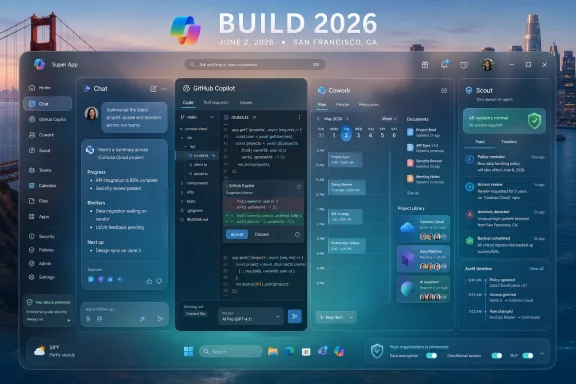
This is why the screenshots matter even if the product is not final. They show a Microsoft that is no longer content to sprinkle AI across existing apps. The company appears to be designing Copilot as a container for work, with chat becoming only one mode among several.
That is not a cosmetic shift. It is a product bet that the next AI battleground will not be the smartest single response in a chat window, but the most convenient place to hand off complicated work. OpenAI, Anthropic, Google, and Microsoft are all converging on the same idea: the assistant has to become more stateful, more tool-aware, and less dependent on the user restating context every five minutes.
Scout, the reportedly always-on agent visible in earlier leaks, is the clearest sign of that convergence. An always-on AI assistant is not merely a chatbot with notifications. It implies a system that can remember goals, monitor tasks, operate across tools, and report back when something changes.
That is also where the risk begins. The more useful an agent becomes, the more permissions it needs. The more permissions it has, the more it starts to look like a junior employee with access to email, files, repos, calendars, chats, and production systems.
Microsoft knows this terrain better than most. It sells identity, endpoint management, compliance tooling, developer platforms, and productivity software into the same organizations that will be asked to trust Copilot agents. The unified app gives Microsoft a chance to make that governance coherent. It also gives Microsoft one more place where a bad default could create a large blast radius.
The screenshots reportedly show a GitHub Copilot-branded coding tab with work tree selection, local and remote repository awareness, a model picker, a repo list, and “Routines” for scheduled coding tasks. That maps directly onto where AI coding tools are heading. The frontier is no longer autocomplete; it is delegation.
Developers increasingly expect AI tools to inspect a repository, reason over its structure, run commands, propose diffs, write tests, and explain tradeoffs. The interface described in the leak sounds closer to a workbench than a chat panel. If Microsoft can connect that workbench cleanly to GitHub identity, pull requests, Codespaces, Actions, issues, and enterprise policy, it has a structural advantage that standalone coding assistants will find hard to match.
The model selector is also telling. Microsoft’s long-term play is unlikely to be one model for every task. Coding agents need tool use, repository memory, strong diff discipline, and the ability to recover from failed builds. A general-purpose conversational model can help, but the winners in code will be the systems that combine models with workflow-specific scaffolding.
That is why a Copilot coding tab inside a broader Copilot app is strategically interesting. Microsoft can make GitHub Copilot feel less like a tool developers open and more like one mode of a larger work assistant. A developer might plan a feature in Cowork, implement it in the coding tab, ask Scout to monitor CI, and summarize the result back into Teams.
That is the dream. The nightmare is that Microsoft ships three overlapping versions of the same idea, each with different permissions, pricing, and admin controls. The difference between those outcomes will matter more than the keynote demo.
This is where Copilot has always had its cleanest enterprise pitch. Most office workers do not need a chatbot that can debate philosophy. They need something that can find the spreadsheet, summarize the thread, draft the brief, identify the next meeting, and turn scattered context into a usable starting point.
Cowork appears to formalize that into a workspace. Instead of treating every interaction as a new chat, the app separates jobs into Library and Projects areas. That distinction matters because work is not a sequence of isolated prompts. It is a pile of half-finished tasks, recurring obligations, reused context, and artifacts that need to be found again.
If Microsoft gets this right, Cowork could become the place where Copilot finally feels less like a search box with personality and more like an assistant that understands your week. If it gets it wrong, it becomes another landing page filled with suggested prompts that users ignore after the first demo.
The unresolved question is local access. The screenshot reportedly shows Cowork running in Edge through a URL, which leaves open whether it can reach desktop files or remains primarily cloud-backed. For Windows users, that distinction is not academic. A Copilot that cannot reason across local files, installed apps, and active windows is not a true Windows assistant; it is a cloud service looking through the browser keyhole.
An agent that can sit in the background and act over time needs durable memory, access to tools, and some mechanism for deciding when to interrupt the user. Each of those capabilities raises hard questions. What can it see? What can it change? What logs are kept? Who can audit its actions? Can an administrator disable it? Can a user tell when Scout is acting autonomously rather than merely responding?
Microsoft’s advantage is that it already has answers for adjacent problems. Entra ID, Intune, Purview, Defender, Conditional Access, sensitivity labels, audit logs, and data loss prevention policies are all part of the enterprise substrate. If Scout is built into that governance fabric, Microsoft can pitch it as safer than a third-party agent bolted onto the side of a company’s data estate.
But that is a big “if.” The history of Microsoft AI in Windows has included moments where the company had to retreat, clarify, or reframe features after privacy and security pushback. An always-on Copilot agent will receive even more scrutiny because it sits closer to the user’s actual work.
For enthusiasts, Scout may look like the assistant Windows was always supposed to have after Cortana faded. For administrators, it will look like another endpoint capability that needs policy, documentation, logging, and a disable switch before it is allowed anywhere near regulated data.
That is why the GitHub Copilot tab matters so much. Developers are both Microsoft’s audience and its distribution channel. If the coding experience feels powerful, developers may tolerate the larger Copilot consolidation. If it feels like a branded wrapper around existing tools, they will keep using whatever agent already fits their workflow.
Build also lets Microsoft position the super app as a platform story rather than a panic response to OpenAI and Anthropic. The company can talk about models, agents, tool use, GitHub integration, Azure AI Foundry, Microsoft 365 data, and Windows local AI as pieces of one stack. That is the kind of story Build exists to tell.
Still, the timing is delicate. The leaked material suggests a possible Build nod, while the app itself may be aimed at late summer. That implies Microsoft may show direction before shipping a polished product. Developers are used to that. Mainstream Windows users are less forgiving.
The company needs to avoid another cycle where AI features are announced loudly, rolled out unevenly, renamed repeatedly, and then rediscovered months later under a different Copilot label. A unified app only solves fragmentation if Microsoft resists the urge to fragment the rollout.
If the app remains mostly a cloud shell, Windows users will reasonably ask why the operating system needs special Copilot integration at all. If it becomes deeply tied to local files, app state, notifications, search, and background tasks, administrators will ask how it is governed. The middle ground is hard: useful enough to justify OS integration, restrained enough not to feel invasive.
This is especially important because Microsoft has already signaled a desire to clean up unnecessary Copilot entry points. That move makes sense only if the company has a better center of gravity. A super app could be that center.
The Windows angle is also about hardware. Copilot+ PCs, local NPUs, on-device models, and privacy-preserving inference all become more meaningful if there is a coherent Copilot interface that can decide when work should happen locally and when it should go to the cloud. Without that, local AI risks becoming a spec-sheet feature waiting for software that knows how to use it.
For WindowsForum readers, the practical question is simple: will this make Windows more capable, or merely more managed by Microsoft’s cloud? The answer will depend on whether the unified app respects user control as much as it celebrates agentic automation.
Enterprise IT will watch a different movie. They will look for licensing boundaries, data residency, retention policies, audit trails, eDiscovery support, plugin governance, model routing controls, and tenant-level disablement. They will want to know whether Scout can access third-party connectors, whether it respects existing sensitivity labels, and whether local repository access creates new data leakage paths.
This is where Microsoft’s breadth becomes both an advantage and a liability. The company can claim end-to-end governance because it owns so much of the stack. But when something goes wrong, it also owns the confusion.
A unified Copilot app must therefore be legible to administrators from day one. If Cowork, Coding, Autopilot, Scout, Library, Projects, and Teams integration each have separate settings scattered across different admin portals, the “one Copilot” message collapses. Enterprise trust is built in policy pages, not launch videos.
The same is true for cost. Microsoft has already trained customers to expect Copilot capabilities to appear in multiple SKUs, add-ons, and premium tiers. A super app that feels like a storefront for entitlements could slow adoption. A super app that makes existing subscriptions feel more coherent could accelerate it.
A Copilot super app has to earn a place in that routine. It cannot merely be available. It has to be the fastest route to a result.
That is difficult because Microsoft’s current Copilot experiences vary widely in usefulness. Some are genuinely productive, especially in coding and document summarization. Others feel like AI-shaped sidebars waiting for a reason to exist. A unified app could smooth out that inconsistency, but it could also expose it.
The best version of this product would make Copilot feel like a workbench: chat when you need a conversation, Cowork when you need planning, GitHub Copilot when you need code, Scout when you need monitored execution, Library when you need memory, and Projects when you need continuity. The worst version would be a portal that requires users to think about Microsoft’s internal product taxonomy before they can get anything done.
Microsoft has the distribution to put this app in front of hundreds of millions of people. It does not yet have the behavioral proof that those people want Copilot as their primary work surface. That is what the super app is really trying to test.
The company’s recent Copilot reshuffling adds another layer. With Jacob Andreou reportedly leading Copilot after organizational changes, Microsoft appears to be tightening product direction around consumer and work AI experiences. Leadership changes do not guarantee coherence, but they often signal that the previous structure was not delivering fast enough.
Weak adoption is the shadow over the entire effort. Microsoft has no shortage of AI inventory. What it needs is sustained use. A super app is an attempt to create a home base, but home bases only matter if users return to them voluntarily.
The late-summer window also puts Microsoft in the path of a fast-moving competitive cycle. OpenAI and Anthropic are pushing desktop-like assistants, coding agents, and increasingly persistent work modes. Google is integrating Gemini across Workspace and Android. Smaller agent startups are trying to own specific workflows before the platform giants absorb them.
Microsoft’s response is to use the one asset none of those rivals can fully replicate: the combined surface area of Windows, Office, Teams, GitHub, Azure, and enterprise identity. The super app is where those pieces are supposed to stop looking like a bundle and start behaving like a system.
Microsoft is moving Copilot away from the era of scattered assistants and toward a consolidated agent workspace. Coding, coworking, background monitoring, project memory, and organizational context are being pulled into one frame. That is a major shift in how the company wants users to perceive AI.
It also raises the bar. Once Microsoft says “one Copilot,” users will expect one coherent experience. They will expect consistent memory, permissions, billing, search, file access, and admin control. They will expect Copilot in Edge not to feel unrelated to Copilot in Windows or GitHub.
That is a harder promise than launching another sidebar. It is also the right promise if Microsoft wants Copilot to be more than a brand stretched across unrelated products.
 Microsoft’s Copilot Problem Has Always Been Too Many Front Doors
For the past three years, Microsoft has put Copilot almost everywhere: Windows, Edge, Bing, Office, Teams, GitHub, Security, Dynamics, Power Platform, and more. That breadth made strategic sense. Microsoft’s advantage was distribution, and it used that distribution aggressively.But ubiquity has a cost. When everything is called Copilot, the word stops describing a product and starts describing a corporate mood. Users are left to discover which Copilot can see which files, which one understands work data, which one can write code, which one is merely a chatbot, and which one is governed by enterprise controls.
The leaked “Delivering one Copilot” direction is therefore less surprising than inevitable. Microsoft cannot sell AI as a new operating layer while asking users to remember a dozen different entry points. A unified Copilot app is the company trying to repair the fragmentation that its own speed created.
This is why the screenshots matter even if the product is not final. They show a Microsoft that is no longer content to sprinkle AI across existing apps. The company appears to be designing Copilot as a container for work, with chat becoming only one mode among several.
The Super App Is Microsoft’s Answer to the Agent Race
The phrase “super app” can sound inflated, especially in the enterprise software world, where every dashboard eventually claims to be a command center. But in this case, it captures the ambition. Microsoft seems to be building a single Copilot shell that can host personal chat, coding workflows, coworking tasks, project libraries, and persistent agents.That is not a cosmetic shift. It is a product bet that the next AI battleground will not be the smartest single response in a chat window, but the most convenient place to hand off complicated work. OpenAI, Anthropic, Google, and Microsoft are all converging on the same idea: the assistant has to become more stateful, more tool-aware, and less dependent on the user restating context every five minutes.
Scout, the reportedly always-on agent visible in earlier leaks, is the clearest sign of that convergence. An always-on AI assistant is not merely a chatbot with notifications. It implies a system that can remember goals, monitor tasks, operate across tools, and report back when something changes.
That is also where the risk begins. The more useful an agent becomes, the more permissions it needs. The more permissions it has, the more it starts to look like a junior employee with access to email, files, repos, calendars, chats, and production systems.
Microsoft knows this terrain better than most. It sells identity, endpoint management, compliance tooling, developer platforms, and productivity software into the same organizations that will be asked to trust Copilot agents. The unified app gives Microsoft a chance to make that governance coherent. It also gives Microsoft one more place where a bad default could create a large blast radius.
The Coding Tab Is the Most Credible Part of the Vision
The leaked coding surface may be the most consequential piece because GitHub Copilot is already one of Microsoft’s strongest AI products. Unlike consumer Copilot, which has struggled to define a durable daily habit, GitHub Copilot has an obvious job: help developers write, understand, refactor, test, and ship code.The screenshots reportedly show a GitHub Copilot-branded coding tab with work tree selection, local and remote repository awareness, a model picker, a repo list, and “Routines” for scheduled coding tasks. That maps directly onto where AI coding tools are heading. The frontier is no longer autocomplete; it is delegation.
Developers increasingly expect AI tools to inspect a repository, reason over its structure, run commands, propose diffs, write tests, and explain tradeoffs. The interface described in the leak sounds closer to a workbench than a chat panel. If Microsoft can connect that workbench cleanly to GitHub identity, pull requests, Codespaces, Actions, issues, and enterprise policy, it has a structural advantage that standalone coding assistants will find hard to match.
The model selector is also telling. Microsoft’s long-term play is unlikely to be one model for every task. Coding agents need tool use, repository memory, strong diff discipline, and the ability to recover from failed builds. A general-purpose conversational model can help, but the winners in code will be the systems that combine models with workflow-specific scaffolding.
That is why a Copilot coding tab inside a broader Copilot app is strategically interesting. Microsoft can make GitHub Copilot feel less like a tool developers open and more like one mode of a larger work assistant. A developer might plan a feature in Cowork, implement it in the coding tab, ask Scout to monitor CI, and summarize the result back into Teams.
That is the dream. The nightmare is that Microsoft ships three overlapping versions of the same idea, each with different permissions, pricing, and admin controls. The difference between those outcomes will matter more than the keynote demo.
Cowork Shows Microsoft Wants Copilot to Plan, Not Just Answer
The Cowork tab is less technically flashy than the coding interface, but it may reveal more about Microsoft’s target user. According to the screenshots, Cowork pulls information from several sources and proposes prompts such as preparing for the week from a calendar or researching a company. That is classic Microsoft 365 territory: meetings, documents, presentations, email, and organizational knowledge.This is where Copilot has always had its cleanest enterprise pitch. Most office workers do not need a chatbot that can debate philosophy. They need something that can find the spreadsheet, summarize the thread, draft the brief, identify the next meeting, and turn scattered context into a usable starting point.
Cowork appears to formalize that into a workspace. Instead of treating every interaction as a new chat, the app separates jobs into Library and Projects areas. That distinction matters because work is not a sequence of isolated prompts. It is a pile of half-finished tasks, recurring obligations, reused context, and artifacts that need to be found again.
If Microsoft gets this right, Cowork could become the place where Copilot finally feels less like a search box with personality and more like an assistant that understands your week. If it gets it wrong, it becomes another landing page filled with suggested prompts that users ignore after the first demo.
The unresolved question is local access. The screenshot reportedly shows Cowork running in Edge through a URL, which leaves open whether it can reach desktop files or remains primarily cloud-backed. For Windows users, that distinction is not academic. A Copilot that cannot reason across local files, installed apps, and active windows is not a true Windows assistant; it is a cloud service looking through the browser keyhole.
Scout Is Where Convenience Starts Looking Like Control
Scout is the name that will likely attract the most attention because “always-on agent” sounds like the future and the surveillance state at the same time. In consumer demos, always-on AI is usually framed as helpful persistence. In enterprise environments, persistence is a permissions problem wearing a friendly icon.An agent that can sit in the background and act over time needs durable memory, access to tools, and some mechanism for deciding when to interrupt the user. Each of those capabilities raises hard questions. What can it see? What can it change? What logs are kept? Who can audit its actions? Can an administrator disable it? Can a user tell when Scout is acting autonomously rather than merely responding?
Microsoft’s advantage is that it already has answers for adjacent problems. Entra ID, Intune, Purview, Defender, Conditional Access, sensitivity labels, audit logs, and data loss prevention policies are all part of the enterprise substrate. If Scout is built into that governance fabric, Microsoft can pitch it as safer than a third-party agent bolted onto the side of a company’s data estate.
But that is a big “if.” The history of Microsoft AI in Windows has included moments where the company had to retreat, clarify, or reframe features after privacy and security pushback. An always-on Copilot agent will receive even more scrutiny because it sits closer to the user’s actual work.
For enthusiasts, Scout may look like the assistant Windows was always supposed to have after Cortana faded. For administrators, it will look like another endpoint capability that needs policy, documentation, logging, and a disable switch before it is allowed anywhere near regulated data.
Build Is the Right Stage Because Developers Are the Gatekeepers
Microsoft Build is the natural venue for this kind of reveal because the super app is not just a consumer interface. It is an ecosystem invitation. If Copilot becomes a shell for agents and workflows, developers need to understand how their apps, repositories, APIs, and data sources plug into it.That is why the GitHub Copilot tab matters so much. Developers are both Microsoft’s audience and its distribution channel. If the coding experience feels powerful, developers may tolerate the larger Copilot consolidation. If it feels like a branded wrapper around existing tools, they will keep using whatever agent already fits their workflow.
Build also lets Microsoft position the super app as a platform story rather than a panic response to OpenAI and Anthropic. The company can talk about models, agents, tool use, GitHub integration, Azure AI Foundry, Microsoft 365 data, and Windows local AI as pieces of one stack. That is the kind of story Build exists to tell.
Still, the timing is delicate. The leaked material suggests a possible Build nod, while the app itself may be aimed at late summer. That implies Microsoft may show direction before shipping a polished product. Developers are used to that. Mainstream Windows users are less forgiving.
The company needs to avoid another cycle where AI features are announced loudly, rolled out unevenly, renamed repeatedly, and then rediscovered months later under a different Copilot label. A unified app only solves fragmentation if Microsoft resists the urge to fragment the rollout.
Windows Is Present Even When It Is Not the Star
The screenshots reportedly show a web-based or Edge-hosted experience, but Windows is still central to the stakes. Microsoft has spent years trying to make AI feel native to Windows without turning the operating system into a billboard for Copilot. A unified Copilot app could either help that effort or make the tension worse.If the app remains mostly a cloud shell, Windows users will reasonably ask why the operating system needs special Copilot integration at all. If it becomes deeply tied to local files, app state, notifications, search, and background tasks, administrators will ask how it is governed. The middle ground is hard: useful enough to justify OS integration, restrained enough not to feel invasive.
This is especially important because Microsoft has already signaled a desire to clean up unnecessary Copilot entry points. That move makes sense only if the company has a better center of gravity. A super app could be that center.
The Windows angle is also about hardware. Copilot+ PCs, local NPUs, on-device models, and privacy-preserving inference all become more meaningful if there is a coherent Copilot interface that can decide when work should happen locally and when it should go to the cloud. Without that, local AI risks becoming a spec-sheet feature waiting for software that knows how to use it.
For WindowsForum readers, the practical question is simple: will this make Windows more capable, or merely more managed by Microsoft’s cloud? The answer will depend on whether the unified app respects user control as much as it celebrates agentic automation.
Enterprise IT Will Judge the Admin Console, Not the Demo
The keynote version of the Copilot super app will almost certainly look smooth. A user asks Cowork to prepare for the week, Scout watches a project, GitHub Copilot works through a code task, and the whole thing flows across Teams, Edge, and Microsoft 365. That is the story Microsoft wants to tell.Enterprise IT will watch a different movie. They will look for licensing boundaries, data residency, retention policies, audit trails, eDiscovery support, plugin governance, model routing controls, and tenant-level disablement. They will want to know whether Scout can access third-party connectors, whether it respects existing sensitivity labels, and whether local repository access creates new data leakage paths.
This is where Microsoft’s breadth becomes both an advantage and a liability. The company can claim end-to-end governance because it owns so much of the stack. But when something goes wrong, it also owns the confusion.
A unified Copilot app must therefore be legible to administrators from day one. If Cowork, Coding, Autopilot, Scout, Library, Projects, and Teams integration each have separate settings scattered across different admin portals, the “one Copilot” message collapses. Enterprise trust is built in policy pages, not launch videos.
The same is true for cost. Microsoft has already trained customers to expect Copilot capabilities to appear in multiple SKUs, add-ons, and premium tiers. A super app that feels like a storefront for entitlements could slow adoption. A super app that makes existing subscriptions feel more coherent could accelerate it.
The Real Rival Is Not ChatGPT, It Is User Habit
It is tempting to frame this as Microsoft versus OpenAI, Anthropic, or Google. That is true at the model and platform level, but at the user level the bigger competitor is habit. People already know where they start work: Outlook, Teams, VS Code, GitHub, Edge, File Explorer, Excel, Slack, Chrome, Jira, Notion, or a terminal.A Copilot super app has to earn a place in that routine. It cannot merely be available. It has to be the fastest route to a result.
That is difficult because Microsoft’s current Copilot experiences vary widely in usefulness. Some are genuinely productive, especially in coding and document summarization. Others feel like AI-shaped sidebars waiting for a reason to exist. A unified app could smooth out that inconsistency, but it could also expose it.
The best version of this product would make Copilot feel like a workbench: chat when you need a conversation, Cowork when you need planning, GitHub Copilot when you need code, Scout when you need monitored execution, Library when you need memory, and Projects when you need continuity. The worst version would be a portal that requires users to think about Microsoft’s internal product taxonomy before they can get anything done.
Microsoft has the distribution to put this app in front of hundreds of millions of people. It does not yet have the behavioral proof that those people want Copilot as their primary work surface. That is what the super app is really trying to test.
The Late-Summer Target Gives Microsoft Time, But Not Much
If the app is indeed aimed at late summer, Microsoft has a short runway between Build positioning and user expectations. That can be enough time to polish an interface, but not enough to resolve a confused strategy. The architecture and governance model need to be solid already.The company’s recent Copilot reshuffling adds another layer. With Jacob Andreou reportedly leading Copilot after organizational changes, Microsoft appears to be tightening product direction around consumer and work AI experiences. Leadership changes do not guarantee coherence, but they often signal that the previous structure was not delivering fast enough.
Weak adoption is the shadow over the entire effort. Microsoft has no shortage of AI inventory. What it needs is sustained use. A super app is an attempt to create a home base, but home bases only matter if users return to them voluntarily.
The late-summer window also puts Microsoft in the path of a fast-moving competitive cycle. OpenAI and Anthropic are pushing desktop-like assistants, coding agents, and increasingly persistent work modes. Google is integrating Gemini across Workspace and Android. Smaller agent startups are trying to own specific workflows before the platform giants absorb them.
Microsoft’s response is to use the one asset none of those rivals can fully replicate: the combined surface area of Windows, Office, Teams, GitHub, Azure, and enterprise identity. The super app is where those pieces are supposed to stop looking like a bundle and start behaving like a system.
The Screenshots Point to a Bigger Product Reckoning
The leaked screenshots should not be treated as final product documentation. Interfaces change, names change, launch plans slip, and pre-release builds often contain experiments that never ship. But leaks can still reveal direction, and the direction here is unmistakable.Microsoft is moving Copilot away from the era of scattered assistants and toward a consolidated agent workspace. Coding, coworking, background monitoring, project memory, and organizational context are being pulled into one frame. That is a major shift in how the company wants users to perceive AI.
It also raises the bar. Once Microsoft says “one Copilot,” users will expect one coherent experience. They will expect consistent memory, permissions, billing, search, file access, and admin control. They will expect Copilot in Edge not to feel unrelated to Copilot in Windows or GitHub.
That is a harder promise than launching another sidebar. It is also the right promise if Microsoft wants Copilot to be more than a brand stretched across unrelated products.
Microsoft’s One-Copilot Bet Comes Down to Five Hard Tests
The leaked app is best understood as a strategic checkpoint rather than a finished answer. Microsoft appears to know what shape the AI workspace should take; now it has to prove it can ship that shape without burying users and administrators under another layer of complexity.- Microsoft appears to be consolidating Copilot around a single app shell with separate surfaces for chat, coding, coworking, projects, and persistent agents.
- The GitHub Copilot coding tab is the most credible wedge because developers already have a clear use case and Microsoft controls the surrounding GitHub workflow.
- Cowork could become useful if it turns Microsoft 365 context into durable workspaces rather than another gallery of suggested prompts.
- Scout will be judged less by how autonomous it looks in a demo than by how clearly users and administrators can see, limit, audit, and stop its actions.
- Windows integration will matter only if the app can bridge cloud intelligence and local context without making the operating system feel less under the user’s control.
- The “one Copilot” message will fail if licensing, policies, memory, connectors, and model choices remain scattered across Microsoft’s existing product maze.
References
- Primary source: TestingCatalog AI News
Published: 2026-05-31T14:50:07.957872
Exclusive: New screenshots of upcoming Copilot Super App
Microsoft may debut its unified Copilot app at Build 2026, featuring a coding tab with GitHub Copilot and a new Cowork tab for smarter workflows. www.testingcatalog.com
- Related coverage: windowscentral.com
Microsoft confirms plans to integrate Copilot with the Taskbar on Windows 11 this summer: Ask Copilot expected to debut "mid-2026" | Windows Central
First announced last year, a new document has confirmed that Microsoft's upcoming "Ask Copilot" feature for Windows 11's Taskbar is arriving mid-2026.www.windowscentral.com - Related coverage: chatforest.com
Microsoft Build 2026: What Builders Should Watch For (June 2-3) — ChatForest
Microsoft Build 2026 runs June 2-3 in San Francisco. Here's what matters for AI builders: GitHub Copilot SDK in public preview, Foundry Agent Service GA, memory billing starting June 1, and a full MCP push across the stack.chatforest.com - Related coverage: sources.news
This is Microsoft's unreleased AI super app - by Alex Heath
A leaked screenshot shows a new Microsoft Copilot Autopilot tab and OpenClaw-like agent called Scout.sources.news - Related coverage: cloudcontraptions.com
GitHub Copilot in 2026: Chat, Edits, Agents, Spaces, and CLI
For more information on this course contact Cloud Contraptions LLC - https://cloudcontraptions.comwww.cloudcontraptions.com
- Related coverage: copilot.summitna.com
