My Windows 10 has the 8 layout

Solid Snake

Active Member
Joined
Aug 27, 2017
Messages
16
Good evening! Just now I have noticed something: my Windows 10 (I upgraded from 8.1 to 10 in the last of day of the free dowload) doesn't have the W10 layout, but the 8.1. Some screenshots:
This is the current layout of my SO (notice that it's not 10, but 8):
Captura-de-Tela-494.png

And this is how the W10 SO look:
Link Removed

I remember clearly that when I upgraded to 10 my SO was exactly like the second pic, but it changed all of a sudden. Do you guys have any idea why that happened and how can I reverse that?
 

Solution
Well the only real difference is the other guy has the search bar turned off, so right click on the taskbar > Search and select "Show Search Icon"

Neemobeer

Windows Forum Team
Staff member
Joined
Jul 4, 2015
Messages
8,998
Press [Windows key + r] and type winver and report the output

From the images the start menu looks like it's Windows 10.

In Windows 8 when you click the start button you would no longer see the taskbar. Otherwise the Start menu's look very similar between 8 and 10.
 

Solid Snake

Active Member
Joined
Aug 27, 2017
Messages
16
Yep, the start menu is really Windows 10. In the windows 8 you don't see the taskbar after you click on the start button, like you said.
But what bugs me is my taskbar, it's not Windows 10.
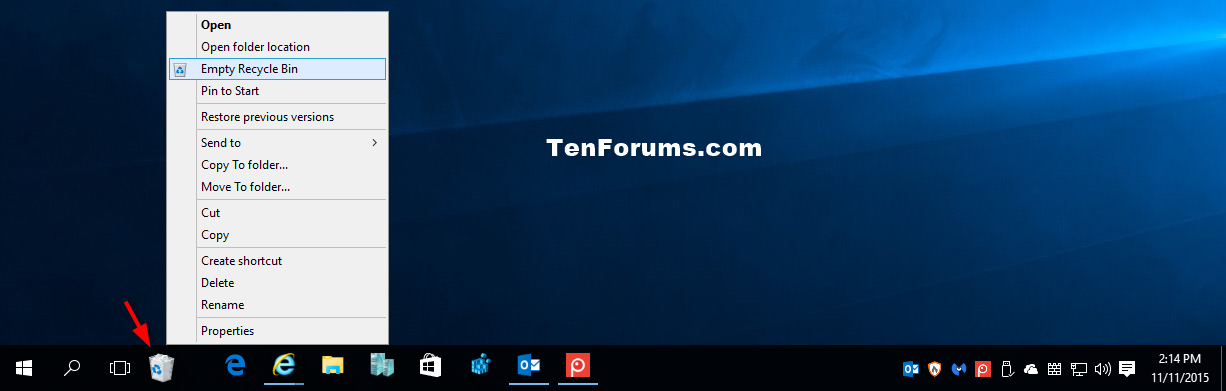
47524d1447277397-pin-recycle-bin-taskbar-windows-10-a-recycle_bin_on_taskbar.png


^^^ Compare the taskbar above with mine. You can see they look diferent. W10 and 8 have diferent taskbar visuals. Mine is the 8 despite my SO being 10.
 

Neemobeer

Windows Forum Team
Staff member
Joined
Jul 4, 2015
Messages
8,998
Well the only real difference is the other guy has the search bar turned off, so right click on the taskbar > Search and select "Show Search Icon"
 

Solution

Neemobeer

Windows Forum Team
Staff member
Joined
Jul 4, 2015
Messages
8,998
Yeah, you just need to hide/show the different items in the the taskbar settings, unpin or pin the give items and same thing with the system tray icons on the right
 

Back
Top