NettleWarbler

Banned
Joined
Mar 25, 2016
Messages
636
Morning all , I bought a new 8TB Hard-drive online , I installed Windows 10 on it and it's only showing 1.99TB on my computer . I thought windows only showed 3TB as the largest size , but the bloke in the local computer shop said windows 10 had solved that problem . (Meaning I wouldn't have to change the format from MBR to GPT ) . He was wrong , I asked him how much his 3TB hard-drives were at first . He told me between £120 to £140 as computer equipment had recently gone up in price , I was expecting to pay about £70 to £80 for a 3TB drive . Is there anyway I can install windows 10 on the drive and keep most of the drive space , I know you don't get the full 8TB but most of it would be nice . Also if I had to format it to GPT will the programs all work just the same / Thank you . NettleWarbler .
 

Solution
You'll need to change your boot mode from legacy to either hybrid if your other windows install is still MBR or UEFI, then boot into a recovery console and run bootrec /fixboot and bootrec /rebuildbcd
MBR formatted discs have a limit of 2TB. The drive needs to be formatted as GPT and the file system needs to be ReFs or NTFS (more common) The format of the drive MBR vs GPT will have will make no difference as far as programs are concerned.
 

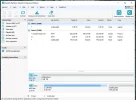
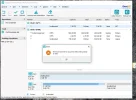
Evening all , could someone please tell me what I need to do next . That's what shows using EaseUS Partition Master 11.0 GPT like Photo 1, when I click convert MBR to GPT I get the error photo and its gone back to MBR like Photo 2 , also the line in the photo of the Disk I want to use is greyed out ,it also says Unallocated above where it says 7.28TB .
 

Attachments

  • Photo 1.webp
    Photo 1.webp
    49.8 KB · Views: 954
  • Photo 2.webp
    Photo 2.webp
    59.4 KB · Views: 1,059
It could actually be some kind of problem with EaseUS Partition Master. Hard to tell. Make sure your SATA cable connections are securely fastened to the HDD.

No need to have cleared Windows 10 from the drive to do this.

Somebody at WindowsClub has an answer for you HERE:

The MBR2GPT Disk Conversion Tool in Windows 10 v1703

This may be your best bet in this regard.

(Also try AOMEI Partition Assistant Standard Edition IMO)
 

Mike I cleared windows because I tried to erase the partition that was there , I wasn't worried about losing any data as there was nothing on .
 

Mike I cleared windows because I tried to erase the partition that was there , I wasn't worried about losing any data as there was nothing on .
Any luck converting to GPT?
 

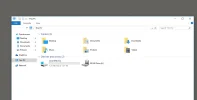
Mornin Mike , I hav'nt tried again the hard-drive is no longer showing in my computer . I'v tried putting all sata and power cables in correct but still nothings showing , I burned a dvd last night and when it was done and I tried to watch a bit to make sure it was on ok . The Dvd writer wasn't showing ( That was immidiately after burning , so how did it burn it in the first place .)its still not this morning its only a couple of month old the writer . I will load windows on the 8TB drive if I can find it and try EaseUS Partition Master again later tonight .
 

Back
Top