

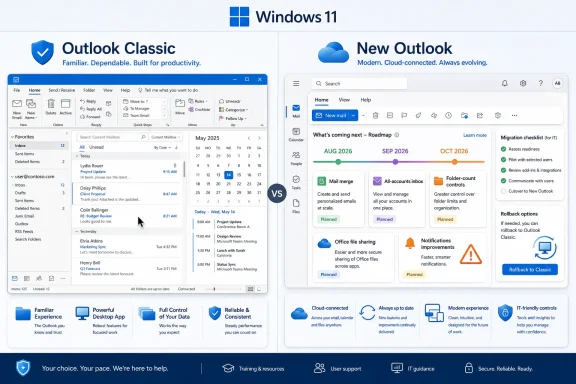
Microsoft’s June 2026 roadmap push for the new Outlook for Windows adds mail merge improvements, an all-accounts inbox, folder-count controls, Office file sharing, and notification work, but the changes arrive while Outlook Classic remains the more dependable client for many Windows 11 users. The feature list is real progress, yet it also reads like an admission: Microsoft is still rebuilding habits that the old desktop app earned over decades. For home users, that means irritation; for administrators, it means migration risk. The new Outlook is not failing because it lacks a marketing story, but because email clients are judged in the seconds when they either get out of the way or do not.
The new Outlook for Windows has always had a strange burden. It is supposed to be the future of Microsoft’s mail experience, but it is also measured against one of the most entrenched productivity applications in the Windows ecosystem. Outlook Classic is not beloved because it is elegant. It is beloved because it is predictable.
That distinction matters more than Microsoft sometimes seems willing to admit. Email is not a showcase workload. It is plumbing, archive, memory, compliance surface, scheduling layer, CRM substitute, and corporate panic button. When a user clicks a notification, opens a shared mailbox, searches old mail, runs rules, or sends a personalized batch message, they do not want to admire a new architecture. They want the action to complete.
That is why the latest batch of planned new Outlook features lands with such mixed force. On paper, the additions sound sensible: richer mail merge, an all-accounts view, better folder controls, tighter Office integration, and improved notifications. In practice, many of these are not futuristic enhancements. They are repairs to expectations created by Outlook Classic long ago.
Microsoft can call this modernization, and in some ways it is. But for the holdouts still launching the old Win32 client every morning, the question is not whether new Outlook is becoming better. It is whether it has become trustworthy enough to replace the thing that already works.
Folder counts are not decoration. For heavy users, they are part of a dashboard. A total count can indicate whether a process completed, whether a rule moved the right mail, or whether a shared folder has changed since yesterday. An unread count answers one question; a total count answers another. Outlook Classic let people develop those habits, and new Outlook has to accommodate them if it wants to feel like a real successor.
The same logic applies to the planned favorite-folder behavior. Microsoft is working on a compact experience in which favorite folders can remain accessible even when the full folder pane is collapsed, with the app remembering the user’s preference between sessions. Again, this is not a flashy feature. It is the kind of interface persistence that makes a professional tool feel like it belongs to the person using it.
These are the features that rarely appear in keynote demos but decide whether a migration sticks. Users who live in Outlook are not merely reading mail; they are triaging, deferring, filing, routing, and cross-checking. If the interface forgets what they asked it to remember, the app becomes a negotiation instead of a workspace.
A real mail merge is about personalization at scale. Names, companies, locations, invoice numbers, plan types, renewal dates, and other fields are not embellishments. They are the reason the feature exists. If every recipient gets a separate message but the content cannot be meaningfully individualized, the workflow is only halfway home.
Microsoft’s more advanced version, as described, would let each recipient receive a separate email with only their address in the “To” field, while allowing personalized values to be inserted into the message. That is the sort of capability that small businesses, schools, nonprofits, sales teams, finance departments, and operations staff actually use. It also shows why feature checklists can be misleading.
A product page can say “mail merge” and be technically correct while still disappointing anyone who depends on the mature version of the feature. This is the broader new Outlook problem in miniature. The app can have a feature and still not have the workflow.
But the feature has a sharper edge in the Microsoft 365 world. Many people do not just manage multiple accounts; they manage multiple tenants. Consultants, MSP technicians, contractors, fractional executives, and IT staff often live across several Microsoft 365 environments. For them, account switching is not a casual nuisance. It is a daily tax.
A unified view could make the new Outlook feel less fragmented, especially on Windows 11 machines where Microsoft wants one modern client to serve both personal and professional use. But the value of that view depends on correctness. If notifications are inconsistent, if account context is unclear, or if sending identity is too easy to mistake, convenience can become risk.
That is the administrator’s version of the problem. Consumers want fewer clicks. Organizations want fewer mistakes. A single inbox may reduce friction, but it also raises the stakes for account labeling, policy handling, search scoping, and send-from behavior. The new Outlook cannot merely borrow the Gmail pattern; it has to make the pattern safe for Microsoft 365’s messier reality.
Ten seconds is an eternity in a mail client. It is long enough for a user to click twice, assume something broke, open the app manually, or miss the context that made the alert useful. A notification is supposed to be a shortcut from interruption to action. If it becomes an interruption followed by waiting, the app has converted urgency into annoyance.
The reported issue becomes worse when notifications are not merely slow but missing across accounts. For users managing more than one mailbox, inconsistent alerts undermine the entire value proposition of a unified modern client. The app may hold all the accounts, but if it cannot reliably tell you when they need attention, it has failed at the front door.
Microsoft is reportedly working on a broader update aimed at underlying performance issues, including delayed or slow notifications. That matters more than almost every feature in the roadmap. The new Outlook does not need another ribbon-adjacent nicety as badly as it needs to feel instant when the operating system hands it a user action.
That difference is not inherently fatal. Web-based clients can be fast, capable, and easier to update. Outlook on the web has matured into a serious product, and Microsoft’s desire to converge experiences across platforms is not irrational. Maintaining multiple Outlooks with divergent codebases, feature sets, and UI conventions is expensive and confusing.
The trouble is that convergence becomes unpopular when users experience it as regression. Classic Outlook may be old, complicated, and occasionally infuriating, but it is also dense with capabilities that professionals have woven into their work. Replacing that with something lighter only works if “lighter” means cleaner without being weaker.
For many Windows users, new Outlook still feels like the reverse. It is simpler in places where they need power, slower in moments where they expect responsiveness, and changing in ways that make admins cautious. Microsoft can win that argument eventually, but not by insisting that architectural elegance should be accepted as a substitute for operational maturity.
This sort of integration is important because Outlook is rarely just an email app inside Microsoft’s ecosystem. It is the transport layer for Office work. Documents, spreadsheets, decks, calendar invites, Teams follow-ups, approvals, and signatures all flow through it. If new Outlook cannot sit naturally inside that loop, it feels like a foreign object on the desktop.
Still, this is not the feature that will convert skeptical Classic users. Nobody with a complex mailbox setup is likely to say, “I can finally send an open spreadsheet, so I will abandon the client that handles my rules, archives, add-ins, shared mailboxes, and muscle memory.” It is a welcome fix, not a decisive one.
The migration trigger will be confidence. Users will switch when the new client stops making them wonder what they are giving up. Each restored workflow helps, but the cumulative feeling matters more than any single line item.
A feature can be technically released and still not be ready for a regulated organization, a law firm, a school district, a hospital, or a support desk that relies on shared mailboxes and precise delegation. Rollout cadence, admin controls, policy support, audit behavior, offline handling, add-in compatibility, and user training all matter. Outlook is not a toy app that can be swapped on a quiet Friday afternoon.
Microsoft’s broader transition strategy reflects that reality. Consumers have already been pushed away from the old Mail and Calendar apps, and the new Outlook is now the default direction for Windows. Enterprises, however, still have more time with Outlook Classic, and that runway exists because Microsoft knows the replacement has to survive more than casual inbox use.
The danger is not that Microsoft is moving too slowly. It is that the company sometimes talks as if listing upcoming features is the same thing as solving deployment anxiety. Administrators do not need enthusiasm. They need tested parity, known gaps, rollback options, and a clear understanding of which users will break first.
But Classic Outlook has one advantage that new Outlook cannot instantly buy: accumulated trust. It has been abused by millions of workflows, extended by vendors, scripted around by admins, and debugged through generations of Exchange and Microsoft 365 migrations. Its weirdness is known weirdness. In enterprise software, known weirdness often beats elegant uncertainty.
That is why the new Outlook discourse can sound harsher than the individual defects might justify. Users are not just reacting to a missing folder option or a delayed notification. They are reacting to the possibility that Microsoft will remove a tool whose failure modes they understand and replace it with one whose boundaries are still being discovered.
For a casual user, a missing advanced feature may be tolerable. For a power user, it is a reason to switch back. For an IT department, it is a ticket multiplier. Outlook Classic continues to win not because it is modern, but because it is legible.
A simple example is mail merge. The feature’s name is easy to put on a roadmap. But users care about fields, data sources, formatting, recipient separation, sending limits, error handling, drafts, and how the workflow intersects with Word and Excel. The same is true for rules, shared folders, offline access, categories, signatures, delegation, and archive workflows.
This is why Microsoft’s “new Outlook is catching up” message can feel both true and insufficient. Catching up on the obvious items does not automatically cover the long tail. The old client’s power is partly in the obscure things people only notice when they disappear.
Microsoft also has to decide how much of Classic Outlook it actually wants to preserve. Some legacy behaviors may not fit the new architecture or security model. Some add-ins may deserve retirement. Some workflows may be better rebuilt around Graph, web add-ins, or cloud-first assumptions. But if Microsoft is going to break with the past, it needs to say so clearly rather than letting users discover the break during work.
A user with one mailbox, light calendar needs, and no dependency on advanced rules or add-ins may do fine in new Outlook today. A user managing multiple tenants, shared mailboxes, mail merge campaigns, delegated calendars, and compliance-sensitive workflows is a different case. The same application can be acceptable for one group and reckless for another.
The right migration plan should begin with workflow inventory rather than executive preference. Which teams rely on COM add-ins? Which users need offline access during travel? Who uses mail merge for customer communication? Which shared mailboxes generate SLA-sensitive notifications? Which departments have trained themselves around folder counts, favorites, categories, or custom views?
Only after those answers are clear does the roadmap become useful. August’s all-accounts view may help consultants and multi-account users. September’s mail merge and Office-sharing improvements may help administrative and sales workflows. October’s folder count controls may reduce friction for users who live in folder hierarchies. But none of those dates eliminate the need for pilots, telemetry, and rollback planning.
But that argument is also weak in the short term because faster change is not always what Outlook users want. They want fewer surprises. A mail client is infrastructure wearing an app icon. If the interface shifts, notifications stutter, or features arrive half-formed, the update velocity that delights product managers can terrify admins.
This is the core tension in Microsoft 365 now. Microsoft wants cloud-paced iteration across the productivity stack, but many customers still experience Office as a set of tools that should be stable, inspectable, and boring. Outlook sits at the center of that conflict because it touches nearly every working day.
The company can resolve that tension, but only by prioritizing reliability as a feature in its own right. Not as an engineering footnote. Not as something implied by future updates. As the central promise of the client.
 Microsoft Is Rebuilding Trust One Missing Feature at a Time
The new Outlook for Windows has always had a strange burden. It is supposed to be the future of Microsoft’s mail experience, but it is also measured against one of the most entrenched productivity applications in the Windows ecosystem. Outlook Classic is not beloved because it is elegant. It is beloved because it is predictable.That distinction matters more than Microsoft sometimes seems willing to admit. Email is not a showcase workload. It is plumbing, archive, memory, compliance surface, scheduling layer, CRM substitute, and corporate panic button. When a user clicks a notification, opens a shared mailbox, searches old mail, runs rules, or sends a personalized batch message, they do not want to admire a new architecture. They want the action to complete.
That is why the latest batch of planned new Outlook features lands with such mixed force. On paper, the additions sound sensible: richer mail merge, an all-accounts view, better folder controls, tighter Office integration, and improved notifications. In practice, many of these are not futuristic enhancements. They are repairs to expectations created by Outlook Classic long ago.
Microsoft can call this modernization, and in some ways it is. But for the holdouts still launching the old Win32 client every morning, the question is not whether new Outlook is becoming better. It is whether it has become trustworthy enough to replace the thing that already works.
The Roadmap Looks Busy Because the Gap Is Still Large
The headline additions are easy to understand because they map directly to familiar complaints. New Outlook is expected to gain greater folder-count control in October 2026, letting users choose between unread counts and total item counts in the folder pane. That sounds minor until you remember how many people navigate Outlook by muscle memory and visual state rather than by formal workflow.Folder counts are not decoration. For heavy users, they are part of a dashboard. A total count can indicate whether a process completed, whether a rule moved the right mail, or whether a shared folder has changed since yesterday. An unread count answers one question; a total count answers another. Outlook Classic let people develop those habits, and new Outlook has to accommodate them if it wants to feel like a real successor.
The same logic applies to the planned favorite-folder behavior. Microsoft is working on a compact experience in which favorite folders can remain accessible even when the full folder pane is collapsed, with the app remembering the user’s preference between sessions. Again, this is not a flashy feature. It is the kind of interface persistence that makes a professional tool feel like it belongs to the person using it.
These are the features that rarely appear in keynote demos but decide whether a migration sticks. Users who live in Outlook are not merely reading mail; they are triaging, deferring, filing, routing, and cross-checking. If the interface forgets what they asked it to remember, the app becomes a negotiation instead of a workspace.
Mail Merge Exposes the Difference Between “Available” and Useful
The planned September 2026 mail merge improvements are more consequential. New Outlook already has a basic mail merge capability, but basic is doing a lot of work there. Sending the same message to a list is not the same as mail merge in the sense that many Office users understand it.A real mail merge is about personalization at scale. Names, companies, locations, invoice numbers, plan types, renewal dates, and other fields are not embellishments. They are the reason the feature exists. If every recipient gets a separate message but the content cannot be meaningfully individualized, the workflow is only halfway home.
Microsoft’s more advanced version, as described, would let each recipient receive a separate email with only their address in the “To” field, while allowing personalized values to be inserted into the message. That is the sort of capability that small businesses, schools, nonprofits, sales teams, finance departments, and operations staff actually use. It also shows why feature checklists can be misleading.
A product page can say “mail merge” and be technically correct while still disappointing anyone who depends on the mature version of the feature. This is the broader new Outlook problem in miniature. The app can have a feature and still not have the workflow.
The All-Accounts Inbox Is a Consumer Feature With Enterprise Consequences
The all-accounts view planned for August 2026 is likely to be one of the most visible improvements. The concept is familiar from Gmail and mobile clients: connect multiple accounts, then view incoming mail in a unified inbox rather than hopping between account silos. For users managing personal mail, work mail, side projects, and client accounts, this is an obvious convenience.But the feature has a sharper edge in the Microsoft 365 world. Many people do not just manage multiple accounts; they manage multiple tenants. Consultants, MSP technicians, contractors, fractional executives, and IT staff often live across several Microsoft 365 environments. For them, account switching is not a casual nuisance. It is a daily tax.
A unified view could make the new Outlook feel less fragmented, especially on Windows 11 machines where Microsoft wants one modern client to serve both personal and professional use. But the value of that view depends on correctness. If notifications are inconsistent, if account context is unclear, or if sending identity is too easy to mistake, convenience can become risk.
That is the administrator’s version of the problem. Consumers want fewer clicks. Organizations want fewer mistakes. A single inbox may reduce friction, but it also raises the stakes for account labeling, policy handling, search scoping, and send-from behavior. The new Outlook cannot merely borrow the Gmail pattern; it has to make the pattern safe for Microsoft 365’s messier reality.
Notifications Are Where Patience Goes to Die
The most damning criticism in the current debate is not that new Outlook lacks a specific feature. It is that it can be slow or unreliable at the exact moment users expect immediacy. Windows Latest reported that, in its tests, opening an email from a notification in new Outlook could take more than 10 seconds, while Outlook Classic and other clients performed the action in less time.Ten seconds is an eternity in a mail client. It is long enough for a user to click twice, assume something broke, open the app manually, or miss the context that made the alert useful. A notification is supposed to be a shortcut from interruption to action. If it becomes an interruption followed by waiting, the app has converted urgency into annoyance.
The reported issue becomes worse when notifications are not merely slow but missing across accounts. For users managing more than one mailbox, inconsistent alerts undermine the entire value proposition of a unified modern client. The app may hold all the accounts, but if it cannot reliably tell you when they need attention, it has failed at the front door.
Microsoft is reportedly working on a broader update aimed at underlying performance issues, including delayed or slow notifications. That matters more than almost every feature in the roadmap. The new Outlook does not need another ribbon-adjacent nicety as badly as it needs to feel instant when the operating system hands it a user action.
The Web-App Question Keeps Haunting the Windows Client
Part of the frustration around new Outlook comes from perception as much as behavior. Many users see it as a web app wearing Windows clothing. That may be an oversimplification of the engineering, but it captures the emotional experience: the old Outlook feels like a desktop application, while the new one often feels like a service endpoint.That difference is not inherently fatal. Web-based clients can be fast, capable, and easier to update. Outlook on the web has matured into a serious product, and Microsoft’s desire to converge experiences across platforms is not irrational. Maintaining multiple Outlooks with divergent codebases, feature sets, and UI conventions is expensive and confusing.
The trouble is that convergence becomes unpopular when users experience it as regression. Classic Outlook may be old, complicated, and occasionally infuriating, but it is also dense with capabilities that professionals have woven into their work. Replacing that with something lighter only works if “lighter” means cleaner without being weaker.
For many Windows users, new Outlook still feels like the reverse. It is simpler in places where they need power, slower in moments where they expect responsiveness, and changing in ways that make admins cautious. Microsoft can win that argument eventually, but not by insisting that architectural elegance should be accepted as a substitute for operational maturity.
Office Integration Is Sensible, but It Is Not the Migration Trigger
The planned September 2026 improvement that allows users to send a local Word, Excel, or PowerPoint file as a copy through new Outlook while the file is open is a useful example of Microsoft thinking across the Microsoft 365 suite. It reduces a small annoyance and restores an expected Office-to-mail pathway. For many users, sending the document they are currently editing is one of those tiny actions that should never require thought.This sort of integration is important because Outlook is rarely just an email app inside Microsoft’s ecosystem. It is the transport layer for Office work. Documents, spreadsheets, decks, calendar invites, Teams follow-ups, approvals, and signatures all flow through it. If new Outlook cannot sit naturally inside that loop, it feels like a foreign object on the desktop.
Still, this is not the feature that will convert skeptical Classic users. Nobody with a complex mailbox setup is likely to say, “I can finally send an open spreadsheet, so I will abandon the client that handles my rules, archives, add-ins, shared mailboxes, and muscle memory.” It is a welcome fix, not a decisive one.
The migration trigger will be confidence. Users will switch when the new client stops making them wonder what they are giving up. Each restored workflow helps, but the cumulative feeling matters more than any single line item.
Microsoft’s Calendar Is Not the Same as an Enterprise Calendar
The roadmap dates are useful, but they should be read as estimates rather than guarantees of organizational readiness. August, September, and October 2026 feature targets tell us when Microsoft expects capabilities to arrive, not when they will be safe to deploy broadly in every tenant. IT departments know the difference.A feature can be technically released and still not be ready for a regulated organization, a law firm, a school district, a hospital, or a support desk that relies on shared mailboxes and precise delegation. Rollout cadence, admin controls, policy support, audit behavior, offline handling, add-in compatibility, and user training all matter. Outlook is not a toy app that can be swapped on a quiet Friday afternoon.
Microsoft’s broader transition strategy reflects that reality. Consumers have already been pushed away from the old Mail and Calendar apps, and the new Outlook is now the default direction for Windows. Enterprises, however, still have more time with Outlook Classic, and that runway exists because Microsoft knows the replacement has to survive more than casual inbox use.
The danger is not that Microsoft is moving too slowly. It is that the company sometimes talks as if listing upcoming features is the same thing as solving deployment anxiety. Administrators do not need enthusiasm. They need tested parity, known gaps, rollback options, and a clear understanding of which users will break first.
Outlook Classic Wins Because It Has Decades of Boring Victories
Outlook Classic is not a perfect product. It can be heavy, arcane, and burdened by design decisions that made sense in another era. PST files, COM add-ins, cached mode quirks, profile corruption, and strange search behavior have all given support teams plenty of grief over the years. Nostalgia should not rewrite that history.But Classic Outlook has one advantage that new Outlook cannot instantly buy: accumulated trust. It has been abused by millions of workflows, extended by vendors, scripted around by admins, and debugged through generations of Exchange and Microsoft 365 migrations. Its weirdness is known weirdness. In enterprise software, known weirdness often beats elegant uncertainty.
That is why the new Outlook discourse can sound harsher than the individual defects might justify. Users are not just reacting to a missing folder option or a delayed notification. They are reacting to the possibility that Microsoft will remove a tool whose failure modes they understand and replace it with one whose boundaries are still being discovered.
For a casual user, a missing advanced feature may be tolerable. For a power user, it is a reason to switch back. For an IT department, it is a ticket multiplier. Outlook Classic continues to win not because it is modern, but because it is legible.
The Feature-Parity Trap Is Harder Than Microsoft Wants It to Be
Feature parity sounds like a straightforward engineering goal: identify what Classic Outlook does, then make new Outlook do the same. But the Outlook problem is not merely a list of features. It is a lattice of behaviors, edge cases, and expectations built across email, calendar, contacts, tasks, identity, storage, search, compliance, and third-party extensions.A simple example is mail merge. The feature’s name is easy to put on a roadmap. But users care about fields, data sources, formatting, recipient separation, sending limits, error handling, drafts, and how the workflow intersects with Word and Excel. The same is true for rules, shared folders, offline access, categories, signatures, delegation, and archive workflows.
This is why Microsoft’s “new Outlook is catching up” message can feel both true and insufficient. Catching up on the obvious items does not automatically cover the long tail. The old client’s power is partly in the obscure things people only notice when they disappear.
Microsoft also has to decide how much of Classic Outlook it actually wants to preserve. Some legacy behaviors may not fit the new architecture or security model. Some add-ins may deserve retirement. Some workflows may be better rebuilt around Graph, web add-ins, or cloud-first assumptions. But if Microsoft is going to break with the past, it needs to say so clearly rather than letting users discover the break during work.
Admins Need a Migration Story, Not a Pep Talk
For WindowsForum’s sysadmin audience, the practical lesson is straightforward: treat new Outlook as a client under active development, not a drop-in replacement for every Outlook Classic deployment. That does not mean blocking it forever. It means segmenting users by risk.A user with one mailbox, light calendar needs, and no dependency on advanced rules or add-ins may do fine in new Outlook today. A user managing multiple tenants, shared mailboxes, mail merge campaigns, delegated calendars, and compliance-sensitive workflows is a different case. The same application can be acceptable for one group and reckless for another.
The right migration plan should begin with workflow inventory rather than executive preference. Which teams rely on COM add-ins? Which users need offline access during travel? Who uses mail merge for customer communication? Which shared mailboxes generate SLA-sensitive notifications? Which departments have trained themselves around folder counts, favorites, categories, or custom views?
Only after those answers are clear does the roadmap become useful. August’s all-accounts view may help consultants and multi-account users. September’s mail merge and Office-sharing improvements may help administrative and sales workflows. October’s folder count controls may reduce friction for users who live in folder hierarchies. But none of those dates eliminate the need for pilots, telemetry, and rollback planning.
Microsoft’s Strongest Argument Is Also Its Weakest
Microsoft’s strongest argument for new Outlook is that the company can improve it faster than Classic Outlook. A more modern, service-connected client can receive updates, align with Outlook on the web, integrate Copilot-era features, and reduce the fragmentation that has made Outlook branding so confusing for years. In the long run, that may be the only sustainable path.But that argument is also weak in the short term because faster change is not always what Outlook users want. They want fewer surprises. A mail client is infrastructure wearing an app icon. If the interface shifts, notifications stutter, or features arrive half-formed, the update velocity that delights product managers can terrify admins.
This is the core tension in Microsoft 365 now. Microsoft wants cloud-paced iteration across the productivity stack, but many customers still experience Office as a set of tools that should be stable, inspectable, and boring. Outlook sits at the center of that conflict because it touches nearly every working day.
The company can resolve that tension, but only by prioritizing reliability as a feature in its own right. Not as an engineering footnote. Not as something implied by future updates. As the central promise of the client.
The September Pitch Still Leaves Classic Holding the High Ground
The coming feature wave gives users real reasons to re-evaluate new Outlook, but it does not yet give every Classic user a reason to surrender. The roadmap is encouraging precisely because it targets practical gaps rather than novelty. Even so, the burden of proof remains on Microsoft.- New Outlook’s planned all-accounts view should reduce account-switching friction, especially for users who manage several Microsoft 365 or personal mailboxes.
- Advanced mail merge support matters because the current basic implementation does not satisfy many real-world personalization workflows.
- Folder-count and favorite-folder improvements are small on paper but important for users who navigate Outlook through long-established visual habits.
- Better Office file sharing will make new Outlook feel more natural inside Word, Excel, and PowerPoint workflows.
- Notification reliability and launch responsiveness are more important than any individual roadmap feature because they define whether the client feels dependable.
- Outlook Classic remains the safer default for complex business workflows until new Outlook proves parity not just in feature names, but in day-to-day behavior.
References
- Primary source: Windows Latest
Published: Mon, 22 Jun 2026 00:14:56 GMT
Microsoft reveals all the features coming to New Outlook, but Outlook Classic still beats it
New Outlook is getting advanced Mail Merge, a new mini calendar, a single view for all your accounts, a reliable notifications experience. www.windowslatest.com
- Official source: support.microsoft.com
Feature comparison between new Outlook and classic Outlook | Microsoft Support
Feature comparison between new Outlook and classic Outlooksupport.microsoft.com - Official source: microsoft.com
Microsoft 365 Roadmap | Microsoft 365
The Microsoft 365 Roadmap lists updates that are currently planned for applicable subscribers. Check here for more information on the status of new features and updates.www.microsoft.com
- Official source: adoption.microsoft.com
New Microsoft Outlook for Windows – Microsoft Adoption
The new Outlook brings the speed of our latest technology into the performance and reliability of a Windows desktop app to build a simple, powerful, and consistent experience in Windows that allows a faster and more agile way to deploy updates and fixes.adoption.microsoft.com - Related coverage: windowscentral.com
Microsoft lists 15 new reasons to switch to the New Outlook but many users say it still isn’t ready | Windows Central
Microsoft lists 15 new features shipping to the New Outlook, potentially making the jump from the Classic client sweeter.www.windowscentral.com - Official source: learn.microsoft.com
when will new outlook be as good as old outlook - Microsoft Q&A
This is intended to be a real question about the development schedule. I really tried to use "new outlook" last year, and the shortcomings in functionality made it frustrating to use. So much of the nice functionality of outlook was lost. …learn.microsoft.com
- Related coverage: nubis365.com
</rdf:Alt> </dc:title> <dc:description> <rdf:Alt> <rdf:li xml:lang="x-default"/> </rdf:Alt> </dc:description> <dc:creator> <rdf:Seq> <rdf:li>Mike Wi
</rdf:Alt> </dc:description> <dc:creator> <rdf:Seq> <rdf:li>Mike Windsornubis365.com
- Related coverage: techriver.com
- Official source: cdn-dynmedia-1.microsoft.com
- Related coverage: tech-talk.com
- Official source: news.microsoft.com
