

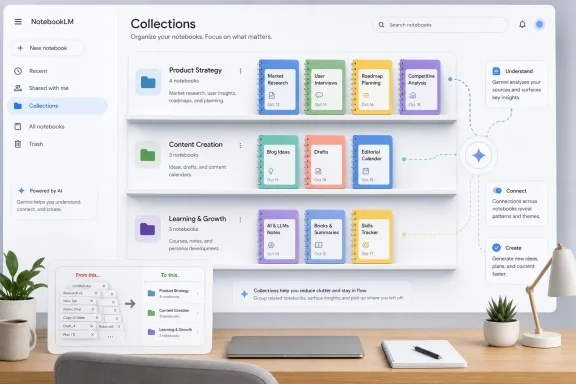
Google is testing a NotebookLM “collections” feature that would group multiple notebooks under a shared heading in the app’s main navigation, according to early evidence reported in late June 2026, though Google has not officially announced the feature or given a release date. That may sound like a small filing-cabinet upgrade, but it cuts directly into the next problem facing AI workspaces: what happens when the tools designed to reduce information overload become overloaded themselves. NotebookLM has become less like a clever document chatbot and more like Google’s research operating system. Collections suggest Google has noticed that the operating system now needs a desktop.
NotebookLM began as a restrained idea by generative AI standards: upload sources, ask questions, get answers grounded in those sources. Its appeal was that it did not pretend to know everything. It knew what you gave it, and it was more useful because of that constraint.
That original design made the notebook the obvious unit of work. A student could build one for a course, a journalist could build one for a reporting file, and an IT administrator could build one for a migration plan. The mental model was clean because the number of notebooks was likely to be small.
The product Google is now building around NotebookLM is not that small anymore. Audio Overviews, Video Overviews, generated briefs, source organization, and Gemini sync have pushed it from “ask questions about documents” toward “turn a body of material into usable output.” Once a tool starts doing that well, users stop creating one or two notebooks and start creating dozens.
That is where the flat list breaks. A list of notebooks is fine when NotebookLM is a research sidecar. It becomes friction when NotebookLM becomes the place where people keep client projects, policy notes, meeting archives, product research, study collections, personal knowledge bases, and half-finished experiments.
The reported collections feature appears to answer that specific failure mode. It would not organize the sources inside a notebook. It would organize the notebooks themselves, creating a higher-level layer above the current workspace model.
But source organization solves the problem inside a workspace. It does not solve the problem of finding the right workspace in the first place. If you have one notebook for “Windows Server 2025 migration,” another for “Intune policy cleanup,” another for “Copilot licensing,” and another for “Q3 procurement,” source labels help only after you open the correct one.
The distinction is not pedantic. It is the difference between tabs in a binder and shelves in a cabinet. NotebookLM has been getting better tabs. Collections would give it shelves.
That is why this feature is more consequential than its plain name suggests. AI apps have tended to treat organization as an afterthought because demos work best with one pristine project. Real users live in accumulation. Every useful tool eventually has to answer the same boring question: where did I put that thing?
NotebookLM’s current answer is not good enough for heavy users. Search helps, recency helps, and naming discipline helps, but none of those replace a native way to group work by client, class, department, beat, product, or life domain. Collections would make NotebookLM feel less like an endless scroll of intentions and more like a durable workspace.
That is strategically important for Google. Gemini has often needed clearer persistence: a way for users to keep context around a project instead of restarting from a blank chat window. Notebooks give Gemini that memory structure, while NotebookLM gives those notebooks specialized research and output tools.
But bidirectional convenience has a cost. If notebooks can be created or used from multiple places, the number of notebooks will rise. The moment notebook creation becomes casual, notebook management becomes necessary.
This is familiar to anyone who has watched collaboration tools mature. Slack channels multiply. Teams teams multiply. SharePoint sites multiply. GitHub repositories multiply. The same dynamic is coming for AI workspaces, and NotebookLM is arriving at that stage earlier than many competitors because Google is pushing it into both research and everyday Gemini use.
The free-tier expansion makes the problem even sharper. When notebook projects become available to free Gemini web users and the free NotebookLM tier supports large libraries, Google is no longer designing only for enthusiasts who will tolerate rough edges. It is designing for a mass audience that may not know why its “AI notebook” list became unmanageable after three months.
Collections are a small product surface with large ecosystem implications. They say Google expects people to keep using notebooks, not merely try them. They also say Google understands that persistence without hierarchy turns into clutter.
But labels also ask users to maintain metadata. They work beautifully for people who already have a taxonomy in mind and miserably for people who just want to put all the “client A” notebooks somewhere. A label system can become a second mess layered over the first one.
Collections, by contrast, sound simpler. A collection is a place. It can still be implemented with label-like flexibility under the hood, but the user-facing metaphor is stronger. Put notebooks about the migration in the migration collection. Put coursework in the coursework collection. Put research for a book in the book collection.
That simplicity matters because NotebookLM is not only serving technical users. It is also being adopted by students, teachers, writers, analysts, lawyers, consultants, and ordinary users who may have no interest in building elaborate information architecture. A product that turns documents into summaries, study guides, podcasts, and videos cannot assume its users want to become librarians.
The risk is that collections become too rigid. If a notebook belongs to both “WindowsForum reporting” and “Microsoft AI,” a strict folder system forces a choice. If Google wants collections to scale, it may eventually need both models: a visible collection layer for ordinary navigation and richer labels or filters for power users.
Still, the first job is not theoretical elegance. The first job is to stop the home screen from becoming a junk drawer. Collections would do that in a way users immediately understand.
NotebookLM now wants to transform sources into artifacts. It can summarize, brief, explain, script, structure, and repackage. Its best-known party trick, Audio Overviews, helped make the product feel less like a search box and more like a studio. Video Overviews and other generated formats push it further in that direction.
That change raises the value of a notebook. A notebook is no longer just a container for documents; it is a production environment. It contains source material, generated outputs, conversations, instructions, and the shape of a project’s evolving understanding.
Once notebooks become production environments, grouping them becomes more than tidiness. It becomes workflow. A consultant might maintain separate notebooks for discovery, compliance, implementation, and training under one client collection. A sysadmin might keep hardware inventory, deployment notes, vendor documentation, and incident retrospectives under one modernization program. A teacher might group class notebooks by semester.
This is the point at which AI tools start resembling the software they once claimed to replace. They need projects, folders, permissions, naming conventions, export controls, retention rules, and eventually governance. The romance of the blank prompt gives way to the dull but indispensable mechanics of work.
Google’s advantage is that it already lives in those mechanics through Drive, Docs, Workspace, and Search. NotebookLM collections could become a bridge between AI-native workspaces and the older document world Google understands very well. The open question is whether Google will make that bridge coherent or merely add another organizational silo.
NotebookLM already raises familiar enterprise questions about data handling, sharing, account boundaries, source provenance, and access control. As the tool becomes more embedded in Gemini and Workspace-style workflows, those questions become harder to ignore. Notebook-level grouping could eventually support administrative patterns that a flat list cannot.
Imagine a future version where collections map to teams, matters, classes, cases, or departments. That could make it easier to onboard users, archive work, apply policies, or reason about who should have access to what. Google has not announced that, and the reported test should not be inflated into a full enterprise roadmap. But hierarchy is often the first step toward governance.
The absence of hierarchy, by contrast, is a warning sign for business use. A tool that can hold sensitive research but cannot organize it well will eventually produce shadow systems. Users will invent naming hacks, duplicate notebooks, share the wrong items, or rely on browser extensions that IT never approved.
Power users are already a leading indicator here. When people build or install third-party helpers to approximate folders, tagging, or cross-notebook management, the market is telling the platform vendor where the product boundary should move. Browser extensions are useful experiments, but they are not a substitute for a native control surface in a product that may hold proprietary or regulated material.
Collections would not solve governance by themselves. They would, however, give Google a cleaner foundation for the governance features that serious deployments will demand.
The limitation is that most of these containers remain one level deep. You can make a project, add context, and return to it later. But once you have dozens of projects, the products often start looking like the same flat lists they were supposed to improve upon.
This is not a glamorous frontier, but it is a real one. The first generation of AI productivity tools competed on model quality, context windows, file uploads, and multimodal tricks. The next generation will compete on whether users can live in them without drowning.
NotebookLM has a credible shot at getting there because it is already opinionated. It is not a general chat product with a folder bolted on. It is a source-grounded workspace with a specific research posture. That makes organization more meaningful because the unit being organized has a clearer purpose.
If collections ship, Google could claim an early lead in a mundane but important part of AI UX. Not because folders are innovative, but because the absence of folders becomes painful exactly when a product becomes useful.
Most enterprise AI adoption is not happening in abstract. It is happening in browsers, Office files, PDFs, meeting transcripts, cloud drives, and desktop routines. A Windows admin might use NotebookLM to digest Microsoft documentation, vendor PDFs, security advisories, procurement files, or internal runbooks. A developer might use it to keep architecture notes, API references, and bug histories in one place.
For those users, collections could make NotebookLM more viable as a long-running tool rather than a temporary scratchpad. The difference matters. Temporary tools can be messy. Long-running tools need structure.
There is also a Microsoft-adjacent lesson here. Copilot, OneDrive, SharePoint, Teams, and Loop all orbit the same problem from a different direction: how to make AI useful inside existing bodies of work. Google’s NotebookLM is approaching from the research workspace side, but the endpoint is similar. The winning products will be the ones that respect how people already organize work while reducing the penalty for imperfect organization.
Windows power users have seen this movie before. The best feature is not always the one with the flashiest demo. Sometimes it is the one that keeps the tool usable after the demo becomes daily work.
The most important unknown is whether collections will be purely cosmetic or structurally meaningful. A sidebar tab that groups notebooks locally would be helpful, but limited. A collection model that supports sharing, permissions, search filters, export, and Gemini integration would be much more important.
Another unknown is portability. NotebookLM is strongest when users trust it as a place to accumulate work, but trust depends partly on escape routes. If collections encourage users to build larger knowledge libraries, Google should eventually make it clear how those structures can be exported, audited, or migrated.
There is also a product-design danger in over-organizing too soon. NotebookLM’s appeal has partly been its low-friction simplicity. If collections arrive with too many knobs, they could make the app feel more like a content management system than a research companion.
The balance is delicate. Google needs to give power users structure without making casual users manage structure. That likely means collections should be optional, obvious, and forgiving. The best version would let new users ignore them and heavy users depend on them.
A few concrete implications stand out:
 Google’s Research App Has Outgrown the Flat List
NotebookLM began as a restrained idea by generative AI standards: upload sources, ask questions, get answers grounded in those sources. Its appeal was that it did not pretend to know everything. It knew what you gave it, and it was more useful because of that constraint.That original design made the notebook the obvious unit of work. A student could build one for a course, a journalist could build one for a reporting file, and an IT administrator could build one for a migration plan. The mental model was clean because the number of notebooks was likely to be small.
The product Google is now building around NotebookLM is not that small anymore. Audio Overviews, Video Overviews, generated briefs, source organization, and Gemini sync have pushed it from “ask questions about documents” toward “turn a body of material into usable output.” Once a tool starts doing that well, users stop creating one or two notebooks and start creating dozens.
That is where the flat list breaks. A list of notebooks is fine when NotebookLM is a research sidecar. It becomes friction when NotebookLM becomes the place where people keep client projects, policy notes, meeting archives, product research, study collections, personal knowledge bases, and half-finished experiments.
The reported collections feature appears to answer that specific failure mode. It would not organize the sources inside a notebook. It would organize the notebooks themselves, creating a higher-level layer above the current workspace model.
The Missing Layer Was Always Above the Notebook
Google has already spent much of 2026 improving organization inside NotebookLM. The most important recent example is source organization, which reached full rollout in early May and lets NotebookLM cluster sources inside a notebook by topic. That matters because notebooks often contain messy piles of PDFs, web pages, transcripts, Docs, slides, and copied text.But source organization solves the problem inside a workspace. It does not solve the problem of finding the right workspace in the first place. If you have one notebook for “Windows Server 2025 migration,” another for “Intune policy cleanup,” another for “Copilot licensing,” and another for “Q3 procurement,” source labels help only after you open the correct one.
The distinction is not pedantic. It is the difference between tabs in a binder and shelves in a cabinet. NotebookLM has been getting better tabs. Collections would give it shelves.
That is why this feature is more consequential than its plain name suggests. AI apps have tended to treat organization as an afterthought because demos work best with one pristine project. Real users live in accumulation. Every useful tool eventually has to answer the same boring question: where did I put that thing?
NotebookLM’s current answer is not good enough for heavy users. Search helps, recency helps, and naming discipline helps, but none of those replace a native way to group work by client, class, department, beat, product, or life domain. Collections would make NotebookLM feel less like an endless scroll of intentions and more like a durable workspace.
Gemini Sync Turns Clutter Into a Platform Problem
The organizational pressure increased sharply when Google tied NotebookLM more tightly to Gemini. Notebooks in Gemini now sync with NotebookLM, meaning sources and notebook changes can carry across both environments. That integration turns NotebookLM from a separate research app into part of Gemini’s broader productivity surface.That is strategically important for Google. Gemini has often needed clearer persistence: a way for users to keep context around a project instead of restarting from a blank chat window. Notebooks give Gemini that memory structure, while NotebookLM gives those notebooks specialized research and output tools.
But bidirectional convenience has a cost. If notebooks can be created or used from multiple places, the number of notebooks will rise. The moment notebook creation becomes casual, notebook management becomes necessary.
This is familiar to anyone who has watched collaboration tools mature. Slack channels multiply. Teams teams multiply. SharePoint sites multiply. GitHub repositories multiply. The same dynamic is coming for AI workspaces, and NotebookLM is arriving at that stage earlier than many competitors because Google is pushing it into both research and everyday Gemini use.
The free-tier expansion makes the problem even sharper. When notebook projects become available to free Gemini web users and the free NotebookLM tier supports large libraries, Google is no longer designing only for enthusiasts who will tolerate rough edges. It is designing for a mass audience that may not know why its “AI notebook” list became unmanageable after three months.
Collections are a small product surface with large ecosystem implications. They say Google expects people to keep using notebooks, not merely try them. They also say Google understands that persistence without hierarchy turns into clutter.
Labels Were the Obvious First Thought, but Folders Win Hearts
The report says there are signs Google previously considered a label-based approach before moving toward collections. That would make sense. Labels are flexible, modern, and Google-ish. Gmail trained a generation of users to think beyond folders, and labels can support multiple classifications at once.But labels also ask users to maintain metadata. They work beautifully for people who already have a taxonomy in mind and miserably for people who just want to put all the “client A” notebooks somewhere. A label system can become a second mess layered over the first one.
Collections, by contrast, sound simpler. A collection is a place. It can still be implemented with label-like flexibility under the hood, but the user-facing metaphor is stronger. Put notebooks about the migration in the migration collection. Put coursework in the coursework collection. Put research for a book in the book collection.
That simplicity matters because NotebookLM is not only serving technical users. It is also being adopted by students, teachers, writers, analysts, lawyers, consultants, and ordinary users who may have no interest in building elaborate information architecture. A product that turns documents into summaries, study guides, podcasts, and videos cannot assume its users want to become librarians.
The risk is that collections become too rigid. If a notebook belongs to both “WindowsForum reporting” and “Microsoft AI,” a strict folder system forces a choice. If Google wants collections to scale, it may eventually need both models: a visible collection layer for ordinary navigation and richer labels or filters for power users.
Still, the first job is not theoretical elegance. The first job is to stop the home screen from becoming a junk drawer. Collections would do that in a way users immediately understand.
NotebookLM Is Becoming an Output Machine, Not Just a Reading Machine
The collections test also lands during a broader shift in NotebookLM’s identity. The product’s early magic was retrieval: it could answer questions based on uploaded material and show its work well enough to inspire more trust than a general chatbot. That remains central, but it is no longer the whole pitch.NotebookLM now wants to transform sources into artifacts. It can summarize, brief, explain, script, structure, and repackage. Its best-known party trick, Audio Overviews, helped make the product feel less like a search box and more like a studio. Video Overviews and other generated formats push it further in that direction.
That change raises the value of a notebook. A notebook is no longer just a container for documents; it is a production environment. It contains source material, generated outputs, conversations, instructions, and the shape of a project’s evolving understanding.
Once notebooks become production environments, grouping them becomes more than tidiness. It becomes workflow. A consultant might maintain separate notebooks for discovery, compliance, implementation, and training under one client collection. A sysadmin might keep hardware inventory, deployment notes, vendor documentation, and incident retrospectives under one modernization program. A teacher might group class notebooks by semester.
This is the point at which AI tools start resembling the software they once claimed to replace. They need projects, folders, permissions, naming conventions, export controls, retention rules, and eventually governance. The romance of the blank prompt gives way to the dull but indispensable mechanics of work.
Google’s advantage is that it already lives in those mechanics through Drive, Docs, Workspace, and Search. NotebookLM collections could become a bridge between AI-native workspaces and the older document world Google understands very well. The open question is whether Google will make that bridge coherent or merely add another organizational silo.
The Enterprise Angle Is Bigger Than the Consumer UI
For individual users, collections are a convenience feature. For organizations, they could become part of the adoption argument. IT departments do not simply ask whether an AI tool is impressive; they ask whether it can be managed.NotebookLM already raises familiar enterprise questions about data handling, sharing, account boundaries, source provenance, and access control. As the tool becomes more embedded in Gemini and Workspace-style workflows, those questions become harder to ignore. Notebook-level grouping could eventually support administrative patterns that a flat list cannot.
Imagine a future version where collections map to teams, matters, classes, cases, or departments. That could make it easier to onboard users, archive work, apply policies, or reason about who should have access to what. Google has not announced that, and the reported test should not be inflated into a full enterprise roadmap. But hierarchy is often the first step toward governance.
The absence of hierarchy, by contrast, is a warning sign for business use. A tool that can hold sensitive research but cannot organize it well will eventually produce shadow systems. Users will invent naming hacks, duplicate notebooks, share the wrong items, or rely on browser extensions that IT never approved.
Power users are already a leading indicator here. When people build or install third-party helpers to approximate folders, tagging, or cross-notebook management, the market is telling the platform vendor where the product boundary should move. Browser extensions are useful experiments, but they are not a substitute for a native control surface in a product that may hold proprietary or regulated material.
Collections would not solve governance by themselves. They would, however, give Google a cleaner foundation for the governance features that serious deployments will demand.
The Competitive Field Has the Same Workspace Ceiling
Google is not alone in running into this problem. ChatGPT Projects, Claude Projects, and Perplexity Spaces all point in the same direction: persistent AI containers for ongoing work. Each is an admission that chat history alone is a poor interface for serious tasks.The limitation is that most of these containers remain one level deep. You can make a project, add context, and return to it later. But once you have dozens of projects, the products often start looking like the same flat lists they were supposed to improve upon.
This is not a glamorous frontier, but it is a real one. The first generation of AI productivity tools competed on model quality, context windows, file uploads, and multimodal tricks. The next generation will compete on whether users can live in them without drowning.
NotebookLM has a credible shot at getting there because it is already opinionated. It is not a general chat product with a folder bolted on. It is a source-grounded workspace with a specific research posture. That makes organization more meaningful because the unit being organized has a clearer purpose.
If collections ship, Google could claim an early lead in a mundane but important part of AI UX. Not because folders are innovative, but because the absence of folders becomes painful exactly when a product becomes useful.
Windows Users Should Read This as a Workflow Signal
At first glance, NotebookLM collections may seem far outside the usual WindowsForum orbit. It is a Google web app feature, not a Windows feature, a Microsoft patch, or a hardware driver issue. But the audience that cares about Windows also cares about the workflows that happen on Windows machines.Most enterprise AI adoption is not happening in abstract. It is happening in browsers, Office files, PDFs, meeting transcripts, cloud drives, and desktop routines. A Windows admin might use NotebookLM to digest Microsoft documentation, vendor PDFs, security advisories, procurement files, or internal runbooks. A developer might use it to keep architecture notes, API references, and bug histories in one place.
For those users, collections could make NotebookLM more viable as a long-running tool rather than a temporary scratchpad. The difference matters. Temporary tools can be messy. Long-running tools need structure.
There is also a Microsoft-adjacent lesson here. Copilot, OneDrive, SharePoint, Teams, and Loop all orbit the same problem from a different direction: how to make AI useful inside existing bodies of work. Google’s NotebookLM is approaching from the research workspace side, but the endpoint is similar. The winning products will be the ones that respect how people already organize work while reducing the penalty for imperfect organization.
Windows power users have seen this movie before. The best feature is not always the one with the flashiest demo. Sometimes it is the one that keeps the tool usable after the demo becomes daily work.
The Unreleased Feature Still Carries Unanswered Risks
Because collections have not been officially announced, the usual caveats apply. Early development signals can change, features can be delayed, and interface experiments can disappear before reaching public users. Google in particular is not shy about testing, renaming, merging, and retiring ideas.The most important unknown is whether collections will be purely cosmetic or structurally meaningful. A sidebar tab that groups notebooks locally would be helpful, but limited. A collection model that supports sharing, permissions, search filters, export, and Gemini integration would be much more important.
Another unknown is portability. NotebookLM is strongest when users trust it as a place to accumulate work, but trust depends partly on escape routes. If collections encourage users to build larger knowledge libraries, Google should eventually make it clear how those structures can be exported, audited, or migrated.
There is also a product-design danger in over-organizing too soon. NotebookLM’s appeal has partly been its low-friction simplicity. If collections arrive with too many knobs, they could make the app feel more like a content management system than a research companion.
The balance is delicate. Google needs to give power users structure without making casual users manage structure. That likely means collections should be optional, obvious, and forgiving. The best version would let new users ignore them and heavy users depend on them.
The Filing Cabinet Is the Feature That Proves the Desk Is Real
The practical meaning of the reported collections test is straightforward: NotebookLM is accumulating enough user work that Google now has to organize the organizers. That is a good problem for a product to have, but it is still a problem.A few concrete implications stand out:
- Collections would give NotebookLM a native way to group whole notebooks instead of merely organizing sources within a single notebook.
- The feature appears to be early and unconfirmed, so users should not plan workflows around it until Google ships or documents it.
- Gemini sync makes notebook sprawl more likely because notebooks now function across more than one Google AI surface.
- Free access to Gemini notebook projects broadens the user base and makes navigation friction a mainstream issue rather than a power-user complaint.
- Google’s reported move from labels toward collections suggests the company may be prioritizing a simpler, folder-like mental model.
- If implemented well, collections could give NotebookLM an organizational advantage over rival AI workspace products that still rely heavily on flat project lists.
References
- Primary source: TestingCatalog AI News
Published: 2026-06-27T13:00:41.358430
Google tests notebook collections for NotebookLM
Google is testing a collections feature for NotebookLM, allowing users to group notebooks under a single heading for easier navigation. www.testingcatalog.com
- Official source: support.google.com

Notebooks in Gemini Apps - NotebookLM Help
NotebookLM notebooks in Gemini Apps makes it easy to chat with your notebooks across Google products. This integration gives you more ways to interact with your personal knowledge base: Your note
support.google.com
- Related coverage: thedailystar.net
Google Gemini Notebooks now free for all users
Google expands Gemini app Notebooks to free users. Organize chats, files, and sync with NotebookLM. Learn about source limits and upcoming mobile support.www.thedailystar.net - Related coverage: how2shout.com
Google Gemini Notebooks Now Free: NotebookLM Features for All Users
Google opens Gemini Notebooks to free users with NotebookLM sync. Organize chats, upload files, get Video Overviews. Web now, mobile coming soon.www.how2shout.com - Related coverage: notebooklm-guide.com
Gemini Notebooks + NotebookLM: The Hybrid Research Workflow (2026 Guide) | NotebookLM Guide
Master the new Gemini Notebooks sync with NotebookLM. Step-by-step hybrid workflow + 50 copy-paste prompts that turn casual chats into literature reviews, slide decks, audio overviews, and content pipelines. Updated April 2026.notebooklm-guide.com - Related coverage: tech.yahoo.com
All Gemini users can now access Notebook projects on the web without paying a dime
Gemini now lets all free users create Notebooks on the web, a shared workspace that syncs with NotebookLM. You can store files, past chats, and sources in one place for smarter AI responses.tech.yahoo.com
- Related coverage: resultsense.com
Gemini gains notebooks, synced with NotebookLM workspaces
Google Gemini now supports notebooks: organised chats, files and custom instructions that sync with NotebookLM for Video Overviews and Infographics.www.resultsense.com
- Related coverage: pasqualepillitteri.it
- Related coverage: blockchain.news
Gemini integrates NotebookLM: Free web users get personal notebooks and chat-to-notebook sources — Latest 2026 Update | AI News Detail
According to NotebookLM on X, Notebooks in the Gemini app are now available to Free users on the web, enabling access to personal, unshared notebooks directly inside Gemini and the ability to use Gblockchain.news - Related coverage: techradar.com
5 tips for using Gemini’s new Notebook feature | TechRadar
Adding continuity to your AI experiencewww.techradar.com
