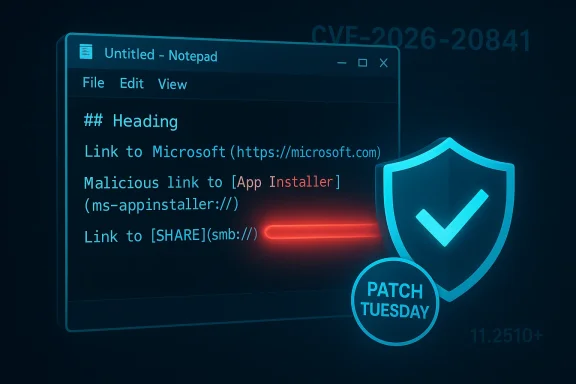
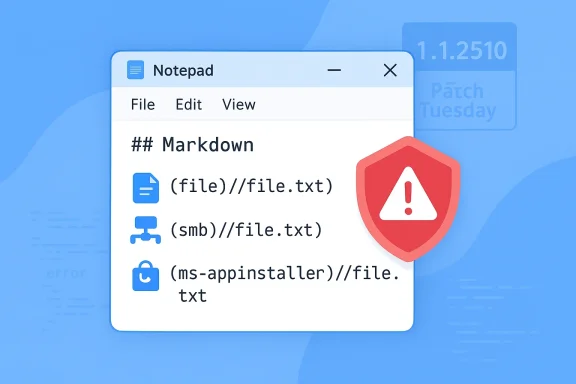
If you’re running Windows 11, update now — Microsoft has closed a high‑severity remote code execution flaw in the modern Notepad app that could let a single click in a Markdown file turn into code execution under your user account.
Notepad has been a Windows constant for decades, known for its simplicity and near-zero attack surface. Over the last year Microsoft transformed Notepad from a plain text utility into a richer editor with Markdown rendering, formatting controls, and clickable links — features designed to modernize the app and replace the deprecated WordPad. That change, however, expanded its trust boundaries and introduced new interactions between Notepad and the operating system’s protocol handlers.
On Patch Tuesday in February 2026 Microsoft disclosed and patched a vulnerability tracked as CVE‑2026‑20841, described as “improper neutralization of special elements used in a command” (a command‑injection class weakness). The practical impact: specially crafted Markdown files could contain links that Notepad exposed as clickable actions, and in vulnerable builds those actions could launch non‑HTTP(S) protocol handlers — including file:// and special URIs such as ms‑appinstaller:// — without the normal Windows security prompt, enabling remote or local files to be executed in the context of the logged‑in user.
Multiple independent security reports and vulnerability trackers assigned the issue a high severity rating (CVSS v3.1 ~8.8) and listed the patched Notepad build as 11.2510 or later. Microsoft rolled the fix into the February 2026 Patch Tuesday updates and updated the Notepad Store package to prevent silent execution by requiring explicit user confirmation for non‑HTTP(S) URIs.
Put simply:
Security teams should treat any public PoC as a practical increase in risk: even if Microsoft reported no known active exploitation at the time of disclosure, PoC publication can catalyze upgrades to commodity malware toolkits and phishing campaigns. Assume higher likelihood of opportunistic abuse and prioritize patching accordingly.
Microsoft’s fix — requiring a prompt for non‑HTTP(S) URIs — is an appropriate immediate mitigation. It restores a necessary human checkpoint and buys defenders time. However, dialogs alone are not a full solution: they rely on user judgment and can be bypassed by effective phishing. The real work for both vendors and enterprises is to ensure that new features arrive with threat modeling, protocol allow‑lists, and an assumption that code paths invoking external handlers are high‑risk and must be hardened.
If you run Windows 11: don’t assume you’re safe. Check your Notepad version, update now, and apply the mitigations outlined above. For IT teams: inventory, patch, and monitor. This is a straightforward flaw with wide impact potential, and the easiest — and best — defense is timely patching.
Source: iPhone in Canada Update Windows 11 Now: Major Notepad Flaw Fixed
 Background: Notepad’s unexpected attack surface
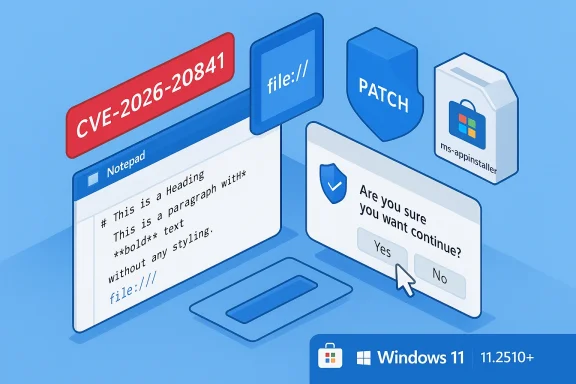
Notepad has been a Windows constant for decades, known for its simplicity and near-zero attack surface. Over the last year Microsoft transformed Notepad from a plain text utility into a richer editor with Markdown rendering, formatting controls, and clickable links — features designed to modernize the app and replace the deprecated WordPad. That change, however, expanded its trust boundaries and introduced new interactions between Notepad and the operating system’s protocol handlers.On Patch Tuesday in February 2026 Microsoft disclosed and patched a vulnerability tracked as CVE‑2026‑20841, described as “improper neutralization of special elements used in a command” (a command‑injection class weakness). The practical impact: specially crafted Markdown files could contain links that Notepad exposed as clickable actions, and in vulnerable builds those actions could launch non‑HTTP(S) protocol handlers — including file:// and special URIs such as ms‑appinstaller:// — without the normal Windows security prompt, enabling remote or local files to be executed in the context of the logged‑in user.
Multiple independent security reports and vulnerability trackers assigned the issue a high severity rating (CVSS v3.1 ~8.8) and listed the patched Notepad build as 11.2510 or later. Microsoft rolled the fix into the February 2026 Patch Tuesday updates and updated the Notepad Store package to prevent silent execution by requiring explicit user confirmation for non‑HTTP(S) URIs.
What exactly went wrong?
The vulnerability in plain language
Notepad’s Markdown renderer converts Markdown link syntax into clickable UI elements. In the vulnerable versions, the app did insufficient sanitization and policy checks for the URI schemes attached to those links. When a user opened a malicious .md file and activated the link (for example with Ctrl+click), Notepad handed the URI to Windows or to a registered protocol handler. That handler could then download or launch an executable, and Windows would not display the usual security interstitial that warns users about potentially unsafe protocol launches.Put simply:
- A seemingly harmless Markdown file becomes a delivery vehicle.
- The link in that file points at a non‑HTTP resource (local file, SMB share, or special protocol).
- Notepad forwards the link to the OS without blocking or warning.
- The referenced resource executes using the current user’s privileges.
Why this matters operationally
- Low complexity: Exploitation required only user interaction (clicking a link), making it easy to incorporate into phishing or supply‑chain lures.
- Wide reach: Notepad ships with Windows 11 as a modern Store app; many users open Markdown readme files, release notes, or documentation without suspicion.
- Multiple protocol vectors: The attack could use file:// references, remote SMB shares, or platform handlers (ms‑appinstaller://, ms‑settings:, etc.), broadening exploitation options.
- Privilege scope: The code runs in the context of the logged‑in user — for administrative or service accounts, the consequences are severe.
Technical analysis: where the chain breaks down
The issue maps to CWE‑77 (command injection / improper neutralization of special elements). From a software‑engineering perspective, the root causes include:- Feature creep without hardened plumbing: Markdown preview necessitates link parsing and protocol invocation logic. That logic must be as carefully validated as a browser’s link handling, but Notepad historically wasn’t built for that level of trust.
- Insufficient validation: Not all URI schemes are equivalent. While http(s) is expected to point to benign web content, schemes like file:// or custom app installers introduce file system and installer behavior that require additional confirmation and sanitization.
- Trust boundary crossing: By making links clickable, Notepad moved from a passive renderer to a component that actively invokes other system components (protocol handlers, installers, SMB file fetchers). Every such crossing is a high‑value audit point.
Proof‑of‑concepts and exploitation status
Public reporting and researcher discourse indicate that PoC code demonstrating the behavior was circulated soon after the issue was disclosed. When exploit code is widely available, the time window between disclosure and attempt of mass exploitation narrows dramatically — especially for a vulnerability that requires only a click.Security teams should treat any public PoC as a practical increase in risk: even if Microsoft reported no known active exploitation at the time of disclosure, PoC publication can catalyze upgrades to commodity malware toolkits and phishing campaigns. Assume higher likelihood of opportunistic abuse and prioritize patching accordingly.
Microsoft’s fix: what changed in Notepad
The February 2026 Patch Tuesday updates and the updated Notepad Store package change the app’s behavior for link activation:- Non‑HTTP(S) URIs now prompt: Clicking links that use schemes other than http:// or https:// results in an explicit confirmation dialog. That dialog warns the user and requires affirmative confirmation before the OS is handed the URI.
- Handled in the Store package and cumulative updates: The fix was delivered via the Store app update flow for Notepad and through standard Windows cumulative update channels for managed environments that map the store package into system updates.
- Patched minimum: Community reporting converges on Notepad version 11.2510 (or later) as the fixed release; earlier builds that include Markdown support are considered vulnerable.
How to confirm you’re patched — step‑by‑step
Follow these steps to verify and remediate quickly. If you manage a fleet, apply the corresponding enterprise steps below.- Open Notepad.
- Click the app menu or the three‑dot (⋯) menu, then select Settings and About (or look for an About/Version entry in the app UI).
- Confirm the version string. You should see 11.2510 or higher for the patched build.
- If your Notepad version is older:
- Open the Microsoft Store app, go to Library → Get updates, and update Notepad.
- Run Windows Update (Settings → Windows Update → Check for updates) to ensure your system has applied the February 2026 cumulative patches where applicable.
- If you maintain managed devices:
- Ensure your enterprise deployment tools (WSUS/Intune/SCCM/Windows Update for Business) have pulled and installed the February 10, 2026 security packages.
- For environments that block Store updates, push the updated Notepad MSIX/AppX package through your software distribution pipeline.
Immediate mitigations and compensating controls
If you cannot patch every endpoint immediately, apply these compensating controls to reduce risk.- Disable Markdown rendering in Notepad temporarily if you don’t need it. Modern Notepad exposes a Formatting or Markdown toggle in Settings that prevents rendering of clickable links. Turning this off restores a plain‑text experience and neutralizes the clickable link vector.
- Treat .md files like executables in your email hygiene: block or quarantine Markdown attachments at the gateway for external senders, add inspection rules for .md files, or remove auto‑preview for attachments in webmail.
- Change the default handler for .md files: set a third‑party editor that doesn’t render links by default (or a viewer you control) as the default app for Markdown files for high‑risk users.
- Enable Windows security features:
- Turn on Smart App Control and Reputation‑based protection to help block unknown or unsigned installers and suspect downloads.
- Use Attack Surface Reduction (ASR) rules, AppLocker, or Windows Defender Application Control (WDAC) for critical endpoints to reduce unexpected process launches.
- For privileged accounts, restrict use of Notepad for opening untrusted files until endpoints are patched.
- Block or monitor invocation of risky protocol handlers where feasible (for example, log or restrict ms‑appinstaller usage in enterprise environments).
Enterprise guidance: prioritize and deploy
For IT teams and security ops, this vulnerability is a high‑priority item even though exploitation requires user interaction. Follow this recommended playbook:- Inventory: Identify machines with the modern Notepad package and report versions. Use endpoint inventory tools or Microsoft Store app inventory in Intune/WSUS to map the vulnerable population.
- Patch: Apply the February 2026 cumulative updates and push the Notepad Store package update to all affected devices. Treat this as a hot‑fix cycle for high‑risk users (executives, sysadmins, service accounts).
- Compensate: Where Store updates are blocked, deploy the patched Notepad package via MSIX/AppX sideloading within the organization or use configuration management to change the default .md handler.
- Harden: For high‑value endpoints, implement allow‑listing (AppLocker/WDAC) and ASR rules to prevent unexpected installer or script execution.
- Email/web hygiene: Apply content filters to prevent .md attachment delivery to large populations. Push guidelines to remove preview of .md files in mail clients and webmail.
- Monitoring and detection:
- Monitor for unusual protocol handler calls originating from notepad.exe.
- Watch for network SMB file fetches or installer downloads tied to user activity that correlate with Notepad process ownership.
- Add detection rules to EDR for ms‑appinstaller and similar protocol handler invocations that are atypical for normal operations.
Detection and hunting ideas for SOC teams
Focus on observable actions that would indicate attempted exploitation:- Process lineage: notepad.exe → protocol handler launch (e.g., installer or cmd.exe) where not typical.
- Network activity: unexpected SMB (445) connections initiated shortly after a user opens notepad.exe, especially toward external or internal file shares.
- Registry and protocol handler invocations: monitor calls to start a protocol (CreateProcess with protocol URL, ShellExecuteEx or ShellExecute with a non‑http URL).
- Installer execution patterns: sudden ms‑appinstaller activity or WINDOWS installer invocations tied to a user session that had recent Notepad activity.
- Email gateway telemetry: spikes in .md attachments delivered externally correlated with user click behavior or complaints.
Why this should prompt a broader rethink about feature scope
This Notepad incident is a useful case study in the trade‑offs between product modernization and security posture:- Feature creep increases the attack surface: Adding rendering, link handling, and protocol integration to a historically inert utility requires the same threat modeling and input sanitization discipline you apply to a browser or document viewer.
- Design choices matter: Clickability and automatic invocation are convenience features that must be coupled with strict validation and explicit, well‑designed prompts to avoid silent escalation.
- Centralization of updates is a mixed blessing: Moving apps to the Microsoft Store enables rapid distribution of fixes (good), but enterprise policies that restrict the Store can create patch gaps (bad). Organizations must reconcile security with control.
- User interface changes can undermine assumptions: Users trust Notepad to be a safe place to open simple files; when UI changes make it act like a launcher, that trust must be defended by engineered safeguards.
Realistic risk assessment
- Immediate risk: elevated but bounded. The vulnerability is real and easy to weaponize in phishing contexts, but exploitation still requires user interaction. That said, low‑friction social engineering campaigns can reliably harvest clicks at scale.
- Long‑term risk: depends on patch uptake. For consumer Windows 11 systems that update the Microsoft Store automatically, the fix should propagate quickly. For managed environments, the window of exposure depends on IT processes — and organizations that have blocked the Store may be delayed.
- Exploitation likelihood: increases significantly when PoC code becomes public, which has been observed for this issue. Expect opportunistic abuse in the days to weeks after disclosure unless patching is near universal.
Practical checklist — what to do right now
- Update Notepad to version 11.2510+ or install the February 2026 cumulative updates.
- If you can’t patch immediately:
- Disable Notepad Markdown formatting / rendering.
- Avoid opening .md files from untrusted sources.
- Block .md attachments at mail gateways or instruct users not to open them.
- Change default .md handler to a safer editor that does not render links.
- Enable Smart App Control and reputation‑based protection in Windows Security.
- For administrators: push the patched Notepad package to managed devices and verify compliance via your patch reporting tools.
Final analysis — why this matters beyond a single bug
CVE‑2026‑20841 is a reminder that utility apps, when modernized, must be treated like any complex client software. The balance between convenience and safety tilted dangerously toward convenience in this case: clickable links in a text editor are useful, but they must be mediated correctly.Microsoft’s fix — requiring a prompt for non‑HTTP(S) URIs — is an appropriate immediate mitigation. It restores a necessary human checkpoint and buys defenders time. However, dialogs alone are not a full solution: they rely on user judgment and can be bypassed by effective phishing. The real work for both vendors and enterprises is to ensure that new features arrive with threat modeling, protocol allow‑lists, and an assumption that code paths invoking external handlers are high‑risk and must be hardened.
If you run Windows 11: don’t assume you’re safe. Check your Notepad version, update now, and apply the mitigations outlined above. For IT teams: inventory, patch, and monitor. This is a straightforward flaw with wide impact potential, and the easiest — and best — defense is timely patching.
Source: iPhone in Canada Update Windows 11 Now: Major Notepad Flaw Fixed