

Craft Studio’s OmniOne Pocket PC lands like a familiar idea in a new form: a compact, thumb-typed handheld that runs full Windows 11, packs an Intel N‑series APU, and promises to deliver a real desktop experience you can carry in a jacket pocket — or at least in a small bag.
The OmniOne revives a category that tech-watchers remember as UMPCs and pocketable PCs: devices that aim to deliver a full desktop OS in a truly portable package. Unlike the recent wave of handheld gaming PCs, however, OmniOne positions itself squarely as a productivity-first pocket computer — email, spreadsheets, video calls, light photo edits and quick productivity tasks — with a thumb keyboard and a small touchscreen rather than gamepads or high‑end GPUs. This product is being financed through a crowdfunding campaign and the maker, Craft Studio (also referenced under the Hyperstrix/OmniOne naming in some coverage), lists a set of modest hardware choices: a 5.7‑inch HD touchscreen, an Intel N150 (Twin Lake family) processor, user‑upgradeable RAM and an M.2 slot — plus a surprisingly broad set of full‑size ports for a device this size. Several independent reports and hands‑on previews have converged on the same base spec sheet, which is uncommon for a pre‑production crowdfunding device and makes the claims easier to analyze.
This makes OmniOne attractive to:
The device’s practical success will hinge on two things: software polish (drivers, default power profiles, and any OEM UI tweaks that make Windows comfortable on a 5.7‑inch screen) and delivery fidelity (whether the final hardware matches campaign claims). If Craft Studio can ship a well‑tuned unit with the upgradability and ports shown in the campaign, OmniOne could be one of the more pragmatic and useful devices in the new wave of handheld PCs. If shipping slips or the final thermal/battery behavior disappoints, it will still be an interesting experiment but fall short of long‑term daily use for most buyers.
For early adopters and those who prize portability above all else, OmniOne is a device worth watching — and, for risk‑tolerant buyers, backing on Kickstarter could net a capable pocket PC at a reasonable price. For everyone else, waiting for retail units and independent testing is the safer path: the idea is excellent, but the execution will define whether OmniOne is a niche novelty or a small but important pivot in how people carry and use Windows PCs.
Source: TechEBlog - OmniOne Pocket PC Wants to be a Compact Windows Machine You Can Thumb-Type On
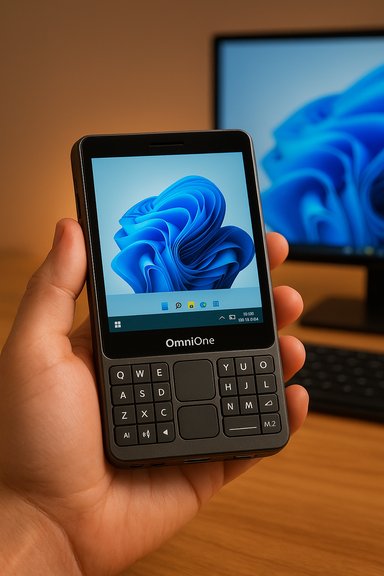 Background / Overview
The OmniOne revives a category that tech-watchers remember as UMPCs and pocketable PCs: devices that aim to deliver a full desktop OS in a truly portable package. Unlike the recent wave of handheld gaming PCs, however, OmniOne positions itself squarely as a productivity-first pocket computer — email, spreadsheets, video calls, light photo edits and quick productivity tasks — with a thumb keyboard and a small touchscreen rather than gamepads or high‑end GPUs. This product is being financed through a crowdfunding campaign and the maker, Craft Studio (also referenced under the Hyperstrix/OmniOne naming in some coverage), lists a set of modest hardware choices: a 5.7‑inch HD touchscreen, an Intel N150 (Twin Lake family) processor, user‑upgradeable RAM and an M.2 slot — plus a surprisingly broad set of full‑size ports for a device this size. Several independent reports and hands‑on previews have converged on the same base spec sheet, which is uncommon for a pre‑production crowdfunding device and makes the claims easier to analyze. Design and ergonomics
Form factor and dimensions
OmniOne measures roughly 158 x 135 x 20 mm and weighs about 326 g — small in absolute terms, but wider than most modern phones because it hosts a split-thumb keyboard on both sides of a small central touchpad. The result is a device you can palm while thumb‑typing, a layout that will feel familiar to anyone who’s used a thumb‑keyboard on earlier pocket computers or modern smartphone gaming controllers.Thumb keyboard: promises and practicalities
The keyboard is the device’s defining human‑interface claim: typeable text without adding a Bluetooth keyboard. That’s powerful in practice — brief email replies, chat, and light editing become credible on a single device. In return, buyers surrender traditional ergonomics: prolonged heavy typing will still be slower and less comfortable than a full laptop keyboard. The small keys and the width make true touch‑typing impossible for most users; OmniOne’s keyboard is best framed as a fast input method for on‑the‑move tasks rather than a laptop replacement for extended drafting.Hardware: what’s inside
Processor and memory
- CPU: Intel N150 (Twin Lake) — a low‑power quad‑core chipset designed for entry laptops and mini‑PCs. This SoC is built for efficiency rather than speed; it’s suitable for web, office suites, conferencing, and media, but it won’t replace a Core i5 or Ryzen 5 for heavy multitasking or serious editing.
- RAM: Configurable options (8GB / 16GB / 32GB listed in campaign materials), and the device reportedly exposes a single SO‑DIMM slot so memory is upgradable by the user — a pleasant surprise in this class.
- Storage: M.2 slot for PCIe NVMe (M.2 2280 suggested) with capacities up to 1TB advertised; user‑serviceable storage is another rare and welcome design choice.
Display and touch
- Panel: 5.7‑inch HD touchscreen, which multiple outlets report at 1280 × 720 (HD) and ~400 nits peak brightness. For text, messaging and light image work the pixel density is acceptable; the modest brightness rating, however, signals that outdoor use in direct sunlight will be compromised.
Ports, camera, audio, and battery
- Ports: Reported I/O is generous: HDMI 2.1, DisplayPort 1.2, Gigabit Ethernet, multiple USB‑A and USB‑C ports, and a 3.5 mm audio jack. This breadth is unusual and lets OmniOne behave as a pocket dock: plug it into monitors, keyboards and networks and you have a full workstation.
- Camera / Mics / Speakers: A simple front camera and microphones for conferencing are included — adequate for casual video calls but not a replacement for a desktop webcam’s quality.
- Battery: A 16.34 Wh battery is commonly cited by pre‑release materials. The maker claims over five hours of use at half brightness with wireless on; reviewers and press coverage flag that this is a best‑case, vendor‑provided figure and real world will vary heavily with workload and brightness. Expect 2–5 hours depending on activity and power profile.
Running Windows 11 on an Intel N150: reality check
Performance expectations
The Intel N150 is a low‑power Twin Lake part. In practice that means:- Smooth for email, document editing, web apps, and standard productivity workflows.
- Good enough for video calls at reasonable resolutions.
- Unsuitable for heavy image rendering, large spreadsheets with complex calculations, or serious video editing.
- The APU can sustain higher power for short bursts when the thermal design allows (reports mention a target configurable TDP range), but it remains limited compared to mainstream laptop CPUs.
Windows 11 usability and UI scaling
Windows 11 runs on the device — but running a full desktop OS on a 5.7‑inch screen introduces friction. Practical observations from hands‑on coverage and crowd commentary include:- Desktop UI elements and traditional applications will often be tiny; automatic scaling helps, but not every app is touch‑friendly at small sizes.
- The thumb keyboard makes short text entry easy, but pointer‑based tasks (dragging, precision selection) remain awkward without a larger pointer or external mouse.
- Handheld modes and compact shells (a trend in Windows for handheld hardware) may improve the UX over time, but OmniOne ships with stock Windows 11 behavior unless OEM customizations are provided.
Ports, docking, and expandability: a pocket dock
One of OmniOne’s clearest strengths is the I/O it offers for such a compact machine. The inclusion of full‑size HDMI 2.1 and DisplayPort 1.2 outputs and Ethernet means OmniOne can walk into a meeting or a desk setup and become a functional desktop PC, hooking up external displays, wired network, and a standard keyboard/mouse in seconds. That “pocket dock” use‑case is persuasive: carry a single small device and use public or office peripherals when available. The user‑accessible RAM and M.2 storage slots significantly improve the device’s long‑term value — you can upgrade capacity later without discarding the whole unit. That contrasts with many ultra‑mini devices that are sealed and not serviceable.Battery, thermals, and real‑world endurance
Vendor claims and campaign copy indicate over five hours at half brightness; independent previews caution that the 16.34 Wh battery is small by laptop standards and the N150’s efficiency will be decisive. Typical real‑world usage with Wi‑Fi, video calls, or sustained browsing is likely to fall under the quoted figure. Fast charging via USB‑C (reported at 35W input) helps recover runtime quickly, but predict frequent recharges on travel days. Thermals are an engineering balancing act: active cooling is present in pre‑release descriptions, but the tiny chassis limits sustained high power. Expect the device to handle short bursts well and throttle under long heavy workloads. For the intended productivity use case, that should be acceptable; for prolonged heavy CPU use, it will feel constrained.Software, drivers, and support risks
Running full Windows 11 means the device inherits both the benefits and the liabilities of a desktop OS in a tiny package:- Benefits: Access to full desktop applications, local installs of Office, browsers, and native Windows tooling; no need to re-architect workflows.
- Risks: Driver and firmware maturity for a new product — especially one built around an unusual thermal and I/O design — can determine whether the device delivers a smooth experience or a scattered one. Early Kickstarter hardware often ships with teething problems around drivers, Wi‑Fi stability, or power management. Multiple pre‑release write‑ups emphasize the crowdfunding caveat: promised features sometimes change between campaign and shipping sample.
Price, availability, and crowdfunding details
OmniOne’s Kickstarter tiers start at a notably affordable entry point for a full Windows handheld: launch specials and Kickstarter early‑bird offers were reported starting around $359 for the base 8GB/256GB configuration, rising through mid tiers and a higher‑end 32GB/1TB option. Retail pricing is expected higher after campaign fulfillment. Craft Studio lists a planned delivery window in early 2026 (campaign materials point to February 2026 for initial shipments), with the usual crowdfunding caveats about delays and spec changes. These price points place OmniOne in the same “affordable ultraportable” bracket as certain low‑end laptops and other handhelds — which is both an advantage (cost) and a constraint (compared to higher‑end handheld PCs). Remember that Kickstarter rewards sometimes bind you to shipping timelines and terms that differ from later retail purchases.Competitors and market fit
The OmniOne sits between several device families:- Pocket/UMPC revival devices and productivity‑focused mini‑PCs.
- Handheld gaming PCs (ROG Ally, AYANEO, GPD) which prioritize gaming controls and stronger GPUs.
- Budget laptops and ultraportables that offer larger screens with better keyboards and longer battery life.
This makes OmniOne attractive to:
- Travelers who primarily need messaging, email, remote desktop and occasional on‑device edits.
- Professionals who value a “one device for meetings” pocket companion.
- Early adopters and tinkerers who appreciate upgradeable memory and storage in a novel form factor.
Strengths — what OmniOne gets right
- Pocketable Windows 11: A real Windows desktop in a travelable form factor is rare and compelling.
- Broad I/O: Full‑size video outputs and wired Ethernet transform it into a genuine pocket dock.
- Upgradeability: SO‑DIMM and M.2 slots increase longevity and resale value.
- Affordability: Kickstarter pricing undercuts many handhelds and positions it as a cost‑effective ultraportable.
- Thumb typing built‑in: The keyboard makes short workflows genuinely phone‑like but more capable because it’s a full PC.
Risks & downsides — where buyers should be cautious
- Windows UI on small screens: Not all desktop apps scale well; frequent zooming and fiddling is likely.
- Thermal and performance limits: The Intel N150 is efficient but modest; expect throttling under sustained loads.
- Battery life: The small 16.34 Wh cell limits all‑day untethered use for anything but light tasks.
- Crowdfunding uncertainty: Specs, timelines and shipping can change; backup plans are necessary.
- Keyboard ergonomics: Thumb keyboards are brilliant for short input bursts, but nowhere near a laptop keyboard for heavy typing.
- Driver/firmware polish: New OEM drivers and small‑team firmware efforts often need months of patches after shipping; early adopters should be prepared for updates and occasional headaches.
Practical buying guidance and checklist
- If you depend on a daily, work‑critical machine, wait for retail reviews and firmware updates rather than backing the Kickstarter.
- If you want a pocketable Windows machine now for experimentation, or to serve as a travel secondary device, OmniOne’s Kickstarter makes sense if you accept crowdfunding risk.
- Plan to carry a USB‑C power brick and, if you intend docking at desks, a lightweight USB‑C hub or cable to leverage HDMI/DP outputs quickly.
- Backups: create an image of the shipped OS if you plan to tinker or test Insider builds — small devices risk bricking with experimental changes.
- Compare alternatives: if you need better battery life or a larger screen, a thin laptop or 2‑in‑1 may be a better long‑term choice.
Final analysis — does OmniOne matter?
OmniOne will not replace mainstream laptops, and it doesn’t need to. Its value proposition is mobility plus flexibility: a pocketable PC that plugs into real desks and docks — and does so at an approachable price. For anyone who’s wanted a full Windows environment in a size you can easily carry on commutes, OmniOne is a meaningful step forward.The device’s practical success will hinge on two things: software polish (drivers, default power profiles, and any OEM UI tweaks that make Windows comfortable on a 5.7‑inch screen) and delivery fidelity (whether the final hardware matches campaign claims). If Craft Studio can ship a well‑tuned unit with the upgradability and ports shown in the campaign, OmniOne could be one of the more pragmatic and useful devices in the new wave of handheld PCs. If shipping slips or the final thermal/battery behavior disappoints, it will still be an interesting experiment but fall short of long‑term daily use for most buyers.
Conclusion
The OmniOne Pocket PC is a credible, compelling attempt to make a real, usable Windows machine that fits in a pocket — or at least in a small bag — and doesn’t force you to buy an external keyboard to be productive. Its combination of upgradeability, full I/O, and low entry price stands out among recent handhelds. That said, inherent tradeoffs — small screen, moderate CPU, limited battery — mean the device will be complementary rather than a one‑device solution for heavy users.For early adopters and those who prize portability above all else, OmniOne is a device worth watching — and, for risk‑tolerant buyers, backing on Kickstarter could net a capable pocket PC at a reasonable price. For everyone else, waiting for retail units and independent testing is the safer path: the idea is excellent, but the execution will define whether OmniOne is a niche novelty or a small but important pivot in how people carry and use Windows PCs.
Source: TechEBlog - OmniOne Pocket PC Wants to be a Compact Windows Machine You Can Thumb-Type On
