

Microsoft will end updates and formal support for the OneDrive sync app on Windows 10 builds older than version 22H2 on August 15, 2026, creating a new operational deadline for organizations that have kept older Windows 10 releases alive. The client is not scheduled to suddenly stop launching that day, but Microsoft says it can no longer guarantee that syncing will keep working after support ends.
The change surfaced in Microsoft 365 Message Center advisory MC1426708 and was first reported by Neowin. It applies to the desktop sync client behind OneDrive’s everyday Windows integration: Files On-Demand, Known Folder Move, offline file access, and the synchronization of personal OneDrive, OneDrive for Business, and SharePoint libraries.
For Windows admins, the immediate message is less dramatic than “OneDrive stops working in 2028,” but more actionable: Windows 10 22H2 is now the minimum practical baseline for supported OneDrive sync. PCs on older feature releases are approaching an August cutoff for fixes, security updates, and new client capabilities.
Microsoft’s wording matters. OneDrive sync on Windows 10 versions earlier than 22H2 is being moved out of support on August 15, 2026. That normally means the installed client may continue connecting and moving files for some time, but Microsoft will no longer service problems that occur uniquely on those operating system releases.
That distinction is critical for users who see the news framed as an immediate shutdown. Existing folders are not being erased, OneDrive’s web interface is not being retired, and a working sync process will not necessarily fail on the date. The risk is that a future OneDrive client change, identity requirement, TLS update, File Explorer integration change, or defect will leave the machine unable to sync—and outside Microsoft’s supported configuration.
That is a bad place for any endpoint to be, particularly when Desktop, Documents, and Pictures have been redirected with Known Folder Move. In those deployments, the sync client is not merely a convenience utility. It is part of the organization’s effective backup, collaboration, profile migration, and device replacement workflow.
Microsoft has previously used this same lifecycle model for the OneDrive desktop app on Windows 7, Windows 8, and Windows 8.1: support ends first, while the question of how long the software remains functional is deliberately left open. The operational outcome is simple. An unsupported client should be treated as unreliable even if its tray icon remains blue and its last sync timestamp looks healthy.
Windows 10 itself reached end of support on October 14, 2025. Microsoft’s ESU program extends critical and important Windows security patches for qualifying commercial Windows 10 Enterprise, Education, and Pro deployments through October 10, 2028. It does not transform Windows 10 into a fully supported current platform, but it creates a managed runway for systems that cannot yet move to Windows 11.
The OneDrive timeline adds a useful, concrete boundary to that runway. A machine on Windows 10 22H2 may remain a supported OneDrive endpoint until October 2028, provided it remains within the applicable servicing and licensing arrangements. A machine left on an earlier Windows 10 release loses OneDrive sync support more than two years sooner.
There is one oddity in the advisory’s reported wording: it refers to “Windows 10 version 22H1 and earlier.” Microsoft never shipped a broadly released Windows 10 version called 22H1. Windows 10 version 22H2, released in October 2022, was the final general release; the immediately previous feature update was version 21H2. In practice, administrators should read the advisory as covering every Windows 10 release below 22H2, including 21H2, 21H1, 20H2, 2004, and older builds.
That clarification matters because Windows 10 Enterprise LTSC 2021 is based on version 21H2. Its separate Windows lifecycle does not automatically mean that its OneDrive sync client receives the same support treatment as 22H2. Organizations using LTSC should validate the Message Center notice against their tenant and confirm their OneDrive support posture directly with Microsoft rather than assuming that OS servicing dates settle the question.
That risk grows when OneDrive is tied into other Microsoft 365 workflows. Files On-Demand depends on the client’s interaction with Windows storage and File Explorer. SharePoint and Teams document libraries rely on the same sync engine when users choose “Sync.” Known Folder Move can make OneDrive central to day-to-day document handling even for staff who do not think of themselves as OneDrive users.
Microsoft’s release notes show that the sync client is still evolving, including integrations around File Explorer and commercial Microsoft 365 Copilot workflows. Freezing a device on an old Windows release therefore means more than foregoing cosmetic app changes. It can mean missing compatibility work that becomes necessary as the service side and adjacent Windows components move on.
The support distinction also complicates troubleshooting. Microsoft’s broader guidance for Microsoft 365 Apps on Windows 10 already warns that, after Windows 10’s end of support, issues reproducible only on Windows 10 may be answered with a request to move to Windows 11. The OneDrive advisory sharpens that rule for pre-22H2 systems: after August 15, an admin may have no supported remediation path beyond upgrading the OS.
Administrators can verify a local system through
The remediation priority should be straightforward:
But October 10, 2028 should not be mistaken for a new Windows 10 normal. It is the end of OneDrive sync support on Windows 10 22H2 and the end of the final commercial ESU year. Microsoft’s preferred destination is plainly Windows 11, where the sync client will continue following the normal current-platform update path.
The August 2026 cutoff is therefore a warning about neglected Windows 10 versions. The October 2028 date is the harder deadline: after that, even fully updated Windows 10 22H2 systems will no longer be a supported place to anchor OneDrive synchronization.
The change surfaced in Microsoft 365 Message Center advisory MC1426708 and was first reported by Neowin. It applies to the desktop sync client behind OneDrive’s everyday Windows integration: Files On-Demand, Known Folder Move, offline file access, and the synchronization of personal OneDrive, OneDrive for Business, and SharePoint libraries.
For Windows admins, the immediate message is less dramatic than “OneDrive stops working in 2028,” but more actionable: Windows 10 22H2 is now the minimum practical baseline for supported OneDrive sync. PCs on older feature releases are approaching an August cutoff for fixes, security updates, and new client capabilities.
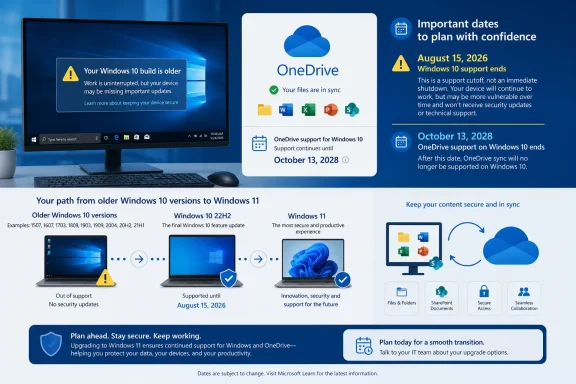 August 15 Is a Support Cutoff, Not a Kill Switch
Microsoft’s wording matters. OneDrive sync on Windows 10 versions earlier than 22H2 is being moved out of support on August 15, 2026. That normally means the installed client may continue connecting and moving files for some time, but Microsoft will no longer service problems that occur uniquely on those operating system releases.That distinction is critical for users who see the news framed as an immediate shutdown. Existing folders are not being erased, OneDrive’s web interface is not being retired, and a working sync process will not necessarily fail on the date. The risk is that a future OneDrive client change, identity requirement, TLS update, File Explorer integration change, or defect will leave the machine unable to sync—and outside Microsoft’s supported configuration.
That is a bad place for any endpoint to be, particularly when Desktop, Documents, and Pictures have been redirected with Known Folder Move. In those deployments, the sync client is not merely a convenience utility. It is part of the organization’s effective backup, collaboration, profile migration, and device replacement workflow.
Microsoft has previously used this same lifecycle model for the OneDrive desktop app on Windows 7, Windows 8, and Windows 8.1: support ends first, while the question of how long the software remains functional is deliberately left open. The operational outcome is simple. An unsupported client should be treated as unreliable even if its tray icon remains blue and its last sync timestamp looks healthy.
Windows 10 22H2 Gets a Longer, But Finite, Reprieve
For devices upgraded to Windows 10 version 22H2, Microsoft says OneDrive sync will continue to receive feature updates, bug fixes, and security updates until October 10, 2028. That date aligns with the end of the third year of commercial Windows 10 Extended Security Updates.Windows 10 itself reached end of support on October 14, 2025. Microsoft’s ESU program extends critical and important Windows security patches for qualifying commercial Windows 10 Enterprise, Education, and Pro deployments through October 10, 2028. It does not transform Windows 10 into a fully supported current platform, but it creates a managed runway for systems that cannot yet move to Windows 11.
The OneDrive timeline adds a useful, concrete boundary to that runway. A machine on Windows 10 22H2 may remain a supported OneDrive endpoint until October 2028, provided it remains within the applicable servicing and licensing arrangements. A machine left on an earlier Windows 10 release loses OneDrive sync support more than two years sooner.
There is one oddity in the advisory’s reported wording: it refers to “Windows 10 version 22H1 and earlier.” Microsoft never shipped a broadly released Windows 10 version called 22H1. Windows 10 version 22H2, released in October 2022, was the final general release; the immediately previous feature update was version 21H2. In practice, administrators should read the advisory as covering every Windows 10 release below 22H2, including 21H2, 21H1, 20H2, 2004, and older builds.
That clarification matters because Windows 10 Enterprise LTSC 2021 is based on version 21H2. Its separate Windows lifecycle does not automatically mean that its OneDrive sync client receives the same support treatment as 22H2. Organizations using LTSC should validate the Message Center notice against their tenant and confirm their OneDrive support posture directly with Microsoft rather than assuming that OS servicing dates settle the question.
The Practical Risk Is Silent Sync Failure
The main danger is not a dramatic crash. It is silent divergence: a user edits a local file believing it is protected in OneDrive, while the client has stopped uploading changes; or a new PC retrieves an older cloud copy because the original endpoint had a lingering synchronization error.That risk grows when OneDrive is tied into other Microsoft 365 workflows. Files On-Demand depends on the client’s interaction with Windows storage and File Explorer. SharePoint and Teams document libraries rely on the same sync engine when users choose “Sync.” Known Folder Move can make OneDrive central to day-to-day document handling even for staff who do not think of themselves as OneDrive users.
Microsoft’s release notes show that the sync client is still evolving, including integrations around File Explorer and commercial Microsoft 365 Copilot workflows. Freezing a device on an old Windows release therefore means more than foregoing cosmetic app changes. It can mean missing compatibility work that becomes necessary as the service side and adjacent Windows components move on.
The support distinction also complicates troubleshooting. Microsoft’s broader guidance for Microsoft 365 Apps on Windows 10 already warns that, after Windows 10’s end of support, issues reproducible only on Windows 10 may be answered with a request to move to Windows 11. The OneDrive advisory sharpens that rule for pre-22H2 systems: after August 15, an admin may have no supported remediation path beyond upgrading the OS.
Inventory Work Should Start With the OS, Not OneDrive.exe
The first task is to identify Windows 10 endpoints that are not on 22H2. In a mixed estate, relying on the OneDrive version alone will miss the point: the cutoff is determined by the underlying Windows release.Administrators can verify a local system through
winver, Settings > System > About, or inventory fields such as Windows version and OS build in Intune, Configuration Manager, RMM platforms, and endpoint-management exports. Windows 10 22H2 devices use the 19045 build family; version 21H2 is associated with 19044.The remediation priority should be straightforward:
- Devices still running a pre-22H2 general Windows 10 release should be upgraded to 22H2 before August 15, 2026, if they must remain on Windows 10.
- Devices that are compatible with Windows 11 should be assessed for an in-place Windows 11 upgrade rather than receiving a short-term Windows 10-only fix.
- Devices dependent on OneDrive Known Folder Move or SharePoint library sync should receive priority because a sync failure can directly affect user data and collaboration.
- LTSC, kiosk, regulated, and line-of-business endpoints should be reviewed individually because their Windows servicing lifecycle may differ from their OneDrive client support status.
October 2028 Is the Real Planning Date
For many Windows 10 holdouts, moving from an older release to 22H2 is still the lowest-risk response to the August deadline. It buys continued OneDrive servicing while organizations finish application compatibility testing, hardware refreshes, or Windows 11 deployment waves.But October 10, 2028 should not be mistaken for a new Windows 10 normal. It is the end of OneDrive sync support on Windows 10 22H2 and the end of the final commercial ESU year. Microsoft’s preferred destination is plainly Windows 11, where the sync client will continue following the normal current-platform update path.
The August 2026 cutoff is therefore a warning about neglected Windows 10 versions. The October 2028 date is the harder deadline: after that, even fully updated Windows 10 22H2 systems will no longer be a supported place to anchor OneDrive synchronization.
References
- Primary source: Neowin
Published: 2026-07-16T06:04:02+00:00
OneDrive sync client will stop working on Windows 10 in 2028 - Neowin
Your OneDrive files may keep syncing on Windows 10, but a major support change is coming that could leave some users exposed. www.neowin.net
- Official source: support.microsoft.com
OneDrive desktop app for earlier versions of Windows | Microsoft Support
Get answers to frequently asked questions about using the OneDrive desktop app for earlier versions of Windows. OneDrive is built in to Windows 10 so there is no need for a desktop app.support.microsoft.com - Official source: learn.microsoft.com
The OneDrive sync app update process - SharePoint in Microsoft 365 | Microsoft Learn
Learn about the Production and Deferred rings for OneDrive sync app updateslearn.microsoft.com - Related coverage: m365admin.handsontek.net
End of support for OneDrive sync app on Windows 10 22H1 and earlier - M365 Admin
Microsoft will end OneDrive sync app updates on Windows 10 version 22H1 and earlier starting August 15, 2026. Devices on 22H2 or later will continue receiving updates until October 10, 2028. Users should upgrade to Windows 10 22H2 or Windows 11 to maintain full support and functionality. What...m365admin.handsontek.net - Related coverage: sharepoint-tips.com
- Related coverage: exeter.ac.uk
Known Issues with OneDrive Sync Client
</rdf:Alt> </dc:description> <dc:title> <rdf:Alt> <rdf:li xml:lang="x-default">Known Issues with OneDrive Sync Clientwww.exeter.ac.uk
