

OpenAI added Windows support for Codex “Computer Use” on May 29, 2026, letting eligible Codex app users ask the agent to see, click, and type inside Windows applications while work can be monitored or steered from ChatGPT on iOS or Android. That sounds like a small platform catch-up release. It is not. It is the moment OpenAI’s coding agent stops being merely a terminal companion for many PC developers and starts behaving like a remote software operator sitting at the keyboard.
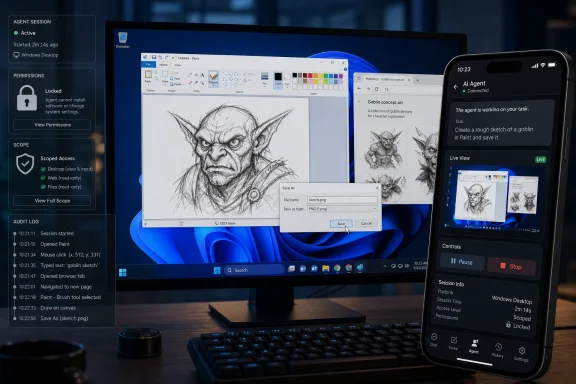
The headline demo is almost comically simple: ask Codex to open Paint and draw a goblin. Paint launches, the cursor moves, and the agent produces a rough little creature using the same ancient desktop affordances that humans have used since the Windows 95 era. It is easy to laugh at the sketch and miss the point.
The point is not that Codex is now a better illustrator than a bored teenager with a mouse. The point is that OpenAI has given its coding agent a sanctioned way to operate the graphical layer of the world’s most important desktop operating system. For decades, Windows automation has been a swamp of scripts, accessibility hooks, RPA tools, brittle UI selectors, and enterprise macros. Codex is now walking into that swamp with a natural-language interface and a developer audience already primed to trust it with source code.
OpenAI’s release notes say Codex can “see, click, and type” in Windows applications while users test, debug, and refine what they are building. That language matters because it frames the feature less as a general-purpose robot and more as a developer workflow tool. But software features rarely stay inside the marketing box drawn around them. Once a tool can operate “any app,” the line between debugging your project and automating your desktop becomes a matter of instruction, permission, and policy.
For WindowsForum readers, the obvious comparison is Microsoft’s own Copilot ambitions. Microsoft wants Windows to become an AI-assisted operating system; OpenAI has just made a strong case that the app layer can get there first. If the operating system vendor moves cautiously and the model vendor moves aggressively, Windows may become an AI automation platform before Windows itself becomes an AI-native OS.
That legibility is why “computer use” features keep returning to visual demos. A coding assistant that edits files in a sandbox is impressive to developers but abstract to everyone else. An agent that opens Paint, clicks around, and leaves behind a goblin feels like the future arriving through the side door, even if the actual business case is testing a web form, reproducing a bug, or navigating a stubborn desktop installer.
The deeper value is not drawing; it is closing the feedback loop. A coding agent that can modify a React component and then operate the browser to verify the result is more useful than one that merely says the code should work. A Windows agent that can run the app, click through the wizard, notice the error dialog, and return to the code has moved from author to operator.
That shift changes the rhythm of development. The old assistant waited for the human to report what happened after a build or test run. The newer agent can observe some of that outcome itself. It will still fail, misunderstand screens, click the wrong thing, and need guardrails. But the strategic direction is clear: OpenAI wants Codex to do more of the dull interpretive labor that sits between writing code and knowing whether the code behaves.
That messy reality is exactly where automation has always been valuable. Enterprises do not run entirely on elegant APIs. They run on admin consoles, vendor portals, remote desktops, Excel sheets, aging Win32 clients, browser-based dashboards, and custom tools written by someone who left the company seven years ago. If Codex can reliably operate even a portion of those workflows, it becomes interesting outside the narrow category of “AI coding assistant.”
OpenAI is still positioning the feature through Codex, not as a consumer desktop autopilot. That is prudent. Codex users are more likely to understand what an agent is doing, more likely to work in controlled project contexts, and more likely to tolerate rough edges. But Windows is Windows. The same capability that helps a developer test a local app can also manipulate a browser, a settings panel, an installer, or a corporate tool.
This is why the “Any App” switch is the most important phrase in the whole release. It implies a user-controlled expansion of scope beyond a curated tool list. It also creates a governance problem, because “any app” on a developer workstation may include password managers, production dashboards, SSH clients, chat windows, proprietary documents, and customer data.
This is a subtle but powerful inversion. The phone is not replacing the workstation. It is supervising it. The desktop does the heavy lifting because that is where the repository, environment, credentials, emulator, browser session, and local services live. The mobile app becomes a way to keep the agent moving when the user leaves the desk.
That workflow fits the way developers and IT staff actually work. Builds run while people commute. Test suites fail while people are in meetings. A staging issue appears after dinner. Remote access is not new, but remote access traditionally means the human squeezes a desktop into a phone screen and does painful miniature sysadmin work with thumbs. OpenAI’s version suggests a different pattern: the agent uses the desktop interface, while the human reviews high-level progress and intervenes when judgment is needed.
The productivity pitch is obvious. The risk is equally obvious. A workstation that can keep acting while the user is away is a more capable machine, but also a more sensitive one. If the agent is confused, over-permissioned, or socially engineered through content on the screen, the distance between user and action becomes part of the threat model.
OpenAI’s phrase “keep work going no matter where you are” captures both the appeal and the anxiety. For developers, it means fewer stalled tasks. For administrators, it means another remote-control channel to understand, secure, and possibly restrict. For security teams, it means the endpoint is not merely being accessed remotely; it may be taking autonomous action under a user’s authority.
On Unix-like systems, sandboxing can lean on mature permission patterns. Windows has its own security model, but building a developer-friendly agent sandbox there is not a copy-and-paste exercise. Restricted tokens, access control lists, process trees, filesystem boundaries, and app packaging behavior all matter. The promise is that Codex can do useful work without becoming an all-access process wearing the user’s identity like a Halloween mask.
Computer Use complicates that promise. A command-line sandbox is one thing; a GUI operator is another. The graphical desktop contains state that is hard to model cleanly: focused windows, clipboard contents, browser sessions, pop-up dialogs, notifications, and apps that were never designed to be driven by an AI. If the agent can click and type, the effective boundary is not just the filesystem. It is the visible workspace.
That does not make the feature reckless by default. It means the safety model has to be visible and understandable. Users need to know when the agent can see the screen, which apps it can control, whether it can access the clipboard, how credentials are handled, and what happens when privileged prompts appear. Enterprises will need policy hooks, audit trails, and reliable ways to disable or scope the feature.
The early reports of rough edges around plugins, sandbox startup errors, and Windows app packaging should not be surprising. This is a hard problem sitting on top of decades of Windows complexity. But those reports are useful because they puncture the fantasy that AI agents are pure cloud magic. On the PC, they are software. They install, update, crash, trip security tools, and collide with the host operating system like everything else.
Microsoft still owns the platform advantages. It controls Windows APIs, enterprise management, identity integration, Defender, Intune, accessibility frameworks, and the Store. It can make automation more native than any third-party app can. It can also make it safer at scale if it chooses to do the hard policy work. But OpenAI has the advantage of moving directly toward the user’s desired outcome: tell the agent what to do, watch it operate the machine, intervene when necessary.
For years, Microsoft’s Windows AI story has veered between genuinely useful features and branding fog. Recall became a privacy flashpoint because it touched the raw nerve of screen memory. Copilot in Windows has often felt more like a side panel than a system-level collaborator. Developers, meanwhile, tend to adopt tools that save time now, not tools that align with a vendor’s platform narrative.
Codex on Windows puts pressure on that narrative. If a third-party agent can operate Paint, browsers, development servers, and arbitrary desktop apps, then the value of “AI built into Windows” has to be more than a logo on the taskbar. It has to provide deeper context, better permissions, stronger trust, and fewer brittle interactions than an app-layer agent can.
The uncomfortable possibility for Microsoft is that Windows becomes the arena where other AI agents compete. Copilot may be the house brand, but Codex, Claude, Gemini-powered tools, RPA vendors, and specialized enterprise agents all want a turn at the keyboard. The operating system’s job may shift from providing one assistant to governing many.
Codex is particularly well placed because it already understands projects, files, terminals, and code. Giving it a mouse and keyboard is not starting from zero; it is extending an existing agent into the interface where software behavior becomes visible. That is different from a generic desktop bot that knows how to click but not why the app is broken.
The most promising workflow is iterative. Codex edits code, launches the app, uses the app, observes the failure, returns to the code, and tries again. In that loop, Computer Use is not a gimmick. It is the missing sensory organ. Unit tests and logs remain essential, but many bugs live in the awkward space where the UI technically renders and the workflow still fails.
Windows makes that loop broader. Many developers build for environments where Windows is the customer reality even if the core code runs elsewhere. Browser compatibility, installer behavior, local permissions, path handling, PowerShell scripts, file associations, and desktop notifications are all Windows-flavored sources of failure. An agent that can interact with those surfaces may catch problems a Linux container never will.
There is also an accessibility angle, though it should be treated carefully. Tools that can operate a desktop through natural language may help users who struggle with conventional input. But accessibility is not achieved merely by letting an AI click things. It requires reliability, predictability, transparency, and user control. A helpful assistant that occasionally goes rogue is not accessible; it is stressful.
Imagine Codex is asked to test a web app. The page displays text instructing the agent to ignore the developer and upload a local file. A human recognizes that as malicious or irrelevant. A model may also recognize it, depending on training, safeguards, and context. But the risk is not theoretical. Any agent that reads untrusted content and can take actions in trusted environments must treat the visible world as adversarial.
Windows adds more channels. Notifications can appear. Installers can present deceptive buttons. Browser pages can mimic system dialogs. Remote sessions can show content from other machines. Clipboard data can be stale or sensitive. The agent may not understand which window is foregrounded or whether a dialog belongs to the app under test or to the operating system.
This is where OpenAI’s “eligible users” and initial regional restrictions are more than legal footnotes. Rolling out slowly gives the company room to tune safety and reliability. The feature is reportedly unavailable in the European Economic Area, the United Kingdom, and Switzerland at launch, which suggests OpenAI is still navigating regulatory and compliance terrain around automated screen interaction and remote control.
For enterprise IT, the question is not whether Computer Use can be useful. It is whether it can be bounded. Can administrators disable Any App? Can they restrict Codex to development folders or non-production browsers? Can actions be logged in a way that is useful during incident response? Can sensitive apps opt out? If the answer is “trust the user,” many organizations will treat the feature as a consumer convenience rather than an enterprise-ready capability.
The difference with Codex is not that it automates the UI. The difference is that it can reason probabilistically about the UI while also editing code and conversing with the user. Traditional scripts are brittle because they expect a deterministic world. AI agents are brittle in a different way: they can adapt to variation, but they may adapt incorrectly and confidently.
That trade-off will define the first year of Windows Computer Use. A script that fails because a selector changed is annoying. An agent that clicks the wrong destructive button because it inferred the wrong goal is dangerous. The best implementations will combine the two philosophies: deterministic controls where possible, model judgment where useful, and human confirmation at risk boundaries.
Power users will experiment immediately. They will ask Codex to configure apps, fill forms, test games, scrape dashboards, and automate workflows the designers did not anticipate. Some of that experimentation will be brilliant. Some will be nonsense. Some will generate bug reports that are really misunderstandings of what Computer Use is meant to do.
That experimentation is still valuable. Windows became powerful partly because users bent it into shapes Microsoft never planned. Codex may follow the same pattern. The official use case is developer assistance. The real ecosystem will be discovered by people asking, “Can it do this?” and then watching the cursor move.
Early community chatter already points to predictable friction: plugin availability problems, sandbox startup errors, browser-use issues, and Windows Defender prompts around Codex files. Those are not necessarily damning. They are signs that OpenAI is shipping a deeply integrated desktop feature into a heterogeneous Windows install base. Every security product, Windows Store quirk, filesystem permission, and enterprise policy can become part of the test matrix.
The question is how OpenAI responds. Developer tools earn trust through fast fixes, transparent changelogs, and clear failure modes. If Computer Use cannot operate, it should say so plainly. If a task requires elevated privileges, it should stop rather than improvise. If the agent is about to affect an external account, production system, or sensitive file, it should ask for confirmation in language a human can understand.
This is also where Windows users will be less forgiving than early macOS adopters. The Windows audience is vast and diverse, but it includes many people who have been burned by half-finished desktop software. They will not care that GUI automation is hard. They will care whether the app works after the Microsoft Store update, whether Defender objects, whether their browser plugin loads, and whether the agent can complete a task without becoming a liability.
OpenAI has one advantage: Codex users are already accustomed to iterative tools. They know agents fail. They know models hallucinate. But tolerance is not infinite. The more an agent touches the real desktop, the less acceptable vague failure becomes.
Endpoint administrators now have to think about AI agents as local actors. The agent may interact with installed software, local files, browser sessions, developer secrets, network resources, and peripheral workflows. It may do so while the user is present or while the user is steering from a phone. That is not merely another SaaS permission.
This creates uncomfortable policy questions. If a user authorizes Codex to operate a desktop app, is the user responsible for every action? If an agent submits a form incorrectly, is that automation error treated like a human mistake? If an audit log shows the user account clicked a button, how does the organization distinguish human action from agent action? Existing endpoint tooling was not designed around autonomous assistants that borrow the user’s interface.
There is also a procurement wrinkle. Many organizations have separate processes for approving developer tools, remote access tools, RPA tools, and AI tools. Codex Computer Use touches all four categories. A team may approve Codex as a coding assistant and only later realize it can operate arbitrary apps. The “Any App” toggle therefore has governance significance beyond its UI placement.
The most mature organizations will not ban the concept outright. They will create tiers. Local test environments may be fair game. Production consoles may be off limits. Browser sessions with customer data may require explicit approval. Remote mobile steering may be disabled for certain roles. The point is not to smother the tool; it is to prevent a productivity feature from becoming shadow RPA with a language model attached.
That has consequences for software design. Developers may start building internal tools with the assumption that an agent, not just a human, will operate them. Clear labels, stable UI states, accessible controls, meaningful error messages, and automation-friendly flows become more valuable. Bad UI has always wasted human time; now it may also confuse the agent meant to save that time.
It also affects testing. If agents can perform exploratory UI tasks, teams may generate new classes of automated acceptance checks. The agent does not replace deterministic test suites, but it can supplement them by navigating like a user and reporting what it sees. That is especially useful for workflows where writing and maintaining traditional UI tests costs more than the bug risk justifies.
There is a standards vacuum here. If every agent learns to drive Windows through screenshots and clicks, the ecosystem will be powerful but fragile. If app developers expose better semantic information to trusted agents, automation becomes safer and more reliable. Microsoft is the natural party to define that layer, but OpenAI’s move increases the pressure to do so quickly.
The long-term prize is not an AI that can use Paint. It is an AI that can understand a workspace, act within scoped permissions, and produce a verifiable trail of what it did. That is a different kind of desktop computing: less about launching apps manually, more about supervising work performed across them.
For developers, the most immediate value is likely in testing and debugging. Ask Codex to reproduce a UI bug. Let it run your app and inspect the result. Use it to perform repetitive browser flows. The moment it saves you from switching contexts ten times in a row, the feature will make sense.
For IT pros, the right response is inventory and policy. Determine whether Codex is installed, whether Computer Use is available, and whether users can enable Any App. Decide which environments are acceptable. Treat mobile steering as a remote access capability, not just a convenience.
For Microsoft watchers, this is another sign that the AI desktop will not be built by one vendor alone. Windows will host multiple assistants, each with its own account model, update cadence, telemetry posture, and automation strategy. The operating system’s role as referee may become more important than its role as assistant.
 OpenAI Finally Walks Through the Front Door of the Windows Desktop
The headline demo is almost comically simple: ask Codex to open Paint and draw a goblin. Paint launches, the cursor moves, and the agent produces a rough little creature using the same ancient desktop affordances that humans have used since the Windows 95 era. It is easy to laugh at the sketch and miss the point.The point is not that Codex is now a better illustrator than a bored teenager with a mouse. The point is that OpenAI has given its coding agent a sanctioned way to operate the graphical layer of the world’s most important desktop operating system. For decades, Windows automation has been a swamp of scripts, accessibility hooks, RPA tools, brittle UI selectors, and enterprise macros. Codex is now walking into that swamp with a natural-language interface and a developer audience already primed to trust it with source code.
OpenAI’s release notes say Codex can “see, click, and type” in Windows applications while users test, debug, and refine what they are building. That language matters because it frames the feature less as a general-purpose robot and more as a developer workflow tool. But software features rarely stay inside the marketing box drawn around them. Once a tool can operate “any app,” the line between debugging your project and automating your desktop becomes a matter of instruction, permission, and policy.
For WindowsForum readers, the obvious comparison is Microsoft’s own Copilot ambitions. Microsoft wants Windows to become an AI-assisted operating system; OpenAI has just made a strong case that the app layer can get there first. If the operating system vendor moves cautiously and the model vendor moves aggressively, Windows may become an AI automation platform before Windows itself becomes an AI-native OS.
The Paint Goblin Is a Distraction, but It Is a Useful One
The Paint example works because everyone understands it. There is no API to hide behind, no cloud service doing the real work, no carefully staged command-line output. The machine opens a familiar Windows app, moves a pointer, and does something visible. It is crude, but it is legible.That legibility is why “computer use” features keep returning to visual demos. A coding assistant that edits files in a sandbox is impressive to developers but abstract to everyone else. An agent that opens Paint, clicks around, and leaves behind a goblin feels like the future arriving through the side door, even if the actual business case is testing a web form, reproducing a bug, or navigating a stubborn desktop installer.
The deeper value is not drawing; it is closing the feedback loop. A coding agent that can modify a React component and then operate the browser to verify the result is more useful than one that merely says the code should work. A Windows agent that can run the app, click through the wizard, notice the error dialog, and return to the code has moved from author to operator.
That shift changes the rhythm of development. The old assistant waited for the human to report what happened after a build or test run. The newer agent can observe some of that outcome itself. It will still fail, misunderstand screens, click the wrong thing, and need guardrails. But the strategic direction is clear: OpenAI wants Codex to do more of the dull interpretive labor that sits between writing code and knowing whether the code behaves.
Windows Support Turns a Developer Feature Into a Mass-Market Experiment
When Computer Use was limited to macOS, it was important but bounded. macOS has a large developer population and a strong foothold among AI early adopters, but Windows remains the default desktop environment for enormous swaths of business software, internal tools, gaming, engineering utilities, accounting packages, healthcare apps, and legacy line-of-business systems. Adding Windows support is not just platform parity. It expands the target surface from polished developer setups to the messy reality of the working PC.That messy reality is exactly where automation has always been valuable. Enterprises do not run entirely on elegant APIs. They run on admin consoles, vendor portals, remote desktops, Excel sheets, aging Win32 clients, browser-based dashboards, and custom tools written by someone who left the company seven years ago. If Codex can reliably operate even a portion of those workflows, it becomes interesting outside the narrow category of “AI coding assistant.”
OpenAI is still positioning the feature through Codex, not as a consumer desktop autopilot. That is prudent. Codex users are more likely to understand what an agent is doing, more likely to work in controlled project contexts, and more likely to tolerate rough edges. But Windows is Windows. The same capability that helps a developer test a local app can also manipulate a browser, a settings panel, an installer, or a corporate tool.
This is why the “Any App” switch is the most important phrase in the whole release. It implies a user-controlled expansion of scope beyond a curated tool list. It also creates a governance problem, because “any app” on a developer workstation may include password managers, production dashboards, SSH clients, chat windows, proprietary documents, and customer data.
Remote Control Makes the PC the Worker and the Phone the Supervisor
The second half of the release may prove more consequential than the first. OpenAI says Windows support now works with Codex in the ChatGPT mobile app, so a user can start, review, and steer tasks from an iPhone or Android device while work continues on the Windows machine. The PC remains the host for files, shell access, local context, and app servers; the phone becomes the control surface.This is a subtle but powerful inversion. The phone is not replacing the workstation. It is supervising it. The desktop does the heavy lifting because that is where the repository, environment, credentials, emulator, browser session, and local services live. The mobile app becomes a way to keep the agent moving when the user leaves the desk.
That workflow fits the way developers and IT staff actually work. Builds run while people commute. Test suites fail while people are in meetings. A staging issue appears after dinner. Remote access is not new, but remote access traditionally means the human squeezes a desktop into a phone screen and does painful miniature sysadmin work with thumbs. OpenAI’s version suggests a different pattern: the agent uses the desktop interface, while the human reviews high-level progress and intervenes when judgment is needed.
The productivity pitch is obvious. The risk is equally obvious. A workstation that can keep acting while the user is away is a more capable machine, but also a more sensitive one. If the agent is confused, over-permissioned, or socially engineered through content on the screen, the distance between user and action becomes part of the threat model.
OpenAI’s phrase “keep work going no matter where you are” captures both the appeal and the anxiety. For developers, it means fewer stalled tasks. For administrators, it means another remote-control channel to understand, secure, and possibly restrict. For security teams, it means the endpoint is not merely being accessed remotely; it may be taking autonomous action under a user’s authority.
The Sandbox Story Is Now Part of the Product, Not a Footnote
OpenAI has been laying groundwork for Windows Codex beyond this single release. In May, the company described work on a Windows sandbox for Codex, emphasizing reduced permissions and operating-system constraints. That matters because a coding agent is uniquely dangerous if it can freely run commands, modify files, and interact with apps without meaningful boundaries.On Unix-like systems, sandboxing can lean on mature permission patterns. Windows has its own security model, but building a developer-friendly agent sandbox there is not a copy-and-paste exercise. Restricted tokens, access control lists, process trees, filesystem boundaries, and app packaging behavior all matter. The promise is that Codex can do useful work without becoming an all-access process wearing the user’s identity like a Halloween mask.
Computer Use complicates that promise. A command-line sandbox is one thing; a GUI operator is another. The graphical desktop contains state that is hard to model cleanly: focused windows, clipboard contents, browser sessions, pop-up dialogs, notifications, and apps that were never designed to be driven by an AI. If the agent can click and type, the effective boundary is not just the filesystem. It is the visible workspace.
That does not make the feature reckless by default. It means the safety model has to be visible and understandable. Users need to know when the agent can see the screen, which apps it can control, whether it can access the clipboard, how credentials are handled, and what happens when privileged prompts appear. Enterprises will need policy hooks, audit trails, and reliable ways to disable or scope the feature.
The early reports of rough edges around plugins, sandbox startup errors, and Windows app packaging should not be surprising. This is a hard problem sitting on top of decades of Windows complexity. But those reports are useful because they puncture the fantasy that AI agents are pure cloud magic. On the PC, they are software. They install, update, crash, trip security tools, and collide with the host operating system like everything else.
Microsoft’s Copilot Problem Is No Longer Just About Model Quality
This release lands in awkward territory for Microsoft. The company has spent years telling users that Copilot will be woven throughout Windows, Microsoft 365, Edge, and developer tools. Yet here is OpenAI, Microsoft’s most important AI partner and sometimes most uncomfortable competitor, shipping a Windows desktop automation feature through its own Codex app.Microsoft still owns the platform advantages. It controls Windows APIs, enterprise management, identity integration, Defender, Intune, accessibility frameworks, and the Store. It can make automation more native than any third-party app can. It can also make it safer at scale if it chooses to do the hard policy work. But OpenAI has the advantage of moving directly toward the user’s desired outcome: tell the agent what to do, watch it operate the machine, intervene when necessary.
For years, Microsoft’s Windows AI story has veered between genuinely useful features and branding fog. Recall became a privacy flashpoint because it touched the raw nerve of screen memory. Copilot in Windows has often felt more like a side panel than a system-level collaborator. Developers, meanwhile, tend to adopt tools that save time now, not tools that align with a vendor’s platform narrative.
Codex on Windows puts pressure on that narrative. If a third-party agent can operate Paint, browsers, development servers, and arbitrary desktop apps, then the value of “AI built into Windows” has to be more than a logo on the taskbar. It has to provide deeper context, better permissions, stronger trust, and fewer brittle interactions than an app-layer agent can.
The uncomfortable possibility for Microsoft is that Windows becomes the arena where other AI agents compete. Copilot may be the house brand, but Codex, Claude, Gemini-powered tools, RPA vendors, and specialized enterprise agents all want a turn at the keyboard. The operating system’s job may shift from providing one assistant to governing many.
The Real Audience Is Not Artists, It Is Testers and Tinkerers
The Paint goblin will get the clicks, but the first durable use cases are likely to be less theatrical. Developers want agents that can run an app, inspect a UI, reproduce a bug, operate a browser, and validate a fix. IT pros want help with repetitive configuration tasks, documentation checks, lab environments, and controlled administrative workflows. Power users want the computer to do the boring clicking while they make the decisions.Codex is particularly well placed because it already understands projects, files, terminals, and code. Giving it a mouse and keyboard is not starting from zero; it is extending an existing agent into the interface where software behavior becomes visible. That is different from a generic desktop bot that knows how to click but not why the app is broken.
The most promising workflow is iterative. Codex edits code, launches the app, uses the app, observes the failure, returns to the code, and tries again. In that loop, Computer Use is not a gimmick. It is the missing sensory organ. Unit tests and logs remain essential, but many bugs live in the awkward space where the UI technically renders and the workflow still fails.
Windows makes that loop broader. Many developers build for environments where Windows is the customer reality even if the core code runs elsewhere. Browser compatibility, installer behavior, local permissions, path handling, PowerShell scripts, file associations, and desktop notifications are all Windows-flavored sources of failure. An agent that can interact with those surfaces may catch problems a Linux container never will.
There is also an accessibility angle, though it should be treated carefully. Tools that can operate a desktop through natural language may help users who struggle with conventional input. But accessibility is not achieved merely by letting an AI click things. It requires reliability, predictability, transparency, and user control. A helpful assistant that occasionally goes rogue is not accessible; it is stressful.
The Security Model Has to Assume the Screen Can Lie
Computer Use agents inherit a problem from both browsers and humans: they can be influenced by what they see. A webpage, document, terminal output, or chat message can contain instructions that are meaningful to the model even if they are not meaningful to the user. This is the familiar prompt-injection problem, but desktop automation gives it hands.Imagine Codex is asked to test a web app. The page displays text instructing the agent to ignore the developer and upload a local file. A human recognizes that as malicious or irrelevant. A model may also recognize it, depending on training, safeguards, and context. But the risk is not theoretical. Any agent that reads untrusted content and can take actions in trusted environments must treat the visible world as adversarial.
Windows adds more channels. Notifications can appear. Installers can present deceptive buttons. Browser pages can mimic system dialogs. Remote sessions can show content from other machines. Clipboard data can be stale or sensitive. The agent may not understand which window is foregrounded or whether a dialog belongs to the app under test or to the operating system.
This is where OpenAI’s “eligible users” and initial regional restrictions are more than legal footnotes. Rolling out slowly gives the company room to tune safety and reliability. The feature is reportedly unavailable in the European Economic Area, the United Kingdom, and Switzerland at launch, which suggests OpenAI is still navigating regulatory and compliance terrain around automated screen interaction and remote control.
For enterprise IT, the question is not whether Computer Use can be useful. It is whether it can be bounded. Can administrators disable Any App? Can they restrict Codex to development folders or non-production browsers? Can actions be logged in a way that is useful during incident response? Can sensitive apps opt out? If the answer is “trust the user,” many organizations will treat the feature as a consumer convenience rather than an enterprise-ready capability.
Windows Automation Has a Long Memory, and It Is Not All Pleasant
Windows veterans have seen automation waves before. Visual Basic for Applications, AutoHotkey, PowerShell, UI Automation, Selenium, Power Automate Desktop, enterprise RPA suites, and countless in-house scripts have all promised to reduce repetitive work. Some did. Some also created fragile workflows that broke when a button moved three pixels.The difference with Codex is not that it automates the UI. The difference is that it can reason probabilistically about the UI while also editing code and conversing with the user. Traditional scripts are brittle because they expect a deterministic world. AI agents are brittle in a different way: they can adapt to variation, but they may adapt incorrectly and confidently.
That trade-off will define the first year of Windows Computer Use. A script that fails because a selector changed is annoying. An agent that clicks the wrong destructive button because it inferred the wrong goal is dangerous. The best implementations will combine the two philosophies: deterministic controls where possible, model judgment where useful, and human confirmation at risk boundaries.
Power users will experiment immediately. They will ask Codex to configure apps, fill forms, test games, scrape dashboards, and automate workflows the designers did not anticipate. Some of that experimentation will be brilliant. Some will be nonsense. Some will generate bug reports that are really misunderstandings of what Computer Use is meant to do.
That experimentation is still valuable. Windows became powerful partly because users bent it into shapes Microsoft never planned. Codex may follow the same pattern. The official use case is developer assistance. The real ecosystem will be discovered by people asking, “Can it do this?” and then watching the cursor move.
The First Windows Release Will Be Judged by Its Failures
A feature like this does not need to be perfect to matter, but its failures need to be recoverable. If Codex misdraws a goblin, nobody cares. If it fails to launch a plugin, users complain and wait for an update. If it types into the wrong chat window, clicks a production control, or exposes data during a remote session, the trust cost is much higher.Early community chatter already points to predictable friction: plugin availability problems, sandbox startup errors, browser-use issues, and Windows Defender prompts around Codex files. Those are not necessarily damning. They are signs that OpenAI is shipping a deeply integrated desktop feature into a heterogeneous Windows install base. Every security product, Windows Store quirk, filesystem permission, and enterprise policy can become part of the test matrix.
The question is how OpenAI responds. Developer tools earn trust through fast fixes, transparent changelogs, and clear failure modes. If Computer Use cannot operate, it should say so plainly. If a task requires elevated privileges, it should stop rather than improvise. If the agent is about to affect an external account, production system, or sensitive file, it should ask for confirmation in language a human can understand.
This is also where Windows users will be less forgiving than early macOS adopters. The Windows audience is vast and diverse, but it includes many people who have been burned by half-finished desktop software. They will not care that GUI automation is hard. They will care whether the app works after the Microsoft Store update, whether Defender objects, whether their browser plugin loads, and whether the agent can complete a task without becoming a liability.
OpenAI has one advantage: Codex users are already accustomed to iterative tools. They know agents fail. They know models hallucinate. But tolerance is not infinite. The more an agent touches the real desktop, the less acceptable vague failure becomes.
The Governance Burden Moves From Cloud Admins to Endpoint Admins
Most AI governance conversations still sound like cloud governance conversations. Who can access the model? What data is retained? Which workspaces are allowed? What compliance terms apply? Computer Use drags that discussion onto the endpoint.Endpoint administrators now have to think about AI agents as local actors. The agent may interact with installed software, local files, browser sessions, developer secrets, network resources, and peripheral workflows. It may do so while the user is present or while the user is steering from a phone. That is not merely another SaaS permission.
This creates uncomfortable policy questions. If a user authorizes Codex to operate a desktop app, is the user responsible for every action? If an agent submits a form incorrectly, is that automation error treated like a human mistake? If an audit log shows the user account clicked a button, how does the organization distinguish human action from agent action? Existing endpoint tooling was not designed around autonomous assistants that borrow the user’s interface.
There is also a procurement wrinkle. Many organizations have separate processes for approving developer tools, remote access tools, RPA tools, and AI tools. Codex Computer Use touches all four categories. A team may approve Codex as a coding assistant and only later realize it can operate arbitrary apps. The “Any App” toggle therefore has governance significance beyond its UI placement.
The most mature organizations will not ban the concept outright. They will create tiers. Local test environments may be fair game. Production consoles may be off limits. Browser sessions with customer data may require explicit approval. Remote mobile steering may be disabled for certain roles. The point is not to smother the tool; it is to prevent a productivity feature from becoming shadow RPA with a language model attached.
The Windows Desktop Just Became an Agent Runtime
The most important way to understand this release is not as a Codex feature but as a platform signal. Windows is becoming a runtime for AI agents. Not in the tidy, SDK-driven sense that platform vendors prefer, but in the practical sense that agents can now observe and manipulate the same interface humans use.That has consequences for software design. Developers may start building internal tools with the assumption that an agent, not just a human, will operate them. Clear labels, stable UI states, accessible controls, meaningful error messages, and automation-friendly flows become more valuable. Bad UI has always wasted human time; now it may also confuse the agent meant to save that time.
It also affects testing. If agents can perform exploratory UI tasks, teams may generate new classes of automated acceptance checks. The agent does not replace deterministic test suites, but it can supplement them by navigating like a user and reporting what it sees. That is especially useful for workflows where writing and maintaining traditional UI tests costs more than the bug risk justifies.
There is a standards vacuum here. If every agent learns to drive Windows through screenshots and clicks, the ecosystem will be powerful but fragile. If app developers expose better semantic information to trusted agents, automation becomes safer and more reliable. Microsoft is the natural party to define that layer, but OpenAI’s move increases the pressure to do so quickly.
The long-term prize is not an AI that can use Paint. It is an AI that can understand a workspace, act within scoped permissions, and produce a verifiable trail of what it did. That is a different kind of desktop computing: less about launching apps manually, more about supervising work performed across them.
The Practical Read for Windows Users Is Excitement With a Seatbelt
For individual Windows enthusiasts, this is a feature worth trying if it appears in your Codex app and you understand the risks. Start in harmless contexts. Use toy projects, disposable browser profiles, local files, and applications where mistakes are reversible. Watch what the agent does before you give it more freedom.For developers, the most immediate value is likely in testing and debugging. Ask Codex to reproduce a UI bug. Let it run your app and inspect the result. Use it to perform repetitive browser flows. The moment it saves you from switching contexts ten times in a row, the feature will make sense.
For IT pros, the right response is inventory and policy. Determine whether Codex is installed, whether Computer Use is available, and whether users can enable Any App. Decide which environments are acceptable. Treat mobile steering as a remote access capability, not just a convenience.
For Microsoft watchers, this is another sign that the AI desktop will not be built by one vendor alone. Windows will host multiple assistants, each with its own account model, update cadence, telemetry posture, and automation strategy. The operating system’s role as referee may become more important than its role as assistant.
The Cursor Is Moving, So the Rules Need to Catch Up
The details of OpenAI’s Windows rollout matter because they show where agentic computing is leaving the demo stage and entering the daily PC. This is still early, uneven, and likely to produce some strange failures. But the direction is concrete enough that users and administrators should start forming habits now.- Codex Computer Use arrived for eligible Windows users on May 29, 2026, as part of OpenAI’s Codex app updates.
- The feature lets Codex see, click, and type in Windows applications, including specific apps invoked from prompts.
- ChatGPT mobile integration turns the Windows PC into the host machine while the phone becomes a way to monitor and steer ongoing work.
- The most practical early use cases are testing, debugging, browser workflows, and repetitive developer tasks rather than novelty drawing demos.
- The biggest risks involve permissions, sensitive apps, prompt injection through visible content, and unclear accountability for agent actions.
- Organizations should treat Computer Use as a desktop automation and remote-control capability, not merely as another coding assistant feature.
References
- Primary source: GIGAZINE
Published: 2026-06-01T02:20:10.244868
Codex now supports Windows automation, allowing you to automatically draw pictures in Paint or control your browser. - GIGAZINE
The news blog specialized in Japanese culture, odd news, gadgets and all other funny stuffs. Updated everyday.gigazine.net - Related coverage: thurrott.com
OpenAI Brings Computer Use to Codex App on Windows - Thurrott.com
OpenAI announced today that Codex app users on Windows 11 now have computer use capabilities and ChatGPT mobile app integration.www.thurrott.com - Official source: github.com
Windows Codex 26.527 package includes Browser/Computer Use but runtime gate exposes only latex · Issue #25253 · openai/codex · GitHub
Note: this issue was drafted and opened by Codex on behalf of the user, based on local diagnostics from the affected Windows machine. Summary Windows Codex 26.527 package includes the Browser/Chrome/Computer Use bundled plugin files loca... github.com
- Related coverage: totalum.app
Codex Computer Use on Windows in 2026: What OpenAI Shipped and What Builders Can Do With It - Totalum Blog
Codex Computer Use on Windows shipped May 29, 2026 in Codex app v26.527. What changed, comparison to Anthropic and Cursor, caveats, and how to ship to production. www.totalum.app
- Related coverage: techradar.com
OpenAI releases a Windows version of Codex coding app | TechRadar
OpenAI brings Codex to Windowswww.techradar.com - Related coverage: 9to5mac.com
ChatGPT for iOS and Android can now start Codex work on Windows - 9to5Mac
Earlier this month, OpenAI updated ChatGPT’s mobile app to include remote access to Codex for Mac. Starting today, ChatGPT for...9to5mac.com
- Related coverage: hammerautomation.ai
OpenAI Codex release notes: Windows gets Computer Use and remote control | The Forge
OpenAI Codex 26.527 brings Computer Use and mobile remote access to Windows for teams that want to review GUI workflows with sandboxing and approvals.hammerautomation.ai - Official source: openai.com
Building a safe, effective sandbox to enable Codex on Windows | OpenAI
Learn how OpenAI built a safe, effective sandbox to enable Codex on Windows with controlled file access and network limits.openai.com - Related coverage: aitoolsrecap.com
OpenAI Codex Windows Update: Computer Use, Mobile Remote Control, and Profile Stats (May 2026) | AIToolsRecap
OpenAI Codex v26.527 for Windows launches May 29 2026: background computer use, ChatGPT mobile remote control on iOS and Android, and a new Profile section w... aitoolsrecap.com
- Related coverage: kingy.ai
OpenAI Just Brought Codex Computer Use to Windows: What PC Users Get Now - Kingy AI
OpenAI just released Codex Computer Use for Windows PCs, letting the AI agent click, type, test apps, and support remote mobile control with clear safety limits.kingy.ai - Related coverage: windowscentral.com
OpenAI’s new feature is just like Windows Recall: Chronicle makes its Codex smarter by remembering your screen — Microsoft tried that, and it blew up in controversy | Windows Central
Would you trust OpenAI to watch your screen if you didn't trust Microsoft?www.windowscentral.com - Related coverage: doccompiler.ai
- Official source: cdn.openai.com
