

Microsoft added Outlook for iOS contact-provider support to the Microsoft 365 Roadmap on July 2, 2026, listing Roadmap ID 567006 as an in-development feature for worldwide general availability in January 2027 across iPhone and iPad. The change sounds small because “Save Contacts” sounds like housekeeping. It is not. This is Microsoft finally aligning Outlook mobile with Apple’s privacy model instead of continuing to make enterprise users choose between useful caller ID and messy contact export.
For years, Outlook’s iOS contact story has had an awkward bargain at its center. Users wanted work contacts to appear in Phone, Messages, Siri, and caller ID, but the mechanism often meant exporting Outlook contacts into the device’s native address book. That made the feature useful, but it also made it administratively and philosophically uncomfortable.
The new roadmap item changes the premise. Rather than copying Outlook contacts into the user’s local contacts database, Outlook will use Apple’s Contact Provider framework to make those contacts available to the system-wide contacts ecosystem. In plain English, the iPhone can know who is calling or texting without Outlook needing broad access to the user’s personal address book and without dumping corporate contacts into the device as ordinary local records.
That distinction matters because mobile contact sync has always been a surprisingly high-stakes corner of enterprise IT. Contacts are not just names and numbers; they are a map of an organization, its executives, customers, vendors, and internal reporting lines. On a personally owned iPhone, that map sits next to family members, doctors, schools, contractors, and every other private relationship a user carries in their pocket.
Microsoft’s move is therefore not just a feature improvement. It is a quiet admission that the old model asked too much of both users and administrators. The device should be able to identify a colleague’s call without turning the address book into a disputed territory between work and life.
But the cure was inelegant. Saving contacts was effectively an export path, and exported data has a way of becoming everyone’s problem. Once work contacts sit in the native contacts store, questions follow: Who owns those records? What happens when the user edits one in Apple’s Contacts app? What happens when a mailbox changes, a person leaves the company, or a user turns off sync?
Those are not theoretical complaints from pedants. They are exactly the kind of edge cases that consume help desks. A contact edited in the wrong place may not flow back the way a user expects. Duplicate records can appear. Names can drift out of date. A corporate contact can end up commingled with iCloud or another personal account, depending on device settings and user behavior.
The problem is that the phrase “save contacts” sounds like a consumer convenience, while the underlying behavior is closer to data replication. Enterprise administrators are trained to distrust replication paths they do not fully control. The more mobile platforms try to blur the line between personal and managed data, the more those administrators reach for policy toggles, app protection rules, and stern documentation.
Microsoft’s new approach does not make every one of those issues disappear, but it changes the default architecture. Instead of asking the iOS address book to become a warehouse for Outlook data, Outlook becomes a provider of contact information to the operating system. That is a cleaner boundary, and cleaner boundaries are what mobile management has needed for a long time.
That design fits Outlook almost perfectly. Microsoft does not need to pretend that an employee’s corporate directory is the same thing as a personal iCloud contact list. Outlook can remain the application that knows about work contacts, while iOS can still surface those people in everyday workflows such as calls, texts, and voice commands.
The privacy win is obvious, but the operational win may be larger. A provider model should reduce the number of situations where corporate contacts are copied into unexpected containers or persist in ways that confuse users. It also gives Microsoft a more Apple-native way to participate in the system experience without building yet another workaround around iOS’s guardrails.
This is where the roadmap item’s wording is doing more work than it first appears. “System-wide” availability is the feature users will notice. “Without full address-book access or copying contacts onto your device” is the part that administrators will underline. The first phrase sells convenience; the second sells risk reduction.
It is also a sign of where Apple’s platform rules have pushed the industry. The days when mobile apps casually vacuumed up contacts and treated them as a growth substrate are long gone. The modern iPhone wants narrower grants, more explicit user control, and better separation between app-managed data and personal data. Microsoft is not merely adding an Outlook feature; it is conforming Outlook to the direction Apple has already chosen.
Contacts sit at the ugliest intersection of those compromises. The Phone app is personal and universal. The corporate directory is managed and sensitive. Outlook is a work app, but it runs on devices that are often user-owned. Siri, Messages, CarPlay, and caller ID are not “enterprise apps,” yet they are exactly where a worker needs contact information to appear.
That is why contact integration has been such a persistent irritant. If IT blocks native contact access too aggressively, the user experience degrades in visible ways. If IT allows too much sync, corporate data spreads into places that security teams would rather not audit after an employee leaves. The technically pure answer often produces an experience that executives, sales teams, field staff, and support engineers will not tolerate.
The Contact Provider route is a better compromise because it lets Outlook participate in the ambient iOS experience without surrendering the entire address-book boundary. The user gets names instead of numbers. The administrator gets a model that is easier to explain than “we exported your contacts, but only sort of, and depending on policy, edits may or may not behave the way you expect.”
No framework can erase the fact that mobile platforms are personal computers in the most literal sense. They are intimate, portable, sensor-rich, and heavily customized by their owners. But architecture still matters. A feature that reduces copying is almost always easier to govern than a feature that multiplies data and then relies on policy cleanup after the fact.
That uncertainty should not stop planning. Organizations that currently rely on Outlook’s Save Contacts behavior should treat this as an opportunity to inventory policies and assumptions. If existing documentation tells users to enable Save Contacts so caller ID works, that documentation may need revision. If support teams have built scripts around duplicate contacts, missing caller names, or one-way sync confusion, those scripts may need a new branch.
The larger question is what Microsoft will do with the old Save Contacts path once the provider model is generally available. It may remain for compatibility. It may be deemphasized. It may be governed differently in managed environments. Until Microsoft publishes full admin guidance, the safest assumption is coexistence during a transition period rather than an immediate cutover.
Enterprises should also watch how this interacts with Intune app configuration and app protection policies. A privacy-preserving contact provider is only as useful as the controls around it. Admins will want to know whether the feature can be enabled, disabled, or enforced; whether it respects managed account boundaries; and how it behaves on enrolled versus unenrolled devices.
For users, the best-case outcome is that nothing feels dramatic. The colleague’s name appears during an incoming call. Siri can call the right person. Messages can resolve the contact. The absence of drama is exactly the point.
That makes features like this one more revealing than splashier AI announcements. Microsoft can promise agentic assistants and smarter inbox triage, but an executive still needs the phone to show who is calling. A frontline manager still needs a contact to resolve in Messages. A field technician still needs work identity to appear in the device experience without polluting personal data.
The tension is especially sharp because Microsoft 365 is built around organizational knowledge, while iOS is built around user consent and app containment. Outlook knows the org chart. iOS controls the place where calls and messages happen. The Contact Provider framework is one of the cleaner bridges between those worlds.
There is a strategic humility in using it. Microsoft is not trying to recreate the entire phone experience inside Outlook, nor is it asking users to abandon Apple’s native apps. It is accepting that the system experience matters and that the right way to join it is through a narrower, more respectful integration point.
That is the kind of platform diplomacy Microsoft increasingly needs. The company’s most important productivity workflows now run across Windows, macOS, iOS, Android, and the web. The winning experience is not the one that forces every surface into Microsoft’s mold. It is the one that makes Microsoft 365 feel native without making administrators feel exposed.
The relevant question becomes scope. Which contacts are exposed? Are they read-only? How quickly are changes reflected? What happens when a user loses access to an account? What happens when Outlook is removed, the device is retired, or a managed account is wiped? These are the details that turn a good architectural idea into a reliable enterprise control.
Apple’s model suggests a more contained lifecycle than traditional export. Provider-backed contacts can be enabled or disabled, and deleting the app should remove the extension and its supplied contacts. But enterprise administrators will want Microsoft’s specific implementation details, not just Apple’s framework promises.
There is also a user-education angle. Users may not understand why Outlook contacts appear in Phone but not as ordinary editable cards in the Contacts app. They may try to edit a work contact and discover different behavior than they expect. They may assume that if Siri can call a colleague, the contact has been “saved” locally. The support burden will shift from sync failure to conceptual clarity.
Still, that is a better problem. Explaining a provider model is easier than unraveling a corrupted or duplicated address book. The former is a training issue. The latter is a cleanup operation.
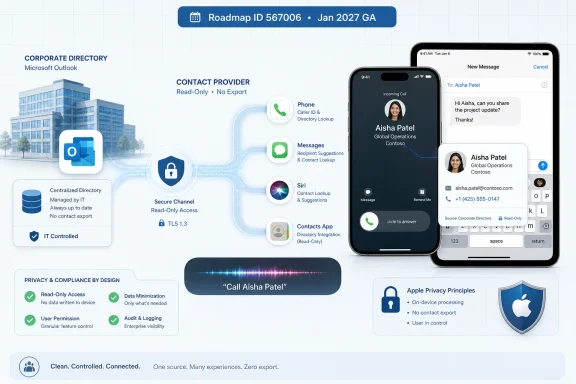 Microsoft Is Turning Contact Sync Into Contact Presence
For years, Outlook’s iOS contact story has had an awkward bargain at its center. Users wanted work contacts to appear in Phone, Messages, Siri, and caller ID, but the mechanism often meant exporting Outlook contacts into the device’s native address book. That made the feature useful, but it also made it administratively and philosophically uncomfortable.The new roadmap item changes the premise. Rather than copying Outlook contacts into the user’s local contacts database, Outlook will use Apple’s Contact Provider framework to make those contacts available to the system-wide contacts ecosystem. In plain English, the iPhone can know who is calling or texting without Outlook needing broad access to the user’s personal address book and without dumping corporate contacts into the device as ordinary local records.
That distinction matters because mobile contact sync has always been a surprisingly high-stakes corner of enterprise IT. Contacts are not just names and numbers; they are a map of an organization, its executives, customers, vendors, and internal reporting lines. On a personally owned iPhone, that map sits next to family members, doctors, schools, contractors, and every other private relationship a user carries in their pocket.
Microsoft’s move is therefore not just a feature improvement. It is a quiet admission that the old model asked too much of both users and administrators. The device should be able to identify a colleague’s call without turning the address book into a disputed territory between work and life.
The Old Save Contacts Button Was Useful Enough to Be Dangerous
Outlook’s existing “Save Contacts” feature solved a real problem. If your organization lived in Exchange Online and Outlook mobile, the native iOS experience could feel oddly blind without it. Incoming calls from colleagues might appear as numbers. Siri could fail to resolve names. Messages and Phone lacked the context that users expected from a modern smartphone.But the cure was inelegant. Saving contacts was effectively an export path, and exported data has a way of becoming everyone’s problem. Once work contacts sit in the native contacts store, questions follow: Who owns those records? What happens when the user edits one in Apple’s Contacts app? What happens when a mailbox changes, a person leaves the company, or a user turns off sync?
Those are not theoretical complaints from pedants. They are exactly the kind of edge cases that consume help desks. A contact edited in the wrong place may not flow back the way a user expects. Duplicate records can appear. Names can drift out of date. A corporate contact can end up commingled with iCloud or another personal account, depending on device settings and user behavior.
The problem is that the phrase “save contacts” sounds like a consumer convenience, while the underlying behavior is closer to data replication. Enterprise administrators are trained to distrust replication paths they do not fully control. The more mobile platforms try to blur the line between personal and managed data, the more those administrators reach for policy toggles, app protection rules, and stern documentation.
Microsoft’s new approach does not make every one of those issues disappear, but it changes the default architecture. Instead of asking the iOS address book to become a warehouse for Outlook data, Outlook becomes a provider of contact information to the operating system. That is a cleaner boundary, and cleaner boundaries are what mobile management has needed for a long time.
Apple’s Framework Gives Microsoft the Escape Hatch It Needed
Apple’s Contact Provider framework is built around a simple idea: an app that manages contacts can expose those contacts to the system without behaving like an app that owns the user’s entire address book. The app provides read-only contact items, and the system can use them in places where contacts matter. The user can enable or disable the provider, and removing the app removes the provider’s contacts.That design fits Outlook almost perfectly. Microsoft does not need to pretend that an employee’s corporate directory is the same thing as a personal iCloud contact list. Outlook can remain the application that knows about work contacts, while iOS can still surface those people in everyday workflows such as calls, texts, and voice commands.
The privacy win is obvious, but the operational win may be larger. A provider model should reduce the number of situations where corporate contacts are copied into unexpected containers or persist in ways that confuse users. It also gives Microsoft a more Apple-native way to participate in the system experience without building yet another workaround around iOS’s guardrails.
This is where the roadmap item’s wording is doing more work than it first appears. “System-wide” availability is the feature users will notice. “Without full address-book access or copying contacts onto your device” is the part that administrators will underline. The first phrase sells convenience; the second sells risk reduction.
It is also a sign of where Apple’s platform rules have pushed the industry. The days when mobile apps casually vacuumed up contacts and treated them as a growth substrate are long gone. The modern iPhone wants narrower grants, more explicit user control, and better separation between app-managed data and personal data. Microsoft is not merely adding an Outlook feature; it is conforming Outlook to the direction Apple has already chosen.
The Enterprise iPhone Is Still a Compromise Machine
The iPhone won the enterprise not because it was designed like a Windows domain member, but because users brought it to work and companies adapted. Mobile device management, app protection policies, managed app configuration, and conditional access all grew around that reality. The result is powerful, but it is also full of compromises.Contacts sit at the ugliest intersection of those compromises. The Phone app is personal and universal. The corporate directory is managed and sensitive. Outlook is a work app, but it runs on devices that are often user-owned. Siri, Messages, CarPlay, and caller ID are not “enterprise apps,” yet they are exactly where a worker needs contact information to appear.
That is why contact integration has been such a persistent irritant. If IT blocks native contact access too aggressively, the user experience degrades in visible ways. If IT allows too much sync, corporate data spreads into places that security teams would rather not audit after an employee leaves. The technically pure answer often produces an experience that executives, sales teams, field staff, and support engineers will not tolerate.
The Contact Provider route is a better compromise because it lets Outlook participate in the ambient iOS experience without surrendering the entire address-book boundary. The user gets names instead of numbers. The administrator gets a model that is easier to explain than “we exported your contacts, but only sort of, and depending on policy, edits may or may not behave the way you expect.”
No framework can erase the fact that mobile platforms are personal computers in the most literal sense. They are intimate, portable, sensor-rich, and heavily customized by their owners. But architecture still matters. A feature that reduces copying is almost always easier to govern than a feature that multiplies data and then relies on policy cleanup after the fact.
January 2027 Is a Roadmap Date, Not a Deployment Plan
The Microsoft 365 Roadmap lists general availability for January 2027, worldwide, in the Standard Multi-Tenant cloud. That gives administrators a rough planning window, not a binding launch day. Roadmap dates move, mobile app releases stage gradually, and features tied to operating-system frameworks can be affected by app-store rollout, tenant configuration, and minimum iOS requirements that Microsoft has not yet fully spelled out.That uncertainty should not stop planning. Organizations that currently rely on Outlook’s Save Contacts behavior should treat this as an opportunity to inventory policies and assumptions. If existing documentation tells users to enable Save Contacts so caller ID works, that documentation may need revision. If support teams have built scripts around duplicate contacts, missing caller names, or one-way sync confusion, those scripts may need a new branch.
The larger question is what Microsoft will do with the old Save Contacts path once the provider model is generally available. It may remain for compatibility. It may be deemphasized. It may be governed differently in managed environments. Until Microsoft publishes full admin guidance, the safest assumption is coexistence during a transition period rather than an immediate cutover.
Enterprises should also watch how this interacts with Intune app configuration and app protection policies. A privacy-preserving contact provider is only as useful as the controls around it. Admins will want to know whether the feature can be enabled, disabled, or enforced; whether it respects managed account boundaries; and how it behaves on enrolled versus unenrolled devices.
For users, the best-case outcome is that nothing feels dramatic. The colleague’s name appears during an incoming call. Siri can call the right person. Messages can resolve the contact. The absence of drama is exactly the point.
Microsoft’s Smallest Outlook Features Often Reveal Its Biggest Platform Problem
Outlook is no longer just an email client. It is Microsoft’s identity, calendar, directory, meeting, task, and Copilot surface on platforms Microsoft does not control. On Windows, Microsoft can shape the shell around its productivity stack. On iOS, it must negotiate with Apple’s APIs, permissions, review rules, and user expectations.That makes features like this one more revealing than splashier AI announcements. Microsoft can promise agentic assistants and smarter inbox triage, but an executive still needs the phone to show who is calling. A frontline manager still needs a contact to resolve in Messages. A field technician still needs work identity to appear in the device experience without polluting personal data.
The tension is especially sharp because Microsoft 365 is built around organizational knowledge, while iOS is built around user consent and app containment. Outlook knows the org chart. iOS controls the place where calls and messages happen. The Contact Provider framework is one of the cleaner bridges between those worlds.
There is a strategic humility in using it. Microsoft is not trying to recreate the entire phone experience inside Outlook, nor is it asking users to abandon Apple’s native apps. It is accepting that the system experience matters and that the right way to join it is through a narrower, more respectful integration point.
That is the kind of platform diplomacy Microsoft increasingly needs. The company’s most important productivity workflows now run across Windows, macOS, iOS, Android, and the web. The winning experience is not the one that forces every surface into Microsoft’s mold. It is the one that makes Microsoft 365 feel native without making administrators feel exposed.
Security Teams Will Like the Direction and Still Demand the Fine Print
Security-minded readers should resist the urge to declare victory too early. “No full address-book access” is a meaningful improvement, but it is not the same as “no risk.” Any system-wide contact integration still places corporate-derived identity information into contexts beyond the Outlook app itself.The relevant question becomes scope. Which contacts are exposed? Are they read-only? How quickly are changes reflected? What happens when a user loses access to an account? What happens when Outlook is removed, the device is retired, or a managed account is wiped? These are the details that turn a good architectural idea into a reliable enterprise control.
Apple’s model suggests a more contained lifecycle than traditional export. Provider-backed contacts can be enabled or disabled, and deleting the app should remove the extension and its supplied contacts. But enterprise administrators will want Microsoft’s specific implementation details, not just Apple’s framework promises.
There is also a user-education angle. Users may not understand why Outlook contacts appear in Phone but not as ordinary editable cards in the Contacts app. They may try to edit a work contact and discover different behavior than they expect. They may assume that if Siri can call a colleague, the contact has been “saved” locally. The support burden will shift from sync failure to conceptual clarity.
Still, that is a better problem. Explaining a provider model is easier than unraveling a corrupted or duplicated address book. The former is a training issue. The latter is a cleanup operation.
The Contact Fix That Tells Admins Where Outlook Mobile Is Headed
The most concrete lesson from Roadmap ID 567006 is that Microsoft is investing in platform-native integration rather than doubling down on contact export as the permanent answer. That has consequences beyond one toggle in Outlook settings.- Outlook for iOS is slated to expose work contacts system-wide through Apple’s Contact Provider framework in January 2027.
- The feature is designed to support caller ID, Phone, Messages, and Siri without copying Outlook contacts into the device’s ordinary address book.
- The change should reduce the long-standing risks around one-way contact export, duplicate records, stale entries, and personal-work commingling.
- Administrators should review current Intune and Outlook mobile contact policies before the feature reaches general availability.
- Microsoft still needs to publish the implementation details that matter most to IT, including policy controls, account scoping, lifecycle behavior, and minimum client or iOS requirements.
References
- Primary source: Microsoft 365 Roadmap
Published: 2026-07-02T23:12:48.2177075Z
Microsoft 365 Roadmap | Microsoft 365
The Microsoft 365 Roadmap lists updates that are currently planned for applicable subscribers. Check here for more information on the status of new features and updates.www.microsoft.com
- Official source: techcommunity.microsoft.com
- Official source: developer.apple.com
Contacts | Apple Developer Documentation
Access the user’s contacts, and format and localize contact information.developer.apple.com
- Official source: support.apple.com
Control access to your contacts on iPhone – Apple Support (UK)
On iPhone, you control which of your contacts an app can access.support.apple.com
- Related coverage: docs.secure-contacts.com
iOS Contact Provider (CPE) | Secure Contacts App (SCA)
aka share contacts with iOSdocs.secure-contacts.com - Related coverage: positioniseverything.net
Fix: Caller Name Shows Up but Not in Contacts on iPhone
Find why a caller name shows up but not in Contacts on iPhone, from Siri Suggestions to carrier ID, and learn how to stop unwanted name display www.positioniseverything.net
- Related coverage: fortune.com
Apple Bars Apps from Scraping Address Books and Spamming Contacts | Fortune
Updated guidelines for app developers for Apple's iPhone and iPad prohibit databases of user information, selling it, or giving it away.fortune.com
- Related coverage: idownloadblog.com
How to allow an iPhone app to only access selected contacts
Learn how to allow an iPhone or iPad app to access just the selected contacts instead of all your contacts. www.idownloadblog.com
