

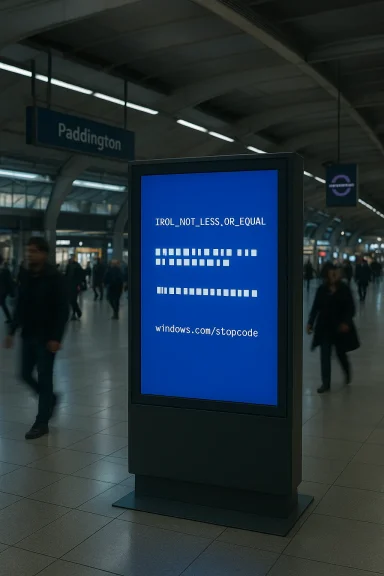
A Windows-style crash on a station information screen at Paddington captured more than a few chuckles online — but beneath the joke is a clear, fixable lapse in how modern transport authorities deploy and manage digital signage. A reader photograph published by The Register shows an Elizabeth Line information display frozen on a Windows crash screen that reports the stop code IRQL_NOT_LESS_OR_EQUAL, substitutes several characters with block glyphs, and points riders to the short “windows.com/stopcode” instruction — an awkward mix of technical telemetry and public-facing consumer messaging that left commuters staring at a literal system failure.
Paddington is one of London’s busiest rail interchanges, served by National Rail services and multiple Underground lines across two separate tube station complexes; the station complex includes Bakerloo, Circle, District and Hammersmith & City line connections and is a major entry point for travelers using the Elizabeth Line. The new central Elizabeth Line platforms at Paddington are intended to be a modern, integrated hub for east–west travel across London.
The passenger-facing element in this story is obvious: people expect station displays to be reliable. These screens carry real-time departure boards, platform assignments, connection guidance and service alerts that are vital — particularly in a station used by long-distance and airport-bound travelers. When the digital display itself fails, that operational visibility disappears and staff have to fall back to manual announcements or printed notices. The photograph published by The Register captured that precise moment of visibility loss and the awkwardness of showing internal OS diagnostics to the public.
From a systems perspective, the simplest operational fail‑safe is a thin client approach: run a minimal, locked player application that does not present OS UI elements and that falls back to a cached static image upon application or driver failure. That reduces the attack surface and eliminates the possibility of showing kernel stop codes in public. Combined with central logging and alerts, this approach also lets engineers respond before an outage persists.
Operators and vendors should prioritize the following action plan now:
The Paddington photograph will likely remain a favourite for IT boards and transport Twitter threads, but it should also serve as a small wake‑up call: when public infrastructure runs general‑purpose software, you must design for failure — and make sure the failure mode is invisible, safe and manageable.
Source: theregister.com Bork on Elizabeth Line Paddington station
 Background: Paddington, the Elizabeth Line and the screens people rely on
Paddington is one of London’s busiest rail interchanges, served by National Rail services and multiple Underground lines across two separate tube station complexes; the station complex includes Bakerloo, Circle, District and Hammersmith & City line connections and is a major entry point for travelers using the Elizabeth Line. The new central Elizabeth Line platforms at Paddington are intended to be a modern, integrated hub for east–west travel across London. The passenger-facing element in this story is obvious: people expect station displays to be reliable. These screens carry real-time departure boards, platform assignments, connection guidance and service alerts that are vital — particularly in a station used by long-distance and airport-bound travelers. When the digital display itself fails, that operational visibility disappears and staff have to fall back to manual announcements or printed notices. The photograph published by The Register captured that precise moment of visibility loss and the awkwardness of showing internal OS diagnostics to the public.
What the screenshot actually shows — a quick technical read
IRQL_NOT_LESS_OR_EQUAL: what that stop code means
The stop code reported on the screen, IRQL_NOT_LESS_OR_EQUAL (Bug Check 0xA), is a well‑documented Windows kernel bug check that occurs when kernel‑mode code attempts to access pageable memory at an inappropriate Interrupt Request Level (IRQL). In practice this is commonly caused by faulty device drivers, rogue kernel components, or memory-related hardware faults. Microsoft’s support documentation lists device drivers and memory as primary suspects and recommends driver and memory checks as first steps in remediation. Independent guides from hardware and troubleshooting outlets describe the same root causes and diagnostic flows.Block glyphs and the video subsystem
The image also shows multiple characters replaced with rectangular “tofu” blocks — an output typical when the video stack cannot render glyphs correctly. That visual artifact points the finger at either a video driver failure or failing video hardware/firmware rather than purely a random kernel memory corruption. In many real‑world BSOD incidents, a corrupt or crashing GPU driver results in garbled output just before the system halts. That combination — IRQL stop code plus display corruption — strongly suggests the signage player’s graphics driver or the display adapter itself was implicated. Technical documentation and blue‑screen troubleshooting guides support this hypothesis: driver problems frequently present with similar symptoms and the kernel will issue a stop to avoid continuing in an inconsistent state.The short “windows.com/stopcode” prompt and security nuance
Older BSOD variants and Microsoft’s more user-friendly screens have for years offered a short pointer such as “windows.com/stopcode” or the modern https‑based support pages to help users find guidance. Historically, the short URL (often shown without a secure‑scheme prefix in screenshots) maps to Microsoft’s support material about stop codes; however, the presence of plain[url="http://windows.com/stopcode"]Troubleshooting Windows unexpected restarts and stop code errors - Microsoft Support[/url] in some screenshots (and the Register image) is more of a cosmetic artifact than a current security recommendation — browsers and Microsoft’s own site now default to HTTPS and to fuller support pages — but to a casual commuter it reads like a bad and unsecured sign-off. The presence of the short URL on a public display also opens trivial social‑engineering avenues: earlier coverage warned that QR codes and short URLs on BSODs could be abused by malware authors and attackers to route people to malicious pages. Why this happened on a station screen: digital signage realities
Signage systems commonly run purpose‑built Windows builds
Public signage rarely runs consumer desktop Windows in the way a home PC does, but many deployments use Windows variants geared to kiosks and embedded devices — Windows 10/11 IoT Enterprise, kiosk mode, or a locked‑down Win10/11 build — because they provide wide hardware compatibility and management tooling. Hardware vendors package compact PCs and SoC modules with Windows IoT for commercial displays and interactive kiosks; LG, other display OEMs and industrial PC vendors advertise Windows IoT compatibility explicitly for digital‑signage models. Microsoft’s IoT guidance even highlights that these enterprise variants support features to suppress typical desktop elements, customize branding, and harden devices for accessible kiosks, including options to control or disable crash screens entirely. That makes a public BSOD both surprising and — crucially — avoidable with correct configuration.Hardware and driver lifecycle issues still bite
Deployments in transport environments face long hardware lifecycles and constrained maintenance windows. A signage appliance with an old GPU or an out‑of‑date driver that slips through a patch cycle is a recipe for the exact crash seen at Paddington: a driver update, firmware regression, or unaddressed hardware fault can trigger kernel instability. Industrial signage PCs are often selected for cost, reliability claims and remote manageability, but in practice operators must still coordinate driver and firmware updates with vendors to avoid regressions. Example product pages and industrial SBC spec sheets show how many signage devices ship with Windows IoT compatibility — illustrating both the prevalence of the platform and the need for proper lifecycle management.The operational and user‑experience impact — more than a meme
A broken display at a busy interchange is more than a photo op for netizens. The immediate impacts are concrete:- Passengers lose a reliable view on platform assignments, delays and interchanges.
- Station staff must step in for announcements, increasing labor overhead during sustained outages.
- Accessibility and wayfinding suffer: visually impaired passengers who rely on clear signage are disadvantaged.
- Brand trust and perceived system resilience are eroded when modern infrastructure exposes raw system errors in public.
Security and social‑engineering considerations
The Register’s image also raises a modest but real security concern: prior coverage of BSOD UX changes (QR codes and stop code pointers) noted potential abuse. A conspicuously public crash screen could be mimicked by attackers to direct passengers to spoofed support pages or malicious QR destinations — a low‑cost social‑engineering trick. Media coverage from security and tech outlets highlighted these possibilities when Microsoft first added QR codes and short lookup URLs to the BSOD in earlier Windows 10 builds. Public signage should never expose interactive elements that can be trivially abused; that means disabling QR/URL prompts on public‑facing signage or pointing them only at operator‑controlled support pages.What should transport operators and signage teams do? Practical remediation and policy
This incident is embarrassingly avoidable. The technical and procurement controls that would prevent a public BSOD are well known. Below are concrete steps that operators (Transport for London, local rail authorities, and signage vendors) should adopt as policy and practice.Short checklist — immediate actions for a borked display
- Remove the device from public-facing rotation and replace it with a static fallback display (printed or a separate player).
- Capture the machine’s memory dump and logs for forensic analysis; inspect minidump files for driver filenames and stack traces.
- Reimage or boot into safe mode to test whether a driver update or hardware fault caused the stop.
- If the device is on an IoT/Enterprise image, enable or verify crash suppression / user‑friendly fallback mode that does not display kernel telemetry publicly.
Medium-term remediation steps
- Enforce a managed update cadence: test GPU drivers and firmware in a staging environment before deploying to all signage units.
- Move display players onto a hardened kiosk/IoT build with assigned access and telemetry forwarding to a central monitoring system.
- Implement redundant players and a watchdog that will automatically switch to a cached signage playback if a primary player fails.
- Disable display of system stop screens; instead show a branded “service message” with an operator contact and a ticket number for internal troubleshooting.
Procurement and lifecycle standards
- Specify OS image, driver baseline and remote management stack in RFPs; require vendors to commit to driver and firmware update SLAs.
- Require hardware with remote KVM/serial-over-LAN support and trusted platform module (TPM) support for secure boot and integrity checks.
- Insist on signage players that can be centrally monitored (heartbeat/health telemetry) and that provide crash reporting that feeds into the operator’s incident management system. Industry product pages and OEM documentation illustrate the kinds of hardware and OS bundles commonly used in commercial signage.
Why disabling public crash screens matters (and how to do it)
Microsoft’s Windows IoT Enterprise and similar kiosk‑oriented configurations let administrators suppress interactive crash screens and customize fallbacks. The platform deliberately provides features suited for public devices — including assigned access, shell replacement, and the ability to remove the standard desktop experience — meaning that a public information screen need not expose internal debugging text to passengers. Transport authorities should adopt those features and ensure signage vendors document their use in contracts. Microsoft’s IoT documentation spells out the capability set available for fixed‑purpose devices.From a systems perspective, the simplest operational fail‑safe is a thin client approach: run a minimal, locked player application that does not present OS UI elements and that falls back to a cached static image upon application or driver failure. That reduces the attack surface and eliminates the possibility of showing kernel stop codes in public. Combined with central logging and alerts, this approach also lets engineers respond before an outage persists.
Broader context: the BSOD is changing, but crashes still happen
Microsoft has iterated the crash UX several times over the last decade — from text‑only bluescreens through the addition of the sad emoticon in Windows 8 and the QR/support pointers in Windows 10, to more recent redesigns in Windows 11 that trade the classic blue for a plainer, darker screen and refined telemetry that favors enterprise troubleshooting. The visual change does not alter the underlying reality: kernel faults still happen, and public displays built on general-purpose OSes are vulnerable unless deliberately hardened. Coverage of the BSOD’s design evolution underscores that the visual UX is meant for end‑users, not for passenger information displays in public spaces.Critical analysis: what the Paddington bork tells us about public infrastructure IT
This single photograph is amusing, but it flags a failure across multiple layers:- Procurement ambiguity: the choice of platform (Windows IoT vs unmanaged Windows) and the lack of clear configuration requirements likely contributed. Digital signage is not a generic endpoint; it demands kiosk‑grade specification and lifecycle contracts.
- Operational discipline: an up‑to‑date fleet should have proactive driver/firmware testing and a monitored rollback plan. A circulating hardware defect or a bad driver push should be caught in staging before a display sees rush‑hour passengers.
- Usability oversight: public displays should never surface raw technical artifacts. A tailored user‑experience that replaces system text with plain language status messages is trivial to implement and expected in professional deployments.
Final verdict and a plain‑English action plan
The Paddington display’s “bork” is not a mystery: it was a kernel‑level fault, likely aggravated by a video driver or hardware failure, shown through a public‑facing device that wasn’t locked down to prevent exactly this scenario. The fix is procedural and technological, not exotic.Operators and vendors should prioritize the following action plan now:
- Pull affected devices from service and switch to a known‑good fallback.
- Collect crash dumps, driver versions and firmware revisions for the failing unit.
- Test and validate the sign’s image and drivers in a staging environment before rolling updates.
- Move public players to a hardened kiosk image (Windows IoT Enterprise or equivalent) and disable OS crash UI for public displays.
- Implement redundant players and a central monitoring/alerting pipeline so engineers know about failures before passengers notice.
- Add contractual SLAs for display suppliers covering driver/firmware patch testing, remote diagnostics and hardware replacement windows.
The Paddington photograph will likely remain a favourite for IT boards and transport Twitter threads, but it should also serve as a small wake‑up call: when public infrastructure runs general‑purpose software, you must design for failure — and make sure the failure mode is invisible, safe and manageable.
Source: theregister.com Bork on Elizabeth Line Paddington station
