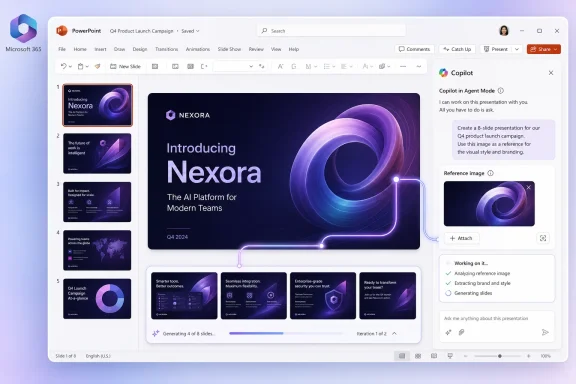
Microsoft began rolling out Roadmap ID 555882 on July 2, 2026, adding the ability for PowerPoint on the web users with Microsoft 365 Copilot to attach and reference an image while creating a presentation through Agent Mode in the Worldwide cloud. The feature sounds small, almost clerical: upload an image, ask Copilot to build around it, get a deck. But it points to a larger shift in Microsoft’s productivity strategy, where Office stops treating files as static containers and starts treating them as evidence in a live production workflow. For WindowsForum readers, the practical question is not whether Copilot can make prettier slides; it is whether Microsoft is quietly redefining how business documents are authored, governed, and trusted.
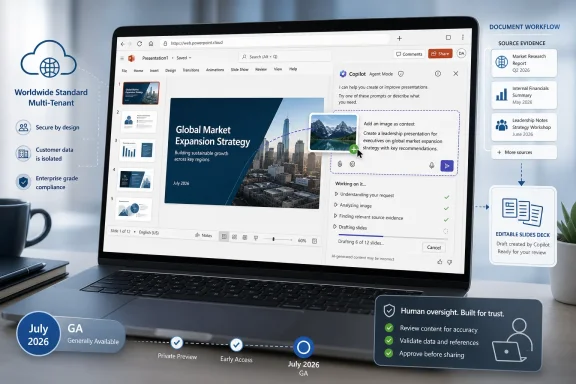
The headline capability is straightforward. When creating a presentation with Copilot in PowerPoint using Agent Mode, users can now attach an image and reference it as part of the prompt. The rollout is listed for General Availability, on the web, in the Worldwide Standard Multi-Tenant cloud, with July 2026 as the GA window.
That means this is not merely a speculative lab demo or an Insider-only curiosity. Microsoft is putting the feature into the mainstream commercial Microsoft 365 Copilot channel, where the messy realities of brand reviews, compliance checks, accessibility requirements, and executive deck polish all collide.
The obvious use cases are easy to imagine. A product marketer drops in a packaging mockup and asks Copilot to create a launch deck. A field engineer attaches a site photo and asks for a customer briefing. A sales team references a diagram, a whiteboard capture, or a competitive screenshot and asks PowerPoint to turn it into a structured presentation.
But the more important change is that Copilot is no longer just responding to a text prompt or mining a document corpus. It is being invited to interpret a visual artifact as part of the source material for a finished business document. That moves PowerPoint closer to a multimodal drafting environment, where the prompt is only one ingredient and the attached file becomes part of the instruction set.
That distinction is important for PowerPoint because presentations are not just text. A good deck is hierarchy, pacing, visual rhythm, slide density, source discipline, and brand constraint. The difference between “write me five slides” and “build a presentation from this image, this instruction, and this destination format” is the difference between autocomplete and delegated production.
Microsoft has been steadily pushing Copilot in that direction. PowerPoint already sits at the intersection of language, layout, images, charts, and corporate templates. It is one of the Office apps where generative AI can look most impressive in a demo and most fragile in actual enterprise use. A passable paragraph can survive rough edges; a bad slide immediately announces itself from across a conference room.
By allowing image references at creation time, Microsoft is giving the agent a richer starting point. It is also raising expectations. If a user attaches a product rendering, the deck should not merely mention “product image” in generic terms. It should understand what the image is for, how it fits the narrative, and whether it should influence style, sequence, emphasis, or visual treatment.
For administrators, that web-first detail is not incidental. Copilot features depend on service-side models, permissions, storage access, tenant configuration, licensing, and policy enforcement. The web app is where Microsoft can orchestrate those dependencies with fewer local variables than a Win32 desktop client running across years of update channels and add-in configurations.
For users, however, the platform distinction still matters. PowerPoint’s desktop app remains the muscle-memory environment for many professionals who build serious decks. Designers, consultants, finance teams, educators, and executives often live in desktop PowerPoint because of local files, add-ins, fonts, offline workflows, and precise formatting control.
That creates a familiar Microsoft 365 tension. The newest AI capability appears first where Microsoft can deliver it most cleanly, not necessarily where longtime power users spend most of their day. The company may eventually close that gap, but for now the roadmap item reinforces a reality administrators already understand: the center of gravity for Microsoft 365 innovation is the cloud service, even when the familiar Office brand sits on the front door.
Image understanding in enterprise productivity is probabilistic. Copilot may recognize objects, layout, text, branding cues, charts, screenshots, and visual themes, but the output still depends on model interpretation, prompt quality, available context, and product guardrails. A photograph of a machine room, a whiteboard architecture sketch, or a UI screenshot can contain details that are obvious to a domain expert but ambiguous to a model.
This is where Microsoft’s marketing and user expectations can diverge. “Attach an image” sounds concrete. “Use this image correctly as source material for a deck” is a harder promise. If the image contains technical detail, legal implications, safety conditions, pricing, regulated data, or customer-identifiable information, the user still has to verify what Copilot inferred.
That does not make the feature weak. It makes it realistic. The valuable workflow is not “AI replaces the slide author.” It is “AI reduces the blank-slide problem while the human remains responsible for correctness.” In a professional environment, the attached image should be treated like any other source: useful, contextual, and in need of review.
Image referencing makes that starting point more tangible. A user may not know how to describe a slide deck in words, but they may have a screenshot, a diagram, a product photo, or an event image that captures the thing they need to explain. The image becomes a bridge between messy reality and a structured business artifact.
That is especially relevant for frontline and operational users. Not every presentation begins with a polished brief. Some begin with a phone photo from a job site, a sketch from a planning session, a prototype image, or a visual defect that needs escalation. Asking Copilot to build a presentation around that artifact could shorten the path from observation to communication.
This is where the feature’s value may be less glamorous than the AI keynote implies. The biggest win is not that Copilot can create a perfect executive deck from a single image. It is that it can help ordinary users turn visual evidence into a communicable draft faster than they could with a blank template and a deadline.
An image may contain sensitive data even when the user does not think of it as a document. A screenshot can reveal customer names, account numbers, internal dashboards, credentials, unreleased UI, regulated health or financial information, or confidential product designs. A photo can expose badges, whiteboards, office layouts, equipment serial numbers, or location details.
Microsoft 365 already has a broad permissions and compliance story, but Copilot adoption tends to expose weak information hygiene. Organizations that tolerated loose file practices when humans were manually searching now face a different risk profile when AI can synthesize, summarize, and repurpose content quickly. The attached image becomes part of a generation request, and that request becomes part of the organization’s operational record.
Administrators should therefore think about this rollout less as a PowerPoint feature and more as another reason to revisit Copilot readiness. Sensitivity labels, retention policies, audit logging, data loss prevention, and user education all matter more when employees can casually bring visual source material into an AI-authored deck.
Image references could help. A source image may provide color, tone, product identity, visual motif, or composition cues that Copilot can use when building a deck. If implemented well, the feature could make generated presentations feel less generic and more anchored to the user’s actual subject.
But that is a high bar. A model can easily overfit to an image’s superficial attributes while missing the brand or communication intent. It might extract colors that clash with a corporate template, emphasize the wrong element, or build a deck that looks related to the image without actually advancing the message.
This is why PowerPoint remains one of the hardest Office apps for AI to master. A Word draft can be edited line by line. A spreadsheet can be checked against formulas and source data. A presentation requires judgment across multiple dimensions at once. The image reference gives Copilot more material, but it does not eliminate the need for human editorial control.
That strategy makes sense commercially. Microsoft 365 is already where many organizations store their work. If Copilot can turn that stored work into new work, the subscription becomes harder to replace. PowerPoint, Word, Excel, Outlook, Teams, SharePoint, and OneDrive become not just applications and repositories, but a connected substrate for agentic work.
The competitive implications are obvious. Standalone AI tools can generate text and images, but Microsoft’s advantage is proximity to the work product. A PowerPoint agent does not need to export into a deck format after the fact; it is already in the application where the artifact will be reviewed, edited, shared, and presented.
That proximity is also the risk. The closer AI moves to the final artifact, the easier it is for users to mistake a plausible output for a finished one. Microsoft’s challenge is to make Copilot useful without training workers to skip the hard parts of judgment, verification, and accountability.
This is not new, but AI accelerates it. In the old Office world, desktop feature parity was the baseline expectation. In the Copilot era, the service layer can move faster than the installed app. Microsoft can ship new agent behaviors, model integrations, and attachment workflows without waiting for the traditional desktop cadence.
That may be rational engineering, but it complicates communication. Users may hear that “PowerPoint has the feature” and discover that their version of PowerPoint does not. Admins may need to explain why the browser version of an app has a Copilot capability that the desktop version lacks, or why a licensed user cannot access a feature because of ring, tenant, or rollout timing.
The correct expectation is therefore staged availability, not universal simultaneity. “Rolling out” means exactly that. Some tenants will see the capability before others, and the user experience may evolve as Microsoft observes usage and tunes the agent.
Suppose a user attaches a product photo and says, “Create a customer-ready deck explaining why this design reduces installation time.” Does Copilot treat the image as evidence, as decoration, or as a style guide? Suppose a teacher attaches a historical photograph and asks for a lecture deck. Does Copilot identify the subject accurately, provide appropriate caveats, and avoid invented context? Suppose an administrator attaches a network diagram. Does Copilot preserve technical relationships or flatten them into executive mush?
These are not edge cases. They are the real use cases. Presentations are acts of persuasion and explanation. If the agent misunderstands what the image is meant to do, the deck may still look polished while being strategically wrong.
That is why the user interface around image referencing will matter. The more clearly PowerPoint lets users specify whether an image is source evidence, brand inspiration, a slide asset, a design reference, or an object to explain, the more useful the feature becomes. A single attachment button is convenient; a well-designed intent model is transformative.
 PowerPoint’s New Trick Is Really About Context
The headline capability is straightforward. When creating a presentation with Copilot in PowerPoint using Agent Mode, users can now attach an image and reference it as part of the prompt. The rollout is listed for General Availability, on the web, in the Worldwide Standard Multi-Tenant cloud, with July 2026 as the GA window.That means this is not merely a speculative lab demo or an Insider-only curiosity. Microsoft is putting the feature into the mainstream commercial Microsoft 365 Copilot channel, where the messy realities of brand reviews, compliance checks, accessibility requirements, and executive deck polish all collide.
The obvious use cases are easy to imagine. A product marketer drops in a packaging mockup and asks Copilot to create a launch deck. A field engineer attaches a site photo and asks for a customer briefing. A sales team references a diagram, a whiteboard capture, or a competitive screenshot and asks PowerPoint to turn it into a structured presentation.
But the more important change is that Copilot is no longer just responding to a text prompt or mining a document corpus. It is being invited to interpret a visual artifact as part of the source material for a finished business document. That moves PowerPoint closer to a multimodal drafting environment, where the prompt is only one ingredient and the attached file becomes part of the instruction set.
Agent Mode Moves Copilot From Assistant to Operator
Microsoft’s use of the phrase Agent Mode matters. Earlier Copilot experiences in Office often behaved like a chat assistant bolted onto an application: summarize this, rewrite that, generate an outline, suggest a slide. Agent Mode implies something more active. The agent is expected to execute a multi-step task inside the app, preserving or applying structure while producing an artifact.That distinction is important for PowerPoint because presentations are not just text. A good deck is hierarchy, pacing, visual rhythm, slide density, source discipline, and brand constraint. The difference between “write me five slides” and “build a presentation from this image, this instruction, and this destination format” is the difference between autocomplete and delegated production.
Microsoft has been steadily pushing Copilot in that direction. PowerPoint already sits at the intersection of language, layout, images, charts, and corporate templates. It is one of the Office apps where generative AI can look most impressive in a demo and most fragile in actual enterprise use. A passable paragraph can survive rough edges; a bad slide immediately announces itself from across a conference room.
By allowing image references at creation time, Microsoft is giving the agent a richer starting point. It is also raising expectations. If a user attaches a product rendering, the deck should not merely mention “product image” in generic terms. It should understand what the image is for, how it fits the narrative, and whether it should influence style, sequence, emphasis, or visual treatment.
The Web-First Rollout Tells Its Own Story
The platform listed for the feature is PowerPoint on the web, not desktop PowerPoint for Windows. That will frustrate some traditional Office users, but it fits Microsoft’s current deployment logic. The web version gives Microsoft tighter control over the Copilot experience, faster iteration, and a more consistent cloud-connected runtime.For administrators, that web-first detail is not incidental. Copilot features depend on service-side models, permissions, storage access, tenant configuration, licensing, and policy enforcement. The web app is where Microsoft can orchestrate those dependencies with fewer local variables than a Win32 desktop client running across years of update channels and add-in configurations.
For users, however, the platform distinction still matters. PowerPoint’s desktop app remains the muscle-memory environment for many professionals who build serious decks. Designers, consultants, finance teams, educators, and executives often live in desktop PowerPoint because of local files, add-ins, fonts, offline workflows, and precise formatting control.
That creates a familiar Microsoft 365 tension. The newest AI capability appears first where Microsoft can deliver it most cleanly, not necessarily where longtime power users spend most of their day. The company may eventually close that gap, but for now the roadmap item reinforces a reality administrators already understand: the center of gravity for Microsoft 365 innovation is the cloud service, even when the familiar Office brand sits on the front door.
An Image Reference Is Not the Same Thing as Image Understanding
The word “reference” deserves scrutiny. Users may assume that if Copilot can attach an image, it can reliably understand every relevant detail in that image. That is not a safe assumption.Image understanding in enterprise productivity is probabilistic. Copilot may recognize objects, layout, text, branding cues, charts, screenshots, and visual themes, but the output still depends on model interpretation, prompt quality, available context, and product guardrails. A photograph of a machine room, a whiteboard architecture sketch, or a UI screenshot can contain details that are obvious to a domain expert but ambiguous to a model.
This is where Microsoft’s marketing and user expectations can diverge. “Attach an image” sounds concrete. “Use this image correctly as source material for a deck” is a harder promise. If the image contains technical detail, legal implications, safety conditions, pricing, regulated data, or customer-identifiable information, the user still has to verify what Copilot inferred.
That does not make the feature weak. It makes it realistic. The valuable workflow is not “AI replaces the slide author.” It is “AI reduces the blank-slide problem while the human remains responsible for correctness.” In a professional environment, the attached image should be treated like any other source: useful, contextual, and in need of review.
The Blank Slide Was Always the Enemy
PowerPoint has long suffered from a peculiar problem: the application is powerful, but the starting point is often terrible. Users stare at an empty slide, a half-formed prompt, or a pile of raw material that has not yet become a narrative. Copilot’s most natural role in PowerPoint is not final polish; it is first structure.Image referencing makes that starting point more tangible. A user may not know how to describe a slide deck in words, but they may have a screenshot, a diagram, a product photo, or an event image that captures the thing they need to explain. The image becomes a bridge between messy reality and a structured business artifact.
That is especially relevant for frontline and operational users. Not every presentation begins with a polished brief. Some begin with a phone photo from a job site, a sketch from a planning session, a prototype image, or a visual defect that needs escalation. Asking Copilot to build a presentation around that artifact could shorten the path from observation to communication.
This is where the feature’s value may be less glamorous than the AI keynote implies. The biggest win is not that Copilot can create a perfect executive deck from a single image. It is that it can help ordinary users turn visual evidence into a communicable draft faster than they could with a blank template and a deadline.
Enterprise IT Will Care About the Files Behind the Prompt
For IT departments, the interesting part is not the slide output. It is the input surface. Every new attachment type in a generative workflow expands the governance conversation.An image may contain sensitive data even when the user does not think of it as a document. A screenshot can reveal customer names, account numbers, internal dashboards, credentials, unreleased UI, regulated health or financial information, or confidential product designs. A photo can expose badges, whiteboards, office layouts, equipment serial numbers, or location details.
Microsoft 365 already has a broad permissions and compliance story, but Copilot adoption tends to expose weak information hygiene. Organizations that tolerated loose file practices when humans were manually searching now face a different risk profile when AI can synthesize, summarize, and repurpose content quickly. The attached image becomes part of a generation request, and that request becomes part of the organization’s operational record.
Administrators should therefore think about this rollout less as a PowerPoint feature and more as another reason to revisit Copilot readiness. Sensitivity labels, retention policies, audit logging, data loss prevention, and user education all matter more when employees can casually bring visual source material into an AI-authored deck.
The Feature Also Gives Microsoft a New Design Lever
PowerPoint’s challenge has never been only content generation. It has been taste. Bad AI decks are recognizable: too many bullets, generic stock visuals, weak hierarchy, inconsistent layouts, and a corporate sameness that makes every presentation feel like a template wearing a costume.Image references could help. A source image may provide color, tone, product identity, visual motif, or composition cues that Copilot can use when building a deck. If implemented well, the feature could make generated presentations feel less generic and more anchored to the user’s actual subject.
But that is a high bar. A model can easily overfit to an image’s superficial attributes while missing the brand or communication intent. It might extract colors that clash with a corporate template, emphasize the wrong element, or build a deck that looks related to the image without actually advancing the message.
This is why PowerPoint remains one of the hardest Office apps for AI to master. A Word draft can be edited line by line. A spreadsheet can be checked against formulas and source data. A presentation requires judgment across multiple dimensions at once. The image reference gives Copilot more material, but it does not eliminate the need for human editorial control.
Microsoft Is Building a Chain of Reference, Not a Single Feature
Roadmap items like this can look isolated if viewed one at a time. In context, they are part of a broader pattern: Microsoft wants Copilot to create Office artifacts from prompts, files, organizational context, and now visual references. The goal is not just chat inside Office. The goal is production workflows that begin with mixed inputs and end in editable business documents.That strategy makes sense commercially. Microsoft 365 is already where many organizations store their work. If Copilot can turn that stored work into new work, the subscription becomes harder to replace. PowerPoint, Word, Excel, Outlook, Teams, SharePoint, and OneDrive become not just applications and repositories, but a connected substrate for agentic work.
The competitive implications are obvious. Standalone AI tools can generate text and images, but Microsoft’s advantage is proximity to the work product. A PowerPoint agent does not need to export into a deck format after the fact; it is already in the application where the artifact will be reviewed, edited, shared, and presented.
That proximity is also the risk. The closer AI moves to the final artifact, the easier it is for users to mistake a plausible output for a finished one. Microsoft’s challenge is to make Copilot useful without training workers to skip the hard parts of judgment, verification, and accountability.
Windows Users Still Live With the Cloud-Desktop Split
For a Windows audience, the web-only platform detail lands awkwardly. Microsoft continues to invest in Windows, desktop Office, and local productivity workflows, but the newest Copilot experiences often arrive first through the browser. The result is a split reality: Windows remains the operating environment, while the cutting edge of Office increasingly lives in Microsoft’s cloud-controlled app surfaces.This is not new, but AI accelerates it. In the old Office world, desktop feature parity was the baseline expectation. In the Copilot era, the service layer can move faster than the installed app. Microsoft can ship new agent behaviors, model integrations, and attachment workflows without waiting for the traditional desktop cadence.
That may be rational engineering, but it complicates communication. Users may hear that “PowerPoint has the feature” and discover that their version of PowerPoint does not. Admins may need to explain why the browser version of an app has a Copilot capability that the desktop version lacks, or why a licensed user cannot access a feature because of ring, tenant, or rollout timing.
The correct expectation is therefore staged availability, not universal simultaneity. “Rolling out” means exactly that. Some tenants will see the capability before others, and the user experience may evolve as Microsoft observes usage and tunes the agent.
The Real Test Is Whether Copilot Respects Intent
The most interesting question for this feature is not whether Copilot can see an image. It is whether it can respect user intent when an image is part of a larger instruction.Suppose a user attaches a product photo and says, “Create a customer-ready deck explaining why this design reduces installation time.” Does Copilot treat the image as evidence, as decoration, or as a style guide? Suppose a teacher attaches a historical photograph and asks for a lecture deck. Does Copilot identify the subject accurately, provide appropriate caveats, and avoid invented context? Suppose an administrator attaches a network diagram. Does Copilot preserve technical relationships or flatten them into executive mush?
These are not edge cases. They are the real use cases. Presentations are acts of persuasion and explanation. If the agent misunderstands what the image is meant to do, the deck may still look polished while being strategically wrong.
That is why the user interface around image referencing will matter. The more clearly PowerPoint lets users specify whether an image is source evidence, brand inspiration, a slide asset, a design reference, or an object to explain, the more useful the feature becomes. A single attachment button is convenient; a well-designed intent model is transformative.
The Deck Factory Gets a New Input Chute
This rollout is small enough to miss and big enough to matter. It does not reinvent PowerPoint on its own, but it gives Copilot another way to ingest the messy materials from which presentations are made. For IT pros and power users, the immediate value is speed; the longer-term implication is a new authorship model inside Microsoft 365.- Microsoft is rolling out image attachment and reference support for creating PowerPoint presentations with Copilot Agent Mode on the web.
- The feature is listed for General Availability in July 2026 for the Worldwide Standard Multi-Tenant cloud.
- The capability is most useful when an image provides context that would be awkward or incomplete to describe in text alone.
- Users should treat Copilot’s interpretation of an image as a draft judgment, not as verified fact.
- Administrators should consider image-based prompts part of the broader Copilot governance surface, especially where screenshots and photos may contain sensitive information.
- The web-first rollout reinforces Microsoft’s pattern of delivering the newest Copilot capabilities through cloud-controlled Microsoft 365 experiences before traditional desktop parity is guaranteed.
References
- Primary source: Microsoft 365 Roadmap
Published: 2026-07-02T23:12:48.2177075Z
Microsoft 365 Roadmap | Microsoft 365
The Microsoft 365 Roadmap lists updates that are currently planned for applicable subscribers. Check here for more information on the status of new features and updates.www.microsoft.com
- Official source: support.microsoft.com
Create a new presentation with Copilot in PowerPoint | Microsoft Support
Learn how to use the power of AI in Microsoft 365 Copilot in PowerPoint to create a presentation from scratch.support.microsoft.com - Related coverage: m365admin.handsontek.net
Microsoft Copilot (Microsoft 365): Reference an attached PowerPoint deck’s style when creating a new presentation with Agent Mode in PowerPoint - M365 Admin
When creating a presentation with Copilot in PowerPoint using Agent Mode, you can reference an existing PowerPoint file, so Copilot applies its theme and styles to the new deck, keeping the design consistent. Product PowerPoint Release phase General Availability Release date March CY2026...m365admin.handsontek.net - Related coverage: techradar.com
Your favorite Microsoft 365 apps are getting a load more Copilot AI Agents - Word, Excel, Outlook, PowerPoint all get a boost | TechRadar
More AI agents are coming to Microsoft 365www.techradar.com - Official source: news.microsoft.com