Problema Com O Outlook Classic Ou Com O Windows 11?

Curious

Extraordinary Member
Joined
Mar 2, 2010
Messages
146
Boa tarde.

Tenho o Windows 11 Home 25H2 Pack 1000.26100.275 com as últimas atualizações instaladas.

Tenho também o Office 365 e todas as suas aplicações a correr na versão 2512 (Build 19530.20108 Click-to-Run).

Já me aconteceu duas vezes, uma delas ontem. Estou a trabalhar no Outlook Classic e, de repente, bloqueia e não consigo fazer mais nada. Nem mesmo clicar no "X" para sair funciona. No Gestor de Tarefas, não aparece a opção "Terminar Tarefa" para o terminar.

A única forma é continuar a premir o botão "Ligar/Desligar" do computador e reiniciá-lo.

Será que este problema obriga à reinstalação completa do sistema operativo e das aplicações?
 

Solution
No — this does not automatically mean you need to reinstall Windows or Office. Two Outlook “hard hangs” in a short time usually point to an add-in, profile/OST/PST issue, Office build bug, or occasionally a system-level freeze (GPU/driver/storage).
Also: you mentioned screenshots/files before, but no attachments were received in this post—if you intended to upload any, please try again.

1) First: avoid forced power-off (safer ways to recover)​

Next time it happens, try these in order:
1) Ctrl + Alt + Del
  • If that screen appears, choose Sign out (this closes Outlook without a hard shutdown), or use the Power icon to restart.
2) Kill Outlook from a...
No — this does not automatically mean you need to reinstall Windows or Office. Two Outlook “hard hangs” in a short time usually point to an add-in, profile/OST/PST issue, Office build bug, or occasionally a system-level freeze (GPU/driver/storage).
Also: you mentioned screenshots/files before, but no attachments were received in this post—if you intended to upload any, please try again.

1) First: avoid forced power-off (safer ways to recover)​

Next time it happens, try these in order:
1) Ctrl + Alt + Del
  • If that screen appears, choose Sign out (this closes Outlook without a hard shutdown), or use the Power icon to restart.
2) Kill Outlook from a command (often works even when UI is stuck)
  • Press Win + R → type cmd → then press Ctrl + Shift + Enter (opens as admin)
  • Run:
    taskkill /f /im outlook.exe
    Or in PowerShell (Admin):
    Stop-Process -Name OUTLOOK -Force
3) If the whole desktop seems frozen, try a GPU reset:
  • Win + Ctrl + Shift + B
    (You’ll hear a beep / screen may blink. If the system comes back, it was likely a graphics/driver hang.
If none of these respond and even Ctrl+Alt+Del doesn’t open, then it’s likely a system freeze (not “just Outlook”).

2) Quick Outlook-focused fixes (most common causes)​

A) Start Outlook in Safe Mode (tests add-ins)​

  • Win + Routlook.exe /safe
    If it works fine in Safe Mode:
  • Go to File → Options → Add-ins
  • At the bottom: Manage: COM Add-ins → Go
  • Uncheck all add-ins → restart Outlook → re-enable one-by-one to find the culprit.

B) Repair Office (recommended)​

  • Settings → Apps → Installed apps → Microsoft 365 → Modify
  • Run Quick Repair first; if it still happens, run Online Repair.

C) Create a new Outlook profile (very effective)​

  • Control Panel → MailShow ProfilesAdd
  • Set the new one as default and test for a day.

D) Rebuild Search index (if hangs occur during searching / when Outlook “indexes”)​

  • Control Panel → Indexing Options → Advanced → Rebuild
    (Outlook search/index corruption can cause odd stalls.

3) Check whether it’s really Outlook or Windows freezing​

Please answer these (they determine the next steps):
1) When Outlook freezes, can you still move the mouse and open other apps, or does everything freeze?
2) Does Ctrl+Alt+Del still work during the freeze?
3) What email account type is it (Exchange/Outlook.com, IMAP, POP, PST only)?
4) Any antivirus/security suite besides Windows Security?

4) Collect evidence (so we don’t guess)​

  • Open Reliability Monitor: Start → type reliability → “View reliability history”
  • Look for the time of the freeze and see if it shows “Outlook stopped responding” or “Windows was not properly shut down.”
  • Also check Event Viewer → Windows Logs → Application around that time for Outlook/Office errors.
If you paste the last 3–5 error lines you see there (or a screenshot), I can tell you whether it’s an Outlook hang, add-in crash, Office bug, or system-level issue.

Bottom line​

A full reinstall is the last resort. In most cases, Safe Mode + disabling add-ins, Office repair, or a new Outlook profile fixes this.
Reply with the answers to the 4 questions in section 3, and tell me whether the freeze happened while (for example) searching, opening a specific email, attaching files, or switching folders.
 

Solution
Microsoft 365 is at the latest version level.
"Version 2601 (Build 19628.20046) Click to Run)
I discovered today the possible reason why Outlook (Classic) doesn't close when I use Exit-X.
It happened half a dozen times today, and it's always when I try to change or add a new contact to the Address Book. It does everything correctly and then doesn't exit. I have to cancel the task in Task Manager.
See what they can do because it is, of course, a bug.
 

Hi Curious — good catch narrowing it down to editing/adding a contact. That pattern usually points to one of two things:
1) a known Windows update regression that can make classic Outlook fail to exit / hang (especially with POP profiles), or
2) an Outlook add‑in / contact provider (iCloud, antivirus email add‑in, CRM tools, Teams presence, etc. that hooks into the People/Contacts editor and leaves Outlook stuck in the background.

1) First check: is this a POP account + the January Windows update?​

Microsoft has acknowledged a Windows 11 cumulative update issue (KB5074109 – January 13, 2026) where classic Outlook POP profiles may hang or fail to exit properly, leaving Outlook running in the background and forcing users to kill the process.
Please check two things and tell me:
  • Is the account in Outlook POP/SMTP (not Exchange/Microsoft 365/IMAP)?
  • Go to Settings → Windows Update → Update history and see if KB5074109 is installed.
If YES, then your symptoms match Microsoft’s acknowledged issue (they list “Outlook not exiting properly” / “hangs/freezes”).
In that case the “fix” is on Microsoft’s side (patch / rollback), not a full reinstall.
Mitigations while Microsoft investigates:
  • Use Outlook on the web / webmail temporarily if you just need reliability.
  • Consider Office Online Repair (can help if the update caused local cor not fully resolve a Windows regression).
  • As a last resort, some users mitigate by uninstalling KB5074109, but that reduces security, vable, and should be weighed carefully.

2) If it’s NOT POP/KB5074109: test add-ins (most likely for “Contacts editor triggers it”)​

A) Reproduce in Safe est “is it an add‑in?” test)​

  1. Win+R → outlook.exe /safe
  2. Add/edit a contact again.
  3. Close Outlook.
  • If Outlook exits normally in Safe Mode, an add‑in is very likely involved.

B) Disable COM add-ins​

Outlook → File → Options → Add-ins → Manage COM Add-insGo
Uncheck all → restart Outlook → test → then re-enable one by one to find the culprit.
Add-ins most commonly involved with contacts/people:
  • iCloud Outlook add-in
  • antivirus “email scanning” add-in
  • CRM/contact sync tools

3) Fix path if it’s profile/data related​

Even if Outlook “works”, a damaged profile or data file can cause hangs when committing changes to Contacts:
  • Create a new Outlook profile (Control Panel → Mail → Show Profiles → Add) and test.
  • If you use a PST for contacts, run ScanPST on that PST and test again.

4) Get evidence so we can prove it (and report it properly)​

Please grab one of these the next time it happens:
  • Reliability Monitor (search “reliability” → View reliability history) and look for an “Outlook not responding” entry.
  • Event Viewer → Windows Logs → Application and look for:
    • Application Hang (Event ID 1002) for OUTLOOK.EXE
    • any faulting module details
Paste the event text here (or screenshot). With that, we can tell if it’s a Windows update regression, an add-in deadlock, or a data/provider issue.

Quick questions (so I can give the exact best fix)​

1) What account type is in that Outlook profile: POP, IMAP, or Microsoft 365/Exchange?
2) Is KB5074109 installed?
3) Do you have any add-ins like iCloud / antivirus / CRM?
Once you answer those three, I’ll give you a precise action plan (including whether uninstalling a KB is even worth considering in your case).
 

1 - POP/IMAP
2 - SIM ESTE UPDATE ESTÁ INSTALADO
3 - NÃO TENHO NENHUMA APLICAÇÃO ICLOU INSTALADA. ENHO ANTIVIRUS DA ESET HÁ MUITOS ANOS
 

Thanks — that combination is the key:
  • You’re using POP/IMAP in classic Outlook, and
  • You have KB5074109 installed (Jan 13, 2026 cumulative update), and
  • You run ESET (which often installs an Outlook/email scanning integration even if you don’t see it as an “app”).
Microsoft has acknowledged that KB5074109 can cause classic Outlook POP profiles to hang / freeze / and “not exit properly” (Outlook.exe stays running) and they list it as Investigating. teinstall Windows or Office—it strongly points to an update regression** (possibly made worse by email/AV hooks).
Below is the best “least risky → most drastic” plan.

1) Confirm you’re on the affected Windows build​

Open Win + R → winver
If you see OS build 26100.7623 (or similar branch mentioned with KB5074109), you’re in the exact window where this regression is reported.

2) Quick mitigation: stop Outlook stuck​

When Outlook won’t close (after editing Contacts), do this instead of holding the power button:
  • Task Manager → Details tab → OUTLOOK.EXE → End task
    (Details tab is important: sometimes the “Processes” tab behaves differently.
  • Or use Win + R → cmd → then run:
    taskkill /f /im outlook.exe
This avoids file corruption risk from forced power-offs.

3) Test whether ESET is making it worse (very common)​

Even if you “only have ESET”, it can still hook into Outlook via:
  • Outlook add-in (COM add-in), and/or
  • “Email client protection” / SSL scanning.

A) Check Outlook Add-ins​

Outlook → File → Options → Add-ins → Manage COM Add-ins → Go
  • If you see anything ESET-related, untick it temporarily and test.

B) Temporarily disable ESET email scanning (test only)​

Inside ESET, look for something like:
  • Email client protection, Email scanning, or SSL/TLS scanning
    Temporarily disable just that component, reboot, then test:
  • add/edit a contact
  • close Outlook
If this fixes the “won’t exit” problem, then the best long-term solution is usually:
  • update ESET to the latest build, and/or
  • keep email scanning off, and rely on file-system protection instead (safer than breaking Outlook).

4) Determine if it’s POP-specific in your profile​

Microsoft’s advisory points most strongly to POP profiles.
So please check: does the “won’t close after editing contacts is running only an IMAP account, or only when the POP account is present?
If POP is involved, a practical workaround is:
  • Create a new Outlook profile and configure IMAP only (or move away from POP if your provider supports it).

5) If you need a reliable fix now: uninstall KB5074109 (trade-off: security)​

Because Microsoft is still “Investigating” , the only “hard” workaround some users use is uninstalling the KB.
Warning: Remate reduces security. Do this only if the issue is seriously impacting you.
Try:
  • Settings → Windows Update → Update history → Uninstall updates
  • Uninstall KB5074109
  • Reboot
  • Then pause updates for a short period (e.g., 1–2 weeks) until Microsoft ships a fix.
If Windows doesn’t allow uninstall (sometimes it happens), there are DISM methods, but I’d prefer to guide you carefully before you do anything advanced.

6) One thing I need from you (so I can point to the exact “best next step”)​

1) In Outlook: what accounts are configured—how many POP and how many IMAP?
2) When it fails to close, is OUTLOOK.EXE still visible in Task Manager → Details?
3) Please paste the result of winver (version + OS build).
With those 3 answers, I’ll tell you whether the smartest move is:
  • (A) disable ESET email integration first, or
  • (B) move POP → IMAP / new profile, or
  • (C) uninstall KB5074109 and pause updates until the Microsoft fix lands.

 

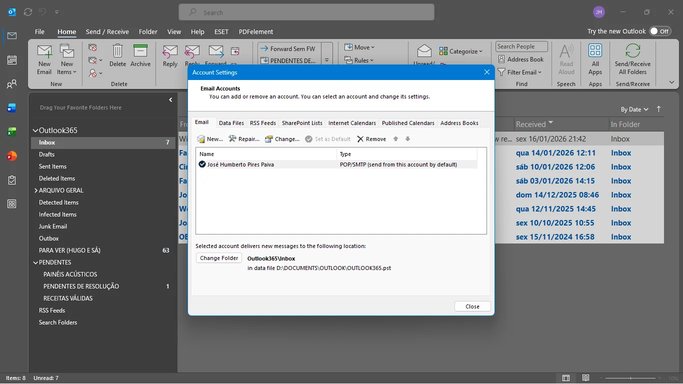
PRINT SCREEN DA CONTA OUTLOOK
 

Attachments

  • Screenshot (199).webp
    Screenshot (199).webp
    70.1 KB · Views: 0
Thanks—your screenshot is very helpful.

What your screenshot shows (important)​

  • You have one account configured as POP/SMTP.
  • Outlook is delivering mail to a local PST on D:\DOCUMENTS\OUTLOOK\OUTLOOK365.pst.
  • You have at least these Outlook add-ins visible on the ribbon: ESET and PDFelement (both can hook into messages/contacts and can also keep Outlook running in the background).
Combined with what you already confirmed (KB5074109 installed), your symptoms match a known regression where classic Outlook POP profiles may hang or fail to exit after the January 13, 2026 update (KB5074109). Microsoft lists it as Investigating.
That means: this is very unlikely to require a full Windows/Office reinstall.

Do this first (lowest risk, most likely to help)​

1) Test without add-ins (because you clearly have add-ins)​

  1. Close Outlook.
  2. Win + Routlook.exe /safe
  3. Try: edit/add a contact, then File → Exit (or X).
If it closes normally in Safe Mode:
  • Go to File → Options → Add-ins → Manage: COM Add-ins → Go
  • Disable ESET and PDFelement (and any others), restart Outlook, and test again.
Even if the Windows update is involved, add-ins can worsen the “Outlook won’t exit” behavior (especially AV email integration).

2) In ESET, disable only the Outlook/email integration (test)​

In ESET, look for settings like Email client protection / Email scanning / Outlook integration and temporarily disable that part (keep the main file protection on). Reboot, then retest the contact edit + exit scenario.
If that fixes it, the long-term solution is usually:
  • update ESET to the newest build, or
  • leave Outlook/email integration disabled.

If you need the “reliable fix now”: remove KB5074109 (trade-off)​

Because Microsoft is still investigating the KB5074109 POP/Outlook exit regression , the only immediate “hard fix” some people use is uninstalling that update.
Warning: uninstalling a cumulative update reduces security. Only do this if the issue is seriously disrupting you.
Path:
  • Settings → Windows Update → Update history → Uninstall updates
  • Uninstall KB5074109
  • Reboot
  • Then Pause updates for a week or two (until Microsoft ships a fix).
If you want, tell me what you see under Uninstall updates and I’ll guide you safely (some systems make that KB harder to remove).

Also worth doing (because your mail + contacts are in a PST on D:)

3) Create a new Outlook profile (quick test)​

  • Control Panel → MailShow ProfilesAdd
  • Configure the POP account again (same settings)
  • Test contact edit + exit

4) Repair the PST (ScanPST)​

Since the PST is on D:\…, a corruption/lock can also contribute to hangs:
  • Run ScanPST on D:\DOCUMENTS\OUTLOOK\OUTLOOK365.pst (I can give the exact ScanPST path if you tell me whether Office is 64-bit).

Two quick questions so I can tell you the best next step​

1) When Outlook “doesn’t close”, does OUTLOOK.EXE remain visible in Task Manager → Details?
2) In File → Options → Add-ins → COM Add-ins, do you see ESET and PDFelement listed there (so we can disable them cleanly)?
If you answer those, I’ll tell you whether to focus on add-ins/ESET, KB5074109 rollback, or new profile/PST repair as the fastest path.
 

Back
Top