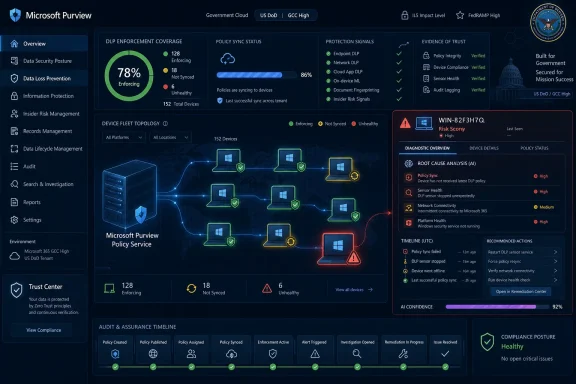
Microsoft plans to add an AI-powered investigation skill to Microsoft Purview Endpoint Data Loss Prevention in preview in July 2026 and general availability in August 2026, giving administrators a web-based way to detect and alert on unhealthy policy sync and device configuration states. The small roadmap entry says more than it appears to say. Microsoft is not merely adding another dashboard tile to Purview; it is acknowledging that DLP effectiveness increasingly depends on whether thousands of endpoints are actually healthy enough to enforce the policies security teams believe they have deployed. In endpoint security, the gap between “configured” and “working” is where incidents live.
Endpoint DLP has always carried an uncomfortable operational truth: the policy is only as real as the endpoint that receives it. A compliance admin can write an elegant rule to prevent sensitive files from being copied to USB storage, uploaded to unsanctioned cloud apps, or pasted into risky destinations, but that policy becomes theoretical if the device is offline, misconfigured, out of date, missing telemetry, or stuck behind a broken sync state.
That is why Roadmap ID 562016 matters. Microsoft describes the coming Purview capability as an AI agent skill that can detect and alert on unhealthy policy sync and device configuration. The release target is near-term rather than speculative: preview in July 2026, general availability in August 2026, for Microsoft Purview on the web in the Worldwide standard multi-tenant cloud.
The phrasing is important. Microsoft is not saying that Endpoint DLP will suddenly enforce more file controls. It is saying Purview will become better at noticing when the enforcement layer itself is unhealthy. That shifts attention from policy authoring to policy survivability.
For years, DLP products have sold themselves around classification depth, policy breadth, and incident review. The harder daily problem for administrators is less glamorous: proving that every managed endpoint has the right configuration, current policy version, current security components, and a usable user-device relationship. Microsoft’s new feature appears aimed directly at that dull but decisive layer of the stack.
Those values sound simple until an enterprise fleet makes them messy. A device can be onboarded but not reporting. It can be online but running a stale Defender component. It can be present in the portal but ineligible for reliable visibility. It can be newly onboarded, recently offline, or technically in scope while still failing to receive the controls that matter.
The most revealing part of Microsoft’s current troubleshooting guidance is not the existence of “Updated,” “Not updated,” and “Not available” states. It is the amount of manual interpretation still required after those states appear. Admins must filter device lists, inspect detail panes, follow workflow diagrams, check last-seen times, inspect Defender versions, and, at scale, turn to Advanced Hunting queries against device data.
That is tolerable for a pilot. It is much less tolerable for a regulated company with tens of thousands of Windows and macOS endpoints, many of them intermittently connected, shared, virtualized, remote, or rebuilt by automation. The larger the estate, the more “policy sync” stops being a status and becomes an operational risk register.
The promised AI skill therefore lands in a specific pain point. It suggests Microsoft wants Purview to do more of the first-pass triage that human administrators now perform by hand: identify unhealthy patterns, connect configuration symptoms to policy delivery risk, and raise alerts before a DLP incident reveals that protection was absent.
This roadmap item points to a more operational kind of AI. An “agent skill” for unhealthy policy sync and device configuration is not merely explaining an event after the fact. It is, at least in Microsoft’s framing, watching for conditions that make DLP unreliable in the first place.
That distinction matters. Compliance tooling has often been retrospective: show me what happened, show me which rule matched, show me who moved the file. Endpoint health is prospective: tell me which devices are about to fail the next policy update, tell me which endpoints cannot enforce the rule I just approved, tell me where the control plane has drifted away from the real machine.
If Microsoft gets this right, the value is not that an AI agent writes prettier explanations. The value is that it shortens the distance between a fleet health anomaly and a concrete remediation path. The admin should not need to discover, three days into an investigation, that the device had not successfully synced the latest policy in the first place.
The risk, naturally, is that “AI-powered investigation” becomes a decorative phrase over the same brittle signals. If the skill merely restates that a device is “Not updated” without prioritizing blast radius, likely cause, recent policy changes, and affected users, it will be another assistant-shaped panel in an already crowded portal. The test will be whether it reduces the number of tabs, exports, KQL queries, and support tickets required to answer a basic question: Are my DLP controls alive where they need to be alive?
That is the substrate an AI investigation skill needs. A model cannot usefully investigate endpoint DLP health unless the product is already collecting consistent device attributes and presenting them in a normalized way. Last seen time, last policy sync time, OS, Defender engine version, Defender client version, Endpoint DLP status, valid user state, and bandwidth-related classification limits are not exciting on their own. Together, they are the anatomy of DLP readiness.
Microsoft’s newer support for querying Endpoint DLP device attributes through Advanced Hunting is another clue. Once DLP health data is available through Defender’s hunting model, it can be used not only in dashboards but in correlation, reporting, automation, and security operations workflows. The AI skill announced in the roadmap looks like the next layer above that telemetry.
This is a familiar Microsoft pattern. First, a product exposes a status page. Then it makes the underlying data queryable. Then it adds guided troubleshooting. Finally, it wraps the path through the data in an AI-assisted experience. The feature is new, but the strategy is classic Microsoft: consolidate enough signals inside the Microsoft security cloud that the portal becomes the default place to diagnose the estate.
For administrators, that is both convenient and constraining. The convenience is obvious: fewer manual exports, fewer disconnected reports, and a better chance of seeing unhealthy devices before auditors or attackers do. The constraint is that the more Purview becomes the place where health is interpreted, the more customers must trust Microsoft’s model of what “healthy” means.
This is especially important because modern DLP is no longer limited to old-fashioned email attachments and file shares. Microsoft Purview DLP now sits in a world of cloud storage, Office apps, browsers, endpoints, generative AI prompts, third-party web destinations, and cross-service compliance alerts. The more places a policy is supposed to follow data, the more damaging it becomes when one enforcement point quietly falls behind.
Endpoint DLP is also where corporate policy meets human improvisation. Users copy files to removable media, drag documents into browsers, paste content into apps, work offline, switch networks, and use devices that may not have checked in recently. A cloud service can often be controlled centrally; an endpoint must be controlled through a chain of local components, identity state, telemetry, and sync.
That is why policy freshness matters. A DLP rule may be updated because a new sensitive information type was added, a group came into scope, a business process changed, or a risky destination was identified. If the endpoint does not receive that update promptly, the organization may believe it has closed a gap that remains open on the device.
The new AI skill appears designed to make that invisible gap louder. In compliance work, loud is often good. Silent failure is the enemy.
That puts pressure on Purview to be more than a compliance archive. If AI systems are going to reason over enterprise content, summarize communications, and act inside business workflows, then data security controls need to be measurable in near real time. A DLP policy that exists only as a configuration object is not enough.
Endpoint health is part of that AI governance story because sensitive data still escapes through ordinary device behavior. A user can save, copy, upload, paste, print, sync, or screen-capture information long before any grand AI agentic future arrives. The enterprise AI era does not reduce the importance of endpoint DLP; it raises the cost of getting it wrong.
Microsoft’s roadmap wording is therefore slightly recursive. AI is being used to investigate the health of controls that help govern data in an AI-heavy workplace. That may sound like marketing poetry, but there is a practical logic underneath it. As the number of policies, locations, device states, and user contexts grows, administrators need machine assistance to identify where enforcement is likely degraded.
Still, customers should keep their expectations grounded. AI does not magically fix stale endpoints. It does not guarantee a laptop comes online, Defender updates, a user maps cleanly to Entra ID, or a policy downloads successfully. The best version of this feature will identify risk faster and explain it better. Remediation will still require device management, security operations, user communication, and sometimes the old-fashioned act of getting a machine to check in.
For this feature to be useful, it must produce evidence-backed investigations rather than plausible explanations. It should distinguish between a device that is temporarily offline and a device that chronically fails sync. It should recognize whether a stale policy state coincides with a recent policy deployment, a Defender version issue, an onboarding problem, or a scope mismatch. It should surface the difference between an isolated endpoint and a pattern across a device group.
False positives will matter. If Purview begins alerting on every transient sync delay, admins will tune it out. If it waits until a device has been unhealthy for too long, the control has already failed. Microsoft will need to strike the same balance that every monitoring product faces: sensitive enough to be useful, quiet enough to be trusted.
The product also needs transparency. Administrators should be able to see the signals behind an AI-generated finding. A recommendation that says “investigate device configuration” is not enough. A recommendation that says a specific group of Windows devices has outdated Defender components, has not synced the latest DLP policy, and affects users in a high-risk policy scope is much closer to operational value.
That is the difference between AI as a narrator and AI as a junior analyst. Enterprises do not need the former. They might have room for the latter, if it leaves a clear audit trail.
Short windows like this usually mean the underlying telemetry and interface work are already substantially in place. The device health dashboard, troubleshooting guidance, and Advanced Hunting access all make the AI skill look less like a standalone invention and more like a packaging and workflow layer over existing Purview data.
That does not make it unimportant. In enterprise software, packaging is often the product. A capability that technically exists through exports, portals, and KQL queries is not the same as one that generates an alert and points an administrator toward the likely failure mode. The former is available to experts with time. The latter is available to teams under pressure.
For smaller IT teams, this could be particularly useful. Many organizations using Microsoft 365 E5 capabilities do not have a dedicated DLP engineering function. They have a security admin, a compliance lead, and a backlog. Anything that turns fleet health into prioritized investigations could make Endpoint DLP less of a set-and-forget checkbox and more of a living control.
For large enterprises, the question will be integration. They will want these findings to flow into existing incident queues, SIEM processes, Defender workflows, and ticketing systems. A pretty Purview alert that cannot be operationalized will have limited value. A health investigation that can become a repeatable remediation workflow is much more compelling.
For Windows administrators, the feature should be read as another signal that compliance and endpoint management are converging. The health of a DLP policy may depend on the same operational hygiene that affects vulnerability management, endpoint detection, inventory accuracy, and conditional access. If Defender is stale, if devices are not checking in, or if users are not mapped correctly, the issue is no longer confined to one security blade.
This convergence can be frustrating because it blurs ownership. Is a DLP sync failure a compliance problem, a Defender problem, an Intune problem, a network problem, or a user problem? In practice, it may be all of the above. An AI-powered investigation skill could help by making cross-domain symptoms easier to follow, but it could also expose organizational seams that tooling cannot heal.
The best administrators will treat the feature as a diagnostic accelerant, not a replacement for fleet discipline. Healthy DLP requires reliable onboarding, patching, telemetry, policy scoping, network reachability, and endpoint security baselines. AI can point to a cracked pipe. It cannot make the plumbing irrelevant.
There is also an audit angle. When regulators or internal risk committees ask whether controls are operating effectively, “we deployed a policy” is a weaker answer than “we monitor policy sync and device configuration health, alert on unhealthy states, and remediate exceptions.” Microsoft’s roadmap item nudges customers toward the second answer.
A useful alert should be scoped, timely, and actionable. It should not merely say that endpoint DLP health is degraded. It should identify the affected devices, the relevant policy state, the suspected cause, and the urgency. Ideally, it should indicate whether sensitive data activity has recently occurred on those devices, whether high-priority users are affected, and whether the condition prevents future policy updates or current enforcement.
A poor alert will be generic. It will add another red badge to a portal already full of them. It will force admins to click through the same device pages, run the same hunting queries, and open the same support cases they would have opened without AI. That outcome would validate the skeptics who see “agent” as a licensing adjective rather than an operational breakthrough.
Microsoft has the raw ingredients to do better. It already knows device onboarding state, policy sync state, configuration state, last seen time, operating system, Defender versions, and other DLP-specific attributes. It also operates the surrounding ecosystem in which many of those failures are caused or fixed. Few vendors have a more complete view of the Microsoft endpoint compliance chain.
The question is whether Microsoft will expose enough of that reasoning to satisfy administrators. Black-box confidence scores will not cut it in compliance. If a finding may drive remediation work across hundreds of devices, the team needs to understand the basis for the recommendation.
Endpoint DLP health is a particularly thankless responsibility because success is invisible. When policies sync correctly, nobody notices. When they fail, the failure may only surface after sensitive data is moved somewhere it should not have gone. The admin then has to reconstruct whether the rule was wrong, the device was wrong, or the expectation was wrong.
An AI-powered investigation skill could make that work less forensic and more preventative. Instead of waiting for a suspicious activity to expose a weak endpoint, Purview could flag that the endpoint’s DLP posture is already suspect. That is a better operating model.
The feature may also reduce the knowledge burden for teams that are new to Purview. Microsoft’s compliance stack is powerful, but it is sprawling. Knowing where to look for device health, policy status, onboarding status, diagnostic workflows, and hunting data requires experience. A guided investigation can encode some of that experience into the product.
That does not eliminate the need for expertise. It changes where expertise is applied. Instead of spending time finding the right page, admins can spend time deciding whether Microsoft’s diagnosis is correct and what remediation path fits their environment.
Microsoft’s AI-powered investigation skill for Endpoint DLP is not the kind of roadmap item that will dominate a keynote, but it may matter more to administrators than another flashy Copilot demo. The future of enterprise data protection will be judged not by how many policies a portal can define, but by how quickly it can tell the truth about where those policies are failing. If Purview can make unhealthy endpoint DLP states visible before they become incidents, Microsoft will have turned a quiet operational weakness into something security teams can finally manage.
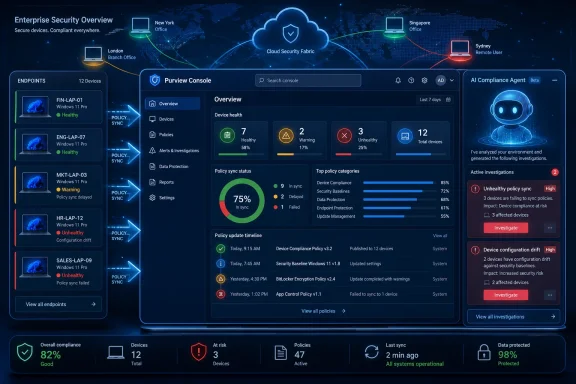 Microsoft Is Turning DLP Health Into an Investigation Problem
Endpoint DLP has always carried an uncomfortable operational truth: the policy is only as real as the endpoint that receives it. A compliance admin can write an elegant rule to prevent sensitive files from being copied to USB storage, uploaded to unsanctioned cloud apps, or pasted into risky destinations, but that policy becomes theoretical if the device is offline, misconfigured, out of date, missing telemetry, or stuck behind a broken sync state.That is why Roadmap ID 562016 matters. Microsoft describes the coming Purview capability as an AI agent skill that can detect and alert on unhealthy policy sync and device configuration. The release target is near-term rather than speculative: preview in July 2026, general availability in August 2026, for Microsoft Purview on the web in the Worldwide standard multi-tenant cloud.
The phrasing is important. Microsoft is not saying that Endpoint DLP will suddenly enforce more file controls. It is saying Purview will become better at noticing when the enforcement layer itself is unhealthy. That shifts attention from policy authoring to policy survivability.
For years, DLP products have sold themselves around classification depth, policy breadth, and incident review. The harder daily problem for administrators is less glamorous: proving that every managed endpoint has the right configuration, current policy version, current security components, and a usable user-device relationship. Microsoft’s new feature appears aimed directly at that dull but decisive layer of the stack.
The Weakest DLP Policy Is the One That Never Arrives
Microsoft’s existing Purview documentation already treats configuration status and policy sync status as first-class health signals. Configuration status tells administrators whether a device is correctly set up, sending the expected heartbeat, and meeting required security conditions. Policy sync status tells them whether the device has received the current DLP policy version.Those values sound simple until an enterprise fleet makes them messy. A device can be onboarded but not reporting. It can be online but running a stale Defender component. It can be present in the portal but ineligible for reliable visibility. It can be newly onboarded, recently offline, or technically in scope while still failing to receive the controls that matter.
The most revealing part of Microsoft’s current troubleshooting guidance is not the existence of “Updated,” “Not updated,” and “Not available” states. It is the amount of manual interpretation still required after those states appear. Admins must filter device lists, inspect detail panes, follow workflow diagrams, check last-seen times, inspect Defender versions, and, at scale, turn to Advanced Hunting queries against device data.
That is tolerable for a pilot. It is much less tolerable for a regulated company with tens of thousands of Windows and macOS endpoints, many of them intermittently connected, shared, virtualized, remote, or rebuilt by automation. The larger the estate, the more “policy sync” stops being a status and becomes an operational risk register.
The promised AI skill therefore lands in a specific pain point. It suggests Microsoft wants Purview to do more of the first-pass triage that human administrators now perform by hand: identify unhealthy patterns, connect configuration symptoms to policy delivery risk, and raise alerts before a DLP incident reveals that protection was absent.
Purview’s AI Push Is Moving From Summaries to Operations
Microsoft has spent the past few years putting Copilot branding and AI-assisted summarization into security and compliance workflows. Alert summarization is useful, but it does not fundamentally change who owns the next step. A summarized alert still leaves a human analyst to decide whether the environment is misconfigured, the rule is wrong, or the device is broken.This roadmap item points to a more operational kind of AI. An “agent skill” for unhealthy policy sync and device configuration is not merely explaining an event after the fact. It is, at least in Microsoft’s framing, watching for conditions that make DLP unreliable in the first place.
That distinction matters. Compliance tooling has often been retrospective: show me what happened, show me which rule matched, show me who moved the file. Endpoint health is prospective: tell me which devices are about to fail the next policy update, tell me which endpoints cannot enforce the rule I just approved, tell me where the control plane has drifted away from the real machine.
If Microsoft gets this right, the value is not that an AI agent writes prettier explanations. The value is that it shortens the distance between a fleet health anomaly and a concrete remediation path. The admin should not need to discover, three days into an investigation, that the device had not successfully synced the latest policy in the first place.
The risk, naturally, is that “AI-powered investigation” becomes a decorative phrase over the same brittle signals. If the skill merely restates that a device is “Not updated” without prioritizing blast radius, likely cause, recent policy changes, and affected users, it will be another assistant-shaped panel in an already crowded portal. The test will be whether it reduces the number of tabs, exports, KQL queries, and support tickets required to answer a basic question: Are my DLP controls alive where they need to be alive?
The Device Health Dashboard Was the Prelude
The roadmap entry also fits into a broader June 2026 Purview pattern. Microsoft has already been adding device health reporting for Endpoint DLP, including centralized views for onboarding status, policy update readiness, and feature readiness. That dashboard is designed to show devices that may not be ready to receive or enforce policies because of configuration, connectivity, or version problems.That is the substrate an AI investigation skill needs. A model cannot usefully investigate endpoint DLP health unless the product is already collecting consistent device attributes and presenting them in a normalized way. Last seen time, last policy sync time, OS, Defender engine version, Defender client version, Endpoint DLP status, valid user state, and bandwidth-related classification limits are not exciting on their own. Together, they are the anatomy of DLP readiness.
Microsoft’s newer support for querying Endpoint DLP device attributes through Advanced Hunting is another clue. Once DLP health data is available through Defender’s hunting model, it can be used not only in dashboards but in correlation, reporting, automation, and security operations workflows. The AI skill announced in the roadmap looks like the next layer above that telemetry.
This is a familiar Microsoft pattern. First, a product exposes a status page. Then it makes the underlying data queryable. Then it adds guided troubleshooting. Finally, it wraps the path through the data in an AI-assisted experience. The feature is new, but the strategy is classic Microsoft: consolidate enough signals inside the Microsoft security cloud that the portal becomes the default place to diagnose the estate.
For administrators, that is both convenient and constraining. The convenience is obvious: fewer manual exports, fewer disconnected reports, and a better chance of seeing unhealthy devices before auditors or attackers do. The constraint is that the more Purview becomes the place where health is interpreted, the more customers must trust Microsoft’s model of what “healthy” means.
Endpoint DLP Is Now an Availability Control
Security teams tend to think of DLP as a data protection control. That is true, but endpoint DLP is also an availability problem. A rule that cannot reach the device is unavailable. A device whose configuration prevents enforcement is unavailable. A dashboard that shows “Not available” for the wrong machine at the wrong time is not a cosmetic issue; it is a control failure.This is especially important because modern DLP is no longer limited to old-fashioned email attachments and file shares. Microsoft Purview DLP now sits in a world of cloud storage, Office apps, browsers, endpoints, generative AI prompts, third-party web destinations, and cross-service compliance alerts. The more places a policy is supposed to follow data, the more damaging it becomes when one enforcement point quietly falls behind.
Endpoint DLP is also where corporate policy meets human improvisation. Users copy files to removable media, drag documents into browsers, paste content into apps, work offline, switch networks, and use devices that may not have checked in recently. A cloud service can often be controlled centrally; an endpoint must be controlled through a chain of local components, identity state, telemetry, and sync.
That is why policy freshness matters. A DLP rule may be updated because a new sensitive information type was added, a group came into scope, a business process changed, or a risky destination was identified. If the endpoint does not receive that update promptly, the organization may believe it has closed a gap that remains open on the device.
The new AI skill appears designed to make that invisible gap louder. In compliance work, loud is often good. Silent failure is the enemy.
The Feature Also Reveals Microsoft’s Governance Anxiety Around AI
There is another layer here: Microsoft is selling AI into the enterprise while also selling the controls meant to make enterprise AI safe. Purview has become central to that pitch. Data classification, sensitivity labels, audit logs, DLP, insider risk, eDiscovery, and compliance workflows all serve as the scaffolding around Copilot and related services.That puts pressure on Purview to be more than a compliance archive. If AI systems are going to reason over enterprise content, summarize communications, and act inside business workflows, then data security controls need to be measurable in near real time. A DLP policy that exists only as a configuration object is not enough.
Endpoint health is part of that AI governance story because sensitive data still escapes through ordinary device behavior. A user can save, copy, upload, paste, print, sync, or screen-capture information long before any grand AI agentic future arrives. The enterprise AI era does not reduce the importance of endpoint DLP; it raises the cost of getting it wrong.
Microsoft’s roadmap wording is therefore slightly recursive. AI is being used to investigate the health of controls that help govern data in an AI-heavy workplace. That may sound like marketing poetry, but there is a practical logic underneath it. As the number of policies, locations, device states, and user contexts grows, administrators need machine assistance to identify where enforcement is likely degraded.
Still, customers should keep their expectations grounded. AI does not magically fix stale endpoints. It does not guarantee a laptop comes online, Defender updates, a user maps cleanly to Entra ID, or a policy downloads successfully. The best version of this feature will identify risk faster and explain it better. Remediation will still require device management, security operations, user communication, and sometimes the old-fashioned act of getting a machine to check in.
Admins Will Want Precision, Not Vibes
The word “AI” can make IT pros suspicious for good reason. In operational tooling, a confident but vague assistant is worse than a boring table. If a device is unhealthy, administrators need to know why, how many devices share the condition, what changed, which policies are affected, and whether the problem is new, worsening, or already being remediated.For this feature to be useful, it must produce evidence-backed investigations rather than plausible explanations. It should distinguish between a device that is temporarily offline and a device that chronically fails sync. It should recognize whether a stale policy state coincides with a recent policy deployment, a Defender version issue, an onboarding problem, or a scope mismatch. It should surface the difference between an isolated endpoint and a pattern across a device group.
False positives will matter. If Purview begins alerting on every transient sync delay, admins will tune it out. If it waits until a device has been unhealthy for too long, the control has already failed. Microsoft will need to strike the same balance that every monitoring product faces: sensitive enough to be useful, quiet enough to be trusted.
The product also needs transparency. Administrators should be able to see the signals behind an AI-generated finding. A recommendation that says “investigate device configuration” is not enough. A recommendation that says a specific group of Windows devices has outdated Defender components, has not synced the latest DLP policy, and affects users in a high-risk policy scope is much closer to operational value.
That is the difference between AI as a narrator and AI as a junior analyst. Enterprises do not need the former. They might have room for the latter, if it leaves a clear audit trail.
The Timing Suggests a Summer of Purview Plumbing
The dates are unusually close. The roadmap item was created on May 12, 2026, last updated on June 22, 2026, and lists preview for July 2026 with general availability in August 2026. That is not a far-off vision statement. It is a near-release feature being pushed into Microsoft’s commercial cloud pipeline.Short windows like this usually mean the underlying telemetry and interface work are already substantially in place. The device health dashboard, troubleshooting guidance, and Advanced Hunting access all make the AI skill look less like a standalone invention and more like a packaging and workflow layer over existing Purview data.
That does not make it unimportant. In enterprise software, packaging is often the product. A capability that technically exists through exports, portals, and KQL queries is not the same as one that generates an alert and points an administrator toward the likely failure mode. The former is available to experts with time. The latter is available to teams under pressure.
For smaller IT teams, this could be particularly useful. Many organizations using Microsoft 365 E5 capabilities do not have a dedicated DLP engineering function. They have a security admin, a compliance lead, and a backlog. Anything that turns fleet health into prioritized investigations could make Endpoint DLP less of a set-and-forget checkbox and more of a living control.
For large enterprises, the question will be integration. They will want these findings to flow into existing incident queues, SIEM processes, Defender workflows, and ticketing systems. A pretty Purview alert that cannot be operationalized will have limited value. A health investigation that can become a repeatable remediation workflow is much more compelling.
Windows Fleets Are the Center of Gravity, Even When Purview Says “Endpoint”
Microsoft Purview Endpoint DLP supports Windows and macOS scenarios, but Windows remains the natural center of gravity for many Microsoft-centric enterprises. The dependency chain often runs through Microsoft Defender for Endpoint, Defender Antivirus settings, Entra identity, Intune management, and the Microsoft Purview portal. That makes WindowsForum.com’s audience unusually close to the real-world impact.For Windows administrators, the feature should be read as another signal that compliance and endpoint management are converging. The health of a DLP policy may depend on the same operational hygiene that affects vulnerability management, endpoint detection, inventory accuracy, and conditional access. If Defender is stale, if devices are not checking in, or if users are not mapped correctly, the issue is no longer confined to one security blade.
This convergence can be frustrating because it blurs ownership. Is a DLP sync failure a compliance problem, a Defender problem, an Intune problem, a network problem, or a user problem? In practice, it may be all of the above. An AI-powered investigation skill could help by making cross-domain symptoms easier to follow, but it could also expose organizational seams that tooling cannot heal.
The best administrators will treat the feature as a diagnostic accelerant, not a replacement for fleet discipline. Healthy DLP requires reliable onboarding, patching, telemetry, policy scoping, network reachability, and endpoint security baselines. AI can point to a cracked pipe. It cannot make the plumbing irrelevant.
There is also an audit angle. When regulators or internal risk committees ask whether controls are operating effectively, “we deployed a policy” is a weaker answer than “we monitor policy sync and device configuration health, alert on unhealthy states, and remediate exceptions.” Microsoft’s roadmap item nudges customers toward the second answer.
The Security Promise Depends on the Quality of the Alert
The most consequential unknown is what Microsoft means by “detect and alert.” Detection alone is table stakes. Alerting is where product design becomes painful.A useful alert should be scoped, timely, and actionable. It should not merely say that endpoint DLP health is degraded. It should identify the affected devices, the relevant policy state, the suspected cause, and the urgency. Ideally, it should indicate whether sensitive data activity has recently occurred on those devices, whether high-priority users are affected, and whether the condition prevents future policy updates or current enforcement.
A poor alert will be generic. It will add another red badge to a portal already full of them. It will force admins to click through the same device pages, run the same hunting queries, and open the same support cases they would have opened without AI. That outcome would validate the skeptics who see “agent” as a licensing adjective rather than an operational breakthrough.
Microsoft has the raw ingredients to do better. It already knows device onboarding state, policy sync state, configuration state, last seen time, operating system, Defender versions, and other DLP-specific attributes. It also operates the surrounding ecosystem in which many of those failures are caused or fixed. Few vendors have a more complete view of the Microsoft endpoint compliance chain.
The question is whether Microsoft will expose enough of that reasoning to satisfy administrators. Black-box confidence scores will not cut it in compliance. If a finding may drive remediation work across hundreds of devices, the team needs to understand the basis for the recommendation.
The Real Customer Is the Overloaded Compliance Admin
Much of Microsoft’s security marketing speaks to CISOs and platform buyers, but this feature is aimed at the person who lives in the portal. That person is often juggling policy requests from legal, exceptions from business units, incident reviews from security operations, and complaints from users who just want to move a file.Endpoint DLP health is a particularly thankless responsibility because success is invisible. When policies sync correctly, nobody notices. When they fail, the failure may only surface after sensitive data is moved somewhere it should not have gone. The admin then has to reconstruct whether the rule was wrong, the device was wrong, or the expectation was wrong.
An AI-powered investigation skill could make that work less forensic and more preventative. Instead of waiting for a suspicious activity to expose a weak endpoint, Purview could flag that the endpoint’s DLP posture is already suspect. That is a better operating model.
The feature may also reduce the knowledge burden for teams that are new to Purview. Microsoft’s compliance stack is powerful, but it is sprawling. Knowing where to look for device health, policy status, onboarding status, diagnostic workflows, and hunting data requires experience. A guided investigation can encode some of that experience into the product.
That does not eliminate the need for expertise. It changes where expertise is applied. Instead of spending time finding the right page, admins can spend time deciding whether Microsoft’s diagnosis is correct and what remediation path fits their environment.
The Summer Roadmap Entry IT Should Not Sleep On
The immediate news is straightforward, but the operational implications are broader than the roadmap text suggests.- Microsoft plans to bring the Purview Endpoint DLP AI investigation skill to preview in July 2026 and general availability in August 2026.
- The feature is designed to detect and alert on unhealthy policy sync and device configuration conditions for Endpoint DLP.
- The capability appears to build on Microsoft’s recent work around Endpoint DLP device health reporting, policy update readiness, and Advanced Hunting access to device attributes.
- Administrators should evaluate the feature by the quality of its evidence, prioritization, and remediation guidance, not by the presence of AI branding.
- The practical value will be highest in environments where DLP policy coverage is assumed but endpoint sync and configuration health are not continuously monitored.
- Windows fleet hygiene remains central, because DLP reliability depends on endpoint onboarding, Defender health, identity state, telemetry, and timely policy delivery.
Microsoft’s AI-powered investigation skill for Endpoint DLP is not the kind of roadmap item that will dominate a keynote, but it may matter more to administrators than another flashy Copilot demo. The future of enterprise data protection will be judged not by how many policies a portal can define, but by how quickly it can tell the truth about where those policies are failing. If Purview can make unhealthy endpoint DLP states visible before they become incidents, Microsoft will have turned a quiet operational weakness into something security teams can finally manage.
References
- Primary source: Microsoft 365 Roadmap
Published: 2026-06-22T23:00:47.0315291Z
Microsoft 365 Roadmap | Microsoft 365
The Microsoft 365 Roadmap lists updates that are currently planned for applicable subscribers. Check here for more information on the status of new features and updates.www.microsoft.com
- Official source: learn.microsoft.com
Monitor Endpoint DLP Device Health in Microsoft Purview | Microsoft Learn
Use the Microsoft Purview device health reports dashboard to monitor device onboarding status, policy update readiness, and feature readiness for Endpoint DLP.learn.microsoft.com - Official source: techcommunity.microsoft.com
Troubleshoot and Manage Microsoft Purview Data Loss Prevention for your Endpoint Devices | Microsoft Community Hub
Welcome to our guide for managing Microsoft Purview Endpoint DLP effectively. Get detailed instructions for troubleshooting and self-remediation. techcommunity.microsoft.com
- Official source: cdn-dynmedia-1.microsoft.com
- Official source: download.microsoft.com
- Official source: wwps.microsoft.com