

Google Chrome before version 149.0.7827.103 contains CVE-2026-11678, a high-severity integer overflow in the libyuv image-processing library disclosed on June 8, 2026, that can let an attacker who already compromised Chrome’s renderer read potentially sensitive process memory through a crafted HTML page. The bug is not the loudest Chrome flaw of the week, and that is exactly why it deserves attention. Modern browser risk is increasingly less about a single spectacular exploit and more about how small memory-safety cracks become useful links in longer attack chains. For Windows users and administrators, the practical answer is simple: get Chrome, Edge, and any Chromium-derived browser past the vulnerable build line, then verify that your patch tooling actually sees the browser, not just Windows Update.
CVE-2026-11678 is not described as a one-click remote code execution flaw. The public wording is narrower: an integer overflow in libyuv, reachable through a crafted HTML page, after the attacker has already compromised the renderer process. That conditional clause matters because Chrome’s security model assumes hostile web content can reach the renderer but should not be able to leap freely into other privileges or read arbitrary sensitive memory.
That framing also makes the vulnerability easy to underestimate. A bug that requires a compromised renderer sounds like a post-exploitation detail, not an emergency. But in browser exploitation, “requires renderer compromise” often means “useful after the first stage works.” Attackers do not need every vulnerability in a chain to be independently catastrophic; they need the chain to move from web content to information disclosure, from disclosure to exploit reliability, and from reliability to persistence or escape.
The public CVSS data reflects that tension. CISA’s ADP scoring places the bug at 5.3 medium under CVSS 3.1, while Chromium labels the security severity high. That is not necessarily a contradiction. CVSS is a generic scoring framework; Chrome’s internal severity is informed by how the flaw fits into browser architecture, exploit chaining, and the cost of leaking memory from a process that was supposed to be contained.
That kind of code is performance-sensitive and routinely processes untrusted data. It also lives close to raw buffers, dimensions, strides, and arithmetic that can go wrong when a malicious input makes a value larger than the programmer expected. An integer overflow is the classic failure mode: a calculation exceeds the maximum size of the integer type, wraps around, and causes later code to allocate, copy, or index memory under a false assumption.
This is why image, font, media, and compression libraries remain recurring security trouble spots. They are not glamorous, but they are ubiquitous. They handle complicated formats from the open internet, and they are often shared across many products. A flaw in a third-party library can therefore become a browser vulnerability, an Electron vulnerability, a communication-app vulnerability, and a Linux distribution headache all at once.
The NVD entry’s weakness mapping to CWE-472, external control of an assumed-immutable web parameter, is also worth treating cautiously. The description of the bug is clearly about an integer overflow in libyuv. NVD and CNA metadata occasionally lag behind or classify imperfectly, especially in the first days after publication. For defenders, the actionable fact is not the CWE label; it is the affected component, the vulnerable version boundary, and the update path.
Address Space Layout Randomization, pointer authentication on some platforms, heap hardening, sandboxing, site isolation, and compiler defenses all raise the cost of exploitation. They also create a demand for reliable leaks. If an attacker can read useful process memory, they may be able to recover addresses, tokens, fragments of cross-origin data, or other clues that turn a fragile crash into a controlled exploit.
The official description says “potentially sensitive information from process memory,” not “arbitrary system memory.” That distinction should stay intact. This is a Chrome process memory issue, not evidence that a web page can dump your whole PC. But browser processes routinely contain things users care about: page content, session state, credentials in transit through web forms, authentication artifacts, or data from other active browser features depending on isolation boundaries and timing.
The renderer requirement also implies the bug is not the front door. An attacker needs a separate path to compromise or control renderer behavior, then uses CVE-2026-11678 to read memory. That makes patching even more important, not less, because defenders rarely know which chain an adversary has assembled until after the public advisory becomes yesterday’s news.
That is how patch backlogs form. Security teams triage the exploited zero-day, push emergency updates to the obvious endpoints, and then miss adjacent Chromium fixes in unmanaged browsers, developer machines, virtual desktop images, golden images, kiosks, lab systems, or third-party apps carrying embedded Chromium. The result is a browser estate that looks mostly current from the helpdesk dashboard but still contains pockets of vulnerable code.
The version numbers add another wrinkle. Google’s advisory line for this update used 149.0.7827.102 and 149.0.7827.103 depending on platform, while CVE-2026-11678’s public description names Chrome prior to 149.0.7827.103. In practice, administrators should not play version-number lawyer. If your browser is below the fixed build for its channel and platform, update it. If your fleet has moved beyond that release, verify it actually installed and relaunched.
Chrome’s auto-update system is good, but it is not magic. A browser that has downloaded an update but has not restarted may still be running vulnerable code. A user who keeps dozens of tabs open for weeks can remain exposed longer than the patch dashboard implies. Managed environments should treat browser restart compliance as part of the patch, not an optional courtesy.
Microsoft Edge follows Chromium closely but uses its own version numbering. That means administrators cannot simply compare Edge to Chrome’s 149.0.7827.103 and call it done. They need to check Microsoft’s Edge Stable security release notes, the installed Edge version, and any WebView2 runtime versions that line-of-business applications depend on. The vulnerable code path may be in a shared upstream component even when the product branding changes.
The same applies beyond Microsoft. Brave, Vivaldi, Opera, Electron-based applications, collaboration tools, remote-support utilities, and developer IDEs can all carry Chromium pieces or related media libraries. Not every downstream product is automatically vulnerable in the same way, because exploitability depends on build configuration and exposure. But the only safe operational assumption is that upstream Chromium security fixes should trigger a review of downstream consumers.
For home users, this reduces to a simpler rule: update every browser you actually have installed, not just the one pinned to your taskbar. For administrators, it becomes an inventory problem. If your software asset management cannot answer which Chromium-based applications are present and which update channel they follow, the CVE is exposing a governance gap as much as a memory-safety bug.
This is where vulnerability databases are useful but not authoritative in the way vendors are. NVD enrichment is a downstream process that normalizes public information into machine-readable fields. Those fields can be incomplete, delayed, or awkwardly modeled when a vulnerability crosses application, library, and operating-system boundaries. CPE is good at naming products; it is less elegant at describing shared components embedded into many products with different update pipelines.
In this case, the concrete boundary is clear enough: Google Chrome versions before the fixed 149 desktop build are affected. The library named in the description is libyuv. The attack surface is a crafted HTML page, but the attacker needs renderer compromise first. Everything else in the metadata should be treated as helpful context, not a substitute for vendor advisories and observed installed versions.
That matters for scanners. A vulnerability scanner may flag Chrome based on CPE, a Linux package based on libyuv, or an application bundle based on heuristics. Another scanner may miss the embedded copy entirely. Security teams should expect inconsistent results for a few days and reconcile them against installed software evidence, especially on developer workstations where bundled runtimes multiply quickly.
Both views have value. CVSS helps compare vulnerabilities across a giant enterprise estate. Product severity helps explain why a bug matters inside a specific architecture. The mistake is pretending one cancels the other.
For patch teams, the right response is not to declare an all-hands emergency solely for CVE-2026-11678. It is to fold the fix into the already-urgent Chrome 149 security rollout, verify restart completion, and include Chromium-based siblings in the same campaign. The fact that another Chrome flaw in the same release was reportedly exploited in the wild further lowers the threshold for quick action.
For risk communicators, the wording should be precise. Do not tell users that this CVE alone lets any website take over Windows. Do tell them that outdated browsers can expose memory and that browser flaws are often chained. Accuracy builds compliance better than exaggeration, especially with users already fatigued by weekly update prompts.
When a CVE says an attacker who has compromised the renderer can read process memory, it is describing a post-sandbox-boundary posture inside one compartment, not a full browser escape. But compartments are not irrelevant. Reading memory inside the renderer can still undermine same-origin assumptions, reveal secrets used by the page, or assist exploitation of additional bugs.
This is also why site isolation and modern browser hardening matter. If sensitive content is split across processes, an information leak in one renderer may have less reach than it would have had a decade ago. But the protection is not absolute, and the attack surface is not static. Features like video conferencing, WebRTC, GPU acceleration, WebCodecs, screen sharing, and increasingly rich web applications keep pushing complex media paths into security-sensitive territory.
The lesson is not that sandboxing failed. It is that sandboxing changes the economics of exploitation. Attackers must chain more pieces together; defenders must patch the pieces before the chain becomes reliable.
The most common failure is assuming installation equals remediation. For browsers, the running process matters. Chrome and Edge can download new binaries in the background, but the old executable remains alive until the browser relaunches. If the user’s session survives for days, so can the vulnerable code.
Another failure is treating Edge as “covered by Windows Update” in the same mental bucket as cumulative updates. Edge has its own update mechanism, enterprise policies, and release notes. WebView2 also has its own runtime story, with evergreen and fixed-version deployments behaving differently. An organization that has standardized on Microsoft’s browser stack still needs browser-specific patch monitoring.
The third failure is ignoring non-standard endpoints. Build agents, RPA machines, conference-room PCs, call-center thin clients, kiosk browsers, and jump boxes often have unusual uptime patterns and user interaction models. Those are exactly the places where browser updates can lag because nobody thinks of them as browsers first. Attackers do not care what the asset owner calls the machine.
Many desktop applications now ship with embedded browser engines or media processing libraries because users expect web-native UI, video previews, camera support, and rich rendering everywhere. That convenience creates a patch responsibility. If an application bundles a Chromium runtime or a fixed copy of a media library, the OS package manager may not save it.
This is especially relevant for Electron applications and internal enterprise tools. A company may patch Chrome on every endpoint and still run an internal dashboard app with an older embedded Chromium build. Whether CVE-2026-11678 specifically applies depends on that app’s code and library version, but the pattern is unmistakable. Embedded web technology turns application owners into browser distributors, whether they planned for it or not.
Security teams should make this a standing question during software intake: how does the vendor ship Chromium and media-library security updates? If the answer is vague, the risk is not hypothetical. It is the predictable cost of modern app packaging.
For Windows administrators, the practical playbook is familiar. Query installed Chrome versions. Query Edge versions separately. Check WebView2 runtime deployments. Confirm that update policies are not pinning stable channels behind the fixed release. Force or strongly prompt browser restarts where needed. Then audit the long tail of software that bundles Chromium.
The user-facing communication should be short and honest. Users do not need a lecture on integer overflow. They need to know that keeping the browser open indefinitely can leave them exposed even after an update downloads. They also need to know that the blue, red, purple, or lion-themed browser they rarely open still counts if it is installed.
Security teams should also resist the urge to wait for perfect NVD enrichment. The NVD record was published on June 8 and modified on June 9; the analysis fields can evolve. Waiting for every scanner, CPE mapping, and third-party advisory to converge is how a fast browser patch becomes a slow enterprise patch.
 The Quiet Chrome Bug Is the One That Explains the Browser Threat Model
CVE-2026-11678 is not described as a one-click remote code execution flaw. The public wording is narrower: an integer overflow in libyuv, reachable through a crafted HTML page, after the attacker has already compromised the renderer process. That conditional clause matters because Chrome’s security model assumes hostile web content can reach the renderer but should not be able to leap freely into other privileges or read arbitrary sensitive memory.That framing also makes the vulnerability easy to underestimate. A bug that requires a compromised renderer sounds like a post-exploitation detail, not an emergency. But in browser exploitation, “requires renderer compromise” often means “useful after the first stage works.” Attackers do not need every vulnerability in a chain to be independently catastrophic; they need the chain to move from web content to information disclosure, from disclosure to exploit reliability, and from reliability to persistence or escape.
The public CVSS data reflects that tension. CISA’s ADP scoring places the bug at 5.3 medium under CVSS 3.1, while Chromium labels the security severity high. That is not necessarily a contradiction. CVSS is a generic scoring framework; Chrome’s internal severity is informed by how the flaw fits into browser architecture, exploit chaining, and the cost of leaking memory from a process that was supposed to be contained.
libyuv Sits in the Unfashionable Part of the Web Stack
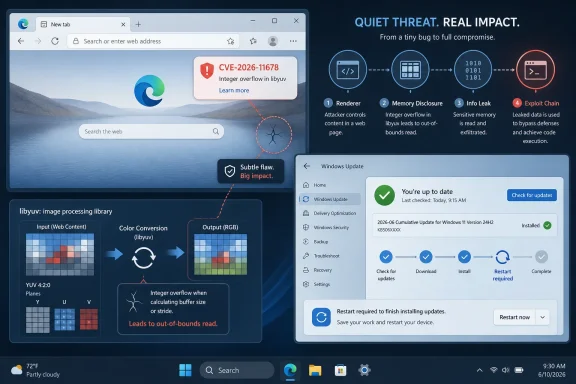
The component at the center of the bug, libyuv, is not a household browser name like V8, Blink, or Skia. It is a library used for image and video color-space conversion, scaling, rotation, and related pixel-format work. In plain English, it helps browsers and other applications move image data between formats fast enough for webcams, video conferencing, screen capture, and media-heavy web apps to feel instantaneous.That kind of code is performance-sensitive and routinely processes untrusted data. It also lives close to raw buffers, dimensions, strides, and arithmetic that can go wrong when a malicious input makes a value larger than the programmer expected. An integer overflow is the classic failure mode: a calculation exceeds the maximum size of the integer type, wraps around, and causes later code to allocate, copy, or index memory under a false assumption.
This is why image, font, media, and compression libraries remain recurring security trouble spots. They are not glamorous, but they are ubiquitous. They handle complicated formats from the open internet, and they are often shared across many products. A flaw in a third-party library can therefore become a browser vulnerability, an Electron vulnerability, a communication-app vulnerability, and a Linux distribution headache all at once.
The NVD entry’s weakness mapping to CWE-472, external control of an assumed-immutable web parameter, is also worth treating cautiously. The description of the bug is clearly about an integer overflow in libyuv. NVD and CNA metadata occasionally lag behind or classify imperfectly, especially in the first days after publication. For defenders, the actionable fact is not the CWE label; it is the affected component, the vulnerable version boundary, and the update path.
This Is an Information Leak, and Information Leaks Still Win Attacks
Memory disclosure bugs tend to get less attention than remote code execution bugs because they sound passive. A read primitive is not as dramatic as shellcode. But browser exploit chains often need exactly this kind of primitive to defeat modern mitigations.Address Space Layout Randomization, pointer authentication on some platforms, heap hardening, sandboxing, site isolation, and compiler defenses all raise the cost of exploitation. They also create a demand for reliable leaks. If an attacker can read useful process memory, they may be able to recover addresses, tokens, fragments of cross-origin data, or other clues that turn a fragile crash into a controlled exploit.
The official description says “potentially sensitive information from process memory,” not “arbitrary system memory.” That distinction should stay intact. This is a Chrome process memory issue, not evidence that a web page can dump your whole PC. But browser processes routinely contain things users care about: page content, session state, credentials in transit through web forms, authentication artifacts, or data from other active browser features depending on isolation boundaries and timing.
The renderer requirement also implies the bug is not the front door. An attacker needs a separate path to compromise or control renderer behavior, then uses CVE-2026-11678 to read memory. That makes patching even more important, not less, because defenders rarely know which chain an adversary has assembled until after the public advisory becomes yesterday’s news.
Chrome 149’s Patch Week Was Bigger Than One CVE
CVE-2026-11678 landed during a crowded Chrome security cycle. Google’s June 2026 desktop stable update around the 149 branch addressed numerous vulnerabilities, and public reporting focused heavily on CVE-2026-11645, a V8 flaw that Google said had an exploit in the wild. That zero-day deserves the attention, but it also risks turning every other fixed bug into background noise.That is how patch backlogs form. Security teams triage the exploited zero-day, push emergency updates to the obvious endpoints, and then miss adjacent Chromium fixes in unmanaged browsers, developer machines, virtual desktop images, golden images, kiosks, lab systems, or third-party apps carrying embedded Chromium. The result is a browser estate that looks mostly current from the helpdesk dashboard but still contains pockets of vulnerable code.
The version numbers add another wrinkle. Google’s advisory line for this update used 149.0.7827.102 and 149.0.7827.103 depending on platform, while CVE-2026-11678’s public description names Chrome prior to 149.0.7827.103. In practice, administrators should not play version-number lawyer. If your browser is below the fixed build for its channel and platform, update it. If your fleet has moved beyond that release, verify it actually installed and relaunched.
Chrome’s auto-update system is good, but it is not magic. A browser that has downloaded an update but has not restarted may still be running vulnerable code. A user who keeps dozens of tabs open for weeks can remain exposed longer than the patch dashboard implies. Managed environments should treat browser restart compliance as part of the patch, not an optional courtesy.
Windows Shops Cannot Pretend This Is Only a Google Problem
WindowsForum readers know the awkward truth: on Windows, “the browser” is rarely just one browser. Chrome may be the standard for some users, Edge is present by default, WebView2 underpins a growing list of desktop applications, and many enterprise tools quietly embed Chromium-derived components. A Chrome CVE is therefore often a Chromium supply-chain event wearing a Google label.Microsoft Edge follows Chromium closely but uses its own version numbering. That means administrators cannot simply compare Edge to Chrome’s 149.0.7827.103 and call it done. They need to check Microsoft’s Edge Stable security release notes, the installed Edge version, and any WebView2 runtime versions that line-of-business applications depend on. The vulnerable code path may be in a shared upstream component even when the product branding changes.
The same applies beyond Microsoft. Brave, Vivaldi, Opera, Electron-based applications, collaboration tools, remote-support utilities, and developer IDEs can all carry Chromium pieces or related media libraries. Not every downstream product is automatically vulnerable in the same way, because exploitability depends on build configuration and exposure. But the only safe operational assumption is that upstream Chromium security fixes should trigger a review of downstream consumers.
For home users, this reduces to a simpler rule: update every browser you actually have installed, not just the one pinned to your taskbar. For administrators, it becomes an inventory problem. If your software asset management cannot answer which Chromium-based applications are present and which update channel they follow, the CVE is exposing a governance gap as much as a memory-safety bug.
The CPE Confusion Is a Symptom of How Vulnerability Data Ages in Public
The NVD entry’s affected software configuration is likely to draw attention because it represents Chrome as the vulnerable application and combines it with Windows, Linux, and macOS operating-system CPEs. That is a common pattern for desktop application vulnerabilities, but it can look odd to anyone expecting a clean “Google Chrome only” product entry. The page even includes the familiar prompt asking whether a CPE is missing.This is where vulnerability databases are useful but not authoritative in the way vendors are. NVD enrichment is a downstream process that normalizes public information into machine-readable fields. Those fields can be incomplete, delayed, or awkwardly modeled when a vulnerability crosses application, library, and operating-system boundaries. CPE is good at naming products; it is less elegant at describing shared components embedded into many products with different update pipelines.
In this case, the concrete boundary is clear enough: Google Chrome versions before the fixed 149 desktop build are affected. The library named in the description is libyuv. The attack surface is a crafted HTML page, but the attacker needs renderer compromise first. Everything else in the metadata should be treated as helpful context, not a substitute for vendor advisories and observed installed versions.
That matters for scanners. A vulnerability scanner may flag Chrome based on CPE, a Linux package based on libyuv, or an application bundle based on heuristics. Another scanner may miss the embedded copy entirely. Security teams should expect inconsistent results for a few days and reconcile them against installed software evidence, especially on developer workstations where bundled runtimes multiply quickly.
High Severity Does Not Mean Panic, But Medium CVSS Does Not Mean Delay
The split between Chromium’s high severity and the ADP medium score is a neat case study in why patch prioritization cannot be outsourced to a single number. CVSS sees a network-reachable flaw requiring user interaction, high attack complexity, no privileges, unchanged scope, high confidentiality impact, and no integrity or availability impact. That produces a moderate score. Browser engineers see a memory disclosure primitive in a renderer-compromise scenario and reasonably treat it as more serious.Both views have value. CVSS helps compare vulnerabilities across a giant enterprise estate. Product severity helps explain why a bug matters inside a specific architecture. The mistake is pretending one cancels the other.
For patch teams, the right response is not to declare an all-hands emergency solely for CVE-2026-11678. It is to fold the fix into the already-urgent Chrome 149 security rollout, verify restart completion, and include Chromium-based siblings in the same campaign. The fact that another Chrome flaw in the same release was reportedly exploited in the wild further lowers the threshold for quick action.
For risk communicators, the wording should be precise. Do not tell users that this CVE alone lets any website take over Windows. Do tell them that outdated browsers can expose memory and that browser flaws are often chained. Accuracy builds compliance better than exaggeration, especially with users already fatigued by weekly update prompts.
The Renderer Compromise Clause Is Doing More Work Than It Seems
Chrome’s multi-process architecture is built around containment. Web content runs in renderer processes with restricted privileges, while the browser process, GPU process, network service, and other components mediate access to more sensitive resources. The renderer is where hostile JavaScript and HTML live; the sandbox is what keeps that hostility from becoming system compromise.When a CVE says an attacker who has compromised the renderer can read process memory, it is describing a post-sandbox-boundary posture inside one compartment, not a full browser escape. But compartments are not irrelevant. Reading memory inside the renderer can still undermine same-origin assumptions, reveal secrets used by the page, or assist exploitation of additional bugs.
This is also why site isolation and modern browser hardening matter. If sensitive content is split across processes, an information leak in one renderer may have less reach than it would have had a decade ago. But the protection is not absolute, and the attack surface is not static. Features like video conferencing, WebRTC, GPU acceleration, WebCodecs, screen sharing, and increasingly rich web applications keep pushing complex media paths into security-sensitive territory.
The lesson is not that sandboxing failed. It is that sandboxing changes the economics of exploitation. Attackers must chain more pieces together; defenders must patch the pieces before the chain becomes reliable.
Enterprise Patch Reality Is Messier Than the About Box
On a single PC, the update advice is almost boring: open the browser’s About page, let it update, and restart. In a managed Windows environment, that advice becomes a workflow. Policies may defer browser updates, endpoint tools may stage them, users may block restarts, and virtual machines may revert to vulnerable snapshots.The most common failure is assuming installation equals remediation. For browsers, the running process matters. Chrome and Edge can download new binaries in the background, but the old executable remains alive until the browser relaunches. If the user’s session survives for days, so can the vulnerable code.
Another failure is treating Edge as “covered by Windows Update” in the same mental bucket as cumulative updates. Edge has its own update mechanism, enterprise policies, and release notes. WebView2 also has its own runtime story, with evergreen and fixed-version deployments behaving differently. An organization that has standardized on Microsoft’s browser stack still needs browser-specific patch monitoring.
The third failure is ignoring non-standard endpoints. Build agents, RPA machines, conference-room PCs, call-center thin clients, kiosk browsers, and jump boxes often have unusual uptime patterns and user interaction models. Those are exactly the places where browser updates can lag because nobody thinks of them as browsers first. Attackers do not care what the asset owner calls the machine.
Developers Should Read This as a Dependency Warning
The libyuv angle should also make developers uncomfortable. A vulnerability in a low-level media library does not stay neatly inside Chrome if the same library is vendored elsewhere. Even when exploitation details differ, the maintenance problem is shared: do you know where your project imports image, video, and codec code, and do you know how quickly you can rebuild when upstream fixes land?Many desktop applications now ship with embedded browser engines or media processing libraries because users expect web-native UI, video previews, camera support, and rich rendering everywhere. That convenience creates a patch responsibility. If an application bundles a Chromium runtime or a fixed copy of a media library, the OS package manager may not save it.
This is especially relevant for Electron applications and internal enterprise tools. A company may patch Chrome on every endpoint and still run an internal dashboard app with an older embedded Chromium build. Whether CVE-2026-11678 specifically applies depends on that app’s code and library version, but the pattern is unmistakable. Embedded web technology turns application owners into browser distributors, whether they planned for it or not.
Security teams should make this a standing question during software intake: how does the vendor ship Chromium and media-library security updates? If the answer is vague, the risk is not hypothetical. It is the predictable cost of modern app packaging.
The Fix Is Operational, Not Philosophical
There is no public indication that CVE-2026-11678 is being exploited in the wild as a standalone issue. The more urgent public exploitation note from the same Chrome update cycle concerns CVE-2026-11645, the V8 issue. Still, organizations should avoid splitting hairs when the remediation path is the same: move Chrome and Chromium-derived browsers to fixed builds and confirm they restarted.For Windows administrators, the practical playbook is familiar. Query installed Chrome versions. Query Edge versions separately. Check WebView2 runtime deployments. Confirm that update policies are not pinning stable channels behind the fixed release. Force or strongly prompt browser restarts where needed. Then audit the long tail of software that bundles Chromium.
The user-facing communication should be short and honest. Users do not need a lecture on integer overflow. They need to know that keeping the browser open indefinitely can leave them exposed even after an update downloads. They also need to know that the blue, red, purple, or lion-themed browser they rarely open still counts if it is installed.
Security teams should also resist the urge to wait for perfect NVD enrichment. The NVD record was published on June 8 and modified on June 9; the analysis fields can evolve. Waiting for every scanner, CPE mapping, and third-party advisory to converge is how a fast browser patch becomes a slow enterprise patch.
The Patch Window Is Short Because the Attack Surface Is Everywhere
The concrete lessons from CVE-2026-11678 are less about one integer overflow and more about the browser platform Windows users now live inside. This is a small flaw in a big system, but the big system is installed everywhere, runs untrusted code by design, and is reused by products that do not look like browsers.- Chrome installations should be updated beyond the vulnerable 149.0.7827.103 boundary, with special attention to whether the browser has actually relaunched.
- Microsoft Edge and WebView2 should be checked through their own release channels rather than inferred from Chrome’s version number.
- Chromium-based browsers and Electron-style applications deserve review because shared upstream components can carry shared risk.
- The medium CVSS score should not override Chromium’s high-severity treatment when the bug may support exploit chaining.
- Vulnerability database CPE entries are useful for scanning but should be reconciled with vendor advisories and real installed versions.
- Users should be told that browser restarts are part of security patching, not merely an annoyance after the update has already happened.
References
- Primary source: NVD / Chromium
Published: 2026-06-15T19:14:39-07:00
NVD - CVE-2026-11678
 nvd.nist.gov
- Security advisory: MSRC
Published: 2026-06-15T19:14:39-07:00
Original feed URL
Security Update Guide - Microsoft Security Response Center
 msrc.microsoft.com
- Related coverage: vulnerability.circl.lu
Vulnerability-Lookup
Vulnerability-Lookup - Fast vulnerability lookup correlation from different sources.vulnerability.circl.lu - Related coverage: radar.offseq.com
CVE-2026-11678: Integer overflow in Google Chrome - Live Threat Intelligence - Threat Radar | OffSeq.com
Detailed information about CVE-2026-11678: Integer overflow in Google Chrome affecting Google Chrome. Get real-time updates, technical details, and mitigation sradar.offseq.com
