

Rufus 4.15 beta, released in June 2026 by developer Pete Batard, is a maintenance update for the Windows bootable-media utility that fixes failures in Rufus 4.14’s new silent Windows 11 installation workflow, including a common 75 percent setup failure and ARM64 boot crash. The update matters because Rufus has become more than a USB-writing tool; it is now an unofficial pressure valve for Windows 11’s most unpopular setup behaviors. Microsoft controls Windows Setup, but Rufus increasingly controls the version of Windows Setup many enthusiasts and technicians actually want to use. That tension is why a bug-fix beta deserves more attention than its modest changelog suggests.
Rufus began life as a small, fast utility for turning ISO images into bootable USB drives. That description is still technically accurate, but it now undersells the role the app plays in the Windows ecosystem. For a large slice of Windows enthusiasts, repair techs, homelab builders, and small-shop administrators, Rufus is the first stop between a Windows ISO and a working machine.
The reason is not simply speed. Microsoft’s own Media Creation Tool is adequate for mainstream installs, but it is deliberately conservative and tightly aligned with Microsoft’s preferred setup path. Rufus, by contrast, lets users make decisions Microsoft increasingly buries behind policy, online-account flows, hardware checks, advertising prompts, and first-run nags.
That has made Rufus a kind of informal referendum on Windows 11 setup. Every time Microsoft adds another cloud-first assumption to the out-of-box experience, Rufus gains another reason to exist. The tool’s popularity is not just about convenience; it is a symptom of user fatigue.
Version 4.14 pushed that role further by adding a silent Windows installation option. Instead of merely preparing installation media and letting Windows Setup take over, Rufus could generate media that automates much of the installation process. In plain terms, a user could boot from the USB drive and let the install proceed with fewer prompts, fewer interruptions, and fewer Microsoft-controlled detours.
That is powerful, but it is also dangerous territory. Once a utility starts generating unattended setup instructions, it is no longer just copying files. It is making assumptions about disks, editions, accounts, regional settings, bootloaders, and Microsoft’s sometimes opaque installation behavior.
The failure appears to have been tied to how Rufus 4.14’s unattended installation logic interacted with Windows Setup in real-world disk scenarios. That is the unglamorous part of installer engineering: the happy path is easy to demo, while the edge cases live in drive letters, hidden partitions, multiple WIM indexes, firmware quirks, and stale assumptions about what Windows Setup will reserve for itself.
Rufus 4.15 beta does not add a flashy feature to solve this. It tightens the guards around the silent option and fixes the failure case. That is exactly the right kind of update for a feature whose main selling point is trust.
Silent installation is unforgiving because the user has intentionally surrendered intermediate control. If an ordinary Windows Setup flow pauses, the user can read the screen and react. If a silent install fails, the machine may simply stop making progress, and the person holding the USB stick must reverse-engineer what the automation tried to do.
That makes reliability more important than ambition. Rufus 4.14 introduced the idea; Rufus 4.15 beta is about making the idea survivable.
But the feature is not just a convenience layer. It encodes a philosophy of Windows installation that differs sharply from Microsoft’s. Microsoft wants setup to be an onboarding funnel for Microsoft accounts, OneDrive, Microsoft 365 trials, telemetry preferences, app suggestions, and cloud services. Rufus users often want setup to be a clean path from blank disk to usable desktop.
That difference explains why Rufus keeps absorbing responsibilities that arguably should belong to Windows itself. Local account creation, bypassing avoidable prompts, suppressing bundled distractions, and automating the first run should not require a third-party utility with a carefully constructed answer file. Yet for many users, that is now the cleaner and more predictable route.
Rufus 4.15 beta also includes Windows User Experience fixes related to OneDrive removal and username validation. Those details may sound minor, but they sit at the center of the modern Windows setup fight. The question is not whether OneDrive is useful; many people rely on it. The question is whether a Windows installation should assume cloud sync, cloud identity, and cloud storage as defaults that users must work around.
This is where Rufus has become politically interesting in the small-p politics of software design. It does not merely offer an alternative installer. It exposes the gap between Microsoft’s definition of a successful Windows setup and the user’s definition of a successful Windows setup.
Mainstream, however, means the boring infrastructure has to work. Boot media, recovery drives, install USBs, firmware paths, NTFS handling, and UEFI behavior all need to behave as reliably as they do on x86 PCs. A crash during boot is not just a Rufus problem; it is a reminder that the Windows PC universe is becoming more heterogeneous at the exact moment users expect installation tools to become simpler.
Rufus has long used UEFI:NTFS to solve a practical Windows media problem. Windows ISOs often contain files too large for FAT32, while UEFI firmware traditionally boots most predictably from FAT-formatted media. Rufus’s workaround has helped countless users create install media that boots cleanly while still carrying large Windows image files.
ARM64 complicates that picture. Firmware behavior varies, Secure Boot expectations are stricter, and the Windows-on-ARM ecosystem has fewer years of accumulated installer folklore than the x86 world. A fix for Snapdragon X systems therefore lands at a strategic moment: the more Microsoft pushes ARM PCs as normal Windows PCs, the more third-party tooling must treat them as first-class targets.
That matters to IT pros because Windows on ARM cannot become operationally boring if the deployment path remains special. Nobody wants a separate mental model for every machine class. The goal is simple: plug in the media, boot, install, recover, repeat.
Rufus 4.15 beta moves a small step toward that normality. It also signals that ARM64 support is no longer an optional courtesy for tools in the Windows deployment chain.
XML parser bugs have a long and undignified history. Entity expansion flaws can turn seemingly harmless structured input into denial-of-service conditions or worse, depending on context and parser behavior. Integer overflows are similarly unglamorous until they become a memory corruption path.
There is no need to overstate the risk without evidence of active exploitation. Rufus is not a background service listening on the network, and using it generally requires deliberate local action. Still, the presence of a parser vulnerability in a media-creation utility is exactly the kind of issue administrators should not dismiss just because the app is small.
The practical lesson is familiar: deployment tools deserve the same patch discipline as the operating systems they install. A bootable-media utility may run outside the glamorous layers of endpoint management, but it often touches privileged workflows, raw disks, removable drives, and trusted install sources. That makes maintenance releases important even when they do not introduce new buttons.
Rufus’s transparency helps here. The project’s public changelog and GitHub-centered development model make it easier to see what changed and why. For a tool that often operates in spaces Microsoft does not officially bless, that openness is part of the trust bargain.
This is not a criticism of Rufus so much as a statement about the domain. Any unattended installer that can partition, format, or install to a detected disk is a tool that must be used with adult supervision. In the wrong environment, automation does not merely save time; it accelerates mistakes.
The improved cancel behavior during write retries is therefore more than a quality-of-life fix. Media creation often fails for mundane reasons: flaky USB sticks, marginal ports, antivirus interference, cheap flash controllers, or a drive that briefly disappears under load. A better cancellation path reduces frustration and lowers the chance that users respond to a stuck write by yanking hardware at the worst possible moment.
The fix for an infinite loop with Windows ISOs containing multiple WIMs points in the same direction. Rufus has to parse a growing variety of official and unofficial Windows images, some of which contain multiple editions or indexes. The more flexible the tool becomes, the more defensive it has to be about malformed, unusual, or simply unexpected media.
Good installer tools are boring because they have already anticipated the weirdness. Rufus 4.15 beta is a reminder that boring takes work.
A fresh Windows 11 install is not just an OS deployment. It is a Microsoft account acquisition flow, a cloud services prompt, a privacy negotiation, a hardware compliance check, an app promotion surface, and a telemetry configuration sequence. Some of those pieces have legitimate purposes. Together, they make setup feel less like installing software and more like entering a vendor-managed corridor.
For enterprise administrators, much of this is handled through imaging, provisioning packages, Intune, Autopilot, Group Policy, or other management layers. But not every deployment lives inside a Fortune 500 endpoint estate. Small businesses, repair shops, consultants, schools, labs, and power users often need repeatable Windows installs without building a full management stack.
Rufus serves that middle ground. It is not a replacement for enterprise deployment infrastructure, and it should not be mistaken for one. But it gives technically competent users a way to reclaim predictable setup behavior without waiting for Microsoft to decide that their preferences deserve first-party UI.
The irony is that Microsoft already understands unattended installation. Windows has supported answer files and deployment automation for ages. Rufus’s achievement is not inventing the concept; it is making it approachable to users who would never handcraft Autounattend XML.
That is why the silent install feature is so compelling despite the rough start. It turns an enterprise-adjacent capability into a checkbox. The risk is that a checkbox can hide complexity until the complexity bites back.
Version 4.15 beta fixes the first Windows User Experience option always being checked by default and corrects cases where the runtime UEFI media validation checkbox was not properly enabled. These are small UI-state bugs, but in this context UI state is policy. A checkbox that appears selected when it should not be selected is not a cosmetic defect; it can change what kind of install media the user creates.
That is especially true around Windows 11 requirement bypasses. Rufus has become famous partly because it can help create install media for machines that do not satisfy Microsoft’s official Windows 11 hardware requirements. Whether one views that as user empowerment or a supportability hazard, the decision must be explicit.
The same applies to debloating and account automation. A user who wants OneDrive removed should get that result. A user who does not want it removed should not be surprised later. Rufus’s value depends on turning Microsoft’s implicit defaults into explicit choices.
This is why a beta focused on guardrails is meaningful. When a utility gives users power over setup, the moral obligation is not to make every choice safe. It is to make every choice legible.
That distinction matters. A consultant preparing a few clean installs may reasonably use Rufus to save time. A sysadmin responsible for hundreds of endpoints should think carefully before standardizing on beta-created unattended media, especially if the install path includes account creation, app removal, or disk-selection automation.
The most sensible use case is controlled and documented. Test the media on spare hardware. Confirm which disk the silent install targets. Verify the resulting Windows edition, partition layout, account state, BitLocker expectations, Secure Boot status, update behavior, and driver installation. Treat the generated USB not as a casual installer but as a deployment artifact.
For enthusiasts, the advice is simpler but just as serious. Do not test silent installation on a machine with data you care about. Disconnect drives that should not be touched. Assume that automation will do exactly what it was told, not what you meant.
The upside is real. When it works, Rufus’s silent install path can turn a fussy Windows 11 setup into a cleaner, faster, more repeatable process. The downside is equally real: if the wrong disk is first, if the ISO is unusual, or if the feature still has beta bugs, the tool will not pause to ask philosophical questions.
The fixes cluster around three themes: making silent installation less fragile, making boot media behave better on modern hardware, and tightening security and UI correctness. That is a good maintenance profile for a utility whose users depend on it in moments when a PC may not have a working operating system.
The release also reinforces a larger pattern. Windows installation has become complex enough that third-party tools now compete not on novelty but on sanity. Rufus wins loyalty by reducing the number of times users must argue with their own operating system before reaching the desktop.
For readers deciding whether to try the beta, the answer depends on urgency. If Rufus 4.14’s silent install failed for you, this beta is directly relevant. If you are using Snapdragon X hardware and hit UEFI:NTFS boot problems, it is also worth attention. If your current Rufus workflow is stable and you do not need silent installation, waiting for a final release is the conservative move.
Rufus is not winning because users love third-party setup utilities in the abstract. It is winning because Windows 11 installation has become a place where users feel managed before they feel served. If Microsoft wants fewer people reaching for tools like Rufus, the answer is not to make workarounds harder; it is to make the official path less adversarial. Until then, every Rufus bug fix will carry a meaning larger than its changelog, because every smoother install is also a vote for a Windows setup experience that trusts the person holding the keyboard.
 Rufus Has Become the Installer Microsoft Would Rather Not Ship
Rufus began life as a small, fast utility for turning ISO images into bootable USB drives. That description is still technically accurate, but it now undersells the role the app plays in the Windows ecosystem. For a large slice of Windows enthusiasts, repair techs, homelab builders, and small-shop administrators, Rufus is the first stop between a Windows ISO and a working machine.The reason is not simply speed. Microsoft’s own Media Creation Tool is adequate for mainstream installs, but it is deliberately conservative and tightly aligned with Microsoft’s preferred setup path. Rufus, by contrast, lets users make decisions Microsoft increasingly buries behind policy, online-account flows, hardware checks, advertising prompts, and first-run nags.
That has made Rufus a kind of informal referendum on Windows 11 setup. Every time Microsoft adds another cloud-first assumption to the out-of-box experience, Rufus gains another reason to exist. The tool’s popularity is not just about convenience; it is a symptom of user fatigue.
Version 4.14 pushed that role further by adding a silent Windows installation option. Instead of merely preparing installation media and letting Windows Setup take over, Rufus could generate media that automates much of the installation process. In plain terms, a user could boot from the USB drive and let the install proceed with fewer prompts, fewer interruptions, and fewer Microsoft-controlled detours.
That is powerful, but it is also dangerous territory. Once a utility starts generating unattended setup instructions, it is no longer just copying files. It is making assumptions about disks, editions, accounts, regional settings, bootloaders, and Microsoft’s sometimes opaque installation behavior.
The 75 Percent Failure Was a Small Bug With a Big Message
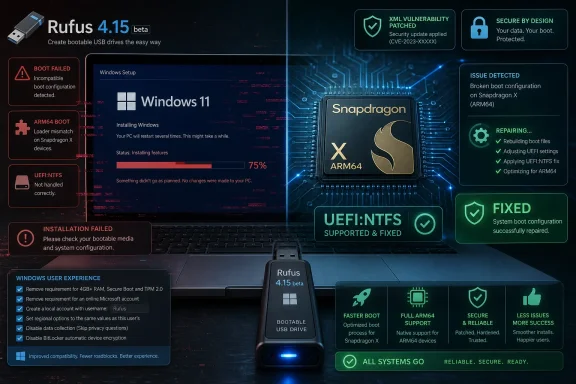
The headline fix in Rufus 4.15 beta is the silent Windows installation failure that could stop setup around 75 percent in many cases. For anyone who has deployed Windows often enough, that number has a familiar kind of menace. It is late enough in the process that users assume the hard part is over, but early enough that the machine may still be in a liminal state between old disk layout, new OS image, and unfinished boot configuration.The failure appears to have been tied to how Rufus 4.14’s unattended installation logic interacted with Windows Setup in real-world disk scenarios. That is the unglamorous part of installer engineering: the happy path is easy to demo, while the edge cases live in drive letters, hidden partitions, multiple WIM indexes, firmware quirks, and stale assumptions about what Windows Setup will reserve for itself.
Rufus 4.15 beta does not add a flashy feature to solve this. It tightens the guards around the silent option and fixes the failure case. That is exactly the right kind of update for a feature whose main selling point is trust.
Silent installation is unforgiving because the user has intentionally surrendered intermediate control. If an ordinary Windows Setup flow pauses, the user can read the screen and react. If a silent install fails, the machine may simply stop making progress, and the person holding the USB stick must reverse-engineer what the automation tried to do.
That makes reliability more important than ambition. Rufus 4.14 introduced the idea; Rufus 4.15 beta is about making the idea survivable.
Automation Turns Windows Setup Into an Argument About Defaults
The appeal of silent installation is obvious to anyone who installs Windows more than once a year. It can save time, reduce repetitive clicking, and produce more consistent results. For technicians imaging a bench of machines or enthusiasts rebuilding test systems, the less time spent shepherding setup screens, the better.But the feature is not just a convenience layer. It encodes a philosophy of Windows installation that differs sharply from Microsoft’s. Microsoft wants setup to be an onboarding funnel for Microsoft accounts, OneDrive, Microsoft 365 trials, telemetry preferences, app suggestions, and cloud services. Rufus users often want setup to be a clean path from blank disk to usable desktop.
That difference explains why Rufus keeps absorbing responsibilities that arguably should belong to Windows itself. Local account creation, bypassing avoidable prompts, suppressing bundled distractions, and automating the first run should not require a third-party utility with a carefully constructed answer file. Yet for many users, that is now the cleaner and more predictable route.
Rufus 4.15 beta also includes Windows User Experience fixes related to OneDrive removal and username validation. Those details may sound minor, but they sit at the center of the modern Windows setup fight. The question is not whether OneDrive is useful; many people rely on it. The question is whether a Windows installation should assume cloud sync, cloud identity, and cloud storage as defaults that users must work around.
This is where Rufus has become politically interesting in the small-p politics of software design. It does not merely offer an alternative installer. It exposes the gap between Microsoft’s definition of a successful Windows setup and the user’s definition of a successful Windows setup.
The Snapdragon X Crash Shows How Messy the New Windows Hardware Map Has Become
Rufus 4.15 beta also fixes a boot crash when using UEFI:NTFS on Snapdragon X-based ARM64 systems. That item is easy to skim past, but it is one of the more revealing entries in the changelog. Windows on ARM is no longer a curiosity living on the edge of the platform; with Qualcomm’s Snapdragon X systems, Microsoft and its partners are trying to make ARM64 PCs feel mainstream.Mainstream, however, means the boring infrastructure has to work. Boot media, recovery drives, install USBs, firmware paths, NTFS handling, and UEFI behavior all need to behave as reliably as they do on x86 PCs. A crash during boot is not just a Rufus problem; it is a reminder that the Windows PC universe is becoming more heterogeneous at the exact moment users expect installation tools to become simpler.
Rufus has long used UEFI:NTFS to solve a practical Windows media problem. Windows ISOs often contain files too large for FAT32, while UEFI firmware traditionally boots most predictably from FAT-formatted media. Rufus’s workaround has helped countless users create install media that boots cleanly while still carrying large Windows image files.
ARM64 complicates that picture. Firmware behavior varies, Secure Boot expectations are stricter, and the Windows-on-ARM ecosystem has fewer years of accumulated installer folklore than the x86 world. A fix for Snapdragon X systems therefore lands at a strategic moment: the more Microsoft pushes ARM PCs as normal Windows PCs, the more third-party tooling must treat them as first-class targets.
That matters to IT pros because Windows on ARM cannot become operationally boring if the deployment path remains special. Nobody wants a separate mental model for every machine class. The goal is simple: plug in the media, boot, install, recover, repeat.
Rufus 4.15 beta moves a small step toward that normality. It also signals that ARM64 support is no longer an optional courtesy for tools in the Windows deployment chain.
The Security Fix Is the Changelog Item Nobody Should Ignore
Among the installer fixes is a security repair for unrestricted XML entity expansion and an integer overflow in the ezxml parser. That is not the crowd-pleasing part of the release, but it may be the most important line for security-minded readers. Rufus processes structured files and installer metadata in contexts where users are often handling downloaded images, custom ISOs, and removable media.XML parser bugs have a long and undignified history. Entity expansion flaws can turn seemingly harmless structured input into denial-of-service conditions or worse, depending on context and parser behavior. Integer overflows are similarly unglamorous until they become a memory corruption path.
There is no need to overstate the risk without evidence of active exploitation. Rufus is not a background service listening on the network, and using it generally requires deliberate local action. Still, the presence of a parser vulnerability in a media-creation utility is exactly the kind of issue administrators should not dismiss just because the app is small.
The practical lesson is familiar: deployment tools deserve the same patch discipline as the operating systems they install. A bootable-media utility may run outside the glamorous layers of endpoint management, but it often touches privileged workflows, raw disks, removable drives, and trusted install sources. That makes maintenance releases important even when they do not introduce new buttons.
Rufus’s transparency helps here. The project’s public changelog and GitHub-centered development model make it easier to see what changed and why. For a tool that often operates in spaces Microsoft does not officially bless, that openness is part of the trust bargain.
Beta Is the Right Label for a Feature That Can Wipe a Disk
Rufus 4.15 is currently a beta, and that label should matter. The silent installation feature is designed to automate Windows installation on the first detected disk. That is convenient in controlled scenarios and potentially catastrophic in careless ones.This is not a criticism of Rufus so much as a statement about the domain. Any unattended installer that can partition, format, or install to a detected disk is a tool that must be used with adult supervision. In the wrong environment, automation does not merely save time; it accelerates mistakes.
The improved cancel behavior during write retries is therefore more than a quality-of-life fix. Media creation often fails for mundane reasons: flaky USB sticks, marginal ports, antivirus interference, cheap flash controllers, or a drive that briefly disappears under load. A better cancellation path reduces frustration and lowers the chance that users respond to a stuck write by yanking hardware at the worst possible moment.
The fix for an infinite loop with Windows ISOs containing multiple WIMs points in the same direction. Rufus has to parse a growing variety of official and unofficial Windows images, some of which contain multiple editions or indexes. The more flexible the tool becomes, the more defensive it has to be about malformed, unusual, or simply unexpected media.
Good installer tools are boring because they have already anticipated the weirdness. Rufus 4.15 beta is a reminder that boring takes work.
Microsoft’s Setup Experience Created the Market for This
It is tempting to frame Rufus’s Windows User Experience options as a hobbyist rebellion against Microsoft. That is partly true, but it misses the larger point. Rufus is popular because Microsoft has made the default Windows installation path serve too many masters.A fresh Windows 11 install is not just an OS deployment. It is a Microsoft account acquisition flow, a cloud services prompt, a privacy negotiation, a hardware compliance check, an app promotion surface, and a telemetry configuration sequence. Some of those pieces have legitimate purposes. Together, they make setup feel less like installing software and more like entering a vendor-managed corridor.
For enterprise administrators, much of this is handled through imaging, provisioning packages, Intune, Autopilot, Group Policy, or other management layers. But not every deployment lives inside a Fortune 500 endpoint estate. Small businesses, repair shops, consultants, schools, labs, and power users often need repeatable Windows installs without building a full management stack.
Rufus serves that middle ground. It is not a replacement for enterprise deployment infrastructure, and it should not be mistaken for one. But it gives technically competent users a way to reclaim predictable setup behavior without waiting for Microsoft to decide that their preferences deserve first-party UI.
The irony is that Microsoft already understands unattended installation. Windows has supported answer files and deployment automation for ages. Rufus’s achievement is not inventing the concept; it is making it approachable to users who would never handcraft Autounattend XML.
That is why the silent install feature is so compelling despite the rough start. It turns an enterprise-adjacent capability into a checkbox. The risk is that a checkbox can hide complexity until the complexity bites back.
The WUE Dialog Is Now the Front Line of Windows Customization
Rufus’s Windows User Experience dialog has become the place where many users make their most consequential Windows 11 decisions. Do they bypass certain hardware checks? Do they create a local account? Do they suppress data collection prompts? Do they remove or avoid Microsoft’s more aggressive bundled experiences? Do they automate the install entirely?Version 4.15 beta fixes the first Windows User Experience option always being checked by default and corrects cases where the runtime UEFI media validation checkbox was not properly enabled. These are small UI-state bugs, but in this context UI state is policy. A checkbox that appears selected when it should not be selected is not a cosmetic defect; it can change what kind of install media the user creates.
That is especially true around Windows 11 requirement bypasses. Rufus has become famous partly because it can help create install media for machines that do not satisfy Microsoft’s official Windows 11 hardware requirements. Whether one views that as user empowerment or a supportability hazard, the decision must be explicit.
The same applies to debloating and account automation. A user who wants OneDrive removed should get that result. A user who does not want it removed should not be surprised later. Rufus’s value depends on turning Microsoft’s implicit defaults into explicit choices.
This is why a beta focused on guardrails is meaningful. When a utility gives users power over setup, the moral obligation is not to make every choice safe. It is to make every choice legible.
For IT Pros, Rufus Is Useful Because It Is Not Magic
The correct enterprise response to Rufus 4.15 beta is neither panic nor blind adoption. Rufus is a useful tool, but it is not a deployment platform with centralized logging, compliance reporting, role-based access control, hardware targeting, staged rollout, or policy enforcement. It is a sharp instrument, not a management plane.That distinction matters. A consultant preparing a few clean installs may reasonably use Rufus to save time. A sysadmin responsible for hundreds of endpoints should think carefully before standardizing on beta-created unattended media, especially if the install path includes account creation, app removal, or disk-selection automation.
The most sensible use case is controlled and documented. Test the media on spare hardware. Confirm which disk the silent install targets. Verify the resulting Windows edition, partition layout, account state, BitLocker expectations, Secure Boot status, update behavior, and driver installation. Treat the generated USB not as a casual installer but as a deployment artifact.
For enthusiasts, the advice is simpler but just as serious. Do not test silent installation on a machine with data you care about. Disconnect drives that should not be touched. Assume that automation will do exactly what it was told, not what you meant.
The upside is real. When it works, Rufus’s silent install path can turn a fussy Windows 11 setup into a cleaner, faster, more repeatable process. The downside is equally real: if the wrong disk is first, if the ISO is unusual, or if the feature still has beta bugs, the tool will not pause to ask philosophical questions.
The Practical Shape of This Rufus Beta
Rufus 4.15 beta is not the kind of release that changes the app’s identity. Rufus 4.14 already did that by adding silent installs and stronger Windows User Experience controls. The new beta is the cleanup pass that inevitably follows when a tool moves deeper into the installer’s bloodstream.The fixes cluster around three themes: making silent installation less fragile, making boot media behave better on modern hardware, and tightening security and UI correctness. That is a good maintenance profile for a utility whose users depend on it in moments when a PC may not have a working operating system.
The release also reinforces a larger pattern. Windows installation has become complex enough that third-party tools now compete not on novelty but on sanity. Rufus wins loyalty by reducing the number of times users must argue with their own operating system before reaching the desktop.
For readers deciding whether to try the beta, the answer depends on urgency. If Rufus 4.14’s silent install failed for you, this beta is directly relevant. If you are using Snapdragon X hardware and hit UEFI:NTFS boot problems, it is also worth attention. If your current Rufus workflow is stable and you do not need silent installation, waiting for a final release is the conservative move.
Rufus 4.15 Beta Is a Repair Job With Platform Consequences
The concrete message from this release is narrower than the industry lesson around it. Rufus is fixing bugs in a new automation feature, and users should treat the beta with appropriate caution. But the reason those bugs matter is that Rufus now sits inside the wider debate over who Windows setup is for.- Rufus 4.15 beta fixes a common silent Windows installation failure that could stop setup around 75 percent.
- The beta improves safeguards around the silent install option, which is important because the feature can proceed without normal user prompts.
- Snapdragon X-based ARM64 systems get a UEFI:NTFS boot-crash fix, reflecting the growing importance of Windows on ARM support in everyday tooling.
- The update patches ezxml parser vulnerabilities, making it relevant even for users who do not care about silent installation.
- Windows User Experience fixes address option-state bugs, OneDrive removal behavior, username validation, and media validation controls.
- Users who need reliability more than experimentation should test the beta on nonproduction hardware or wait for a stable release.
Rufus is not winning because users love third-party setup utilities in the abstract. It is winning because Windows 11 installation has become a place where users feel managed before they feel served. If Microsoft wants fewer people reaching for tools like Rufus, the answer is not to make workarounds harder; it is to make the official path less adversarial. Until then, every Rufus bug fix will carry a meaning larger than its changelog, because every smoother install is also a vote for a Windows setup experience that trusts the person holding the keyboard.
References
- Primary source: Neowin
Published: Wed, 17 Jun 2026 17:20:00 GMT
Latest Rufus update improves new Windows 11 install method - Neowin
A popular Windows 11 setup utility has been updated with fixes for silent installation, Windows on ARM PCs, and more. www.neowin.net
- Related coverage: windowsforum.com
Rufus 4.14 Bug Re-Enables Windows 11 TPM Bypass Option After Clearing | Windows Forum
Rufus 4.14, released at the end of April 2026, has introduced a persistence bug in its Windows User Experience dialog that makes the Windows 11...windowsforum.com - Related coverage: cultura-informatica.com
Rufus 4.14 tiene un bug que resetea requisitos de Windows 11 | Cultura Informática
La última versión de Rufus no guarda la configuración de requisitos de Windows 11. El desarrollador ya localizó el fallo y prepara una corrección | Cultura Informáticacultura-informatica.com - Related coverage: anavem.com
Rufus 4.14 Beta Removes Windows 11 Bloatware Automatically
Rufus 4.14 Beta automates Windows 11 bloatware removal and silent installation for IT administrators. Clean deployments without pre-installed apps now possible.www.anavem.com - Related coverage: unikoshardware.com
- Related coverage: hardwarepremium.com
Rufus 4.14 añade instalación silenciosa de Windows 11 y limpia el arranque
Windows 11 gana con Rufus 4.14 instalación silenciosa, menos apps de Microsoft y correcciones para Windows To Go y cuentas locales.www.hardwarepremium.com
- Related coverage: generation-nt.com
Rufus 4.14 rend l'installation de Windows 11 totalement automatique et sans bloatware
GNT est le portail Hi-Tech français consacré aux nouvelles technologies (internet, logiciel, matériel, mobilité, entreprise) et au jeu vidéo PC et consoles.www.generation-nt.com - Related coverage: rufus.tools
Rufus Downloads - All Versions Archive
Complete Rufus Downloads Archive - All versions available. Create bootable USB flash drives for Windows, Linux, UEFI, and more with the fastest and most reliable free tool.www.rufus.tools - Related coverage: techviral.net
Download Rufus 4.14 Beta (Debloat & Install Windows 11 Silently)
The latest Rufus 4.14 Beta adds features that are supposed to improve the Windows User Experience. Here's how to download and use the tool. techviral.net
- Related coverage: pcgamer.com
Rufus developers have been blocked from downloading Windows ISOs, and believe there to be 'active intentional involvement from Microsoft' | PC Gamer
Microsoft has yet to comment on the issue.www.pcgamer.com - Official source: github.com
Releases · pbatard/rufus · GitHub
The Reliable USB Formatting Utility. Contribute to pbatard/rufus development by creating an account on GitHub. github.com
