

Samsung says Galaxy Gallery’s direct OneDrive sync ends on September 30, 2026. The practical answer is simple: Galaxy owners who rely on it should move new photo and video uploads to OneDrive Camera backup, confirm the correct Microsoft account, allow OneDrive photo/video access, download any originals they still want to browse inside Samsung Gallery, and test that the library is visible where they expect before the cutoff.
Here is the migration outcome in one sentence: photos and videos already stored in OneDrive should remain accessible in OneDrive, but OneDrive cloud photos will stop appearing in Samsung Gallery after the integration ends, so users should enable OneDrive Camera backup and download any originals they need inside Gallery before September 30, 2026.
That distinction is the whole story. This is not primarily a “cloud storage disappears” warning. It is a “the app you use to find your photos stops being the front end for that cloud library” warning.
Before September 30, 2026, do only the minimum that matters:
The answer should stay grounded. Samsung is ending a Gallery-to-OneDrive convenience layer. Microsoft points users toward OneDrive Camera backup. Existing OneDrive files are not described as being deleted. The expected break is visibility inside Samsung Gallery.
The important part is not the precise label on a button. The important part is proving four things:
That is the key actionable value. The safe migration is not “hope the cloud has it.” It is: confirm the account, confirm the backup setting, confirm permissions, download local originals where Gallery visibility matters, and confirm where a photo appears after upload.
Before September 30, users should check whether their Gallery library depends on the direct OneDrive sync feature. If Gallery has cloud-only or synced items that users expect to browse locally, Samsung’s advice is to download originals from Gallery or obtain the files through OneDrive before the feature ends. The important distinction is that “stored in OneDrive” and “visible in Samsung Gallery” are about to become different things again.
That is where the headline date undersells the operational risk. This is not framed by Samsung or Microsoft as a deletion event. The verified facts are narrower: the Gallery-to-OneDrive sync feature ends, OneDrive Camera backup is the replacement upload path, and files already stored in OneDrive remain accessible in OneDrive. The practical user impact — likely, but still an inference from Samsung and Microsoft’s guidance — is that many people will experience this as a missing-library problem because the same files may no longer appear inside the Samsung app they habitually open.
For ordinary Galaxy owners, that can feel like data loss even when the files are still present. For family IT helpers, help-desk staff, and anyone managing mixed Samsung and Windows devices, it is a workflow break: the familiar app stops being the reliable index of the cloud archive.
That means the central risk is not that Microsoft’s cloud suddenly loses your camera roll. It is that Samsung Gallery will no longer act as the convenient, native-looking viewer and sync controller for that cloud content. The same picture can survive in OneDrive while disappearing from the Samsung app experience that made it feel local.
That distinction matters because the old integration blurred three different states:
The verified facts are limited. Samsung has given the shutdown date and the download-originals recommendation. Microsoft has pointed users toward OneDrive Camera backup and warned that OneDrive photos will no longer appear in Samsung Gallery after the change. The likely impact is an inference from those facts: anyone who treats Samsung Gallery as the authoritative photo browser should make local-copy decisions before the bridge is removed.
The replacement model is cleaner but less Samsung-native. OneDrive becomes the app responsible for backup, access, and cloud visibility. Gallery returns to being a device-centered photo manager unless Samsung provides another supported continuity path for a particular device, market, carrier, model, or account setup.
A WindowsForum-style support thread almost writes itself: a Galaxy owner resets or upgrades a phone after September 30, 2026, opens Samsung Gallery, and finds only recent local photos. They insist that Gallery used to show years of pictures. The fix is not necessarily to recover deleted files. The first step is to open OneDrive, confirm the Microsoft account, check whether the old library is there, and then decide which items need to be downloaded locally for Gallery visibility.
That is a subtle but serious user-experience failure. People do not organize personal archives around storage-provider boundaries. They organize them around the app they open when they want to show a picture. If the same user can still find the file in OneDrive but not in Gallery, the data is present, yet the mental model is broken.
This is why the pre-deadline checklist has to be more concrete than “make sure you’re backed up.” A backup that cannot be found by the user who needs it is an incomplete migration. The goal is to preserve not only the files but the expected access path.
For WindowsForum readers, the useful test is simple: take a new photo, confirm it appears in OneDrive through Camera backup, and then check from another device that it landed in the right account. If your restore habit is “open Gallery and scroll,” retrain that habit now or download the originals you need to keep inside Gallery.
This is especially important for albums that users treat as device albums even though they are cloud-backed. Family favorites, ID scans, worksite photos, receipts, travel documents, shared reference images, insurance photos, and medical paperwork are all examples of files people expect to open quickly from the native Gallery app. If those items live only in OneDrive, they may still be safe, but they may no longer be where the user reaches first.
The restore behavior should be described carefully. What Samsung and Microsoft support is that OneDrive remains the place to access files already stored there, and OneDrive Camera backup becomes the forward-looking upload mechanism. What is not supported is the assumption that Samsung Gallery will remain a full viewer for old OneDrive-backed cloud content after the cutoff.
The safest approach is to divide the library into two classes before September 30, 2026:
A Galaxy owner may have a Samsung account for device services, a Microsoft account for OneDrive, and perhaps another Microsoft account used on Windows, Office, school, or work. If OneDrive Camera backup is enabled under the wrong Microsoft account, the phone may be uploading photos to a place the user never checks. The backup exists, but the recovery plan fails.
This matters even more in households where one technically inclined person set up several phones years ago. The Gallery integration made the arrangement feel Samsung-managed. Moving to OneDrive Camera backup makes Microsoft account hygiene central to the photo strategy.
The pre-deadline test should therefore include account verification, not just backup verification. Open OneDrive, confirm the signed-in account, confirm Camera backup is on for that account, take a new test photo, and then verify from another device that the photo lands in the expected OneDrive library.
If it lands in the wrong account, fix that now. A working backup in the wrong place is still a support problem waiting to happen.
That variance is the reason this article avoids hard-coded UI paths. Exact labels are less important than the outcome: OneDrive Camera backup must be enabled in the OneDrive app, permissions must allow photo and video access, and any Gallery-only expectations must be resolved before the cutoff.
This is where consumer cloud features become enterprise-adjacent headaches. The change may not be an enterprise product announcement, but it affects employees, contractors, and small businesses that use Galaxy phones as document scanners, field cameras, receipt collectors, and incident-reporting tools. A photo backup path is often part of the unofficial productivity stack.
For sysadmins, the advice is not to over-engineer a consumer feature retirement. It is to identify who relies on it before the calls begin. If users capture business-relevant images on Galaxy devices and assume OneDrive receives them automatically, confirm whether that assumption depends on Samsung Gallery sync or OneDrive Camera backup.
The right internal note is short: Samsung Gallery direct sync to OneDrive ends September 30, 2026; users should enable OneDrive Camera backup, verify the Microsoft account and permissions, and download any originals that must remain visible in Samsung Gallery. Files already in OneDrive remain there, but OneDrive photos will stop appearing in Samsung Gallery.
That is the operational risk.
The useful takeaway is not a grand theory that Samsung is abandoning Microsoft. The supported facts are narrower: Samsung is changing Gallery’s OneDrive behavior, and Samsung is also investing in other Galaxy-to-PC and Galaxy-to-screen experiences. Anything broader than that is interpretation.
So the WindowsForum angle should stay grounded in the user problem. After September 30, 2026, the likely forum post is not going to be “analyze Samsung’s ecosystem strategy.” It is going to be: “My Samsung Gallery no longer shows my OneDrive photos after the sync shutdown — are they gone?”
The correct answer will be:
The downside is loss of native-feeling convenience on the phone. Samsung Gallery is where Galaxy owners edit, browse, organize, and rediscover images. If OneDrive content no longer appears there, the user has to switch apps to see older cloud-backed items or deliberately download originals to bring selected content back into Gallery.
That is the trade-off Microsoft and Samsung are leaving users to reconcile. OneDrive remains the stronger Windows bridge. Gallery remains the familiar Galaxy browsing surface. The retiring integration was valuable precisely because it hid that split.
For enthusiasts, this is a good moment to audit whether OneDrive is still the desired photo archive. Some users will double down on OneDrive because it fits Windows. Others will decide the native phone gallery experience matters more and look for another Samsung-centered or Android-centered approach. The important thing is making that choice before the sync layer disappears, not after a missing-album scare.
Use this short test:
Do not treat September 30, 2026, as the day to begin. Treat it as the day the old assumptions expire. The work is account verification, permission verification, local-original decisions, and user education.
Microsoft’s guidance says new uploads require OneDrive permissions to access photos and videos and Camera backup to be turned on. Those are the two switches that determine whether the future backup path works. Everything else is expectation management.
Here is the migration outcome in one sentence: photos and videos already stored in OneDrive should remain accessible in OneDrive, but OneDrive cloud photos will stop appearing in Samsung Gallery after the integration ends, so users should enable OneDrive Camera backup and download any originals they need inside Gallery before September 30, 2026.
That distinction is the whole story. This is not primarily a “cloud storage disappears” warning. It is a “the app you use to find your photos stops being the front end for that cloud library” warning.
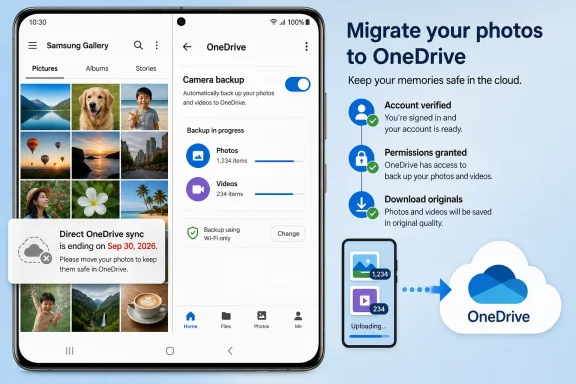 Pre-Deadline Checklist
Before September 30, 2026, do only the minimum that matters:- Confirm the backup account: Make sure OneDrive is signed in with the Microsoft account that should hold the photo archive.
- Enable backup: Turn on OneDrive Camera backup in the OneDrive app.
- Verify permissions: Allow OneDrive access to photos and videos when Android asks.
- Download originals that must stay in Gallery: Save local originals for albums, documents, or favorites you still expect to browse in Samsung Gallery.
- Test restore and visibility: Take a new photo, confirm it appears in OneDrive under the right account, and check whether the photos you need are visible in the app where you expect to find them.
The answer should stay grounded. Samsung is ending a Gallery-to-OneDrive convenience layer. Microsoft points users toward OneDrive Camera backup. Existing OneDrive files are not described as being deleted. The expected break is visibility inside Samsung Gallery.
The Migration Starts With OneDrive Camera Backup
The replacement path is OneDrive Camera backup. Because exact menus and labels can vary by app version, Android release, device, carrier, and market, do not depend on one rigid click path. Open the OneDrive app, go to the account/profile or settings area, find Camera backup, confirm the right Microsoft account, turn the feature on, and grant photo and video access if prompted.The important part is not the precise label on a button. The important part is proving four things:
- OneDrive is signed in with the Microsoft account you actually use.
- Camera backup is enabled for that account.
- Android has granted OneDrive permission to access photos and videos.
- A newly taken photo appears in the expected OneDrive library.
That is the key actionable value. The safe migration is not “hope the cloud has it.” It is: confirm the account, confirm the backup setting, confirm permissions, download local originals where Gallery visibility matters, and confirm where a photo appears after upload.
Before September 30, users should check whether their Gallery library depends on the direct OneDrive sync feature. If Gallery has cloud-only or synced items that users expect to browse locally, Samsung’s advice is to download originals from Gallery or obtain the files through OneDrive before the feature ends. The important distinction is that “stored in OneDrive” and “visible in Samsung Gallery” are about to become different things again.
That is where the headline date undersells the operational risk. This is not framed by Samsung or Microsoft as a deletion event. The verified facts are narrower: the Gallery-to-OneDrive sync feature ends, OneDrive Camera backup is the replacement upload path, and files already stored in OneDrive remain accessible in OneDrive. The practical user impact — likely, but still an inference from Samsung and Microsoft’s guidance — is that many people will experience this as a missing-library problem because the same files may no longer appear inside the Samsung app they habitually open.
For ordinary Galaxy owners, that can feel like data loss even when the files are still present. For family IT helpers, help-desk staff, and anyone managing mixed Samsung and Windows devices, it is a workflow break: the familiar app stops being the reliable index of the cloud archive.
Samsung Is Ending a Convenience Layer, Not OneDrive Storage
Samsung’s support language is careful. The Gallery-to-OneDrive feature is ending on September 30, 2026, but photos and videos stored in OneDrive through that feature remain in OneDrive. Samsung’s advice is practical: download originals from Gallery or OneDrive before the feature ends if you want them on the device.That means the central risk is not that Microsoft’s cloud suddenly loses your camera roll. It is that Samsung Gallery will no longer act as the convenient, native-looking viewer and sync controller for that cloud content. The same picture can survive in OneDrive while disappearing from the Samsung app experience that made it feel local.
That distinction matters because the old integration blurred three different states:
- locally stored on the phone;
- synced through Samsung Gallery’s OneDrive integration;
- stored in OneDrive.
The verified facts are limited. Samsung has given the shutdown date and the download-originals recommendation. Microsoft has pointed users toward OneDrive Camera backup and warned that OneDrive photos will no longer appear in Samsung Gallery after the change. The likely impact is an inference from those facts: anyone who treats Samsung Gallery as the authoritative photo browser should make local-copy decisions before the bridge is removed.
The replacement model is cleaner but less Samsung-native. OneDrive becomes the app responsible for backup, access, and cloud visibility. Gallery returns to being a device-centered photo manager unless Samsung provides another supported continuity path for a particular device, market, carrier, model, or account setup.
The Likely Failure Mode Is a Missing Library, Not a Missing File
The most likely panic scenario after the cutoff is not “my photos were deleted.” It is “my photos vanished from Gallery.” This is a likely user impact inferred from Samsung and Microsoft’s guidance, especially Microsoft’s warning that OneDrive photos will no longer appear in Samsung Gallery once direct sync ends.A WindowsForum-style support thread almost writes itself: a Galaxy owner resets or upgrades a phone after September 30, 2026, opens Samsung Gallery, and finds only recent local photos. They insist that Gallery used to show years of pictures. The fix is not necessarily to recover deleted files. The first step is to open OneDrive, confirm the Microsoft account, check whether the old library is there, and then decide which items need to be downloaded locally for Gallery visibility.
That is a subtle but serious user-experience failure. People do not organize personal archives around storage-provider boundaries. They organize them around the app they open when they want to show a picture. If the same user can still find the file in OneDrive but not in Gallery, the data is present, yet the mental model is broken.
This is why the pre-deadline checklist has to be more concrete than “make sure you’re backed up.” A backup that cannot be found by the user who needs it is an incomplete migration. The goal is to preserve not only the files but the expected access path.
For WindowsForum readers, the useful test is simple: take a new photo, confirm it appears in OneDrive through Camera backup, and then check from another device that it landed in the right account. If your restore habit is “open Gallery and scroll,” retrain that habit now or download the originals you need to keep inside Gallery.
Download Originals Before the Cutoff If Gallery Visibility Matters
Samsung’s “download originals” advice deserves more attention than the shutdown date itself. If a photo appears in Gallery because of cloud sync rather than local storage, the end of the integration may change whether that item appears in Gallery at all. Downloading originals is the way to make selected photos and videos local before the bridge is removed.This is especially important for albums that users treat as device albums even though they are cloud-backed. Family favorites, ID scans, worksite photos, receipts, travel documents, shared reference images, insurance photos, and medical paperwork are all examples of files people expect to open quickly from the native Gallery app. If those items live only in OneDrive, they may still be safe, but they may no longer be where the user reaches first.
The restore behavior should be described carefully. What Samsung and Microsoft support is that OneDrive remains the place to access files already stored there, and OneDrive Camera backup becomes the forward-looking upload mechanism. What is not supported is the assumption that Samsung Gallery will remain a full viewer for old OneDrive-backed cloud content after the cutoff.
The safest approach is to divide the library into two classes before September 30, 2026:
- Photos and videos that simply need cloud backup can live in OneDrive Camera backup.
- Photos and videos that must remain visible in Samsung Gallery should be downloaded to the device as originals while that option is still available.
The Account Boundary Is Where Many Migrations Will Go Wrong
Microsoft’s migration guidance includes a detail that will trip up plenty of users: the Microsoft account used for OneDrive may be different from the Samsung account on the phone. That sounds obvious to anyone who has cleaned up consumer cloud problems, but it is exactly the kind of mismatch that causes backup confusion.A Galaxy owner may have a Samsung account for device services, a Microsoft account for OneDrive, and perhaps another Microsoft account used on Windows, Office, school, or work. If OneDrive Camera backup is enabled under the wrong Microsoft account, the phone may be uploading photos to a place the user never checks. The backup exists, but the recovery plan fails.
This matters even more in households where one technically inclined person set up several phones years ago. The Gallery integration made the arrangement feel Samsung-managed. Moving to OneDrive Camera backup makes Microsoft account hygiene central to the photo strategy.
The pre-deadline test should therefore include account verification, not just backup verification. Open OneDrive, confirm the signed-in account, confirm Camera backup is on for that account, take a new test photo, and then verify from another device that the photo lands in the expected OneDrive library.
If it lands in the wrong account, fix that now. A working backup in the wrong place is still a support problem waiting to happen.
Regional, Carrier, and Device Variance Makes This a Support Problem
Microsoft notes that availability of the Samsung Gallery connection to OneDrive depends on market, carrier, and model. That means the migration experience will not be perfectly uniform across the Galaxy installed base. Some users may see familiar options; others may see different wording, missing toggles, or behavior shaped by device, carrier, or regional availability.That variance is the reason this article avoids hard-coded UI paths. Exact labels are less important than the outcome: OneDrive Camera backup must be enabled in the OneDrive app, permissions must allow photo and video access, and any Gallery-only expectations must be resolved before the cutoff.
This is where consumer cloud features become enterprise-adjacent headaches. The change may not be an enterprise product announcement, but it affects employees, contractors, and small businesses that use Galaxy phones as document scanners, field cameras, receipt collectors, and incident-reporting tools. A photo backup path is often part of the unofficial productivity stack.
For sysadmins, the advice is not to over-engineer a consumer feature retirement. It is to identify who relies on it before the calls begin. If users capture business-relevant images on Galaxy devices and assume OneDrive receives them automatically, confirm whether that assumption depends on Samsung Gallery sync or OneDrive Camera backup.
The right internal note is short: Samsung Gallery direct sync to OneDrive ends September 30, 2026; users should enable OneDrive Camera backup, verify the Microsoft account and permissions, and download any originals that must remain visible in Samsung Gallery. Files already in OneDrive remain there, but OneDrive photos will stop appearing in Samsung Gallery.
That is the operational risk.
The WindowsForum Angle Is the Support Question Users Will Actually Ask
WindowsForum’s recent Samsung-related reports show why this change matters to Windows users. The forum has covered reports that Samsung may replace OneDrive integration in Galaxy Gallery backups, while other WindowsForum pieces have tracked Samsung Internet’s return to Windows with cross-device sync, Galaxy AI features, Samsung Pass credential continuity, and privacy tools. WindowsForum has also covered Samsung and Google bringing Google Photos Memories to Samsung TVs in March 2026.The useful takeaway is not a grand theory that Samsung is abandoning Microsoft. The supported facts are narrower: Samsung is changing Gallery’s OneDrive behavior, and Samsung is also investing in other Galaxy-to-PC and Galaxy-to-screen experiences. Anything broader than that is interpretation.
So the WindowsForum angle should stay grounded in the user problem. After September 30, 2026, the likely forum post is not going to be “analyze Samsung’s ecosystem strategy.” It is going to be: “My Samsung Gallery no longer shows my OneDrive photos after the sync shutdown — are they gone?”
The correct answer will be:
- check OneDrive first;
- verify the Microsoft account;
- confirm Camera backup for new uploads;
- download originals for anything that must remain visible in Gallery;
- treat Gallery visibility and OneDrive storage as separate issues.
The Windows Angle Is Convenience Versus Control
For Windows users, OneDrive Camera backup may be the cleaner long-term model. A photo uploaded by OneDrive is a OneDrive photo, managed in the OneDrive app and available wherever OneDrive is installed. There is less ambiguity about whether Samsung Cloud, Samsung Gallery, or Microsoft is responsible for a given file.The downside is loss of native-feeling convenience on the phone. Samsung Gallery is where Galaxy owners edit, browse, organize, and rediscover images. If OneDrive content no longer appears there, the user has to switch apps to see older cloud-backed items or deliberately download originals to bring selected content back into Gallery.
That is the trade-off Microsoft and Samsung are leaving users to reconcile. OneDrive remains the stronger Windows bridge. Gallery remains the familiar Galaxy browsing surface. The retiring integration was valuable precisely because it hid that split.
For enthusiasts, this is a good moment to audit whether OneDrive is still the desired photo archive. Some users will double down on OneDrive because it fits Windows. Others will decide the native phone gallery experience matters more and look for another Samsung-centered or Android-centered approach. The important thing is making that choice before the sync layer disappears, not after a missing-album scare.
The Pre-Deadline Test Should Be Boring by Design
A good migration test is deliberately mundane. Take a photo of something disposable, wait for backup, and confirm it appears in OneDrive under the right account. Then open Samsung Gallery and decide whether the visibility model is acceptable for your real library.Use this short test:
- Open OneDrive on the Galaxy device.
- Confirm the signed-in Microsoft account.
- Find Camera backup in OneDrive’s settings or backup area.
- Turn Camera backup on.
- Grant access to photos and videos if prompted.
- Take a new test photo.
- Confirm that photo appears in OneDrive on another device or in a browser.
- Open Samsung Gallery.
- Check whether older items depend on the retiring OneDrive sync integration.
- Download originals for any photos or videos that must remain local and visible in Gallery.
Do not treat September 30, 2026, as the day to begin. Treat it as the day the old assumptions expire. The work is account verification, permission verification, local-original decisions, and user education.
Microsoft’s guidance says new uploads require OneDrive permissions to access photos and videos and Camera backup to be turned on. Those are the two switches that determine whether the future backup path works. Everything else is expectation management.
Frequently Asked Questions
Is Samsung deleting my OneDrive photos on September 30, 2026?
No. The announced change is the end of Samsung Gallery’s direct OneDrive sync integration. The supported guidance says photos and videos already stored in OneDrive remain accessible in OneDrive. The user-facing problem is that OneDrive photos will no longer appear inside Samsung Gallery after the change.What exactly should I turn on instead?
Turn on OneDrive Camera backup in the OneDrive app. Because menu labels and layouts can vary, do not rely on a single exact path. Open OneDrive, go to its account/profile or settings area, find Camera backup, confirm the Microsoft account, enable backup, and grant access to photos and videos when Android prompts you.What should I check in Samsung Gallery?
Check whether Samsung Gallery has been relying on the retiring OneDrive sync integration. The exact wording may vary by device, market, carrier, model, and app version. If the device has been using that integration, decide which photos and videos must remain local and use the available download-originals option for items you still want visible from the Gallery app after the cutoff.Will my old OneDrive photos still show in Samsung Gallery after the cutoff?
Microsoft’s guidance says OneDrive photos will no longer appear in Samsung Gallery once the direct sync integration ends. That is the part users should plan around. Files may still be in OneDrive, but Gallery should not be treated as the guaranteed viewer for those cloud-backed items after September 30, 2026.Do I need to download every photo to my phone?
Not necessarily. If OneDrive is your archive and you are comfortable using the OneDrive app or Windows to browse older photos, you may not need local copies of everything. Download originals for the albums or files you expect to open directly inside Samsung Gallery, such as IDs, receipts, family favorites, worksite references, or travel documents.What is the most common mistake to avoid?
Using the wrong Microsoft account. A Galaxy phone can have a Samsung account, a Microsoft account for OneDrive, and another Microsoft account used on Windows, Office, school, or work. Camera backup only helps if it uploads to the account where the user expects to find the photos later.What should Windows users do?
Windows users who already rely on OneDrive should probably make OneDrive Camera backup the source of truth, then test it. Take a new photo, wait for upload, and confirm it appears in the expected OneDrive account on a PC or another device. If the file lands in the wrong account, fix that before trusting the migration.What support question should admins expect after September 30, 2026?
Expect variations of: “My Samsung Gallery photos disappeared after the OneDrive sync change — are they gone?” The first troubleshooting step should be to open OneDrive, verify the Microsoft account, and look for the library there. If the photos are present in OneDrive, the issue is Gallery visibility, not necessarily file loss.Do This Now
Open OneDrive on each Galaxy device, confirm the Microsoft account, turn on Camera backup, allow photo and video access, and take a test photo to prove it uploads to the right place. Then open Samsung Gallery, identify any photos or albums that must remain visible there, and download those originals before September 30, 2026.References
- Primary source: us.community.samsung.com
Solved: DISCONTINUED: Samsung Gallery - OneDrive sync feat... - Samsung Community - 3567282
Solved: What is happening: The sync feature that links Samsung Gallery and OneDrive is going away and will no longer be supported. When is - 3567282us.community.samsung.com
- Independent coverage: samsung.com
Sync your Gallery photos with OneDrive
You can sync your Gallery photos with OneDrive, so they can be accessed from other devices at any time.www.samsung.com - Independent coverage: sammobile.com
Samsung Gallery OneDrive sync support has quietly ended - SamMobile
Samsung appears to be quietly removing the Samsung Gallery OneDrive sync option for users ahead of the September 30, 2026 deadline. - SamMobilewww.sammobile.com - Independent coverage: business-standard.com
Microsoft to end Samsung Gallery app's direct sync with OneDrive in Sept | Tech News - Business Standard
Samsung Gallery OneDrive Sync End: Samsung smartphone users will soon lose Samsung Gallery's built-in OneDrive syncing feature, as Microsoft is set to move future cloud backups entirely to the standalone OneDrive appwww.business-standard.com
- Independent coverage: thetechoutlook.com
Starting September 30, Samsung Gallery will no longer sync directly with Microsoft OneDrive - The Tech Outlook
Are you also using your Samsung Gallery with OneDrive for backup? Recently, Microsoft announced via its support page that starting September 30, 2026, new users will be able to link their Samsung Gallery and OneDrive apps. Samsung Gallery will no longer sync directly with Microsoft OneDrive From...www.thetechoutlook.com - Independent coverage: r1.community.samsung.com
Solved: Confirmation date for OneDrive gallery sync shutdo... - Samsung Members
Solved: https://sammyguru.com/samsung-microsoft-confirm-onedrive-gallery-sync-shutdown-deadline/ Samsung and Microsoft have confirmed that OneDriver1.community.samsung.com
- Independent coverage: windowscentral.com
Microsoft confirms that Samsung is killing OneDrive integration on its Galaxy phones very soon: Here's what will happen to your photo backups | Windows Central
Starting September 30, Samsung Galaxy users will no longer be able to backup their photos to OneDrive using the Gallery app.www.windowscentral.com - Independent coverage: 9to5google.com
Samsung Gallery is ditching OneDrive integration
Microsoft has confirmed that Samsung Gallery is losing the ability to back up to OneDrive starting later this year. Quietly...9to5google.com - Independent coverage: samsung.gadgethacks.com
Samsung Gallery OneDrive Integration End Date Confirmed: How to Keep Your Backups << Samsung :: Gadget Hacks
Samsung Gallery will stop syncing directly with OneDrive on September 30, 2026. Microsoft's support page, updated earlier this month, sets that as the... samsung.gadgethacks.com
- Independent coverage: heise.de
Samsung Gallery App Loses OneDrive Sync | heise online
Starting late September 2026, the Samsung Gallery app will no longer sync photos with OneDrive. Users must switch to the OneDrive app for backups. www.heise.de
- Independent coverage: androidauthority.com
Here's when Samsung Gallery is officially cutting ties with OneDrive
Microsoft has recently updated its Samsung Gallery sync support page to reveal the date when support will end.www.androidauthority.com
