

Microsoft’s original Windows Secure Boot certificates, issued in 2011 and embedded across years of PCs, begin expiring in June 2026, forcing Microsoft, OEMs, administrators, and some users to move devices to newer 2023 certificate authorities before boot-level security protections fall behind. This is not a Y2K-style cliff where every old Windows box instantly refuses to start. It is more awkward than that: a slow trust rollover in the one part of the PC stack most users never see and most administrators are reluctant to touch. The real story is not panic; it is that Windows’ security foundation has finally aged into an operational deadline.
Secure Boot was always sold as a clean idea. Before Windows loads, the firmware checks that the bootloader, option ROMs, and other early-start components are signed by authorities the machine trusts. If the chain of trust holds, the machine continues. If it does not, the firmware blocks execution before malware gets the first move.
That model depends on certificates, and certificates expire. Microsoft’s 2011-era Secure Boot authorities were created when Windows 8 was still the coming attraction, when UEFI was displacing the old BIOS world, and when “modern PC” meant something rather different from what it means in 2026. Fifteen years later, those trust anchors are no longer background plumbing. They are calendar-bound infrastructure.
The expiring set includes Microsoft’s 2011 Key Exchange Key and the certificate authorities used to validate Windows boot components and third-party UEFI code. Microsoft’s replacement chain is the 2023 generation, including updated authorities for Windows boot components, third-party UEFI applications, and option ROMs. That split matters because Secure Boot does not protect one thing; it protects a sequence of firmware and pre-OS decisions.
For most consumer PCs that are supported, updated, and left in Microsoft’s normal servicing lane, the transition should be quiet. Windows Update and OEM firmware channels are supposed to do the work. But the word “supposed” is doing a lot of labor here, because Secure Boot lives at the boundary between Microsoft’s operating system, OEM firmware implementation, hardware add-ins, deployment media, BitLocker, virtualization, and the bootloaders used by non-Windows systems.
This is why the correct reaction is neither shrugging nor doomscrolling. The deadline matters because it turns a security architecture into an inventory problem.
The practical answer settled into an uneasy compromise. Windows systems shipped with Microsoft’s keys. Linux distributions found ways to work through Microsoft-signed shim loaders or machine owner keys. Enterprises learned to treat Secure Boot as one more control to validate during hardware procurement. Power users learned where the firmware toggle lived, usually after needing to boot something unusual.
Windows 10 kept Secure Boot in the “strongly encouraged but not universal” category because the PC base was still messy. Windows 11 changed the temperature. By making Secure Boot capability part of the hardware baseline, alongside TPM 2.0 and other platform requirements, Microsoft moved it from an optional modernity marker to a default assumption.
That history explains why the 2026 expiration is so broad. The original 2011 certificates were not a niche artifact. They became part of the trust fabric for more than a decade of Windows machines, servers, workstations, gaming rigs, point-of-sale systems, industrial PCs, and virtualized environments. The longer something works invisibly, the more surprised everyone is when it needs maintenance.
The irony is that expiration is evidence the system was designed with a lifecycle. A certificate that never expires is not a certificate; it is a fossilized trust decision. But the PC ecosystem is not a single service where one operator rotates keys behind the curtain. It is a federation of firmware vendors, OEMs, component makers, OS images, recovery tools, and administrators who may or may not have touched the BIOS setup screen since deployment day.
That distinction is accurate, but it is also dangerous if it becomes an excuse for inaction. The issue is not merely whether the machine reaches the desktop the morning after a certificate date passes. The issue is whether it can continue to receive and enforce future Secure Boot protections for early boot components, revocation lists, boot manager updates, and mitigations for new classes of pre-OS attack.
In security terms, “still boots” is a low bar. A machine can boot while becoming less able to trust future boot components. It can install monthly updates while missing the firmware trust changes required to protect the earliest part of startup. It can appear healthy to a user while becoming a future exception in an administrator’s compliance report.
That is the operational trap. Catastrophic failures get attention; degraded trust states get deferred. Windows administrators know this pattern from certificate expirations, TLS deprecations, domain functional levels, SHA-1 retirement, and old authentication protocols. The ecosystem rarely collapses overnight. Instead, the unsupported corner cases accumulate until a later update, audit, or incident turns “we’ll get to it” into a weekend outage.
Secure Boot certificate renewal therefore has to be understood as preventive maintenance, not emergency repair. The point is to complete the transition while the machine still has known-good update paths, vendor support, recovery options, and time for staged testing.
The 2023 refresh therefore has multiple parts. Systems need the new Microsoft KEK so future updates to Secure Boot trust databases can be authorized. They need the newer Windows signing authority for bootloader and boot component validation. They may need the newer Microsoft UEFI authority and option ROM authority for third-party bootloaders, EFI applications, and expansion card firmware paths.
That separation is not administrative trivia. It reflects lessons from the last decade of Secure Boot attacks and mitigations. The BlackLotus bootkit and related Secure Boot bypass concerns showed that trusting a boot path is not enough if old, vulnerable components remain usable. A mature Secure Boot ecosystem needs updated trust anchors and revocations, and revocations are where operational risk rises.
Revocation is the sharp edge of Secure Boot. Adding trust is usually reversible and low drama. Removing trust can strand old media, old bootloaders, recovery environments, add-in cards, or niche deployment workflows. Microsoft has therefore treated Secure Boot hardening as a staged process, because pushing every revocation at once across the Windows installed base would invite the kind of firmware chaos that makes administrators disable controls rather than manage them.
The 2026 deadline makes that staged process less abstract. It says the old roots cannot remain the quiet assumption forever. The platform has to learn to trust the 2023 chain before the 2011 chain becomes a liability.
A newish Windows 11 laptop from a major vendor, fully patched and still within its support lifecycle, is the easy case. An aging workstation with a discrete GPU, a stale BIOS, BitLocker enabled, a third-party disk encryption bootloader, and a fleet image created years ago is not. A server platform with conservative firmware update windows is a different problem again. An IoT device deployed in a closet and forgotten until audit season is its own genre of pain.
Microsoft can ship certificate update logic, but it cannot make every firmware implementation elegant. Some machines may require OEM firmware updates before the 2023 certificates can be applied reliably. Some platforms may be out of scope for new BIOS releases yet still able to receive certificate updates through Windows. Some may expose confusing signals that require administrators to distinguish “not yet updated,” “blocked,” and “unsupported.”
This is why vendor pages and hardware inventories matter. The Secure Boot certificate rollover is not just a Windows version question. It is a device model question, a firmware revision question, and sometimes a peripheral question. A fleet that looks uniform from the Windows build number may be heterogeneous below the OS line.
The consumer version of this problem is simpler but not trivial. Users who never install firmware updates, who run old Windows 10 systems outside a clear support path, or who have disabled Secure Boot for dual-boot experiments may not receive the intended remediation. A PC bought in the last year or two is probably already better positioned. A PC that barely met Windows 11’s requirements, or never did, deserves more scrutiny.
For an individual user, the practical answer may be “keep installing updates if you are eligible, check firmware support, and avoid turning Secure Boot into a weekend project unless you know why.” For an organization, the answer is less forgiving. If Windows 10 devices remain in production, they need to be visible in inventory and covered by a support plan that includes Secure Boot remediation, not merely monthly OS patching.
The danger is that some administrators will treat Windows 10 and Secure Boot as separate migrations. They are not the same project, but they overlap in the riskiest places: older hardware, inconsistent firmware support, deferred replacement cycles, and systems that have acquired local exceptions over years. The machine that missed the Windows 11 hardware cutoff is also more likely to be the machine with aging firmware and neglected boot configuration.
Extended security updates may keep Windows 10 viable for a time, but they do not magically modernize the platform beneath it. If a device cannot receive updated Secure Boot trust anchors, the administrator has to decide whether that device remains acceptable for its role. That decision is not ideological. It depends on exposure, data sensitivity, compensating controls, and the cost of replacement.
This is where Microsoft’s “degraded security state” phrasing becomes useful. It avoids exaggerating the risk into instant failure, but it also gives IT a defensible reason to push hardware refreshes or firmware remediation. “It still boots” is not a compliance strategy.
The answer depends on the component, the firmware trust database, and the update path. Existing binaries do not necessarily vanish into untrustworthiness simply because a certificate reaches its date, especially if the relevant certificate remains in the device’s Secure Boot database. But future signing, future revocation, and future validation behavior can diverge. That distinction is exactly why the topic is confusing.
Linux vendors and maintainers have been dealing with Microsoft’s Secure Boot ecosystem for years, often through shim loaders signed by Microsoft. They will need to ensure their boot chain works under the 2023 authorities where required. The same is true for tools that boot before Windows for backup, recovery, forensics, or deployment. Enterprises that rely on such media should not wait until a crisis to discover whether an ISO, USB stick, PXE workflow, or appliance bootloader still fits the trust model.
Gaming PCs add another wrinkle. Some anti-cheat systems and competitive titles already require Secure Boot or related platform integrity features. That means a misconfigured Secure Boot state can surface not as a Windows boot problem, but as a game refusing to launch or an anti-cheat driver complaining about platform trust. For enthusiasts, the firmware security stack has become part of the consumer software experience, however absurd that may feel.
Then there are option ROMs and add-in cards. Graphics cards, storage controllers, network adapters, and other hardware may rely on firmware components signed under older authorities. Most mainstream configurations should have a path forward, but niche hardware and older expansion cards deserve testing. Secure Boot is not just about the Windows bootloader; it is about what the firmware is willing to execute on the way there.
The sensible enterprise response is sequencing. Back up recovery keys. Confirm escrow into Active Directory, Microsoft Entra ID, or the organization’s chosen management platform. Pilot representative hardware. Avoid combining Secure Boot certificate changes, BIOS updates, storage firmware updates, and bootloader changes into one heroic reboot unless the vendor guidance explicitly says to do so.
For consumers, the advice is more basic: know where your BitLocker recovery key is before making firmware-level changes. Many Windows 11 systems encrypt by default or through device encryption, and users may not realize that a Microsoft account holds the recovery key until they are staring at a blue recovery screen. The Secure Boot rollover does not mean everyone should dive into firmware menus, but anyone who does should prepare first.
This is the recurring theme: the update itself is not inherently exotic, but the layer it touches is unforgiving. Windows users are accustomed to rolling back drivers, uninstalling patches, and rebooting twice. Firmware trust changes are not that casual. They are manageable, but they reward planning and punish improvisation.
That is especially true for revocations. Adding 2023 trust anchors is one stage. Enforcing revocations against older vulnerable boot components is another. Administrators should understand the distinction and resist the urge to compress the entire Secure Boot modernization story into a single maintenance window simply because the calendar is making noise.
Microsoft has exposed event log and registry signals that can help identify whether a device has moved to the expected 2023 state. Enterprises should use those signals in inventory, compliance reporting, and staged rollout rings. The goal is not merely to install a package; it is to verify that the device’s Secure Boot trust state changed as intended.
That means creating groups. Which devices already have the 2023 authorities? Which are pending? Which are blocked because Secure Boot is disabled? Which require firmware updates? Which are out of OEM support? Which are servers with separate maintenance rules? Which are virtual machines whose firmware template predates the new certificates?
Virtualization deserves special attention because administrators may forget that virtual machines have firmware too. A VM created years ago may present an older Secure Boot environment even if the host is current. Templates, golden images, recovery media, and offline devices can all lag behind. The rollover is therefore not just an endpoint project; it touches image engineering and platform operations.
This is also a moment to stop treating Secure Boot disablement as harmless convenience. In labs and enthusiast setups, turning Secure Boot off may be a temporary workaround. In production, it can become a silent permanent exception. If Windows cannot update active Secure Boot variables while Secure Boot is disabled, then disabled systems may miss the very transition they need in order to remain secure later.
The company’s best argument is also the most boring one: certificate rotation is normal security hygiene. Credentials age. Cryptographic ecosystems evolve. Boot attacks improve. A platform that never renews its roots becomes brittle and eventually indefensible.
But Windows is not a cloud service where Microsoft owns the whole stack. The company can coordinate, publish guidance, ship updates, and pressure OEMs, but the installed base includes years of hardware decisions that Microsoft did not fully control. The Secure Boot certificate rollover exposes the limits of centralized platform security in a decentralized PC ecosystem.
There is also a trust cost to Windows 11’s hardware line. Microsoft told users that modern Windows needed a more secure platform baseline, then left many otherwise functional Windows 10 PCs outside the official upgrade path. Now a separate but related platform-security deadline reinforces the same message: old hardware can keep running, but it increasingly lives outside the fully protected path.
That message is defensible from a security standpoint and irritating from a user standpoint. Both can be true. The PC’s openness has always depended on old machines continuing to do useful work long after vendors would prefer to stop thinking about them. Secure Boot certificate expiration is one of the moments when that culture collides with the maintenance demands of a cryptographic trust system.
If you are on a supported Windows 11 PC from a mainstream vendor, the odds are good that remediation either has happened or will happen through normal servicing. If you bought a recent PC, it may already ship with the 2023 authorities. If you are running Windows 10 under an eligible extended update arrangement, the path may still exist, but you should be more deliberate about confirming support.
The harder consumer cases are the ones enthusiasts know well. Dual-boot systems, modified bootloaders, custom encryption setups, older discrete hardware, and machines that have had Secure Boot toggled on and off over the years should be checked before the deadline becomes urgent. The right test is not “does Windows boot today?” but “does this configuration still have a supported path for Secure Boot trust updates?”
Users should also separate firmware updates from internet folklore. A BIOS update from Dell, HP, Lenovo, ASUS, MSI, Gigabyte, or another OEM is a normal maintenance channel. A mysterious executable promising to “fix Secure Boot certificates” is not. The closer a change gets to boot trust, the more conservative the source should be.
For many readers of WindowsForum.com, this is familiar advice dressed in new clothes. The boot chain is not a place for bravado. Make a backup, know your recovery keys, update through official channels, and test unusual setups before you need them.
The healthiest organizations will treat the 2026 rollover as an excuse to improve visibility. They will query Secure Boot status, firmware versions, certificate state, and model support. They will build pilot rings and watch for event log failures. They will test rescue media and imaging workflows. They will decide which old machines are worth remediating and which should finally leave production.
The less healthy organizations will wait until a security update, audit finding, game anti-cheat error, BitLocker prompt, or failed boot media forces the conversation. That is how platform debt usually announces itself. Not as a single outage, but as a sequence of small exceptions that no one budgeted time to understand.
The consumer version of inventory is simpler: know what PC you have, whether it is still supported, whether Secure Boot is enabled, and whether firmware updates exist. That alone puts a user ahead of most panic-driven advice. The goal is not to become a UEFI engineer; it is to avoid being surprised by the part of the computer that runs before the operating system has a chance to help.
Secure Boot’s certificate refresh is therefore a useful reminder that security is not only software features and monthly patches. It is also maintenance of the trust assumptions buried in firmware, keys, and supply-chain coordination. The more invisible a layer is, the more deliberate its upkeep has to be.
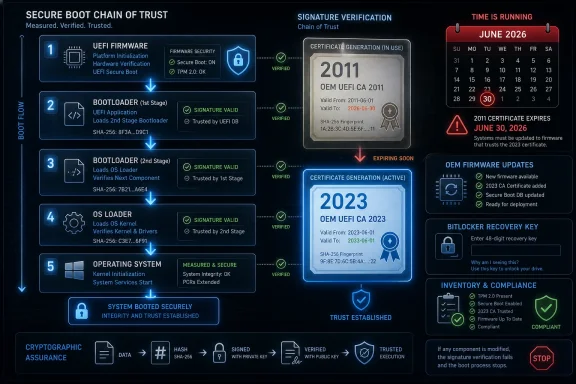 The Certificate Clock Has Reached the Firmware Layer
Secure Boot was always sold as a clean idea. Before Windows loads, the firmware checks that the bootloader, option ROMs, and other early-start components are signed by authorities the machine trusts. If the chain of trust holds, the machine continues. If it does not, the firmware blocks execution before malware gets the first move.That model depends on certificates, and certificates expire. Microsoft’s 2011-era Secure Boot authorities were created when Windows 8 was still the coming attraction, when UEFI was displacing the old BIOS world, and when “modern PC” meant something rather different from what it means in 2026. Fifteen years later, those trust anchors are no longer background plumbing. They are calendar-bound infrastructure.
The expiring set includes Microsoft’s 2011 Key Exchange Key and the certificate authorities used to validate Windows boot components and third-party UEFI code. Microsoft’s replacement chain is the 2023 generation, including updated authorities for Windows boot components, third-party UEFI applications, and option ROMs. That split matters because Secure Boot does not protect one thing; it protects a sequence of firmware and pre-OS decisions.
For most consumer PCs that are supported, updated, and left in Microsoft’s normal servicing lane, the transition should be quiet. Windows Update and OEM firmware channels are supposed to do the work. But the word “supposed” is doing a lot of labor here, because Secure Boot lives at the boundary between Microsoft’s operating system, OEM firmware implementation, hardware add-ins, deployment media, BitLocker, virtualization, and the bootloaders used by non-Windows systems.
This is why the correct reaction is neither shrugging nor doomscrolling. The deadline matters because it turns a security architecture into an inventory problem.
Secure Boot Was Optional Until It Became the Price of Admission
Secure Boot entered the Windows mainstream with Windows 8, but its political and technical shadow stretched much farther. It was part of the UEFI move away from legacy BIOS, and it arrived with familiar anxieties: Would Microsoft use it to lock out alternative operating systems? Would OEMs expose usable controls? Would users understand what was being trusted on their behalf?The practical answer settled into an uneasy compromise. Windows systems shipped with Microsoft’s keys. Linux distributions found ways to work through Microsoft-signed shim loaders or machine owner keys. Enterprises learned to treat Secure Boot as one more control to validate during hardware procurement. Power users learned where the firmware toggle lived, usually after needing to boot something unusual.
Windows 10 kept Secure Boot in the “strongly encouraged but not universal” category because the PC base was still messy. Windows 11 changed the temperature. By making Secure Boot capability part of the hardware baseline, alongside TPM 2.0 and other platform requirements, Microsoft moved it from an optional modernity marker to a default assumption.
That history explains why the 2026 expiration is so broad. The original 2011 certificates were not a niche artifact. They became part of the trust fabric for more than a decade of Windows machines, servers, workstations, gaming rigs, point-of-sale systems, industrial PCs, and virtualized environments. The longer something works invisibly, the more surprised everyone is when it needs maintenance.
The irony is that expiration is evidence the system was designed with a lifecycle. A certificate that never expires is not a certificate; it is a fossilized trust decision. But the PC ecosystem is not a single service where one operator rotates keys behind the curtain. It is a federation of firmware vendors, OEMs, component makers, OS images, recovery tools, and administrators who may or may not have touched the BIOS setup screen since deployment day.
The PC Will Probably Boot, Which Is Part of the Problem
The most important correction to the emerging panic is simple: expiration does not necessarily mean a Windows PC bricks itself in June 2026. Microsoft’s guidance has repeatedly framed the risk as a degraded security and servicing state, not an automatic mass boot failure. Many affected devices may continue to start and install ordinary Windows updates.That distinction is accurate, but it is also dangerous if it becomes an excuse for inaction. The issue is not merely whether the machine reaches the desktop the morning after a certificate date passes. The issue is whether it can continue to receive and enforce future Secure Boot protections for early boot components, revocation lists, boot manager updates, and mitigations for new classes of pre-OS attack.
In security terms, “still boots” is a low bar. A machine can boot while becoming less able to trust future boot components. It can install monthly updates while missing the firmware trust changes required to protect the earliest part of startup. It can appear healthy to a user while becoming a future exception in an administrator’s compliance report.
That is the operational trap. Catastrophic failures get attention; degraded trust states get deferred. Windows administrators know this pattern from certificate expirations, TLS deprecations, domain functional levels, SHA-1 retirement, and old authentication protocols. The ecosystem rarely collapses overnight. Instead, the unsupported corner cases accumulate until a later update, audit, or incident turns “we’ll get to it” into a weekend outage.
Secure Boot certificate renewal therefore has to be understood as preventive maintenance, not emergency repair. The point is to complete the transition while the machine still has known-good update paths, vendor support, recovery options, and time for staged testing.
Microsoft Is Rotating Trust, Not Merely Replacing a File
It is tempting to describe this as “install the new certificate,” but that undersells the choreography. Secure Boot uses several databases and trust relationships. The Key Exchange Key authorizes updates to Secure Boot databases. The allowed database contains trusted signing authorities. The forbidden database contains revoked signatures and hashes. Boot managers and firmware components are signed against those authorities.The 2023 refresh therefore has multiple parts. Systems need the new Microsoft KEK so future updates to Secure Boot trust databases can be authorized. They need the newer Windows signing authority for bootloader and boot component validation. They may need the newer Microsoft UEFI authority and option ROM authority for third-party bootloaders, EFI applications, and expansion card firmware paths.
That separation is not administrative trivia. It reflects lessons from the last decade of Secure Boot attacks and mitigations. The BlackLotus bootkit and related Secure Boot bypass concerns showed that trusting a boot path is not enough if old, vulnerable components remain usable. A mature Secure Boot ecosystem needs updated trust anchors and revocations, and revocations are where operational risk rises.
Revocation is the sharp edge of Secure Boot. Adding trust is usually reversible and low drama. Removing trust can strand old media, old bootloaders, recovery environments, add-in cards, or niche deployment workflows. Microsoft has therefore treated Secure Boot hardening as a staged process, because pushing every revocation at once across the Windows installed base would invite the kind of firmware chaos that makes administrators disable controls rather than manage them.
The 2026 deadline makes that staged process less abstract. It says the old roots cannot remain the quiet assumption forever. The platform has to learn to trust the 2023 chain before the 2011 chain becomes a liability.
OEM Firmware Is the Unromantic Center of the Story
For Windows enthusiasts, it is natural to focus on Microsoft because the certificates carry Microsoft’s name and Windows Update is the most visible delivery vehicle. But the firmware layer is where many of the hardest cases will live. Secure Boot variables are stored and enforced by UEFI firmware, and firmware quality varies.A newish Windows 11 laptop from a major vendor, fully patched and still within its support lifecycle, is the easy case. An aging workstation with a discrete GPU, a stale BIOS, BitLocker enabled, a third-party disk encryption bootloader, and a fleet image created years ago is not. A server platform with conservative firmware update windows is a different problem again. An IoT device deployed in a closet and forgotten until audit season is its own genre of pain.
Microsoft can ship certificate update logic, but it cannot make every firmware implementation elegant. Some machines may require OEM firmware updates before the 2023 certificates can be applied reliably. Some platforms may be out of scope for new BIOS releases yet still able to receive certificate updates through Windows. Some may expose confusing signals that require administrators to distinguish “not yet updated,” “blocked,” and “unsupported.”
This is why vendor pages and hardware inventories matter. The Secure Boot certificate rollover is not just a Windows version question. It is a device model question, a firmware revision question, and sometimes a peripheral question. A fleet that looks uniform from the Windows build number may be heterogeneous below the OS line.
The consumer version of this problem is simpler but not trivial. Users who never install firmware updates, who run old Windows 10 systems outside a clear support path, or who have disabled Secure Boot for dual-boot experiments may not receive the intended remediation. A PC bought in the last year or two is probably already better positioned. A PC that barely met Windows 11’s requirements, or never did, deserves more scrutiny.
Windows 10 Turns a Security Rollover Into a Support Rollover
The timing is particularly uncomfortable because Windows 10 is already in its late-life era. Microsoft’s mainstream Windows 10 support ended in October 2025, with extended security update paths available for certain users and organizations. That means the Secure Boot certificate issue lands in the same mental bucket as a larger question: which older PCs are still being kept alive, by whom, and under what servicing assumptions?For an individual user, the practical answer may be “keep installing updates if you are eligible, check firmware support, and avoid turning Secure Boot into a weekend project unless you know why.” For an organization, the answer is less forgiving. If Windows 10 devices remain in production, they need to be visible in inventory and covered by a support plan that includes Secure Boot remediation, not merely monthly OS patching.
The danger is that some administrators will treat Windows 10 and Secure Boot as separate migrations. They are not the same project, but they overlap in the riskiest places: older hardware, inconsistent firmware support, deferred replacement cycles, and systems that have acquired local exceptions over years. The machine that missed the Windows 11 hardware cutoff is also more likely to be the machine with aging firmware and neglected boot configuration.
Extended security updates may keep Windows 10 viable for a time, but they do not magically modernize the platform beneath it. If a device cannot receive updated Secure Boot trust anchors, the administrator has to decide whether that device remains acceptable for its role. That decision is not ideological. It depends on exposure, data sensitivity, compensating controls, and the cost of replacement.
This is where Microsoft’s “degraded security state” phrasing becomes useful. It avoids exaggerating the risk into instant failure, but it also gives IT a defensible reason to push hardware refreshes or firmware remediation. “It still boots” is not a compliance strategy.
Linux, Recovery Media, and Anti-Cheat Are the Edge Cases That Become Headlines
Secure Boot has always been most complicated outside the default Windows path. Linux distributions, bootable rescue tools, imaging systems, hypervisors, encryption products, and some anti-cheat systems interact with pre-OS trust in ways that ordinary users rarely see. The certificate rollover therefore raises a predictable question: what happens to everything signed under the older Microsoft UEFI CA?The answer depends on the component, the firmware trust database, and the update path. Existing binaries do not necessarily vanish into untrustworthiness simply because a certificate reaches its date, especially if the relevant certificate remains in the device’s Secure Boot database. But future signing, future revocation, and future validation behavior can diverge. That distinction is exactly why the topic is confusing.
Linux vendors and maintainers have been dealing with Microsoft’s Secure Boot ecosystem for years, often through shim loaders signed by Microsoft. They will need to ensure their boot chain works under the 2023 authorities where required. The same is true for tools that boot before Windows for backup, recovery, forensics, or deployment. Enterprises that rely on such media should not wait until a crisis to discover whether an ISO, USB stick, PXE workflow, or appliance bootloader still fits the trust model.
Gaming PCs add another wrinkle. Some anti-cheat systems and competitive titles already require Secure Boot or related platform integrity features. That means a misconfigured Secure Boot state can surface not as a Windows boot problem, but as a game refusing to launch or an anti-cheat driver complaining about platform trust. For enthusiasts, the firmware security stack has become part of the consumer software experience, however absurd that may feel.
Then there are option ROMs and add-in cards. Graphics cards, storage controllers, network adapters, and other hardware may rely on firmware components signed under older authorities. Most mainstream configurations should have a path forward, but niche hardware and older expansion cards deserve testing. Secure Boot is not just about the Windows bootloader; it is about what the firmware is willing to execute on the way there.
BitLocker Makes Firmware Maintenance Feel Riskier Than It Is
No discussion of Secure Boot changes is complete without BitLocker anxiety. BitLocker binds disk encryption trust to platform state, and firmware or Secure Boot changes can cause recovery prompts if the measured boot environment changes in ways BitLocker interprets as suspicious. That is a feature, not a bug, but it can feel like punishment when a planned update turns into a recovery-key scramble.The sensible enterprise response is sequencing. Back up recovery keys. Confirm escrow into Active Directory, Microsoft Entra ID, or the organization’s chosen management platform. Pilot representative hardware. Avoid combining Secure Boot certificate changes, BIOS updates, storage firmware updates, and bootloader changes into one heroic reboot unless the vendor guidance explicitly says to do so.
For consumers, the advice is more basic: know where your BitLocker recovery key is before making firmware-level changes. Many Windows 11 systems encrypt by default or through device encryption, and users may not realize that a Microsoft account holds the recovery key until they are staring at a blue recovery screen. The Secure Boot rollover does not mean everyone should dive into firmware menus, but anyone who does should prepare first.
This is the recurring theme: the update itself is not inherently exotic, but the layer it touches is unforgiving. Windows users are accustomed to rolling back drivers, uninstalling patches, and rebooting twice. Firmware trust changes are not that casual. They are manageable, but they reward planning and punish improvisation.
That is especially true for revocations. Adding 2023 trust anchors is one stage. Enforcing revocations against older vulnerable boot components is another. Administrators should understand the distinction and resist the urge to compress the entire Secure Boot modernization story into a single maintenance window simply because the calendar is making noise.
The Right Enterprise Question Is Not “Are We Patched?” but “Are We Transitioned?”
Patch management dashboards are good at telling administrators whether a Windows cumulative update installed. They are less naturally good at proving that UEFI variables, firmware trust databases, boot managers, and revocation states are where they should be. The Secure Boot certificate rollover is a test of whether endpoint management reaches below the OS in a meaningful way.Microsoft has exposed event log and registry signals that can help identify whether a device has moved to the expected 2023 state. Enterprises should use those signals in inventory, compliance reporting, and staged rollout rings. The goal is not merely to install a package; it is to verify that the device’s Secure Boot trust state changed as intended.
That means creating groups. Which devices already have the 2023 authorities? Which are pending? Which are blocked because Secure Boot is disabled? Which require firmware updates? Which are out of OEM support? Which are servers with separate maintenance rules? Which are virtual machines whose firmware template predates the new certificates?
Virtualization deserves special attention because administrators may forget that virtual machines have firmware too. A VM created years ago may present an older Secure Boot environment even if the host is current. Templates, golden images, recovery media, and offline devices can all lag behind. The rollover is therefore not just an endpoint project; it touches image engineering and platform operations.
This is also a moment to stop treating Secure Boot disablement as harmless convenience. In labs and enthusiast setups, turning Secure Boot off may be a temporary workaround. In production, it can become a silent permanent exception. If Windows cannot update active Secure Boot variables while Secure Boot is disabled, then disabled systems may miss the very transition they need in order to remain secure later.
Microsoft’s Messaging Has to Thread a Narrow Needle
Microsoft’s public posture has been careful because it has to be. If it says too little, administrators defer the work. If it says too much, consumers panic and vendors drown in support tickets. If it promises a seamless transition, every firmware edge case becomes a betrayal. If it emphasizes degraded security, headlines turn that into “millions of PCs at risk.”The company’s best argument is also the most boring one: certificate rotation is normal security hygiene. Credentials age. Cryptographic ecosystems evolve. Boot attacks improve. A platform that never renews its roots becomes brittle and eventually indefensible.
But Windows is not a cloud service where Microsoft owns the whole stack. The company can coordinate, publish guidance, ship updates, and pressure OEMs, but the installed base includes years of hardware decisions that Microsoft did not fully control. The Secure Boot certificate rollover exposes the limits of centralized platform security in a decentralized PC ecosystem.
There is also a trust cost to Windows 11’s hardware line. Microsoft told users that modern Windows needed a more secure platform baseline, then left many otherwise functional Windows 10 PCs outside the official upgrade path. Now a separate but related platform-security deadline reinforces the same message: old hardware can keep running, but it increasingly lives outside the fully protected path.
That message is defensible from a security standpoint and irritating from a user standpoint. Both can be true. The PC’s openness has always depended on old machines continuing to do useful work long after vendors would prefer to stop thinking about them. Secure Boot certificate expiration is one of the moments when that culture collides with the maintenance demands of a cryptographic trust system.
The Home User’s Best Move Is Boring: Update, Don’t Tinker
For ordinary Windows users, the right response is refreshingly dull. Keep Windows Update enabled. Install OEM firmware updates from the PC manufacturer when offered through trusted channels. Do not disable Secure Boot because a forum post made the deadline sound scary. Do not download random “certificate fix” utilities from search results.If you are on a supported Windows 11 PC from a mainstream vendor, the odds are good that remediation either has happened or will happen through normal servicing. If you bought a recent PC, it may already ship with the 2023 authorities. If you are running Windows 10 under an eligible extended update arrangement, the path may still exist, but you should be more deliberate about confirming support.
The harder consumer cases are the ones enthusiasts know well. Dual-boot systems, modified bootloaders, custom encryption setups, older discrete hardware, and machines that have had Secure Boot toggled on and off over the years should be checked before the deadline becomes urgent. The right test is not “does Windows boot today?” but “does this configuration still have a supported path for Secure Boot trust updates?”
Users should also separate firmware updates from internet folklore. A BIOS update from Dell, HP, Lenovo, ASUS, MSI, Gigabyte, or another OEM is a normal maintenance channel. A mysterious executable promising to “fix Secure Boot certificates” is not. The closer a change gets to boot trust, the more conservative the source should be.
For many readers of WindowsForum.com, this is familiar advice dressed in new clothes. The boot chain is not a place for bravado. Make a backup, know your recovery keys, update through official channels, and test unusual setups before you need them.
The Calendar Is Forcing a Long-Delayed Inventory Conversation
The Secure Boot certificate deadline has a way of sounding narrow until you map the affected assets. It touches hardware age, OS lifecycle, firmware support, deployment media, recovery practices, Linux compatibility, BitLocker readiness, virtual machine templates, and security compliance. That is too broad to be handled as a last-minute helpdesk bulletin.The healthiest organizations will treat the 2026 rollover as an excuse to improve visibility. They will query Secure Boot status, firmware versions, certificate state, and model support. They will build pilot rings and watch for event log failures. They will test rescue media and imaging workflows. They will decide which old machines are worth remediating and which should finally leave production.
The less healthy organizations will wait until a security update, audit finding, game anti-cheat error, BitLocker prompt, or failed boot media forces the conversation. That is how platform debt usually announces itself. Not as a single outage, but as a sequence of small exceptions that no one budgeted time to understand.
The consumer version of inventory is simpler: know what PC you have, whether it is still supported, whether Secure Boot is enabled, and whether firmware updates exist. That alone puts a user ahead of most panic-driven advice. The goal is not to become a UEFI engineer; it is to avoid being surprised by the part of the computer that runs before the operating system has a chance to help.
Secure Boot’s certificate refresh is therefore a useful reminder that security is not only software features and monthly patches. It is also maintenance of the trust assumptions buried in firmware, keys, and supply-chain coordination. The more invisible a layer is, the more deliberate its upkeep has to be.
The Practical Read Before June Becomes a Deadline
The Secure Boot rollover is manageable, but it rewards readers who separate concrete action from ambient dread. The near-term job is to confirm that supported systems can receive the 2023 trust anchors and that unusual systems are tested before the old assumptions expire.- Most supported Windows PCs should continue booting after the 2011 Secure Boot certificates begin expiring, but systems that miss the transition may lose access to future boot-level protections.
- The important replacement authorities are the 2023 Secure Boot certificates, including updated trust for Windows boot components, third-party UEFI code, option ROMs, and future Secure Boot database updates.
- Windows Update may handle the process for many consumer and managed devices, but older firmware, disabled Secure Boot, unsupported hardware, or unusual boot configurations can block or complicate remediation.
- Administrators should verify the actual Secure Boot certificate state through inventory signals rather than assuming that a monthly Windows update proves the firmware trust store is current.
- BitLocker recovery keys, firmware update plans, deployment media, virtual machine templates, and dual-boot workflows should be checked before making broad Secure Boot or revocation changes.
- Devices that cannot transition should be treated as security exceptions, not merely old PCs that still power on.
References
- Primary source: Computerworld
Published: Tue, 26 May 2026 10:03:28 GMT

FAQ: What you need to know about expiring Windows Secure Boot certificates
A major change is coming to Windows that neither individual users nor IT admins can ignore. Here’s how to prepare. www.computerworld.com
- Official source: learn.microsoft.com

Update Secure Boot Certificates for Windows Devices - Windows Client
Update your Windows devices to maintain Secure Boot protection with 2023 certificates before they expire in June 2026.learn.microsoft.com - Official source: microsoft.com

Prepare your servers for Secure Boot certificate updates | Microsoft Windows Server Blog
The original Secure Boot certificates introduced in 2011 are approaching the end of their planned lifecycle, with expirations beginning in late June 2026. www.microsoft.com
- Related coverage: windowscentral.com
Microsoft warns Secure Boot certificates will expire soon — what to expect
After 15 years, the original Secure Boot certificates that keep your PC secure during boot are expiring. Here's what you need to know. www.windowscentral.com
- Related coverage: notebookcheck.net
Windows Secure Boot 2026: Microsoft issues final warning over expiring certificates
Microsoft warns that 2011 Secure Boot certificates expire in June 2026. Is your PC ready? We look at the OEM roadmap and how to verify your firmware status. www.notebookcheck.net
- Related coverage: techspot.com
- Official source: support.microsoft.com
- Official source: techcommunity.microsoft.com
Act now: Secure Boot certificates expire in June 2026 - Windows IT Pro Blog
Get tips to prepare for the rollout of updated certificates across your organization. techcommunity.microsoft.com
- Related coverage: its.wsu.edu
Windows Secure Boot Certificates Expire 2026
Please see the following scheduled Microsoft change: Date: June 2026 and October 2026 The following work is being completed: Several original Microsoft certificates used by the Secure Boot feature in Unified Extensible Firmware Interface (UEFI)-based firmware are nearing expiration. These... its.wsu.edu
- Related coverage: cisco.com
- Related coverage: tomshardware.com
Microsoft is refreshing Secure Boot certificates to plug security holes before they happen — if you bought a PC last year, you should be set
Be sure to keep Windows 11 systems updated to get refreshed security certificates.www.tomshardware.com
- Related coverage: techradar.com

Microsoft's Secure Boot replacements could be bad news for Windows 10 users
Secure Boot certificate upgrades is bad news for Windows 10www.techradar.com
- Related coverage: pcgamer.com
- Related coverage: tomsguide.com

