

Microsoft is preparing Windows PCs for a Secure Boot certificate rollover beginning in late June 2026, when original 2011-era certificates start expiring and unsupported Windows 10 systems outside Extended Security Updates will not receive the replacement certificates. This is not a theatrical “your PC will stop booting” deadline, but it is a real security boundary. The practical message is blunt: Windows servicing status now determines whether a machine can keep trusting the earliest and most sensitive part of the boot chain.
The awkward part is that Microsoft’s warning lands after Windows 10 has already left mainstream support. For years, Secure Boot was treated by most users as a BIOS checkbox, a Windows 11 eligibility hurdle, or an anti-cheat requirement for certain games. Now it is becoming something more uncomfortable: a live maintenance dependency whose failure mode may be invisible until the next boot-level vulnerability needs patching.
Secure Boot arrived in the Windows ecosystem as part of the UEFI transition, with Windows 8-era hardware carrying a shared set of Microsoft certificates used to decide what could run before Windows itself loads. Those certificates were never meant to be immortal. They were issued in 2011, and after roughly 15 years they are reaching the end of their planned life.
That matters because Secure Boot is not merely a Windows feature in the familiar sense. It sits in the pre-OS world, where firmware, boot managers, option ROMs, and early startup components establish whether the system should trust what happens next. If malware wins there, it can operate beneath the layers where normal endpoint protection is most comfortable.
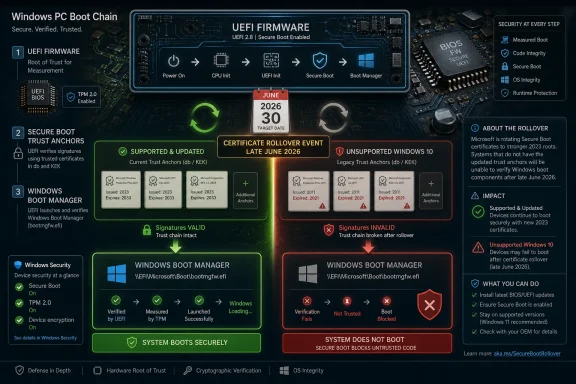
Microsoft’s replacement plan moves devices from the 2011 certificate chain to new 2023 certificates. The company has been preparing this for months through Windows updates, firmware coordination with OEMs, and new status surfaces in Windows Security. In the best case, a supported and updated PC receives the new trust material automatically and the user notices little beyond another monthly patch cycle.
But the phrase “in the best case” is doing a lot of work. The PC ecosystem is a museum of firmware ages, servicing channels, corporate controls, dual-boot setups, dormant spares, old recovery media, virtual machines, and consumer laptops that have not seen an OEM firmware update since the first year of ownership. A certificate rollover that sounds tidy in a Microsoft diagram becomes messier when it meets the installed base.
The risk is narrower and more technical, but not smaller. A device that has not received the new certificates may lose the ability to receive future security protections for early boot components, including Secure Boot databases, revocation lists, Windows Boot Manager updates, and mitigations for newly discovered boot-level vulnerabilities. In other words, the machine may keep working while its most foundational trust mechanism ages out of the update stream.
That is a classic infrastructure security problem: the failure is not dramatic enough to trigger immediate user action, yet significant enough to matter when the next serious vulnerability appears. A laptop that turns on, signs into Windows, opens Edge, and installs normal cumulative updates can still be in a degraded boot-trust posture. For consumers, that nuance is almost guaranteed to be lost.
For IT administrators, it is more legible but not necessarily easier. The problem is not simply “install Patch Tuesday.” It is “inventory Secure Boot state, certificate state, firmware readiness, Windows support status, and any special boot dependencies across every physical and virtual device before the certificate chain becomes tomorrow’s incident ticket.”
Windows 10 support ended on October 14, 2025. Microsoft’s consumer ESU program gives eligible Windows 10 version 22H2 users a way to receive critical and important security updates through October 13, 2026, with enrollment available until that date. It does not provide feature updates, broad product improvements, or the kind of full support experience people remember from Windows 10’s mainstream years.
That timing is uncomfortable. The Secure Boot certificate rollover begins in late June 2026, less than four months before the first-year Windows 10 ESU runway ends. For a Windows 10 user who has delayed a Windows 11 move because the machine works fine, the message has changed from “you are missing future features” to “you are increasingly dependent on an exception program to preserve security plumbing.”
There is a consumer-policy irony here. Microsoft spent years insisting Windows 11 needed stricter hardware requirements because security baselines matter. Now a large slice of the Windows 10 installed base is discovering that the same security architecture is not just a launch requirement but an ongoing servicing relationship. If your machine is too old, too unmanaged, or too unsupported to stay in that relationship, the risk accumulates in places the average user never sees.
But dismissing this as mere upgrade theater would be a mistake. Secure Boot certificates are not a marketing artifact. Certificates expire, signing chains rotate, old keys become liabilities, and security platforms need a way to revoke trust and introduce new trust without breaking the world. The fact that Microsoft is having to do this for the first time at PC scale is precisely why the story feels strange.
The company is also not saying that every unpatched machine becomes instantly compromised. The warning is about future protections and boot-level trust continuity. That makes the message harder to sell, because it asks users to care about a conditional risk: not “your PC is broken,” but “your PC may no longer be able to accept certain future protections in the layer that decides whether Windows can trust itself.”
That is exactly the sort of risk that security teams are paid to care about. Bootkits and pre-OS attacks are rare compared with phishing, credential theft, and commodity malware, but they occupy a privileged layer. If attackers compromise the boot chain, the rest of the system’s assurances become less convincing. Secure Boot is not magic, and it has had its own messy vulnerability history, but weakening its update path is not something responsible operators should shrug off.
The difficulty is that Secure Boot lives partly in firmware, and firmware is where the PC industry’s neat abstractions go to die. OEMs ship different update tools, different BIOS interfaces, different defaults, and different support lifetimes. Some machines receive firmware through Windows Update. Others require vendor utilities. Some older devices may need firmware updates before the new certificates apply cleanly.
Microsoft has warned that Secure Boot should not be disabled as a workaround. That advice is worth taking seriously. Toggling Secure Boot off and on can reset variables or restore defaults in ways that complicate the very certificate state users are trying to fix. The BIOS checkbox is not a magic broom; it can sweep away the updated trust configuration.
This is also where dual-boot users, Linux users, and enthusiasts with custom bootloaders should slow down. Secure Boot’s 2023 certificate transition is about trust chains, not just Windows. Third-party bootloaders, EFI applications, recovery tools, and older install media may behave differently depending on what a given machine trusts after the rollover. The Windows-first update path may be correct for Windows security while still creating friction for edge setups.
That means endpoint teams need inventory. They need to know which systems have Secure Boot enabled, which are still using old certificates, which require OEM firmware, which are in storage, which are virtualized, and which are on Windows 10 ESU rather than a fully supported Windows 11 build. They also need to know which recovery images, task sequences, WinPE environments, and bootable tools have been updated for the new signing era.
The hidden risk is not the well-managed corporate laptop that checks in every day. It is the machine in a lab, the kiosk nobody owns, the spare laptop in a cabinet, the remote office workstation that only VPNs once a month, or the golden image that has not been rebuilt since the previous hardware refresh. Certificate transitions punish assumptions about sameness.
The server side is even less forgiving. Windows Server environments often move slowly for good operational reasons, and Secure Boot-enabled virtual machines introduce additional layers of platform dependency. Hypervisors, templates, virtual firmware, backup restores, and disaster recovery exercises all need to be considered. The fact that a production workload is stable is not proof that its boot-trust path is future-ready.
That does not mean the new surface will solve the communication problem. Windows Security already contains language that many users do not understand, and Secure Boot status is easy to misread. A machine can have Secure Boot enabled but still need a certificate update. A machine can be technically capable but blocked by firmware. A machine can be unsupported at the OS level and therefore outside the normal fix path.
Still, surfacing the state matters. One of Windows’ long-running weaknesses is that deeply important system-health signals often appear only after something has already gone wrong. Here, Microsoft is trying to expose a maintenance condition before the cliff. That is the right instinct, even if the rollout will inevitably produce confusing screenshots, forum threads, and contradictory vendor advice.
For Windows enthusiasts, this is where community expertise becomes useful. The right response is not to amplify panic claims that millions of PCs will brick overnight. It is to help users distinguish boot failure myths from genuine degraded-security warnings, and to point them toward practical checks: Windows support status, Secure Boot state, firmware updates, and whether the 2023 certificates are actually present.
The deeper story is that Windows security has become inseparable from lifecycle management. A PC is no longer just a box that runs an operating system until the hardware dies. It is a chain of firmware, certificates, revocation lists, signed boot components, cloud-delivered updates, OEM cooperation, and Microsoft servicing policy. Break any link long enough, and the machine may still function while quietly falling behind the security model it was designed to participate in.
That is a harder message than “upgrade now.” It is also more honest. Some Windows 10 users have perfectly rational reasons for staying put: specialized software, old peripherals, hardware that fails Windows 11 checks, cost, habit, or simple distrust of Microsoft’s product direction. But rational reasons do not cancel cryptographic timelines.
The security industry has trained users to respond to visible emergencies: red screens, ransomware notes, breach headlines, stolen passwords. Certificate expiration is dull by comparison. Yet modern computing depends on dull things being maintained correctly. Trust is paperwork with consequences.
But any system built on long-lived certificates eventually has to rotate them. The fact that this is Microsoft’s first PC-scale Secure Boot certificate expiration event makes the transition feel novel, but it is not surprising. The surprising part is how many devices, images, and operational habits still depend on the old chain.
That dependence reflects the inertia of the Windows ecosystem. PCs last longer than vendor roadmaps. Businesses stretch depreciation cycles. Consumers keep machines as secondary devices. Enthusiasts preserve old hardware because it does a job. Virtual machines live as templates long after the administrator who created them has moved on.
Security architecture ages differently from hardware. A laptop from 2018 may still feel fast enough for email, Office, browsing, and streaming. Its battery may be replaceable, its SSD upgradable, and its display acceptable. But if its firmware and OS servicing path cannot keep up with the trust infrastructure underneath Windows, “still works” stops being the same as “still defensible.”
Still, Microsoft also owns part of the confusion. Windows 10’s end of support, Windows 11’s hardware requirements, ESU enrollment, Secure Boot certificate status, firmware dependencies, and monthly cumulative updates are separate concepts in Microsoft’s documentation but one tangled reality for users. The company’s messaging tends to be technically correct while assuming a level of lifecycle literacy most consumers do not have.
The ESU program is a particular example. It gives Windows 10 users a bridge, but a bridge with deadlines, eligibility rules, account requirements, and a narrow update promise. For a security feature as foundational as Secure Boot, the distinction between unsupported Windows 10 and Windows 10 enrolled in ESU needs to be unmistakable. A user should not have to parse support pages to understand whether their machine is on the safe side of the certificate transition.
OEMs have their own responsibility. Firmware updates remain one of the least user-friendly parts of PC ownership, and yet they are increasingly central to security posture. If a vendor’s device requires a BIOS update before the new certificates can be applied cleanly, that vendor should make the path obvious, stable, and available through normal channels wherever possible.
For home users, the priority is to check whether the PC is on a supported Windows path. If it can upgrade to Windows 11, the Secure Boot certificate story is another reason to stop delaying. If it cannot, enrolling in Windows 10 ESU is the minimum bridge, not a long-term plan. If neither option is acceptable, the user is choosing to operate outside Microsoft’s security-maintenance model and should treat the machine accordingly.
For administrators, the priority is measurement. The dangerous estate is the one that looks patched in normal dashboards but has not actually completed the Secure Boot certificate transition. That means leaning on inventory signals, firmware compliance, Windows Security status, Intune remediations where applicable, and vendor-specific advisories for hardware that falls outside the clean Microsoft-managed path.
For enthusiasts, the priority is patience. Do not disable Secure Boot because a headline made the rollover sound scary. Do not assume every bootloader problem after an update is proof Microsoft “broke” your PC. Do not assume old installation media, recovery drives, or niche EFI tools will behave the same on a post-transition machine. This is one of those rare moments when reading before toggling is the power-user move.
That makes the most concrete lessons unusually practical:
Source: Forbes https://www.forbes.com/sites/zakdof...important-warning-windows-changes-in-6-weeks/
The awkward part is that Microsoft’s warning lands after Windows 10 has already left mainstream support. For years, Secure Boot was treated by most users as a BIOS checkbox, a Windows 11 eligibility hurdle, or an anti-cheat requirement for certain games. Now it is becoming something more uncomfortable: a live maintenance dependency whose failure mode may be invisible until the next boot-level vulnerability needs patching.
 Microsoft’s Certificate Clock Has Finally Reached the BIOS
Secure Boot arrived in the Windows ecosystem as part of the UEFI transition, with Windows 8-era hardware carrying a shared set of Microsoft certificates used to decide what could run before Windows itself loads. Those certificates were never meant to be immortal. They were issued in 2011, and after roughly 15 years they are reaching the end of their planned life.That matters because Secure Boot is not merely a Windows feature in the familiar sense. It sits in the pre-OS world, where firmware, boot managers, option ROMs, and early startup components establish whether the system should trust what happens next. If malware wins there, it can operate beneath the layers where normal endpoint protection is most comfortable.
Microsoft’s replacement plan moves devices from the 2011 certificate chain to new 2023 certificates. The company has been preparing this for months through Windows updates, firmware coordination with OEMs, and new status surfaces in Windows Security. In the best case, a supported and updated PC receives the new trust material automatically and the user notices little beyond another monthly patch cycle.
But the phrase “in the best case” is doing a lot of work. The PC ecosystem is a museum of firmware ages, servicing channels, corporate controls, dual-boot setups, dormant spares, old recovery media, virtual machines, and consumer laptops that have not seen an OEM firmware update since the first year of ownership. A certificate rollover that sounds tidy in a Microsoft diagram becomes messier when it meets the installed base.
The Expiration Is Not a Shutdown Date, Which Makes It More Dangerous to Ignore
The most important correction to the panic version of this story is that a PC with old Secure Boot certificates is not necessarily expected to refuse to start the moment the calendar reaches late June. Microsoft’s own guidance says affected devices may continue to boot and may continue installing ordinary Windows updates. That distinction is crucial.The risk is narrower and more technical, but not smaller. A device that has not received the new certificates may lose the ability to receive future security protections for early boot components, including Secure Boot databases, revocation lists, Windows Boot Manager updates, and mitigations for newly discovered boot-level vulnerabilities. In other words, the machine may keep working while its most foundational trust mechanism ages out of the update stream.
That is a classic infrastructure security problem: the failure is not dramatic enough to trigger immediate user action, yet significant enough to matter when the next serious vulnerability appears. A laptop that turns on, signs into Windows, opens Edge, and installs normal cumulative updates can still be in a degraded boot-trust posture. For consumers, that nuance is almost guaranteed to be lost.
For IT administrators, it is more legible but not necessarily easier. The problem is not simply “install Patch Tuesday.” It is “inventory Secure Boot state, certificate state, firmware readiness, Windows support status, and any special boot dependencies across every physical and virtual device before the certificate chain becomes tomorrow’s incident ticket.”
Windows 10 Has Become the Uncomfortable Edge Case
The sharpest part of Microsoft’s warning concerns unsupported Windows versions. Devices that are no longer supported do not receive Windows updates, and therefore do not receive the new Secure Boot certificates through the normal Microsoft-managed pipeline. In 2026, that effectively puts many Windows 10 machines on the wrong side of the handover unless they are enrolled in Extended Security Updates.Windows 10 support ended on October 14, 2025. Microsoft’s consumer ESU program gives eligible Windows 10 version 22H2 users a way to receive critical and important security updates through October 13, 2026, with enrollment available until that date. It does not provide feature updates, broad product improvements, or the kind of full support experience people remember from Windows 10’s mainstream years.
That timing is uncomfortable. The Secure Boot certificate rollover begins in late June 2026, less than four months before the first-year Windows 10 ESU runway ends. For a Windows 10 user who has delayed a Windows 11 move because the machine works fine, the message has changed from “you are missing future features” to “you are increasingly dependent on an exception program to preserve security plumbing.”
There is a consumer-policy irony here. Microsoft spent years insisting Windows 11 needed stricter hardware requirements because security baselines matter. Now a large slice of the Windows 10 installed base is discovering that the same security architecture is not just a launch requirement but an ongoing servicing relationship. If your machine is too old, too unmanaged, or too unsupported to stay in that relationship, the risk accumulates in places the average user never sees.
The Upgrade Pitch Is Real, but So Is the Security Problem
It is tempting to read every Microsoft Windows 10 warning as another nudge toward Windows 11, and there is truth in that. The company benefits when users leave an old operating system, buy newer hardware, subscribe to services, and reduce the long tail of support complexity. The Secure Boot deadline fits neatly into that broader migration campaign.But dismissing this as mere upgrade theater would be a mistake. Secure Boot certificates are not a marketing artifact. Certificates expire, signing chains rotate, old keys become liabilities, and security platforms need a way to revoke trust and introduce new trust without breaking the world. The fact that Microsoft is having to do this for the first time at PC scale is precisely why the story feels strange.
The company is also not saying that every unpatched machine becomes instantly compromised. The warning is about future protections and boot-level trust continuity. That makes the message harder to sell, because it asks users to care about a conditional risk: not “your PC is broken,” but “your PC may no longer be able to accept certain future protections in the layer that decides whether Windows can trust itself.”
That is exactly the sort of risk that security teams are paid to care about. Bootkits and pre-OS attacks are rare compared with phishing, credential theft, and commodity malware, but they occupy a privileged layer. If attackers compromise the boot chain, the rest of the system’s assurances become less convincing. Secure Boot is not magic, and it has had its own messy vulnerability history, but weakening its update path is not something responsible operators should shrug off.
The Firmware Layer Is Where Simple Advice Goes to Die
For many supported Windows 11 users, the practical advice is simple: install Windows updates, keep firmware current, and check the Secure Boot status now exposed in Windows Security. That is the consumer-friendly version, and it is mostly right. Microsoft has built the rollover so most modern PCs should receive the new certificates without a manual ritual.The difficulty is that Secure Boot lives partly in firmware, and firmware is where the PC industry’s neat abstractions go to die. OEMs ship different update tools, different BIOS interfaces, different defaults, and different support lifetimes. Some machines receive firmware through Windows Update. Others require vendor utilities. Some older devices may need firmware updates before the new certificates apply cleanly.
Microsoft has warned that Secure Boot should not be disabled as a workaround. That advice is worth taking seriously. Toggling Secure Boot off and on can reset variables or restore defaults in ways that complicate the very certificate state users are trying to fix. The BIOS checkbox is not a magic broom; it can sweep away the updated trust configuration.
This is also where dual-boot users, Linux users, and enthusiasts with custom bootloaders should slow down. Secure Boot’s 2023 certificate transition is about trust chains, not just Windows. Third-party bootloaders, EFI applications, recovery tools, and older install media may behave differently depending on what a given machine trusts after the rollover. The Windows-first update path may be correct for Windows security while still creating friction for edge setups.
Enterprises Face a Visibility Problem, Not Just a Patch Problem
For enterprise IT, the Secure Boot rollover should be treated as a fleet readiness project rather than a single monthly update. The difference matters. A patch problem can be measured by deployment percentage. A trust-chain problem has to be measured by whether the right certificates are present, active, and compatible with the device’s firmware and boot configuration.That means endpoint teams need inventory. They need to know which systems have Secure Boot enabled, which are still using old certificates, which require OEM firmware, which are in storage, which are virtualized, and which are on Windows 10 ESU rather than a fully supported Windows 11 build. They also need to know which recovery images, task sequences, WinPE environments, and bootable tools have been updated for the new signing era.
The hidden risk is not the well-managed corporate laptop that checks in every day. It is the machine in a lab, the kiosk nobody owns, the spare laptop in a cabinet, the remote office workstation that only VPNs once a month, or the golden image that has not been rebuilt since the previous hardware refresh. Certificate transitions punish assumptions about sameness.
The server side is even less forgiving. Windows Server environments often move slowly for good operational reasons, and Secure Boot-enabled virtual machines introduce additional layers of platform dependency. Hypervisors, templates, virtual firmware, backup restores, and disaster recovery exercises all need to be considered. The fact that a production workload is stable is not proof that its boot-trust path is future-ready.
Windows Security Gets a New Job: Explaining the Invisible
Microsoft’s move to show Secure Boot certificate update status in the Windows Security app is more than a UI tweak. It is an admission that the old model — burying this state in PowerShell, Event Viewer, registry keys, and firmware screens — is not good enough for a mass-market transition. If users need to act, they need a status screen that says something comprehensible.That does not mean the new surface will solve the communication problem. Windows Security already contains language that many users do not understand, and Secure Boot status is easy to misread. A machine can have Secure Boot enabled but still need a certificate update. A machine can be technically capable but blocked by firmware. A machine can be unsupported at the OS level and therefore outside the normal fix path.
Still, surfacing the state matters. One of Windows’ long-running weaknesses is that deeply important system-health signals often appear only after something has already gone wrong. Here, Microsoft is trying to expose a maintenance condition before the cliff. That is the right instinct, even if the rollout will inevitably produce confusing screenshots, forum threads, and contradictory vendor advice.
For Windows enthusiasts, this is where community expertise becomes useful. The right response is not to amplify panic claims that millions of PCs will brick overnight. It is to help users distinguish boot failure myths from genuine degraded-security warnings, and to point them toward practical checks: Windows support status, Secure Boot state, firmware updates, and whether the 2023 certificates are actually present.
The Media Panic Cycle Misses the Better Story
The Forbes framing captures the consumer urgency, and it is right to underline Microsoft’s warning that unsupported Windows versions will not receive the new certificates. But the better story is not simply that “Windows changes in six weeks.” Windows has been changing for months. The June deadline is the moment the abstraction becomes much harder to ignore.The deeper story is that Windows security has become inseparable from lifecycle management. A PC is no longer just a box that runs an operating system until the hardware dies. It is a chain of firmware, certificates, revocation lists, signed boot components, cloud-delivered updates, OEM cooperation, and Microsoft servicing policy. Break any link long enough, and the machine may still function while quietly falling behind the security model it was designed to participate in.
That is a harder message than “upgrade now.” It is also more honest. Some Windows 10 users have perfectly rational reasons for staying put: specialized software, old peripherals, hardware that fails Windows 11 checks, cost, habit, or simple distrust of Microsoft’s product direction. But rational reasons do not cancel cryptographic timelines.
The security industry has trained users to respond to visible emergencies: red screens, ransomware notes, breach headlines, stolen passwords. Certificate expiration is dull by comparison. Yet modern computing depends on dull things being maintained correctly. Trust is paperwork with consequences.
The 2011 Trust Chain Was Always Living on Borrowed Time
There is a philosophical lesson buried under the technical one. The original Secure Boot certificate set was a bet that a standardized trust anchor could help secure an enormous and chaotic hardware ecosystem. For the most part, that bet held. Windows devices gained a stronger pre-boot defense, OEMs aligned around UEFI Secure Boot, and enterprise security baselines increasingly treated it as table stakes.But any system built on long-lived certificates eventually has to rotate them. The fact that this is Microsoft’s first PC-scale Secure Boot certificate expiration event makes the transition feel novel, but it is not surprising. The surprising part is how many devices, images, and operational habits still depend on the old chain.
That dependence reflects the inertia of the Windows ecosystem. PCs last longer than vendor roadmaps. Businesses stretch depreciation cycles. Consumers keep machines as secondary devices. Enthusiasts preserve old hardware because it does a job. Virtual machines live as templates long after the administrator who created them has moved on.
Security architecture ages differently from hardware. A laptop from 2018 may still feel fast enough for email, Office, browsing, and streaming. Its battery may be replaceable, its SSD upgradable, and its display acceptable. But if its firmware and OS servicing path cannot keep up with the trust infrastructure underneath Windows, “still works” stops being the same as “still defensible.”
Microsoft’s Responsibility Does Not End at the Warning Banner
Microsoft deserves some credit for starting the rollout before the certificates expire, building status checks, and coordinating with OEMs. A last-minute scramble in June would have been indefensible. The company has also been careful, in its official guidance, not to overclaim that old machines will instantly fail.Still, Microsoft also owns part of the confusion. Windows 10’s end of support, Windows 11’s hardware requirements, ESU enrollment, Secure Boot certificate status, firmware dependencies, and monthly cumulative updates are separate concepts in Microsoft’s documentation but one tangled reality for users. The company’s messaging tends to be technically correct while assuming a level of lifecycle literacy most consumers do not have.
The ESU program is a particular example. It gives Windows 10 users a bridge, but a bridge with deadlines, eligibility rules, account requirements, and a narrow update promise. For a security feature as foundational as Secure Boot, the distinction between unsupported Windows 10 and Windows 10 enrolled in ESU needs to be unmistakable. A user should not have to parse support pages to understand whether their machine is on the safe side of the certificate transition.
OEMs have their own responsibility. Firmware updates remain one of the least user-friendly parts of PC ownership, and yet they are increasingly central to security posture. If a vendor’s device requires a BIOS update before the new certificates can be applied cleanly, that vendor should make the path obvious, stable, and available through normal channels wherever possible.
The Practical Line Between Caution and Panic
The correct response depends on the machine. A current Windows 11 PC that is fully updated, has Secure Boot enabled, and receives OEM firmware through Windows Update is likely to be fine. A Windows 10 PC outside ESU is not. A managed enterprise fleet needs verification, not vibes. A dual-boot workstation needs more care than a stock consumer laptop.For home users, the priority is to check whether the PC is on a supported Windows path. If it can upgrade to Windows 11, the Secure Boot certificate story is another reason to stop delaying. If it cannot, enrolling in Windows 10 ESU is the minimum bridge, not a long-term plan. If neither option is acceptable, the user is choosing to operate outside Microsoft’s security-maintenance model and should treat the machine accordingly.
For administrators, the priority is measurement. The dangerous estate is the one that looks patched in normal dashboards but has not actually completed the Secure Boot certificate transition. That means leaning on inventory signals, firmware compliance, Windows Security status, Intune remediations where applicable, and vendor-specific advisories for hardware that falls outside the clean Microsoft-managed path.
For enthusiasts, the priority is patience. Do not disable Secure Boot because a headline made the rollover sound scary. Do not assume every bootloader problem after an update is proof Microsoft “broke” your PC. Do not assume old installation media, recovery drives, or niche EFI tools will behave the same on a post-transition machine. This is one of those rare moments when reading before toggling is the power-user move.
The Six-Week Window Is Really a Lifecycle Test
The calendar makes this feel like a countdown, but the real test is whether Windows users and administrators understand the kind of platform Windows has become. Secure Boot certificate rotation is not a normal app update, and it is not a conventional feature upgrade. It is maintenance of the cryptographic scaffolding beneath the operating system.That makes the most concrete lessons unusually practical:
- Supported Windows 11 systems should be kept current with both Windows updates and OEM firmware updates before the late-June 2026 certificate expirations begin.
- Windows 10 systems outside Extended Security Updates should not be treated as covered by Microsoft’s Secure Boot certificate rollout.
- Windows 10 ESU is a temporary security bridge through October 13, 2026, not a substitute for a Windows 11 migration or hardware replacement plan.
- Secure Boot should not be disabled as a workaround, because toggling firmware settings can make certificate state harder to reason about.
- IT teams should verify certificate and firmware readiness directly rather than assuming ordinary patch compliance proves Secure Boot readiness.
- Recovery media, deployment images, virtual machine templates, and dual-boot configurations deserve special attention because they often preserve old boot assumptions long after production PCs have moved on.
Source: Forbes https://www.forbes.com/sites/zakdof...important-warning-windows-changes-in-6-weeks/
