

On June 3, 2026, Microsoft published a customer story describing how Japan’s Shinsei Technos adopted Microsoft Entra Internet Access and Microsoft Entra Private Access to secure mobile work, temporary construction offices, and access to internal systems while preserving parts of its existing IP-VPN architecture. The case matters because it is not the usual cloud-migration victory lap. It is a glimpse of how Zero Trust actually gets negotiated in organizations that cannot simply tear out legacy networks, ignore group policy, or tell field workers to wait for perfect connectivity. For Windows administrators, the interesting part is not that Microsoft sold another security suite; it is that the old boundary between endpoint management, identity, and network routing is being collapsed into one operating model.
Zero Trust has spent years as a slogan that vendors could stretch to fit almost any product category. In the Shinsei Technos case, it becomes more concrete because the company’s problem was not abstract cyber hygiene. It had employees moving between offices, client sites, temporary construction bases, and critical infrastructure projects where secure access had to work without turning every new location into a bespoke networking project.
Shinsei Technos is not a small cloud-native startup looking to simplify a greenfield environment. It is a comprehensive electrical construction company in the JR Tokai Group, with roots going back to 1947 and work tied to railways, airports, roads, government offices, public facilities, and other infrastructure. That history matters because infrastructure firms tend to carry two kinds of complexity at once: operational environments that change constantly, and risk tolerances that do not.
The company’s challenge was familiar to anyone who has supported mobile workers in a heavy industry setting. Temporary site offices might be opened and closed every month at peak periods. Employees needed to meet clients, visit job sites, handle large drawings, and still reach the same business systems without requiring IT to rebuild the world every time a project moved.
Microsoft’s published account frames the result as a successful adoption of Microsoft Entra Suite capabilities, including Entra Internet Access, Entra Private Access, Entra ID, Microsoft Defender, Microsoft Intune, and the Global Secure Access client. Beneath the product names is a larger argument: Microsoft wants identity to become the control plane for enterprise networking, not merely the login layer for cloud apps.
Shinsei Technos had already moved beyond a purely office-bound model. During the pandemic, it equipped employees with tablets and built a mobile work environment. It had also used thin-client desktops, a sensible choice for centralized control and leakage prevention, especially when device loss or uncontrolled local storage are major concerns.
But thin clients have their own gravity. They work best when connectivity is stable and latency is tolerable. For employees handling CAD drawings and other large data sets, a screen-transfer architecture can become a productivity bottleneck, particularly when the worker is outside a controlled office network.
That is why the company’s move toward “fat” client PCs and Microsoft 365 E3 is more than a device refresh. It reflects a broader shift in where trust and control live. Instead of assuming the session is safe because it stays inside a centrally managed desktop environment, the new model assumes the endpoint, identity, access path, and application context must be continuously evaluated.
For Windows shops, this is the part worth watching. The endpoint is not disappearing into the browser, and the network is not disappearing into the cloud. Instead, the Windows device becomes a managed participant in a policy fabric that includes Intune, Entra ID, Defender, and Global Secure Access.
That detail is important because it punctures one of the more naïve enterprise-security narratives. Most large organizations do not adopt Zero Trust by flipping a switch and abandoning inherited architecture. They adopt it by threading new policy controls through old routing, old dependencies, old governance requirements, and old expectations about where traffic is allowed to go.
In Shinsei Technos’ case, the group internet gateway was described as robust and advanced, but designed for a closed-network environment. The company needed to keep using existing network routes while solving a newer problem: how to move large volumes of data safely and smoothly for remote work and construction digital transformation.
The answer was local breakout, which in plain terms means allowing certain internet-bound traffic to go directly out rather than forcing it through a central private-network path. Local breakout is attractive because it can reduce latency and avoid unnecessary backhaul. It is also scary because it weakens the comforting simplicity of “everything goes through the one big gateway.”
Microsoft’s proposition is that identity-aware policy, device management, and cloud-delivered security controls can make that trade-off acceptable. Entra Internet Access is positioned as the secure path for Microsoft 365, SaaS, and internet traffic. Entra Private Access is positioned as the replacement for legacy VPN-style access to internal applications. Together under Global Secure Access, they aim to make location less important without making policy optional.
That is the quiet admission at the heart of the enterprise security market. Many competing products can satisfy the headline security requirement. The harder question is which one a small IT team can actually operate without creating another isolated console, another routing exception process, and another set of logs nobody has time to correlate.
Shinsei Technos appears to have chosen Microsoft because it already lived in the Microsoft 365 and Entra world. Identity management and Global Secure Access management could be handled centrally from the Entra admin center. Device deployment could use Intune. Security monitoring could be tied to Microsoft Defender. The value was not just protection; it was reducing the number of operational seams.
That does not mean Microsoft automatically wins every SSE evaluation. Enterprises with different incumbent tools, network architectures, regulatory constraints, or security operations models may come to different conclusions. But the Shinsei Technos story shows why Microsoft’s bundling strategy is so powerful in the mid-to-large enterprise: once Microsoft 365 E3, Entra ID, Intune, and Defender are already strategic platforms, the marginal appeal of adding Microsoft’s access layer grows sharply.
This is also where administrators should keep their skepticism intact. Consolidation is not the same thing as simplicity. A unified portal can reduce management sprawl, but it can also deepen platform dependency. The more policy, routing, device posture, identity, and detection are concentrated in one ecosystem, the more important it becomes to understand failure modes, licensing boundaries, and administrative privilege design.
That is not a minor implementation concern. For construction and engineering firms, large CAD files are not edge cases. They are the work product. If a secure-access design cannot handle those flows comfortably, users will either suffer, work around it, or pressure IT to create exceptions that undermine the architecture.
Microsoft’s advantage, as described by Shinsei Technos, was that the company could scale connector server specifications and use fewer connectors. That is a very IT-prosaic benefit, and precisely why it matters. Zero Trust projects often fail not because the principle is wrong, but because the throughput, latency, and operational experience are worse than the thing they replaced.
The broader lesson is that secure access is still access. Users do not experience compliance posture; they experience whether their drawings open, whether Teams calls stutter, whether SaaS apps load, and whether the green icon in the taskbar means they can get on with their day. If the security layer becomes the reason work slows down, the organization will eventually route around it politically or technically.
For WindowsForum readers managing real estates of Windows PCs, this is the part that should sound familiar. The success of identity-centric networking depends heavily on endpoint deployment, client reliability, traffic steering, DNS behavior, and support workflows. The slogan belongs to the CISO deck, but the lived reality lands on the desktop team.
The user-facing support model is almost comically simple: employees were told that if the taskbar icon is green, the GSA client is operating normally; if it is not green, they contact IT. That detail deserves attention because enterprise security often fails at the last inch. If users cannot tell whether the access layer is working, the help desk inherits confusion and the security team inherits shadow behavior.
There is a Windows management story hiding here. The more Microsoft shifts access controls into identity and cloud networking, the more the endpoint client becomes critical infrastructure. Its health, updates, logs, and policy state become as operationally important as a VPN client once was, but with a wider role in traffic forwarding and conditional access.
For administrators, this changes the nature of troubleshooting. A user who cannot reach an internal app may no longer be facing a simple VPN tunnel problem. The cause could involve Entra policy, private application configuration, connector health, DNS resolution, traffic forwarding profiles, device compliance, Defender signals, or client state. The management plane may be unified, but the diagnostic chain is still multi-layered.
This is where Microsoft’s ecosystem integration can either shine or frustrate. If logs and signals come together cleanly, the help desk gets better visibility than it had with a patchwork of appliances and agents. If they do not, the organization has traded one kind of opacity for another, only now wrapped in a larger suite.
That is a meaningful milestone, but it should not be confused with the death of all VPN-like behavior. Entra Private Access still creates secure connectivity between users and private resources. The difference is that access is brokered through identity-aware, application-oriented controls rather than a broad network tunnel that drops the user onto a large internal address space.
This distinction is the essence of Zero Trust Network Access, or ZTNA. The user should receive access to the specific applications and resources they are authorized to use, not a general-purpose passport to the internal network. In theory, that reduces the blast radius of compromised credentials or devices.
In practice, the quality of the implementation matters. Organizations must define private applications accurately, manage DNS carefully, avoid overly broad quick-access rules, and keep conditional access policies aligned with business reality. Badly modeled ZTNA can recreate the risks of VPN under a more modern brand.
Shinsei Technos’ environment underscores another practical point: remote access is no longer only about home workers. It is about temporary offices, client visits, field sites, partner devices, mobile endpoints, and hybrid routes back into on-premises systems. A VPN replacement strategy that only models the employee-at-home scenario will miss much of the real enterprise perimeter.
This is the kind of detail that makes a customer story useful. It shows that hybrid Zero Trust is not merely a licensing exercise. Once a company keeps a closed network while adding cloud-delivered access controls, it must decide which paths traffic should take under which conditions, and it must prove that the behavior matches security policy.
Microsoft’s answer is Intelligent Local Access, a feature for Entra Private Access that can detect whether a client is inside the corporate network and allow specified private-application traffic to use a local route instead of traversing the cloud backend. The feature uses DNS probing logic to determine corporate network presence and is meant to reduce latency and avoid unnecessary hairpinning while keeping conditional access policy in play.
In Microsoft’s customer story, Shinsei Technos plans to transition to Intelligent Local Access as a standard capability going forward. That chronology matters. The company’s initial deployment had to solve a problem that Microsoft has since productized more directly. The lesson for other organizations is that timing matters in cloud security adoption; early adopters often absorb complexity that later becomes a checkbox.
For Windows admins, Intelligent Local Access is also a reminder that DNS remains destiny. Modern access products may talk in the language of identity and posture, but local detection, application routing, and private-resource access still depend on name resolution and network truth. If your DNS architecture is a museum of historical compromises, your Zero Trust rollout will discover every exhibit.
Microsoft’s strategy thrives on that chain reaction. Once an organization standardizes on Microsoft 365, the case for Intune grows. Once Intune manages the devices, Entra Conditional Access becomes more valuable. Once Entra governs access, Defender signals become more relevant. Once those pieces exist, Global Secure Access begins to look less like a new product category and more like a missing layer in a Microsoft-shaped operating model.
That is not accidental. Microsoft has spent years turning its enterprise stack into an interdependent security platform. The appeal is obvious for organizations with limited IT staff: fewer vendors, fewer integrations, and a single commercial relationship that can cover productivity, endpoint management, identity, detection, and access.
The risk is equally obvious. Customers may find themselves evaluating architecture through the lens of what their licensing bundle makes easy, not only what their environment requires. In many cases those will align. In some cases, the most convenient Microsoft answer may not be the most resilient, flexible, or cost-effective answer over the long term.
Shinsei Technos’ evaluation process appears to have avoided the worst version of platform inertia because it ran proof-of-concept trials against multiple vendors. That is the right pattern. If Microsoft wins, it should win under the weight of operational evidence, not because the suite diagram looked tidy.
This is a pattern across enterprise IT. Security architectures that require specialist care and feeding for every policy change are increasingly hard to sustain. Most organizations do not have enough network engineers, identity architects, endpoint specialists, and security analysts to operate a best-of-breed stack gracefully. They need designs that ordinary IT teams can run on bad Tuesdays.
Microsoft’s strongest argument is not that it invented Zero Trust or that its controls are uniquely magical. It is that it can make identity, endpoint management, access control, and detection feel like parts of the same administrative universe. For small teams, that can be the difference between a policy that exists in a design document and a policy that survives contact with daily operations.
But small-team friendliness should not be mistaken for low complexity. Entra, Intune, Defender, Conditional Access, Global Secure Access, private connectors, traffic profiles, and Microsoft 365 administration all have their own knobs and failure states. Consolidation reduces some forms of complexity while concentrating the remaining complexity inside one platform.
That means governance becomes more important, not less. Role-based access control, change management, break-glass accounts, connector monitoring, device compliance baselines, and logging retention are not optional footnotes. In a consolidated Microsoft security environment, a misconfiguration can have effects across identity, access, and endpoint behavior at once.
That is why the company’s emphasis on direct commuting to and from job sites is more than a perk. If field employees can start work immediately from the location where they are needed, while still operating under governed access controls, the IT architecture becomes part of labor allocation. In an industry facing workforce shortages and stricter work-hour regulations, that matters.
The company also wants to extend the same model beyond corporate PCs. Its future plans include bringing office devices such as multifunction printers under a remote-network architecture, lending GSA-installed devices to dispatched workers from partner companies, and extending protections to smartphones and tablets. That is the natural endpoint of the Zero Trust idea: not a remote-access tool, but a common security envelope for a shifting workforce.
This ambition will bring harder questions. Partner-device access is always politically and technically sensitive. Mobile platforms introduce their own management constraints. Printers and other office devices rarely fit neatly into identity-centric access models. The more the architecture expands, the more carefully Shinsei Technos will need to segment policy and avoid treating every device class as a PC with a different screen.
Still, the direction is clear. The old perimeter was a place. The new perimeter is a negotiated relationship among identity, device, app, network path, and risk signal. Shinsei Technos is moving because its work already stopped fitting inside the old perimeter.
The GSA client, Intune deployment, Defender integration, and Microsoft 365 E3 environment all assume a managed device can be trusted enough to participate in policy enforcement. Not blindly trusted, but measured, updated, monitored, and constrained. That is a very Windows-centric enterprise future.
This also gives desktop administrators a stronger role in security architecture. They are no longer merely packaging applications and patching operating systems. They are maintaining the client substrate through which cloud-delivered access policy becomes real. If the endpoint state is wrong, the access policy may be theoretically correct and practically useless.
The tension is that Microsoft is asking organizations to accept more moving parts on the endpoint in exchange for less dependence on legacy network tunnels. That trade may be worthwhile, but it needs operational discipline. Client deployment rings, rollback plans, health telemetry, user education, and support playbooks are not secondary tasks; they are the difference between a Zero Trust rollout and an expensive icon in the system tray.
Manufacturing plants, hospitals, utilities, universities, logistics firms, and public agencies all have versions of this problem. They cannot simply declare the data center dead. They cannot make every application SaaS by next quarter. They cannot assume every worker sits behind the same firewall. They also cannot let security controls become so cumbersome that users invent their own access paths.
That is why SSE and ZTNA products have become so strategically important. They are not just replacing VPN clients; they are becoming the transition layer between the corporate network that exists and the cloud-first operating model vendors want customers to adopt. Microsoft’s bet is that Entra can own that transition because it already owns so much of the identity and productivity surface.
For competitors, the Shinsei Technos case shows the challenge. A rival SSE vendor may match or beat Microsoft on individual security capabilities, network performance, or policy sophistication. But it must also overcome Microsoft’s administrative gravity, licensing gravity, and familiarity gravity. In a small IT team, those forces are hard to beat.
For customers, the warning is to keep the proof-of-concept grounded in real traffic and real users. Test CAD files, not just browser access. Test temporary offices, not just headquarters. Test internal routing, not just SaaS. Test help-desk workflows, not just architecture diagrams.
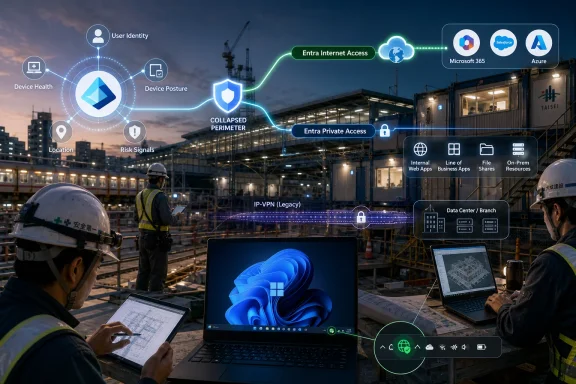 Microsoft’s Zero Trust Pitch Gets Tested Outside the Office Park
Zero Trust has spent years as a slogan that vendors could stretch to fit almost any product category. In the Shinsei Technos case, it becomes more concrete because the company’s problem was not abstract cyber hygiene. It had employees moving between offices, client sites, temporary construction bases, and critical infrastructure projects where secure access had to work without turning every new location into a bespoke networking project.Shinsei Technos is not a small cloud-native startup looking to simplify a greenfield environment. It is a comprehensive electrical construction company in the JR Tokai Group, with roots going back to 1947 and work tied to railways, airports, roads, government offices, public facilities, and other infrastructure. That history matters because infrastructure firms tend to carry two kinds of complexity at once: operational environments that change constantly, and risk tolerances that do not.
The company’s challenge was familiar to anyone who has supported mobile workers in a heavy industry setting. Temporary site offices might be opened and closed every month at peak periods. Employees needed to meet clients, visit job sites, handle large drawings, and still reach the same business systems without requiring IT to rebuild the world every time a project moved.
Microsoft’s published account frames the result as a successful adoption of Microsoft Entra Suite capabilities, including Entra Internet Access, Entra Private Access, Entra ID, Microsoft Defender, Microsoft Intune, and the Global Secure Access client. Beneath the product names is a larger argument: Microsoft wants identity to become the control plane for enterprise networking, not merely the login layer for cloud apps.
The Construction Site Is Where Legacy Network Assumptions Break
The traditional enterprise network was built around the idea that work happened in predictable places. Users sat in offices, applications lived in data centers, and traffic could be funneled through a central gateway where policy, inspection, and logging were easier to enforce. The farther modern work drifts from that model, the more the old architecture starts to punish the people it is supposed to protect.Shinsei Technos had already moved beyond a purely office-bound model. During the pandemic, it equipped employees with tablets and built a mobile work environment. It had also used thin-client desktops, a sensible choice for centralized control and leakage prevention, especially when device loss or uncontrolled local storage are major concerns.
But thin clients have their own gravity. They work best when connectivity is stable and latency is tolerable. For employees handling CAD drawings and other large data sets, a screen-transfer architecture can become a productivity bottleneck, particularly when the worker is outside a controlled office network.
That is why the company’s move toward “fat” client PCs and Microsoft 365 E3 is more than a device refresh. It reflects a broader shift in where trust and control live. Instead of assuming the session is safe because it stays inside a centrally managed desktop environment, the new model assumes the endpoint, identity, access path, and application context must be continuously evaluated.
For Windows shops, this is the part worth watching. The endpoint is not disappearing into the browser, and the network is not disappearing into the cloud. Instead, the Windows device becomes a managed participant in a policy fabric that includes Intune, Entra ID, Defender, and Global Secure Access.
The IP-VPN Did Not Vanish; It Became a Constraint to Design Around
A weaker version of this story would have claimed that Zero Trust simply replaced the old network. That is not what happened. Shinsei Technos still had to operate within JR Tokai Group policies and an existing network environment built around an IP-VPN compatible with the group’s internet gateway.That detail is important because it punctures one of the more naïve enterprise-security narratives. Most large organizations do not adopt Zero Trust by flipping a switch and abandoning inherited architecture. They adopt it by threading new policy controls through old routing, old dependencies, old governance requirements, and old expectations about where traffic is allowed to go.
In Shinsei Technos’ case, the group internet gateway was described as robust and advanced, but designed for a closed-network environment. The company needed to keep using existing network routes while solving a newer problem: how to move large volumes of data safely and smoothly for remote work and construction digital transformation.
The answer was local breakout, which in plain terms means allowing certain internet-bound traffic to go directly out rather than forcing it through a central private-network path. Local breakout is attractive because it can reduce latency and avoid unnecessary backhaul. It is also scary because it weakens the comforting simplicity of “everything goes through the one big gateway.”
Microsoft’s proposition is that identity-aware policy, device management, and cloud-delivered security controls can make that trade-off acceptable. Entra Internet Access is positioned as the secure path for Microsoft 365, SaaS, and internet traffic. Entra Private Access is positioned as the replacement for legacy VPN-style access to internal applications. Together under Global Secure Access, they aim to make location less important without making policy optional.
The Real Product Is Operational Consolidation
The buying logic in Microsoft’s account is telling. Shinsei Technos evaluated multiple vendors, narrowed the field to Microsoft and two others, built proof-of-concept environments, and had employees try them. According to the company, the security difference between approaches was not the decisive factor.That is the quiet admission at the heart of the enterprise security market. Many competing products can satisfy the headline security requirement. The harder question is which one a small IT team can actually operate without creating another isolated console, another routing exception process, and another set of logs nobody has time to correlate.
Shinsei Technos appears to have chosen Microsoft because it already lived in the Microsoft 365 and Entra world. Identity management and Global Secure Access management could be handled centrally from the Entra admin center. Device deployment could use Intune. Security monitoring could be tied to Microsoft Defender. The value was not just protection; it was reducing the number of operational seams.
That does not mean Microsoft automatically wins every SSE evaluation. Enterprises with different incumbent tools, network architectures, regulatory constraints, or security operations models may come to different conclusions. But the Shinsei Technos story shows why Microsoft’s bundling strategy is so powerful in the mid-to-large enterprise: once Microsoft 365 E3, Entra ID, Intune, and Defender are already strategic platforms, the marginal appeal of adding Microsoft’s access layer grows sharply.
This is also where administrators should keep their skepticism intact. Consolidation is not the same thing as simplicity. A unified portal can reduce management sprawl, but it can also deepen platform dependency. The more policy, routing, device posture, identity, and detection are concentrated in one ecosystem, the more important it becomes to understand failure modes, licensing boundaries, and administrative privilege design.
Bandwidth Was Not a Footnote; It Was the Business Case
The most practical detail in the Shinsei Technos case may be the least glamorous one: bandwidth. The company was planning a 10 Gbps fiber-optic line to support large drawing data. Competing products reportedly imposed private-access bandwidth limits that would have required more connector appliances, raising cost and complexity.That is not a minor implementation concern. For construction and engineering firms, large CAD files are not edge cases. They are the work product. If a secure-access design cannot handle those flows comfortably, users will either suffer, work around it, or pressure IT to create exceptions that undermine the architecture.
Microsoft’s advantage, as described by Shinsei Technos, was that the company could scale connector server specifications and use fewer connectors. That is a very IT-prosaic benefit, and precisely why it matters. Zero Trust projects often fail not because the principle is wrong, but because the throughput, latency, and operational experience are worse than the thing they replaced.
The broader lesson is that secure access is still access. Users do not experience compliance posture; they experience whether their drawings open, whether Teams calls stutter, whether SaaS apps load, and whether the green icon in the taskbar means they can get on with their day. If the security layer becomes the reason work slows down, the organization will eventually route around it politically or technically.
For WindowsForum readers managing real estates of Windows PCs, this is the part that should sound familiar. The success of identity-centric networking depends heavily on endpoint deployment, client reliability, traffic steering, DNS behavior, and support workflows. The slogan belongs to the CISO deck, but the lived reality lands on the desktop team.
The GSA Client Turns the Taskbar Into a Trust Signal
Shinsei Technos’ rollout depended on installing Microsoft’s Global Secure Access client on devices. Once installed, the client establishes the secure path used by Entra Internet Access and Entra Private Access. Microsoft’s customer story says the company used Intune to automatically distribute the client and completed the company-wide rollout across corporate PCs in two weeks after preparations were finished.The user-facing support model is almost comically simple: employees were told that if the taskbar icon is green, the GSA client is operating normally; if it is not green, they contact IT. That detail deserves attention because enterprise security often fails at the last inch. If users cannot tell whether the access layer is working, the help desk inherits confusion and the security team inherits shadow behavior.
There is a Windows management story hiding here. The more Microsoft shifts access controls into identity and cloud networking, the more the endpoint client becomes critical infrastructure. Its health, updates, logs, and policy state become as operationally important as a VPN client once was, but with a wider role in traffic forwarding and conditional access.
For administrators, this changes the nature of troubleshooting. A user who cannot reach an internal app may no longer be facing a simple VPN tunnel problem. The cause could involve Entra policy, private application configuration, connector health, DNS resolution, traffic forwarding profiles, device compliance, Defender signals, or client state. The management plane may be unified, but the diagnostic chain is still multi-layered.
This is where Microsoft’s ecosystem integration can either shine or frustrate. If logs and signals come together cleanly, the help desk gets better visibility than it had with a patchwork of appliances and agents. If they do not, the organization has traded one kind of opacity for another, only now wrapped in a larger suite.
Replacing VPN Is Easy to Say and Hard to Mean
Microsoft’s story says Shinsei Technos discontinued VPN use for temporary site offices that lacked IP-VPN connections. Previously, those locations used VPN over the public internet to reach internal systems. With Entra Private Access and Internet Access deployed, employees could access both internal systems and the internet securely without the old VPN setup.That is a meaningful milestone, but it should not be confused with the death of all VPN-like behavior. Entra Private Access still creates secure connectivity between users and private resources. The difference is that access is brokered through identity-aware, application-oriented controls rather than a broad network tunnel that drops the user onto a large internal address space.
This distinction is the essence of Zero Trust Network Access, or ZTNA. The user should receive access to the specific applications and resources they are authorized to use, not a general-purpose passport to the internal network. In theory, that reduces the blast radius of compromised credentials or devices.
In practice, the quality of the implementation matters. Organizations must define private applications accurately, manage DNS carefully, avoid overly broad quick-access rules, and keep conditional access policies aligned with business reality. Badly modeled ZTNA can recreate the risks of VPN under a more modern brand.
Shinsei Technos’ environment underscores another practical point: remote access is no longer only about home workers. It is about temporary offices, client visits, field sites, partner devices, mobile endpoints, and hybrid routes back into on-premises systems. A VPN replacement strategy that only models the employee-at-home scenario will miss much of the real enterprise perimeter.
Intelligent Local Access Reveals the Messiness Microsoft Had to Solve
One of the most revealing parts of the deployment was a problem with internal traffic loopback. Shinsei Technos wanted traffic to internal systems, when accessed from inside the corporate network, to stay within the closed network rather than go out to the internet and back. Achieving that requirement was difficult enough that Shinsei Technos, Microsoft, and partner Progdence had to work through trial and error.This is the kind of detail that makes a customer story useful. It shows that hybrid Zero Trust is not merely a licensing exercise. Once a company keeps a closed network while adding cloud-delivered access controls, it must decide which paths traffic should take under which conditions, and it must prove that the behavior matches security policy.
Microsoft’s answer is Intelligent Local Access, a feature for Entra Private Access that can detect whether a client is inside the corporate network and allow specified private-application traffic to use a local route instead of traversing the cloud backend. The feature uses DNS probing logic to determine corporate network presence and is meant to reduce latency and avoid unnecessary hairpinning while keeping conditional access policy in play.
In Microsoft’s customer story, Shinsei Technos plans to transition to Intelligent Local Access as a standard capability going forward. That chronology matters. The company’s initial deployment had to solve a problem that Microsoft has since productized more directly. The lesson for other organizations is that timing matters in cloud security adoption; early adopters often absorb complexity that later becomes a checkbox.
For Windows admins, Intelligent Local Access is also a reminder that DNS remains destiny. Modern access products may talk in the language of identity and posture, but local detection, application routing, and private-resource access still depend on name resolution and network truth. If your DNS architecture is a museum of historical compromises, your Zero Trust rollout will discover every exhibit.
Microsoft 365 E3 Becomes the Gravity Well
Shinsei Technos’ move was tied to Microsoft 365 E3, which gave the company a broader productivity and management platform as it moved away from aging thin-client desktops and renewed Office licensing. That sequence is familiar: a productivity modernization becomes an endpoint modernization, which becomes an identity modernization, which becomes a network-security modernization.Microsoft’s strategy thrives on that chain reaction. Once an organization standardizes on Microsoft 365, the case for Intune grows. Once Intune manages the devices, Entra Conditional Access becomes more valuable. Once Entra governs access, Defender signals become more relevant. Once those pieces exist, Global Secure Access begins to look less like a new product category and more like a missing layer in a Microsoft-shaped operating model.
That is not accidental. Microsoft has spent years turning its enterprise stack into an interdependent security platform. The appeal is obvious for organizations with limited IT staff: fewer vendors, fewer integrations, and a single commercial relationship that can cover productivity, endpoint management, identity, detection, and access.
The risk is equally obvious. Customers may find themselves evaluating architecture through the lens of what their licensing bundle makes easy, not only what their environment requires. In many cases those will align. In some cases, the most convenient Microsoft answer may not be the most resilient, flexible, or cost-effective answer over the long term.
Shinsei Technos’ evaluation process appears to have avoided the worst version of platform inertia because it ran proof-of-concept trials against multiple vendors. That is the right pattern. If Microsoft wins, it should win under the weight of operational evidence, not because the suite diagram looked tidy.
Small IT Teams Are Driving Big Architecture Decisions
The Shinsei Technos deployment is also a story about staffing. The company’s Information Systems department needed to maintain Zero Trust with a small team. That constraint shaped the product decision as much as pure security capability did.This is a pattern across enterprise IT. Security architectures that require specialist care and feeding for every policy change are increasingly hard to sustain. Most organizations do not have enough network engineers, identity architects, endpoint specialists, and security analysts to operate a best-of-breed stack gracefully. They need designs that ordinary IT teams can run on bad Tuesdays.
Microsoft’s strongest argument is not that it invented Zero Trust or that its controls are uniquely magical. It is that it can make identity, endpoint management, access control, and detection feel like parts of the same administrative universe. For small teams, that can be the difference between a policy that exists in a design document and a policy that survives contact with daily operations.
But small-team friendliness should not be mistaken for low complexity. Entra, Intune, Defender, Conditional Access, Global Secure Access, private connectors, traffic profiles, and Microsoft 365 administration all have their own knobs and failure states. Consolidation reduces some forms of complexity while concentrating the remaining complexity inside one platform.
That means governance becomes more important, not less. Role-based access control, change management, break-glass accounts, connector monitoring, device compliance baselines, and logging retention are not optional footnotes. In a consolidated Microsoft security environment, a misconfiguration can have effects across identity, access, and endpoint behavior at once.
Critical Infrastructure Raises the Stakes for Ordinary Usability
It is tempting to discuss this deployment as a software architecture story, but Shinsei Technos works in the physical world. Its employees support railway-related systems, public facilities, roads, airports, and other infrastructure projects. The access layer is not just enabling a more pleasant work-from-home policy; it is supporting people who move between project sites where delays and coordination failures have real consequences.That is why the company’s emphasis on direct commuting to and from job sites is more than a perk. If field employees can start work immediately from the location where they are needed, while still operating under governed access controls, the IT architecture becomes part of labor allocation. In an industry facing workforce shortages and stricter work-hour regulations, that matters.
The company also wants to extend the same model beyond corporate PCs. Its future plans include bringing office devices such as multifunction printers under a remote-network architecture, lending GSA-installed devices to dispatched workers from partner companies, and extending protections to smartphones and tablets. That is the natural endpoint of the Zero Trust idea: not a remote-access tool, but a common security envelope for a shifting workforce.
This ambition will bring harder questions. Partner-device access is always politically and technically sensitive. Mobile platforms introduce their own management constraints. Printers and other office devices rarely fit neatly into identity-centric access models. The more the architecture expands, the more carefully Shinsei Technos will need to segment policy and avoid treating every device class as a PC with a different screen.
Still, the direction is clear. The old perimeter was a place. The new perimeter is a negotiated relationship among identity, device, app, network path, and risk signal. Shinsei Technos is moving because its work already stopped fitting inside the old perimeter.
The Windows Endpoint Is Back in the Center of the Story
For years, some cloud narratives implied that the managed Windows endpoint would become less important as applications moved to SaaS and browsers. The Shinsei Technos case points the other way. The endpoint is becoming more important because it is where identity, traffic steering, device posture, user experience, and support visibility converge.The GSA client, Intune deployment, Defender integration, and Microsoft 365 E3 environment all assume a managed device can be trusted enough to participate in policy enforcement. Not blindly trusted, but measured, updated, monitored, and constrained. That is a very Windows-centric enterprise future.
This also gives desktop administrators a stronger role in security architecture. They are no longer merely packaging applications and patching operating systems. They are maintaining the client substrate through which cloud-delivered access policy becomes real. If the endpoint state is wrong, the access policy may be theoretically correct and practically useless.
The tension is that Microsoft is asking organizations to accept more moving parts on the endpoint in exchange for less dependence on legacy network tunnels. That trade may be worthwhile, but it needs operational discipline. Client deployment rings, rollback plans, health telemetry, user education, and support playbooks are not secondary tasks; they are the difference between a Zero Trust rollout and an expensive icon in the system tray.
The Lesson From Shinsei Technos Is Less About Japan Than About Hybrid Reality
There is a geographic specificity to the story: a Japanese infrastructure company inside the JR Tokai Group, operating under group-level policy, supporting field projects across varied sites. But the pattern is global. Every enterprise with distributed operations is trying to reconcile cloud productivity with legacy network governance.Manufacturing plants, hospitals, utilities, universities, logistics firms, and public agencies all have versions of this problem. They cannot simply declare the data center dead. They cannot make every application SaaS by next quarter. They cannot assume every worker sits behind the same firewall. They also cannot let security controls become so cumbersome that users invent their own access paths.
That is why SSE and ZTNA products have become so strategically important. They are not just replacing VPN clients; they are becoming the transition layer between the corporate network that exists and the cloud-first operating model vendors want customers to adopt. Microsoft’s bet is that Entra can own that transition because it already owns so much of the identity and productivity surface.
For competitors, the Shinsei Technos case shows the challenge. A rival SSE vendor may match or beat Microsoft on individual security capabilities, network performance, or policy sophistication. But it must also overcome Microsoft’s administrative gravity, licensing gravity, and familiarity gravity. In a small IT team, those forces are hard to beat.
For customers, the warning is to keep the proof-of-concept grounded in real traffic and real users. Test CAD files, not just browser access. Test temporary offices, not just headquarters. Test internal routing, not just SaaS. Test help-desk workflows, not just architecture diagrams.
The Green Taskbar Icon Is the New Perimeter
The concrete lessons from Shinsei Technos are not revolutionary, but they are useful because they come from a deployment where old and new infrastructure had to coexist. The story is less “VPN is dead” than “VPN is being absorbed into a larger identity-and-endpoint control plane.”- Shinsei Technos chose Microsoft’s SSE stack after proof-of-concept testing against other vendors, with operational efficiency and Microsoft 365 compatibility carrying as much weight as security capability.
- The company used Entra Internet Access and Entra Private Access to support secure internet, SaaS, Microsoft 365, and internal-system access for employees moving across offices, temporary sites, and construction locations.
- The deployment kept the existing IP-VPN and group gateway context in view rather than pretending Zero Trust could replace every legacy network assumption at once.
- Bandwidth and connector scaling were decisive because large CAD drawings and construction data made performance a first-order requirement, not a post-deployment optimization.
- Intune-based deployment of the Global Secure Access client turned Windows endpoint management into a core part of the access architecture.
- Intelligent Local Access points to the next phase of Microsoft’s work: making hybrid routing smarter when users move between corporate networks and remote locations.
References
- Primary source: Microsoft
Published: 2026-06-04T07:42:07.358265
SHINSEI TECHNOS supports Japan's infrastructure, accelerating mobile operations with the Zero Trust based Microsoft Entra Suite. | Microsoft Customer Stories
Shinsei Technos uses Microsoft Entra Zero Trust to enable secure, location independent work, replace VPNs, and boost field productivity.www.microsoft.com
