

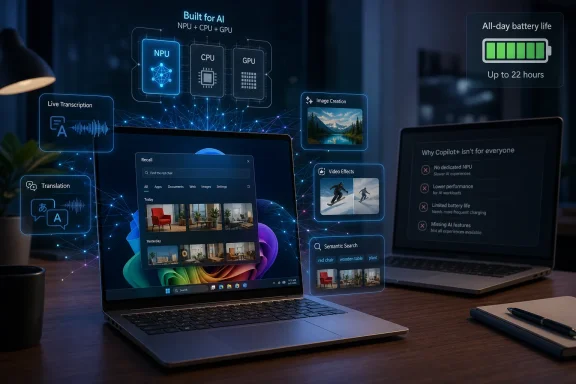
A Copilot+ PC is worth buying in 2026 mainly if you need long battery life, modern Windows AI features, and on-device acceleration for workloads such as transcription, translation, image generation, video effects, and AI-assisted creative apps. It is not a magic upgrade for every slow laptop, nor is it the same thing as buying a faster CPU or more RAM. Microsoft’s new PC class is really a bet that the next phase of Windows computing will be defined less by raw processor speed and more by whether your machine has a capable neural processor sitting beside the CPU and GPU.
For years, the standard laptop-buying advice was boring but reliable: buy the newest CPU you can afford, make sure you have enough RAM, avoid tiny SSDs, and worry about the screen, keyboard, ports, and battery after that. Copilot+ PCs complicate that formula because they introduce a new baseline component into the Windows buying equation: the NPU, or neural processing unit.
That does not mean the CPU and GPU suddenly stop mattering. It means Microsoft has decided that certain Windows experiences should be accelerated locally by dedicated AI silicon rather than treated as ordinary software jobs. The distinction matters because a laptop can be “new,” expensive, and perfectly fast in conventional benchmarks while still missing the hardware Microsoft requires for its newest on-device AI features.
The Hindustan Times framing gets the broad consumer question right: if your existing machine feels slow under AI-heavy work, a normal spec bump may not solve the specific problem you now have. A laptop with a stronger CPU and more RAM may feel better in Chrome, Excel, Teams, Photoshop, or Visual Studio, but it will not automatically become a Copilot+ PC. Microsoft’s certification line is drawn around a 40-plus TOPS NPU, 16GB of RAM, and at least 256GB of storage, alongside Windows 11.
That is the real shift. The upgrade question is no longer only “How fast is this PC?” It is “Which parts of Windows and the app ecosystem will this PC be allowed to run locally?”
TOPS, short for trillions of operations per second, is an imperfect but useful shorthand. It does not tell you everything about real-world AI performance, just as gigahertz stopped being a complete measure of CPU speed decades ago. But it does tell you whether a system is in the ballpark for the kind of always-available, battery-conscious AI tasks Microsoft wants Windows to support.
The difference between a traditional Windows laptop and a Copilot+ PC is therefore architectural. A conventional machine leans on the CPU and GPU for most accelerated work. A Copilot+ PC adds a dedicated NPU so that some AI tasks can run locally, continuously, and with less power draw than if they were hammered through the CPU or discrete graphics.
That last point is easy to miss. The NPU is not just about making AI faster; it is about making AI mundane. Microsoft wants translation, background effects, semantic search, recall-like memory, image generation, and app-level inference to feel like webcam support or Wi-Fi — features the machine can provide in the background without turning the laptop into a hot, loud battery drain.
That matters because many people do not actually need AI image generation every day. They do, however, need a laptop that can survive a day of meetings, browser tabs, Office documents, video calls, and background sync without hunting for a charger. If the Copilot+ transition pushes buyers toward machines with more efficient processors, better standby behavior, and higher baseline memory, the value may show up even when no one is typing a prompt.
The problem is that Microsoft’s marketing often blurs two different promises. One promise is that Copilot+ PCs will run certain AI experiences locally. The other is that these PCs are simply better modern laptops. The second may matter more to mainstream buyers, but it is also less unique: a well-designed non-Copilot+ laptop with a strong processor, good battery, and 32GB of RAM can still be the better machine for many workloads.
This is where buyers need to resist the industry’s favorite trick: collapsing every improvement into the newest brand. A Copilot+ PC is not automatically better built, better cooled, more repairable, or better value. It has met Microsoft’s AI hardware requirements. Everything else still depends on the specific model.
Microsoft has since revised Recall with more explicit controls, opt-in behavior, authentication requirements, and administrative management options. That makes the feature more defensible than the early pitch, but it does not erase the larger point. Copilot+ PCs are not only faster laptops; they are the hardware foundation for a version of Windows that observes, indexes, and assists more locally than before.
For some users, that is attractive. A well-implemented local memory system could make file search, workflow recovery, and multitasking dramatically less frustrating. Anyone who has spent 20 minutes trying to remember which browser tab, PDF, chat, or spreadsheet contained a key detail can understand the appeal.
For others, the entire concept remains uncomfortable. Local processing reduces some cloud privacy risks, but it does not eliminate endpoint risk. If valuable context is stored on the device, then device security, user authentication, encryption, malware resistance, and policy controls become even more important. The NPU may keep more data off someone else’s server, but it also makes the PC itself a richer target.
But “local” should not be confused with “risk-free.” A local AI feature can still create artifacts, caches, indexes, logs, thumbnails, embeddings, or model interactions that need to be protected. A feature that summarizes a meeting locally is better than one that uploads the meeting to an unknown service, but it still raises questions about where the transcript lives, who can access it, and how long it survives.
This is why Copilot+ PCs are more interesting for managed fleets than their consumer ads suggest. IT departments do not just see a shiny AI laptop; they see a new class of endpoint capability that has to be governed. Policies for Recall, Windows Studio Effects, local search, app permissions, and model access will matter as much as the silicon.
For home users, the equation is simpler but not trivial. If you share a laptop, handle confidential material, or install software casually, AI features that remember and transform context deserve careful configuration. The upgrade is not only a purchase; it is a new trust relationship with Windows.
For creators, the appeal is obvious. Background removal, masking, denoising, relighting, smart selection, captioning, transcription, and generative fill-style tools are exactly the kind of work that benefits from specialized acceleration. If those features run faster, drain less battery, and require fewer round trips to the cloud, the machine feels meaningfully more capable.
The catch is that “AI workload” is not one thing. Some AI tasks run well on NPUs, some prefer GPUs, and some remain cloud-bound because the models are too large or the service design depends on remote infrastructure. Buyers who expect a Copilot+ PC to replace a workstation GPU for every machine-learning task will be disappointed.
This is especially relevant for developers and technical users. A 40 TOPS NPU is not the same as an NVIDIA GPU with CUDA support, large VRAM, and mature ML tooling. If your work involves training models, running large local LLMs, 3D rendering, or GPU-heavy compute, the Copilot+ badge is not the specification that should drive your purchase. You should still shop by memory, thermals, GPU capability, storage, and software stack.
Remote workers may get more value from those small improvements than from more futuristic AI demos. A laptop that handles calls cleanly without spinning up fans or chewing through battery is a better work machine. If the NPU keeps those effects off the CPU, the rest of the system has more headroom for documents, browsers, dashboards, and chat clients.
Still, this is not a reason for everyone to upgrade immediately. Many existing laptops already provide decent webcam effects through Teams, Zoom, OBS plugins, or vendor utilities. The Copilot+ difference is integration and efficiency, not the invention of video enhancement.
That distinction matters because Microsoft’s best AI features will often feel incremental rather than spectacular. The upgrade is less like buying the first Retina display and more like moving to SSDs: a collection of responsiveness, efficiency, and convenience gains that become more obvious over time.
By 2026, the category is broader. AMD Ryzen AI and Intel Core Ultra platforms give buyers x86 Copilot+ options, while Qualcomm continues to push Arm efficiency. That is good news because it means Copilot+ no longer forces a single architectural choice. Buyers can decide whether battery life, app compatibility, performance, or fleet consistency matters most.
But the compatibility question has not vanished. Arm machines can be excellent for mainstream productivity, web work, Office, media, and many modern apps. They can also be the wrong choice if you depend on niche drivers, older VPN clients, specialized hardware utilities, anti-cheat systems, legacy enterprise apps, or software that still assumes x86.
This is where the “best for professionals, creators, students, and remote workers” line needs a footnote. Which professionals? Which creators? Which students? A writer, analyst, consultant, or university student living in the browser may love a Snapdragon Copilot+ laptop. An engineering student with unusual lab software, a gamer with anti-cheat constraints, or a sysadmin with crusty device tools may be better served by x86.
This distinction is particularly important because AI branding has started to sprawl across the PC market. Game upscaling, frame generation, NPC behavior, content creation, and driver-level optimizations all use the language of AI. But Microsoft’s Copilot+ requirement is not measuring the same thing as a gaming GPU’s tensor performance or ray-tracing capability.
If gaming is your priority, buy for the GPU, cooling system, display refresh rate, and power limits. If local AI features are a bonus, fine. But do not buy a thin Copilot+ ultraportable expecting it to replace a gaming notebook simply because both products use the word AI.
The same warning applies to workstation buyers. Copilot+ is a Windows platform class, not a professional graphics certification. For CAD, 3D, simulation, or heavy GPU rendering, the old boring details still rule.
The problem is that the new minimum can quickly become the new trap. Sixteen gigabytes is adequate for mainstream multitasking, but it may not be enough for serious creative work, development, local AI experimentation, virtual machines, or heavy browser-plus-Teams-plus-Office workloads over the next several years. A 256GB drive is especially tight once Windows, recovery partitions, apps, media caches, OneDrive sync, and creative projects enter the picture.
Copilot+ laptops also tend to prioritize thinness and battery life, which often means soldered RAM and limited upgrade paths. That makes the purchase configuration more important. A buyer who saves money by choosing the base model may end up with a machine that qualifies for Microsoft’s AI features but ages poorly as workloads expand.
For most WindowsForum readers, the practical advice is simple: treat 16GB and 256GB as the certification floor, not the recommended configuration. If you plan to keep the system for four or five years, 32GB of RAM and at least 512GB or 1TB of storage are safer targets, especially on machines that cannot be upgraded later.
That hybrid model is not inherently bad. Large models, enterprise connectors, cloud search, and cross-device context often require server-side infrastructure. The danger is buyer confusion. A Copilot+ PC does not mean every Copilot feature runs locally, nor does it mean every AI tool becomes free, private, or offline.
This distinction will become more important as Microsoft, Adobe, Google, OpenAI, and others package AI behind subscriptions. The laptop may contain the NPU, but the best features in a given app may still require an account, a paid plan, or cloud processing. Hardware eligibility is only one gate.
That is why the upgrade is easiest to justify when the hardware benefits are valuable even without a subscription upsell. Battery life, local camera effects, better Windows search, on-device captions, and app acceleration are tangible. Paying a premium only because future AI services might become compelling is a weaker bet.
That argues against a sudden all-at-once migration. Many organizations will start with pilot groups: executives, consultants, developers, analysts, accessibility users, and departments that benefit from transcription, translation, and heavy meeting workflows. They will watch battery life, help desk tickets, application breakage, user satisfaction, and data governance concerns before expanding.
But once Copilot+ hardware becomes the default in mainstream business laptops, the transition will accelerate quietly. Most enterprises do not need to be sold on AI PCs if the next standard ThinkPad, Latitude, EliteBook, Surface, or commercial ASUS model simply arrives with a qualifying NPU. The category may become normal through procurement gravity rather than executive enthusiasm.
The bigger question is software maturity. If Microsoft and ISVs deliver genuinely useful local AI workflows, enterprises will standardize around them. If the features remain scattered, gimmicky, or hard to govern, IT departments will treat Copilot+ capability as future-proofing rather than a reason to refresh early.
The case is weaker if you bought a good laptop in the last two or three years. A strong Ryzen, Core, or Apple Silicon machine with enough RAM and storage is not obsolete because Microsoft has drawn a new AI line. It may miss some Windows features, but it can still be excellent at conventional computing.
The decision should also depend on your tolerance for early-platform messiness. Copilot+ has improved since its launch, but AI features remain uneven across processors, regions, apps, and Windows releases. Buyers who want stability above all else may prefer to wait until the second or third generation of machines makes the choice less conditional.
There is also a pricing question. Copilot+ machines often sit in the premium tier, and the best configurations can cost enough that buyers should be ruthless. Paying extra for an NPU while accepting a poor screen, cramped SSD, bad keyboard, weak port selection, or soldered low memory is not a good trade.
Then ask the AI-specific questions. Does the processor meet Microsoft’s Copilot+ threshold? Are the Windows features you care about available on that chip today, not merely promised? Do your apps use the NPU meaningfully? Are you buying Arm or x86, and does that matter for your software? Can your organization manage or disable features like Recall if needed?
This approach keeps the purchase grounded. The Copilot+ PC is not a separate species of computer; it is a Windows laptop with a new required accelerator and a bundle of evolving software privileges. That can be valuable, but only as part of a complete system.
The danger for consumers is buying tomorrow’s promise inside today’s compromised chassis. The danger for IT is dismissing the category as hype and then discovering too late that Microsoft has made NPU capability the price of admission for important Windows features.
Budget buyers get a different rule. If the choice is between a well-configured traditional laptop and a compromised Copilot+ machine with too little storage, a bad display, or weak build quality, buy the better laptop. AI features are not worth living with a worse computer every day.
Power users get a third rule. If your workload depends on GPU compute, gaming, virtualization, development environments, local LLMs, or professional applications, do not let the Copilot+ badge outrank the specific hardware you actually need. The NPU is useful, but it is not a universal accelerator.
That nuance is not as catchy as Microsoft’s marketing, but it is how people actually buy PCs. A certification can narrow the field. It should not make the decision for you.
For now, the value is uneven. Some features are genuinely useful, some remain controversial, and some are still waiting for the software ecosystem to catch up with the silicon. The upgrade is therefore less like buying a single killer feature and more like buying eligibility for the next phase of Windows.
That can be enough if you are due for a new machine. It is less persuasive if your current laptop is still fast, efficient, and well configured. The NPU is a meaningful addition, but it does not repeal the normal laws of PC buying.
 Microsoft Has Turned the Laptop Upgrade Into an AI Hardware Decision
For years, the standard laptop-buying advice was boring but reliable: buy the newest CPU you can afford, make sure you have enough RAM, avoid tiny SSDs, and worry about the screen, keyboard, ports, and battery after that. Copilot+ PCs complicate that formula because they introduce a new baseline component into the Windows buying equation: the NPU, or neural processing unit.That does not mean the CPU and GPU suddenly stop mattering. It means Microsoft has decided that certain Windows experiences should be accelerated locally by dedicated AI silicon rather than treated as ordinary software jobs. The distinction matters because a laptop can be “new,” expensive, and perfectly fast in conventional benchmarks while still missing the hardware Microsoft requires for its newest on-device AI features.
The Hindustan Times framing gets the broad consumer question right: if your existing machine feels slow under AI-heavy work, a normal spec bump may not solve the specific problem you now have. A laptop with a stronger CPU and more RAM may feel better in Chrome, Excel, Teams, Photoshop, or Visual Studio, but it will not automatically become a Copilot+ PC. Microsoft’s certification line is drawn around a 40-plus TOPS NPU, 16GB of RAM, and at least 256GB of storage, alongside Windows 11.
That is the real shift. The upgrade question is no longer only “How fast is this PC?” It is “Which parts of Windows and the app ecosystem will this PC be allowed to run locally?”
The NPU Is the Feature, Not the Sticker
The Copilot+ badge is easy to treat as another marketing label, and the PC industry has certainly trained buyers to be suspicious of stickers. But in this case, the label maps to a concrete hardware floor. Microsoft is not merely saying these are nice laptops for AI; it is saying they contain a class of neural processor powerful enough to run certain local AI workloads efficiently.TOPS, short for trillions of operations per second, is an imperfect but useful shorthand. It does not tell you everything about real-world AI performance, just as gigahertz stopped being a complete measure of CPU speed decades ago. But it does tell you whether a system is in the ballpark for the kind of always-available, battery-conscious AI tasks Microsoft wants Windows to support.
The difference between a traditional Windows laptop and a Copilot+ PC is therefore architectural. A conventional machine leans on the CPU and GPU for most accelerated work. A Copilot+ PC adds a dedicated NPU so that some AI tasks can run locally, continuously, and with less power draw than if they were hammered through the CPU or discrete graphics.
That last point is easy to miss. The NPU is not just about making AI faster; it is about making AI mundane. Microsoft wants translation, background effects, semantic search, recall-like memory, image generation, and app-level inference to feel like webcam support or Wi-Fi — features the machine can provide in the background without turning the laptop into a hot, loud battery drain.
The Most Valuable Upgrade May Be Battery Life, Not Chatbots
The most convincing practical case for Copilot+ PCs has less to do with the Copilot chatbot and more to do with mobile computing. The first wave of these systems, especially Snapdragon X machines, made their strongest impression by challenging the old assumption that Windows laptops must choose between performance and battery life. Later AMD and Intel platforms extended the category beyond Arm, but the broader story stayed the same: AI PCs are also an excuse to reset the efficiency expectations for premium Windows laptops.That matters because many people do not actually need AI image generation every day. They do, however, need a laptop that can survive a day of meetings, browser tabs, Office documents, video calls, and background sync without hunting for a charger. If the Copilot+ transition pushes buyers toward machines with more efficient processors, better standby behavior, and higher baseline memory, the value may show up even when no one is typing a prompt.
The problem is that Microsoft’s marketing often blurs two different promises. One promise is that Copilot+ PCs will run certain AI experiences locally. The other is that these PCs are simply better modern laptops. The second may matter more to mainstream buyers, but it is also less unique: a well-designed non-Copilot+ laptop with a strong processor, good battery, and 32GB of RAM can still be the better machine for many workloads.
This is where buyers need to resist the industry’s favorite trick: collapsing every improvement into the newest brand. A Copilot+ PC is not automatically better built, better cooled, more repairable, or better value. It has met Microsoft’s AI hardware requirements. Everything else still depends on the specific model.
Recall Made the Category Famous for the Wrong Reason
No Copilot+ discussion can avoid Recall, because Recall became the feature that turned Microsoft’s AI PC launch from a hardware story into a trust story. The idea was simple and provocative: Windows would take periodic snapshots of activity so users could search their past actions in natural language. The reaction was just as predictable: security researchers, privacy advocates, and administrators immediately asked what happens when a PC’s memory becomes a searchable database of a user’s digital life.Microsoft has since revised Recall with more explicit controls, opt-in behavior, authentication requirements, and administrative management options. That makes the feature more defensible than the early pitch, but it does not erase the larger point. Copilot+ PCs are not only faster laptops; they are the hardware foundation for a version of Windows that observes, indexes, and assists more locally than before.
For some users, that is attractive. A well-implemented local memory system could make file search, workflow recovery, and multitasking dramatically less frustrating. Anyone who has spent 20 minutes trying to remember which browser tab, PDF, chat, or spreadsheet contained a key detail can understand the appeal.
For others, the entire concept remains uncomfortable. Local processing reduces some cloud privacy risks, but it does not eliminate endpoint risk. If valuable context is stored on the device, then device security, user authentication, encryption, malware resistance, and policy controls become even more important. The NPU may keep more data off someone else’s server, but it also makes the PC itself a richer target.
Local AI Is a Privacy Improvement, But Not a Privacy Guarantee
The case for on-device AI is strongest when compared with sending every request to a cloud service. Local transcription, translation, camera effects, and some generative functions can reduce exposure by keeping sensitive material on the machine. For regulated industries, lawyers, journalists, healthcare workers, and enterprises with strict data policies, that is not a small benefit.But “local” should not be confused with “risk-free.” A local AI feature can still create artifacts, caches, indexes, logs, thumbnails, embeddings, or model interactions that need to be protected. A feature that summarizes a meeting locally is better than one that uploads the meeting to an unknown service, but it still raises questions about where the transcript lives, who can access it, and how long it survives.
This is why Copilot+ PCs are more interesting for managed fleets than their consumer ads suggest. IT departments do not just see a shiny AI laptop; they see a new class of endpoint capability that has to be governed. Policies for Recall, Windows Studio Effects, local search, app permissions, and model access will matter as much as the silicon.
For home users, the equation is simpler but not trivial. If you share a laptop, handle confidential material, or install software casually, AI features that remember and transform context deserve careful configuration. The upgrade is not only a purchase; it is a new trust relationship with Windows.
Creative Apps Give the NPU Its Best Early Argument
The strongest day-one argument for Copilot+ hardware is not that Windows itself becomes brilliant. It is that creative, communication, and productivity apps can offload specific jobs to the NPU. Adobe, DaVinci Resolve, CapCut, and other software ecosystems have been moving toward AI-assisted workflows for years, and dedicated local acceleration gives those features a more natural home.For creators, the appeal is obvious. Background removal, masking, denoising, relighting, smart selection, captioning, transcription, and generative fill-style tools are exactly the kind of work that benefits from specialized acceleration. If those features run faster, drain less battery, and require fewer round trips to the cloud, the machine feels meaningfully more capable.
The catch is that “AI workload” is not one thing. Some AI tasks run well on NPUs, some prefer GPUs, and some remain cloud-bound because the models are too large or the service design depends on remote infrastructure. Buyers who expect a Copilot+ PC to replace a workstation GPU for every machine-learning task will be disappointed.
This is especially relevant for developers and technical users. A 40 TOPS NPU is not the same as an NVIDIA GPU with CUDA support, large VRAM, and mature ML tooling. If your work involves training models, running large local LLMs, 3D rendering, or GPU-heavy compute, the Copilot+ badge is not the specification that should drive your purchase. You should still shop by memory, thermals, GPU capability, storage, and software stack.
Windows Studio Effects Are Useful, Even If They Are Not Revolutionary
Video conferencing is one of the most practical Copilot+ use cases because it combines constant background processing with battery sensitivity. Automatic framing, background blur, eye contact correction, portrait lighting, and noise suppression are not glamorous, but they are precisely the kind of features that become better when handled efficiently on-device.Remote workers may get more value from those small improvements than from more futuristic AI demos. A laptop that handles calls cleanly without spinning up fans or chewing through battery is a better work machine. If the NPU keeps those effects off the CPU, the rest of the system has more headroom for documents, browsers, dashboards, and chat clients.
Still, this is not a reason for everyone to upgrade immediately. Many existing laptops already provide decent webcam effects through Teams, Zoom, OBS plugins, or vendor utilities. The Copilot+ difference is integration and efficiency, not the invention of video enhancement.
That distinction matters because Microsoft’s best AI features will often feel incremental rather than spectacular. The upgrade is less like buying the first Retina display and more like moving to SSDs: a collection of responsiveness, efficiency, and convenience gains that become more obvious over time.
Arm Is No Longer the Whole Story, But Compatibility Still Matters
The first Copilot+ wave leaned heavily on Qualcomm’s Snapdragon X chips, and that immediately revived old Windows-on-Arm concerns. For years, Arm Windows systems promised long battery life but carried awkward compromises around app compatibility, drivers, and performance under emulation. Copilot+ arrived at a moment when those compromises had shrunk but not disappeared.By 2026, the category is broader. AMD Ryzen AI and Intel Core Ultra platforms give buyers x86 Copilot+ options, while Qualcomm continues to push Arm efficiency. That is good news because it means Copilot+ no longer forces a single architectural choice. Buyers can decide whether battery life, app compatibility, performance, or fleet consistency matters most.
But the compatibility question has not vanished. Arm machines can be excellent for mainstream productivity, web work, Office, media, and many modern apps. They can also be the wrong choice if you depend on niche drivers, older VPN clients, specialized hardware utilities, anti-cheat systems, legacy enterprise apps, or software that still assumes x86.
This is where the “best for professionals, creators, students, and remote workers” line needs a footnote. Which professionals? Which creators? Which students? A writer, analyst, consultant, or university student living in the browser may love a Snapdragon Copilot+ laptop. An engineering student with unusual lab software, a gamer with anti-cheat constraints, or a sysadmin with crusty device tools may be better served by x86.
Gamers Should Not Confuse AI Branding With Gaming Performance
Copilot+ PCs are not gaming laptops by definition. Some may be decent casual gaming machines, and future chips will keep improving integrated graphics, but the certification is about NPU performance, not frame rates. A laptop can qualify as Copilot+ and still be mediocre for modern games.This distinction is particularly important because AI branding has started to sprawl across the PC market. Game upscaling, frame generation, NPC behavior, content creation, and driver-level optimizations all use the language of AI. But Microsoft’s Copilot+ requirement is not measuring the same thing as a gaming GPU’s tensor performance or ray-tracing capability.
If gaming is your priority, buy for the GPU, cooling system, display refresh rate, and power limits. If local AI features are a bonus, fine. But do not buy a thin Copilot+ ultraportable expecting it to replace a gaming notebook simply because both products use the word AI.
The same warning applies to workstation buyers. Copilot+ is a Windows platform class, not a professional graphics certification. For CAD, 3D, simulation, or heavy GPU rendering, the old boring details still rule.
The Minimum Specs Are Better Than Before, But Still Not Generous
One underrated advantage of the Copilot+ standard is that it raises the floor. A certified machine must have at least 16GB of RAM and 256GB of storage. That is not luxurious in 2026, but it is a meaningful improvement over the bargain-bin Windows laptops that shipped for years with too little memory and cramped storage.The problem is that the new minimum can quickly become the new trap. Sixteen gigabytes is adequate for mainstream multitasking, but it may not be enough for serious creative work, development, local AI experimentation, virtual machines, or heavy browser-plus-Teams-plus-Office workloads over the next several years. A 256GB drive is especially tight once Windows, recovery partitions, apps, media caches, OneDrive sync, and creative projects enter the picture.
Copilot+ laptops also tend to prioritize thinness and battery life, which often means soldered RAM and limited upgrade paths. That makes the purchase configuration more important. A buyer who saves money by choosing the base model may end up with a machine that qualifies for Microsoft’s AI features but ages poorly as workloads expand.
For most WindowsForum readers, the practical advice is simple: treat 16GB and 256GB as the certification floor, not the recommended configuration. If you plan to keep the system for four or five years, 32GB of RAM and at least 512GB or 1TB of storage are safer targets, especially on machines that cannot be upgraded later.
The Cloud Has Not Left the Building
The Copilot+ story is often told as a move from cloud AI to local AI, but the reality is hybrid. Some features run on-device, some use the cloud, and many will blend the two depending on model size, privacy settings, connectivity, and subscription status. The PC industry is selling local AI, but Microsoft’s broader business remains deeply tied to cloud services.That hybrid model is not inherently bad. Large models, enterprise connectors, cloud search, and cross-device context often require server-side infrastructure. The danger is buyer confusion. A Copilot+ PC does not mean every Copilot feature runs locally, nor does it mean every AI tool becomes free, private, or offline.
This distinction will become more important as Microsoft, Adobe, Google, OpenAI, and others package AI behind subscriptions. The laptop may contain the NPU, but the best features in a given app may still require an account, a paid plan, or cloud processing. Hardware eligibility is only one gate.
That is why the upgrade is easiest to justify when the hardware benefits are valuable even without a subscription upsell. Battery life, local camera effects, better Windows search, on-device captions, and app acceleration are tangible. Paying a premium only because future AI services might become compelling is a weaker bet.
Enterprise IT Will Buy Slowly, Then All at Once
For businesses, Copilot+ PCs are less a consumer gadget trend than a fleet planning problem. Hardware refresh cycles are long, application compatibility testing is slow, and security teams do not casually introduce new endpoint behaviors across thousands of machines. Even when the technology is promising, enterprises need policy, management, auditability, and support.That argues against a sudden all-at-once migration. Many organizations will start with pilot groups: executives, consultants, developers, analysts, accessibility users, and departments that benefit from transcription, translation, and heavy meeting workflows. They will watch battery life, help desk tickets, application breakage, user satisfaction, and data governance concerns before expanding.
But once Copilot+ hardware becomes the default in mainstream business laptops, the transition will accelerate quietly. Most enterprises do not need to be sold on AI PCs if the next standard ThinkPad, Latitude, EliteBook, Surface, or commercial ASUS model simply arrives with a qualifying NPU. The category may become normal through procurement gravity rather than executive enthusiasm.
The bigger question is software maturity. If Microsoft and ISVs deliver genuinely useful local AI workflows, enterprises will standardize around them. If the features remain scattered, gimmicky, or hard to govern, IT departments will treat Copilot+ capability as future-proofing rather than a reason to refresh early.
The Best Buyer Is Someone Already at the Replacement Point
The upgrade makes the most sense if you already need a new laptop. If your current machine has poor battery life, weak performance, failing storage, insufficient memory, or an unsupported Windows future, then choosing a Copilot+ PC is a sensible way to avoid buying into yesterday’s platform. In that case, the NPU is not the only reason to upgrade; it is the reason not to buy a new premium laptop without one.The case is weaker if you bought a good laptop in the last two or three years. A strong Ryzen, Core, or Apple Silicon machine with enough RAM and storage is not obsolete because Microsoft has drawn a new AI line. It may miss some Windows features, but it can still be excellent at conventional computing.
The decision should also depend on your tolerance for early-platform messiness. Copilot+ has improved since its launch, but AI features remain uneven across processors, regions, apps, and Windows releases. Buyers who want stability above all else may prefer to wait until the second or third generation of machines makes the choice less conditional.
There is also a pricing question. Copilot+ machines often sit in the premium tier, and the best configurations can cost enough that buyers should be ruthless. Paying extra for an NPU while accepting a poor screen, cramped SSD, bad keyboard, weak port selection, or soldered low memory is not a good trade.
The Copilot+ Premium Is Worth Paying Only When the Rest of the Laptop Is Right
The most honest way to evaluate a Copilot+ PC is to ignore the badge for the first half of the shopping process. Start with the ordinary laptop questions: display quality, keyboard, trackpad, webcam, ports, weight, battery tests, thermals, fan noise, build quality, warranty, memory, storage, and price. If the machine fails those tests, the NPU does not rescue it.Then ask the AI-specific questions. Does the processor meet Microsoft’s Copilot+ threshold? Are the Windows features you care about available on that chip today, not merely promised? Do your apps use the NPU meaningfully? Are you buying Arm or x86, and does that matter for your software? Can your organization manage or disable features like Recall if needed?
This approach keeps the purchase grounded. The Copilot+ PC is not a separate species of computer; it is a Windows laptop with a new required accelerator and a bundle of evolving software privileges. That can be valuable, but only as part of a complete system.
The danger for consumers is buying tomorrow’s promise inside today’s compromised chassis. The danger for IT is dismissing the category as hype and then discovering too late that Microsoft has made NPU capability the price of admission for important Windows features.
The Sensible 2026 Buying Rule Is Narrower Than Microsoft’s Pitch
The practical rule is this: if you are buying a premium Windows laptop in 2026, you should have a strong reason not to buy a Copilot+ capable model. That does not mean every Copilot+ model is good. It means the AI hardware floor is becoming part of the Windows platform baseline, and buying above the budget tier without it risks shortening the machine’s useful life.Budget buyers get a different rule. If the choice is between a well-configured traditional laptop and a compromised Copilot+ machine with too little storage, a bad display, or weak build quality, buy the better laptop. AI features are not worth living with a worse computer every day.
Power users get a third rule. If your workload depends on GPU compute, gaming, virtualization, development environments, local LLMs, or professional applications, do not let the Copilot+ badge outrank the specific hardware you actually need. The NPU is useful, but it is not a universal accelerator.
That nuance is not as catchy as Microsoft’s marketing, but it is how people actually buy PCs. A certification can narrow the field. It should not make the decision for you.
The Upgrade Pays Off When Windows Stops Treating AI as an Add-On
The clearest lesson from the Copilot+ push is that Microsoft wants AI to move from browser tab to operating system substrate. That shift will not happen overnight, and it will not be equally useful to everyone. But the hardware requirement tells us where Windows is going: more local indexing, more real-time translation, more context-aware assistance, more AI in creative apps, and more background processing that must not destroy battery life.For now, the value is uneven. Some features are genuinely useful, some remain controversial, and some are still waiting for the software ecosystem to catch up with the silicon. The upgrade is therefore less like buying a single killer feature and more like buying eligibility for the next phase of Windows.
That can be enough if you are due for a new machine. It is less persuasive if your current laptop is still fast, efficient, and well configured. The NPU is a meaningful addition, but it does not repeal the normal laws of PC buying.
The Money Is Best Spent Where the AI Claims Meet Everyday Work
For buyers trying to turn the Copilot+ pitch into a purchasing decision, the answer is less mystical than the branding suggests. The upgrade is worth it when the machine is already a good laptop and the AI hardware supports tasks you will actually perform.- A Copilot+ PC is a smart default for a premium Windows laptop purchase in 2026 if you want the longest useful life from Microsoft’s next wave of Windows features.
- A qualifying NPU matters most for local AI tasks such as translation, captions, camera effects, semantic search, creative-app acceleration, and Recall-style experiences.
- A Copilot+ badge does not guarantee strong gaming, workstation performance, repairability, upgradeability, or good value.
- Buyers should treat 16GB of RAM and 256GB of storage as minimums, not ideal long-term specifications.
- Arm-based Copilot+ PCs can be excellent mobile machines, but x86 models remain safer for users with legacy apps, drivers, games, or specialized enterprise tools.
- The best upgrade candidates are people replacing an aging laptop anyway, not owners of recent high-end systems expecting AI branding to transform their workflow.
References
- Primary source: Hindustan Times
Published: Sun, 07 Jun 2026 01:30:18 GMT
Is the upgrade worth it? What you actually get for your money when switching to a Copilot+ PC | Technology News (HT Tech)
All of these laptops run Windows 11 and they can be purchased at an exchange bonus of up to ₹20,500 on Amazon right now. | Technology Newswww.hindustantimes.com - Official source: support.microsoft.com
Privacy and control over your Recall experience - Microsoft Support
 support.microsoft.com
- Official source: microsoft.com
Copilot+ PCs and AI Features for Businesses | Microsoft
Discover Microsoft Copilot+ PCs for your business. Learn how these AI-powered computers and laptops deliver business solutions with Copilot+ PC AI features that streamline work.www.microsoft.com
- Related coverage: tomshardware.com
Copilot+ PCs: All we know about the AI-ready laptops and exclusive Windows features | Tom's Hardware
Microsoft's shiny new AI innovations for the laptop spacewww.tomshardware.com - Related coverage: makeuseof.com
Microsoft's Copilot+ Laptops Are Here, but What Does That Actually Mean?
They look sublime and have excellent battery life, but what does Microsoft's new AI-focused branding actually mean? www.makeuseof.com
- Related coverage: unanswered.io
Is Windows Recall Only on Copilot+ PCs? (2026 Guide)
Discover if Windows Recall works only on Copilot+ PCs. Learn hardware requirements, availability on standard machines, and how to check or remove it based on official sources.unanswered.io
- Related coverage: windowscentral.com
Microsoft Copilot+ PC guide: What it is, features, how to access it, and PC requirements, and everything you need to know | Windows Central
Microsoft Copilot+ has been announced for upcoming AI PCs, but what exactly is it? Here's everything you need to know.www.windowscentral.com - Related coverage: solidaitech.com
AI PC NPU Dashboard: Check Your Copilot+ TOPS Rating (2026)
Most PCs sold as 'AI PCs' fail real workloads. Check your CPU's NPU TOPS rating and find out if your hardware actually handles on-device AI in 2026.www.solidaitech.com
- Related coverage: windowsnews.ai
Copilot+ AI Locked to New PCs: Why Your Windows 11 Device Misses Out - Windows News
Microsoft’s Copilot+ PC features require a 40 TOPS NPU and Windows 11 24H2, locking out most existing PCs. Learn why AI tools like Recall need this hardware...windowsnews.ai - Related coverage: mypcrig.com
Copilot+ PC ノートPC選び方ガイド 2026年版:Snapdragon X Elite / Core Ultra 200V / Ryzen AI 300 / Apple Silicon を NPU TOPS で選ぶ
Copilot+ PC 認定の NPU 40 TOPS 基準を満たす Snapdragon X Elite (45) / Intel Core Ultra 200V (48) / AMD Ryzen AI 300 (50) を比較。Apple Silicon との立ち位置の違いも整理し、用途別に最適な AI ノートPC を選ぶ判断軸を提示します。mypcrig.com
- Related coverage: windowslatest.com
What are Windows 11 Copilot Plus PCs: features, release date explained
What are Copilot Plus PCs? All you need to know about the Windows 11 AI features, hardware requirements, pricing, and other quirks.www.windowslatest.com - Official source: news.microsoft.com
