

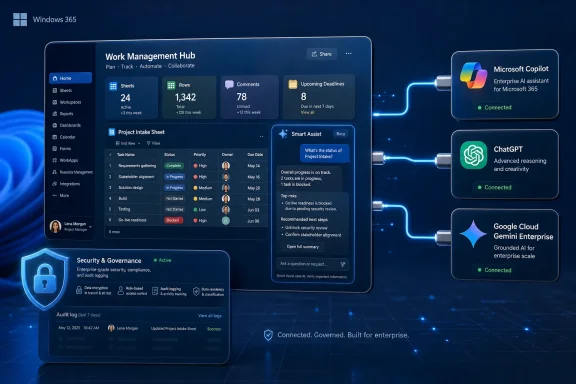
Smartsheet said on June 11, 2026, in Bellevue, Washington, that enterprise customers can connect ChatGPT, Microsoft Copilot, and Google Cloud Gemini Enterprise to its Model Context Protocol server, adding those assistants to existing Claude support and introducing a native Smart Assist companion inside Smartsheet. The announcement is not just another connector roundup. It is a bet that the next phase of enterprise AI will be won less by the smartest chatbot and more by the systems that can safely expose live business context to whichever assistant a company already trusts. For WindowsForum readers, the Microsoft Copilot angle is the obvious hook, but the larger story is the emerging contest over who gets to broker work data for agentic AI.
Smartsheet has long occupied a middle ground between spreadsheet, project management system, workflow engine, and enterprise operating layer. That makes its MCP Server more strategically interesting than a normal API integration, because Smartsheet often contains the messy coordination data that does not live neatly inside a CRM, ERP, Git repository, or ticketing queue.
The company’s pitch is that AI assistants should not merely summarize static documents. They should understand the live state of projects, owners, blockers, deadlines, approvals, comments, dashboards, and operational dependencies. In Smartsheet’s telling, the work itself becomes the intelligence layer.
That is a convenient slogan, but it also reflects a real architectural shift. Classic SaaS integrations were built around moving records from one application to another. MCP-style integrations are about letting an AI agent query and act across systems in real time, while preserving the system of record underneath.
For IT teams, that changes the risk model. A connector that can read a sheet is one thing. A connector that can create rows, update work items, add comments, and potentially trigger downstream automations is something else entirely.
Smartsheet’s March launch put that idea into production for its own platform. The company said its MCP Server exposes core work management objects through a standardized protocol, including sheets, rows, columns, discussions, comments, and workspaces. It also framed the server as generally available, not a distant preview parked in a lab.
That matters because enterprise AI has been suffering from a familiar disease: too many pilots, too little durable plumbing. A team gets excited about Claude, another standardizes on Copilot, the data science group prefers Gemini, developers experiment with ChatGPT, and suddenly IT is being asked to secure four different routes into the same operational data.
MCP’s promise is to collapse that sprawl. If the server is the controlled entry point, the assistant becomes more interchangeable. That does not eliminate platform lock-in, but it changes where the lock-in sits.
That is the practical bridge between Smartsheet’s announcement and the Microsoft ecosystem. If a company has already invested in Microsoft 365, Entra ID, Power Platform governance, and Copilot Studio, it does not want a separate AI control plane for every business application. It wants external work systems to appear as governed tools inside the same agent experience.
The tricky part is that “Copilot” is now an overloaded brand. There is Microsoft 365 Copilot, Copilot Studio, GitHub Copilot, Windows Copilot experiences, and a growing web of agents and connectors beneath them. Smartsheet’s announcement lands in that fog, and administrators will need to distinguish a marketing-level Copilot connection from the exact tenant, licensing, authentication, and governance path required in their environment.
Still, the direction is clear. Microsoft wants Copilot Studio to be where organizations assemble agents that can use both Microsoft and third-party tools. Smartsheet wants its work data to be one of the systems those agents can safely call.
That is sensible because most large organizations are not standardizing as cleanly as vendor slides imply. Microsoft may own the productivity estate, Google may own parts of the cloud or collaboration stack, OpenAI may have executive mindshare, and Anthropic may have won over developers or risk-sensitive teams. The resulting enterprise AI portfolio often looks less like a single platform strategy and more like a federation of tolerated exceptions.
Smartsheet is leaning into that reality. Its March rollout already included Claude support, and the June announcement adds the three names no enterprise AI buyer can ignore: ChatGPT, Copilot, and Gemini Enterprise. The company is effectively saying: bring the assistant your team already uses, and we will supply the operational context.
That is also a defensive move. If Smartsheet did not expose its data to these assistants, customers would find other ways to do it. Shadow integrations, brittle scripts, exported CSVs, browser extensions, and copy-pasted project status dumps are all worse outcomes for governance.
Every SaaS vendor now faces the same threat: if users increasingly interact with software through a general-purpose assistant, the underlying application risks becoming invisible infrastructure. That is acceptable for a database, less acceptable for an application vendor that sells user experience, workflow design, templates, dashboards, and governance.
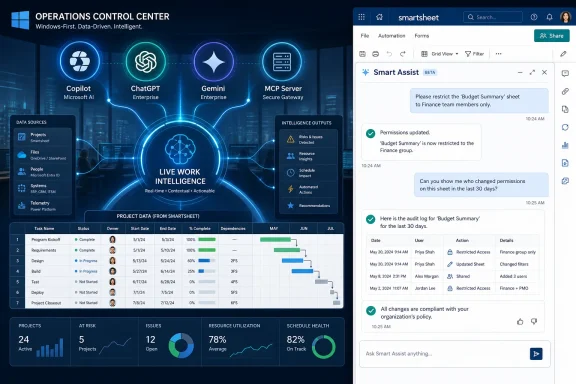
Smart Assist is Smartsheet’s answer to that risk. It gives users a native AI companion that can answer questions and help with tasks using the same live platform context. The point is not simply to add a chat pane. The point is to make Smartsheet itself feel like the intelligent place where work is managed, not merely the source that Copilot or ChatGPT raids for context.
This is the new enterprise software dilemma. Vendors must connect to external AI assistants because customers demand it, but they must also build native AI experiences so the assistant layer does not swallow their product identity.
Those are strong early numbers for a technical enterprise feature, especially one tied to an emerging protocol. Smartsheet also said the first 10 days of June accounted for more than 860,000 AI actions and that June 9 and June 10 set back-to-back records for active organizations in a single day.
But usage metrics around AI connectors require careful reading. An “AI action” can represent a meaningful workflow update, a simple read operation, repeated experimentation, or a burst of automated calls. Tool-call volume is not the same as business value, and unique-user counts do not tell us whether a company changed how work gets done.
The more interesting number is Smartsheet’s claim that nearly one in three AI-driven actions creates, updates, or modifies live work. If that pattern holds, the MCP Server is not merely being used for status summaries. It is being used to perform operational changes inside the system of record.
The governance challenge is not just whether Smartsheet respects Smartsheet permissions. It is what happens when work data leaves Smartsheet’s boundary and enters another AI provider’s context window, logging layer, retention policy, regional processing model, or enterprise agreement. Smartsheet can enforce access controls on its side, but downstream handling depends on the customer’s contract and configuration with OpenAI, Microsoft, Google, or Anthropic.
That is why the “any AI tool” promise always needs an asterisk. In practice, not every assistant will be equally acceptable for every dataset, jurisdiction, industry, or risk tier. A regulated company may approve Copilot for some workflows because it aligns with its Microsoft tenant controls, while restricting ChatGPT or Gemini Enterprise to narrower use cases pending legal review.
MCP does not remove the need for data classification. It increases the urgency of getting classification right, because it makes access easier and action more natural.
Microsoft’s Copilot Studio documentation points toward the future shape of this work. Admins define MCP server details, configure authentication, add tools and resources to agents, and rely on orchestration to decide when a tool should be called. That is more scalable than hand-wiring every API action, but it is also more abstract.
Abstraction is helpful until something goes wrong. If an agent updates the wrong project row, posts a misleading status comment, or exposes sensitive operational details in a response, the investigation will need to answer several questions at once: which user authorized the action, which assistant invoked the tool, which MCP server handled the request, what permissions were applied, and what logs exist across each platform.
This is where Windows and Microsoft 365 shops may have an advantage if they already operate mature identity, audit, and endpoint management practices. The companies that treat MCP connectors as part of their identity and governance architecture will fare better than those that treat them as productivity toys.
Smartsheet’s MCP Server is designed for that second world. The company talks about surfacing risks, making resource decisions, building workflows, testing ideas, and taking action in natural language. A construction project manager, for example, could ask an assistant to identify delayed tasks, draft escalation notes, update ownership fields, and prepare a summary for stakeholders.
That is useful precisely because Smartsheet often sits where cross-functional work is coordinated. The same quality also makes errors more consequential. If a work management system is connected to approvals, customer delivery, compliance evidence, or capital projects, AI actions are not harmless conveniences.
This does not mean organizations should avoid the technology. It means they should stage adoption carefully. Read-only use cases are a good starting point; write actions should be introduced with narrower scopes, human confirmation, strong logging, and rollback expectations.
This matters for Smartsheet because the same MCP Server can be reached through Claude, ChatGPT, Copilot, Gemini Enterprise, and custom agents, but the user experience will not be identical. A prompt that works beautifully in one assistant may produce a clumsy or overly broad tool call in another. An enterprise agent configured by IT may behave differently from a general assistant used by an individual power user.
There is also the question of feature parity. Smartsheet says Claude and Gemini Enterprise connections are available to all customers now, while Microsoft Copilot and ChatGPT connections are available to all US customers now and will reach APJ and EMEA customers soon. That staged availability is normal for enterprise software, but it means global organizations will need to plan around regional differences.
The protocol reduces integration friction. It does not erase product, licensing, compliance, or regional rollout complexity.
That is the sort of developer enablement that can turn a platform feature into an ecosystem. If internal teams can use AI to generate formulas, inspect workspaces, create sheets, update rows, or build workflow prototypes, the barrier between “business user automation” and “developer automation” gets thinner.
But developers should not confuse easier access with simpler responsibility. MCP servers expose capabilities as tools, and tool descriptions become part of how models decide what to do. Naming, scoping, permissioning, and prompt design all become operational concerns.
The uncomfortable truth is that agentic systems move some integration complexity out of code and into configuration, governance, and behavior. That can be a good trade, but it is not the same as making complexity disappear.
Microsoft wants that control plane to be Copilot and Power Platform. OpenAI wants ChatGPT Enterprise to be the general interface to company knowledge and tools. Google wants Gemini Enterprise to play that role for organizations invested in Google Cloud and Workspace. Smartsheet, meanwhile, wants to ensure the operational truth of work remains anchored in Smartsheet even as assistants multiply around it.
Those ambitions can coexist, but not without tension. If Copilot becomes the front door for employee work, Smartsheet must be a high-quality back-end tool. If Smart Assist becomes the preferred experience for project teams, Microsoft becomes one of several AI routes rather than the primary interface. If ChatGPT or Gemini becomes the executive assistant of choice, IT must reconcile those assistants with existing Microsoft governance investments.
This is why connector announcements now deserve more scrutiny than they used to. They are no longer small convenience features. They are bids for position in the enterprise AI stack.
Admins should ask how authentication is handled, whether user-level permissions are preserved, what actions are exposed, where logs are stored, and how regional availability maps to tenant geography. They should also determine whether Copilot Studio agents will be centrally built and approved or whether departments can create their own connections.
Security teams should pressure-test write actions before broad rollout. They should understand whether an AI assistant can update fields that trigger automations, change project status, add comments visible to external collaborators, or generate records that later become audit evidence.
None of this makes the Smartsheet announcement bad news. Quite the opposite: it is a sign that enterprise AI is finally reaching the systems where work actually happens. But when AI touches live work, IT has to stop evaluating it as a novelty and start evaluating it as production automation.
That gives systems like Smartsheet more leverage than they may appear to have. A model without access to current work data is a polished generalist. A model connected to project status, ownership, dependencies, and operational history can become a useful participant in the work itself.
The same logic applies across the enterprise stack. Jira, ServiceNow, Salesforce, GitHub, Microsoft Graph, Google Drive, SAP, and countless internal systems all contain different kinds of gravity. MCP is one mechanism for turning that gravity into usable context across assistants.
The result will not be a single universal AI interface. More likely, enterprises will run several assistants against a curated set of governed MCP servers, with different access patterns for different roles. That is messier than vendor narratives, but much closer to how IT actually works.
 Smartsheet Is Turning Work Management Into AI Infrastructure
Smartsheet has long occupied a middle ground between spreadsheet, project management system, workflow engine, and enterprise operating layer. That makes its MCP Server more strategically interesting than a normal API integration, because Smartsheet often contains the messy coordination data that does not live neatly inside a CRM, ERP, Git repository, or ticketing queue.The company’s pitch is that AI assistants should not merely summarize static documents. They should understand the live state of projects, owners, blockers, deadlines, approvals, comments, dashboards, and operational dependencies. In Smartsheet’s telling, the work itself becomes the intelligence layer.
That is a convenient slogan, but it also reflects a real architectural shift. Classic SaaS integrations were built around moving records from one application to another. MCP-style integrations are about letting an AI agent query and act across systems in real time, while preserving the system of record underneath.
For IT teams, that changes the risk model. A connector that can read a sheet is one thing. A connector that can create rows, update work items, add comments, and potentially trigger downstream automations is something else entirely.
MCP Moves From Developer Curiosity to Enterprise Plumbing
The Model Context Protocol began as a way to standardize how AI systems connect to tools and data sources. The useful comparison is not “another API.” It is closer to a USB-C port for AI tools: imperfect, politically contested, and still dependent on implementation quality, but attractive because every vendor would rather not build a bespoke cable for every other vendor.Smartsheet’s March launch put that idea into production for its own platform. The company said its MCP Server exposes core work management objects through a standardized protocol, including sheets, rows, columns, discussions, comments, and workspaces. It also framed the server as generally available, not a distant preview parked in a lab.
That matters because enterprise AI has been suffering from a familiar disease: too many pilots, too little durable plumbing. A team gets excited about Claude, another standardizes on Copilot, the data science group prefers Gemini, developers experiment with ChatGPT, and suddenly IT is being asked to secure four different routes into the same operational data.
MCP’s promise is to collapse that sprawl. If the server is the controlled entry point, the assistant becomes more interchangeable. That does not eliminate platform lock-in, but it changes where the lock-in sits.
Copilot Support Makes This a Windows and Microsoft 365 Story
The Microsoft Copilot connection is the part that will matter most to many Windows-centric organizations. Copilot is no longer just a chatbot inside Microsoft 365; it is becoming an extensibility surface for agents, tools, connectors, and business process automation. Microsoft’s own documentation has been steadily expanding around MCP support in Copilot Studio, including the ability to connect agents to existing MCP servers.That is the practical bridge between Smartsheet’s announcement and the Microsoft ecosystem. If a company has already invested in Microsoft 365, Entra ID, Power Platform governance, and Copilot Studio, it does not want a separate AI control plane for every business application. It wants external work systems to appear as governed tools inside the same agent experience.
The tricky part is that “Copilot” is now an overloaded brand. There is Microsoft 365 Copilot, Copilot Studio, GitHub Copilot, Windows Copilot experiences, and a growing web of agents and connectors beneath them. Smartsheet’s announcement lands in that fog, and administrators will need to distinguish a marketing-level Copilot connection from the exact tenant, licensing, authentication, and governance path required in their environment.
Still, the direction is clear. Microsoft wants Copilot Studio to be where organizations assemble agents that can use both Microsoft and third-party tools. Smartsheet wants its work data to be one of the systems those agents can safely call.
ChatGPT and Gemini Enterprise Keep the Platform War Honest
Adding ChatGPT and Google Cloud Gemini Enterprise alongside Copilot is the more important strategic move. Smartsheet is telling customers that it does not want to be seen as an accessory to one AI vendor’s ecosystem. It wants to be the neutral work context layer under several of them.That is sensible because most large organizations are not standardizing as cleanly as vendor slides imply. Microsoft may own the productivity estate, Google may own parts of the cloud or collaboration stack, OpenAI may have executive mindshare, and Anthropic may have won over developers or risk-sensitive teams. The resulting enterprise AI portfolio often looks less like a single platform strategy and more like a federation of tolerated exceptions.
Smartsheet is leaning into that reality. Its March rollout already included Claude support, and the June announcement adds the three names no enterprise AI buyer can ignore: ChatGPT, Copilot, and Gemini Enterprise. The company is effectively saying: bring the assistant your team already uses, and we will supply the operational context.
That is also a defensive move. If Smartsheet did not expose its data to these assistants, customers would find other ways to do it. Shadow integrations, brittle scripts, exported CSVs, browser extensions, and copy-pasted project status dumps are all worse outcomes for governance.
Smart Assist Shows Smartsheet Does Not Want to Be Just the Backend
The new Smart Assist companion complicates the story in a useful way. If MCP Server is about meeting users in their preferred AI assistant, Smart Assist is about keeping them inside Smartsheet. The two moves might seem contradictory, but they are really two sides of the same platform strategy.Every SaaS vendor now faces the same threat: if users increasingly interact with software through a general-purpose assistant, the underlying application risks becoming invisible infrastructure. That is acceptable for a database, less acceptable for an application vendor that sells user experience, workflow design, templates, dashboards, and governance.
Smart Assist is Smartsheet’s answer to that risk. It gives users a native AI companion that can answer questions and help with tasks using the same live platform context. The point is not simply to add a chat pane. The point is to make Smartsheet itself feel like the intelligent place where work is managed, not merely the source that Copilot or ChatGPT raids for context.
This is the new enterprise software dilemma. Vendors must connect to external AI assistants because customers demand it, but they must also build native AI experiences so the assistant layer does not swallow their product identity.
The Adoption Numbers Are Impressive, But They Need Context
Smartsheet says MCP usage has grown quickly since the March launch with Claude. The company reported more than 22,000 unique users and 3 million AI actions since March, with adoption growing nearly ninefold from the first week. It also said weekly active users rose from fewer than 1,000 at launch to more than 9,000, while weekly tool calls climbed from 42,000 to more than 700,000.Those are strong early numbers for a technical enterprise feature, especially one tied to an emerging protocol. Smartsheet also said the first 10 days of June accounted for more than 860,000 AI actions and that June 9 and June 10 set back-to-back records for active organizations in a single day.
But usage metrics around AI connectors require careful reading. An “AI action” can represent a meaningful workflow update, a simple read operation, repeated experimentation, or a burst of automated calls. Tool-call volume is not the same as business value, and unique-user counts do not tell us whether a company changed how work gets done.
The more interesting number is Smartsheet’s claim that nearly one in three AI-driven actions creates, updates, or modifies live work. If that pattern holds, the MCP Server is not merely being used for status summaries. It is being used to perform operational changes inside the system of record.
The Governance Story Is the Product Story
Smartsheet emphasizes that these AI connections are built on a shared governance foundation. That is the sentence IT should linger over, because enterprise AI adoption will rise or fall on whether admins can make these systems boringly governable.The governance challenge is not just whether Smartsheet respects Smartsheet permissions. It is what happens when work data leaves Smartsheet’s boundary and enters another AI provider’s context window, logging layer, retention policy, regional processing model, or enterprise agreement. Smartsheet can enforce access controls on its side, but downstream handling depends on the customer’s contract and configuration with OpenAI, Microsoft, Google, or Anthropic.
That is why the “any AI tool” promise always needs an asterisk. In practice, not every assistant will be equally acceptable for every dataset, jurisdiction, industry, or risk tier. A regulated company may approve Copilot for some workflows because it aligns with its Microsoft tenant controls, while restricting ChatGPT or Gemini Enterprise to narrower use cases pending legal review.
MCP does not remove the need for data classification. It increases the urgency of getting classification right, because it makes access easier and action more natural.
The Admin Burden Shifts From Integration to Policy
The best-case version of MCP is that administrators stop building one-off integrations and start managing reusable access patterns. The worst-case version is that they inherit a new class of agentic sprawl, where every team attaches powerful assistants to live systems without a consistent approval process.Microsoft’s Copilot Studio documentation points toward the future shape of this work. Admins define MCP server details, configure authentication, add tools and resources to agents, and rely on orchestration to decide when a tool should be called. That is more scalable than hand-wiring every API action, but it is also more abstract.
Abstraction is helpful until something goes wrong. If an agent updates the wrong project row, posts a misleading status comment, or exposes sensitive operational details in a response, the investigation will need to answer several questions at once: which user authorized the action, which assistant invoked the tool, which MCP server handled the request, what permissions were applied, and what logs exist across each platform.
This is where Windows and Microsoft 365 shops may have an advantage if they already operate mature identity, audit, and endpoint management practices. The companies that treat MCP connectors as part of their identity and governance architecture will fare better than those that treat them as productivity toys.
Agentic Workflows Raise the Stakes Beyond Search
The phrase agentic workflow is often abused, but in this case it captures a real difference. Search retrieves information. An agentic workflow can interpret a goal, inspect live data, choose a tool, perform an update, and potentially kick off a chain of consequences.Smartsheet’s MCP Server is designed for that second world. The company talks about surfacing risks, making resource decisions, building workflows, testing ideas, and taking action in natural language. A construction project manager, for example, could ask an assistant to identify delayed tasks, draft escalation notes, update ownership fields, and prepare a summary for stakeholders.
That is useful precisely because Smartsheet often sits where cross-functional work is coordinated. The same quality also makes errors more consequential. If a work management system is connected to approvals, customer delivery, compliance evidence, or capital projects, AI actions are not harmless conveniences.
This does not mean organizations should avoid the technology. It means they should stage adoption carefully. Read-only use cases are a good starting point; write actions should be introduced with narrower scopes, human confirmation, strong logging, and rollback expectations.
The Protocol Will Not Magically Normalize Every Assistant
One risk in the MCP hype cycle is the assumption that a standard protocol creates a standard experience. It does not. Different assistants may interpret tool descriptions differently, handle ambiguity differently, summarize results differently, and ask for confirmation at different moments.This matters for Smartsheet because the same MCP Server can be reached through Claude, ChatGPT, Copilot, Gemini Enterprise, and custom agents, but the user experience will not be identical. A prompt that works beautifully in one assistant may produce a clumsy or overly broad tool call in another. An enterprise agent configured by IT may behave differently from a general assistant used by an individual power user.
There is also the question of feature parity. Smartsheet says Claude and Gemini Enterprise connections are available to all customers now, while Microsoft Copilot and ChatGPT connections are available to all US customers now and will reach APJ and EMEA customers soon. That staged availability is normal for enterprise software, but it means global organizations will need to plan around regional differences.
The protocol reduces integration friction. It does not erase product, licensing, compliance, or regional rollout complexity.
Developers Get a Cleaner Path, But Not a Free Pass
For developers, the appeal is obvious. Instead of writing custom wrappers around Smartsheet’s REST API for each assistant, they can connect an MCP-compliant client to a single standardized server. Smartsheet has also released CLI Agent Power Tools, described as a free open-source toolkit of six Claude Code agents purpose-built against the MCP Server.That is the sort of developer enablement that can turn a platform feature into an ecosystem. If internal teams can use AI to generate formulas, inspect workspaces, create sheets, update rows, or build workflow prototypes, the barrier between “business user automation” and “developer automation” gets thinner.
But developers should not confuse easier access with simpler responsibility. MCP servers expose capabilities as tools, and tool descriptions become part of how models decide what to do. Naming, scoping, permissioning, and prompt design all become operational concerns.
The uncomfortable truth is that agentic systems move some integration complexity out of code and into configuration, governance, and behavior. That can be a good trade, but it is not the same as making complexity disappear.
CIOs Should Treat This as a Control-Plane Decision
The strategic question for CIOs is not whether Smartsheet’s new AI connections are useful. They almost certainly are, especially for organizations that already run complex programs in Smartsheet. The strategic question is which system becomes the control plane for AI-assisted work.Microsoft wants that control plane to be Copilot and Power Platform. OpenAI wants ChatGPT Enterprise to be the general interface to company knowledge and tools. Google wants Gemini Enterprise to play that role for organizations invested in Google Cloud and Workspace. Smartsheet, meanwhile, wants to ensure the operational truth of work remains anchored in Smartsheet even as assistants multiply around it.
Those ambitions can coexist, but not without tension. If Copilot becomes the front door for employee work, Smartsheet must be a high-quality back-end tool. If Smart Assist becomes the preferred experience for project teams, Microsoft becomes one of several AI routes rather than the primary interface. If ChatGPT or Gemini becomes the executive assistant of choice, IT must reconcile those assistants with existing Microsoft governance investments.
This is why connector announcements now deserve more scrutiny than they used to. They are no longer small convenience features. They are bids for position in the enterprise AI stack.
The Windows Shop’s Checklist Is Getting Longer
For Windows-heavy organizations, the immediate temptation will be to focus on Copilot support and ask whether Smartsheet can now “work with Microsoft AI.” The better question is whether the integration can be governed in a way that matches the organization’s existing Microsoft 365, Entra, compliance, and data-loss-prevention posture.Admins should ask how authentication is handled, whether user-level permissions are preserved, what actions are exposed, where logs are stored, and how regional availability maps to tenant geography. They should also determine whether Copilot Studio agents will be centrally built and approved or whether departments can create their own connections.
Security teams should pressure-test write actions before broad rollout. They should understand whether an AI assistant can update fields that trigger automations, change project status, add comments visible to external collaborators, or generate records that later become audit evidence.
None of this makes the Smartsheet announcement bad news. Quite the opposite: it is a sign that enterprise AI is finally reaching the systems where work actually happens. But when AI touches live work, IT has to stop evaluating it as a novelty and start evaluating it as production automation.
The Real News Is That AI Choice Now Depends on Data Gravity
Smartsheet’s announcement is a reminder that the AI assistant market will not be decided solely by model quality. The winning tools will be the ones that can reach the right business context safely, quickly, and with enough governance for enterprises to say yes.That gives systems like Smartsheet more leverage than they may appear to have. A model without access to current work data is a polished generalist. A model connected to project status, ownership, dependencies, and operational history can become a useful participant in the work itself.
The same logic applies across the enterprise stack. Jira, ServiceNow, Salesforce, GitHub, Microsoft Graph, Google Drive, SAP, and countless internal systems all contain different kinds of gravity. MCP is one mechanism for turning that gravity into usable context across assistants.
The result will not be a single universal AI interface. More likely, enterprises will run several assistants against a curated set of governed MCP servers, with different access patterns for different roles. That is messier than vendor narratives, but much closer to how IT actually works.
The Smartsheet Bet Comes Down to Five Practical Tests
The announcement is strongest when read as a practical integration milestone rather than a grand AI revolution. Smartsheet has expanded its MCP Server beyond Claude, added native AI inside the platform, and put itself in the middle of the Copilot-ChatGPT-Gemini enterprise contest.- Smartsheet’s MCP Server now connects to ChatGPT, Microsoft Copilot, and Google Cloud Gemini Enterprise, joining its earlier Claude support.
- Smart Assist gives users a native Smartsheet AI experience for teams that do not want to leave the platform.
- Microsoft Copilot support matters most when paired with Copilot Studio governance, authentication, and tenant-level controls.
- The most important adoption metric is not tool-call volume but the share of AI actions that safely create, update, or modify live work.
- IT teams should begin with read-only scenarios, then expand write actions only after logging, permissions, and rollback expectations are clear.
- MCP reduces custom integration work, but it does not eliminate responsibility for data classification, regional policy, vendor contracts, or auditability.
References
- Primary source: News-Press NOW
Published: 2026-06-11T13:50:29.811073
Smartsheet Adds ChatGPT, Microsoft Copilot and Google Cloud Gemini Enterprise Connections for its MCP Server
BELLEVUE, Wash.--(BUSINESS WIRE)--Jun 11, 2026--www.newspressnow.com - Related coverage: smartsheet.com
Smartsheet API now speaks AI: Introducing Smartsheet MCP server for every MCP-compliant AI tool
Smartsheet MCP Server is live — connect any MCP-compliant AI tool to your Smartsheet data.www.smartsheet.com - Related coverage: newshub.medianet.com.au
- Related coverage: itbrief.in
Smartsheet adds ChatGPT & Copilot links to MCP Server
Enterprise teams can now use live Smartsheet work data through ChatGPT, Copilot and Gemini Enterprise, as AI adoption races across workplaces. itbrief.in
- Official source: learn.microsoft.com
Smartsheet US - Connectors | Microsoft Learn
learn.microsoft.com - Related coverage: developers.smartsheet.com

Smartsheet MCP server introduction
developers.smartsheet.com

- Related coverage: cdata.com
How to Connect Smartsheet Data to Gemini Enterprise via CData Connect AI
Connect CData Connect AI Remote MCP to Gemini Enterprise to securely read and take actions on live Smartsheet data in real time using natural language.www.cdata.com
- Related coverage: growthengineer.ai
- Related coverage: intuitionlabs.ai



%22 d=%22M44,140.1h42.8V272H54.9c0-0.1,0-103.8,0-103.8H44V140.1z M44,1c28.4,0,42.6,16.2,42.6,42.2v66.1H54.9V43.8 c0-7.2-3.1-11.7-10.6-11.7c-7,0-10.6,4.2-10.6,11.7c0,0,0,228.1,0,228.2H0.2c0-0.5,0-228.8,0-228.8C0.1,16.8,14.8,1,44,1L44,1z%22/><style>path { fill: %23262626 } @media (prefers-color-scheme: dark) { path { fill: %23EEEFE9 } }</style></svg>)

