

Qualcomm has released Snapdragon Control Panel 2026.2.0.0, a maintenance-focused update for Windows on Arm PCs that makes its gaming utility easier to navigate and broadens its driver-update role. The release does not promise higher frame rates, but it should remove some friction around game profiles, driver maintenance, and troubleshooting on Snapdragon X laptops.
As reported by Windows Central, Qualcomm posted the changelog through its Snapdragon community on Reddit. The update redesigns the Game Library navigation, clarifies adding and removing favorites, and removes a top-level Back button in favor of simpler navigation. It also remembers the state of the navigation sidebar and enlarges clickable targets in the Help dialog.
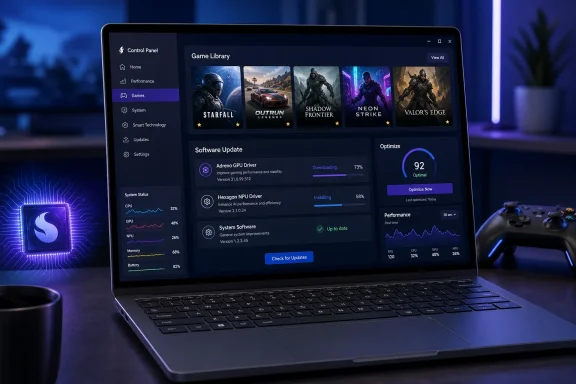
The more consequential change is the Software Update page. Qualcomm has consolidated the update experience for the Control Panel itself, Adreno GPU drivers, and Hexagon NPU drivers. Snapdragon X users can now obtain current Hexagon NPU driver releases directly through the Control Panel, rather than treating NPU support as a separate OEM-driver concern.
The revised page also provides clearer feedback on whether an update is available, downloading, installing, or already applied. That is a small but welcome change for a platform where graphics-driver revisions can determine whether a specific game launches cleanly, renders correctly, or benefits from a targeted compatibility fix.
Qualcomm originally positioned its Windows utility as an Adreno-focused control app, including game-specific optimization and an easier route to updated GPU drivers. The renamed Snapdragon Control Panel has gradually become the company’s equivalent of the management apps offered by Nvidia, AMD, and Intel: a central place to manage drivers and per-game behavior without waiting for a full laptop OEM package.
The update is therefore more about making the platform manageable than transforming its graphics capability. It does not change the basic constraints of Windows on Arm gaming: games may run natively on Arm, through Microsoft’s x64 emulation layer, or not at all if their anti-cheat, launcher, driver, or instruction-set requirements remain incompatible. Performance and support will still vary sharply by title.
For existing Snapdragon X owners, the practical move is simply to install the Control Panel update and check for current Adreno and Hexagon drivers before diagnosing a game-specific problem.
As reported by Windows Central, Qualcomm posted the changelog through its Snapdragon community on Reddit. The update redesigns the Game Library navigation, clarifies adding and removing favorites, and removes a top-level Back button in favor of simpler navigation. It also remembers the state of the navigation sidebar and enlarges clickable targets in the Help dialog.
 Driver management gets more useful
The more consequential change is the Software Update page. Qualcomm has consolidated the update experience for the Control Panel itself, Adreno GPU drivers, and Hexagon NPU drivers. Snapdragon X users can now obtain current Hexagon NPU driver releases directly through the Control Panel, rather than treating NPU support as a separate OEM-driver concern.The revised page also provides clearer feedback on whether an update is available, downloading, installing, or already applied. That is a small but welcome change for a platform where graphics-driver revisions can determine whether a specific game launches cleanly, renders correctly, or benefits from a targeted compatibility fix.
Qualcomm originally positioned its Windows utility as an Adreno-focused control app, including game-specific optimization and an easier route to updated GPU drivers. The renamed Snapdragon Control Panel has gradually become the company’s equivalent of the management apps offered by Nvidia, AMD, and Intel: a central place to manage drivers and per-game behavior without waiting for a full laptop OEM package.
Optimization remains limited to first-generation hardware
Version 2026.2.0.0 also improves the reliability of One-Click Game Optimization, including its optimize, revert, and refresh workflows. Qualcomm says that feature remains supported only on first-generation Snapdragon X Series devices. That limitation matters because the newer Snapdragon X2 laptops are increasingly being marketed with gaming among their broader performance claims, yet they do not currently receive that particular automated tuning function.The update is therefore more about making the platform manageable than transforming its graphics capability. It does not change the basic constraints of Windows on Arm gaming: games may run natively on Arm, through Microsoft’s x64 emulation layer, or not at all if their anti-cheat, launcher, driver, or instruction-set requirements remain incompatible. Performance and support will still vary sharply by title.
For existing Snapdragon X owners, the practical move is simply to install the Control Panel update and check for current Adreno and Hexagon drivers before diagnosing a game-specific problem.
References
- Primary source: Windows Central
Published: 2026-07-14T12:31:41+00:00
Your Snapdragon X PC just took a step toward becoming a true gaming laptop | Windows Central
Qualcomm's Snapdragon Control Panel update brings direct NPU driver access, a redesigned game library, and optimized settings to Snapdragon X PCs.www.windowscentral.com - Related coverage: windowsforum.com
Windows on Arm Becomes a Real Gaming Platform with Prism AVX Emulation and Arm64 Builds | Windows Forum
Windows on Arm has taken a concrete step toward becoming a genuine gaming platform rather than a hopeful experiment, after a coordinated push from Microsoft...windowsforum.com - Related coverage: tomshardware.com
Qualcomm refines Windows on Arm gaming with broad feature release — platform gets Snapdragon Control Panel, AVX2 emulation, improved anti-cheat support | Tom's Hardware
The gaming experience on ARM is slowly making progress.www.tomshardware.com
