

Stellar Repair for Exchange was tested against a 10GB Exchange Server 2019 CU15 database on Windows Server 2022 that had fallen into Dirty Shutdown, and it recovered mailbox data, previews, deleted items, and exports without modifying the original EDB file. That is the narrow but important point: this is not a replacement for a disciplined Exchange recovery plan, but it is a credible escape hatch when the normal plan becomes too blunt. Exchange administrators do not need another magic wand; they need tools that reduce risk when backups, Recovery Databases, and ESEUtil stop being clean answers. On that measure, Stellar’s utility earns a serious look.
Exchange database recovery has always been a strange mix of precision and dread. On paper, the order of operations is familiar: check the backup chain, inspect the database state, replay logs if possible, mount a Recovery Database when appropriate, and keep ESEUtil in reserve for the ugly cases. In practice, administrators often find themselves deciding between downtime, data loss, and a repair process that may technically succeed while leaving too many operational questions behind.
That is why tools like Stellar Repair for Exchange exist. Their pitch is not that Microsoft’s tools are irrelevant, because they are not. The pitch is that mailbox-level recovery, export flexibility, and pre-export preview matter when the organization does not need a heroic database resurrection so much as usable access to specific user data.
The test scenario here is useful because it does not pretend that corruption is exotic. A database in Dirty Shutdown is a routine enough Exchange problem that many admins have seen it, feared it, or inherited it from someone else’s storage incident. The question is whether a third-party repair tool can handle that condition without making the recovery surface more dangerous.
In this run, the answer was mostly yes. Stellar Repair for Exchange handled the database in a way that felt closer to a controlled extraction workflow than a risky repair operation. That distinction matters.
Microsoft’s own recovery model still begins with Exchange-native thinking. If the required logs exist, soft recovery is the least dramatic path. If a restore is involved, a Recovery Database gives administrators a supported way to mount restored data in an alternate location and extract mailbox content. ESEUtil remains the tool of last resort when the database engine itself must be pushed into a repaired state.
The phrase “last resort” is doing a lot of work there. A hard repair is not simply a more powerful soft recovery. It can discard damaged pages to get a database into a usable state, and that means it belongs behind backups, copies, and less destructive recovery methods.
That is the opening Stellar tries to occupy. In this test, the EDB file was handed directly to the software after
The EDB contained the data types that usually separate a reassuring demo from a useful recovery: messages, attachments, contacts, calendar entries, deleted items, and shared mailbox data. That matters because Exchange recovery is rarely about one pristine Inbox. Users remember the missing calendar series, the attachment from a vendor, the shared mailbox folder, or the deleted message that legal suddenly wants preserved.
The database was already in Dirty Shutdown before Stellar touched it. Running
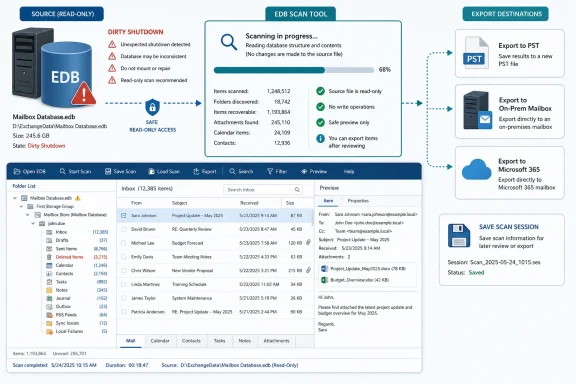
The key constraint was also the right one: the original database file should not be modified during scanning. In a recovery incident, the first rule is to stop making the evidence worse. Stellar’s approach of scanning the EDB without altering the source file is exactly the right posture for a tool that may be used when administrators are already short on time and confidence.
That matters because Exchange recovery rarely happens during calm maintenance windows. It happens when a database will not mount, a migration is half-complete, a backup restore is taking too long, or a VIP mailbox has become the visible symbol of IT failure. A recovery tool should not require the administrator to become a product specialist before the first scan begins.
The workflow is straightforward: select the EDB, choose the scan mode, and begin. Stellar offers Quick Scan for lighter cases and Extensive Scan for more serious damage. Given the Dirty Shutdown state, Extensive Scan was the sensible choice.
This is where the tool’s design makes a quiet but useful decision. It does not ask the administrator to diagnose the entire failure before proceeding. It lets the operator make a severity call and then moves into recovery. That is not a substitute for understanding Exchange internals, but it is a practical concession to how recovery work actually unfolds.
A responsive scan does not prove perfect recovery. It does, however, preserve operator confidence. When the UI continues to report progress and the system does not lock up, the administrator can keep evaluating options rather than wondering whether the recovery process itself has failed.
The more important behavior is that the source EDB is left untouched. This should be table stakes, but in recovery it cannot be overstated. If the first pass fails, you still want the original file available for Microsoft support, another tool, another copy operation, or a return to native recovery methods.
That makes Stellar feel less like a repair hammer and more like an extraction bench. It can work from a damaged database and build a recoverable view of mailbox content without requiring the administrator to commit immediately to a destructive operation. In an Exchange incident, that preservation of optionality is worth real money.
That is more than convenience. Preview turns a recovery attempt from an act of faith into an evidence-gathering exercise. Before exporting anything, an administrator can inspect representative mailboxes, open sample messages, verify attachments, and check whether folder structures make sense.
In this test, the recovered content did not appear garbled or truncated. Attachments opened, calendar and contact data appeared where expected, and deleted items were present. That is exactly the kind of validation an admin needs before telling management that recovery is not merely possible but usable.
The Outlook-style layout also matters because it reduces cognitive load. Exchange administrators already know the shape of mailbox data. A recovery tool that preserves that mental model lets them spend their attention on validating content, not deciphering a vendor’s interface.
Stellar allowed the scan session to be saved and reloaded later. That means an administrator can perform the expensive discovery phase once, then return to exports, previews, or prioritization without starting from zero. In a long incident, that can reduce both downtime and fatigue.
This feature also changes how teams can collaborate. One admin can run the scan, another can validate specific mailboxes, and a third can prepare export targets without treating the scan as a fragile one-time event. It makes the workflow more operational and less like a single-user desktop gamble.
Exchange recovery is often constrained by time, storage, and human attention. Saving scan state helps with all three. It does not make corruption less complex, but it prevents the tool from adding avoidable repetition to an already stressful process.
In the test, exported mailboxes loaded into Outlook successfully. Folder hierarchy remained intact, attachments opened, and calendar entries and contacts appeared as expected. That is the standard by which this feature should be judged: not whether the export dialog completes, but whether Outlook can consume the result without surprises.
For smaller incidents, PST may be enough. A departed user’s mailbox, a legal request, a damaged shared mailbox, or a single executive recovery can all end with a PST if the organization’s process allows it. For larger incidents, PST becomes a staging format rather than the final destination.
The risk with PST, of course, is governance. Once mailbox data becomes a file, it can drift outside normal retention, auditing, and access controls. Stellar’s PST export is useful, but administrators should treat it as a recovery mechanism, not a casual archival strategy.
The mailbox mapping process was clean, which is important because mapping is where many recovery workflows become tedious. A tool can scan brilliantly and still lose the room if the final step requires too much manual babysitting. In this case, the export flow was understandable and practical.
The mailbox priority feature is especially notable. During an outage, not all mailboxes are politically equal, even if administrators wish they were. The ability to push critical users, executives, service mailboxes, or operational teams to the front of the export queue reflects the reality of incident management.
This is not merely about appeasing leadership. Restoring the right mailbox first can restore business function faster. A help desk shared mailbox, a sales operations mailbox, or an executive assistant’s calendar can matter more in the first hour than a technically larger but less urgent mailbox.
In this test, Stellar supported automatic mapping, manual mapping, and parallel exports to Microsoft 365. Those capabilities matter because cloud recovery is rarely a one-mailbox exercise. Administrators need to map identities correctly, move data efficiently, and avoid turning a recovery into a slow manual migration.
Parallel export is the feature that points most clearly at real-world use. If a database incident occurs during a migration window, or if a failed on-prem server becomes the final nudge toward Microsoft 365, recovery speed becomes a business constraint. Sequential exports may be tolerable in a lab; they become painful when departments are waiting.
The flow did not introduce needless ceremony. That is a compliment. The best recovery software does not make cloud export feel like a separate product bolted onto the side. It treats Microsoft 365 as another destination in the same recovery continuum.
Stellar surfaced deleted emails in preview and exported them alongside other mailbox data. That capability makes the tool useful outside the narrow category of catastrophic database failure. It also fits eDiscovery, internal investigation, and user-error scenarios where the database may be damaged but the business question is more specific: can we get this item back?
This is also where preview becomes important again. Recovering deleted content without being able to inspect it first can create unnecessary data handling. If an admin can identify the relevant mailbox, folder, and item before export, the recovery process becomes more targeted and defensible.
Administrators should still understand the limits of deleted item recovery. No tool can recover data that is not present in any recoverable form, and retention policy remains retention policy. But when the item is still discoverable in the EDB, Stellar’s ability to expose and export it adds practical value.
The danger is that format flexibility can look more important than it is. Most Exchange administrators will still reach first for PST, direct Exchange export, or Microsoft 365 export. Those are the recovery paths that map most directly to user productivity.
Even so, the additional formats round out the tool’s usefulness. They make it easier to extract only what is needed rather than moving entire mailboxes around. In regulated environments, that kind of selectivity can matter as much as speed.
This is another example of Stellar aiming at the operational middle ground. It is not just trying to mount a database. It is trying to turn a damaged EDB into usable, movable, reviewable mailbox data.
The better argument is that it gives administrators another path before they accept the risks of a hard repair or the delays of a full restore. If the organization needs specific mailbox data quickly, scanning a copy of the EDB and exporting recoverable content may be the least disruptive option. It can sit between “restore everything” and “repair the database and hope.”
That middle path is valuable because Exchange incidents are rarely pure technical puzzles. They are business events with impatient stakeholders. The right answer may be to recover the CEO’s mailbox first, export a shared mailbox to Microsoft 365, preserve deleted items for legal, and then continue the deeper infrastructure repair in parallel.
Stellar’s workflow supports that kind of triage. Preview, saved scans, mailbox prioritization, and multiple export targets all point toward selective recovery rather than one-size-fits-all database repair. That is the right conceptual model for modern Exchange operations.
The test also began with a Dirty Shutdown state, but Dirty Shutdown is not a single failure mode. A database missing logs after a power event is different from one damaged by failing storage, malware, or a botched restore. A successful recovery in one scenario should not be read as a universal guarantee.
There is also the question of trust. Third-party recovery tools handle sensitive mailbox data, which may include credentials, contracts, personal information, legal material, and regulated records. Before using any such tool in production, organizations should evaluate licensing, data handling, audit requirements, and whether the recovery workstation itself is secured.
Finally, administrators should keep Microsoft’s supported recovery paths in the plan. Stellar is most compelling as an addition to the toolkit, not as a philosophical replacement for backups, DAG design, tested restores, or documented incident procedures. The strongest recovery posture is layered, not improvised.
In that world, direct export to Microsoft 365 and support for current Exchange targets become more than nice-to-have features. They allow administrators to treat recovery as part of a broader messaging transition. A corrupt legacy database may not need to return to the exact same architecture if the organization is already moving away from it.
This is where products like Stellar can become strategically useful rather than merely tactical. They can help extract value from old or damaged EDB files while the organization builds a cleaner destination. That does not make migration simple, but it can reduce the number of dead ends.
The practical lesson is that recovery tools should be tested before the outage. Install them in a lab, point them at copies of real databases where policy allows, validate export paths, and document the process. A tool discovered during an incident is a gamble; a tool rehearsed before one is part of the plan.
 Exchange Recovery Still Has a Tooling Gap
Exchange database recovery has always been a strange mix of precision and dread. On paper, the order of operations is familiar: check the backup chain, inspect the database state, replay logs if possible, mount a Recovery Database when appropriate, and keep ESEUtil in reserve for the ugly cases. In practice, administrators often find themselves deciding between downtime, data loss, and a repair process that may technically succeed while leaving too many operational questions behind.That is why tools like Stellar Repair for Exchange exist. Their pitch is not that Microsoft’s tools are irrelevant, because they are not. The pitch is that mailbox-level recovery, export flexibility, and pre-export preview matter when the organization does not need a heroic database resurrection so much as usable access to specific user data.
The test scenario here is useful because it does not pretend that corruption is exotic. A database in Dirty Shutdown is a routine enough Exchange problem that many admins have seen it, feared it, or inherited it from someone else’s storage incident. The question is whether a third-party repair tool can handle that condition without making the recovery surface more dangerous.
In this run, the answer was mostly yes. Stellar Repair for Exchange handled the database in a way that felt closer to a controlled extraction workflow than a risky repair operation. That distinction matters.
Dirty Shutdown Is a Symptom, Not a Diagnosis
The phrase Dirty Shutdown can make Exchange sound more broken than it necessarily is. It means the database was not cleanly detached from its transaction logs and is not in a mount-ready consistent state. Sometimes that is a recoverable log-replay problem; sometimes it is the visible edge of deeper corruption, storage trouble, missing logs, or an interrupted failure chain.Microsoft’s own recovery model still begins with Exchange-native thinking. If the required logs exist, soft recovery is the least dramatic path. If a restore is involved, a Recovery Database gives administrators a supported way to mount restored data in an alternate location and extract mailbox content. ESEUtil remains the tool of last resort when the database engine itself must be pushed into a repaired state.
The phrase “last resort” is doing a lot of work there. A hard repair is not simply a more powerful soft recovery. It can discard damaged pages to get a database into a usable state, and that means it belongs behind backups, copies, and less destructive recovery methods.
That is the opening Stellar tries to occupy. In this test, the EDB file was handed directly to the software after
eseutil /mh confirmed Dirty Shutdown. The conventional soft-recovery route was deliberately bypassed, not because that is always best practice, but because the point was to see whether Stellar could extract value from an unhealthy database without forcing a hard repair against it.The Test Bed Was Realistic Enough to Matter
The environment was not a monster deployment, and that is a strength rather than a weakness. Exchange Server 2019 CU15 on Windows Server 2022, 16GB of RAM, SSD storage, and a 10GB EDB file is the kind of lab that resembles many smaller production recoveries and branch-office realities. It is not a 12TB DAG nightmare, but most administrators do not begin evaluating tools at maximum scale. They begin by asking whether the thing works on a damaged database they can understand.The EDB contained the data types that usually separate a reassuring demo from a useful recovery: messages, attachments, contacts, calendar entries, deleted items, and shared mailbox data. That matters because Exchange recovery is rarely about one pristine Inbox. Users remember the missing calendar series, the attachment from a vendor, the shared mailbox folder, or the deleted message that legal suddenly wants preserved.
The database was already in Dirty Shutdown before Stellar touched it. Running
eseutil /mh DB01.edb returned the expected state, creating a meaningful recovery target rather than a cosmetic demo file. That is important because repair software often looks impressive when it is parsing healthy data under theatrical conditions.The key constraint was also the right one: the original database file should not be modified during scanning. In a recovery incident, the first rule is to stop making the evidence worse. Stellar’s approach of scanning the EDB without altering the source file is exactly the right posture for a tool that may be used when administrators are already short on time and confidence.
The Interface Understands the Moment It Will Be Used In
Installation is not the glamorous part of a recovery product, but it is one of the places where bad software reveals itself. A tool that demands a scavenger hunt for prerequisites during an outage is not an enterprise utility; it is another incident. In this test, setup completed quickly, and the main interface was available within a couple of minutes.That matters because Exchange recovery rarely happens during calm maintenance windows. It happens when a database will not mount, a migration is half-complete, a backup restore is taking too long, or a VIP mailbox has become the visible symbol of IT failure. A recovery tool should not require the administrator to become a product specialist before the first scan begins.
The workflow is straightforward: select the EDB, choose the scan mode, and begin. Stellar offers Quick Scan for lighter cases and Extensive Scan for more serious damage. Given the Dirty Shutdown state, Extensive Scan was the sensible choice.
This is where the tool’s design makes a quiet but useful decision. It does not ask the administrator to diagnose the entire failure before proceeding. It lets the operator make a severity call and then moves into recovery. That is not a substitute for understanding Exchange internals, but it is a practical concession to how recovery work actually unfolds.
Scanning Without Drama Is a Feature
The scan of the 10GB database completed in a reasonable amount of time, and the application remained responsive. That sounds mundane until you consider the category. Recovery tools are often judged in moments when administrators have little patience for frozen progress bars, cryptic status messages, or user interfaces that appear to have died while doing important work.A responsive scan does not prove perfect recovery. It does, however, preserve operator confidence. When the UI continues to report progress and the system does not lock up, the administrator can keep evaluating options rather than wondering whether the recovery process itself has failed.
The more important behavior is that the source EDB is left untouched. This should be table stakes, but in recovery it cannot be overstated. If the first pass fails, you still want the original file available for Microsoft support, another tool, another copy operation, or a return to native recovery methods.
That makes Stellar feel less like a repair hammer and more like an extraction bench. It can work from a damaged database and build a recoverable view of mailbox content without requiring the administrator to commit immediately to a destructive operation. In an Exchange incident, that preservation of optionality is worth real money.
Preview Is the Difference Between Hope and Evidence
The preview stage is where Stellar Repair for Exchange begins to justify itself. After the scan completed, recovered mailboxes appeared in an Outlook-style folder hierarchy. Messages, attachments, calendar entries, contacts, tasks, notes, and deleted items were visible and navigable.That is more than convenience. Preview turns a recovery attempt from an act of faith into an evidence-gathering exercise. Before exporting anything, an administrator can inspect representative mailboxes, open sample messages, verify attachments, and check whether folder structures make sense.
In this test, the recovered content did not appear garbled or truncated. Attachments opened, calendar and contact data appeared where expected, and deleted items were present. That is exactly the kind of validation an admin needs before telling management that recovery is not merely possible but usable.
The Outlook-style layout also matters because it reduces cognitive load. Exchange administrators already know the shape of mailbox data. A recovery tool that preserves that mental model lets them spend their attention on validating content, not deciphering a vendor’s interface.
Saving the Scan Session Is Not a Minor Convenience
The ability to save scan information sounds like a small checkbox feature until the database gets large. On a 10GB EDB, avoiding a rescan is nice. On a 50GB, 100GB, or larger database, it becomes part of the recovery strategy.Stellar allowed the scan session to be saved and reloaded later. That means an administrator can perform the expensive discovery phase once, then return to exports, previews, or prioritization without starting from zero. In a long incident, that can reduce both downtime and fatigue.
This feature also changes how teams can collaborate. One admin can run the scan, another can validate specific mailboxes, and a third can prepare export targets without treating the scan as a fragile one-time event. It makes the workflow more operational and less like a single-user desktop gamble.
Exchange recovery is often constrained by time, storage, and human attention. Saving scan state helps with all three. It does not make corruption less complex, but it prevents the tool from adding avoidable repetition to an already stressful process.
PST Export Remains the Universal Escape Hatch
PST export was the first tested output path, and for good reason. PST is not elegant, and it is not where modern enterprise messaging architecture wants to live, but it remains the practical currency of mailbox recovery. If you can get a user’s mailbox into a clean PST, you have something portable, inspectable, and immediately useful.In the test, exported mailboxes loaded into Outlook successfully. Folder hierarchy remained intact, attachments opened, and calendar entries and contacts appeared as expected. That is the standard by which this feature should be judged: not whether the export dialog completes, but whether Outlook can consume the result without surprises.
For smaller incidents, PST may be enough. A departed user’s mailbox, a legal request, a damaged shared mailbox, or a single executive recovery can all end with a PST if the organization’s process allows it. For larger incidents, PST becomes a staging format rather than the final destination.
The risk with PST, of course, is governance. Once mailbox data becomes a file, it can drift outside normal retention, auditing, and access controls. Stellar’s PST export is useful, but administrators should treat it as a recovery mechanism, not a casual archival strategy.
Direct Exchange Export Is Where the Tool Becomes Operational
The more interesting test was direct export back to Exchange Server. PST gets data out; direct export helps put data back where users and policies expect it to be. That is a different level of usefulness during a real outage.The mailbox mapping process was clean, which is important because mapping is where many recovery workflows become tedious. A tool can scan brilliantly and still lose the room if the final step requires too much manual babysitting. In this case, the export flow was understandable and practical.
The mailbox priority feature is especially notable. During an outage, not all mailboxes are politically equal, even if administrators wish they were. The ability to push critical users, executives, service mailboxes, or operational teams to the front of the export queue reflects the reality of incident management.
This is not merely about appeasing leadership. Restoring the right mailbox first can restore business function faster. A help desk shared mailbox, a sales operations mailbox, or an executive assistant’s calendar can matter more in the first hour than a technically larger but less urgent mailbox.
Microsoft 365 Export Reflects Where Exchange Recovery Is Going
The Microsoft 365 export path is not an accessory anymore. Hybrid estates, staged migrations, and cloud-first recovery plans mean that an Exchange recovery product has to understand cloud destinations. Many organizations still run on-prem Exchange, but fewer want a recovery story that ends only on-prem.In this test, Stellar supported automatic mapping, manual mapping, and parallel exports to Microsoft 365. Those capabilities matter because cloud recovery is rarely a one-mailbox exercise. Administrators need to map identities correctly, move data efficiently, and avoid turning a recovery into a slow manual migration.
Parallel export is the feature that points most clearly at real-world use. If a database incident occurs during a migration window, or if a failed on-prem server becomes the final nudge toward Microsoft 365, recovery speed becomes a business constraint. Sequential exports may be tolerable in a lab; they become painful when departments are waiting.
The flow did not introduce needless ceremony. That is a compliment. The best recovery software does not make cloud export feel like a separate product bolted onto the side. It treats Microsoft 365 as another destination in the same recovery continuum.
Deleted Items Are Where Recovery Gets Political
Deleted item recovery deserves more attention than it usually gets. In many incidents, the database is not the only problem. Users may have deleted messages before anyone realized they mattered, retention settings may have narrowed the window, or legal and compliance teams may be asking for content that normal mailbox browsing no longer exposes.Stellar surfaced deleted emails in preview and exported them alongside other mailbox data. That capability makes the tool useful outside the narrow category of catastrophic database failure. It also fits eDiscovery, internal investigation, and user-error scenarios where the database may be damaged but the business question is more specific: can we get this item back?
This is also where preview becomes important again. Recovering deleted content without being able to inspect it first can create unnecessary data handling. If an admin can identify the relevant mailbox, folder, and item before export, the recovery process becomes more targeted and defensible.
Administrators should still understand the limits of deleted item recovery. No tool can recover data that is not present in any recoverable form, and retention policy remains retention policy. But when the item is still discoverable in the EDB, Stellar’s ability to expose and export it adds practical value.
Alternative Formats Serve the Compliance Crowd
PST will get most of the attention, but Stellar’s support for MSG, EML, PDF, HTML, and RTF is not filler. Those formats serve different audiences. Legal teams may want PDF. Investigators may prefer individual message files. Compliance workflows may require a format that is easier to review or attach to a case record than a full mailbox export.The danger is that format flexibility can look more important than it is. Most Exchange administrators will still reach first for PST, direct Exchange export, or Microsoft 365 export. Those are the recovery paths that map most directly to user productivity.
Even so, the additional formats round out the tool’s usefulness. They make it easier to extract only what is needed rather than moving entire mailboxes around. In regulated environments, that kind of selectivity can matter as much as speed.
This is another example of Stellar aiming at the operational middle ground. It is not just trying to mount a database. It is trying to turn a damaged EDB into usable, movable, reviewable mailbox data.
The Product’s Real Value Is Avoiding the Worst Trade-Off
The best argument for Stellar Repair for Exchange is not that it replaces backups. It does not. Any administrator who treats a repair utility as a backup strategy is building a failure into the calendar.The better argument is that it gives administrators another path before they accept the risks of a hard repair or the delays of a full restore. If the organization needs specific mailbox data quickly, scanning a copy of the EDB and exporting recoverable content may be the least disruptive option. It can sit between “restore everything” and “repair the database and hope.”
That middle path is valuable because Exchange incidents are rarely pure technical puzzles. They are business events with impatient stakeholders. The right answer may be to recover the CEO’s mailbox first, export a shared mailbox to Microsoft 365, preserve deleted items for legal, and then continue the deeper infrastructure repair in parallel.
Stellar’s workflow supports that kind of triage. Preview, saved scans, mailbox prioritization, and multiple export targets all point toward selective recovery rather than one-size-fits-all database repair. That is the right conceptual model for modern Exchange operations.
The Limits Still Matter
There are caveats. This test used a 10GB sample database, not a multi-terabyte production store under severe storage failure conditions. Performance, memory pressure, export duration, and administrative complexity can all change dramatically at larger scale.The test also began with a Dirty Shutdown state, but Dirty Shutdown is not a single failure mode. A database missing logs after a power event is different from one damaged by failing storage, malware, or a botched restore. A successful recovery in one scenario should not be read as a universal guarantee.
There is also the question of trust. Third-party recovery tools handle sensitive mailbox data, which may include credentials, contracts, personal information, legal material, and regulated records. Before using any such tool in production, organizations should evaluate licensing, data handling, audit requirements, and whether the recovery workstation itself is secured.
Finally, administrators should keep Microsoft’s supported recovery paths in the plan. Stellar is most compelling as an addition to the toolkit, not as a philosophical replacement for backups, DAG design, tested restores, or documented incident procedures. The strongest recovery posture is layered, not improvised.
The Exchange SE Era Makes Recovery Planning More Urgent
The timing is not incidental. Exchange Server 2019 has been moving through its late lifecycle, and Microsoft’s Exchange Subscription Edition has become the future path for organizations that remain on-premises. That transition increases the number of environments where recovery is entangled with migration, coexistence, or modernization.In that world, direct export to Microsoft 365 and support for current Exchange targets become more than nice-to-have features. They allow administrators to treat recovery as part of a broader messaging transition. A corrupt legacy database may not need to return to the exact same architecture if the organization is already moving away from it.
This is where products like Stellar can become strategically useful rather than merely tactical. They can help extract value from old or damaged EDB files while the organization builds a cleaner destination. That does not make migration simple, but it can reduce the number of dead ends.
The practical lesson is that recovery tools should be tested before the outage. Install them in a lab, point them at copies of real databases where policy allows, validate export paths, and document the process. A tool discovered during an incident is a gamble; a tool rehearsed before one is part of the plan.
The Recovery Bench Should Have More Than One Wrench
The test leaves a clear impression: Stellar Repair for Exchange is strongest when treated as a selective recovery and extraction tool, not a miracle cure. Its value lies in letting administrators see what is recoverable, choose what matters first, and export it to the destination that fits the incident.- Stellar Repair for Exchange successfully scanned a 10GB Exchange Server 2019 CU15 EDB in Dirty Shutdown without modifying the original database file.
- The preview pane made it possible to validate messages, attachments, calendar entries, contacts, tasks, notes, deleted items, and shared mailbox content before export.
- Saving and reloading scan sessions is a practical advantage for larger databases where rescanning would waste valuable recovery time.
- PST export worked cleanly in testing, while direct Exchange export and Microsoft 365 export made the tool more useful for operational recovery.
- Mailbox prioritization is a small feature with large incident-management value because it lets administrators restore critical users first.
- The tool should complement tested backups, Recovery Databases, and native Exchange procedures rather than replace them.
References
- Primary source: VMblog
Published: 2026-06-22T12:02:08.313697
Stellar Repair for Exchange Review: How It Handles Real Exchange Database Corruption
How does Stellar Repair for Exchange hold up in a realistic Exchange recovery scenario not just whether it runs, but whether it actually earns a place in the toolkit.vmblog.com - Official source: learn.microsoft.com
Exchange Server build numbers and release dates | Microsoft Learn
Summary: Learn about build numbers and release dates for current and past versions of Exchange Server.learn.microsoft.com - Official source: support.microsoft.com
- Related coverage: stellarinfo.com
Exchange Database Hard Repair Process Using ESEUTIL /P Cmdlet
Run ESEUTIL /P commands to complete Exchange database hard repair process using . ESEUTIL /P – repair corrupt or damaged exchange database EDB files smoothly.www.stellarinfo.com - Related coverage: exchangemvp.org
Exchange Dirty Shutdown Repair Done Right
Can’t perform Exchange dirty shutdown repair on your Server? Find and fix problems that lead to an improper closure of any Exchange Server.www.exchangemvp.org
- Related coverage: systoolsgroup.com
How to Repair Exchange Database - Most Recommended Way
Know how to repair the Exchange database using Eseutil utility. Also, get the best alternative to repair corrupt Exchange DB without data loss.www.systoolsgroup.com

- Related coverage: techradar.com
Microsoft extends support for Exchange, Skype business servers - here's how to keep access | TechRadar
Exchange and Skype for Business get a further lifelinewww.techradar.com - Related coverage: stellarservertools.com
