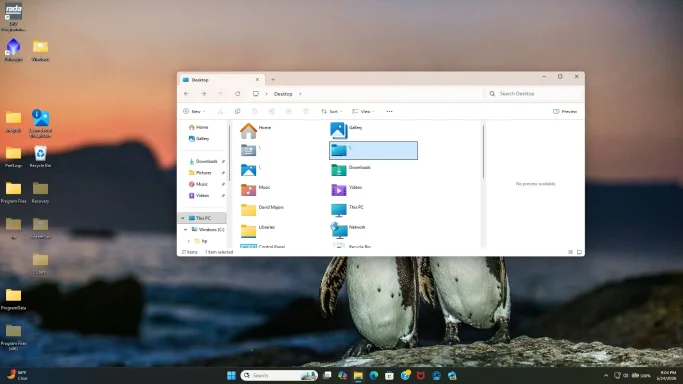
Hi
davercrb2 — thanks for the update. If only
three folders remain, we need to identify whether they are coming from your
user Desktop, the
Public Desktop, or the
Desktop known-folder path is still partly misdirected.
Do not delete them yet, especially if they resemble
Windows,
Program Files,
Users, or anything with system attributes.
Step 1: Check the actual Desktop path Windows is using
- Right-click Start.
- Click Terminal or Windows PowerShell.
- Paste this command and press Enter:
- The result should be something like:
C:\Users\David Majors\Desktop
If it says
C:\,
C:\Users,
C:\Windows, or anything unusual, the Desktop path is still wrong.
Step 2: Check both Desktop registry entries
In the same PowerShell window, run:
Code:
reg query "HKCU\Software\Microsoft\Windows\CurrentVersion\Explorer\User Shell Folders" /v Desktop
reg query "HKCU\Software\Microsoft\Windows\CurrentVersion\Explorer\Shell Folders" /v Desktop
Expected results should point to:
%USERPROFILE%\Desktop
and:
C:\Users\David Majors\Desktop
If either still points to
C:\, that explains why system folders remain visible.
Step 3: Force-reset the Desktop location
If the entries are wrong, run these commands:
Code:
reg add "HKCU\Software\Microsoft\Windows\CurrentVersion\Explorer\User Shell Folders" /v Desktop /t REG_EXPAND_SZ /d "%%USERPROFILE%%\Desktop" /f
reg add "HKCU\Software\Microsoft\Windows\CurrentVersion\Explorer\Shell Folders" /v Desktop /t REG_SZ /d "%USERPROFILE%\Desktop" /f
Then restart Explorer:
Code:
taskkill /f /im explorer.exe
start explorer.exe
If the icons are still there after that, restart the computer.
Step 4: Check the Public Desktop
Some items can appear on every user’s desktop because they are stored in the
Public Desktop.
- Press
Win + R.
- Type:
C:\Users\Public\Desktop
- Press Enter.
- Look for the three remaining folders there.
If they are in
C:\Users\Public\Desktop, they may be shared desktop items. But again,
do not delete anything named like a Windows system folder until we confirm what it is.
Step 5: Confirm what the three folders actually are
Please run this command and paste the output back here:
Get-ChildItem -Force "$env:USERPROFILE\Desktop","C:\Users\Public\Desktop" | Select-Object FullName,Attributes
That will show whether the remaining folders are real folders, hidden/system items, shortcuts, or junction/reparse-point folders.
Also, please tell me the exact names of the three folders that remain. If they still show as just a backslash
\, that is unusual and may indicate a corrupted Desktop namespace entry rather than normal folders.