

Microsoft is rolling out Automatic Update of work location in Teams for Windows and macOS through Microsoft 365 Places by mid-2026, letting organizations infer office presence from corporate Wi-Fi or managed peripherals while separately shipping a record June Patch Tuesday with 206 vulnerability fixes. The awkward timing is not a coincidence so much as a snapshot of Microsoft’s enterprise problem in 2026: every new productivity signal is also a governance event, and every governance event arrives while admins are already drowning in risk. The company wants Teams to become a smarter coordination layer for hybrid work, but the same plumbing that helps colleagues find one another can look, to workers and regulators, like a new attendance ledger. That tension is now landing hardest in Europe’s DACH region, where workplace privacy is not a settings page but a legal and cultural boundary.
Teams presence used to mean a colored dot, a meeting state, or a manually selected location. Microsoft’s new model pushes that idea further by letting the workplace itself become a signal: connect to a configured office Wi-Fi network, plug into a managed desk peripheral, and Teams can update where the user is working for the day.
That is useful in the narrow, practical way many Microsoft 365 features are useful. Hybrid offices are full of half-empty floors, ghost meetings, and colleagues trying to guess whether a person is worth walking over to see. Microsoft Places is designed to make those guesses less wasteful by tying people, rooms, desks, calendars, and building data into the same collaboration fabric.
The controversy begins because location is not just another productivity hint. A work location field may be less invasive than GPS, but it still says something materially important about an employee’s behavior: whether they are at home, in a company building, or attached to a particular workplace environment. In a trust-rich organization, that can reduce friction. In a trust-poor one, it becomes a new instrument of pressure.
Microsoft has tried to draw the line carefully. The feature is administrator-controlled, can be disabled, is framed as user-consented, and is limited to working hours with the day’s actual location cleared afterward. But enterprise privacy disputes rarely turn on whether a vendor can describe a benign use case. They turn on whether the system can be repurposed once deployed.
Yet the consent model contains nuance that matters. Microsoft’s policy language distinguishes between modes where users must explicitly opt in and modes where Wi-Fi-based update can be enabled by default while users are informed and given a way to opt out. That difference may sound like administrative trivia, but it is precisely the kind of distinction that privacy officers and labor representatives will seize on.
The central issue is not whether a user can click a toggle. It is whether that toggle exists inside a power relationship. An employee who is told that location sharing is “voluntary” may still reasonably wonder how voluntary it feels if managers begin using visible office presence as a proxy for commitment, availability, or compliance with hybrid-work rules.
That is why the DACH region matters. Germany, Austria, and Switzerland have long treated workplace monitoring as a collective governance issue, not merely an individual preference. In Germany especially, works councils can have co-determination rights over systems that monitor employee conduct or performance, and a tool that automatically broadcasts office presence is unlikely to be waved through as a harmless collaboration flourish.
In the United States, the same feature may generate fewer formal legal roadblocks, but it can still create employee-relations risk. A company that deploys automatic work-location updates without a clear policy may find itself accused of backdoor attendance tracking even if the technical implementation is limited. The privacy harm is not only data retention; it is the behavioral chill that arrives when workers believe the system is watching patterns they did not mean to publish.
For multinational tenants, the challenge is sharper. Microsoft 365 is global by design, while labor law remains stubbornly local. A Teams administrator can think in terms of policies, scopes, and defaults; a compliance team must think in terms of jurisdiction, consultation duties, consent validity, retention limits, and the difference between collaboration and performance monitoring.
This is where many deployments will stall. The technical work may be straightforward: map buildings, configure networks, set policy, communicate to users. The organizational work is harder: define who can see location data, prohibit disciplinary use unless separately negotiated, document retention behavior, and create a path for employees to refuse without retaliation.
Teams sits directly in the blast radius because it is both the meeting room and the measurement surface. It knows when people are online, when they respond, when they join calls, and now, potentially, where they are working. Even when Microsoft does not build a “surveillance product,” the aggregation of small signals can make Teams feel like one.
Microsoft’s product strategy depends on making Microsoft 365 the operating system for work. Places extends that strategy from documents and meetings into physical space. Copilot extends it into reasoning, drafting, summarizing, and clinical or operational workflows. The enterprise pitch is compelling: fewer wasted minutes, better coordination, smarter use of buildings, and more context-aware software.
But the social contract is lagging behind the software contract. Employees are being asked to accept more inference in exchange for convenience. The unresolved question is whether employers will use those inferences to improve work or to police it.
The reported inclusion of publicly disclosed zero-days raises the urgency. For defenders, zero-day does not only mean “patch quickly.” It means the vulnerability is already known beyond the vendor’s private process, giving attackers and researchers a head start. Even when exploitation is limited or unconfirmed, the operational response is the same: prioritize, test, deploy, and watch for breakage.
This is the irony of modern Microsoft administration. The company ships ever more integrated services to reduce friction, but each integration expands the number of components that must be secured, governed, and explained. The same IT department being asked to enable smarter office coordination is also being asked to absorb one of the largest monthly vulnerability drops in Microsoft history.
For WindowsForum readers, the practical lesson is familiar: Microsoft’s cloud era did not eliminate Patch Tuesday gravity. It redistributed it. Endpoint updates, server fixes, Exchange and Defender advisories, identity controls, Teams policies, and Microsoft 365 admin changes now form a single operational weather system.
That matters because Microsoft is not merely the maker of Windows and Office. It is the steward of GitHub, Azure, Entra ID, Defender, Teams, and the administrative glue that connects them. When attackers chase developer credentials, they are chasing the connective tissue of modern software delivery.
For IT leaders, the response is not dramatic but disciplined. Rotate exposed keys, enforce least privilege, monitor unusual token use, shorten credential lifetimes where possible, and treat repositories as part of the enterprise attack surface rather than a developer side channel. The lesson is less about one malware family than about the permanent convergence of collaboration, code, identity, and infrastructure.
The location feature belongs in that same mental model. It may not be a security vulnerability, but it is another data flow that must be threat-modeled and governance-modeled. Who can access it? How is it logged? Can it be exported? Can it be combined with badge data, VPN logs, or productivity analytics? Those are not paranoid questions; they are normal questions in a Microsoft 365 estate.
But healthcare is also where trust failures become most visible. AI tools in clinical environments must be evaluated not only for efficiency but for accuracy, accountability, data protection, and workflow fit. A system that saves time in aggregate can still create risk if staff over-rely on summaries, if sensitive information flows into poorly understood pipelines, or if audit responsibilities are unclear.
This is the broader Microsoft bet: that enterprises will accept deeper instrumentation because the payoff is operational intelligence. Places instruments the office. Copilot instruments knowledge work. Security tooling instruments endpoints and identities. The combined result is a workplace stack that can see more, infer more, and automate more.
That is powerful. It is also why privacy advocates are right to scrutinize even features that appear limited. The most consequential workplace systems are rarely born as surveillance tools. They become surveillance tools when data collected for coordination is reused for evaluation, discipline, or quiet ranking.
The first step should be a written purpose limitation. If the feature is for collaboration, desk planning, and room discovery, say so explicitly. If it will not be used for attendance enforcement or performance evaluation, say that too — and make sure managers understand it. A vague “we use Microsoft Places to improve hybrid work” statement will not survive first contact with employee suspicion.
The second step is role design. Not everyone who can benefit from location context needs broad visibility. Colleagues may need to know whether someone is in the office today; facilities teams may need aggregated occupancy trends; HR and management should not automatically receive a new behavioral dataset just because it exists.
The third step is regional variation. A single global enablement plan may be administratively convenient but legally brittle. DACH deployments should involve works councils or local counsel early, not after the toggle is already visible in Teams. Even outside Europe, consultation is cheaper than remediation.
Finally, admins should test the user experience before mass rollout. If prompts are confusing, defaults feel coercive, or location updates appear in unexpected places, the deployment will be judged by screenshots and hallway chatter long before the official policy document is read.
But privacy language can only do so much when the product is embedded in a workplace hierarchy. “Disabled by default” protects tenants before deployment; it does not settle what happens after an employer enables it. “User choice” matters; it does not erase the pressure employees may feel when the organization has an official preference. “Cleared at the end of working hours” limits persistence; it does not prevent same-day observation.
The most honest reading is that Microsoft has built a feature that can be deployed responsibly, not a feature that is inherently risk-free. That distinction should shape both criticism and adoption. Calling it pure spyware overstates the technical facts. Calling it merely a convenience feature understates the institutional reality.
Microsoft’s challenge is that it sells to management but is used by workers. The buyer values coordination, utilization, and measurable efficiency. The user values autonomy, context, and not being quietly judged by an algorithmic proxy. A successful rollout has to satisfy both audiences, and that is much harder than shipping a roadmap item.
This is the subscription-era bargain. Microsoft continuously adds capability, and customers continuously inherit decisions. Some of those decisions are technical, like patch prioritization and exploit mitigation. Others are institutional, like whether a collaboration tool should infer employee location. The admin center has become a policy arena.
For Windows enthusiasts, this may feel far removed from the old desktop battles over Start menus and Control Panel settings. But it is the same story in enterprise form. Windows and Microsoft 365 are no longer just software environments; they are systems of defaults. Whoever controls the defaults shapes user experience, security posture, and workplace norms.
The company still has room to get this right. More granular controls would help. Clearer separation between colleague-visible presence and management analytics would help. Stronger tenant-level reporting on who accessed location data would help. So would region-aware deployment guidance that treats works councils and employee representatives as first-class stakeholders rather than local complications.
Microsoft’s next phase of workplace software will be defined less by whether it can detect, summarize, infer, and automate than by whether enterprises can prove they deserve those powers. Teams location updates, massive security patch drops, GitHub credential scares, and healthcare AI rollouts all point in the same direction: the Microsoft stack is becoming more capable and more intimate at once. The winners will be the organizations that deploy it with restraint before regulators, attackers, or employees force that restraint upon them.
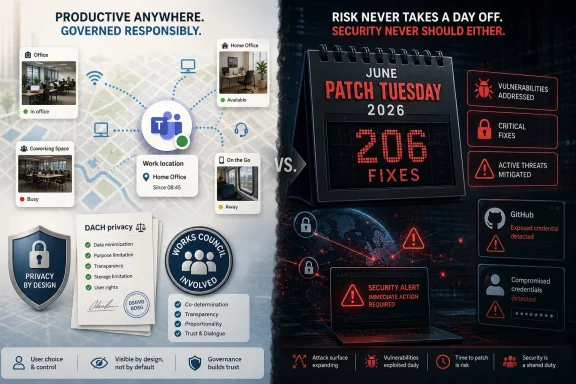 Microsoft Turns Presence Into Infrastructure
Teams presence used to mean a colored dot, a meeting state, or a manually selected location. Microsoft’s new model pushes that idea further by letting the workplace itself become a signal: connect to a configured office Wi-Fi network, plug into a managed desk peripheral, and Teams can update where the user is working for the day.That is useful in the narrow, practical way many Microsoft 365 features are useful. Hybrid offices are full of half-empty floors, ghost meetings, and colleagues trying to guess whether a person is worth walking over to see. Microsoft Places is designed to make those guesses less wasteful by tying people, rooms, desks, calendars, and building data into the same collaboration fabric.
The controversy begins because location is not just another productivity hint. A work location field may be less invasive than GPS, but it still says something materially important about an employee’s behavior: whether they are at home, in a company building, or attached to a particular workplace environment. In a trust-rich organization, that can reduce friction. In a trust-poor one, it becomes a new instrument of pressure.
Microsoft has tried to draw the line carefully. The feature is administrator-controlled, can be disabled, is framed as user-consented, and is limited to working hours with the day’s actual location cleared afterward. But enterprise privacy disputes rarely turn on whether a vendor can describe a benign use case. They turn on whether the system can be repurposed once deployed.
The Opt-In Story Is More Complicated Than It Sounds
Microsoft’s strongest argument is that Automatic Update of work location is not meant to be covert tracking. The company’s documentation says the feature relies on organization-managed networks and devices rather than personal-device geolocation, and that automatic detection can be governed through Teams policy. On paper, that places it closer to workplace presence than surveillance.Yet the consent model contains nuance that matters. Microsoft’s policy language distinguishes between modes where users must explicitly opt in and modes where Wi-Fi-based update can be enabled by default while users are informed and given a way to opt out. That difference may sound like administrative trivia, but it is precisely the kind of distinction that privacy officers and labor representatives will seize on.
The central issue is not whether a user can click a toggle. It is whether that toggle exists inside a power relationship. An employee who is told that location sharing is “voluntary” may still reasonably wonder how voluntary it feels if managers begin using visible office presence as a proxy for commitment, availability, or compliance with hybrid-work rules.
That is why the DACH region matters. Germany, Austria, and Switzerland have long treated workplace monitoring as a collective governance issue, not merely an individual preference. In Germany especially, works councils can have co-determination rights over systems that monitor employee conduct or performance, and a tool that automatically broadcasts office presence is unlikely to be waved through as a harmless collaboration flourish.
The DACH Problem Is a Warning Shot for Global IT
The mistake would be to treat this as a uniquely German concern. DACH regulators and works councils are simply more explicit about a question every enterprise will face: who gets to turn ambient workplace data into operational knowledge?In the United States, the same feature may generate fewer formal legal roadblocks, but it can still create employee-relations risk. A company that deploys automatic work-location updates without a clear policy may find itself accused of backdoor attendance tracking even if the technical implementation is limited. The privacy harm is not only data retention; it is the behavioral chill that arrives when workers believe the system is watching patterns they did not mean to publish.
For multinational tenants, the challenge is sharper. Microsoft 365 is global by design, while labor law remains stubbornly local. A Teams administrator can think in terms of policies, scopes, and defaults; a compliance team must think in terms of jurisdiction, consultation duties, consent validity, retention limits, and the difference between collaboration and performance monitoring.
This is where many deployments will stall. The technical work may be straightforward: map buildings, configure networks, set policy, communicate to users. The organizational work is harder: define who can see location data, prohibit disciplinary use unless separately negotiated, document retention behavior, and create a path for employees to refuse without retaliation.
Hybrid Work Has Reopened the Attendance Wars
The location feature is landing in a corporate climate already primed for conflict. After years of remote-work normalization, many employers are trying to reassert office attendance expectations without fully rebuilding the old office bargain. Workers, meanwhile, have grown wary of tools that convert digital exhaust into management dashboards.Teams sits directly in the blast radius because it is both the meeting room and the measurement surface. It knows when people are online, when they respond, when they join calls, and now, potentially, where they are working. Even when Microsoft does not build a “surveillance product,” the aggregation of small signals can make Teams feel like one.
Microsoft’s product strategy depends on making Microsoft 365 the operating system for work. Places extends that strategy from documents and meetings into physical space. Copilot extends it into reasoning, drafting, summarizing, and clinical or operational workflows. The enterprise pitch is compelling: fewer wasted minutes, better coordination, smarter use of buildings, and more context-aware software.
But the social contract is lagging behind the software contract. Employees are being asked to accept more inference in exchange for convenience. The unresolved question is whether employers will use those inferences to improve work or to police it.
Patch Tuesday Shows the Other Half of the Bargain
While the Teams location debate plays out, Microsoft’s June 2026 security release underlines why administrators may have little patience for another governance-sensitive feature. A record 206 vulnerabilities in one month is not just a large patch set; it is a reminder of the enormous attack surface Microsoft’s enterprise stack represents.The reported inclusion of publicly disclosed zero-days raises the urgency. For defenders, zero-day does not only mean “patch quickly.” It means the vulnerability is already known beyond the vendor’s private process, giving attackers and researchers a head start. Even when exploitation is limited or unconfirmed, the operational response is the same: prioritize, test, deploy, and watch for breakage.
This is the irony of modern Microsoft administration. The company ships ever more integrated services to reduce friction, but each integration expands the number of components that must be secured, governed, and explained. The same IT department being asked to enable smarter office coordination is also being asked to absorb one of the largest monthly vulnerability drops in Microsoft history.
For WindowsForum readers, the practical lesson is familiar: Microsoft’s cloud era did not eliminate Patch Tuesday gravity. It redistributed it. Endpoint updates, server fixes, Exchange and Defender advisories, identity controls, Teams policies, and Microsoft 365 admin changes now form a single operational weather system.
GitHub Malware Scare Reinforces the Supply-Chain Anxiety
The reported GitHub repository takedowns tied to credential-stealing malware add another layer to the story. Developer credentials are among the most valuable targets in a cloud-first enterprise because they can open paths into Azure, AWS, CI/CD systems, package registries, and production environments. A compromised token is often more useful than a compromised laptop.That matters because Microsoft is not merely the maker of Windows and Office. It is the steward of GitHub, Azure, Entra ID, Defender, Teams, and the administrative glue that connects them. When attackers chase developer credentials, they are chasing the connective tissue of modern software delivery.
For IT leaders, the response is not dramatic but disciplined. Rotate exposed keys, enforce least privilege, monitor unusual token use, shorten credential lifetimes where possible, and treat repositories as part of the enterprise attack surface rather than a developer side channel. The lesson is less about one malware family than about the permanent convergence of collaboration, code, identity, and infrastructure.
The location feature belongs in that same mental model. It may not be a security vulnerability, but it is another data flow that must be threat-modeled and governance-modeled. Who can access it? How is it logged? Can it be exported? Can it be combined with badge data, VPN logs, or productivity analytics? Those are not paranoid questions; they are normal questions in a Microsoft 365 estate.
AI in Healthcare Raises the Stakes for Trust
The NHS Copilot rollout, reportedly reaching more than 500,000 staff by October 2026 after pilots suggested daily time savings, shows why Microsoft is pushing so aggressively. If generative AI can save clinicians meaningful time on documentation and administrative work, the productivity upside is not cosmetic. It could affect waiting lists, staff burnout, and the capacity of strained public services.But healthcare is also where trust failures become most visible. AI tools in clinical environments must be evaluated not only for efficiency but for accuracy, accountability, data protection, and workflow fit. A system that saves time in aggregate can still create risk if staff over-rely on summaries, if sensitive information flows into poorly understood pipelines, or if audit responsibilities are unclear.
This is the broader Microsoft bet: that enterprises will accept deeper instrumentation because the payoff is operational intelligence. Places instruments the office. Copilot instruments knowledge work. Security tooling instruments endpoints and identities. The combined result is a workplace stack that can see more, infer more, and automate more.
That is powerful. It is also why privacy advocates are right to scrutinize even features that appear limited. The most consequential workplace systems are rarely born as surveillance tools. They become surveillance tools when data collected for coordination is reused for evaluation, discipline, or quiet ranking.
Admins Need Policy Before PowerShell
For administrators, the worst deployment path is to treat Automatic Update of work location as a routine Teams enhancement. It is not. It touches employee expectations, labor relations, privacy law, facility management, and managerial behavior.The first step should be a written purpose limitation. If the feature is for collaboration, desk planning, and room discovery, say so explicitly. If it will not be used for attendance enforcement or performance evaluation, say that too — and make sure managers understand it. A vague “we use Microsoft Places to improve hybrid work” statement will not survive first contact with employee suspicion.
The second step is role design. Not everyone who can benefit from location context needs broad visibility. Colleagues may need to know whether someone is in the office today; facilities teams may need aggregated occupancy trends; HR and management should not automatically receive a new behavioral dataset just because it exists.
The third step is regional variation. A single global enablement plan may be administratively convenient but legally brittle. DACH deployments should involve works councils or local counsel early, not after the toggle is already visible in Teams. Even outside Europe, consultation is cheaper than remediation.
Finally, admins should test the user experience before mass rollout. If prompts are confusing, defaults feel coercive, or location updates appear in unexpected places, the deployment will be judged by screenshots and hallway chatter long before the official policy document is read.
Microsoft’s Privacy Language Is Necessary but Not Sufficient
Microsoft has clearly learned from the backlash. The company emphasizes that the feature is off unless configured, tied to managed workplace signals, and bounded by working hours. Those limits matter, and they are better than a silent, tenant-wide rollout of automatic office presence.But privacy language can only do so much when the product is embedded in a workplace hierarchy. “Disabled by default” protects tenants before deployment; it does not settle what happens after an employer enables it. “User choice” matters; it does not erase the pressure employees may feel when the organization has an official preference. “Cleared at the end of working hours” limits persistence; it does not prevent same-day observation.
The most honest reading is that Microsoft has built a feature that can be deployed responsibly, not a feature that is inherently risk-free. That distinction should shape both criticism and adoption. Calling it pure spyware overstates the technical facts. Calling it merely a convenience feature understates the institutional reality.
Microsoft’s challenge is that it sells to management but is used by workers. The buyer values coordination, utilization, and measurable efficiency. The user values autonomy, context, and not being quietly judged by an algorithmic proxy. A successful rollout has to satisfy both audiences, and that is much harder than shipping a roadmap item.
The June Signal Microsoft Cannot Ignore
The 206-patch month and the Teams location debate are not separate stories. Together they describe the burden Microsoft now places on its customers: adopt faster, govern more carefully, patch more urgently, and trust the platform more deeply.This is the subscription-era bargain. Microsoft continuously adds capability, and customers continuously inherit decisions. Some of those decisions are technical, like patch prioritization and exploit mitigation. Others are institutional, like whether a collaboration tool should infer employee location. The admin center has become a policy arena.
For Windows enthusiasts, this may feel far removed from the old desktop battles over Start menus and Control Panel settings. But it is the same story in enterprise form. Windows and Microsoft 365 are no longer just software environments; they are systems of defaults. Whoever controls the defaults shapes user experience, security posture, and workplace norms.
The company still has room to get this right. More granular controls would help. Clearer separation between colleague-visible presence and management analytics would help. Stronger tenant-level reporting on who accessed location data would help. So would region-aware deployment guidance that treats works councils and employee representatives as first-class stakeholders rather than local complications.
The Office Map Is Becoming a Compliance Map
The concrete readout for IT teams is less sensational than the headlines, but more important than the headlines.- Organizations should treat Automatic Update of work location as a governed workplace monitoring feature, even if they ultimately approve it for collaboration.
- Administrators should confirm whether their Teams policy uses explicit opt-in behavior or an inform-and-opt-out model before any pilot expands.
- DACH-region deployments should involve works councils, legal teams, and data protection officers before configuration work becomes an implied decision.
- Security teams should prioritize June 2026 Microsoft patches with special attention to publicly disclosed flaws and externally reachable services.
- Developer teams affected by credential-stealing campaigns should rotate secrets, review token scopes, and audit recent cloud access rather than waiting for broader confirmation.
- Microsoft 365 Copilot and Places deployments should be assessed together because both increase the amount of workplace context flowing through Microsoft’s cloud.
Microsoft’s next phase of workplace software will be defined less by whether it can detect, summarize, infer, and automate than by whether enterprises can prove they deserve those powers. Teams location updates, massive security patch drops, GitHub credential scares, and healthcare AI rollouts all point in the same direction: the Microsoft stack is becoming more capable and more intimate at once. The winners will be the organizations that deploy it with restraint before regulators, attackers, or employees force that restraint upon them.
References
- Primary source: AD HOC NEWS
Published: Thu, 11 Jun 2026 23:03:21 GMT
Microsoft's New Office Location Tracker for Teams Raises Privacy Flags as 206 Patches Deployed
Microsoft's voluntary workplace location feature in Teams faces legal hurdles in DACH region as the company also patches 206 flaws, including zero-days, and expands AI in healthcare.www.ad-hoc-news.de - Related coverage: techradar.com
Microsoft breaks Patch Tuesday record with fixes for over 200 security flaws | TechRadar
AI use is really starting to showwww.techradar.com - Related coverage: windowscentral.com
Windows 11’s June update shuts down an intentional BitLocker backdoor with full file access — here’s what changed | Windows Central
Microsoft’s June 2026 Patch Tuesday update fixes a controversial BitLocker flaw.www.windowscentral.com - Official source: learn.microsoft.com
Configure workplace check-in - Microsoft Places | Microsoft Learn
Configure workplace check-in in a Places environment.learn.microsoft.com - Related coverage: hackread.com
Microsoft June 2026 Patch Tuesday Fixes 206 Flaws and 3 Zero-Days
Microsoft’s June 2026 patch Tuesday resolves 206 vulnerabilities, including 3 critical zero-days and severe 9.8 CVSS kernel, network and HTTP.sys flaws.hackread.com - Related coverage: britec.com
Microsoft June 2026 Patch Tuesday Fixes 206 Vulnerabilities
Microsoft has released a record 206 security fixes, including critical remote code execution vulnerabilities and three publicly disclosed zero-days. Learn what businesses need to know.britec.com
- Related coverage: cyberscoop.com
Microsoft breaks Patch Tuesday record with 206 vulnerabilities | CyberScoop
Fears and warnings about a roaring flood of error-riddled software have materialized. And the disease is spreading.cyberscoop.com - Related coverage: easternherald.com
Microsoft June 2026 Patch Tuesday: Record 206 CVEs, 3 Zero-Days
Microsoft's June 2026 Patch Tuesday fixes a record 206 flaws, including BitLocker bypass, wormable DHCP RCE, and the GreenPlasma SYSTEM privilege zero-day.easternherald.com - Related coverage: pcworld.com
Microsoft says new Teams location feature isn't for 'employee tracking' | PCWorld
When this new feature rolls out, your bosses and colleagues will always know where you are.www.pcworld.com - Related coverage: enterprisedna.co
NHS Rolls Out AI to 505,000 Staff, Saving 43 Minutes Daily — Enterprise DNA
NHS England's £120m Microsoft 365 Copilot rollout to 505,000 staff saves 43 minutes daily per person after the largest AI trial in global healthcare.enterprisedna.co - Related coverage: tomsguide.com
Do you use Microsoft Exchange? Hackers are actively exploiting a new zero-day flaw | Tom's Guide
Microsoft warns of a new zero-day vulnerability that leaves Exchange open to hackers.www.tomsguide.com - Related coverage: sra.io
- Official source: techcommunity.microsoft.com
Microsoft Teams Licensing Updates April 2026 Customer FAQ 1
PDF documenttechcommunity.microsoft.com
- Official source: microsoft.com
