

Microsoft is adding automatic recording and transcription to Microsoft Teams Call Queues in August 2026, letting administrators configure each queue so calls answered by representatives are captured automatically, stored in SharePoint, and surfaced through the Teams Queues app without agents pressing Record. The feature, now listed as in development on the Microsoft 365 Roadmap under ID 565215, is a small line item with outsized operational consequences. It turns call recording from a human habit into a tenant policy. For IT departments that have been using Teams Phone as a lightweight contact-center substitute, that is both overdue and politically delicate.
Teams Call Queues have always lived in a strange middle ground. They are not a full contact-center platform, but many organizations use them that way because they are already inside Microsoft 365, already tied to Entra identities, already familiar to users, and already licensed into the broader productivity stack. That convenience has made Call Queues popular for help desks, reception teams, HR lines, facilities desks, clinics, school offices, and small customer-service teams that do not want to buy a separate platform.
The weakness has been that Teams often behaved like a collaboration tool wearing a phone-system jacket. Recording and transcription existed elsewhere in the Teams universe, but queue-based inbound calls lacked the kind of native, policy-driven capture that administrators expect from business telephony. If an agent had to remember to record, then recording was not really a control; it was a hope.
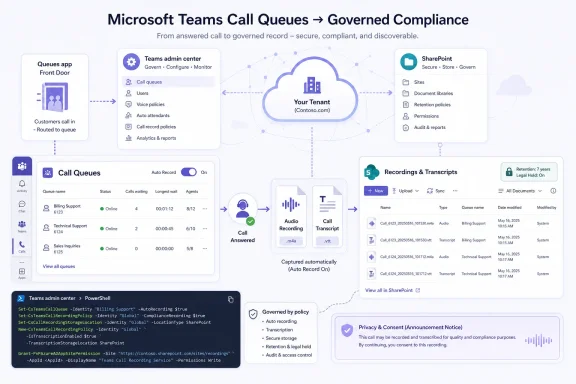
Microsoft’s new feature attacks that gap directly. Automatic recording starts when a call queue representative answers and stops when the call ends. Transcription can be enabled alongside recording, and administrators can decide whether agents can see recordings for the queue. The result is a more contact-center-like experience, even if Microsoft is still careful not to call basic Call Queues a contact center.
That distinction matters. Microsoft is not replacing Five9, NICE, Genesys, Verint, or the broader ecosystem of Teams-integrated contact-center and compliance-recording products. It is, however, shrinking the number of cases where an organization needs to bolt on another system merely to prove what was said on routine inbound calls.
That changes the role of Teams Phone. A call to the IT help desk is no longer just a transient exchange between a user and an agent. It becomes a retrievable artifact: audio, transcript, metadata, and eventually perhaps a source for analytics, coaching, dispute resolution, and compliance review. The telephone call becomes more like email, chat, and ticketing data — part of the corporate memory.
For administrators, the attraction is obvious. Queue-level configuration means recording policies can follow business function rather than individual behavior. A billing queue can be recorded while an internal cafeteria queue is not. A customer escalation queue can allow supervisor access while a sensitive HR queue can restrict agent visibility. That granularity is what separates a workable governance model from an all-or-nothing mess.
But the same power creates new obligations. If a business automatically records a queue, it must understand who is notified, where the data lands, how long it remains there, who can search it, whether transcripts are accurate enough to use operationally, and how the setup intersects with legal consent requirements. The button may sit in the Teams admin center or PowerShell, but the decision belongs in a larger governance conversation.
That has advantages. SharePoint brings permissions, retention labels, eDiscovery hooks, audit trails, data residency options, and the administrative muscle of Microsoft Purview. In a Microsoft-centric tenant, storing call recordings there is easier to defend than scattering them across third-party portals with their own identity systems and retention models.
It also creates friction. SharePoint permissions are powerful but unforgiving, and many organizations have a long history of oversharing, inheritance confusion, abandoned sites, and owners who do not fully understand what they control. A queue recording is not a project document. It may contain payment details, health information, employee disputes, disciplinary issues, authentication answers, or customer complaints. Treating it like ordinary content would be a category error.
Microsoft’s setup guidance points to templated provisioning rather than manually created SharePoint sites for these recordings. That is the right instinct. If call recordings are going to live in SharePoint, administrators should resist the temptation to toss them into a convenient existing site. The storage location should be designed as a controlled repository from the start, with ownership, retention, access review, and discovery expectations settled before the first caller hears a recording announcement.
This follows a pattern. Microsoft increasingly leaves baseline communication features in core Teams while placing advanced management, analytics, customization, and workflow capabilities behind add-on licenses. Teams Premium began with meeting enhancements, branded experiences, intelligent recap, and advanced webinar or appointment scenarios. Over time, it has become a broader container for features Microsoft believes sit above standard collaboration.
For small organizations, that can feel like nickel-and-diming. A call queue is a phone-system feature; recording queue calls feels like something a phone system should simply do. If the practical way to review those recordings is tied to a Premium app experience, budget owners will ask why Teams Phone’s operational maturity keeps arriving through incremental licensing.
For Microsoft, the argument is equally clear. The Queues app is not merely a playback screen. It is part of a broader attempt to turn Teams into a front-office operations surface, with queue management, reporting, real-time metrics, and supervisor controls. The company wants customers to see Teams Premium not as a meeting add-on but as an operational layer for work that happens in Teams. Whether customers accept that framing will depend less on marketing and more on how cleanly the feature works at launch.
That is not a problem by itself. PowerShell is where repeatability, change control, and documentation can be stronger than a click path in a portal. If a tenant has dozens or hundreds of queues, scripting templates and assignments is not a luxury; it is the only sane deployment model. The relevant cmdlets allow administrators to create recording templates, define recording and transcription settings, specify SharePoint storage, configure announcements, and assign templates to queues.
The risk is that PowerShell-first features can hide complexity from less mature IT teams. A small business administrator may see the roadmap item and assume this will be a straightforward toggle. In practice, automatic recording has prerequisites and dependencies that deserve planning: queue configuration, conference mode, membership structure, SharePoint provisioning, shared call history, agent permissions, announcements, licensing, and access through the Queues app.
That is not Microsoft being unusually hostile; it is the nature of turning telephony into governed cloud collaboration. Still, the company should be judged on whether the Teams admin center eventually makes the feature understandable without sanding off the controls. A recording system that is easy to enable but hard to govern is worse than one that is slightly slower to deploy.
Consent rules vary by jurisdiction, and businesses operating across U.S. states, countries, or regulated sectors need to be careful. Some environments require one-party consent; others require all-party consent or specific notice. Even when the law does not demand explicit consent, customer trust often does. Nobody wants to discover after a dispute that the recording notice was ambiguous, missing from certain call paths, or configured differently across queues.
The announcement also shapes the customer’s perception of the organization. “This call may be recorded for quality and training purposes” is a familiar phrase, but it is also imprecise. If the call will be recorded and saved in SharePoint, as Microsoft’s default-style wording suggests, that directness may be better. If transcription is enabled, organizations should consider whether callers deserve to know that speech is being converted into searchable text, not merely stored as audio.
There is a difference between legally sufficient notice and ethically clear notice. Microsoft can provide the mechanism, but customers must decide what callers should reasonably understand. As transcription and AI-assisted review become more common, old call-center scripts may no longer be good enough.
A transcript can make a help desk more efficient. A supervisor can skim a call without listening to ten minutes of audio. A ticket can be updated with the customer’s exact complaint. A recurring product issue can be spotted across dozens of queue calls. In a mature environment, this data can help improve service quality and reduce repeat contacts.
But transcripts are not neutral. Speech recognition can mishear names, accents, technical terms, addresses, product codes, serial numbers, medical language, and emotionally charged statements. In a workplace dispute or customer complaint, a bad transcript can become a misleading artifact unless users know to treat the audio as the source of record. Microsoft’s feature will be most useful where organizations build habits around verification rather than pretending that generated text is perfect.
That becomes even more important as Copilot and other AI features hover around the Teams ecosystem. Once transcripts exist, the temptation to summarize them, classify them, score them, and mine them grows quickly. The August 2026 roadmap item is not marketed as an AI feature, but it lays the data plumbing for AI-assisted voice operations. That makes governance urgent from day one, not after the analytics arrive.
Native automatic recording changes the calculation for simpler scenarios. A school district’s front office, a municipal service desk, a small healthcare administration line, or an internal IT support queue may not need workforce management, omnichannel routing, complex quality scoring, or deep CRM integration. They may simply need every answered inbound call captured reliably, with supervisors able to review it later.
That is where Microsoft’s move is strongest. It reduces the “we need a whole contact center because we need recording” argument. If the queue is otherwise adequately served by Teams Phone, native recording keeps the workflow inside Microsoft 365 and avoids another vendor relationship.
But there is a ceiling. Dedicated contact-center platforms still win on advanced analytics, quality management, real-time coaching workflows, campaign handling, omnichannel context, compliance specialization, and integrations with customer records. Microsoft’s feature is not the end of that market. It is the removal of an obvious deficiency from Teams Phone’s lower and middle tiers.
That is operationally useful. Agents reviewing prior queue calls can understand a customer’s history, avoid repetition, and improve continuity. In a shared support environment, the ability to look back can be the difference between good service and a frustrating reset.
It is also a privacy trap. If every agent in a queue can see every recording, then a large group of frontline staff may gain access to sensitive conversations they did not handle. In a small company, that might be acceptable. In HR, finance, healthcare, legal intake, education, public-sector services, or executive support, it may be reckless.
The better model is role-based restraint. Supervisors, authorized users, and specific operational leads should have access where there is a business reason. Agents should get broader access only where the queue’s purpose justifies it and where training makes expectations clear. The fact that recordings live inside Microsoft 365 does not automatically make them safe; it only makes them governable if someone actually governs them.
The first task is inventory. Many tenants have more call queues than anyone remembers, especially after years of departmental requests, pandemic-era routing changes, pilot projects, and help desk workarounds. Before enabling recording, IT should know which queues exist, who owns them, which resource accounts they use, which agents answer them, which departments rely on them, and which call paths feed into them.
The second task is classification. Not every queue deserves the same recording posture. Customer service, technical support, finance, HR, legal, healthcare, and public-facing services carry different expectations. Internal-only queues may have lower notice burdens but still raise employee-monitoring concerns. A queue that handles password resets may not be sensitive in the same way as a patient scheduling line, but both can contain data the organization should not expose casually.
The third task is stakeholder alignment. Legal, compliance, security, records management, HR, service owners, and telecom administrators should all have a say before automatic recording becomes default behavior. If that sounds bureaucratic, consider the alternative: an administrator flips a switch, recordings accumulate, and months later someone asks why a sensitive conversation was retained, searchable, and visible to too many people.
Public-sector organizations often run high-volume phone lines with limited staffing and serious accountability requirements. City services, school districts, public health offices, licensing departments, and administrative help desks all field calls where the ability to verify what was said can matter. Native Teams recording could be attractive if it fits within the broader compliance posture those organizations already maintain in Microsoft 365.
The same is true for education and regulated-adjacent industries using commercial tenants. Teams has become the default communications layer in many institutions that are not traditional call centers but still conduct important business over the phone. When those calls are routed through queues, the absence of automatic recording has been conspicuous.
Still, GCC availability should not be confused with universal cloud parity. The roadmap specifically names Worldwide and GCC, not every sovereign or defense cloud. Organizations in GCC High, DoD, or specialized cloud environments will need to verify availability before designing processes around it. In Microsoft 365, cloud instance remains one of the most practical boundaries between promise and deployable reality.
This is especially true because supported configurations matter. Microsoft’s current guidance points to requirements such as conference mode and Microsoft 365 security group-based membership for automatic recording in Call Queues. Shifts-based queues and other configurations may not support the same recording behavior. Organizations that built queues opportunistically may need to rework them before they can standardize recording.
That is not merely technical cleanup. Membership design determines who answers calls, who appears in reporting, and potentially who can access queue artifacts. If a call queue was built years ago with a convenient group that now contains stale users, automatic recording can turn that neglect into an access-control incident.
The healthiest deployments will treat this rollout as a reason to audit the voice estate. Teams Phone has matured enough that it deserves the same lifecycle management as email groups, SharePoint sites, Teams workspaces, and privileged roles. Voice used to be separate infrastructure. In Microsoft 365, it is now part of the same identity and data-governance fabric.
That creates a familiar Microsoft advantage. The company does not need to build the best standalone phone-recording product in the market. It needs to make native Teams recording good enough, governed enough, and integrated enough that many customers choose it by default. Once the recording is in SharePoint, subject to Microsoft 365 identity and compliance controls, the gravitational pull increases.
Competitors will argue, fairly, that specialized tools remain stronger. They will point to deeper compliance recording, richer analytics, quality management, sentiment analysis, agent evaluation, CRM linkage, and contact-center orchestration. For sophisticated operations, those arguments will hold.
But Microsoft’s strategy has rarely required winning the high end immediately. It wins by collapsing adjacent needs into the platform customers already own. Automatic Call Queue recording is another collapse: a third-party requirement for some, a native checkbox for others, and a licensing upsell path through Teams Premium for many.
Administrators should use the runway between the June roadmap update and the August 2026 general availability target to make the policy choices that are hardest to reverse later.
 Microsoft Moves Call Queues From “Good Enough” to Governed
Teams Call Queues have always lived in a strange middle ground. They are not a full contact-center platform, but many organizations use them that way because they are already inside Microsoft 365, already tied to Entra identities, already familiar to users, and already licensed into the broader productivity stack. That convenience has made Call Queues popular for help desks, reception teams, HR lines, facilities desks, clinics, school offices, and small customer-service teams that do not want to buy a separate platform.The weakness has been that Teams often behaved like a collaboration tool wearing a phone-system jacket. Recording and transcription existed elsewhere in the Teams universe, but queue-based inbound calls lacked the kind of native, policy-driven capture that administrators expect from business telephony. If an agent had to remember to record, then recording was not really a control; it was a hope.
Microsoft’s new feature attacks that gap directly. Automatic recording starts when a call queue representative answers and stops when the call ends. Transcription can be enabled alongside recording, and administrators can decide whether agents can see recordings for the queue. The result is a more contact-center-like experience, even if Microsoft is still careful not to call basic Call Queues a contact center.
That distinction matters. Microsoft is not replacing Five9, NICE, Genesys, Verint, or the broader ecosystem of Teams-integrated contact-center and compliance-recording products. It is, however, shrinking the number of cases where an organization needs to bolt on another system merely to prove what was said on routine inbound calls.
The Real Feature Is Not Recording; It Is Administrative Intent
Manual recording is a user feature. Automatic recording is an administrative statement. Once a queue is configured to record by default, the organization is saying that this category of conversation has institutional value beyond the moment it happens.That changes the role of Teams Phone. A call to the IT help desk is no longer just a transient exchange between a user and an agent. It becomes a retrievable artifact: audio, transcript, metadata, and eventually perhaps a source for analytics, coaching, dispute resolution, and compliance review. The telephone call becomes more like email, chat, and ticketing data — part of the corporate memory.
For administrators, the attraction is obvious. Queue-level configuration means recording policies can follow business function rather than individual behavior. A billing queue can be recorded while an internal cafeteria queue is not. A customer escalation queue can allow supervisor access while a sensitive HR queue can restrict agent visibility. That granularity is what separates a workable governance model from an all-or-nothing mess.
But the same power creates new obligations. If a business automatically records a queue, it must understand who is notified, where the data lands, how long it remains there, who can search it, whether transcripts are accurate enough to use operationally, and how the setup intersects with legal consent requirements. The button may sit in the Teams admin center or PowerShell, but the decision belongs in a larger governance conversation.
SharePoint Becomes the Filing Cabinet for the Phone System
Microsoft’s choice of SharePoint as the storage location is unsurprising and consequential. Teams meeting recordings already pushed organizations into the OneDrive and SharePoint storage model, and Call Queue recordings now appear to follow the same gravity. For Microsoft, this is architectural tidiness. For customers, it is one more reminder that SharePoint is no longer just an intranet and document-management platform; it is the storage substrate for Microsoft 365’s communications record.That has advantages. SharePoint brings permissions, retention labels, eDiscovery hooks, audit trails, data residency options, and the administrative muscle of Microsoft Purview. In a Microsoft-centric tenant, storing call recordings there is easier to defend than scattering them across third-party portals with their own identity systems and retention models.
It also creates friction. SharePoint permissions are powerful but unforgiving, and many organizations have a long history of oversharing, inheritance confusion, abandoned sites, and owners who do not fully understand what they control. A queue recording is not a project document. It may contain payment details, health information, employee disputes, disciplinary issues, authentication answers, or customer complaints. Treating it like ordinary content would be a category error.
Microsoft’s setup guidance points to templated provisioning rather than manually created SharePoint sites for these recordings. That is the right instinct. If call recordings are going to live in SharePoint, administrators should resist the temptation to toss them into a convenient existing site. The storage location should be designed as a controlled repository from the start, with ownership, retention, access review, and discovery expectations settled before the first caller hears a recording announcement.
The Queues App Is the Front Door, and Teams Premium Is the Tollbooth
The roadmap note includes a detail that will irritate some customers: access through the Queues app requires Teams Premium. That does not necessarily mean every piece of the recording pipeline is a Premium feature in every scenario, but Microsoft is clearly positioning the Queues app as the richer management and visibility layer for modern Teams Phone operations.This follows a pattern. Microsoft increasingly leaves baseline communication features in core Teams while placing advanced management, analytics, customization, and workflow capabilities behind add-on licenses. Teams Premium began with meeting enhancements, branded experiences, intelligent recap, and advanced webinar or appointment scenarios. Over time, it has become a broader container for features Microsoft believes sit above standard collaboration.
For small organizations, that can feel like nickel-and-diming. A call queue is a phone-system feature; recording queue calls feels like something a phone system should simply do. If the practical way to review those recordings is tied to a Premium app experience, budget owners will ask why Teams Phone’s operational maturity keeps arriving through incremental licensing.
For Microsoft, the argument is equally clear. The Queues app is not merely a playback screen. It is part of a broader attempt to turn Teams into a front-office operations surface, with queue management, reporting, real-time metrics, and supervisor controls. The company wants customers to see Teams Premium not as a meeting add-on but as an operational layer for work that happens in Teams. Whether customers accept that framing will depend less on marketing and more on how cleanly the feature works at launch.
PowerShell First Is a Signal to the People Who Will Actually Deploy It
Microsoft says administrators can configure automatic recording and transcription per queue via the Teams admin center or PowerShell, while current technical documentation has emphasized PowerShell availability and Teams admin center support arriving around the feature’s rollout path. That sequencing is familiar. The deepest Teams Phone controls often land first in PowerShell because the people piloting them are telecom administrators, managed service providers, and enterprise IT teams who already live there.That is not a problem by itself. PowerShell is where repeatability, change control, and documentation can be stronger than a click path in a portal. If a tenant has dozens or hundreds of queues, scripting templates and assignments is not a luxury; it is the only sane deployment model. The relevant cmdlets allow administrators to create recording templates, define recording and transcription settings, specify SharePoint storage, configure announcements, and assign templates to queues.
The risk is that PowerShell-first features can hide complexity from less mature IT teams. A small business administrator may see the roadmap item and assume this will be a straightforward toggle. In practice, automatic recording has prerequisites and dependencies that deserve planning: queue configuration, conference mode, membership structure, SharePoint provisioning, shared call history, agent permissions, announcements, licensing, and access through the Queues app.
That is not Microsoft being unusually hostile; it is the nature of turning telephony into governed cloud collaboration. Still, the company should be judged on whether the Teams admin center eventually makes the feature understandable without sanding off the controls. A recording system that is easy to enable but hard to govern is worse than one that is slightly slower to deploy.
The Announcement Is More Than a Courtesy
Automatic call recording lives at the intersection of user experience and legal exposure. Microsoft’s documentation points to configurable announcements, including a system default message and support for custom text-to-speech or audio prompts. That may sound like a minor implementation detail, but for many organizations it is the difference between a compliant workflow and a risky one.Consent rules vary by jurisdiction, and businesses operating across U.S. states, countries, or regulated sectors need to be careful. Some environments require one-party consent; others require all-party consent or specific notice. Even when the law does not demand explicit consent, customer trust often does. Nobody wants to discover after a dispute that the recording notice was ambiguous, missing from certain call paths, or configured differently across queues.
The announcement also shapes the customer’s perception of the organization. “This call may be recorded for quality and training purposes” is a familiar phrase, but it is also imprecise. If the call will be recorded and saved in SharePoint, as Microsoft’s default-style wording suggests, that directness may be better. If transcription is enabled, organizations should consider whether callers deserve to know that speech is being converted into searchable text, not merely stored as audio.
There is a difference between legally sufficient notice and ethically clear notice. Microsoft can provide the mechanism, but customers must decide what callers should reasonably understand. As transcription and AI-assisted review become more common, old call-center scripts may no longer be good enough.
Transcription Turns Audio Into Evidence, but Not Always Truth
Recording captures sound. Transcription creates text, and text travels farther. It is easier to search, summarize, export, classify, retain, produce in discovery, and feed into downstream workflows. That is why transcription is valuable, and why it is more sensitive than many administrators initially realize.A transcript can make a help desk more efficient. A supervisor can skim a call without listening to ten minutes of audio. A ticket can be updated with the customer’s exact complaint. A recurring product issue can be spotted across dozens of queue calls. In a mature environment, this data can help improve service quality and reduce repeat contacts.
But transcripts are not neutral. Speech recognition can mishear names, accents, technical terms, addresses, product codes, serial numbers, medical language, and emotionally charged statements. In a workplace dispute or customer complaint, a bad transcript can become a misleading artifact unless users know to treat the audio as the source of record. Microsoft’s feature will be most useful where organizations build habits around verification rather than pretending that generated text is perfect.
That becomes even more important as Copilot and other AI features hover around the Teams ecosystem. Once transcripts exist, the temptation to summarize them, classify them, score them, and mine them grows quickly. The August 2026 roadmap item is not marketed as an AI feature, but it lays the data plumbing for AI-assisted voice operations. That makes governance urgent from day one, not after the analytics arrive.
Native Recording Narrows the Gap With Contact Centers Without Closing It
For years, one of the common complaints about Teams Call Queues was that they offered just enough call distribution to be useful but not enough recording, supervision, reporting, or quality-management depth to satisfy teams with serious operational requirements. The answer was often a third-party contact-center platform or compliance-recording integration. That remains true for many businesses.Native automatic recording changes the calculation for simpler scenarios. A school district’s front office, a municipal service desk, a small healthcare administration line, or an internal IT support queue may not need workforce management, omnichannel routing, complex quality scoring, or deep CRM integration. They may simply need every answered inbound call captured reliably, with supervisors able to review it later.
That is where Microsoft’s move is strongest. It reduces the “we need a whole contact center because we need recording” argument. If the queue is otherwise adequately served by Teams Phone, native recording keeps the workflow inside Microsoft 365 and avoids another vendor relationship.
But there is a ceiling. Dedicated contact-center platforms still win on advanced analytics, quality management, real-time coaching workflows, campaign handling, omnichannel context, compliance specialization, and integrations with customer records. Microsoft’s feature is not the end of that market. It is the removal of an obvious deficiency from Teams Phone’s lower and middle tiers.
IT Will Have to Decide Who Gets to Hear the Company’s Memory
Agent access to recordings is one of the more important controls in the feature. Microsoft allows administrators to configure whether call queue representatives can access recordings and transcriptions for the queue. If enabled, representatives may be able to see recordings beyond only their own calls, depending on the permission model.That is operationally useful. Agents reviewing prior queue calls can understand a customer’s history, avoid repetition, and improve continuity. In a shared support environment, the ability to look back can be the difference between good service and a frustrating reset.
It is also a privacy trap. If every agent in a queue can see every recording, then a large group of frontline staff may gain access to sensitive conversations they did not handle. In a small company, that might be acceptable. In HR, finance, healthcare, legal intake, education, public-sector services, or executive support, it may be reckless.
The better model is role-based restraint. Supervisors, authorized users, and specific operational leads should have access where there is a business reason. Agents should get broader access only where the queue’s purpose justifies it and where training makes expectations clear. The fact that recordings live inside Microsoft 365 does not automatically make them safe; it only makes them governable if someone actually governs them.
August 2026 Is Close Enough for Planning and Far Enough for Policy
The roadmap lists general availability for August 2026, with Targeted Release and General Availability rings and support for Worldwide standard multi-tenant and GCC cloud instances. That gives administrators a narrow but useful planning window. The feature is not something to discover on launch day.The first task is inventory. Many tenants have more call queues than anyone remembers, especially after years of departmental requests, pandemic-era routing changes, pilot projects, and help desk workarounds. Before enabling recording, IT should know which queues exist, who owns them, which resource accounts they use, which agents answer them, which departments rely on them, and which call paths feed into them.
The second task is classification. Not every queue deserves the same recording posture. Customer service, technical support, finance, HR, legal, healthcare, and public-facing services carry different expectations. Internal-only queues may have lower notice burdens but still raise employee-monitoring concerns. A queue that handles password resets may not be sensitive in the same way as a patient scheduling line, but both can contain data the organization should not expose casually.
The third task is stakeholder alignment. Legal, compliance, security, records management, HR, service owners, and telecom administrators should all have a say before automatic recording becomes default behavior. If that sounds bureaucratic, consider the alternative: an administrator flips a switch, recordings accumulate, and months later someone asks why a sensitive conversation was retained, searchable, and visible to too many people.
GCC Support Shows the Feature Is Not Just for the Commercial Help Desk
The inclusion of GCC in the roadmap is notable. Government Community Cloud customers tend to care deeply about records, retention, auditability, and controlled access. Bringing automatic queue recording there suggests Microsoft sees this as more than a convenience feature for commercial support teams.Public-sector organizations often run high-volume phone lines with limited staffing and serious accountability requirements. City services, school districts, public health offices, licensing departments, and administrative help desks all field calls where the ability to verify what was said can matter. Native Teams recording could be attractive if it fits within the broader compliance posture those organizations already maintain in Microsoft 365.
The same is true for education and regulated-adjacent industries using commercial tenants. Teams has become the default communications layer in many institutions that are not traditional call centers but still conduct important business over the phone. When those calls are routed through queues, the absence of automatic recording has been conspicuous.
Still, GCC availability should not be confused with universal cloud parity. The roadmap specifically names Worldwide and GCC, not every sovereign or defense cloud. Organizations in GCC High, DoD, or specialized cloud environments will need to verify availability before designing processes around it. In Microsoft 365, cloud instance remains one of the most practical boundaries between promise and deployable reality.
The Feature Also Makes Bad Queue Hygiene More Visible
Automatic recording will expose the messiness of many Teams Phone deployments. A queue that seemed harmless when it only routed calls may look different once every answered conversation becomes a stored record. Poor naming, unclear ownership, outdated membership, overly broad agent groups, and abandoned queues all become governance problems.This is especially true because supported configurations matter. Microsoft’s current guidance points to requirements such as conference mode and Microsoft 365 security group-based membership for automatic recording in Call Queues. Shifts-based queues and other configurations may not support the same recording behavior. Organizations that built queues opportunistically may need to rework them before they can standardize recording.
That is not merely technical cleanup. Membership design determines who answers calls, who appears in reporting, and potentially who can access queue artifacts. If a call queue was built years ago with a convenient group that now contains stale users, automatic recording can turn that neglect into an access-control incident.
The healthiest deployments will treat this rollout as a reason to audit the voice estate. Teams Phone has matured enough that it deserves the same lifecycle management as email groups, SharePoint sites, Teams workspaces, and privileged roles. Voice used to be separate infrastructure. In Microsoft 365, it is now part of the same identity and data-governance fabric.
Microsoft Is Quietly Turning Teams Phone Into a Records System
The bigger story is not one roadmap item. It is the direction of travel. Teams began as chat and meetings, expanded into calling, absorbed webinar and appointment workflows, and is now becoming an operational surface for queues, agents, supervisors, histories, recordings, and transcripts. Each feature makes Teams less like an app and more like a workplace system of record.That creates a familiar Microsoft advantage. The company does not need to build the best standalone phone-recording product in the market. It needs to make native Teams recording good enough, governed enough, and integrated enough that many customers choose it by default. Once the recording is in SharePoint, subject to Microsoft 365 identity and compliance controls, the gravitational pull increases.
Competitors will argue, fairly, that specialized tools remain stronger. They will point to deeper compliance recording, richer analytics, quality management, sentiment analysis, agent evaluation, CRM linkage, and contact-center orchestration. For sophisticated operations, those arguments will hold.
But Microsoft’s strategy has rarely required winning the high end immediately. It wins by collapsing adjacent needs into the platform customers already own. Automatic Call Queue recording is another collapse: a third-party requirement for some, a native checkbox for others, and a licensing upsell path through Teams Premium for many.
The August Rollout Gives Admins a Short List of Decisions That Cannot Wait
The practical work starts before the feature appears in every tenant. Automatic recording is easy to misunderstand because the phrase sounds self-contained. In reality, it touches licensing, SharePoint architecture, queue design, user permissions, legal notices, retention, and operational culture.Administrators should use the runway between the June roadmap update and the August 2026 general availability target to make the policy choices that are hardest to reverse later.
- Organizations should inventory existing Teams Call Queues and identify which ones have a genuine business, legal, training, or quality reason to be recorded automatically.
- Administrators should design dedicated SharePoint storage for recordings rather than reusing casual collaboration sites with unclear ownership or inherited permissions.
- Legal and compliance teams should review recording announcements, transcription notices, retention rules, and jurisdiction-specific consent obligations before rollout.
- Queue owners should decide whether agents need access to all queue recordings, only supervisor-reviewed material, or no recordings at all.
- Teams Phone administrators should validate configuration prerequisites, including queue membership models, conference mode, shared call history, and Queues app licensing.
- Help desk and service leaders should train agents to treat transcripts as useful aids rather than perfect records, with audio remaining the more authoritative source when accuracy matters.
References
- Primary source: Microsoft 365 Roadmap
Published: 2026-06-30T22:57:58.6723014Z
Microsoft 365 Roadmap | Microsoft 365
The Microsoft 365 Roadmap lists updates that are currently planned for applicable subscribers. Check here for more information on the status of new features and updates.www.microsoft.com
- Official source: learn.microsoft.com
Plan - Recording for Teams Phone Agent, Auto Attendant, and Call Queue calls - Microsoft Teams | Microsoft Learn
Plan - Recording for Teams Phone Agent, Auto Attendant, and Call Queue callslearn.microsoft.com - Related coverage: m365admin.handsontek.net
Microsoft Teams: Automatic recording and transcription for Teams Call Queues - M365 Admin
Administrators can enable automatic recording and transcription for Teams call queues. When enabled, calls answered by calling representatives are automatically recorded without manual action. Admins configure the feature per queue via Teams admin center or PowerShell, with controls for...m365admin.handsontek.net - Related coverage: mwpro.co.uk
Automatic Recording & Transcription for Teams Call Queues MC1401299
Discover how automatic recording and transcription for Teams call queues (MC1401299) enhances compliance and productivity. Learn key features and benefits for your organization.mwpro.co.uk - Official source: techcommunity.microsoft.com
- Official source: cdn-dynmedia-1.microsoft.com
- Official source: download.microsoft.com
- Related coverage: 365a.com.au
Tech Alert - Auto Recording in Microsoft Teams Meetings - Modern Office 83054
PDF document365a.com.au
