

Microsoft added a Microsoft Teams roadmap item on June 24, 2026, confirming that centralized notification settings for channels are in development for Teams desktop and Mac, with general availability planned for August 2026 in worldwide standard multi-tenant Microsoft 365 environments. The feature promises a single place inside Teams settings where users can review and adjust notifications for all visible channels, rather than visiting each channel one by one. That sounds like a small user-interface cleanup. It is actually Microsoft admitting that Teams’ channel model has outgrown the notification controls wrapped around it.
For years, Teams has asked users to behave like disciplined information architects while giving them the notification controls of a filing cabinet. Every new team, project, shared channel, class, committee, incident room, and departmental broadcast space adds another potential source of pings. The user is then expected to remember which of those spaces matter, which are merely visible, and which have become archaeological remains of last quarter’s initiative.
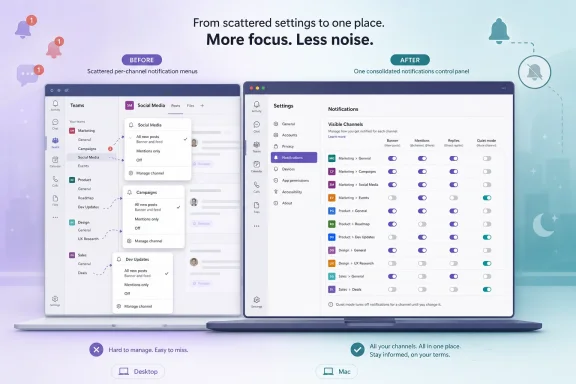
Centralized channel notification settings are Microsoft’s answer to that drift. The new control surface will live in Teams settings, not inside each individual channel menu. That placement matters because it changes the task from reacting to a noisy channel to auditing the whole notification estate.
The feature is not positioned as an admin policy, a compliance setting, or a tenant-wide default. It is a user-facing productivity control for Teams on desktop and Mac. In other words, Microsoft is not promising to solve notification governance from the top down; it is giving end users a better dashboard for the mess they already inhabit.
That may disappoint administrators hoping for another lever in the Teams admin center. But it also reflects the reality of modern collaboration software. The person best positioned to decide whether a channel deserves a banner, feed item, or silence is often the person being interrupted.
That assumption has not survived enterprise Teams usage. A moderately active worker can belong to dozens of teams and see many more channels than they actively use. Add shared channels, private channels, project churn, mergers, reorganizations, and guest collaboration, and notification settings become a hidden layer of personal infrastructure.
This is where the current Teams experience breaks down. Users do not merely suffer too many notifications; they lose confidence in the relationship between channel visibility and interruption. A channel can be visible but ignored, important but under-notifying, noisy but politically risky to mute, or buried inside a team whose name no longer describes its purpose.
The result is a familiar Teams contradiction. Microsoft has spent years promoting Teams as the hub for work, but the more central it becomes, the harder it is for users to keep its attention demands proportional. Centralized settings are a belated recognition that notification management is no longer a per-channel edge case. It is core workflow maintenance.
But the bigger change is cognitive. A centralized page lets users compare channels against one another. That turns notification tuning into a prioritization exercise: which channels actually deserve my attention, which should appear only in the activity feed, and which should be quiet unless I am explicitly mentioned?
That comparison is difficult when settings are scattered. Per-channel menus force users into local decisions, often made at the moment of annoyance. A centralized view encourages a more global decision: what does my Teams attention budget look like?
This matters because notification overload is rarely caused by one badly behaved channel. It is usually the compound interest of many channels that are each only slightly too noisy. Centralization gives users a chance to find the accumulation.
In practice, that means the new settings page is unlikely to be a complete map of every channel a user could access. It is a control panel for the channels already surfaced in the user’s Teams experience. That is sensible from a usability standpoint, but it also leaves a boundary administrators and power users should understand.
Hidden channels can still matter. A user may hide a channel to reduce clutter and later miss activity if expectations around mentions, team-level announcements, or project communications are unclear. Conversely, a visible channel may remain visible for political or organizational reasons even if the user does not want its activity pushed aggressively.
The feature therefore does not eliminate the need for good Teams hygiene. It makes the personal notification layer easier to manage, but it does not decide which channels should exist, which should be visible by default, or which teams have become abandoned notification traps. Those remain governance problems.
Mobile notifications are a related but different battlefield. On phones, Teams competes with operating-system notification permissions, lock-screen privacy controls, Intune app protection policies, focus modes, and user expectations shaped by consumer messaging apps. Desktop Teams has its own problem: it is always there, always adjacent to work, and often loud enough to fracture concentration without feeling urgent enough to justify the interruption.
By targeting desktop and Mac first, Microsoft is addressing the place where channel overload is most visible to knowledge workers. The Teams desktop client is where users sit inside meetings, chats, files, channels, Loop components, Copilot surfaces, and calendar context. It is also where channel notifications can become background radiation.
That does not mean mobile should be ignored. For frontline workers, executives, field staff, and anyone living out of a phone, channel notification behavior can be even more consequential. But the August 2026 roadmap item is best understood as a desktop productivity fix rather than a complete cross-device notification strategy.
However, centralized user settings do not automatically solve enterprise consistency. Admins often want default behaviors for departments, roles, security groups, or critical operational channels. They may want incident-response channels to break through, HR broadcast channels to avoid banner spam, or executive communications to remain visible without training every user individually.
The roadmap item does not indicate that this is that kind of policy engine. It is not described as a Teams admin center enhancement, a Graph API control, or an Intune-configurable desktop notification matrix. It is described as an in-app user settings experience.
That distinction is crucial. Microsoft is giving users better self-service, not giving admins deterministic control over every worker’s attention. In many organizations, that is the right tradeoff. In regulated, safety-critical, or highly operational environments, it will feel incomplete.
Centralized settings can reduce pain, but they cannot tell a company which channels deserve to exist. They cannot distinguish between an urgent production incident and a social committee thread unless the organization already uses Teams in a disciplined way. They cannot compensate for leaders who post every update as an announcement or teams that use @channel as punctuation.
This is why IT pros should read the roadmap item as part of a larger governance conversation. Teams notification quality depends on naming conventions, channel lifecycle policies, team ownership, archival practices, and norms around mentions. The new settings page helps users manage the final mile of interruption, but the first mile remains organizational.
There is also a training opportunity here. When the feature arrives, administrators should not merely announce that “new settings are available.” They should use it as a prompt to teach users the difference between channel visibility, activity feed alerts, banner notifications, mentions, and replies. Most people do not want more controls; they want confidence that the controls they touch will do what they expect.
Now Microsoft is cleaning up the lived experience. Recent Teams development has leaned heavily into performance, interface consolidation, meeting polish, Copilot integration, unread management, and reducing friction in everyday workflows. Centralized channel notification settings fit that pattern. They are not glamorous, but they address the daily grind of using a platform that never really closes.
This is also part of a broader shift from feature abundance to feature manageability. Teams does not lack surfaces. It has chats, channels, meetings, files, apps, tabs, workflows, webinars, communities, shared channels, avatars, transcription, recap, and AI assistance. The challenge is helping users survive all of that without turning Teams into a second inbox with worse filters.
Notification settings are a small control point in that broader war. But small control points matter when they sit between a user and every interruption that arrives during the workday.
That modesty makes the feature more believable. Teams users do not need another opaque layer deciding what should interrupt them. They need a comprehensible place to see and change the settings that already govern their day.
There is room for Microsoft to build on this later. A future version could add filters for muted channels, recently noisy channels, channels with unread spikes, or channels where the user has been mentioned often. It could surface recommended changes without applying them automatically. It could show notification settings alongside channel visibility, making it easier to understand why something keeps appearing.
But the first step is consolidation. Before Teams can become smarter about channel attention, users need a trustworthy map of the current state. Roadmap ID 557970 appears to be that map.
This is a familiar Microsoft problem. The company frequently adds useful controls without creating the onboarding moment that makes users aware of them. A setting hidden three clicks below a profile menu can be technically available and practically invisible.
Teams should treat this feature as an intervention, not just a checkbox. A first-run prompt, a “review channel notifications” nudge after joining several new teams, or a contextual link from the activity feed would make the feature more effective. Even a banner after rollout could help users understand that the old per-channel hunt is no longer the only option.
The worst outcome would be for centralized notification settings to become another little-known power-user feature. The best outcome is that it becomes the default place people go when Teams feels too noisy.
If channels are casual conversation spaces, users need easy muting and low-friction controls. If channels are operational workspaces, users need reliable signaling and clear escalation paths. Most organizations use Teams as both, often inside the same tenant and sometimes inside the same team.
A centralized settings page does not resolve that tension, but it makes it more visible. Users will see, in one place, the uneven landscape of their work: a critical support channel next to a dormant planning channel, a noisy team-wide space next to a private leadership channel, a shared external collaboration space next to an internal announcement feed.
That visibility may change behavior. When users see how many channels are competing for attention, they may hide more, mute more, or ask team owners to consolidate. When team owners realize users are tuning out, they may become more careful with mentions and posts. A settings page can become a mirror.
Banner notifications compete with Outlook alerts, browser notifications, security prompts, endpoint management messages, and whatever else the user’s workstation throws onto the screen. Even when notifications are not technically disruptive, they create micro-interruptions. A channel banner during a remote support session, PowerShell task, code review, or incident bridge can be enough to derail concentration.
Centralized settings should make it easier for Windows users to tune Teams after role changes. Someone moving from one project to another can review visible channels and silence the old ones without spelunking through each team. A manager inheriting several departments can quickly identify which channels are configured to interrupt and which are merely available.
Mac users get the same conceptual benefit, with the added complexity of macOS notification behavior. Teams must coexist with system-level notification permissions and focus modes. A centralized in-app settings view will not replace those OS controls, but it should reduce the need to troubleshoot channel behavior one menu at a time.
The key phrase is in-app control. Users still need to understand that Teams settings and operating-system notification settings are separate layers. If the OS blocks Teams notifications, a beautifully tuned channel list inside Teams will not make banners appear.
The most useful preparation is not a 20-page guide. It is a short internal note explaining where the setting lives, what “visible channels” means, and how users should think about alert levels. Help desks should also be ready for the inverse complaint: after users aggressively quiet channels, they may later say they missed something important.
That makes expectation-setting important. Notification settings are not a substitute for explicit communication norms. If a message is urgent, teams should know whether to use @mentions, chats, calls, incident tools, or escalation processes. If a channel is informational, owners should say so.
Admins should also watch for rollout variance. Roadmap items can appear first in Targeted Release before broad general availability, and tenants may not all see the change at the same moment. Support teams should avoid promising a specific day in August unless Microsoft later provides one.
The right message is simple: this is coming, it should reduce per-channel friction, and it will not replace broader Teams governance.
Teams has flirted with that failure mode for years. Users often keep Teams open because they must, not because they trust its attention model. They watch the activity feed, scan bold channel names, search missed chats, and ask colleagues to resend things because the boundary between important and merely new is not always clear.
Centralized channel settings can rebuild some of that trust. Not because it is revolutionary, but because it gives users a visible mechanism for aligning Teams with their work. The user can look at the list and say: these channels may interrupt me; these may not.
That act of review is powerful. It turns Teams from a stream of decisions made long ago into a system users can re-tune as their jobs change. In a collaboration platform, control is not a luxury feature. It is the condition for sustained use.
 Microsoft Is Finally Treating Channel Noise as a Product Problem
For years, Teams has asked users to behave like disciplined information architects while giving them the notification controls of a filing cabinet. Every new team, project, shared channel, class, committee, incident room, and departmental broadcast space adds another potential source of pings. The user is then expected to remember which of those spaces matter, which are merely visible, and which have become archaeological remains of last quarter’s initiative.Centralized channel notification settings are Microsoft’s answer to that drift. The new control surface will live in Teams settings, not inside each individual channel menu. That placement matters because it changes the task from reacting to a noisy channel to auditing the whole notification estate.
The feature is not positioned as an admin policy, a compliance setting, or a tenant-wide default. It is a user-facing productivity control for Teams on desktop and Mac. In other words, Microsoft is not promising to solve notification governance from the top down; it is giving end users a better dashboard for the mess they already inhabit.
That may disappoint administrators hoping for another lever in the Teams admin center. But it also reflects the reality of modern collaboration software. The person best positioned to decide whether a channel deserves a banner, feed item, or silence is often the person being interrupted.
The Old Model Made Sense Until Teams Became the Workplace
The original Teams channel notification model was defensible when teams were relatively few and channels mapped cleanly to workstreams. A user could open a channel, inspect its menu, and decide whether all activity, mentions, replies, or fewer events deserved attention. That model assumes a manageable number of channels and a user with enough time to tune each one.That assumption has not survived enterprise Teams usage. A moderately active worker can belong to dozens of teams and see many more channels than they actively use. Add shared channels, private channels, project churn, mergers, reorganizations, and guest collaboration, and notification settings become a hidden layer of personal infrastructure.
This is where the current Teams experience breaks down. Users do not merely suffer too many notifications; they lose confidence in the relationship between channel visibility and interruption. A channel can be visible but ignored, important but under-notifying, noisy but politically risky to mute, or buried inside a team whose name no longer describes its purpose.
The result is a familiar Teams contradiction. Microsoft has spent years promoting Teams as the hub for work, but the more central it becomes, the harder it is for users to keep its attention demands proportional. Centralized settings are a belated recognition that notification management is no longer a per-channel edge case. It is core workflow maintenance.
A Single Settings Page Changes the Psychology of Triage
The practical benefit of the new feature is obvious: fewer clicks. Instead of opening each channel’s notification menu, users will be able to review visible channels from one place. For anyone who has inherited a sprawling Teams environment, that alone is a meaningful improvement.But the bigger change is cognitive. A centralized page lets users compare channels against one another. That turns notification tuning into a prioritization exercise: which channels actually deserve my attention, which should appear only in the activity feed, and which should be quiet unless I am explicitly mentioned?
That comparison is difficult when settings are scattered. Per-channel menus force users into local decisions, often made at the moment of annoyance. A centralized view encourages a more global decision: what does my Teams attention budget look like?
This matters because notification overload is rarely caused by one badly behaved channel. It is usually the compound interest of many channels that are each only slightly too noisy. Centralization gives users a chance to find the accumulation.
The Word “Visible” Is Doing a Lot of Work
Microsoft’s roadmap language says the feature applies to all visible channels. That qualifier is important. Teams has long used visibility as a kind of soft subscription model: channels that are shown or pinned are treated differently from channels hidden away in the hierarchy.In practice, that means the new settings page is unlikely to be a complete map of every channel a user could access. It is a control panel for the channels already surfaced in the user’s Teams experience. That is sensible from a usability standpoint, but it also leaves a boundary administrators and power users should understand.
Hidden channels can still matter. A user may hide a channel to reduce clutter and later miss activity if expectations around mentions, team-level announcements, or project communications are unclear. Conversely, a visible channel may remain visible for political or organizational reasons even if the user does not want its activity pushed aggressively.
The feature therefore does not eliminate the need for good Teams hygiene. It makes the personal notification layer easier to manage, but it does not decide which channels should exist, which should be visible by default, or which teams have become abandoned notification traps. Those remain governance problems.
This Is a Desktop-First Fix for a Desktop-Centric Pain
The roadmap lists Teams on desktop and Mac, not mobile. That makes sense. Channel notification configuration is the kind of task users are more likely to perform while seated at a workstation, staring at the accumulated evidence of a noisy collaboration environment.Mobile notifications are a related but different battlefield. On phones, Teams competes with operating-system notification permissions, lock-screen privacy controls, Intune app protection policies, focus modes, and user expectations shaped by consumer messaging apps. Desktop Teams has its own problem: it is always there, always adjacent to work, and often loud enough to fracture concentration without feeling urgent enough to justify the interruption.
By targeting desktop and Mac first, Microsoft is addressing the place where channel overload is most visible to knowledge workers. The Teams desktop client is where users sit inside meetings, chats, files, channels, Loop components, Copilot surfaces, and calendar context. It is also where channel notifications can become background radiation.
That does not mean mobile should be ignored. For frontline workers, executives, field staff, and anyone living out of a phone, channel notification behavior can be even more consequential. But the August 2026 roadmap item is best understood as a desktop productivity fix rather than a complete cross-device notification strategy.
The Admin Story Is More Complicated Than the User Story
For IT departments, the feature is both welcome and limited. It gives help desks a cleaner answer when users complain that Teams is too noisy or too quiet. “Go to Teams settings and review all your visible channel notifications” is a better support script than walking someone through a dozen channel menus.However, centralized user settings do not automatically solve enterprise consistency. Admins often want default behaviors for departments, roles, security groups, or critical operational channels. They may want incident-response channels to break through, HR broadcast channels to avoid banner spam, or executive communications to remain visible without training every user individually.
The roadmap item does not indicate that this is that kind of policy engine. It is not described as a Teams admin center enhancement, a Graph API control, or an Intune-configurable desktop notification matrix. It is described as an in-app user settings experience.
That distinction is crucial. Microsoft is giving users better self-service, not giving admins deterministic control over every worker’s attention. In many organizations, that is the right tradeoff. In regulated, safety-critical, or highly operational environments, it will feel incomplete.
Teams Governance Still Starts Before the Notification
The danger with any notification feature is that it becomes a bandage over poor information architecture. If an organization creates a channel for every fleeting project, keeps obsolete teams alive forever, and uses channel posts for messages that should be tickets, dashboards, emails, or knowledge-base updates, no settings page will make Teams feel healthy.Centralized settings can reduce pain, but they cannot tell a company which channels deserve to exist. They cannot distinguish between an urgent production incident and a social committee thread unless the organization already uses Teams in a disciplined way. They cannot compensate for leaders who post every update as an announcement or teams that use @channel as punctuation.
This is why IT pros should read the roadmap item as part of a larger governance conversation. Teams notification quality depends on naming conventions, channel lifecycle policies, team ownership, archival practices, and norms around mentions. The new settings page helps users manage the final mile of interruption, but the first mile remains organizational.
There is also a training opportunity here. When the feature arrives, administrators should not merely announce that “new settings are available.” They should use it as a prompt to teach users the difference between channel visibility, activity feed alerts, banner notifications, mentions, and replies. Most people do not want more controls; they want confidence that the controls they touch will do what they expect.
Microsoft’s Timing Reflects the Post-Pandemic Teams Hangover
The August 2026 target lands well after the explosive adoption phase that turned Teams from a collaboration product into workplace plumbing. During the pandemic years, organizations rolled out Teams quickly, often with permissive creation policies and limited training. The priority was continuity, not elegance.Now Microsoft is cleaning up the lived experience. Recent Teams development has leaned heavily into performance, interface consolidation, meeting polish, Copilot integration, unread management, and reducing friction in everyday workflows. Centralized channel notification settings fit that pattern. They are not glamorous, but they address the daily grind of using a platform that never really closes.
This is also part of a broader shift from feature abundance to feature manageability. Teams does not lack surfaces. It has chats, channels, meetings, files, apps, tabs, workflows, webinars, communities, shared channels, avatars, transcription, recap, and AI assistance. The challenge is helping users survive all of that without turning Teams into a second inbox with worse filters.
Notification settings are a small control point in that broader war. But small control points matter when they sit between a user and every interruption that arrives during the workday.
The Roadmap Item Is Modest, Which Is Why It Is Credible
The most encouraging thing about this feature is that Microsoft is not overselling it. The roadmap description is plain: users get one place to review and adjust notifications for visible channels. There is no grand claim about AI-driven attention management, no promise of automatic prioritization, and no suggestion that Teams will magically infer what matters.That modesty makes the feature more believable. Teams users do not need another opaque layer deciding what should interrupt them. They need a comprehensible place to see and change the settings that already govern their day.
There is room for Microsoft to build on this later. A future version could add filters for muted channels, recently noisy channels, channels with unread spikes, or channels where the user has been mentioned often. It could surface recommended changes without applying them automatically. It could show notification settings alongside channel visibility, making it easier to understand why something keeps appearing.
But the first step is consolidation. Before Teams can become smarter about channel attention, users need a trustworthy map of the current state. Roadmap ID 557970 appears to be that map.
The Risk Is Another Settings Page Nobody Finds
Microsoft’s biggest challenge may not be engineering. It may be discoverability. Teams already has a substantial settings area, and users often learn notification controls only after something goes wrong. If centralized channel settings are buried too deeply, the people who need them most may never find them.This is a familiar Microsoft problem. The company frequently adds useful controls without creating the onboarding moment that makes users aware of them. A setting hidden three clicks below a profile menu can be technically available and practically invisible.
Teams should treat this feature as an intervention, not just a checkbox. A first-run prompt, a “review channel notifications” nudge after joining several new teams, or a contextual link from the activity feed would make the feature more effective. Even a banner after rollout could help users understand that the old per-channel hunt is no longer the only option.
The worst outcome would be for centralized notification settings to become another little-known power-user feature. The best outcome is that it becomes the default place people go when Teams feels too noisy.
The Feature Also Exposes a Larger Teams Design Tension
Teams has always balanced two competing ideas of channels. One idea treats a channel as a lightweight place for persistent group conversation. The other treats it as a structured work area with membership, files, apps, meetings, and organizational meaning. Notifications sit awkwardly between those models.If channels are casual conversation spaces, users need easy muting and low-friction controls. If channels are operational workspaces, users need reliable signaling and clear escalation paths. Most organizations use Teams as both, often inside the same tenant and sometimes inside the same team.
A centralized settings page does not resolve that tension, but it makes it more visible. Users will see, in one place, the uneven landscape of their work: a critical support channel next to a dormant planning channel, a noisy team-wide space next to a private leadership channel, a shared external collaboration space next to an internal announcement feed.
That visibility may change behavior. When users see how many channels are competing for attention, they may hide more, mute more, or ask team owners to consolidate. When team owners realize users are tuning out, they may become more careful with mentions and posts. A settings page can become a mirror.
Where Windows Users Will Feel the Difference
For WindowsForum readers, the desktop emphasis is especially relevant. Teams on Windows is often part of the standard enterprise image, pinned to taskbars, launched at startup, and integrated into daily work habits. A channel notification setting is not just an app preference; it affects the rhythm of the Windows desktop.Banner notifications compete with Outlook alerts, browser notifications, security prompts, endpoint management messages, and whatever else the user’s workstation throws onto the screen. Even when notifications are not technically disruptive, they create micro-interruptions. A channel banner during a remote support session, PowerShell task, code review, or incident bridge can be enough to derail concentration.
Centralized settings should make it easier for Windows users to tune Teams after role changes. Someone moving from one project to another can review visible channels and silence the old ones without spelunking through each team. A manager inheriting several departments can quickly identify which channels are configured to interrupt and which are merely available.
Mac users get the same conceptual benefit, with the added complexity of macOS notification behavior. Teams must coexist with system-level notification permissions and focus modes. A centralized in-app settings view will not replace those OS controls, but it should reduce the need to troubleshoot channel behavior one menu at a time.
The key phrase is in-app control. Users still need to understand that Teams settings and operating-system notification settings are separate layers. If the OS blocks Teams notifications, a beautifully tuned channel list inside Teams will not make banners appear.
Help Desks Should Prepare Scripts Before August
Because the roadmap points to August 2026 general availability, IT teams have time to prepare. The feature is in development now, and Microsoft’s dates can shift, but the current target gives organizations a clear window for support planning.The most useful preparation is not a 20-page guide. It is a short internal note explaining where the setting lives, what “visible channels” means, and how users should think about alert levels. Help desks should also be ready for the inverse complaint: after users aggressively quiet channels, they may later say they missed something important.
That makes expectation-setting important. Notification settings are not a substitute for explicit communication norms. If a message is urgent, teams should know whether to use @mentions, chats, calls, incident tools, or escalation processes. If a channel is informational, owners should say so.
Admins should also watch for rollout variance. Roadmap items can appear first in Targeted Release before broad general availability, and tenants may not all see the change at the same moment. Support teams should avoid promising a specific day in August unless Microsoft later provides one.
The right message is simple: this is coming, it should reduce per-channel friction, and it will not replace broader Teams governance.
The Real Productivity Win Is Trust
Notification systems fail when users stop trusting them. Too many pings and people mute everything. Too few signals and people keep checking manually. In both cases, the software stops acting like an assistant and starts acting like a liability.Teams has flirted with that failure mode for years. Users often keep Teams open because they must, not because they trust its attention model. They watch the activity feed, scan bold channel names, search missed chats, and ask colleagues to resend things because the boundary between important and merely new is not always clear.
Centralized channel settings can rebuild some of that trust. Not because it is revolutionary, but because it gives users a visible mechanism for aligning Teams with their work. The user can look at the list and say: these channels may interrupt me; these may not.
That act of review is powerful. It turns Teams from a stream of decisions made long ago into a system users can re-tune as their jobs change. In a collaboration platform, control is not a luxury feature. It is the condition for sustained use.
The August Rollout Will Reward Tenants That Already Practice Restraint
The organizations that benefit most from centralized channel notification settings will be the ones that already treat Teams as a managed workspace rather than an infinite chat attic. The feature will amplify good habits and expose bad ones. It gives users a better steering wheel, but it does not fix the road.- Microsoft plans to make centralized channel notification settings generally available for Teams desktop and Mac in August 2026.
- The feature will let users review and adjust notification settings for all visible channels from Teams settings.
- The roadmap item applies to worldwide standard multi-tenant Microsoft 365 environments and is currently marked as in development.
- The change is user-facing rather than an announced tenant-wide administrative policy control.
- The feature should reduce support friction, but it will not replace channel lifecycle management, mention discipline, or clear communication norms.
- IT teams should prepare simple rollout guidance that explains visibility, notification layers, and the difference between Teams settings and operating-system notification permissions.
References
- Primary source: Microsoft 365 Roadmap
Published: 2026-06-24T23:15:55.6812517Z
Microsoft 365 Roadmap | Microsoft 365
The Microsoft 365 Roadmap lists updates that are currently planned for applicable subscribers. Check here for more information on the status of new features and updates.www.microsoft.com
- Official source: support.microsoft.com
Manage notifications in Microsoft Teams | Microsoft Support
Mark a notification as read or unread or unfollow the channel it appears in in Microsoft Teams.support.microsoft.com - Official source: techcommunity.microsoft.com
Microsoft Teams inconsistencies with channel notification settings | Microsoft Community Hub
Hi all, Below are a few items about Microsoft Teams notification settings that I find confusing and that have confused some others where I work.  I... techcommunity.microsoft.com
- Related coverage: howtogeek.com
How to Configure Microsoft Teams Notifications
Tired of Microsoft Teams alerting you all the time? Here's how to decide what Teams should and shouldn't alert you about. www.howtogeek.com
- Related coverage: allthings.how
How to Disable Chat Notifications in a Microsoft Teams Channel
Microsoft Teams is the hub for workplace collaboration. It has oodles of features that promote collaboration and teamwork. The whole system exists so you can work productively. But when everything is happening on Microsoft Teams, notifications can get out of hand pretty quickly. Especially...allthings.how - Official source: learn.microsoft.com
Teams @channel notifications for shown/pinned channels - Microsoft Q&A
In Teams Settings > Notifications, there is an option to configure @channel notifications for all shown/pinned channels. By default, these notifications are off when a channel is created. If a channel is shown/pinned at the time Settings is updated,…learn.microsoft.com
- Related coverage: windowscentral.com
Microsoft Teams finally fixes the Enter key (yes, really) and adds more long‑awaited tweaks — Here is everything else new in March 2026 | Windows Central
Microsoft delivered a massive quality-of-life update to Teams with new privacy protections, notification shortcuts, and a smarter way to manage drafts.www.windowscentral.com - Official source: adoption.microsoft.com
- Related coverage: choc.org
- Related coverage: eagle.umaryland.edu
