

Microsoft added Microsoft 365 Roadmap item 567306 on July 7, 2026, describing new Microsoft Teams delegated-calling controls for desktop and Mac clients that are scheduled for general availability in August 2026 across commercial, GCC, GCC High, and DoD tenants. The feature lets a delegator lock an active call against delegate access and optionally play warning tones when a delegate joins or resumes a call. That sounds narrow, almost clerical, but it points at a larger shift in Teams Phone: Microsoft is treating delegated calling less like a convenience feature and more like a live privacy boundary. For executives, assistants, help desks, legal teams, and regulated organizations, the difference matters.
Call delegation in Teams has always been a compromise between reachability and control. A manager wants an assistant to screen, place, and retrieve calls; the assistant needs enough visibility to do that job; the organization wants the setup to behave like a proper phone system rather than a string of forwarding hacks. Microsoft’s own Teams documentation describes the feature, also known as shared line appearance, as a way for one user to authorize another to make or receive calls on their behalf.
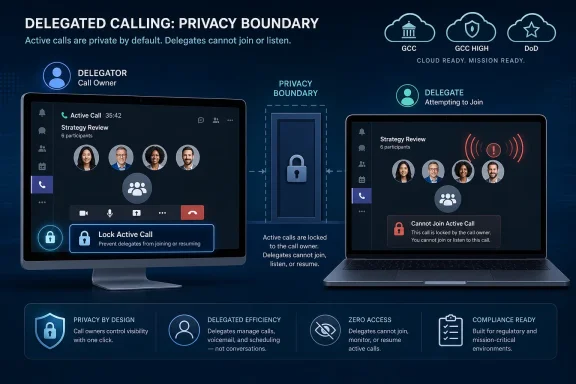
The newly listed roadmap item changes the emotional center of that model. Instead of assuming that a delegated call remains a shared workspace until it ends, Teams is getting an explicit lock for the delegator. Once a call is underway, the person whose line is being represented can prevent delegates from joining or resuming it.
That is not just another button in the call window. It is a recognition that delegated calling contains a privilege escalation problem hiding in plain sight. If a delegate can join, resume, or monitor the state of a call too freely, the system may be working exactly as configured while still violating the delegator’s expectation of confidentiality.
The second half of the feature, optional warning tones, completes the same argument from the other direction. If a delegate does join or resume a call, Teams can make that action audible to participants. In an enterprise calling system, privacy is not only about blocking access; it is also about making access visible when it happens.
But business phone systems carry old assumptions that become awkward in software. A shared line on a desk phone is visible. A physical phone has lights, buttons, and social context. When someone barges into a call, parks it, retrieves it, or answers for someone else, the action often happens in a room full of people who understand the workflow.
Teams collapses those signals into software states. A delegate may be remote. The delegator may be on a laptop, a headset, or a certified phone. The caller may have no idea whether the person they are speaking to has granted other people live operational access to the call. That ambiguity is manageable when calls are routine, but it becomes dangerous when the call turns sensitive.
The new lock feature is Microsoft’s answer to that ambiguity. It gives the delegator an active-call control rather than forcing them to revisit the entire delegation relationship. That distinction is important. You may want your assistant to screen most calls and resume some calls, while still needing to seal off one conversation with HR, counsel, finance, a journalist, a doctor, or a customer in escalation.
Still, the cloud-instance coverage is striking. Microsoft lists Worldwide Standard Multi-Tenant, GCC, GCC High, and DoD. That means the company is not framing this as a commercial-only quality-of-life tweak. It is aiming the control at exactly the environments where delegated calling and call confidentiality can collide hardest.
Government cloud inclusion matters because those tenants tend to expose whether a feature is merely convenient or operationally significant. GCC High and DoD customers do not typically get frivolous Teams niceties first. If Microsoft is targeting those clouds from the roadmap stage, it is implicitly acknowledging that delegated call access has governance value.
The platform boundary also tells us where Microsoft sees the primary interaction. Desktop and Mac are where knowledge workers manage the full Teams calling experience, where assistants and executives are likely to watch shared line states, and where a call lock UI can be made visible without squeezing into a mobile interface. Mobile and IP phone support may arrive later, but the first wave is aimed at the command center, not the pocket.
Roadmap item 567306 shifts attention to what the delegator can do during the call itself. That is a subtle but meaningful inversion. The delegator is not merely the person whose settings were configured weeks ago; they become the active authority over the live conversation.
This matters because delegation is not static in real life. A call can begin as logistical and become confidential. An assistant may appropriately start the interaction, identify the caller, and hand the call to the delegator. Five minutes later, the same call may contain merger discussion, personnel details, incident response facts, or privileged legal advice.
A static permission model is bad at that kind of context switch. If the delegate relationship is either on or off, users will either over-share for convenience or disable delegation entirely for safety. A call lock gives Teams a middle path: keep the delegation relationship intact, but narrow access when the live conversation demands it.
That tension is the point. A delegate joining or resuming a call is not always a dramatic privacy event, but it is an event. If the caller thinks they are speaking only to the delegator, and another authorized person enters or re-enters the call path, the caller’s understanding of the conversation has changed.
A warning tone does not explain who joined, why they joined, or what permissions they hold. It is not a substitute for policy or etiquette. But it does prevent the worst version of the experience, where access changes silently and participants discover later that the call was operationally shared.
For regulated sectors, that small audible cue may do more than improve manners. It creates a consistent signal that can be written into internal procedures. If your organization already trains users around recording notifications, supervisory monitoring, or call-center barging, delegate join tones fit into the same cultural vocabulary.
Microsoft’s existing Teams calling documentation already gives admins significant control over delegation relationships. Administrators can configure call forwarding and delegation settings, and Microsoft notes that Teams Phone licensing is required for both delegator and delegate in the familiar manager-assistant example. Delegation can also be enabled through a Teams calling policy, with Microsoft documentation saying the AllowDelegation setting is on by default.
That administrative foundation makes the roadmap feature more useful, but also raises expectations. If a bank, law firm, defense contractor, hospital, or public agency adopts delegated calling, it may not be enough to tell users that warning tones are available. The organization may need to prove that certain classes of calls cannot be silently joined by delegates.
The difference between an option and a policy is the difference between user empowerment and compliance control. Microsoft has not, in the roadmap entry, promised a policy surface for this feature. Until it does, admins should treat August 2026 as the beginning of a rollout conversation rather than the end of a governance project.
Delegated calling is one of the workloads that exposes whether that ambition is real. A lightweight calling app can forward calls. A serious enterprise voice platform must handle assistants, shared lines, call queues, pickup groups, compliance expectations, device variance, and the messy fact that phone workflows are often embedded in office politics.
The roadmap item’s government-cloud scope reinforces that Teams Phone is being hardened for customers who compare it against mature telephony platforms, not just Slack calls or consumer VoIP. In that market, “can my delegate answer my call?” is table stakes. “Can I keep my delegate out of this call without dismantling my delegation setup?” is closer to the enterprise-grade question.
That is why the feature deserves more attention than its short roadmap wording invites. It is not glamorous. It will not headline Ignite. But it addresses the sort of operational edge case that decides whether IT departments trust a platform with real business calling.
Software can make that confusion better or worse. A lock button that is buried in a menu will be discovered only after the awkward incident. A warning tone that is too subtle may not register. A warning tone that is too aggressive may annoy users into turning it off, if they are allowed to.
Microsoft’s challenge is to make the privacy state legible without turning every delegated call into an aircraft cockpit. The delegator should know whether a call is open to delegate access. The delegate should know whether they are blocked by an intentional lock or by a technical failure. Participants should know when the call’s human perimeter changes.
Those details are not cosmetic. In calling software, interface design becomes policy in practice. The roadmap tells us what Microsoft intends to add, but the success of the feature will depend on the minute-by-minute friction of using it.
A call lock can protect the delegate as much as the delegator. If the system clearly says a call is locked, the delegate is no longer guessing whether it is appropriate to resume or join. They have a clean boundary they can point to when a caller, colleague, or manager later asks why they did not intervene.
Warning tones can serve the same function. A delegate who joins a call with an audible notification is less likely to be accused of silently listening or intruding. The system records, at least socially, that presence changed.
Good enterprise controls reduce ambiguity for everyone involved. The best version of this feature does not make delegates less trusted. It makes trust less dependent on memory, habit, and private assumptions.
The roadmap item does not answer those questions. Microsoft’s Teams ecosystem already includes multiple reporting and logging surfaces, but not every user-visible call action becomes a compliance-grade event. Admins should resist assuming that because a control exists in the client, it will automatically satisfy legal, regulatory, or internal audit requirements.
There is also a records-management wrinkle. A warning tone is a live signal, not a durable disclosure. If the organization records calls, the tone may be captured. If it does not, the tone may leave no artifact unless Teams logs the underlying event somewhere administrators can retrieve.
That gap is not a reason to dismiss the feature. It is a reason to test it carefully when it reaches preview or early rollout. Privacy features become enterprise features only when they can be monitored, explained, and defended.
Endpoint inconsistency is a perennial Teams Phone headache. An organization can define a workflow centrally, only to discover that the user experience differs across a Windows laptop, a MacBook, an IP phone, and a mobile client. Delegated calling amplifies that problem because the workflow often spans multiple people using different devices.
If a delegator locks a call on desktop, the lock should be respected everywhere. If a delegate uses a Teams phone or another client, they should not see a stale or misleading call state. If warning tones are enabled, participants should experience them consistently enough that policy writers can describe the behavior without a page of exceptions.
The roadmap does not imply that other endpoints will bypass the restriction; server-side enforcement would be the obvious design. But client visibility still matters. A locked-door metaphor only works if everyone can see the door.
Enterprise collaboration tools often discover privacy boundaries through failure. A meeting option is too permissive. A recording indicator is too subtle. A guest access rule behaves differently than expected. A user assumes one audience while the software permits another.
Delegated calling has the same risk profile. The more organizations rely on Teams Phone for executive, legal, medical, governmental, or security-sensitive communications, the less acceptable it becomes for delegate access to be governed only by static permissions and informal etiquette.
By giving delegators an active lock, Microsoft is admitting that live context matters. By offering tones, it is admitting that participants deserve a signal when the call perimeter changes. Those admissions are healthy, even if they arrive inside a dry roadmap entry.
That cleanup matters because the new feature does not make bad delegation design good. A delegator can lock a sensitive call, but they still need to know who their delegates are. A warning tone can announce a join, but it cannot fix an overbroad roster of people authorized to act on someone’s line.
Admins should also review Teams Phone licensing and calling policies for delegators and delegates. Microsoft’s documentation makes clear that Teams Phone is part of the call delegation story, and that policy alignment can matter when delegates and delegators have different calling configurations. If the organization has treated delegation as a one-off user convenience, this is a good moment to bring it into standard voice governance.
Finally, communications teams should prepare user guidance that is specific rather than generic. “Use the lock for confidential calls” is better than nothing, but “lock calls involving HR, legal, finance, incident response, executive compensation, acquisition discussions, or regulated customer data” is the kind of instruction users can actually follow.
That decision cannot be outsourced entirely to Microsoft. Microsoft can provide the mechanism, but each organization has to decide when delegate access is appropriate, when audible notification is required, and who is responsible for maintaining delegation relationships. The fact that the feature spans commercial and government clouds only widens that responsibility.
The most mature deployments will likely standardize the behavior by role. Executives may be trained to lock calls by default after handoff. Legal and HR teams may require tones whenever delegates re-enter a call. Help desks and operations teams may decide that the workflow cost outweighs the privacy benefit for routine internal calls.
The worst deployments will discover the feature only after someone asks why a delegate could enter a call they thought was private. Microsoft is giving tenants a chance to answer that question in advance.
 Microsoft Turns the Shared Line Into a Privacy Surface
Call delegation in Teams has always been a compromise between reachability and control. A manager wants an assistant to screen, place, and retrieve calls; the assistant needs enough visibility to do that job; the organization wants the setup to behave like a proper phone system rather than a string of forwarding hacks. Microsoft’s own Teams documentation describes the feature, also known as shared line appearance, as a way for one user to authorize another to make or receive calls on their behalf.The newly listed roadmap item changes the emotional center of that model. Instead of assuming that a delegated call remains a shared workspace until it ends, Teams is getting an explicit lock for the delegator. Once a call is underway, the person whose line is being represented can prevent delegates from joining or resuming it.
That is not just another button in the call window. It is a recognition that delegated calling contains a privilege escalation problem hiding in plain sight. If a delegate can join, resume, or monitor the state of a call too freely, the system may be working exactly as configured while still violating the delegator’s expectation of confidentiality.
The second half of the feature, optional warning tones, completes the same argument from the other direction. If a delegate does join or resume a call, Teams can make that action audible to participants. In an enterprise calling system, privacy is not only about blocking access; it is also about making access visible when it happens.
Delegation Was Built for Workflow, Not Ambiguity
The classic use case for Teams delegation is the executive-assistant pattern: one person owns the relationship, another person keeps the communications machinery moving. Microsoft’s documentation says delegates can make and receive calls on behalf of a delegator, and administrators can configure these relationships through the Teams admin center or PowerShell. The feature is useful precisely because it makes Teams behave more like a business phone system than a personal chat app.But business phone systems carry old assumptions that become awkward in software. A shared line on a desk phone is visible. A physical phone has lights, buttons, and social context. When someone barges into a call, parks it, retrieves it, or answers for someone else, the action often happens in a room full of people who understand the workflow.
Teams collapses those signals into software states. A delegate may be remote. The delegator may be on a laptop, a headset, or a certified phone. The caller may have no idea whether the person they are speaking to has granted other people live operational access to the call. That ambiguity is manageable when calls are routine, but it becomes dangerous when the call turns sensitive.
The new lock feature is Microsoft’s answer to that ambiguity. It gives the delegator an active-call control rather than forcing them to revisit the entire delegation relationship. That distinction is important. You may want your assistant to screen most calls and resume some calls, while still needing to seal off one conversation with HR, counsel, finance, a journalist, a doctor, or a customer in escalation.
The August 2026 Target Is a Quietly Aggressive Rollout
The roadmap entry lists general availability for August 2026 and marks the feature as in development. It applies to Microsoft Teams on desktop and Mac, not every Teams endpoint at launch. Microsoft’s roadmap language also includes its usual caveat that dates are estimates and subject to change, a point worth remembering for tenant admins who have watched Teams features arrive in staged waves.Still, the cloud-instance coverage is striking. Microsoft lists Worldwide Standard Multi-Tenant, GCC, GCC High, and DoD. That means the company is not framing this as a commercial-only quality-of-life tweak. It is aiming the control at exactly the environments where delegated calling and call confidentiality can collide hardest.
Government cloud inclusion matters because those tenants tend to expose whether a feature is merely convenient or operationally significant. GCC High and DoD customers do not typically get frivolous Teams niceties first. If Microsoft is targeting those clouds from the roadmap stage, it is implicitly acknowledging that delegated call access has governance value.
The platform boundary also tells us where Microsoft sees the primary interaction. Desktop and Mac are where knowledge workers manage the full Teams calling experience, where assistants and executives are likely to watch shared line states, and where a call lock UI can be made visible without squeezing into a mobile interface. Mobile and IP phone support may arrive later, but the first wave is aimed at the command center, not the pocket.
The Real Feature Is the Right to Interrupt the Delegate
Delegation systems tend to focus on what the delegate can do. Can they answer? Can they place calls? Can they manage settings? Can they hold and resume? Microsoft’s existing Teams admin documentation reflects that model, with PowerShell cmdlets allowing administrators to add delegates and adjust permissions such as making calls, receiving calls, and managing settings.Roadmap item 567306 shifts attention to what the delegator can do during the call itself. That is a subtle but meaningful inversion. The delegator is not merely the person whose settings were configured weeks ago; they become the active authority over the live conversation.
This matters because delegation is not static in real life. A call can begin as logistical and become confidential. An assistant may appropriately start the interaction, identify the caller, and hand the call to the delegator. Five minutes later, the same call may contain merger discussion, personnel details, incident response facts, or privileged legal advice.
A static permission model is bad at that kind of context switch. If the delegate relationship is either on or off, users will either over-share for convenience or disable delegation entirely for safety. A call lock gives Teams a middle path: keep the delegation relationship intact, but narrow access when the live conversation demands it.
Warning Tones Bring the Caller Into the Trust Model
The optional warning-tone feature may be more controversial than the lock. In many organizations, tones are associated with recording notices, conference joins, or contact-center supervision. They can reassure participants, but they can also make a conversation feel bureaucratic, monitored, or less natural.That tension is the point. A delegate joining or resuming a call is not always a dramatic privacy event, but it is an event. If the caller thinks they are speaking only to the delegator, and another authorized person enters or re-enters the call path, the caller’s understanding of the conversation has changed.
A warning tone does not explain who joined, why they joined, or what permissions they hold. It is not a substitute for policy or etiquette. But it does prevent the worst version of the experience, where access changes silently and participants discover later that the call was operationally shared.
For regulated sectors, that small audible cue may do more than improve manners. It creates a consistent signal that can be written into internal procedures. If your organization already trains users around recording notifications, supervisory monitoring, or call-center barging, delegate join tones fit into the same cultural vocabulary.
Enterprise Admins Will Want Policy, Not Just UI
The roadmap description is user-facing: delegators can lock calls and can optionally enable tones. The unanswered enterprise question is how much of this will be centrally manageable. Teams administrators will want to know whether the lock can be enforced, whether warning tones can be required, whether settings are exposed through PowerShell or policy, and whether audit events will show delegate join, resume, and lock actions.Microsoft’s existing Teams calling documentation already gives admins significant control over delegation relationships. Administrators can configure call forwarding and delegation settings, and Microsoft notes that Teams Phone licensing is required for both delegator and delegate in the familiar manager-assistant example. Delegation can also be enabled through a Teams calling policy, with Microsoft documentation saying the AllowDelegation setting is on by default.
That administrative foundation makes the roadmap feature more useful, but also raises expectations. If a bank, law firm, defense contractor, hospital, or public agency adopts delegated calling, it may not be enough to tell users that warning tones are available. The organization may need to prove that certain classes of calls cannot be silently joined by delegates.
The difference between an option and a policy is the difference between user empowerment and compliance control. Microsoft has not, in the roadmap entry, promised a policy surface for this feature. Until it does, admins should treat August 2026 as the beginning of a rollout conversation rather than the end of a governance project.
The Teams Phone Story Keeps Moving Upmarket
This feature also fits a broader Teams Phone pattern. Microsoft has spent years trying to make Teams more than a meeting app with chat attached. Teams Phone is meant to replace PBXs, absorb enterprise voice workflows, and become the place where desk-phone habits, cloud policy, identity, and collaboration meet.Delegated calling is one of the workloads that exposes whether that ambition is real. A lightweight calling app can forward calls. A serious enterprise voice platform must handle assistants, shared lines, call queues, pickup groups, compliance expectations, device variance, and the messy fact that phone workflows are often embedded in office politics.
The roadmap item’s government-cloud scope reinforces that Teams Phone is being hardened for customers who compare it against mature telephony platforms, not just Slack calls or consumer VoIP. In that market, “can my delegate answer my call?” is table stakes. “Can I keep my delegate out of this call without dismantling my delegation setup?” is closer to the enterprise-grade question.
That is why the feature deserves more attention than its short roadmap wording invites. It is not glamorous. It will not headline Ignite. But it addresses the sort of operational edge case that decides whether IT departments trust a platform with real business calling.
The Privacy Problem Is Also a Human-Factors Problem
There is a reason shared-line controls have to be designed carefully: users rarely understand telephony permissions at the same level administrators configure them. An executive may know that an assistant can answer calls, but not remember whether that assistant can join active calls. A delegate may know they can resume a held call, but not know whether a sensitive discussion has started since the call was parked.Software can make that confusion better or worse. A lock button that is buried in a menu will be discovered only after the awkward incident. A warning tone that is too subtle may not register. A warning tone that is too aggressive may annoy users into turning it off, if they are allowed to.
Microsoft’s challenge is to make the privacy state legible without turning every delegated call into an aircraft cockpit. The delegator should know whether a call is open to delegate access. The delegate should know whether they are blocked by an intentional lock or by a technical failure. Participants should know when the call’s human perimeter changes.
Those details are not cosmetic. In calling software, interface design becomes policy in practice. The roadmap tells us what Microsoft intends to add, but the success of the feature will depend on the minute-by-minute friction of using it.
Delegates Need Protection From Bad Assumptions Too
It is easy to frame the feature as protecting delegators from overreaching delegates. That is too narrow and, in many workplaces, unfair. Delegates are often acting under pressure, expected to keep calls moving, retrieve managers from chaos, and rescue conversations before they become missed opportunities.A call lock can protect the delegate as much as the delegator. If the system clearly says a call is locked, the delegate is no longer guessing whether it is appropriate to resume or join. They have a clean boundary they can point to when a caller, colleague, or manager later asks why they did not intervene.
Warning tones can serve the same function. A delegate who joins a call with an audible notification is less likely to be accused of silently listening or intruding. The system records, at least socially, that presence changed.
Good enterprise controls reduce ambiguity for everyone involved. The best version of this feature does not make delegates less trusted. It makes trust less dependent on memory, habit, and private assumptions.
Compliance Teams Will Ask for Evidence
For WindowsForum’s sysadmin readership, the practical next question is auditability. If a locked call becomes part of an investigation, will Teams expose who locked it, when it was locked, who attempted to join, and whether the attempt was blocked? If warning tones are enabled, will that setting be discoverable after the fact? If a delegate resumes a call, will the event appear in call analytics, audit logs, or only in ephemeral client state?The roadmap item does not answer those questions. Microsoft’s Teams ecosystem already includes multiple reporting and logging surfaces, but not every user-visible call action becomes a compliance-grade event. Admins should resist assuming that because a control exists in the client, it will automatically satisfy legal, regulatory, or internal audit requirements.
There is also a records-management wrinkle. A warning tone is a live signal, not a durable disclosure. If the organization records calls, the tone may be captured. If it does not, the tone may leave no artifact unless Teams logs the underlying event somewhere administrators can retrieve.
That gap is not a reason to dismiss the feature. It is a reason to test it carefully when it reaches preview or early rollout. Privacy features become enterprise features only when they can be monitored, explained, and defended.
Desktop and Mac First Leaves Endpoint Questions Behind
Microsoft’s roadmap entry names Teams Desktop and Mac as platforms. That is sensible for the first implementation, but it leaves obvious questions about Teams mobile, Teams web, and certified Teams phones. Microsoft’s current documentation for call delegation already shows that capabilities vary by endpoint; for example, some delegation features are available on desktop and web but not Mac or mobile, depending on the specific action.Endpoint inconsistency is a perennial Teams Phone headache. An organization can define a workflow centrally, only to discover that the user experience differs across a Windows laptop, a MacBook, an IP phone, and a mobile client. Delegated calling amplifies that problem because the workflow often spans multiple people using different devices.
If a delegator locks a call on desktop, the lock should be respected everywhere. If a delegate uses a Teams phone or another client, they should not see a stale or misleading call state. If warning tones are enabled, participants should experience them consistently enough that policy writers can describe the behavior without a page of exceptions.
The roadmap does not imply that other endpoints will bypass the restriction; server-side enforcement would be the obvious design. But client visibility still matters. A locked-door metaphor only works if everyone can see the door.
Microsoft Is Fixing a Feature Before It Becomes a Headline
The cynical read is that this is a small catch-up feature: shared lines need privacy controls, Microsoft added them, move on. The more interesting read is that Microsoft is trying to prevent a predictable class of Teams Phone incidents before they become embarrassing customer stories.Enterprise collaboration tools often discover privacy boundaries through failure. A meeting option is too permissive. A recording indicator is too subtle. A guest access rule behaves differently than expected. A user assumes one audience while the software permits another.
Delegated calling has the same risk profile. The more organizations rely on Teams Phone for executive, legal, medical, governmental, or security-sensitive communications, the less acceptable it becomes for delegate access to be governed only by static permissions and informal etiquette.
By giving delegators an active lock, Microsoft is admitting that live context matters. By offering tones, it is admitting that participants deserve a signal when the call perimeter changes. Those admissions are healthy, even if they arrive inside a dry roadmap entry.
The Admin Playbook Should Start Before August
IT teams do not need to wait for the feature to appear before preparing. The first step is to inventory where call delegation is used today. In many tenants, delegation relationships grow organically: assistants are added during onboarding, temporary coverage becomes permanent, and permissions linger after role changes.That cleanup matters because the new feature does not make bad delegation design good. A delegator can lock a sensitive call, but they still need to know who their delegates are. A warning tone can announce a join, but it cannot fix an overbroad roster of people authorized to act on someone’s line.
Admins should also review Teams Phone licensing and calling policies for delegators and delegates. Microsoft’s documentation makes clear that Teams Phone is part of the call delegation story, and that policy alignment can matter when delegates and delegators have different calling configurations. If the organization has treated delegation as a one-off user convenience, this is a good moment to bring it into standard voice governance.
Finally, communications teams should prepare user guidance that is specific rather than generic. “Use the lock for confidential calls” is better than nothing, but “lock calls involving HR, legal, finance, incident response, executive compensation, acquisition discussions, or regulated customer data” is the kind of instruction users can actually follow.
The Small Toggle That Will Expose Your Voice Governance
When the feature reaches tenants, it will probably look like a modest control in the Teams calling experience. The policy implications will be larger than the UI. A single lock button will force organizations to decide whether delegated calling is a casual productivity feature or part of their formal communications-control environment.That decision cannot be outsourced entirely to Microsoft. Microsoft can provide the mechanism, but each organization has to decide when delegate access is appropriate, when audible notification is required, and who is responsible for maintaining delegation relationships. The fact that the feature spans commercial and government clouds only widens that responsibility.
The most mature deployments will likely standardize the behavior by role. Executives may be trained to lock calls by default after handoff. Legal and HR teams may require tones whenever delegates re-enter a call. Help desks and operations teams may decide that the workflow cost outweighs the privacy benefit for routine internal calls.
The worst deployments will discover the feature only after someone asks why a delegate could enter a call they thought was private. Microsoft is giving tenants a chance to answer that question in advance.
The August Roadmap Entry Gives IT a Short Checklist
The new delegated-calling controls are not yet generally available, and Microsoft’s roadmap dates remain estimates. But the feature is concrete enough that Teams Phone administrators can begin planning around it now, especially in organizations where shared-line workflows carry confidentiality risk.- Microsoft lists enhanced delegated calling under Roadmap ID 567306, created and updated on July 7, 2026, with general availability targeted for August 2026.
- The feature is planned for Microsoft Teams desktop and Mac clients, with Microsoft listing Worldwide, GCC, GCC High, and DoD cloud instances.
- Delegators will be able to lock an active call so delegates cannot join or resume that call.
- Organizations will be able to use optional warning tones to notify participants when a delegate joins or resumes a call.
- Admins should review current delegate rosters, Teams Phone licensing, and calling policies before the feature lands.
- Compliance teams should validate whether lock, join, resume, and warning-tone events are visible in the logging and reporting surfaces they rely on.
References
- Primary source: Microsoft 365 Roadmap
Published: 2026-07-07T23:10:08.8577921Z
Loading…
www.microsoft.com