

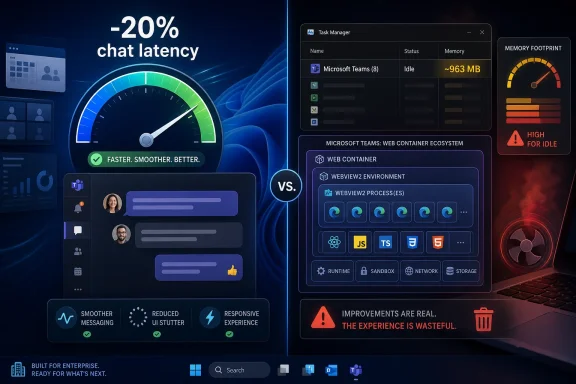
Microsoft says Teams became faster in June 2026 after recent engineering work cut chat-switching latency by about 20 percent, reduced some freezes tied to WebView2 loading, and continued earlier video-rendering improvements, but user testing still shows the Windows app consuming nearly 1GB of memory while idle. That is the contradiction at the center of modern Teams: measurable improvements can be real while the lived experience remains wasteful. Microsoft is optimizing a web-heavy desktop app rather than abandoning the architecture that made those optimizations necessary. For Windows users and IT departments, the question is no longer whether Teams has improved; it is whether improvement inside this design is enough.
The Windows Latest report lands because it captures a familiar enterprise-software absurdity. Microsoft can point to specific, plausible gains: faster chat switching, fewer UI stalls, fewer video freezes, and better handling of WebView2 work on background threads. Those are not imaginary wins, and anyone who has used Teams since the classic Electron-era client knows the newer app is not the same kind of disaster.
But Teams is judged less like a normal app and more like infrastructure. It opens when Windows starts, sits in the tray all day, mediates meetings, chat, files, calendar nudges, presence, telephony, transcription, and increasingly AI-inflected workplace workflows. When an app occupies that much of the working day, users do not grade it on isolated latency reductions. They grade it on whether the machine feels heavier because Teams exists.
That is why a nearly idle Teams instance sitting around 963MB of memory in Windows Latest’s test is more damning than a synthetic performance chart is flattering. A chat app that does nothing should not look like a small virtual machine. The fact that it can be explained by WebView2 processes, shared runtimes, caches, renderers, and sandboxing does not make it feel less absurd to the person watching Task Manager.
Microsoft’s defense is essentially that Teams is not just a chat app. That is true. It is also the problem.
From the user’s side, it can look like a tax. WebView2 gives desktop apps a way to embed the Edge browser engine, which is powerful, secure, and constantly updated. It also means the app inherits browser-like process models and resource habits, even when the job at hand is showing a small chat window with no active conversation.
The old argument for this approach was that hardware had become cheap enough to absorb the overhead. That argument aged badly. Windows 11 still runs on plenty of 8GB business laptops, schools buy fleets that remain in service for years, and even 16GB systems can feel squeezed once Outlook, Edge, OneDrive, security agents, management tools, and a few line-of-business apps are all awake.
Microsoft also faces a credibility problem of its own making. The company has spent the last year telling users it wants Windows 11 to feel faster, lighter, and more responsive. It has talked up operating-system improvements, app launch responsiveness, and reduced resource usage. Then one of its most unavoidable workplace apps remains a conspicuous example of how modern Microsoft software can make a PC feel less like a personal computer and more like a host for web containers.
The architecture may be efficient for Microsoft’s development organization. That does not mean it is efficient for the machine on your desk.
But the reset also changed expectations. Once Microsoft made performance part of the sales pitch, every new optimization became a reminder that the app had needed rescue in the first place. A 10 percent video-loading improvement is welcome. A 36 percent reduction in video freezes is welcome. A 20 percent reduction in chat-switching latency is welcome. None of those numbers erase the baseline experience of a large, always-on collaboration suite that can chew through memory before the user has done anything.
This is the trap of incremental repair. If users remember an app as bloated, every improvement is filtered through suspicion. Microsoft says a Teams operation is faster; users open Task Manager. Microsoft says freezes are reduced; users remember the meeting that locked up while they were sharing a screen. Microsoft says WebView2 enables faster rollout; admins remember the ticket storm when a web runtime or update interaction breaks something important.
The company is not wrong to measure. It is wrong if it thinks measurement alone changes the social reality of Teams. Users do not experience Teams as a benchmark suite. They experience it as the app that rings during lunch, steals focus before a meeting, runs in the background after the call ends, and makes a modest laptop fan spin up for no obvious reason.
That is good engineering. It is also an admission of the kind of complexity Microsoft has chosen. Teams performance is no longer merely Teams performance. It is Teams plus React rendering behavior, IndexedDB queries, WebView2 initialization, Edge runtime behavior, process scheduling, memory trimming, OS idle handling, and whatever meeting media stack is active at the time.
This is why users can be right when they say Teams feels sluggish even if Microsoft is also right that a specific interaction is faster. Responsiveness is not only the time from click to rendered chat. It is also how predictable the app feels, how often it hangs, how much memory pressure it creates, how quickly it recovers from sleep, whether it behaves on battery, and whether it respects the rest of the desktop.
Modern web-app architecture often optimizes for portability and delivery velocity before tactile feel. On a powerful desktop, that compromise can be invisible. On a thin-and-light laptop with a corporate security stack, a dozen browser tabs, and a video call at 9 a.m., the compromise becomes the user experience.
Microsoft appears to know this. That is why it keeps tuning the machinery under Teams rather than pretending everything is fine. The trouble is that each optimization reinforces the same uncomfortable conclusion: the app is being made tolerable through continual intervention.
Memory use is a proxy for trust. Users see RAM as a finite budget, and they expect idle software to be modest. When an app appears to consume nearly a gigabyte while doing nothing, it suggests indifference, even if some of that memory may be cache, shared runtime overhead, or reclaimable working set.
Administrators see a different risk. Multiply that footprint across thousands of endpoints, many of them aging, and Teams becomes part of capacity planning. It affects virtual desktop density, laptop refresh timing, help-desk narratives, and the business case for more RAM. An app that is mandatory but heavy silently shifts cost from the software vendor to the customer’s hardware estate.
Microsoft’s own optimization language acknowledges this reality. References to idle memory reductions, working-set trimming, and better handling on 8GB systems are not cosmetic. They are evidence that Teams has been operating close enough to the pain threshold for Microsoft to spend serious engineering effort pushing it back.
But users are increasingly hostile to software that treats spare capacity as permission. A 32GB PC is not an invitation for every collaboration, chat, storage, browser, launcher, updater, and AI assistant process to become enormous. The more Windows itself becomes a host for cloud-connected experiences, the more every megabyte starts to feel political.
Still, native has become a symbol in this argument because it implies platform commitment. A well-built native Windows app can use the operating system’s controls, accessibility frameworks, memory conventions, notification model, and rendering stack more directly. It can feel like it belongs to the machine rather than being delivered through a browser-shaped abstraction.
Microsoft has complicated this symbolism by urging developers to build better Windows apps while many of its own flagship experiences lean heavily on web technology. The company promotes native UI frameworks, talks about responsiveness, and sells premium Windows hardware. Then users open Teams, Outlook, Copilot, or other web-inflected experiences and see multiple WebView2 processes in Task Manager.
This does not mean Microsoft should rewrite Teams overnight in C++ and WinUI. Teams is a cross-platform service with enormous surface area, and a native rewrite could introduce years of regressions. But the frustration is understandable. Users are not asking Microsoft to optimize the wrong abstraction forever. They are asking why the abstraction became non-negotiable.
The answer, bluntly, is that Microsoft’s productivity suite is now organized around service velocity. Teams is a delivery vehicle for Microsoft 365 features, compliance hooks, meeting services, AI add-ons, extensibility, and cross-platform parity. The desktop app is not merely an app; it is a shell around a rapidly changing service. Native purity loses that internal argument before it starts.
That is not necessarily bad. Microsoft has become more explicit about performance work, and explicit claims can be tested. The problem is that many organizations do not run pristine Windows images. They run endpoint detection agents, DLP tools, VPN clients, browser extensions, custom Office add-ins, accessibility software, VDI brokers, and device management policies that all interact with Teams in ways Microsoft’s clean benchmarks may not capture.
VDI and Cloud PC environments are especially sensitive. Teams in a virtual desktop is already a special case because audio, video, and screen sharing need optimization paths to avoid punishing the host. If Teams consumes too much CPU, RAM, or bandwidth in the wrong mode, the cost is not just a bad meeting. It is reduced session density and a more expensive infrastructure bill.
Admins should also keep an eye on WebView2 as a shared dependency. Its evergreen model is good for security and feature delivery, but shared runtimes can create shared failure modes. A WebView2 regression does not necessarily stay inside one app. In a Microsoft 365-heavy environment, it can ripple through Teams, Outlook experiences, embedded web content, and internal apps that rely on the same runtime.
The practical response is not panic. It is disciplined measurement. Enterprises should compare Teams memory and responsiveness before and after client updates, separate idle behavior from call behavior, test on 8GB and 16GB machines, and validate on representative managed builds rather than developer workstations.
The modern desktop has been colonized by apps that ship like websites, update like services, and consume resources like browsers. Slack, Discord, Teams, and many companion apps inhabit the same design era. They prioritize rapid iteration, cross-platform sameness, plug-in ecosystems, and cloud-connected UI over the lean assumptions that shaped older desktop software.
Discord’s reported approach of restarting itself when memory crosses a threshold is almost darkly comic. It is the software equivalent of telling users the kitchen is clean because the trash compactor runs more often. It may be pragmatic, but it also signals how normalized bloat has become.
Microsoft, however, is not Discord. It owns Windows. It owns the productivity suite. It owns the app, the runtime, the operating system, the browser engine, and much of the enterprise management stack around it. That vertical integration makes the excuse weaker, not stronger.
If any company can make a web-backed desktop app behave responsibly on Windows, it should be Microsoft. If Microsoft cannot, or will not, then the rest of the ecosystem will read the signal clearly: resource discipline is optional as long as the service is mandatory.
This is the modern Windows experience in miniature. The desktop is no longer a set of discrete applications with obvious boundaries. It is a stack of services, runtimes, web components, identity brokers, sync engines, background agents, and telemetry loops. The UI may show a window titled Microsoft Teams, but the performance profile belongs to a system.
That makes Microsoft’s performance work both more important and less satisfying. Moving WebView2 loading to a background thread is the sort of fix users will never notice directly unless it fails. Reducing data queries during rendering may shave time off a chat switch but will not change the emotional response to seeing a forest of processes. Memory trimming can make Task Manager look better without making the app feel truly light.
The challenge for Microsoft is not merely to improve Teams. It is to make Teams feel unremarkable. A workplace chat app should not be a recurring character in Windows performance discourse. It should run, notify, call, and get out of the way.
That is a higher bar than Microsoft’s current claims meet.
Teams sits awkwardly inside that campaign. It is one of Microsoft’s most visible daily apps, and it often behaves like a counterexample to the “lighter Windows” story. Even if the OS gets better at launching apps and prioritizing foreground responsiveness, a heavyweight always-on collaboration client can still make the machine feel encumbered.
That is why this story resonates beyond Teams. It is a test of whether Microsoft’s performance push is philosophical or merely tactical. Tactical performance work fixes hotspots. Philosophical performance work changes what teams are allowed to ship in the first place.
A truly lighter Windows ecosystem would not just patch the worst stalls after telemetry exposes them. It would treat idle resource use as a product-quality issue, especially for first-party apps. It would make background behavior legible to users and manageable by admins. It would stop asking customers to celebrate optimizations that recover only part of the performance lost to architectural convenience.
Microsoft’s engineers are clearly doing real work. The question is whether the product culture around them is willing to define success in user terms rather than service-delivery terms.
This is not always technically fair. Task Manager can show memory in ways that do not distinguish cleanly between private working set, shared resources, cache, reclaimable pages, and runtime overhead. A large number is not automatically a leak. A small number is not automatically good engineering.
But consumer perception is not a debugger. If Teams appears idle and consumes close to a gigabyte, the burden shifts to Microsoft to explain why that is acceptable. If the explanation requires a lecture about multi-process web runtimes, the company has already lost most users.
The most damaging part of the Teams story is that it confirms what many people already suspect about modern software. Apps are faster in demos, heavier in practice, and optimized after the fact. Performance becomes a rolling promise rather than a shipping constraint.
Microsoft has enough telemetry to know where Teams hurts. What it needs now is a simpler story: not that Teams is less bad than before, but that it is becoming disciplined enough to disappear into the background.
Microsoft reportedly says the latest chat-switching improvements are especially noticeable on 8GB PCs and slower networks. That is the right target. It is also a reminder that many Windows users are not living in the hardware future Microsoft likes to imagine. They are living with procurement cycles, hand-me-down laptops, shared desks, and devices selected for price rather than comfort.
For those users, idle memory is not academic. Every background app competes with the browser, Office, line-of-business tools, and the OS itself. Once the machine starts paging, the debate about architecture becomes tangible: clicks lag, meetings stutter, and the whole system feels old before its time.
The same applies to battery life. A collaboration app that wakes too often, renders too heavily, or keeps too much machinery alive can erode mobile work even when it is not visibly misbehaving. Responsiveness must include restraint.
Microsoft does not have to make Teams tiny. It does have to make Teams proportional. The app’s footprint should make sense for what it is doing at that moment, not for the full universe of things it might do later.
Here is the practical shape of the story for Windows users and administrators:
 Microsoft Wins the Benchmark and Still Loses the Room
The Windows Latest report lands because it captures a familiar enterprise-software absurdity. Microsoft can point to specific, plausible gains: faster chat switching, fewer UI stalls, fewer video freezes, and better handling of WebView2 work on background threads. Those are not imaginary wins, and anyone who has used Teams since the classic Electron-era client knows the newer app is not the same kind of disaster.But Teams is judged less like a normal app and more like infrastructure. It opens when Windows starts, sits in the tray all day, mediates meetings, chat, files, calendar nudges, presence, telephony, transcription, and increasingly AI-inflected workplace workflows. When an app occupies that much of the working day, users do not grade it on isolated latency reductions. They grade it on whether the machine feels heavier because Teams exists.
That is why a nearly idle Teams instance sitting around 963MB of memory in Windows Latest’s test is more damning than a synthetic performance chart is flattering. A chat app that does nothing should not look like a small virtual machine. The fact that it can be explained by WebView2 processes, shared runtimes, caches, renderers, and sandboxing does not make it feel less absurd to the person watching Task Manager.
Microsoft’s defense is essentially that Teams is not just a chat app. That is true. It is also the problem.
WebView2 Is Microsoft’s Productivity Shortcut, Not Yours
Microsoft’s commitment to WebView2 is not a mystery. A web-based architecture lets Teams share more code across Windows, macOS, and the browser. It accelerates feature rollout, keeps the rendering model consistent, and gives Microsoft a single platform for instrumentation, experimentation, and debugging. From Redmond’s side of the glass, this is rational engineering.From the user’s side, it can look like a tax. WebView2 gives desktop apps a way to embed the Edge browser engine, which is powerful, secure, and constantly updated. It also means the app inherits browser-like process models and resource habits, even when the job at hand is showing a small chat window with no active conversation.
The old argument for this approach was that hardware had become cheap enough to absorb the overhead. That argument aged badly. Windows 11 still runs on plenty of 8GB business laptops, schools buy fleets that remain in service for years, and even 16GB systems can feel squeezed once Outlook, Edge, OneDrive, security agents, management tools, and a few line-of-business apps are all awake.
Microsoft also faces a credibility problem of its own making. The company has spent the last year telling users it wants Windows 11 to feel faster, lighter, and more responsive. It has talked up operating-system improvements, app launch responsiveness, and reduced resource usage. Then one of its most unavoidable workplace apps remains a conspicuous example of how modern Microsoft software can make a PC feel less like a personal computer and more like a host for web containers.
The architecture may be efficient for Microsoft’s development organization. That does not mean it is efficient for the machine on your desk.
The New Teams Was Supposed to Be the Reset
The current Teams client was marketed as a major improvement over the older app. Microsoft moved away from the previous classic client and emphasized speed, lower memory use, and better reliability. In broad strokes, the new client did improve things: startup became less painful, switching contexts improved, and the app stopped feeling quite so much like a permanent browser tab wearing a corporate badge.But the reset also changed expectations. Once Microsoft made performance part of the sales pitch, every new optimization became a reminder that the app had needed rescue in the first place. A 10 percent video-loading improvement is welcome. A 36 percent reduction in video freezes is welcome. A 20 percent reduction in chat-switching latency is welcome. None of those numbers erase the baseline experience of a large, always-on collaboration suite that can chew through memory before the user has done anything.
This is the trap of incremental repair. If users remember an app as bloated, every improvement is filtered through suspicion. Microsoft says a Teams operation is faster; users open Task Manager. Microsoft says freezes are reduced; users remember the meeting that locked up while they were sharing a screen. Microsoft says WebView2 enables faster rollout; admins remember the ticket storm when a web runtime or update interaction breaks something important.
The company is not wrong to measure. It is wrong if it thinks measurement alone changes the social reality of Teams. Users do not experience Teams as a benchmark suite. They experience it as the app that rings during lunch, steals focus before a meeting, runs in the background after the call ends, and makes a modest laptop fan spin up for no obvious reason.
Responsiveness Is More Than Latency
The most interesting detail in the Windows Latest report is not the 20 percent latency reduction. It is the freeze fix tied to WebView2’s dynamic library loading. Microsoft reportedly found that loading a WebView2 dynamic library on the main thread accounted for a measurable share of Teams freezes, then worked with the WebView2 team to preload the library on a background thread.That is good engineering. It is also an admission of the kind of complexity Microsoft has chosen. Teams performance is no longer merely Teams performance. It is Teams plus React rendering behavior, IndexedDB queries, WebView2 initialization, Edge runtime behavior, process scheduling, memory trimming, OS idle handling, and whatever meeting media stack is active at the time.
This is why users can be right when they say Teams feels sluggish even if Microsoft is also right that a specific interaction is faster. Responsiveness is not only the time from click to rendered chat. It is also how predictable the app feels, how often it hangs, how much memory pressure it creates, how quickly it recovers from sleep, whether it behaves on battery, and whether it respects the rest of the desktop.
Modern web-app architecture often optimizes for portability and delivery velocity before tactile feel. On a powerful desktop, that compromise can be invisible. On a thin-and-light laptop with a corporate security stack, a dozen browser tabs, and a video call at 9 a.m., the compromise becomes the user experience.
Microsoft appears to know this. That is why it keeps tuning the machinery under Teams rather than pretending everything is fine. The trouble is that each optimization reinforces the same uncomfortable conclusion: the app is being made tolerable through continual intervention.
The Memory Argument Is Really a Trust Argument
It is tempting to reduce this debate to a number. Is 963MB too much? Is 2GB during a call outrageous? Should users with 32GB of RAM care? Those questions matter, but they are not the whole story.Memory use is a proxy for trust. Users see RAM as a finite budget, and they expect idle software to be modest. When an app appears to consume nearly a gigabyte while doing nothing, it suggests indifference, even if some of that memory may be cache, shared runtime overhead, or reclaimable working set.
Administrators see a different risk. Multiply that footprint across thousands of endpoints, many of them aging, and Teams becomes part of capacity planning. It affects virtual desktop density, laptop refresh timing, help-desk narratives, and the business case for more RAM. An app that is mandatory but heavy silently shifts cost from the software vendor to the customer’s hardware estate.
Microsoft’s own optimization language acknowledges this reality. References to idle memory reductions, working-set trimming, and better handling on 8GB systems are not cosmetic. They are evidence that Teams has been operating close enough to the pain threshold for Microsoft to spend serious engineering effort pushing it back.
But users are increasingly hostile to software that treats spare capacity as permission. A 32GB PC is not an invitation for every collaboration, chat, storage, browser, launcher, updater, and AI assistant process to become enormous. The more Windows itself becomes a host for cloud-connected experiences, the more every megabyte starts to feel political.
Native Code Became a Symbol for Respect
The native-versus-web debate is often oversimplified. Native apps can be terrible. Web-based apps can be excellent. A bad native Windows app can leak memory, freeze the UI thread, and disrespect the desktop just as thoroughly as a WebView2 app.Still, native has become a symbol in this argument because it implies platform commitment. A well-built native Windows app can use the operating system’s controls, accessibility frameworks, memory conventions, notification model, and rendering stack more directly. It can feel like it belongs to the machine rather than being delivered through a browser-shaped abstraction.
Microsoft has complicated this symbolism by urging developers to build better Windows apps while many of its own flagship experiences lean heavily on web technology. The company promotes native UI frameworks, talks about responsiveness, and sells premium Windows hardware. Then users open Teams, Outlook, Copilot, or other web-inflected experiences and see multiple WebView2 processes in Task Manager.
This does not mean Microsoft should rewrite Teams overnight in C++ and WinUI. Teams is a cross-platform service with enormous surface area, and a native rewrite could introduce years of regressions. But the frustration is understandable. Users are not asking Microsoft to optimize the wrong abstraction forever. They are asking why the abstraction became non-negotiable.
The answer, bluntly, is that Microsoft’s productivity suite is now organized around service velocity. Teams is a delivery vehicle for Microsoft 365 features, compliance hooks, meeting services, AI add-ons, extensibility, and cross-platform parity. The desktop app is not merely an app; it is a shell around a rapidly changing service. Native purity loses that internal argument before it starts.
IT Departments Will Measure What Microsoft Markets
For enterprise admins, Microsoft’s claims create a practical obligation. If Teams is now more responsive, someone will be asked whether users can feel it. If idle memory has improved, someone will need to validate that on managed devices. If WebView2 runtime behavior matters, someone will need to understand how Edge runtime updates affect Teams stability.That is not necessarily bad. Microsoft has become more explicit about performance work, and explicit claims can be tested. The problem is that many organizations do not run pristine Windows images. They run endpoint detection agents, DLP tools, VPN clients, browser extensions, custom Office add-ins, accessibility software, VDI brokers, and device management policies that all interact with Teams in ways Microsoft’s clean benchmarks may not capture.
VDI and Cloud PC environments are especially sensitive. Teams in a virtual desktop is already a special case because audio, video, and screen sharing need optimization paths to avoid punishing the host. If Teams consumes too much CPU, RAM, or bandwidth in the wrong mode, the cost is not just a bad meeting. It is reduced session density and a more expensive infrastructure bill.
Admins should also keep an eye on WebView2 as a shared dependency. Its evergreen model is good for security and feature delivery, but shared runtimes can create shared failure modes. A WebView2 regression does not necessarily stay inside one app. In a Microsoft 365-heavy environment, it can ripple through Teams, Outlook experiences, embedded web content, and internal apps that rely on the same runtime.
The practical response is not panic. It is disciplined measurement. Enterprises should compare Teams memory and responsiveness before and after client updates, separate idle behavior from call behavior, test on 8GB and 16GB machines, and validate on representative managed builds rather than developer workstations.
Discord Is the Warning, Not the Excuse
Windows Latest also points to Discord as another example of a web-based app that can consume multiple gigabytes of RAM. That comparison is useful, but not because it lets Microsoft off the hook. It shows that the problem is industry-wide.The modern desktop has been colonized by apps that ship like websites, update like services, and consume resources like browsers. Slack, Discord, Teams, and many companion apps inhabit the same design era. They prioritize rapid iteration, cross-platform sameness, plug-in ecosystems, and cloud-connected UI over the lean assumptions that shaped older desktop software.
Discord’s reported approach of restarting itself when memory crosses a threshold is almost darkly comic. It is the software equivalent of telling users the kitchen is clean because the trash compactor runs more often. It may be pragmatic, but it also signals how normalized bloat has become.
Microsoft, however, is not Discord. It owns Windows. It owns the productivity suite. It owns the app, the runtime, the operating system, the browser engine, and much of the enterprise management stack around it. That vertical integration makes the excuse weaker, not stronger.
If any company can make a web-backed desktop app behave responsibly on Windows, it should be Microsoft. If Microsoft cannot, or will not, then the rest of the ecosystem will read the signal clearly: resource discipline is optional as long as the service is mandatory.
The User Experience Is Now a Stack Trace
Teams is a useful case study because it reveals how difficult it has become to assign blame for desktop sluggishness. A user clicks a chat and waits. Is the delay caused by React rendering, local cache queries, network latency, WebView2 scheduling, antivirus inspection, Graph service behavior, GPU compositing, or Windows power management? The answer may be several of those at once.This is the modern Windows experience in miniature. The desktop is no longer a set of discrete applications with obvious boundaries. It is a stack of services, runtimes, web components, identity brokers, sync engines, background agents, and telemetry loops. The UI may show a window titled Microsoft Teams, but the performance profile belongs to a system.
That makes Microsoft’s performance work both more important and less satisfying. Moving WebView2 loading to a background thread is the sort of fix users will never notice directly unless it fails. Reducing data queries during rendering may shave time off a chat switch but will not change the emotional response to seeing a forest of processes. Memory trimming can make Task Manager look better without making the app feel truly light.
The challenge for Microsoft is not merely to improve Teams. It is to make Teams feel unremarkable. A workplace chat app should not be a recurring character in Windows performance discourse. It should run, notify, call, and get out of the way.
That is a higher bar than Microsoft’s current claims meet.
The June Teams Fixes Do Not Settle the Bigger Windows Argument
The larger context matters. Microsoft is in the middle of a broad attempt to convince users that Windows 11 is becoming more responsive. Recent Windows work has emphasized faster app launches, smoother shell experiences, better behavior under load, and reduced baseline resource usage. Those are exactly the areas where enthusiasts and IT pros have been complaining for years.Teams sits awkwardly inside that campaign. It is one of Microsoft’s most visible daily apps, and it often behaves like a counterexample to the “lighter Windows” story. Even if the OS gets better at launching apps and prioritizing foreground responsiveness, a heavyweight always-on collaboration client can still make the machine feel encumbered.
That is why this story resonates beyond Teams. It is a test of whether Microsoft’s performance push is philosophical or merely tactical. Tactical performance work fixes hotspots. Philosophical performance work changes what teams are allowed to ship in the first place.
A truly lighter Windows ecosystem would not just patch the worst stalls after telemetry exposes them. It would treat idle resource use as a product-quality issue, especially for first-party apps. It would make background behavior legible to users and manageable by admins. It would stop asking customers to celebrate optimizations that recover only part of the performance lost to architectural convenience.
Microsoft’s engineers are clearly doing real work. The question is whether the product culture around them is willing to define success in user terms rather than service-delivery terms.
The Numbers Microsoft Should Fear Are the Ones Users Can See
Microsoft can publish detailed performance wins, but Task Manager remains the court of public opinion. Users do not need a profiler to form a judgment. They open a laptop, join a call, hear the fan, see memory pressure, and decide whether the app is bloated.This is not always technically fair. Task Manager can show memory in ways that do not distinguish cleanly between private working set, shared resources, cache, reclaimable pages, and runtime overhead. A large number is not automatically a leak. A small number is not automatically good engineering.
But consumer perception is not a debugger. If Teams appears idle and consumes close to a gigabyte, the burden shifts to Microsoft to explain why that is acceptable. If the explanation requires a lecture about multi-process web runtimes, the company has already lost most users.
The most damaging part of the Teams story is that it confirms what many people already suspect about modern software. Apps are faster in demos, heavier in practice, and optimized after the fact. Performance becomes a rolling promise rather than a shipping constraint.
Microsoft has enough telemetry to know where Teams hurts. What it needs now is a simpler story: not that Teams is less bad than before, but that it is becoming disciplined enough to disappear into the background.
The Real Test Comes on the Boring PCs
Performance claims should always be judged on ordinary machines. A 32GB desktop can hide sins. A corporate laptop with 8GB of RAM, a modest CPU, aggressive security tooling, and a user who keeps 40 browser tabs open cannot. That is where Teams either proves Microsoft’s claims or exposes their limits.Microsoft reportedly says the latest chat-switching improvements are especially noticeable on 8GB PCs and slower networks. That is the right target. It is also a reminder that many Windows users are not living in the hardware future Microsoft likes to imagine. They are living with procurement cycles, hand-me-down laptops, shared desks, and devices selected for price rather than comfort.
For those users, idle memory is not academic. Every background app competes with the browser, Office, line-of-business tools, and the OS itself. Once the machine starts paging, the debate about architecture becomes tangible: clicks lag, meetings stutter, and the whole system feels old before its time.
The same applies to battery life. A collaboration app that wakes too often, renders too heavily, or keeps too much machinery alive can erode mobile work even when it is not visibly misbehaving. Responsiveness must include restraint.
Microsoft does not have to make Teams tiny. It does have to make Teams proportional. The app’s footprint should make sense for what it is doing at that moment, not for the full universe of things it might do later.
A Faster Teams Still Has to Earn Its Place in Memory
The useful reading of this week’s Teams news is neither cynical nor credulous. Microsoft has improved parts of Teams, and those improvements may matter in real daily use. But the same report shows why users remain unconvinced: a faster click path does not redeem an app that still feels too heavy for its resting state.Here is the practical shape of the story for Windows users and administrators:
- Microsoft’s reported 20 percent chat-switching latency improvement is meaningful, but it addresses one interaction rather than the overall footprint of the app.
- The WebView2 freeze work suggests Microsoft is fixing real architectural bottlenecks, but it also shows how dependent Teams performance is on a browser-based runtime stack.
- Idle memory use remains the public-facing weakness because users can see it immediately and compare it with what the app appears to be doing.
- Organizations should test Teams on representative managed PCs, especially 8GB and 16GB systems, instead of assuming Microsoft’s improvements translate cleanly to their fleet.
- WebView2 should be treated as a strategic dependency in Microsoft 365 environments, not as an invisible implementation detail.
- Microsoft’s broader Windows performance push will be judged partly by whether first-party apps like Teams become less intrusive, not just by whether the shell launches faster.
References
- Primary source: Windows Latest
Published: Wed, 10 Jun 2026 22:19:51 GMT
Microsoft claims MS Teams is more responsive now, but it still eats your PC's RAM doing nothing
Microsoft says MS Teams is now more responsive, which may be true, but there's no denying it still eats up RAM even when doing nothing. www.windowslatest.com
- Related coverage: windowscentral.com
Here are the 6 biggest features and improvements coming to Windows 11 in the June 2026 update on Tuesday | Windows Central
Microsoft's June 2026 Windows 11 update boosts responsiveness, adds Shared Audio, expands NPU metrics, and improves OOBE.www.windowscentral.com - Official source: learn.microsoft.com
WebView2 'IntegrityFailure' during sub-resource fetching - Microsoft Q&A
We are observing a significant rendering regression in our custom Teams Tab application following the April 2026 WebView2 runtime update (v148.x). The application’s initial HTML payload loads successfully, but all subsequent CSS and JS sub-resources are…learn.microsoft.com - Related coverage: tomshardware.com
Microsoft promises major improvements to Windows 11 performance, reliability, and updates — lower RAM usage, fewer Copilot interactions, and enhanced File Explorer incoming | Tom's Hardware
It only took four years to get the taskbar working properly.www.tomshardware.com - Related coverage: techradar.com
Did Microsoft not hear about the RAM crisis? Windows 11's new Copilot app is quite the memory hog | TechRadar
Hands off my memory, Edge… I mean, Copilotwww.techradar.com - Related coverage: thegputrade.com
Windows 11 June update adds NPU diagnostics
Task Manager gains NPU columns and memory telemetry as on‑device AI spreadsthegputrade.com
- Related coverage: windowsforum.com
Windows 11 June 2026 Update: Low Latency, Shared Audio, NPU Task Manager | Windows Forum
Microsoft is expected to begin rolling out the June 2026 security update for Windows 11 on Tuesday, June 9, 2026, bringing a batch of quality-of-life...windowsforum.com - Related coverage: arstechnica.com
Microsoft will lean on your CPU to speed up Windows 11's apps and animations - Ars Technica
All modern operating systems do this, including macOS and Linux."arstechnica.com - Related coverage: notebookcheck.net
Microsoft admits Windows 11 issues, pivots team to rebuild user trust - Notebookcheck News
Microsoft is pivoting engineering teams to a new "swarming" model to fix Windows 11 performance and reliability issues after a wave of buggy 2026 updates. www.notebookcheck.net
- Related coverage: europapress.es
Microsoft confirma la fecha de lanzamiento de la actualización que hará volar a Windows 11
   Microsoft ha confirmado que la actualización tipo-MacOS, a la que se conoce como 'Perfil...www.europapress.es
- Official source: news.microsoft.com
Microsoft Build Live
The home for real-time coverage of the news as it is announced from Microsoft Build, June 2-3, 2026.news.microsoft.com - Official source: microsoft.com
- Official source: techcommunity.microsoft.com
Microsoft Teams Licensing Updates April 2026 Customer FAQ 1
PDF documenttechcommunity.microsoft.com
- Official source: download.microsoft.com
Improving Microsoft Dynamics CRM 4.0 Performance and Securing Data with Microsoft SQL Server 2008 R2
PDF documentdownload.microsoft.com
