

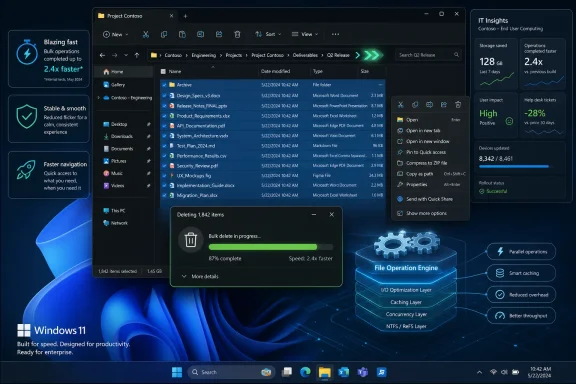
Microsoft is testing Windows 11 File Explorer performance improvements in June 2026 that target bulk file deletion, launch speed, flicker, navigation, context menus, and everyday file operations, with early reporting pointing to at least a 30 percent gain for deleting large groups of files. The important part is not that Explorer may soon feel a little snappier. It is that Microsoft appears to be treating Explorer’s slowness as an operating-system problem rather than a cosmetic defect. For Windows users and IT departments, that distinction matters.
For much of Windows 11’s life, File Explorer has been a symbol of the operating system’s uneven modernization. The app looked newer, adopted a command bar, gained tabs, pulled in cloud-adjacent surfaces, and slowly absorbed more of Microsoft’s current design language. Yet many users experienced the same stubborn problem: the interface could feel heavier than the version it replaced.
That tension has dogged Windows 11 since launch. Microsoft wanted an Explorer that fit the rest of the OS, but Explorer is not a notepad clone or a weather widget. It is the working face of the file system, the place where users discover whether a machine feels responsive or strangely encumbered.
The latest reporting suggests Microsoft is now pushing past the visible shell and into the file operation path itself. Bulk deletion is the first concrete example: not just animating a window faster, not just preloading an app in memory, but changing how Windows handles a workload that can punish the OS when multiplied across hundreds or thousands of files.
That is why the 30 percent figure matters. It is not a benchmark trophy for enthusiasts to argue over in isolation. It is a sign that Microsoft has identified measurable drag in a core path and is willing to put a number on improvement.
That is why bulk deletion can feel oddly slow on powerful hardware. A fast NVMe SSD may be capable of astonishing throughput, but Explorer is often waiting on a parade of small operations rather than a single clean transfer. The bottleneck is not always the disk; sometimes it is the choreography.
Microsoft’s reported target of at least 30 percent faster bulk deletion suggests the company is optimizing the software-side path rather than pretending that newer hardware will paper over everything. That is the right battlefield. Windows 11 runs on machines ranging from premium workstations to aging business laptops, and responsiveness has to survive outside a benchmark lab.
There is also a psychological component. Users tolerate waiting when they understand the work being done, such as copying a huge video archive to an external drive. They are far less patient when deleting a pile of temporary files, old project folders, or extracted archives feels like the OS is negotiating a treaty with itself.
That is a dangerous category of defect for Microsoft. A crash produces logs and urgency. A security bug produces bulletins and deadlines. A half-second delay in the wrong place produces irritation, workarounds, forum threads, and eventually a quiet loss of trust.
Windows 10’s Explorer was not perfect, but it had the advantage of familiarity and perceived lightness. Windows 11’s Explorer, by contrast, arrived as part of a broader redesign that made many users suspicious of whether Microsoft had traded speed for polish. Once that impression settles in, each minor delay reinforces the narrative.
This is why preloading alone was never going to be enough. Starting Explorer faster is useful, but if navigation, deletion, transfer, and right-click behavior still feel sluggish, users will treat preloading as a trick rather than a fix. The reported focus on deeper file operations is more promising because it attacks the parts of Explorer that users cannot theme away.
The problem is that users judge redesigns by latency and utility, not by architectural tidiness. If the new menu hides familiar commands, loads slowly, or forces an extra click into “Show more options,” the modernization argument collapses. A cleaner menu that interrupts work is not cleaner in practice.
Microsoft’s reported exploration of customizable context menu entries is therefore more than a convenience feature. It is an admission that the shell cannot be one-size-fits-all when professional workflows vary wildly. A photographer, developer, sysadmin, accountant, and gamer do not need the same right-click surface.
The real prize is not merely fewer menu entries. It is predictability. If users can trim what they do not need and keep what they use constantly, Microsoft can reduce clutter without turning the context menu into another example of Windows deciding what is best for everyone.
The infamous flashes, inconsistent surfaces, and legacy dialogs are not just cosmetic annoyances. They remind users that Windows 11’s visual refresh is layered over older components that do not always behave like part of the same system. In a tool as central as Explorer, those seams become daily evidence.
Modernizing the Properties window and other legacy pieces is therefore not an indulgence. Properties is one of the most frequently touched dialogs in the shell, especially for administrators, power users, and anyone troubleshooting permissions, file types, or storage usage. Leaving it behind while polishing the top-level shell makes the whole project feel unfinished.
The difficulty is that Microsoft cannot simply rip out the old. Enterprise workflows, shell extensions, management tools, and decades of user expectations depend on continuity. The company’s job is harder than making a pretty file browser from scratch; it has to modernize a public utility while keeping the pipes connected.
Explorer is the interface, but the experience of copying, moving, deleting, and transferring files depends on deeper OS behavior. Those operations touch the file system, security model, search index, shell notification system, and sometimes network or cloud layers. If Microsoft improves that engine, the benefit could extend beyond one window.
That matters for IT pros because file operations are not edge cases. They are deployment cleanup, log rotation, profile migration, archive extraction, build output management, redirected folders, shared drives, and user support. A modest percentage improvement repeated across everyday tasks can save real time, especially on lower-end hardware or heavily managed machines.
It also matters for perceived stability. Slow file operations invite users to click again, kill processes, reboot, or assume the machine has hung. Faster completion is useful, but clearer responsiveness is just as important. A system that communicates progress well and avoids long unexplained stalls feels more trustworthy.
Microsoft’s challenge will be to preserve correctness while chasing speed. File deletion and transfer are not places to cut corners. Users can forgive a slow delete more easily than they can forgive a delete that mishandles permissions, skips files silently, or interacts badly with sync and backup tools.
This is the danger of incremental repair. Each fix may be real, but if the user encounters three remaining pauses after one improved action, the OS still feels slow. Microsoft needs a campaign that adds up to a changed perception, not a collection of isolated improvements that only insiders notice.
The company also has to contend with Windows 10’s ghost. Even as Windows 10 moves further into its post-mainstream-support era, many users still measure Windows 11 against it emotionally. They remember the older Explorer as direct, familiar, and fast enough, even if the reality varied by machine and configuration.
That comparison is not always fair, but it is commercially relevant. Microsoft asked users to accept a new hardware baseline, a new interface, new defaults, deeper cloud hooks, and now more AI-facing experiences. The least the OS can do in return is make opening, deleting, and moving files feel instant.
But preloading is also politically risky. Windows users are increasingly sensitive to background activity, especially when they already suspect the OS of doing too much without asking. If Explorer opens faster only because it was already partially awake, critics will call that a workaround rather than optimization.
The truth is less dramatic. Operating systems have always used caching, prefetching, and background preparation to make common actions feel faster. The question is whether those techniques are paired with real efficiency work or used to hide a slow path.
That is why the reported bulk deletion optimization is significant. It suggests Microsoft is not merely staging Explorer behind the curtain before the user clicks. It is also trying to reduce the amount of time the work itself takes once the curtain rises.
Microsoft should welcome that scrutiny. Bulk file operations are notoriously sensitive to real-world variation: file size distribution, storage type, antivirus settings, OneDrive status, NTFS permissions, ReFS or network shares, removable drives, and third-party shell extensions can all change the outcome. A 30 percent improvement in a clean internal test is encouraging; the field results will be messier.
For administrators, the important question is not whether a lab benchmark improves. It is whether the change behaves predictably across managed endpoints. Faster deletion is useful only if it does not create new support cases around missing prompts, stalled Explorer processes, broken progress windows, or unexpected interactions with security tools.
There is also the usual update cadence problem. A performance fix that arrives through Insider channels can take time to reach stable builds, and even longer to land everywhere in conservative enterprise environments. By the time the improvement becomes broadly visible, Microsoft will need to show that the work continued rather than stopped at the first headline.
But enterprise environments also complicate the performance story. Managed endpoints often run heavier security stacks, data loss prevention tools, backup agents, sync clients, and network storage mappings. Explorer performance in that world is shaped by policies and integrations that Microsoft does not fully control.
That is why Microsoft’s best move is not merely to optimize Explorer in default consumer configurations. It should expose enough telemetry, documentation, and diagnostic clarity for administrators to understand where file operation delays originate. If deletion is slow because a security product is scanning every file, admins need to see that. If a shell extension is blocking the context menu, they need a clean way to prove it.
Windows has historically been powerful because it is extensible. That same extensibility can make the shell fragile. Microsoft cannot eliminate that tradeoff, but it can make the slow path less mysterious.
A slow Explorer makes the whole machine feel worse. It does not matter whether the CPU is fast, the display is beautiful, or the battery life is improved if basic file handling feels hesitant. Responsiveness is the operating system’s handshake with the user.
Microsoft understands this in other parts of Windows. Start menu latency, app launch time, animation smoothness, and wake behavior all shape the impression of quality. Explorer belongs in that same category, not as a legacy utility tolerated in the corner but as a primary measure of whether Windows feels alive.
The company’s renewed focus is therefore overdue. Windows 11 has spent too much time looking modern while occasionally behaving like modernization added weight. Performance work is the unglamorous corrective.
The more useful scoreboard would measure Explorer across a basket of everyday tasks. How long does it take to open Home on a midrange business laptop? How quickly does a folder with thousands of mixed files sort by date? How fast does the context menu appear with common third-party apps installed? How reliably does dark mode avoid white flashes across the full path?
Microsoft does not need to publish every internal metric, but it should think in those terms. Explorer’s reputation will improve only when the broad experience changes. One fast delete operation will not redeem a sluggish shell.
Still, the reported deletion work is a credible place to start. It is concrete, measurable, and tied to a real annoyance. If Microsoft follows it with similar gains in copy and transfer operations, the company can begin to turn a quality narrative into something users can feel.
Explorer sits at the intersection of that credibility problem. It must integrate OneDrive and search. It must support old Win32 assumptions and new design surfaces. It must handle local files, cloud files, removable drives, network locations, archives, permissions, thumbnails, and third-party extensions. It is both mundane and impossibly central.
That complexity explains some of the slowness, but it does not excuse it. Users do not owe an operating system sympathy for its architecture. They owe it attention only if it gets out of their way.
If Microsoft can make Explorer faster without stripping away compatibility, it will have done something more meaningful than polishing a familiar app. It will have shown that Windows 11 can modernize without becoming heavier in the places that matter most.
 Microsoft Finally Aims Below the Toolbar
For much of Windows 11’s life, File Explorer has been a symbol of the operating system’s uneven modernization. The app looked newer, adopted a command bar, gained tabs, pulled in cloud-adjacent surfaces, and slowly absorbed more of Microsoft’s current design language. Yet many users experienced the same stubborn problem: the interface could feel heavier than the version it replaced.That tension has dogged Windows 11 since launch. Microsoft wanted an Explorer that fit the rest of the OS, but Explorer is not a notepad clone or a weather widget. It is the working face of the file system, the place where users discover whether a machine feels responsive or strangely encumbered.
The latest reporting suggests Microsoft is now pushing past the visible shell and into the file operation path itself. Bulk deletion is the first concrete example: not just animating a window faster, not just preloading an app in memory, but changing how Windows handles a workload that can punish the OS when multiplied across hundreds or thousands of files.
That is why the 30 percent figure matters. It is not a benchmark trophy for enthusiasts to argue over in isolation. It is a sign that Microsoft has identified measurable drag in a core path and is willing to put a number on improvement.
Bulk Delete Exposes the Cost of a Modern Windows Desktop
Deleting a file sounds simple only if one imagines the file system as a table of names and locations. In practice, Windows has to coordinate metadata, access control, indexing, thumbnail caches, shell extensions, cloud sync clients, Recycle Bin behavior, security software, and whatever else has inserted itself into the file lifecycle. The more files involved, the more that overhead compounds.That is why bulk deletion can feel oddly slow on powerful hardware. A fast NVMe SSD may be capable of astonishing throughput, but Explorer is often waiting on a parade of small operations rather than a single clean transfer. The bottleneck is not always the disk; sometimes it is the choreography.
Microsoft’s reported target of at least 30 percent faster bulk deletion suggests the company is optimizing the software-side path rather than pretending that newer hardware will paper over everything. That is the right battlefield. Windows 11 runs on machines ranging from premium workstations to aging business laptops, and responsiveness has to survive outside a benchmark lab.
There is also a psychological component. Users tolerate waiting when they understand the work being done, such as copying a huge video archive to an external drive. They are far less patient when deleting a pile of temporary files, old project folders, or extracted archives feels like the OS is negotiating a treaty with itself.
Explorer’s Reputation Was Damaged One Pause at a Time
File Explorer’s problem has never been a single catastrophic failure. It has been the accumulation of small waits: the context menu that hesitates, the folder that flashes, the Home view that takes just long enough to be noticed, the right-click path that feels slower than muscle memory expects. Windows users rarely describe these moments with precision, but they feel them constantly.That is a dangerous category of defect for Microsoft. A crash produces logs and urgency. A security bug produces bulletins and deadlines. A half-second delay in the wrong place produces irritation, workarounds, forum threads, and eventually a quiet loss of trust.
Windows 10’s Explorer was not perfect, but it had the advantage of familiarity and perceived lightness. Windows 11’s Explorer, by contrast, arrived as part of a broader redesign that made many users suspicious of whether Microsoft had traded speed for polish. Once that impression settles in, each minor delay reinforces the narrative.
This is why preloading alone was never going to be enough. Starting Explorer faster is useful, but if navigation, deletion, transfer, and right-click behavior still feel sluggish, users will treat preloading as a trick rather than a fix. The reported focus on deeper file operations is more promising because it attacks the parts of Explorer that users cannot theme away.
The Context Menu Became a Case Study in Good Intentions
Windows 11’s redesigned context menu was supposed to make right-clicking less chaotic. In theory, that was defensible. The old menu had become a dumping ground for application hooks, utilities, compression tools, security scanners, cloud clients, graphics drivers, and assorted vendor clutter.The problem is that users judge redesigns by latency and utility, not by architectural tidiness. If the new menu hides familiar commands, loads slowly, or forces an extra click into “Show more options,” the modernization argument collapses. A cleaner menu that interrupts work is not cleaner in practice.
Microsoft’s reported exploration of customizable context menu entries is therefore more than a convenience feature. It is an admission that the shell cannot be one-size-fits-all when professional workflows vary wildly. A photographer, developer, sysadmin, accountant, and gamer do not need the same right-click surface.
The real prize is not merely fewer menu entries. It is predictability. If users can trim what they do not need and keep what they use constantly, Microsoft can reduce clutter without turning the context menu into another example of Windows deciding what is best for everyone.
Dark Mode Flicker Is a Symptom, Not a Side Quest
Reduced flicker and dark mode fixes may sound less important than faster deletion, but they point to the same underlying problem. File Explorer is a hybrid creature, carrying decades of Windows history while trying to present itself as a modern app. That mixture is useful because compatibility matters, but it also produces visible seams.The infamous flashes, inconsistent surfaces, and legacy dialogs are not just cosmetic annoyances. They remind users that Windows 11’s visual refresh is layered over older components that do not always behave like part of the same system. In a tool as central as Explorer, those seams become daily evidence.
Modernizing the Properties window and other legacy pieces is therefore not an indulgence. Properties is one of the most frequently touched dialogs in the shell, especially for administrators, power users, and anyone troubleshooting permissions, file types, or storage usage. Leaving it behind while polishing the top-level shell makes the whole project feel unfinished.
The difficulty is that Microsoft cannot simply rip out the old. Enterprise workflows, shell extensions, management tools, and decades of user expectations depend on continuity. The company’s job is harder than making a pretty file browser from scratch; it has to modernize a public utility while keeping the pipes connected.
The File Operation Engine Matters More Than the File Browser
The most interesting phrase in the current reporting is not “File Explorer.” It is the reference to the underlying file operation engine. That is where this story becomes bigger than an app update.Explorer is the interface, but the experience of copying, moving, deleting, and transferring files depends on deeper OS behavior. Those operations touch the file system, security model, search index, shell notification system, and sometimes network or cloud layers. If Microsoft improves that engine, the benefit could extend beyond one window.
That matters for IT pros because file operations are not edge cases. They are deployment cleanup, log rotation, profile migration, archive extraction, build output management, redirected folders, shared drives, and user support. A modest percentage improvement repeated across everyday tasks can save real time, especially on lower-end hardware or heavily managed machines.
It also matters for perceived stability. Slow file operations invite users to click again, kill processes, reboot, or assume the machine has hung. Faster completion is useful, but clearer responsiveness is just as important. A system that communicates progress well and avoids long unexplained stalls feels more trustworthy.
Microsoft’s challenge will be to preserve correctness while chasing speed. File deletion and transfer are not places to cut corners. Users can forgive a slow delete more easily than they can forgive a delete that mishandles permissions, skips files silently, or interacts badly with sync and backup tools.
Windows 11’s Performance Story Has Been Too Fragmented
Microsoft has spent 2026 talking more openly about Windows 11 responsiveness, from File Explorer to system performance, memory usage, and interface latency. That is welcome, but it also highlights how scattered the problem has seemed. Users do not experience “File Explorer launch,” “context menu performance,” and “bulk delete throughput” as separate product areas. They experience Windows as fast or not.This is the danger of incremental repair. Each fix may be real, but if the user encounters three remaining pauses after one improved action, the OS still feels slow. Microsoft needs a campaign that adds up to a changed perception, not a collection of isolated improvements that only insiders notice.
The company also has to contend with Windows 10’s ghost. Even as Windows 10 moves further into its post-mainstream-support era, many users still measure Windows 11 against it emotionally. They remember the older Explorer as direct, familiar, and fast enough, even if the reality varied by machine and configuration.
That comparison is not always fair, but it is commercially relevant. Microsoft asked users to accept a new hardware baseline, a new interface, new defaults, deeper cloud hooks, and now more AI-facing experiences. The least the OS can do in return is make opening, deleting, and moving files feel instant.
Preloading Helps, But It Cannot Be the Whole Answer
Preloading File Explorer in the background is a classic operating-system bargain. The user gets faster apparent launch time, while the system spends memory and background resources to make that possible. On modern machines with abundant RAM, that may be an acceptable trade.But preloading is also politically risky. Windows users are increasingly sensitive to background activity, especially when they already suspect the OS of doing too much without asking. If Explorer opens faster only because it was already partially awake, critics will call that a workaround rather than optimization.
The truth is less dramatic. Operating systems have always used caching, prefetching, and background preparation to make common actions feel faster. The question is whether those techniques are paired with real efficiency work or used to hide a slow path.
That is why the reported bulk deletion optimization is significant. It suggests Microsoft is not merely staging Explorer behind the curtain before the user clicks. It is also trying to reduce the amount of time the work itself takes once the curtain rises.
Insiders Will Be the First Stress Test
The improvements are expected to appear first in Windows Insider builds before reaching general Windows 11 users through a future update. That pipeline is sensible, but it also means the first public reactions will come from a particularly demanding audience. Insiders are more likely to measure, compare, and notice regressions.Microsoft should welcome that scrutiny. Bulk file operations are notoriously sensitive to real-world variation: file size distribution, storage type, antivirus settings, OneDrive status, NTFS permissions, ReFS or network shares, removable drives, and third-party shell extensions can all change the outcome. A 30 percent improvement in a clean internal test is encouraging; the field results will be messier.
For administrators, the important question is not whether a lab benchmark improves. It is whether the change behaves predictably across managed endpoints. Faster deletion is useful only if it does not create new support cases around missing prompts, stalled Explorer processes, broken progress windows, or unexpected interactions with security tools.
There is also the usual update cadence problem. A performance fix that arrives through Insider channels can take time to reach stable builds, and even longer to land everywhere in conservative enterprise environments. By the time the improvement becomes broadly visible, Microsoft will need to show that the work continued rather than stopped at the first headline.
The Enterprise View Is Less Romantic and More Useful
Consumer users may frame this as a quality-of-life improvement. Enterprise IT will frame it as risk reduction. A faster Explorer means fewer complaints, fewer “my laptop is slow” tickets, and less temptation for users to install third-party file managers or unsupported shell tweaks.But enterprise environments also complicate the performance story. Managed endpoints often run heavier security stacks, data loss prevention tools, backup agents, sync clients, and network storage mappings. Explorer performance in that world is shaped by policies and integrations that Microsoft does not fully control.
That is why Microsoft’s best move is not merely to optimize Explorer in default consumer configurations. It should expose enough telemetry, documentation, and diagnostic clarity for administrators to understand where file operation delays originate. If deletion is slow because a security product is scanning every file, admins need to see that. If a shell extension is blocking the context menu, they need a clean way to prove it.
Windows has historically been powerful because it is extensible. That same extensibility can make the shell fragile. Microsoft cannot eliminate that tradeoff, but it can make the slow path less mysterious.
The User Experience War Is Fought in Milliseconds
It is tempting to dismiss Explorer performance as a small matter in an era of AI PCs, cloud desktops, and security hardening. That would be a mistake. The file manager is one of the few parts of Windows that nearly every user touches, regardless of job, device class, or technical skill.A slow Explorer makes the whole machine feel worse. It does not matter whether the CPU is fast, the display is beautiful, or the battery life is improved if basic file handling feels hesitant. Responsiveness is the operating system’s handshake with the user.
Microsoft understands this in other parts of Windows. Start menu latency, app launch time, animation smoothness, and wake behavior all shape the impression of quality. Explorer belongs in that same category, not as a legacy utility tolerated in the corner but as a primary measure of whether Windows feels alive.
The company’s renewed focus is therefore overdue. Windows 11 has spent too much time looking modern while occasionally behaving like modernization added weight. Performance work is the unglamorous corrective.
The 30 Percent Promise Needs a Wider Scoreboard
A reported 30 percent improvement in bulk deletion is a strong opening claim, but Microsoft should avoid letting that number become the whole story. Users do not delete files in benchmark-shaped batches all day. They open folders, search, preview, sort, right-click, drag, copy to external drives, work across network shares, and fight with cloud placeholders.The more useful scoreboard would measure Explorer across a basket of everyday tasks. How long does it take to open Home on a midrange business laptop? How quickly does a folder with thousands of mixed files sort by date? How fast does the context menu appear with common third-party apps installed? How reliably does dark mode avoid white flashes across the full path?
Microsoft does not need to publish every internal metric, but it should think in those terms. Explorer’s reputation will improve only when the broad experience changes. One fast delete operation will not redeem a sluggish shell.
Still, the reported deletion work is a credible place to start. It is concrete, measurable, and tied to a real annoyance. If Microsoft follows it with similar gains in copy and transfer operations, the company can begin to turn a quality narrative into something users can feel.
The Real Test Is Whether Explorer Stops Feeling Like a Compromise
This moment also exposes a larger Windows 11 dilemma. Microsoft wants Windows to be a platform for AI features, cloud services, developer workflows, gaming, enterprise security, and modern hardware. But the OS cannot credibly sell the future if the ordinary desktop feels less immediate than users expect.Explorer sits at the intersection of that credibility problem. It must integrate OneDrive and search. It must support old Win32 assumptions and new design surfaces. It must handle local files, cloud files, removable drives, network locations, archives, permissions, thumbnails, and third-party extensions. It is both mundane and impossibly central.
That complexity explains some of the slowness, but it does not excuse it. Users do not owe an operating system sympathy for its architecture. They owe it attention only if it gets out of their way.
If Microsoft can make Explorer faster without stripping away compatibility, it will have done something more meaningful than polishing a familiar app. It will have shown that Windows 11 can modernize without becoming heavier in the places that matter most.
The Explorer Fix That Has to Prove Itself Outside Redmond
The near-term story is simple: Microsoft is reportedly testing faster bulk deletion and broader Explorer responsiveness improvements, with Insider builds likely to see the work before mainstream users. The long-term story is more demanding. Windows 11 needs these fixes to add up to a different daily feel, not just a handful of better demos.- Microsoft is reportedly targeting at least a 30 percent improvement for deleting large groups of files in Windows 11.
- The work appears to extend beyond File Explorer’s interface and into the file operation engine that handles deletion, copy, and transfer tasks.
- Faster launch, reduced flicker, smoother navigation, and more reliable everyday file handling are part of the broader Explorer performance push.
- Context menu cleanup and possible customization matter because right-click latency has become one of Windows 11’s most visible irritations.
- Insider testing will determine whether Microsoft’s internal gains survive real-world storage, security, sync, and shell-extension complexity.
- For IT departments, the practical win is fewer slow-PC complaints and fewer incentives for users to reach for unsupported Explorer replacements.
References
- Primary source: TechRepublic
Published: Wed, 10 Jun 2026 18:07:49 GMT
Microsoft Tests File Explorer Performance Upgrades for Windows 11 Users
Microsoft is reportedly testing Windows 11 File Explorer changes that could make bulk file deletion at least 30% faster in future updates.www.techrepublic.com
- Related coverage: windowscentral.com
Here are the 6 biggest features and improvements coming to Windows 11 in the June 2026 update on Tuesday | Windows Central
Microsoft's June 2026 Windows 11 update boosts responsiveness, adds Shared Audio, expands NPU metrics, and improves OOBE.www.windowscentral.com - Related coverage: windowslatest.com
Microsoft reveals Windows 11 will bulk delete files at least 30% faster, and it's only the start
Microsoft has confirmed Windows 11 will soon delete files at least 30% faster, with similar speed boosts coming for file transfer soon. www.windowslatest.com
- Official source: support.microsoft.com
File Explorer in Windows | Microsoft Support
Find and open File Explorer in Windows, and customize Quick access by pinning and removing files and folders.support.microsoft.com - Related coverage: pcworld.com
Windows 11's File Explorer is finally fixing an annoying file size quirk | PCWorld
Windows 11 is restoring Refresh and Print to File Explorer's right-click menu, and file sizes will finally display in MB and GB instead of KB.www.pcworld.com - Related coverage: whokeys.com
whokeysMicrosoft reveals Windows 11 will bulk delete files at least 30% faster, and it's only the start
Microsoft has confirmed Windows 11 will soon delete files at least 30% faster, with similar speed boosts coming for file transfer soon.www.whokeys.com
- Related coverage: techradar.com
Complaints about Windows 11's fix for File Explorer sluggishness are overblown – but they underline a fundamental problem with the OS | TechRadar
Too much fudge spoils your desktop appetitewww.techradar.com - Official source: learn.microsoft.com
Windows 11 Explorer Slow BUG - how to check and fix it - Microsoft Q&A
Windows 11 has one nasty bug that slows down Explorer. When you open any folder, you will first see a blank screen for a fraction of a second, and only then will the files appear. This creates a feeling of Explorer slowing down and frequent blinking of…learn.microsoft.com - Related coverage: frandroid.com
Windows 11 : suppression de fichiers 30 % plus rapide bientôt — Frandroid
Microsoft promet une suppression de fichiers en masse au moins 30 % plus rapide sur Windows 11. Et ce n'est qu'un début : l'explorateur de fichiers, longtewww.frandroid.com - Related coverage: tomshardware.com
Microsoft promises major improvements to Windows 11 performance, reliability, and updates — lower RAM usage, fewer Copilot interactions, and enhanced File Explorer incoming | Tom's Hardware
It only took four years to get the taskbar working properly.www.tomshardware.com - Related coverage: windowsforum.com
Windows 11 File Explorer Gets Faster in 2026: Less Flicker & Lower Lag | Windows Forum
Windows 11’s File Explorer is finally headed toward a long-overdue speed-up in 2026, and the significance goes well beyond a few milliseconds shaved off a...windowsforum.com - Related coverage: pcgamer.com
Hooray, Microsoft is making File Explorer faster, but it's still slower than Windows 10 and consumes more RAM. Boo | PC Gamer
It's a little bit better, but you won't even notice.www.pcgamer.com - Official source: microsoft.com
laptop-illustration
Online conversation. Successful confident african american man, executive, company manager, ceo, sits on modern office, has business negotiation with colleagues by video call using laptop, smilingwww.microsoft.com
- Official source: cdn-dynmedia-1.microsoft.com
