

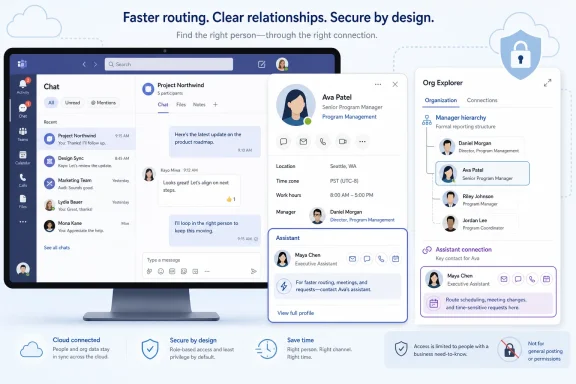
Microsoft plans to bring the Microsoft 365 Assistant field into Teams’ Organization view on desktop, Mac, and web in July 2026, surfacing designated assistant information on profile cards and in Org Explorer for Worldwide standard commercial tenants. The change is small in interface terms but revealing in product strategy: Teams is becoming less a meeting app than the front door to Microsoft’s corporate directory. For users, it promises a faster path to the person who actually keeps executive calendars moving. For administrators, it is another reminder that directory metadata is now user experience, governance surface, and operational infrastructure all at once.
The Assistant field has never been glamorous. In the long life of enterprise identity systems, it sits beside manager, department, title, office, phone number, and the other attributes that make a corporate directory useful only when someone has bothered to keep it current. Microsoft’s new Teams update gives that field a more prominent job: it will appear in the Organization view on the profile card and in Org Explorer.
That matters because the Organization view is where many employees already go when they are not sure how a company actually works. A formal org chart tells you who reports to whom, but an assistant designation tells you something more practical: who can help route a request, coordinate a meeting, or find the right window in an executive’s schedule. In large companies, that distinction is not cosmetic. It is often the difference between a message that disappears into an inbox and a meeting that actually happens.
Microsoft is careful to frame the feature as informational only. The assistant designation does not grant mailbox access, calendar delegation, Teams permissions, management authority, or any change in reporting hierarchy. It is a label, not a role assignment.
That caveat is important, because Teams has become a place where users infer authority from visibility. If a profile card says someone is an assistant, many employees will assume that person has some operational relationship to the executive or manager shown. Microsoft’s implementation may not change permissions, but it will change behavior.
The old model of enterprise software assumed that employees would know where to look. Need a person’s reporting line? Open the directory. Need an assistant? Check Outlook, Delve, an intranet profile, or ask someone nearby. Need to understand who sits under a vice president? Find the org chart tool, assuming your company has licensed one and maintained the data.
The new Microsoft model is more aggressive. It assumes that the directory should appear wherever work happens. If a user is already in Teams looking at a colleague’s profile, Microsoft wants the relevant organizational context to be there too.
There is a logic to that. Hybrid work made informal office navigation less reliable. The executive assistant who once sat outside a door is now a field in a cloud directory, visible to users who may never share a building, time zone, or business unit. Teams is where those users are likely to look first.
Executive coordination runs on unofficial knowledge. Some people know that a chief financial officer’s calendar is managed by one assistant for internal meetings and another for external events. Others know that a regional general manager prefers requests routed through a business manager rather than a direct report. None of that nuance fits neatly into a reporting line.
Microsoft is not solving all of that with one field. But it is making one layer of that knowledge visible in a place where users already make contact decisions. The practical value comes from reducing the number of “Who handles this?” messages that bounce around before a request lands with the right person.
The feature also serves a second audience: assistants themselves. Visibility can reduce misdirected pings to executives, but it can also increase the number of requests routed through support staff. In organizations where assistant roles are well defined, that may be welcome. In organizations where the field is stale, informal, or politically sensitive, it may create friction.
This update does not touch those systems directly. A person displayed as an assistant in Teams does not automatically gain authority to accept meetings, read email, edit calendars, approve requests, or act on behalf of someone else. That is the right design choice.
But users do not always distinguish between displayed relationship and actual authorization. If Teams surfaces an assistant in a highly visible organizational context, employees may treat that person as a sanctioned point of contact. In many cases, that is exactly the intended effect. In some cases, it may outpace the policies behind it.
The burden therefore shifts to administrators and business owners to ensure that the field means what users think it means. A stale assistant value is no longer just a directory annoyance. Once exposed in Teams and Org Explorer, it becomes a misleading workflow cue.
The Teams change raises the cost of that messiness. When directory attributes remain buried in admin tools, bad data mostly irritates IT. When those attributes appear in profile cards and org views, bad data confuses everyone.
This is the quiet story behind many Microsoft 365 improvements. Features that look like interface tweaks increasingly depend on Entra ID, Exchange Online, SharePoint profiles, Viva people data, and Microsoft Graph being accurate enough to trust. The user sees a helpful card. The administrator sees an ecosystem of synchronized attributes and ownership questions.
The assistant field is especially sensitive because it describes a working relationship rather than a static fact. A department name can be broadly correct even when imprecise. An assistant relationship is either current or it is not. If it is wrong, users may send scheduling requests, confidential context, or executive communications to the wrong person.
Adding assistant information introduces a useful non-managerial relationship into that view. That is a subtle but important move. Formal org charts privilege hierarchy. Real work often flows through coordinators, chiefs of staff, executive assistants, program managers, and trusted operators whose authority comes from proximity and responsibility rather than direct reports.
By surfacing assistants, Teams acknowledges that the person who can get something done may not be the person at the top of the card. That is a more honest model of workplace navigation.
Still, Microsoft is keeping the feature conservative. It does not appear to create a broader relationship graph for chiefs of staff, business managers, delegates, or project leads. It exposes a specific existing profile field in more places. That restraint is sensible, but it also shows how much of modern collaboration remains dependent on old directory concepts.
That scope is unsurprising. Microsoft typically brings this kind of people-profile enhancement first to commercial cloud tenants where the modern Teams client, Microsoft 365 profile card, and Org Explorer experiences are most aligned. Government, sovereign, and specialized cloud environments often follow different timelines, if they receive the feature at all.
For WindowsForum readers, the desktop angle is notable because Teams is now a central workplace app on Windows systems, not an optional collaboration add-on. The same profile experience that appears in a browser or on Mac also shapes what users expect in the Windows client. Microsoft’s cross-platform approach here reflects the reality that Teams features are increasingly service-driven rather than tied to a single operating system release.
The roadmap timing also matters because it gives administrators a short runway. A July 2026 general availability target means tenants that care about data quality should not wait until users start asking why an assistant is wrong. This is the sort of change that arrives quietly and becomes a help desk ticket only after someone important notices.
The risk sits elsewhere. Miscommunication can still have consequences. A visible assistant field may encourage employees to send sensitive scheduling context, personnel matters, travel details, customer issues, or meeting agendas to someone they believe is the appropriate coordinator.
In most organizations, that is probably fine when the field is accurate. Executive assistants and coordinators routinely handle sensitive logistics. But if the data is outdated, or if the assistant relationship was entered for one purpose and interpreted for another, Teams can amplify the mistake.
There is also a privacy dimension. Some executives may be comfortable with assistant visibility. Others may not want the relationship exposed broadly, especially in organizations where internal contact boundaries are tightly managed. Microsoft’s roadmap description does not suggest the field creates new data; it changes where existing assistant information is displayed. That distinction may matter technically, but users experience visibility, not data lineage.
In some companies, HR systems are authoritative for people data. In others, executive support teams maintain assistant relationships manually. Exchange administrators may be involved if assistant information is tied to mailbox or contact attributes. Identity teams may own synchronization from on-premises Active Directory to Microsoft Entra ID. The answer varies, and the variation is exactly why these fields become stale.
Before the July 2026 target, administrators should identify whether assistant data exists, where it originates, how it syncs, and who is allowed to change it. They should also decide whether the field is meant to indicate an executive assistant, an administrative assistant, a delegate, a scheduler, a support contact, or some other role. Microsoft’s interface will show the field; it will not resolve the organization’s semantics.
There is a cultural piece too. If assistants are going to become more visible through Teams, they should know. Their managers should know. Executives should know. A field that quietly existed in a directory can become a front-door contact point once exposed in a daily collaboration app.
That people layer is valuable because modern work is messy. Employees need to know not only who someone is, but where they sit, what they work on, what skills they have, who supports them, and how best to reach them. Microsoft has strong incentives to make that knowledge available inside its own apps rather than leave it to third-party intranet tools or informal Slack messages.
The arrival of Copilot makes this more consequential. Even when this specific roadmap item is not an AI feature, the quality of organizational metadata affects how useful AI-assisted work can become. If Microsoft 365 understands people, relationships, skills, and responsibilities more accurately, it can make better suggestions, route users more intelligently, and reduce friction across workflows.
That is also why administrators should resist treating this as a minor cosmetic change. The same metadata that powers a helpful Teams profile card may become part of broader discovery and assistance experiences later. Today it tells a user whom to contact for scheduling. Tomorrow it may influence how workplace agents interpret organizational context.
For Microsoft, this is a sensible bet. Teams is already where many users spend their workday, and reducing context switching is one of the few productivity promises that still feels concrete. Nobody wants to open a separate directory app just to find the person who can coordinate a meeting.
For IT, the same bet creates maintenance pressure. The more Microsoft turns identity data into visible workflow guidance, the less tolerance users will have for inaccuracies. A broken org chart once looked like an HR problem. In Teams, it looks like the product is wrong.
That perception matters. Users rarely know whether a bad profile card comes from Entra ID, Exchange, HR sync, Graph, or an abandoned manual update. They know only that Teams showed them something inaccurate. Microsoft owns the interface, but the tenant owns much of the truth behind it.
Microsoft’s assistant-field update will not transform Teams by itself, and it will not fix the deeper chaos of enterprise scheduling. But it is a revealing example of where Microsoft is taking the product: toward a workplace interface where people, roles, relationships, and coordination cues are surfaced at the moment users need them. If organizations treat the field as a throwaway directory relic, the result will be confusion in a prettier card. If they treat it as part of the company’s operational map, Teams becomes a little less like a chat app and a little more like the connective tissue Microsoft has always wanted it to be.
 Microsoft Turns a Directory Field Into a Workplace Shortcut
The Assistant field has never been glamorous. In the long life of enterprise identity systems, it sits beside manager, department, title, office, phone number, and the other attributes that make a corporate directory useful only when someone has bothered to keep it current. Microsoft’s new Teams update gives that field a more prominent job: it will appear in the Organization view on the profile card and in Org Explorer.That matters because the Organization view is where many employees already go when they are not sure how a company actually works. A formal org chart tells you who reports to whom, but an assistant designation tells you something more practical: who can help route a request, coordinate a meeting, or find the right window in an executive’s schedule. In large companies, that distinction is not cosmetic. It is often the difference between a message that disappears into an inbox and a meeting that actually happens.
Microsoft is careful to frame the feature as informational only. The assistant designation does not grant mailbox access, calendar delegation, Teams permissions, management authority, or any change in reporting hierarchy. It is a label, not a role assignment.
That caveat is important, because Teams has become a place where users infer authority from visibility. If a profile card says someone is an assistant, many employees will assume that person has some operational relationship to the executive or manager shown. Microsoft’s implementation may not change permissions, but it will change behavior.
Teams Keeps Absorbing the Corporate Intranet
Teams began as a Slack competitor, became the default collaboration shell for Microsoft 365, and has since been steadily absorbing functions that once lived in separate portals. Meetings, calls, chat, files, channels, apps, Viva surfaces, Copilot entry points, and now richer organization views all compete for space inside the same daily work canvas. The assistant field belongs to this broader consolidation.The old model of enterprise software assumed that employees would know where to look. Need a person’s reporting line? Open the directory. Need an assistant? Check Outlook, Delve, an intranet profile, or ask someone nearby. Need to understand who sits under a vice president? Find the org chart tool, assuming your company has licensed one and maintained the data.
The new Microsoft model is more aggressive. It assumes that the directory should appear wherever work happens. If a user is already in Teams looking at a colleague’s profile, Microsoft wants the relevant organizational context to be there too.
There is a logic to that. Hybrid work made informal office navigation less reliable. The executive assistant who once sat outside a door is now a field in a cloud directory, visible to users who may never share a building, time zone, or business unit. Teams is where those users are likely to look first.
The Assistant Field Is Small Because the Workflow Is Huge
The obvious use case is scheduling. An employee needs time with a senior leader, opens the leader’s profile card, checks the Organization view, sees the assistant, and contacts the right person. That sounds mundane until you consider how much enterprise time is wasted figuring out who can unblock access to whom.Executive coordination runs on unofficial knowledge. Some people know that a chief financial officer’s calendar is managed by one assistant for internal meetings and another for external events. Others know that a regional general manager prefers requests routed through a business manager rather than a direct report. None of that nuance fits neatly into a reporting line.
Microsoft is not solving all of that with one field. But it is making one layer of that knowledge visible in a place where users already make contact decisions. The practical value comes from reducing the number of “Who handles this?” messages that bounce around before a request lands with the right person.
The feature also serves a second audience: assistants themselves. Visibility can reduce misdirected pings to executives, but it can also increase the number of requests routed through support staff. In organizations where assistant roles are well defined, that may be welcome. In organizations where the field is stale, informal, or politically sensitive, it may create friction.
Informational Only Is Doing a Lot of Work
Microsoft’s note that the assistant designation is informational only is more than legal hygiene. It is the line between profile enrichment and access control. In Microsoft 365, delegate rights, mailbox permissions, calendar sharing, Teams policies, Entra ID roles, Exchange settings, and organizational hierarchy all live in systems where mistakes can carry real consequences.This update does not touch those systems directly. A person displayed as an assistant in Teams does not automatically gain authority to accept meetings, read email, edit calendars, approve requests, or act on behalf of someone else. That is the right design choice.
But users do not always distinguish between displayed relationship and actual authorization. If Teams surfaces an assistant in a highly visible organizational context, employees may treat that person as a sanctioned point of contact. In many cases, that is exactly the intended effect. In some cases, it may outpace the policies behind it.
The burden therefore shifts to administrators and business owners to ensure that the field means what users think it means. A stale assistant value is no longer just a directory annoyance. Once exposed in Teams and Org Explorer, it becomes a misleading workflow cue.
Directory Hygiene Moves From Back Office to Front Stage
Every organization has identity data debt. Titles remain after reorganizations. Managers are wrong for weeks after transfers. Office locations reflect buildings nobody visits. Phone numbers point to abandoned desks. Assistant fields, where used at all, may be maintained by HR, executive offices, Exchange administrators, identity teams, or no one consistently.The Teams change raises the cost of that messiness. When directory attributes remain buried in admin tools, bad data mostly irritates IT. When those attributes appear in profile cards and org views, bad data confuses everyone.
This is the quiet story behind many Microsoft 365 improvements. Features that look like interface tweaks increasingly depend on Entra ID, Exchange Online, SharePoint profiles, Viva people data, and Microsoft Graph being accurate enough to trust. The user sees a helpful card. The administrator sees an ecosystem of synchronized attributes and ownership questions.
The assistant field is especially sensitive because it describes a working relationship rather than a static fact. A department name can be broadly correct even when imprecise. An assistant relationship is either current or it is not. If it is wrong, users may send scheduling requests, confidential context, or executive communications to the wrong person.
Org Explorer Becomes More Useful, and More Political
Org Explorer is Microsoft’s answer to a problem that large companies have never really solved: employees need to understand the organization, but the organization keeps changing. Reporting lines shift, dotted-line relationships multiply, and job titles become less useful as teams become more cross-functional. A richer Org Explorer can help, but it also makes visible the politics of how a company describes itself.Adding assistant information introduces a useful non-managerial relationship into that view. That is a subtle but important move. Formal org charts privilege hierarchy. Real work often flows through coordinators, chiefs of staff, executive assistants, program managers, and trusted operators whose authority comes from proximity and responsibility rather than direct reports.
By surfacing assistants, Teams acknowledges that the person who can get something done may not be the person at the top of the card. That is a more honest model of workplace navigation.
Still, Microsoft is keeping the feature conservative. It does not appear to create a broader relationship graph for chiefs of staff, business managers, delegates, or project leads. It exposes a specific existing profile field in more places. That restraint is sensible, but it also shows how much of modern collaboration remains dependent on old directory concepts.
The Release Plan Is Narrow, but the Signal Is Broad
According to the roadmap entry, the feature is in development and targeted for general availability in July 2026. The supported platforms are Teams desktop, Mac, and web. The rollout applies to Worldwide standard multi-tenant cloud environments and is listed for General Availability and Targeted Release rings.That scope is unsurprising. Microsoft typically brings this kind of people-profile enhancement first to commercial cloud tenants where the modern Teams client, Microsoft 365 profile card, and Org Explorer experiences are most aligned. Government, sovereign, and specialized cloud environments often follow different timelines, if they receive the feature at all.
For WindowsForum readers, the desktop angle is notable because Teams is now a central workplace app on Windows systems, not an optional collaboration add-on. The same profile experience that appears in a browser or on Mac also shapes what users expect in the Windows client. Microsoft’s cross-platform approach here reflects the reality that Teams features are increasingly service-driven rather than tied to a single operating system release.
The roadmap timing also matters because it gives administrators a short runway. A July 2026 general availability target means tenants that care about data quality should not wait until users start asking why an assistant is wrong. This is the sort of change that arrives quietly and becomes a help desk ticket only after someone important notices.
The Risk Is Not Security Escalation; It Is Miscommunication
The most reassuring part of the update is also the easiest to overlook: no permissions change. Security teams do not need to treat the assistant field as a new access pathway. It is not a hidden delegation mechanism, and it should not alter who can do what inside Microsoft 365.The risk sits elsewhere. Miscommunication can still have consequences. A visible assistant field may encourage employees to send sensitive scheduling context, personnel matters, travel details, customer issues, or meeting agendas to someone they believe is the appropriate coordinator.
In most organizations, that is probably fine when the field is accurate. Executive assistants and coordinators routinely handle sensitive logistics. But if the data is outdated, or if the assistant relationship was entered for one purpose and interpreted for another, Teams can amplify the mistake.
There is also a privacy dimension. Some executives may be comfortable with assistant visibility. Others may not want the relationship exposed broadly, especially in organizations where internal contact boundaries are tightly managed. Microsoft’s roadmap description does not suggest the field creates new data; it changes where existing assistant information is displayed. That distinction may matter technically, but users experience visibility, not data lineage.
Admins Need an Owner Before Users Need the Field
The practical question for IT is not whether the feature should be enabled. If Microsoft ships it into the standard Teams profile experience, many tenants will simply receive it as part of the service. The better question is who owns the assistant attribute and the process around it.In some companies, HR systems are authoritative for people data. In others, executive support teams maintain assistant relationships manually. Exchange administrators may be involved if assistant information is tied to mailbox or contact attributes. Identity teams may own synchronization from on-premises Active Directory to Microsoft Entra ID. The answer varies, and the variation is exactly why these fields become stale.
Before the July 2026 target, administrators should identify whether assistant data exists, where it originates, how it syncs, and who is allowed to change it. They should also decide whether the field is meant to indicate an executive assistant, an administrative assistant, a delegate, a scheduler, a support contact, or some other role. Microsoft’s interface will show the field; it will not resolve the organization’s semantics.
There is a cultural piece too. If assistants are going to become more visible through Teams, they should know. Their managers should know. Executives should know. A field that quietly existed in a directory can become a front-door contact point once exposed in a daily collaboration app.
Microsoft’s People Layer Is Becoming a Product in Its Own Right
This update sits alongside a larger Microsoft push to make people information more actionable across Microsoft 365. Profile cards have been gaining richer signals, Org Explorer has become more prominent, and Teams increasingly treats the user profile as a navigation hub. The company is building a people layer that sits beneath collaboration, search, meetings, and Copilot.That people layer is valuable because modern work is messy. Employees need to know not only who someone is, but where they sit, what they work on, what skills they have, who supports them, and how best to reach them. Microsoft has strong incentives to make that knowledge available inside its own apps rather than leave it to third-party intranet tools or informal Slack messages.
The arrival of Copilot makes this more consequential. Even when this specific roadmap item is not an AI feature, the quality of organizational metadata affects how useful AI-assisted work can become. If Microsoft 365 understands people, relationships, skills, and responsibilities more accurately, it can make better suggestions, route users more intelligently, and reduce friction across workflows.
That is also why administrators should resist treating this as a minor cosmetic change. The same metadata that powers a helpful Teams profile card may become part of broader discovery and assistance experiences later. Today it tells a user whom to contact for scheduling. Tomorrow it may influence how workplace agents interpret organizational context.
Small Fields Now Carry Enterprise-Scale Meaning
The assistant field is a reminder that enterprise software often changes through accumulation rather than revolution. One profile attribute appears in one more place. A card becomes slightly more informative. An org view becomes slightly more useful. Then, suddenly, the directory is no longer a backend record; it is the map employees use to navigate the company.For Microsoft, this is a sensible bet. Teams is already where many users spend their workday, and reducing context switching is one of the few productivity promises that still feels concrete. Nobody wants to open a separate directory app just to find the person who can coordinate a meeting.
For IT, the same bet creates maintenance pressure. The more Microsoft turns identity data into visible workflow guidance, the less tolerance users will have for inaccuracies. A broken org chart once looked like an HR problem. In Teams, it looks like the product is wrong.
That perception matters. Users rarely know whether a bad profile card comes from Entra ID, Exchange, HR sync, Graph, or an abandoned manual update. They know only that Teams showed them something inaccurate. Microsoft owns the interface, but the tenant owns much of the truth behind it.
The July Rollout Gives IT a Narrow Window to Clean the Map
The concrete action items are not dramatic, but they are worth doing before the feature lands broadly. This is one of those Microsoft 365 changes that rewards boring preparation: verify the data, define the owner, and tell the affected users what is coming.- Organizations should audit whether assistant information is currently populated and whether it reflects real working relationships.
- Administrators should identify the authoritative source for the assistant field before users start relying on it in Teams.
- Executive support teams should be told that their visibility may increase in profile cards and Org Explorer.
- Security teams should understand that the feature does not grant permissions, even though users may interpret it as an endorsed contact path.
- Help desk teams should be ready for reports of incorrect assistant information after the Teams experience becomes more visible.
- Tenants using Targeted Release should watch the feature early, because profile-card changes often reveal data problems that were previously hidden.
Microsoft’s assistant-field update will not transform Teams by itself, and it will not fix the deeper chaos of enterprise scheduling. But it is a revealing example of where Microsoft is taking the product: toward a workplace interface where people, roles, relationships, and coordination cues are surfaced at the moment users need them. If organizations treat the field as a throwaway directory relic, the result will be confusion in a prettier card. If they treat it as part of the company’s operational map, Teams becomes a little less like a chat app and a little more like the connective tissue Microsoft has always wanted it to be.
References
- Primary source: Microsoft 365 Roadmap
Published: 2026-06-25T23:15:45.5477468Z
Microsoft 365 Roadmap | Microsoft 365
The Microsoft 365 Roadmap lists updates that are currently planned for applicable subscribers. Check here for more information on the status of new features and updates.www.microsoft.com
- Official source: support.microsoft.com
Add an assistant on your profile in Microsoft 365 - Microsoft Support
 support.microsoft.com
- Official source: learn.microsoft.com
- Official source: marketplace.microsoft.com
Org Explorer
Visualize your entire organization in a single, intuitive and interactive view.marketplace.microsoft.com
- Related coverage: mspoweruser.com
Microsoft working on expanded view for Teams profile cards
Microsoft is working on an expanded profile view for Teams profile. The feature will help get users to get a "richer view of a person's profile, such as their contact data, custom properties, and their LinkedIn information." However, it will be available to desktop users only. Microsoft is... mspoweruser.com
- Related coverage: m365admin.handsontek.net
Teams update: Expanded view of the profile card in Teams - M365 Admin
We’re adding a new feature to Teams Beginning in February, users in your organization will be able to use expanded views of the profile card in Teams. The expanded view is already available in Outlook and includes more information, like an overview of the profile, contact information...m365admin.handsontek.net
- Related coverage: windowscentral.com
Microsoft Teams will help assign tasks with "People Skills" | Windows Central
Microsoft is expanding People Skills on the Microsoft 365 profile card in Microsoft Teams, making it easier to understand and organize your colleagues.www.windowscentral.com - Official source: cdn-dynmedia-1.microsoft.com
