

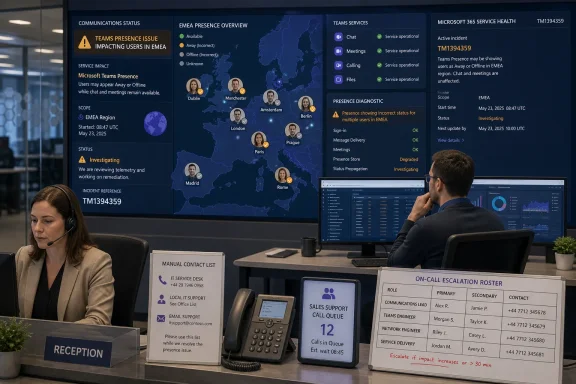
When Microsoft Teams showed active users as Away or Offline during the June 17 EMEA incident, the right first move was not to clear caches, reinstall the client, or reset user presence. Verify whether the problem is broad, check Microsoft 365 Service Health for incident TM1394359, run Microsoft’s Teams Presence diagnostic for a representative user, and immediately protect reception, call-queue, and escalation workflows that depend on presence.
Microsoft said TM1394359 primarily affected EMEA, although users in other regions could see incorrect status when they interacted with affected people. The company attributed the failure to a recent Teams traffic-routing change, while reports from UK and European organizations indicated that messaging and other Teams functions could remain available even when presence was wrong.
Presence is easy to dismiss as cosmetic until a receptionist cannot see whether the on-call engineer is reachable, a call queue routes poorly, or staff choose the wrong escalation path. The June 17 event is a useful reminder that presence is a shared cloud signal, not merely a local Teams client indicator.
Use this decision tree before assigning endpoint work:
If a user appears incorrectly to colleagues across offices and devices, the issue may be tied to the affected user’s presence state, account, calendar integration, or a Microsoft-side service path. If only one observer sees incorrect status, concentrate first on that observer’s Teams session, connectivity, and client environment. If all users in one office see stale or incorrect presence but users elsewhere do not, investigate local egress, DNS, proxy, inspection, or network-policy differences.
A simple evidence sheet can prevent an outage bridge from turning into guesswork:
For wider perspective, WindowsForum’s coverage of the June 17 reports documented the early Offline-presence symptoms, while the February Teams incident showed how a different underlying service component can produce a very different user-facing failure. The operational lesson is to classify the symptom before choosing the repair.
For an affected user, administrators and non-administrators can also use Microsoft’s Teams Presence Based on Calendar Events connectivity test in the Microsoft Remote Connectivity Analyzer. Sign in with the affected user’s credentials, enter and verify the displayed code, accept the terms, and select Perform Test. The results identify whether the checks passed, failed, or completed with warnings.
That test is especially relevant when the complaint is tied to meetings, calendar-driven availability, or a status that looks wrong only around scheduled events. It is not available in GCC and GCC High environments, and Microsoft’s Teams Presence self-help diagnostic is also unavailable in Microsoft 365 Government, Microsoft 365 operated by 21Vianet, and Microsoft 365 Germany. Admins in those environments should document the symptom matrix carefully and use their available support channels rather than assuming the absence of the diagnostic means the issue is client-side.
Identity investigation should be narrow and evidence-led. Confirm that the issue follows the same user across observers; then check whether the account is behaving normally in Teams and whether calendar-related presence tests identify a specific failure. Do not turn a cloud incident into an identity outage by making broad account changes without a diagnostic finding.
During a confirmed or likely presence incident, tell call-queue owners and reception staff to use a temporary contact method that does not depend on the green, yellow, or gray indicator. That may mean a defined duty roster, a manually maintained escalation channel, direct phone procedures, or a short-term shared handoff process. The important point is that “Offline” must not be interpreted as “unreachable” while the service signal is unreliable.
The internal notice should be blunt and operational:
Clearing Teams data, reinstalling the app, forcing users to reauthenticate, or changing local Windows settings may create temporary correlation without proving causation. At scale, those actions consume support capacity, interrupt working features, erase useful comparison points, and can complicate recovery once Microsoft resolves the service issue.
There is a place for endpoint troubleshooting—but only after the evidence excludes a broader incident. A single user whose status is incorrect only in one client, one network, or one device is a candidate for local investigation. A cross-office pattern in an affected region is a candidate for Service Health, a controlled diagnostic, and incident communications.
The sharper takeaway from June 17 is that presence is an operational dependency, not a decorative UI element. Teams administrators should add a presence-specific branch to their incident runbook: test scope, inspect Service Health, run the diagnostic on a representative account, activate routing fallbacks, and defer destructive client changes until the platform itself is cleared.
Microsoft said TM1394359 primarily affected EMEA, although users in other regions could see incorrect status when they interacted with affected people. The company attributed the failure to a recent Teams traffic-routing change, while reports from UK and European organizations indicated that messaging and other Teams functions could remain available even when presence was wrong.
 Start by deciding whether this is a service incident
Presence is easy to dismiss as cosmetic until a receptionist cannot see whether the on-call engineer is reachable, a call queue routes poorly, or staff choose the wrong escalation path. The June 17 event is a useful reminder that presence is a shared cloud signal, not merely a local Teams client indicator.Use this decision tree before assigning endpoint work:
- Confirm the symptom with two or three users in different offices, networks, and Teams clients. Ask whether the same people appear incorrectly to multiple observers, rather than relying on one user’s self-reported status.
- Establish geographic and organizational scope. If multiple users in the UK or Europe see the same colleagues as Away or Offline, especially across different devices, treat it as a potential Microsoft-side problem rather than a single Windows or identity fault.
- Open the Microsoft 365 admin center and review Service Health. During the June 17 incident, the relevant reference was TM1394359. A matching advisory changes the response: preserve evidence, communicate operational impact, and stop broad client remediation.
- Run the Teams Presence diagnostic for one affected account. In the Microsoft 365 admin center, open the Teams Presence diagnostic, select Run Tests, enter the affected user’s email address in the Username or Email field, and select Run Tests again. Review the diagnostic’s results and follow its resolution links only if it identifies a tenant, account, or configuration issue.
- If Service Health is clear and the diagnostic does not point to a broad fault, test the identity, calendar, network, and client branches in that order. Avoid changing several variables at once; presence troubleshooting becomes meaningless when administrators reset identities, network paths, and clients simultaneously.
The fastest scope test separates tenant trouble from local trouble
The key question is not whether an affected person appears Offline. It is whether the error follows the person, the viewer, or the network.If a user appears incorrectly to colleagues across offices and devices, the issue may be tied to the affected user’s presence state, account, calendar integration, or a Microsoft-side service path. If only one observer sees incorrect status, concentrate first on that observer’s Teams session, connectivity, and client environment. If all users in one office see stale or incorrect presence but users elsewhere do not, investigate local egress, DNS, proxy, inspection, or network-policy differences.
A simple evidence sheet can prevent an outage bridge from turning into guesswork:
- Record the affected person, the observer, each user’s region, and whether the symptom appears in more than one Teams client.
- Record whether messaging, calls, meetings, and contact search still work while presence is wrong.
- Record the time the error was first seen and whether it changes after the user unlocks their PC, resumes activity, or changes device.
- Record the Service Health incident reference and its stated regional impact before escalating internally.
For wider perspective, WindowsForum’s coverage of the June 17 reports documented the early Offline-presence symptoms, while the February Teams incident showed how a different underlying service component can produce a very different user-facing failure. The operational lesson is to classify the symptom before choosing the repair.
The account and calendar branch still matters after Service Health is clear
When there is no matching advisory and scope is limited, Microsoft’s documented test path should come before invasive client work. Presence can legitimately change when a desktop is locked, idle, asleep, or when the user is active in the Teams mobile app. Microsoft notes that Teams can show a user as Away after more than five minutes of desktop inactivity; the real problem is when activity resumes but presence does not return as expected.For an affected user, administrators and non-administrators can also use Microsoft’s Teams Presence Based on Calendar Events connectivity test in the Microsoft Remote Connectivity Analyzer. Sign in with the affected user’s credentials, enter and verify the displayed code, accept the terms, and select Perform Test. The results identify whether the checks passed, failed, or completed with warnings.
That test is especially relevant when the complaint is tied to meetings, calendar-driven availability, or a status that looks wrong only around scheduled events. It is not available in GCC and GCC High environments, and Microsoft’s Teams Presence self-help diagnostic is also unavailable in Microsoft 365 Government, Microsoft 365 operated by 21Vianet, and Microsoft 365 Germany. Admins in those environments should document the symptom matrix carefully and use their available support channels rather than assuming the absence of the diagnostic means the issue is client-side.
Identity investigation should be narrow and evidence-led. Confirm that the issue follows the same user across observers; then check whether the account is behaving normally in Teams and whether calendar-related presence tests identify a specific failure. Do not turn a cloud incident into an identity outage by making broad account changes without a diagnostic finding.
Call queues and reception desks need a manual fallback
Presence outages disproportionately affect the people who coordinate work for everyone else. An individual contributor may simply send a message instead of calling; a front desk, dispatcher, help desk, or incident commander may be unable to tell who is available at all.During a confirmed or likely presence incident, tell call-queue owners and reception staff to use a temporary contact method that does not depend on the green, yellow, or gray indicator. That may mean a defined duty roster, a manually maintained escalation channel, direct phone procedures, or a short-term shared handoff process. The important point is that “Offline” must not be interpreted as “unreachable” while the service signal is unreliable.
The internal notice should be blunt and operational:
This is also where administrators should protect the help desk from unnecessary ticket volume. State what users should report—who appears wrong, who is viewing them, when it began, and whether calls and messages still work—and state what they should not do, including repeated sign-outs, reinstallations, or profile resets.Teams presence may be inaccurate for some users. Do not use Away or Offline status as a decision point for urgent routing. Use the published escalation roster or direct contact method until IT confirms restoration.
Why cache-clearing is the wrong reflex during a routing incident
Microsoft documented the June 17 cause as a recent Teams traffic-routing change, not an endpoint-specific client defect. That distinction should determine the repair strategy.Clearing Teams data, reinstalling the app, forcing users to reauthenticate, or changing local Windows settings may create temporary correlation without proving causation. At scale, those actions consume support capacity, interrupt working features, erase useful comparison points, and can complicate recovery once Microsoft resolves the service issue.
There is a place for endpoint troubleshooting—but only after the evidence excludes a broader incident. A single user whose status is incorrect only in one client, one network, or one device is a candidate for local investigation. A cross-office pattern in an affected region is a candidate for Service Health, a controlled diagnostic, and incident communications.
The sharper takeaway from June 17 is that presence is an operational dependency, not a decorative UI element. Teams administrators should add a presence-specific branch to their incident runbook: test scope, inspect Service Health, run the diagnostic on a representative account, activate routing fallbacks, and defer destructive client changes until the platform itself is cleared.
Frequently Asked Questions
Should admins reinstall Teams when users appear Offline?
Not first. Check scope and Microsoft 365 Service Health, then run the Teams Presence diagnostic for a representative affected user. Reinstallation is a local remedy and does not address a Microsoft-side routing incident.Can Teams presence be wrong while chat and meetings still work?
Yes. Reports from the June 17 EMEA incident indicated that incorrect presence could occur while other Teams functions remained available.What should a receptionist do during a presence outage?
Use an approved manual escalation roster or direct contact method. Do not treat an Offline or Away indicator as confirmation that a person cannot take an urgent call.What is the next practical runbook improvement?
Add a documented fallback for call queues, reception, and on-call routing that does not rely on Teams presence. The next incident will be easier to manage if the organization has already decided how to route urgent work without it.References
- Primary source: learn.microsoft.com
Loading…
learn.microsoft.com - Independent coverage: mailservices.isc.upenn.edu
Loading…
mailservices.isc.upenn.edu - Independent coverage: knowall.net
Loading…
www.knowall.net - Independent coverage: reddit.com
Loading…
www.reddit.com - Independent coverage: vanlett.com
Loading…
vanlett.com - Independent coverage: downforeveryoneorjustme.com
Is Microsoft Teams down? Live status and problems past 24 hours
Live problems for Microsoft Teams. Error received? Down? Slow? Check what is going on. downforeveryoneorjustme.com