

Microsoft Teams users are running into an odd but disruptive regression: the right-click Paste option in chats has gone grey, even though keyboard-based paste still works. The pattern matters because Microsoft has now tied the problem to a recent Microsoft Edge update, underscoring how tightly Teams depends on Edge WebView2 and related browser components. For enterprises that have already standardized on the new Teams client, this is not just a cosmetic annoyance; it is a reminder that a browser-side regression can cascade into one of Microsoft’s most business-critical collaboration tools. The current workaround is simple, but the architectural lesson is broader and more uncomfortable.
The latest Teams paste issue is a classic example of modern app design producing modern failure modes. Teams is no longer a self-contained desktop program in the old sense; it increasingly behaves like a shell wrapped around web technologies, with Microsoft Edge WebView2 powering large parts of the experience. That design gives Microsoft a faster release cadence and more consistent rendering across platforms, but it also means that a change in one layer can surface as a failure in another. When the browser engine changes, Teams can inherit both the benefits and the bugs.
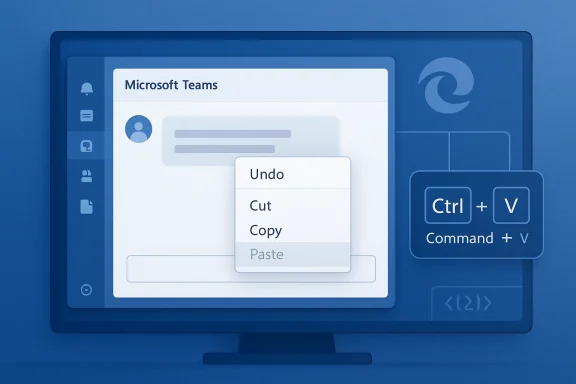
The specific symptom is straightforward. Users report that when they right-click inside a Teams chat or message box, the Paste command is disabled or unavailable, while standard keyboard shortcuts continue to function. In practical terms, that means people can still paste with Ctrl+V on Windows or Command+V on macOS, but the context menu path is blocked. That distinction matters because many users rely on right-click workflows for speed, accessibility, or muscle memory.
Microsoft has reportedly confirmed that the issue stems from a code regression in a recent Edge update. In other words, the browser component that Teams leans on introduced behavior that broke the paste context menu in the desktop client. The problem has appeared on build 26072.519.4556.7438, and user reports suggest it affects a wide range of content types, including text, URLs, and images. The important part is not only that Teams is affected, but that the failure crosses the boundary between app and browser in a way many users will never see coming.
The timing also exposes a broader ecosystem reality. Teams is not operating in isolation; it sits inside Microsoft 365, often alongside Edge, Outlook, OneDrive, SharePoint, and Copilot-linked workflows. That interconnectedness can be a competitive advantage, but it also means faults are rarely local. A bug in one component can affect everyday collaboration across the stack.
That architecture is not unique to Teams, but Teams is especially sensitive because it is used all day, every day, by millions of people. Collaboration software lives in the seams of business processes: it handles quick notes, screenshots, URLs, files, meeting links, and back-and-forth approvals. If paste breaks, users feel it immediately because they are constantly moving content into chats and channels. A minor UI regression can therefore become a major productivity drag.
Microsoft has also been steadily normalizing the use of browser-based delivery for desktop experiences. Teams for Web offers near feature parity with the desktop client, and the company recommends Edge for several Microsoft 365 workflows. Meanwhile, the new Teams client is built to keep pace with the latest Edge and Chromium fixes. That creates a tight coupling between the browser stack and the user-facing app stack. The upside is speed; the downside is shared fragility.
This is not the first time Teams users have seen weird context-menu or paste-related behavior. Microsoft Q&A and community forums have carried similar complaints for years, often with temporary fixes such as clearing cache, reinstalling, or using keyboard shortcuts. What is different here is the explicit acknowledgement that the root cause sits in a recent Edge update, not in a generic local configuration problem. That distinction shifts the story from isolated troubleshooting to platform-level regression.
The practical consequence is that debugging becomes harder. A support engineer may think they are dealing with a Teams defect when the fault is actually in a browser layer. Conversely, an Edge update that seems harmless in isolation can trigger downstream failures in productivity apps. That is exactly the kind of cross-layer failure that frustrates IT admins because the visible symptom appears in one product while the fault lives in another.
Importantly, the clipboard itself is not broken. The keyboard shortcut still works, which points away from a system-wide paste failure and toward a context-menu or UI-layer regression. That subtle distinction helps explain why many users can keep working if they switch habits, but it does not reduce the impact. If a control disappears from the interface, the app still feels broken even when a backdoor remains open. That is especially true for casual users who may never think to try a shortcut.
The build number cited in user reports, 26072.519.4556.7438, is useful because it gives IT teams a concrete fingerprint. When a problem clusters around one version, it becomes easier to compare impacted systems and see whether the same Edge or WebView2 release is present. It also helps distinguish a regression from tenant policy behavior, which is important in large organizations where admins often suspect permissions first.
The problem also creates a subtle support burden. Help desks must answer questions that look like local corruption, policy blocks, or permissions problems, even though the root cause may be an upstream update. That means more time spent clearing cache, reinstalling clients, and validating versions before the real cause is identified.
The company is also said to be deploying a fix in phases and monitoring telemetry before fully expanding it. That is a standard enterprise approach, especially when the affected component sits inside a widely deployed collaboration tool. The downside is that phased rollout can leave some users stuck on the broken behavior for longer than they would like. That gap between fix availability and fix reach is where support pain often lives.
At the same time, phased deployment can feel like a non-answer to users who need their chat client to work now. When a bug interrupts a daily business process, “the fix is rolling out gradually” can sound uncomfortably vague. For affected teams, the distinction between a staged fix and a complete fix is the difference between a workaround and a restored workflow.
That blur is strategically useful because it lets Microsoft ship consistent experiences across browser, desktop, and cloud. But it also means that failures can ripple across products in ways that customers are less able to isolate. For administrators, the outcome is more dependency tracking, not less.
The upside is obvious. Microsoft can improve rendering, security, and feature parity by shipping a common browser core. The downside is that the browser core becomes a shared failure domain. If something breaks in the engine, it can affect Teams, Outlook add-ins, and other app surfaces that users assume are independent.
That is why IT teams should treat WebView2 like a first-class platform dependency rather than a background helper. Microsoft’s own Teams guidance says WebView2 should remain on a current supported version, and it notes that third-party tools can interfere with Teams and WebView2 behavior. In other words, Microsoft already acknowledges that this layer is operationally sensitive.
For users, the lesson is less about blaming Edge and more about understanding modern software architecture. The more a desktop app behaves like a web app, the more it inherits web-app failure modes. That tradeoff is not inherently bad, but it does require better communication and faster rollback discipline.
The biggest enterprise cost is not the technical workaround, which is easy enough. It is the cognitive load imposed on thousands of users who must remember to switch from right-click to keyboard shortcuts. That kind of friction compounds across departments and shifts. In a large organization, even a tiny UI regression can create measurable delay.
There is also a policy angle. Some enterprises restrict browser updates or stage them through managed rings, while others allow broader auto-update behavior. If a browser update is the trigger, update governance suddenly matters more. Organizations that have historically treated browser versions as background maintenance may now need to think about them as app-stability inputs.
The consumer impact is also reputational. Teams already carries baggage for many people because it is associated with workplace friction, meetings, and Microsoft account complexity. When a familiar action like paste stops working from the context menu, it reinforces the idea that Microsoft software can be powerful but occasionally brittle. That perception matters, especially when users compare Teams to simpler consumer chat apps.
For light users, the effect can be short-lived if Microsoft pushes the fix quickly. For heavier users, however, even a brief interruption can be enough to create resentment. Small errors in frequently repeated interactions are the fastest way to make an application feel unstable.
That is why bugs like this should not be waved away as “just use the keyboard.” The real-world usability impact is broader than that phrase suggests. A resilient collaboration tool should preserve multiple paths to the same action.
The other practical response is to avoid assuming the problem is on the user’s machine. Reinstalling Teams, clearing cache, and rebooting may not help if the trigger is a browser-side regression. That is why administrators should avoid sending users into repetitive repair loops unless there is evidence the local environment is actually damaged.
That said, administrators should still validate whether the issue is universal or limited to particular rings, devices, or update channels. Not every symptom with a broad footprint has the same root cause everywhere. Version-specific behavior remains the most important clue.
Rivals such as Slack, Zoom Team Chat, and browser-native collaboration tools may not be free of bugs, but they do not always carry the same degree of shared-stack exposure. Microsoft’s challenge is that its integration story is both its differentiator and its vulnerability. The tighter the integration, the more one product’s bug can damage another product’s trust.
There is a second strategic implication: Windows administrators may become more cautious about accepting browser changes on the same cadence as collaboration app changes. Even when both are meant to improve rapidly, the overlap can create instability windows. That is a governance problem as much as a product one.
Either way, the lesson is clear. Microsoft’s platform advantage depends on making integration feel seamless. When it does not, the seams become visible in the least forgiving places: everyday productivity tasks.
What happens next will also say something about Microsoft’s ability to manage dependencies across Teams and Edge. The company has invested heavily in making its web and desktop experiences feel unified, and that strategy will keep paying dividends only if the update discipline behind it stays strong. The more Microsoft relies on shared runtimes, the more important it becomes to isolate problems before they spread.
Source: Windows Report https://windowsreport.com/microsoft-teams-right-click-paste-broken-after-edge-update/
 Overview
The latest Teams paste issue is a classic example of modern app design producing modern failure modes. Teams is no longer a self-contained desktop program in the old sense; it increasingly behaves like a shell wrapped around web technologies, with Microsoft Edge WebView2 powering large parts of the experience. That design gives Microsoft a faster release cadence and more consistent rendering across platforms, but it also means that a change in one layer can surface as a failure in another. When the browser engine changes, Teams can inherit both the benefits and the bugs.The specific symptom is straightforward. Users report that when they right-click inside a Teams chat or message box, the Paste command is disabled or unavailable, while standard keyboard shortcuts continue to function. In practical terms, that means people can still paste with Ctrl+V on Windows or Command+V on macOS, but the context menu path is blocked. That distinction matters because many users rely on right-click workflows for speed, accessibility, or muscle memory.
Microsoft has reportedly confirmed that the issue stems from a code regression in a recent Edge update. In other words, the browser component that Teams leans on introduced behavior that broke the paste context menu in the desktop client. The problem has appeared on build 26072.519.4556.7438, and user reports suggest it affects a wide range of content types, including text, URLs, and images. The important part is not only that Teams is affected, but that the failure crosses the boundary between app and browser in a way many users will never see coming.
Why this matters now
This issue lands at a time when Microsoft is pushing the new Teams client more aggressively and leaning harder on the same WebView2 stack across Windows experiences. Microsoft’s own documentation says the new Teams client uses the Evergreen version of Microsoft Edge WebView2 so it stays aligned with the latest fixes and Chromium improvements. That’s a strength when everything works. It is also the reason regressions can travel faster than they used to.The timing also exposes a broader ecosystem reality. Teams is not operating in isolation; it sits inside Microsoft 365, often alongside Edge, Outlook, OneDrive, SharePoint, and Copilot-linked workflows. That interconnectedness can be a competitive advantage, but it also means faults are rarely local. A bug in one component can affect everyday collaboration across the stack.
- Right-click Paste is broken
- Keyboard paste still works
- The issue is tied to Edge
- WebView2 dependency is the root architectural factor
- Enterprise and consumer users are both exposed
Background
To understand why a browser update can break a desktop chat app, you have to look at how Microsoft has evolved Teams. The desktop client now leans heavily on web technologies, with Edge WebView2 serving as the browser runtime that renders and powers parts of the interface. Microsoft’s Teams documentation and update guidance make that dependency explicit, noting that WebView2 must remain on a supported version and that Teams updates itself on a regular cadence.That architecture is not unique to Teams, but Teams is especially sensitive because it is used all day, every day, by millions of people. Collaboration software lives in the seams of business processes: it handles quick notes, screenshots, URLs, files, meeting links, and back-and-forth approvals. If paste breaks, users feel it immediately because they are constantly moving content into chats and channels. A minor UI regression can therefore become a major productivity drag.
Microsoft has also been steadily normalizing the use of browser-based delivery for desktop experiences. Teams for Web offers near feature parity with the desktop client, and the company recommends Edge for several Microsoft 365 workflows. Meanwhile, the new Teams client is built to keep pace with the latest Edge and Chromium fixes. That creates a tight coupling between the browser stack and the user-facing app stack. The upside is speed; the downside is shared fragility.
This is not the first time Teams users have seen weird context-menu or paste-related behavior. Microsoft Q&A and community forums have carried similar complaints for years, often with temporary fixes such as clearing cache, reinstalling, or using keyboard shortcuts. What is different here is the explicit acknowledgement that the root cause sits in a recent Edge update, not in a generic local configuration problem. That distinction shifts the story from isolated troubleshooting to platform-level regression.
The role of WebView2
WebView2 is the glue in this story. Microsoft says Teams depends on the Evergreen WebView2 runtime so the client can stay current with Edge and Chromium improvements. That design supports fast fixes and modern web compatibility, but it also means Teams inherits the stability profile of the runtime beneath it. If WebView2 changes event handling, clipboard behavior, or context-menu logic, Teams can reflect those changes instantly.The practical consequence is that debugging becomes harder. A support engineer may think they are dealing with a Teams defect when the fault is actually in a browser layer. Conversely, an Edge update that seems harmless in isolation can trigger downstream failures in productivity apps. That is exactly the kind of cross-layer failure that frustrates IT admins because the visible symptom appears in one product while the fault lives in another.
- Teams is increasingly web-powered
- WebView2 is central to its behavior
- Browser regressions can surface inside the app
- Troubleshooting is harder when the root cause is upstream
- The user impact shows up in everyday workflow friction
What Users Are Seeing
The most common report is simple but annoying: right-clicking inside a Teams message field shows Paste greyed out, or the paste action fails entirely from the context menu. This appears to affect both plain text and richer content, including links and images. For users who routinely drop screenshots or URLs into chats, the bug interrupts a workflow that often happens dozens of times a day.Importantly, the clipboard itself is not broken. The keyboard shortcut still works, which points away from a system-wide paste failure and toward a context-menu or UI-layer regression. That subtle distinction helps explain why many users can keep working if they switch habits, but it does not reduce the impact. If a control disappears from the interface, the app still feels broken even when a backdoor remains open. That is especially true for casual users who may never think to try a shortcut.
Symptoms across content types
Reports indicate the issue is not limited to one file type or formatting style. Text, URLs, and images can all be affected when pasted through the right-click path. That broad symptom profile suggests the bug sits at a common clipboard-handling layer rather than a specific content parser.The build number cited in user reports, 26072.519.4556.7438, is useful because it gives IT teams a concrete fingerprint. When a problem clusters around one version, it becomes easier to compare impacted systems and see whether the same Edge or WebView2 release is present. It also helps distinguish a regression from tenant policy behavior, which is important in large organizations where admins often suspect permissions first.
Why the context menu matters
Some people may dismiss the issue as minor because Ctrl+V still works. That misses the point. In enterprise software, the right-click menu is not a luxury feature; it is part of the productivity contract. Removing or disabling it creates an accessibility issue for some users, and a training issue for everyone else. Small interface failures can create outsized frustration when they affect a daily habit.The problem also creates a subtle support burden. Help desks must answer questions that look like local corruption, policy blocks, or permissions problems, even though the root cause may be an upstream update. That means more time spent clearing cache, reinstalling clients, and validating versions before the real cause is identified.
- Paste is greyed out
- Ctrl+V still works
- Images and URLs can be affected
- The clipboard is not necessarily the problem
- The issue looks local but is likely upstream
Microsoft’s Position
Microsoft has reportedly acknowledged the root cause and linked it to a recent Edge regression. That matters because it changes the remediation path. Instead of telling users to repair Teams, support teams can now focus on the update chain itself and wait for a corrected rollout. It also suggests Microsoft reproduced the issue internally, which is an important signal that the bug is not merely anecdotal.The company is also said to be deploying a fix in phases and monitoring telemetry before fully expanding it. That is a standard enterprise approach, especially when the affected component sits inside a widely deployed collaboration tool. The downside is that phased rollout can leave some users stuck on the broken behavior for longer than they would like. That gap between fix availability and fix reach is where support pain often lives.
Why phased fixes are both good and frustrating
Phased rollout reduces the chance of introducing a second problem while solving the first. Microsoft can observe whether the repair works across different environments, devices, and tenant configurations before making it universal. For complex products like Teams, that caution is reasonable.At the same time, phased deployment can feel like a non-answer to users who need their chat client to work now. When a bug interrupts a daily business process, “the fix is rolling out gradually” can sound uncomfortably vague. For affected teams, the distinction between a staged fix and a complete fix is the difference between a workaround and a restored workflow.
Microsoft’s ecosystem problem
This incident also raises a wider question about Microsoft’s product boundaries. When Edge updates can break Teams behavior, where does one product end and another begin? The answer, increasingly, is that the seams are blurred by design.That blur is strategically useful because it lets Microsoft ship consistent experiences across browser, desktop, and cloud. But it also means that failures can ripple across products in ways that customers are less able to isolate. For administrators, the outcome is more dependency tracking, not less.
- Microsoft has identified the root cause
- The fix is being rolled out gradually
- Telemetry is being used to validate the repair
- The issue highlights product boundary blur
- Upstream changes can become downstream outages
The Edge Dependency Problem
This bug is bigger than a single paste command because it spotlights Microsoft’s dependence on Edge inside other Microsoft products. Teams is not alone here. Microsoft increasingly uses Edge and WebView2 as the embedded engine for app experiences that need web rendering, authentication, and fast service delivery. That makes strategic sense, but it also turns Edge maintenance into an enterprise dependency event.The upside is obvious. Microsoft can improve rendering, security, and feature parity by shipping a common browser core. The downside is that the browser core becomes a shared failure domain. If something breaks in the engine, it can affect Teams, Outlook add-ins, and other app surfaces that users assume are independent.
Shared components, shared consequences
One of the least appreciated aspects of modern app stacks is how much invisible infrastructure they share. Edge WebView2 is a good example. It lets desktop apps render web content without requiring a full browser window, but it also means any clipboard, input, or DOM-related regression can escape the browser and infect app behavior.That is why IT teams should treat WebView2 like a first-class platform dependency rather than a background helper. Microsoft’s own Teams guidance says WebView2 should remain on a current supported version, and it notes that third-party tools can interfere with Teams and WebView2 behavior. In other words, Microsoft already acknowledges that this layer is operationally sensitive.
Historical pattern
This is not the first time a Microsoft browser change has triggered side effects in another Microsoft product. The company has spent years tightening integration between Edge, Office, Windows, and Teams. That integration can reduce friction when it works, but it also creates a familiar pattern: one update, many touchpoints.For users, the lesson is less about blaming Edge and more about understanding modern software architecture. The more a desktop app behaves like a web app, the more it inherits web-app failure modes. That tradeoff is not inherently bad, but it does require better communication and faster rollback discipline.
- Edge WebView2 is a shared dependency
- Shared dependencies create shared outage risk
- Clipboard and input regressions can travel upstream
- Teams is part of a broader Microsoft web stack
- Modern integration increases operational complexity
Enterprise Impact
For enterprises, the Teams paste bug is more than a nuisance. It affects message routing, incident response, support escalations, and routine collaboration in environments where copy-paste is the fastest way to move information. If staff cannot paste screenshots, log snippets, or URLs through the expected menu, support tickets start arriving in other channels.The biggest enterprise cost is not the technical workaround, which is easy enough. It is the cognitive load imposed on thousands of users who must remember to switch from right-click to keyboard shortcuts. That kind of friction compounds across departments and shifts. In a large organization, even a tiny UI regression can create measurable delay.
Operational effects
Admins may also face a troubleshooting spike because the symptom looks like a local permission problem. Teams cache corruption, policy misconfiguration, and clipboard restrictions all become suspects. That leads to wasted time unless administrators quickly correlate reports to the affected Edge or Teams build.There is also a policy angle. Some enterprises restrict browser updates or stage them through managed rings, while others allow broader auto-update behavior. If a browser update is the trigger, update governance suddenly matters more. Organizations that have historically treated browser versions as background maintenance may now need to think about them as app-stability inputs.
How support teams will likely respond
A sensible enterprise response would include version fingerprinting, help-desk scripts, and clear guidance on the keyboard workaround. Support teams should also track whether the issue affects desktop, web, and PWA use differently, because that will help isolate whether the defect lives in the app shell, the runtime, or a user profile. The point is to stop treating this like a generic “paste problem” and start treating it like a release-train issue.- Support load increases
- Users lose time to workflow friction
- Version tracking becomes essential
- Browser update policy matters more
- Keyboard shortcuts become the interim standard
Consumer Impact
Consumer and small-business users experience the same bug differently. They may not have an IT department to explain the workaround, and they are more likely to assume something in their own system is broken. For independent users, the fact that Ctrl+V still works can be a discovery only after several failed attempts with the mouse. That makes the issue feel random and personal rather than systemic.The consumer impact is also reputational. Teams already carries baggage for many people because it is associated with workplace friction, meetings, and Microsoft account complexity. When a familiar action like paste stops working from the context menu, it reinforces the idea that Microsoft software can be powerful but occasionally brittle. That perception matters, especially when users compare Teams to simpler consumer chat apps.
Everyday usability is the real metric
What makes the bug notable is not the technical sophistication of the failure, but how ordinary the affected action is. Pasting a link into a chat is one of the most basic things people do in Teams. When a basic action breaks, the software feels less dependable even if the workaround is trivial.For light users, the effect can be short-lived if Microsoft pushes the fix quickly. For heavier users, however, even a brief interruption can be enough to create resentment. Small errors in frequently repeated interactions are the fastest way to make an application feel unstable.
The accessibility angle
There is also an accessibility consideration. Not every user is equally comfortable with keyboard shortcuts, and some rely on mouse-driven workflows because of habit, physical comfort, or assistive technology setups. When right-click paste stops functioning, the burden shifts to alternative input methods that may not be equally convenient for everyone.That is why bugs like this should not be waved away as “just use the keyboard.” The real-world usability impact is broader than that phrase suggests. A resilient collaboration tool should preserve multiple paths to the same action.
- Consumers may mistake the issue for local corruption
- Small-business users may lack immediate support
- The bug affects a basic daily task
- Perception of reliability takes a hit
- Accessibility and input preference matter
Workarounds and Immediate Steps
The immediate workaround is straightforward: use Ctrl+V on Windows or Command+V on macOS instead of the right-click menu. In some cases, Ctrl+Shift+V or “Paste as plain text” may also help if the content needs to preserve raw formatting or avoid Teams’ URL handling behavior. Microsoft Q&A guidance around related paste complaints continues to emphasize keyboard shortcuts as the reliable path when context-menu paste is unavailable.The other practical response is to avoid assuming the problem is on the user’s machine. Reinstalling Teams, clearing cache, and rebooting may not help if the trigger is a browser-side regression. That is why administrators should avoid sending users into repetitive repair loops unless there is evidence the local environment is actually damaged.
Suggested response order
A disciplined support process can save time. First confirm whether the issue appears in the affected Teams build and whether keyboard paste still works. Then verify whether the user is on desktop, web, or PWA, because that helps separate client behavior from browser behavior. Finally, track the update version of Edge or WebView2 to see whether the environment aligns with the known regression window.- Confirm the symptom in Teams chat.
- Test keyboard paste.
- Check the Teams and Edge/WebView2 versions.
- Try Teams web or another client path.
- Escalate only if the behavior persists outside the known regression window.
What not to over-interpret
It is tempting to read too much into a greyed-out Paste menu and assume permissions or tenant policy. That is not impossible, but the current evidence points toward a client-side regression tied to Edge. The cleaner the correlation to a specific build, the less useful generic troubleshooting becomes.That said, administrators should still validate whether the issue is universal or limited to particular rings, devices, or update channels. Not every symptom with a broad footprint has the same root cause everywhere. Version-specific behavior remains the most important clue.
- Use keyboard paste immediately
- Try plain-text paste if needed
- Do not over-focus on cache repair
- Check build versions first
- Escalate with version evidence
Competitive and Strategic Implications
From a competitive standpoint, this kind of issue is a mixed bag for Microsoft. On one hand, the company’s integrated stack gives it a huge advantage: it can align browser, desktop, cloud, and AI features across a common substrate. On the other hand, the more that stack becomes interdependent, the more visible regressions become to users who expect collaboration software to be boringly reliable.Rivals such as Slack, Zoom Team Chat, and browser-native collaboration tools may not be free of bugs, but they do not always carry the same degree of shared-stack exposure. Microsoft’s challenge is that its integration story is both its differentiator and its vulnerability. The tighter the integration, the more one product’s bug can damage another product’s trust.
The trust equation
Users rarely evaluate architecture directly. They evaluate outcomes. If a chat app cannot paste the way it used to, they remember the inconvenience, not the dependency graph. That means Microsoft must do extra work to preserve confidence in the reliability of the experience, especially as it pushes more features through Edge and WebView2.There is a second strategic implication: Windows administrators may become more cautious about accepting browser changes on the same cadence as collaboration app changes. Even when both are meant to improve rapidly, the overlap can create instability windows. That is a governance problem as much as a product one.
Why this is bigger than Teams
The same architectural logic applies elsewhere in Microsoft’s ecosystem. If a browser update can disturb Teams, similar problems could emerge in any app that leans on embedded web content. That could make Microsoft more conservative about how it sequences feature updates, or it could push the company to improve blast-radius controls around runtime changes.Either way, the lesson is clear. Microsoft’s platform advantage depends on making integration feel seamless. When it does not, the seams become visible in the least forgiving places: everyday productivity tasks.
- Integration is both strength and weakness
- Competitors may gain a reliability talking point
- Admins may become more cautious about update cadence
- User trust is shaped by basic tasks, not architecture
- The same pattern could affect other web-powered apps
Strengths and Opportunities
This episode is frustrating, but it also reveals where Microsoft has room to improve. The company can turn a regression into an opportunity by improving telemetry visibility, shortening the path from defect discovery to fix deployment, and making the dependency chain clearer to administrators. If Microsoft handles the repair well, the incident can reinforce the value of rapid servicing rather than undermine it.- Clear root-cause identification
- Keyboard workaround keeps work moving
- Phased rollout reduces the chance of a bad broad fix
- Telemetry can validate the repair across environments
- Microsoft can improve communication about WebView2 dependencies
- Administrators get a concrete build number to track
- The issue highlights the value of rapid issue isolation
Risks and Concerns
The bigger concern is not the bug itself but what it suggests about layered dependence inside Microsoft’s ecosystem. If one update can break a simple paste action in Teams, users may reasonably wonder what else could fail next. That doubt is hard to quantify, but it is easy to feel.- Repeated regressions could erode trust
- Help desks may spend time on false leads
- Accessibility and workflow disruptions can be underestimated
- Phased fixes may leave some users exposed longer
- Edge and Teams update coordination may need tighter controls
- Enterprise admins may face more version-management overhead
- Users may lose confidence in “boring” daily functions
Looking Ahead
The near-term question is not whether Microsoft can fix the paste bug, but how quickly the fix reaches everyone affected. If the phased rollout proceeds cleanly, this story will fade into the long catalog of update regressions that were annoying but short-lived. If not, it could become another example users cite when arguing that Microsoft’s increasingly integrated app stack is too brittle for mission-critical work.What happens next will also say something about Microsoft’s ability to manage dependencies across Teams and Edge. The company has invested heavily in making its web and desktop experiences feel unified, and that strategy will keep paying dividends only if the update discipline behind it stays strong. The more Microsoft relies on shared runtimes, the more important it becomes to isolate problems before they spread.
- Watch for confirmation that the fix is fully deployed
- Track whether the bug reappears after subsequent Edge updates
- Monitor whether other Teams input or context-menu issues surface
- Look for clearer Microsoft guidance on affected versions
- See whether enterprise admins adjust Edge rollout policies
Source: Windows Report https://windowsreport.com/microsoft-teams-right-click-paste-broken-after-edge-update/
