

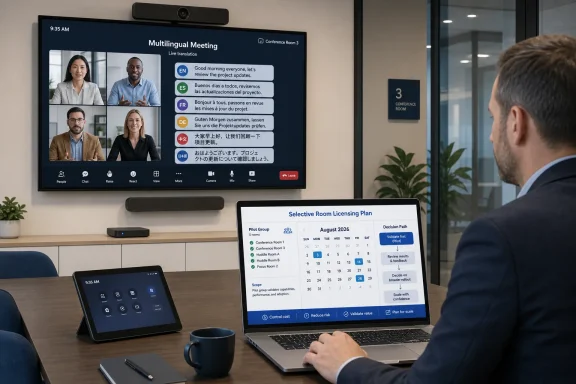
For organizations running Microsoft Teams Rooms on Android, do not change room licensing solely for Interpreter before the planned August 2026 rollout. WindowsForum member reports make the opportunity clear—Android room support is targeted for August—but the available evidence does not yet establish Android-specific entitlement, included usage, or technical requirements. Build a selective-room plan now, validate Microsoft’s final rollout documentation after release, and upgrade rooms to Teams Rooms Pro only where Pro is already justified by independently confirmed needs.
Microsoft’s public roadmap targets August 2026 for Interpreter agent support in Teams Rooms on Android. WindowsForum users tracking the roadmap have highlighted that date as an important expansion of real-time translation to shared meeting rooms, but it remains a rollout target rather than a feature administrators can configure on Android today.
As of Microsoft documentation dated July 9, 2026, Teams Rooms on Android was not listed as a currently supported Interpreter platform. That makes the August roadmap item a planned platform expansion. It does not yet answer the questions that matter for a room-license budget:
There is useful Windows precedent, but it is not an Android licensing promise. Teams Rooms on Windows has a documented allowance of 20 room-account hours per month for Interpreter, with access after that point dependent on available capacity. Android allowance, accounting, and capacity behavior are unknown until Microsoft documents them. Do not use the Windows 20-hour model as an Android budget forecast.
WindowsForum’s reporting also shows why organizations should avoid treating every Android roadmap item as one licensing decision. Android rooms are gaining other capabilities, including webinar participation for Pro-licensed rooms, SIP-based cross-platform joining, and user-selectable meeting languages expected later in 2026. Those may strengthen the case for Pro in certain high-value rooms, but they do not establish an Interpreter prerequisite.
Use a demand model rather than a fleet-wide assumption. For each room, ask:
Do not assume that employee Microsoft 365 Copilot licenses enable Interpreter for a shared Android room. Microsoft’s user licensing guidance for Teams meetings concerns individually licensed users and does not establish room-account entitlement for Android devices. A participant’s Copilot license should not be treated as a substitute for whatever room licensing Microsoft eventually specifies.
Treat these as separate questions:
After Microsoft publishes Android Interpreter guidance, validate each pilot room in this order:
Windows has a documented allowance of 20 room-account hours per month, followed by capacity-dependent access. That tells administrators that Interpreter may not be an unlimited service even on a supported platform. It does not tell them what Android will include, how Android usage will be counted, or whether any Android allowance will exist.
Likewise, a pool of employee Copilot licenses does not answer the shared-room licensing question. Room demand must be modeled separately from user demand. A room used for several multilingual meetings each week may justify a dedicated service evaluation; a room used once a quarter probably does not need a license change until the final Android entitlement is known.
For broader Android planning, WindowsForum’s coverage of Teams Rooms on Android joining webinars and SIP-based cross-platform meetings can help identify rooms that may already have a Pro business case. Keep those projects separate from the Interpreter budget until each feature’s requirements are verified.
The August rollout should be treated as a selective service-planning opportunity, not an automatic fleet-wide upgrade. Let real multilingual demand determine the pilot group, let confirmed Pro requirements determine current license decisions, and let Microsoft’s Android documentation determine Interpreter entitlement, configuration, and capacity planning.
 Why August 2026 changes the Teams Rooms licensing conversation
Microsoft’s public roadmap targets August 2026 for Interpreter agent support in Teams Rooms on Android. WindowsForum users tracking the roadmap have highlighted that date as an important expansion of real-time translation to shared meeting rooms, but it remains a rollout target rather than a feature administrators can configure on Android today.As of Microsoft documentation dated July 9, 2026, Teams Rooms on Android was not listed as a currently supported Interpreter platform. That makes the August roadmap item a planned platform expansion. It does not yet answer the questions that matter for a room-license budget:
- Which Android room licenses will qualify.
- Whether Teams Rooms Basic can participate in any capacity.
- Whether Teams Rooms Pro will be required, included, or simply recommended.
- Whether Android rooms will receive a monthly allowance.
- How usage will be measured and what happens after any included capacity is consumed.
- Which Android app, device, firmware, or tenant prerequisites will apply.
There is useful Windows precedent, but it is not an Android licensing promise. Teams Rooms on Windows has a documented allowance of 20 room-account hours per month for Interpreter, with access after that point dependent on available capacity. Android allowance, accounting, and capacity behavior are unknown until Microsoft documents them. Do not use the Windows 20-hour model as an Android budget forecast.
WindowsForum’s reporting also shows why organizations should avoid treating every Android roadmap item as one licensing decision. Android rooms are gaining other capabilities, including webinar participation for Pro-licensed rooms, SIP-based cross-platform joining, and user-selectable meeting languages expected later in 2026. Those may strengthen the case for Pro in certain high-value rooms, but they do not establish an Interpreter prerequisite.
Should you upgrade Android rooms to Teams Rooms Pro now?
The practical answer is selective: evaluate Pro now only for rooms that already need confirmed Pro features. Do not upgrade a room solely because Android Interpreter is planned.Upgrade selected rooms now only when Pro already has an independent business case
A targeted Pro review makes sense when a room already needs capabilities that Microsoft has documented as Pro features, such as webinar participation where applicable, or when the room is a strategic executive, training, customer-briefing, or regional collaboration space.Use a demand model rather than a fleet-wide assumption. For each room, ask:
- How often does it host multilingual meetings?
- Which languages are actually required?
- Does the room already need another confirmed Pro capability?
- Is the room important enough to justify a higher recurring license even if Interpreter availability, allowance, or requirements change?
- Can the organization provide a human or bilingual fallback when AI interpretation is unavailable or unsuitable?
Wait when Interpreter is the only reason to change licensing
Waiting is the defensible choice when multilingual meetings are occasional, experimental, or outside the documented language set. It is also the right choice when the proposed budget depends on assuming that Android will receive the same capacity model as Windows.Do not assume that employee Microsoft 365 Copilot licenses enable Interpreter for a shared Android room. Microsoft’s user licensing guidance for Teams meetings concerns individually licensed users and does not establish room-account entitlement for Android devices. A participant’s Copilot license should not be treated as a substitute for whatever room licensing Microsoft eventually specifies.
Treat these as separate questions:
- Does an Android room resource account need a particular Teams Rooms license for Interpreter?
- Do individual meeting participants need their own eligible licenses for their personal Interpreter experience?
- Will Android rooms have an included allowance, and how will that allowance be calculated?
- What device and app versions must be in place?
Prepare a pilot without assuming the feature is already available
The best preparation is to identify demand and create a validation plan, not to make a premature licensing change or attempt unsupported configuration.- Inventory Android rooms and their current roles.
List each room’s device model, resource account, current license, location, primary meeting types, and operating owner. Separate rooms with recurring multilingual use from rooms that only occasionally host international guests. - Document the languages people actually need.
Ask regional teams, executive assistants, training owners, customer-facing groups, and service desks which languages occur in live meetings. Record the frequency of those meetings and whether participants need spoken translation, captions, or a qualified human interpreter. - Compare demand with the currently documented Interpreter language set.
Identify rooms whose expected language needs fit the documented languages: Chinese (Mandarin), English, French, German, Italian, Japanese, Korean, Portuguese, and Spanish. Mark all other language needs as requiring a separate solution unless Microsoft expands Android documentation. - Review whether selected rooms already need Pro for confirmed reasons.
Check each candidate room against features your organization has independently verified as requiring Teams Rooms Pro. WindowsForum reporting on Android webinar participation is one example of a Pro-related scenario, but validate the feature against your own tenant requirements before relying on it. - Capture the room’s current technical baseline.
Record the Teams Rooms on Android app version, Android version, firmware version, device certification status, and vendor support status. This is not an Interpreter configuration step; it is a baseline for post-release troubleshooting. - Create a post-release validation checklist.
Prepare the test users, room accounts, representative meeting scenarios, required languages, fallback contacts, and success criteria. Leave all Android Interpreter-specific settings, licensing actions, and policy checks for after Microsoft publishes the applicable documentation. - Choose a limited pilot group.
Start with a small number of rooms where multilingual demand is real and the business impact is measurable. A focused pilot produces better evidence than upgrading every standard conference room based on a roadmap date. - Define the fallback service before testing.
For meetings where accuracy is critical, identify bilingual staff, professional interpreters, or another approved process. AI interpretation should not be the only plan for legal, clinical, labor, safety, contractual, or high-stakes customer conversations.
What to verify after the August rollout
Do not treat the arrival of August as proof that every tenant, device, or room is ready. Roadmap dates can represent phased availability, and the final documentation should drive the deployment sequence.After Microsoft publishes Android Interpreter guidance, validate each pilot room in this order:
- Confirm tenant availability.
Verify that the feature has reached your tenant and cloud environment and that the published rollout notes apply to your organization. - Confirm Android-specific prerequisites.
Check Microsoft’s final requirements for room licensing, room-resource entitlement, supported device types, app versions, firmware, meeting conditions, and any administrative settings. - Confirm the room’s actual license assignment.
Verify the license on the room resource account rather than relying on licenses assigned to meeting organizers or attendees. If Microsoft specifies Pro, Basic, add-on, or another entitlement model, document that result for each pilot room. - Confirm supported languages and meeting behavior.
Test only the language scenarios Microsoft documents for Android at release. Do not assume that a language available in another Teams client is automatically available from the Android room console. - Run representative meetings.
Include the room, remote participants, normal room audio, the languages your organization identified during planning, and the meeting formats that matter to your users. Test joining, audio recovery after a reconnect, participant guidance, and fallback procedures. - Record service results.
Capture the room model, app version, license, meeting scenario, languages used, observed behavior, and any capacity or availability messages. This record will help distinguish a rollout issue from a device-specific issue. - Expand only after repeatable results.
Move from pilot rooms to similar rooms only when the feature, licensing, support process, and business value are repeatable.
Troubleshooting and rollout controls
If Interpreter does not appear or does not behave as expected after release, avoid guessing at policy settings or applying undocumented administrative commands. Use a simple escalation path:- Recheck Microsoft’s Android-specific documentation for the tenant, cloud, license, app version, and device requirements.
- Compare the affected room against a working pilot room, including its resource account and software baseline.
- Confirm that the room is using a supported certified device and remains within vendor support.
- Review the meeting scenario and languages against Microsoft’s published Android support details.
- Test the room’s normal microphone, speaker, network, and meeting-join behavior before treating the problem as an Interpreter issue.
- Capture timestamps, room account details, device logs available through your approved management process, and screenshots of any error messages before opening a support case.
- Keep the fallback interpretation process available until the feature has been proven reliable for that room type.
Capacity is the practical licensing caveat
The strongest planning warning is not to extrapolate from user licenses or Windows room allowances.Windows has a documented allowance of 20 room-account hours per month, followed by capacity-dependent access. That tells administrators that Interpreter may not be an unlimited service even on a supported platform. It does not tell them what Android will include, how Android usage will be counted, or whether any Android allowance will exist.
Likewise, a pool of employee Copilot licenses does not answer the shared-room licensing question. Room demand must be modeled separately from user demand. A room used for several multilingual meetings each week may justify a dedicated service evaluation; a room used once a quarter probably does not need a license change until the final Android entitlement is known.
For broader Android planning, WindowsForum’s coverage of Teams Rooms on Android joining webinars and SIP-based cross-platform meetings can help identify rooms that may already have a Pro business case. Keep those projects separate from the Interpreter budget until each feature’s requirements are verified.
Frequently Asked Questions
Does Teams Rooms Basic include Interpreter on Android?
Microsoft has not yet published final Android Interpreter licensing details in the evidence available; do not assume Basic or a participant Copilot license qualifies a shared room.Can an employee’s Microsoft 365 Copilot license enable Interpreter for a Basic-licensed Android room?
Do not assume so. Individual-user licensing guidance does not establish entitlement for a shared Android room resource account. Wait for Microsoft’s Android-specific licensing documentation.Does every Android room need to be upgraded?
No. Use a selective-room demand model. Review Pro for rooms that already need confirmed Pro features, have recurring multilingual demand, and can justify the cost independently of Interpreter. Wait on Interpreter-only upgrades until Microsoft documents Android entitlement and requirements.Will Android rooms receive the same 20-hour allowance as Teams Rooms on Windows?
That is unknown. Windows has 20 room-account hours per month and capacity-dependent access afterward. Microsoft has not yet established that Android will use the same allowance or accounting model.What should administrators configure before the release?
Do not attempt Android Interpreter-specific configuration before Microsoft publishes the final requirements. The actionable work now is inventorying multilingual demand, identifying required languages, reviewing independently justified Pro candidates, recording room baselines, and preparing a post-release validation checklist.The August rollout should be treated as a selective service-planning opportunity, not an automatic fleet-wide upgrade. Let real multilingual demand determine the pilot group, let confirmed Pro requirements determine current license decisions, and let Microsoft’s Android documentation determine Interpreter entitlement, configuration, and capacity planning.
References
- Primary source: learn.microsoft.com
Manage Interpreter agent for your organization - Microsoft Teams | Microsoft Learn
Learn how to manage Interpreter agent in Microsoft Teams to provide translation during meetings.learn.microsoft.com - Independent coverage: support.microsoft.com
Interpreter in Microsoft Teams meetings and calls | Microsoft Support
Use Interpreter, an AI-powered translator, during multilingual Microsoft Teams meetings for more clear, effective communication between participants.support.microsoft.com - Independent coverage: microsoft.com
Microsoft 365 Roadmap | Microsoft 365
The Microsoft 365 Roadmap lists updates that are currently planned for applicable subscribers. Check here for more information on the status of new features and updates.www.microsoft.com
- Independent coverage: deltapulse.app
(Updated) Microsoft Teams: Interpreter agent support in Teams rooms on Windows | DeltaPulse - Microsoft 365 Change Intelligence
Service: Microsoft Teams, Microsoft Copilot (Microsoft 365). Category: Stay Informed. Interpreter agent support is now available in Microsoft Teams Rooms on Win deltapulse.app
- Independent coverage: techcommunity.microsoft.com
- Independent coverage: content.govdelivery.com
