

David Fortin’s test of more than 100 Microsoft Copilot agents, summarized by Geeky Gadgets, identifies five workplace tools as the practical standouts: Researcher, Facilitator, a SharePoint-backed Knowledge Hub, Copilot in Excel, and Co-work for email management. The interesting part is not that Microsoft has built another shelf of AI assistants. It is that the useful ones look less like magic coworkers and more like narrow, permission-aware workflow machinery. That distinction matters for WindowsForum readers because the next phase of Microsoft 365 Copilot will be judged not by demos, but by whether it can survive the messy reality of meetings, mailboxes, SharePoint sprawl, and Excel files that should have been databases years ago.
Microsoft has spent the last two years turning Copilot from a chat box into a platform. The company now talks about agents as if they are the next software layer: small, purpose-built AI systems that sit inside Microsoft 365, Teams, SharePoint, Excel, Outlook, and admin-controlled business processes. That pitch is strategically coherent, but it also creates a problem familiar to anyone who lived through the app-store explosion: abundance is not the same thing as usefulness.
Fortin’s reported exercise — testing more than 100 Copilot agents and narrowing the field to five — lands because it implicitly punctures Microsoft’s grander narrative. If only a handful of agents feel essential after broad testing, then the value is not in the word agent. The value is in whether an assistant has a clean job, trustworthy data access, and a workflow where automation saves more time than it consumes.
That is the right lens for enterprises. Most organizations do not need 100 agents. They need fewer interruptions, better meeting memory, less duplicate HR traffic, faster data cleanup, and a way to keep Outlook from becoming a second full-time job. The five agents highlighted in the Geeky Gadgets summary are persuasive because they map to those old problems rather than inventing new AI-shaped ones.
Microsoft’s own documentation reinforces this direction. Researcher is positioned as a deeper, multi-step assistant that can draw on web information and work content the user is permitted to access, while SharePoint agents are being framed as ways to make organizational content conversational. Facilitator sits in Teams meetings as a note-taker and moderator of sorts. Copilot in Excel continues the long Microsoft tradition of trying to make business data less hostile to humans. Co-work, meanwhile, points toward a more ambitious future: not just answering questions, but taking delegated action across the day.
The lesson is blunt. Copilot agents become credible when they disappear into boring office work.
Researcher’s promise is to collapse that pre-meeting scavenger hunt into a guided synthesis. Instead of asking a general chatbot to “summarize this topic,” the user can frame a specific objective: prepare for a client pitch, identify unresolved issues from the last project review, compare stakeholder positions, or produce a briefing with source-grounded context. The agent’s advantage is not creativity; it is retrieval plus reasoning over the particular mess the user already has permission to see.
That permission boundary is critical. In Microsoft 365, the quality of Copilot’s answer is inseparable from the quality and governance of the tenant’s content. If files are misclassified, old drafts are left in shared folders, or sensitive data has been sprayed across Teams channels, Researcher can reflect that disorder back with impressive fluency. The agent does not eliminate information governance; it makes the consequences of weak governance more visible.
Still, this is one of the strongest AI use cases in the Microsoft stack because the baseline is so poor. Human workers already waste time finding the latest document, confirming who said what, and rebuilding context after every gap in communication. If Researcher can shave even 20 minutes from recurring meeting preparation, the value becomes obvious across a team of managers, sales staff, consultants, lawyers, engineers, and administrators.
The deeper point is that Researcher is not replacing the meeting owner. It is arming that person with a better memory. The best version of the tool produces a briefing that can be challenged, corrected, and refined before humans make decisions. That is a much more plausible enterprise use of AI than the fantasy of a bot independently understanding office politics.
This matters because meetings are often where productivity goes to die while everyone pretends to collaborate. The failure is rarely that nobody took notes. The failure is that the notes do not capture decisions, disagreements, owners, deadlines, or context in a form that can be reused. People leave with different understandings of what just happened, and the next meeting begins by relitigating the last one.
A useful Facilitator changes the social contract. If participants know that action items will be captured, agenda drift will be visible, and unresolved topics will not simply evaporate, the meeting becomes more accountable. It also helps absent participants catch up without forcing someone else to become the unofficial historian.
There are caveats. Real-time summaries can be wrong, and meeting transcripts can encode mistakes with dangerous confidence. In sensitive settings — HR discussions, legal strategy, incident response, disciplinary meetings, merger talks — organizations will need clear policies about when AI note-taking is appropriate and when it is not. A summary that is almost right can be worse than no summary at all if it misstates intent, attributes a decision to the wrong person, or omits a critical caveat.
But for ordinary operational meetings, Facilitator fits the sweet spot of enterprise AI. It is not asking the system to invent strategy. It is asking the system to watch, structure, and remember. That is precisely the kind of narrow assistance that can become habit-forming if the output is reliable enough.
This is exactly where many companies should begin with Copilot agents. The domain is bounded. The documents already exist. The questions are repetitive. The cost of poor search is obvious. HR, IT, finance, facilities, and operations teams spend a remarkable amount of time answering the same procedural questions because the authoritative answer is technically published but practically undiscoverable.
The Knowledge Hub model also exposes the central truth of agentic AI in Microsoft 365: SharePoint is still the house foundation. If an organization’s policies are scattered across old PDFs, duplicated libraries, orphaned Teams sites, and unofficial departmental folders, the agent will inherit that confusion. If the policy library is clean, current, and owned by accountable teams, the agent can make the company feel far more navigable.
That is why this use case is less about replacing HR staff than about forcing documentation discipline. An employee-facing agent cannot be better than the content it is grounded in. The best deployment pattern is therefore not “turn it on and let AI figure it out.” It is to curate a policy corpus, assign owners, define update cycles, test common questions, and monitor where the agent fails.
For WindowsForum’s sysadmin-heavy readership, this should sound familiar. The technology layer is the easy part; lifecycle management is the hard part. Permissions, retention, document ownership, version control, auditability, and user education will determine whether a Knowledge Hub becomes a trusted front door or another chatbot employees learn to avoid.
The Geeky Gadgets summary emphasizes Copilot’s ability to extract, organize, and analyze data, including converting unstructured documents such as invoices or reports into more usable spreadsheet form. That is a practical use case because spreadsheet work is full of micro-friction. Users spend time cleaning columns, identifying anomalies, building summaries, converting formats, and trying to explain what the numbers show.
Excel is also a dangerous place for AI overconfidence. A chatbot that writes a poor email wastes time; an assistant that silently misreads financial data can create expensive mistakes. Copilot’s Excel value depends on transparency: showing what it changed, how it interpreted a dataset, where values came from, and whether a formula or summary can be inspected by a human who understands the business context.
That means Copilot in Excel should be treated as an accelerant, not an authority. It is well suited for first drafts of analysis, cleanup suggestions, quick visualizations, plain-English explanations of trends, and repetitive structuring work. It is less suited to unsupervised financial reporting, compliance submissions, payroll calculations, or anything where a quiet error becomes a formal record.
Even with that caution, Excel may be one of the most important Copilot surfaces because it meets users where they already work. Many AI tools fail because they ask workers to leave their workflow and visit a separate assistant. Excel has the opposite advantage. If Copilot can reduce the grunt work inside the spreadsheet itself, users do not need to adopt a new productivity philosophy. They just need the next step in a familiar ribbon to be useful.
That makes Co-work both promising and risky. The upside is enormous because professionals drown in triage. They scan newsletters, vendor updates, automated alerts, meeting changes, approval requests, internal FYIs, customer escalations, and messages where the real ask is buried in paragraph four. A competent agent that separates action from noise could return significant attention to users.
But email automation touches judgment. Which message is urgent? Which customer requires a personal reply? Which manager’s vague note should become a task? Which thread is politically sensitive enough that a drafted response needs careful tone? Co-work can help, but it cannot safely erase the human from the loop in many organizations.
The most believable version is not a bot that runs the mailbox independently. It is a daily briefing and drafting assistant that makes inbox review less chaotic. It can group messages by project, flag unanswered asks, propose replies, identify commitments, and remind the user that a promise made three days ago still lacks follow-through. That is practical because it augments attention rather than pretending attention is obsolete.
There is also a compliance angle. Many companies have retention, eDiscovery, confidentiality, and customer communication rules that already apply to email. Any agent that drafts, sorts, or summarizes mail must operate inside those controls. Administrators will need to know what is logged, what is retained, what data is processed, and how users can prevent sensitive material from being mishandled.
If Microsoft gets Co-work right, it could become the agent people feel most directly. Meetings and policies matter, but email is the daily battlefield. The agent that reduces inbox dread without creating new governance headaches will be the one users defend when budget owners ask whether Copilot is worth the money.
That is why the “100 agents tested, five worth keeping” framing is more useful than a product catalog. The enterprise AI market is currently stuffed with overlapping claims: agents, copilots, assistants, copilots inside agents, agents inside copilots, workflows, skills, connectors, and automations. The labels blur quickly. What remains is workflow fit.
Microsoft’s platform advantage is obvious. It owns the productivity surfaces where work already happens: Windows, Office, Teams, Outlook, SharePoint, OneDrive, Exchange, Entra, Power Platform, and the Microsoft Graph. If an AI assistant needs context, Microsoft is sitting near the richest context layer in corporate computing.
That advantage cuts both ways. Users will be less forgiving of generic answers inside Microsoft 365 because the system appears to have access to the relevant work context. If Copilot gets something wrong in a browser chatbot, the user may blame the prompt. If it gets something wrong while sitting inside Teams, Outlook, or Excel, the user may blame Microsoft, IT, or the organization’s deployment.
This is where agent design becomes less about model capability and more about product discipline. A useful agent must communicate its boundaries. It should make clear what it inspected, what it did not inspect, what sources shaped its answer, and when it is guessing. The illusion of omniscience is a product bug, not a feature.
Microsoft has been adding controls for managing agents in Microsoft 365, including admin-center visibility and mechanisms to block or allow certain agents. That is necessary because the agent layer can become messy quickly. An organization that would never allow random SaaS tools to proliferate should be equally cautious about random AI agents grounded in internal data.
The biggest risk is not necessarily a rogue super-agent doing something dramatic. It is mundane sprawl. Ten departments create similar policy assistants. A project agent outlives the project. A sales agent relies on outdated collateral. A custom workflow keeps running after the process changes. A user trusts an agent because it has a friendly name, not because anyone has validated its output.
Good governance will look boring. It will include naming conventions, ownership metadata, approval workflows, periodic reviews, data-source inventories, sensitivity labels, and clear rules about external connectors. It will also require training users to distinguish between first-party Microsoft agents, organization-built agents, and third-party marketplace agents.
The irony is that AI adoption may force companies to do the information hygiene they avoided for years. SharePoint permissions, stale files, unlabeled data, and undocumented processes were already problems. Copilot agents merely make those problems conversational.
The benefits will also vary by role. Executives and managers may gravitate toward Researcher and Co-work because their pain is context switching. Project managers may value Facilitator because their pain is follow-through. HR and IT teams may value Knowledge Hub because their pain is repeated questions. Analysts and operations staff may value Copilot in Excel because their pain is data preparation.
That unevenness matters for licensing and deployment. Copilot should not be treated as a blanket productivity tax applied uniformly to every seat without thought. The better strategy is to map agents to job families, identify measurable pain points, and run pilots with specific success criteria. “People like AI” is not a business case. “The HR team reduced repetitive policy tickets by 30 percent” is closer.
There is a cultural piece, too. Employees must trust that AI summaries will not be used as surveillance artifacts detached from context. They must know when meetings are transcribed, when agents are active, and how generated notes or tasks enter the official record. If the tool feels like management spyware, adoption will sour no matter how clever the features are.
This is especially true in Teams meetings. A Facilitator agent may make meetings more productive, but it also changes how people speak when they know every aside may be summarized. Organizations need etiquette as much as enablement: when to use AI notes, when to pause them, who receives the recap, and how corrections are handled.
Start with bounded knowledge retrieval, because it is easiest to validate. A policy or knowledge agent can be tested against known questions and corrected when it fails. Then move into meeting support, where summaries and action items can be compared with human notes. Add Researcher for roles that need synthesis across large amounts of internal material. Use Copilot in Excel where spreadsheet-heavy teams can verify outputs. Approach Co-work with more care, because email triage sits closest to personal judgment and external communication.
This sequence is not about technical difficulty alone. It is about trust. Users who see an agent answer policy questions accurately are more likely to trust meeting summaries. Users who trust meeting summaries are more likely to try research briefs. Users who understand the limits of AI assistance are more likely to supervise email drafts intelligently.
The shortlist also suggests that general-purpose Copilot adoption may be less important than agent-shaped habit formation. People do not wake up wanting to “use AI.” They want to prepare for the 10 a.m. meeting, find the travel policy, clean the invoice export, and answer the customer without missing the legal caveat. Agents win when they attach to those moments.
That should shape Microsoft’s own messaging. The company’s broad “AI at work” narrative is too abstract for many users. The concrete story is stronger: here are five annoying work patterns, and here is where Copilot can reduce the drag.
The next year of Copilot adoption will therefore be less about whether AI can “transform work” and more about whether Microsoft, administrators, and users can make agents boring enough to trust. If Researcher, Facilitator, Knowledge Hub, Copilot in Excel, and Co-work become dependable pieces of office infrastructure, the agent era will arrive not as a grand replacement for human labor, but as a gradual rewiring of the tedious connective tissue around it.
 Microsoft’s Agent Boom Has a Signal-to-Noise Problem
Microsoft has spent the last two years turning Copilot from a chat box into a platform. The company now talks about agents as if they are the next software layer: small, purpose-built AI systems that sit inside Microsoft 365, Teams, SharePoint, Excel, Outlook, and admin-controlled business processes. That pitch is strategically coherent, but it also creates a problem familiar to anyone who lived through the app-store explosion: abundance is not the same thing as usefulness.Fortin’s reported exercise — testing more than 100 Copilot agents and narrowing the field to five — lands because it implicitly punctures Microsoft’s grander narrative. If only a handful of agents feel essential after broad testing, then the value is not in the word agent. The value is in whether an assistant has a clean job, trustworthy data access, and a workflow where automation saves more time than it consumes.
That is the right lens for enterprises. Most organizations do not need 100 agents. They need fewer interruptions, better meeting memory, less duplicate HR traffic, faster data cleanup, and a way to keep Outlook from becoming a second full-time job. The five agents highlighted in the Geeky Gadgets summary are persuasive because they map to those old problems rather than inventing new AI-shaped ones.
Microsoft’s own documentation reinforces this direction. Researcher is positioned as a deeper, multi-step assistant that can draw on web information and work content the user is permitted to access, while SharePoint agents are being framed as ways to make organizational content conversational. Facilitator sits in Teams meetings as a note-taker and moderator of sorts. Copilot in Excel continues the long Microsoft tradition of trying to make business data less hostile to humans. Co-work, meanwhile, points toward a more ambitious future: not just answering questions, but taking delegated action across the day.
The lesson is blunt. Copilot agents become credible when they disappear into boring office work.
Researcher Wins Because Meeting Prep Is Broken Everywhere
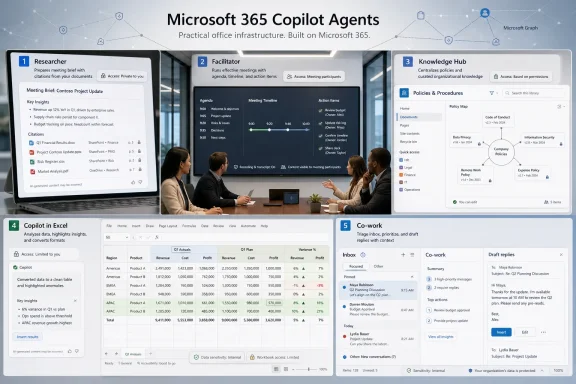
The Researcher agent is the easiest of the five to understand because it attacks a universal knowledge-work tax. Before a customer call, a quarterly review, an internal escalation, or a product planning session, someone has to reconstruct the state of the world. That usually means spelunking through email threads, Teams chats, previous decks, shared documents, meeting notes, OneNote pages, and half-remembered decisions that were never written down properly.Researcher’s promise is to collapse that pre-meeting scavenger hunt into a guided synthesis. Instead of asking a general chatbot to “summarize this topic,” the user can frame a specific objective: prepare for a client pitch, identify unresolved issues from the last project review, compare stakeholder positions, or produce a briefing with source-grounded context. The agent’s advantage is not creativity; it is retrieval plus reasoning over the particular mess the user already has permission to see.
That permission boundary is critical. In Microsoft 365, the quality of Copilot’s answer is inseparable from the quality and governance of the tenant’s content. If files are misclassified, old drafts are left in shared folders, or sensitive data has been sprayed across Teams channels, Researcher can reflect that disorder back with impressive fluency. The agent does not eliminate information governance; it makes the consequences of weak governance more visible.
Still, this is one of the strongest AI use cases in the Microsoft stack because the baseline is so poor. Human workers already waste time finding the latest document, confirming who said what, and rebuilding context after every gap in communication. If Researcher can shave even 20 minutes from recurring meeting preparation, the value becomes obvious across a team of managers, sales staff, consultants, lawyers, engineers, and administrators.
The deeper point is that Researcher is not replacing the meeting owner. It is arming that person with a better memory. The best version of the tool produces a briefing that can be challenged, corrected, and refined before humans make decisions. That is a much more plausible enterprise use of AI than the fantasy of a bot independently understanding office politics.
Facilitator Turns the Meeting From a Performance Into a Record
If Researcher helps before the meeting, Facilitator tries to make the meeting itself less wasteful. Microsoft has been circling this territory for years through Teams transcription, recap features, intelligent meeting summaries, and task extraction. The Facilitator agent bundles those ambitions into something closer to a meeting operator: tracking the agenda, summarizing discussion, surfacing questions, and turning talk into follow-up items.This matters because meetings are often where productivity goes to die while everyone pretends to collaborate. The failure is rarely that nobody took notes. The failure is that the notes do not capture decisions, disagreements, owners, deadlines, or context in a form that can be reused. People leave with different understandings of what just happened, and the next meeting begins by relitigating the last one.
A useful Facilitator changes the social contract. If participants know that action items will be captured, agenda drift will be visible, and unresolved topics will not simply evaporate, the meeting becomes more accountable. It also helps absent participants catch up without forcing someone else to become the unofficial historian.
There are caveats. Real-time summaries can be wrong, and meeting transcripts can encode mistakes with dangerous confidence. In sensitive settings — HR discussions, legal strategy, incident response, disciplinary meetings, merger talks — organizations will need clear policies about when AI note-taking is appropriate and when it is not. A summary that is almost right can be worse than no summary at all if it misstates intent, attributes a decision to the wrong person, or omits a critical caveat.
But for ordinary operational meetings, Facilitator fits the sweet spot of enterprise AI. It is not asking the system to invent strategy. It is asking the system to watch, structure, and remember. That is precisely the kind of narrow assistance that can become habit-forming if the output is reliable enough.
The Knowledge Hub Agent Is Really a SharePoint Governance Test
The Knowledge Hub agent described in the Geeky Gadgets piece sounds like the least glamorous entry, but it may be the most enterprise-realistic. Built around company policies and internal documents, it functions as an HR policy concierge or administrative answer desk. Employees ask about vacation rules, expense procedures, onboarding steps, equipment policies, or benefits documentation, and the agent answers from a controlled document base.This is exactly where many companies should begin with Copilot agents. The domain is bounded. The documents already exist. The questions are repetitive. The cost of poor search is obvious. HR, IT, finance, facilities, and operations teams spend a remarkable amount of time answering the same procedural questions because the authoritative answer is technically published but practically undiscoverable.
The Knowledge Hub model also exposes the central truth of agentic AI in Microsoft 365: SharePoint is still the house foundation. If an organization’s policies are scattered across old PDFs, duplicated libraries, orphaned Teams sites, and unofficial departmental folders, the agent will inherit that confusion. If the policy library is clean, current, and owned by accountable teams, the agent can make the company feel far more navigable.
That is why this use case is less about replacing HR staff than about forcing documentation discipline. An employee-facing agent cannot be better than the content it is grounded in. The best deployment pattern is therefore not “turn it on and let AI figure it out.” It is to curate a policy corpus, assign owners, define update cycles, test common questions, and monitor where the agent fails.
For WindowsForum’s sysadmin-heavy readership, this should sound familiar. The technology layer is the easy part; lifecycle management is the hard part. Permissions, retention, document ownership, version control, auditability, and user education will determine whether a Knowledge Hub becomes a trusted front door or another chatbot employees learn to avoid.
Excel Remains the Place Where AI Has to Prove Itself
Copilot in Excel earns its place on the list because Excel is where much of the world’s business logic actually lives. Not in pristine data warehouses. Not in elegant line-of-business applications. In spreadsheets emailed between departments, exported from portals, pasted from PDFs, manually cleaned by analysts, and decorated with formulas no one wants to touch.The Geeky Gadgets summary emphasizes Copilot’s ability to extract, organize, and analyze data, including converting unstructured documents such as invoices or reports into more usable spreadsheet form. That is a practical use case because spreadsheet work is full of micro-friction. Users spend time cleaning columns, identifying anomalies, building summaries, converting formats, and trying to explain what the numbers show.
Excel is also a dangerous place for AI overconfidence. A chatbot that writes a poor email wastes time; an assistant that silently misreads financial data can create expensive mistakes. Copilot’s Excel value depends on transparency: showing what it changed, how it interpreted a dataset, where values came from, and whether a formula or summary can be inspected by a human who understands the business context.
That means Copilot in Excel should be treated as an accelerant, not an authority. It is well suited for first drafts of analysis, cleanup suggestions, quick visualizations, plain-English explanations of trends, and repetitive structuring work. It is less suited to unsupervised financial reporting, compliance submissions, payroll calculations, or anything where a quiet error becomes a formal record.
Even with that caution, Excel may be one of the most important Copilot surfaces because it meets users where they already work. Many AI tools fail because they ask workers to leave their workflow and visit a separate assistant. Excel has the opposite advantage. If Copilot can reduce the grunt work inside the spreadsheet itself, users do not need to adopt a new productivity philosophy. They just need the next step in a familiar ribbon to be useful.
Co-work Is the Most Ambitious Agent Because Email Is a Behavioral Problem
The Co-work agent, as described in the summary, tackles email overload by prioritizing messages, drafting replies, filtering low-value mail, identifying actionable items, and helping users schedule review workflows. That sounds straightforward until one remembers that email is not merely an inbox. It is a negotiation layer, a task system, a filing cabinet, a political record, a customer channel, and a source of daily anxiety.That makes Co-work both promising and risky. The upside is enormous because professionals drown in triage. They scan newsletters, vendor updates, automated alerts, meeting changes, approval requests, internal FYIs, customer escalations, and messages where the real ask is buried in paragraph four. A competent agent that separates action from noise could return significant attention to users.
But email automation touches judgment. Which message is urgent? Which customer requires a personal reply? Which manager’s vague note should become a task? Which thread is politically sensitive enough that a drafted response needs careful tone? Co-work can help, but it cannot safely erase the human from the loop in many organizations.
The most believable version is not a bot that runs the mailbox independently. It is a daily briefing and drafting assistant that makes inbox review less chaotic. It can group messages by project, flag unanswered asks, propose replies, identify commitments, and remind the user that a promise made three days ago still lacks follow-through. That is practical because it augments attention rather than pretending attention is obsolete.
There is also a compliance angle. Many companies have retention, eDiscovery, confidentiality, and customer communication rules that already apply to email. Any agent that drafts, sorts, or summarizes mail must operate inside those controls. Administrators will need to know what is logged, what is retained, what data is processed, and how users can prevent sensitive material from being mishandled.
If Microsoft gets Co-work right, it could become the agent people feel most directly. Meetings and policies matter, but email is the daily battlefield. The agent that reduces inbox dread without creating new governance headaches will be the one users defend when budget owners ask whether Copilot is worth the money.
The Real Test Is Not Intelligence, It Is Fit
The common thread across these five tools is specificity. Researcher prepares. Facilitator records and structures. Knowledge Hub answers from governed documents. Copilot in Excel manipulates and explains data. Co-work triages communication. None of these use cases require the user to believe in a science-fiction version of AI. They require the user to believe that a narrow assistant can remove enough friction to be worth invoking again tomorrow.That is why the “100 agents tested, five worth keeping” framing is more useful than a product catalog. The enterprise AI market is currently stuffed with overlapping claims: agents, copilots, assistants, copilots inside agents, agents inside copilots, workflows, skills, connectors, and automations. The labels blur quickly. What remains is workflow fit.
Microsoft’s platform advantage is obvious. It owns the productivity surfaces where work already happens: Windows, Office, Teams, Outlook, SharePoint, OneDrive, Exchange, Entra, Power Platform, and the Microsoft Graph. If an AI assistant needs context, Microsoft is sitting near the richest context layer in corporate computing.
That advantage cuts both ways. Users will be less forgiving of generic answers inside Microsoft 365 because the system appears to have access to the relevant work context. If Copilot gets something wrong in a browser chatbot, the user may blame the prompt. If it gets something wrong while sitting inside Teams, Outlook, or Excel, the user may blame Microsoft, IT, or the organization’s deployment.
This is where agent design becomes less about model capability and more about product discipline. A useful agent must communicate its boundaries. It should make clear what it inspected, what it did not inspect, what sources shaped its answer, and when it is guessing. The illusion of omniscience is a product bug, not a feature.
Admins Will Decide Whether Agents Become Tools or Clutter
For administrators, Copilot agents introduce a familiar lifecycle problem in a new wrapper. Who can create agents? Who can publish them? Who can use them? Which data sources can they touch? How are they retired? How are they audited? What happens when a department builds a clever helper that quietly becomes business-critical?Microsoft has been adding controls for managing agents in Microsoft 365, including admin-center visibility and mechanisms to block or allow certain agents. That is necessary because the agent layer can become messy quickly. An organization that would never allow random SaaS tools to proliferate should be equally cautious about random AI agents grounded in internal data.
The biggest risk is not necessarily a rogue super-agent doing something dramatic. It is mundane sprawl. Ten departments create similar policy assistants. A project agent outlives the project. A sales agent relies on outdated collateral. A custom workflow keeps running after the process changes. A user trusts an agent because it has a friendly name, not because anyone has validated its output.
Good governance will look boring. It will include naming conventions, ownership metadata, approval workflows, periodic reviews, data-source inventories, sensitivity labels, and clear rules about external connectors. It will also require training users to distinguish between first-party Microsoft agents, organization-built agents, and third-party marketplace agents.
The irony is that AI adoption may force companies to do the information hygiene they avoided for years. SharePoint permissions, stale files, unlabeled data, and undocumented processes were already problems. Copilot agents merely make those problems conversational.
The Productivity Gains Are Real, but They Are Unevenly Distributed
The case for these five agents is strongest in organizations with heavy Microsoft 365 usage, disciplined identity management, and enough repeatable knowledge work to justify the overhead. A 20-person business with ad hoc processes may see sporadic benefits. A 10,000-person enterprise with sprawling meetings, policy documents, shared drives, and overloaded managers may find the gains much easier to quantify.The benefits will also vary by role. Executives and managers may gravitate toward Researcher and Co-work because their pain is context switching. Project managers may value Facilitator because their pain is follow-through. HR and IT teams may value Knowledge Hub because their pain is repeated questions. Analysts and operations staff may value Copilot in Excel because their pain is data preparation.
That unevenness matters for licensing and deployment. Copilot should not be treated as a blanket productivity tax applied uniformly to every seat without thought. The better strategy is to map agents to job families, identify measurable pain points, and run pilots with specific success criteria. “People like AI” is not a business case. “The HR team reduced repetitive policy tickets by 30 percent” is closer.
There is a cultural piece, too. Employees must trust that AI summaries will not be used as surveillance artifacts detached from context. They must know when meetings are transcribed, when agents are active, and how generated notes or tasks enter the official record. If the tool feels like management spyware, adoption will sour no matter how clever the features are.
This is especially true in Teams meetings. A Facilitator agent may make meetings more productive, but it also changes how people speak when they know every aside may be summarized. Organizations need etiquette as much as enablement: when to use AI notes, when to pause them, who receives the recap, and how corrections are handled.
The Five-Agent Shortlist Is Really a Deployment Strategy
The practical wisdom in Fortin’s shortlist is that it gives organizations a way to resist AI maximalism. Instead of asking, “How many agents can we deploy?” the better question is, “Which recurring work pattern is painful enough that an agent will be used without nagging?” The five highlighted tools form a reasonable maturity path.Start with bounded knowledge retrieval, because it is easiest to validate. A policy or knowledge agent can be tested against known questions and corrected when it fails. Then move into meeting support, where summaries and action items can be compared with human notes. Add Researcher for roles that need synthesis across large amounts of internal material. Use Copilot in Excel where spreadsheet-heavy teams can verify outputs. Approach Co-work with more care, because email triage sits closest to personal judgment and external communication.
This sequence is not about technical difficulty alone. It is about trust. Users who see an agent answer policy questions accurately are more likely to trust meeting summaries. Users who trust meeting summaries are more likely to try research briefs. Users who understand the limits of AI assistance are more likely to supervise email drafts intelligently.
The shortlist also suggests that general-purpose Copilot adoption may be less important than agent-shaped habit formation. People do not wake up wanting to “use AI.” They want to prepare for the 10 a.m. meeting, find the travel policy, clean the invoice export, and answer the customer without missing the legal caveat. Agents win when they attach to those moments.
That should shape Microsoft’s own messaging. The company’s broad “AI at work” narrative is too abstract for many users. The concrete story is stronger: here are five annoying work patterns, and here is where Copilot can reduce the drag.
The Five Agents Worth Piloting Before the Agent Store Gets Noisy
The useful conclusion from the Geeky Gadgets summary is not that every organization should immediately standardize on these exact five tools. It is that these are the categories where Copilot agents currently make the most operational sense: preparation, meeting memory, governed knowledge, spreadsheet work, and communication triage.- Researcher is best aimed at roles that routinely need briefings from scattered Microsoft 365 content before meetings, reviews, pitches, or planning sessions.
- Facilitator is most valuable when teams already suffer from agenda drift, weak notes, unclear owners, and forgotten action items.
- A SharePoint-backed Knowledge Hub works only if the underlying policies and documents are current, owned, permissioned, and tested against real employee questions.
- Copilot in Excel should be used to accelerate cleanup, extraction, summarization, and exploratory analysis, while humans remain responsible for validating high-stakes numbers.
- Co-work is promising for inbox triage and draft assistance, but it needs careful rollout because email mixes productivity, judgment, compliance, and organizational politics.
The next year of Copilot adoption will therefore be less about whether AI can “transform work” and more about whether Microsoft, administrators, and users can make agents boring enough to trust. If Researcher, Facilitator, Knowledge Hub, Copilot in Excel, and Co-work become dependable pieces of office infrastructure, the agent era will arrive not as a grand replacement for human labor, but as a gradual rewiring of the tedious connective tissue around it.
References
- Primary source: Geeky Gadgets
Published: Wed, 10 Jun 2026 10:16:06 GMT
100 Copilot Agents Tested : Here Are 5 You Need - Geeky Gadgets
100 Microsoft Copilot agents have been tested to find the five essential tools you need to manage emails, track meetings, and organize company policies.www.geeky-gadgets.com - Official source: learn.microsoft.com
What is Researcher Agent in Microsoft 365 Copilot? | Microsoft Learn
Researcher is an intelligent AI assistant in Microsoft 365 Copilot that gathers enterprise and web data to deliver comprehensive, source-backed answers.learn.microsoft.com - Official source: developer.microsoft.com
Microsoft 365 Copilot | Extend and Customize Copilot
Extend, enrich, and customize Microsoft Microsoft 365 Copilot. Explore Copilot extensibility options such as agents, API plugins, and Copilot connectors to expand AI-powered productivity, skills, and creativity.developer.microsoft.com - Official source: wwwqa.microsoft.com

Log In ‹ Microsoft 365 Blog — WordPress
wwwqa.microsoft.com
- Official source: microsoft.com
AI Agents for Individuals and Businesses | Microsoft Copilot
Learn about the different types of AI agents and how they help people and organizations automate tasks and enhance productivity.www.microsoft.com
- Official source: adoption.microsoft.com
Agents in Microsoft 365 – Microsoft Adoption
Meet the new agents in Microsoft 365—purpose-built to bring specialized skills and knowledge into Microsoft 365 Copilot. Embedded directly in Microsoft 365 Copilot Chat and the Microsoft 365 apps you use every day, these out-of-the-box agents take on unique roles to work alongside you and your...adoption.microsoft.com
- Official source: support.microsoft.com
- Related coverage: windowscentral.com
This is Microsoft's new "Copilot Cowork": An experiment with Anthropic's Claude AI models that plans and delegates your work | Windows Central
Microsoft ships Copilot Cowork to its Frontier program.www.windowscentral.com - Related coverage: techradar.com
'When intelligence and trust move together, AI stops being an experiment and starts becoming how work gets done': Microsoft and OpenAI are making AI research tools smarter to help answer even your trickiest questions | TechRadar
Claude will check GPT's research output for qualitywww.techradar.com - Official source: cdn.techcommunity.microsoft.com
