

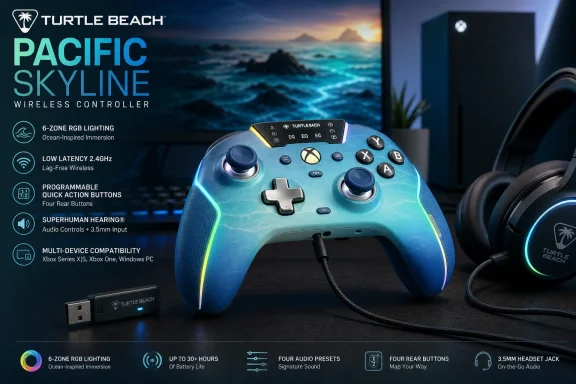
Turtle Beach’s Pacific Skyline Wireless Controller, announced in its June 16, 2026 summer controller guide, is an officially licensed Xbox gamepad for Xbox Series X|S, Xbox One, Windows 10/11 PCs, and Android Bluetooth devices with programmable rear buttons, RGB lighting, audio controls, and triple connectivity. That makes it less a vanity colorway than a statement about where the middle of the controller market has moved. The old split between “standard pad” and “pro controller” is collapsing, and Pacific Skyline is trying to occupy the new center. For WindowsForum readers, the interesting question is not whether it looks good on a desk, but whether it makes the default Xbox controller feel under-equipped.
The Pacific Skyline arrives at a moment when the controller category has become weirdly crowded and weirdly mature. Microsoft’s standard Xbox Wireless Controller remains the safe default: familiar shape, broad compatibility, AA battery flexibility, Bluetooth, Xbox Wireless, and the Xbox Accessories app. But third-party licensed controllers are no longer just cheaper alternatives with loud colors and compromises buried in the fine print.
Turtle Beach is pitching the Pacific Skyline as a more complete everyday controller. The spec sheet reads like a bundle of features that, a few years ago, would have been scattered across “pro” models: two programmable back buttons, a 2.4GHz wireless dongle, wired USB-C, Bluetooth, six-zone RGB lighting, headset controls, calibration, and a rechargeable battery.
That does not automatically make it a professional controller. It lacks trigger stops, hair-trigger modes, and the deeper physical customization found in higher-end models like the Stealth Ultra or Victrix Pro BFG Reloaded. The more useful way to read it is as a controller for the player who has outgrown the standard Xbox pad but has not made peace with spending elite-controller money.
This is where Turtle Beach’s argument is strongest. The Pacific Skyline does not try to redefine the gamepad; it tries to make a bunch of once-premium conveniences feel normal.
That is the point of back buttons: they do not make you faster because plastic is magic; they reduce the number of times you have to abandon camera control to hit a face button. In a competitive shooter, that fraction of a second matters. In a single-player action game, it just feels better.
The Pacific Skyline’s remapping method is deliberately simple. Hold the Function button, press the rear button you want to configure, then press the front-facing button you want assigned. A three-flash LED confirmation tells you the mapping stuck. For players who hate companion software, this is the correct design choice.
The catch is that the rear buttons are not fully open-ended macro keys. Turtle Beach says users can map front-facing controls, including face buttons, bumpers, D-pad directions, and stick clicks, but not triggers or keyboard keys. That is a meaningful limitation for PC players who imagine turning the pad into a hybrid controller-keyboard device.
Still, the limitation is not fatal. Most of the benefit comes from moving common face-button actions to the back, not from building elaborate macros. Turtle Beach has chosen reliability and console friendliness over deep PC tinkering, and for an officially licensed Xbox controller, that trade-off is unsurprising.
The included 2.4GHz transmitter is the main console-and-PC wireless mode. Turtle Beach lists it at 250Hz polling, while wired USB-C mode reaches 1000Hz. Bluetooth is the convenience layer, best understood as the mobile and compatibility option rather than the latency-first choice.
This is where the Pacific Skyline differs from Microsoft’s own controller in a way that will divide buyers. The standard Xbox Wireless Controller connects to Xbox consoles using Microsoft’s Xbox Wireless protocol without a dongle, and it can connect to Windows PCs over Bluetooth, USB-C, or an Xbox Wireless Adapter. The Pacific Skyline instead leans on a dedicated USB transmitter for its low-latency wireless mode.
For a console player who wants one less dongle in the front of the Xbox, Microsoft’s own pad still has elegance on its side. For a PC player, especially one with flaky Bluetooth or a desktop tucked under a desk, a dedicated dongle can be a feature rather than a nuisance. The dongle makes the controller feel more like a gaming mouse or headset: plug in the receiver, pair once, and stop negotiating with Windows Bluetooth.
The wired mode is the nerdier selling point. A 1000Hz polling rate means the controller can report input once per millisecond under ideal conditions. That does not guarantee pro-level performance in every game, and most players will not suddenly become better because a cable is attached. But it gives PC players a clear low-latency option when input consistency matters.
An officially licensed Xbox controller that works across Xbox and Windows has a much easier path than a generic Bluetooth pad. The Pacific Skyline’s value to Windows users is not only that it can connect three ways; it is that it should present itself in ways modern Windows games already expect. That matters more than it sounds.
The Turtle Beach - PDP Control Hub adds another layer for PC and Xbox users. It handles button remapping, diagnostics, and recalibration for analog sticks and triggers. For an enthusiast, calibration is not glamorous, but it is exactly the kind of tool that extends the practical life of a controller.
Stick drift has made players more aware of the limits of analog hardware. Turtle Beach’s mention of TMR, or tunnel magnetoresistance, is therefore notable. Like Hall Effect-style approaches, magnetic sensing is marketed as a way to read stick position without relying on the same kind of physical contact points associated with traditional potentiometer wear.
That does not mean any magnetic-stick controller is automatically immune to every failure mode. Springs, centering mechanisms, plastics, firmware curves, and assembly quality still matter. But it does show that the mid-range controller market is absorbing durability language that used to belong mostly to enthusiast devices.
On Xbox, integrated audio controls are a quality-of-life feature that reduces menu diving. On PC, they are a little more conditional. Depending on the game, audio device routing, chat app, and Windows configuration, not every hardware control maps neatly to every use case.
Even so, the broader idea is right. Controllers have become living-room command centers as much as input devices. If you plug a wired headset into the pad, the ability to adjust volume, chat mix, and mute without opening a guide menu makes the controller feel more complete.
The onboard mic mute is particularly useful because it is physical, immediate, and game-agnostic in spirit. Software mute states can be confusing when Windows, Xbox Game Bar, Discord, and a game all have their own audio layers. A controller-level mute shortcut is not a substitute for good audio routing, but it is a practical guardrail.
Turtle Beach also sells headsets, and the company’s guide naturally nudges readers toward pairing the controller with its audio lineup. That is predictable ecosystem marketing. Still, the controller’s wired headset support is not locked to Turtle Beach hardware, and that distinction matters.
But RGB on a controller is not only decoration. For desk setups, streaming, and multi-device gaming spaces, visual identity is part of the purchase. The “Pacific Skyline” name and ocean-gradient aesthetic are selling a vibe as much as an input device.
The more practical point is that Turtle Beach appears to understand the battery trade-off. If lighting becomes a meaningful drain, the controller has to manage that gracefully. Automatically disabling decorative LEDs at low battery is the right kind of compromise: keep the flair when there is headroom, kill it when playtime is at risk.
There is also a useful psychological distinction between customization that affects performance and customization that affects ownership. Back-button mapping changes play. RGB changes attachment. A controller that feels like yours is not necessarily better, but it is more likely to be the one you reach for.
Microsoft’s standard Xbox Wireless Controller still uses AA batteries by default, with official materials commonly citing up to 40 hours depending on use. Some players hate AA cells in 2026 and see them as an anachronism. Others see them as a feature: swap in fresh rechargeables and keep playing, or use the official rechargeable battery pack if you prefer USB-C charging.
The Pacific Skyline’s integrated battery makes the controller feel more modern. It also means the battery is part of the product’s long-term aging curve. If the pack degrades after years of use, the fix is less trivial than replacing a pair of AAs.
That is not a reason to reject it. Most modern wireless peripherals make the same bargain, and a 20-plus-hour rating is enough for several long sessions between charges. But WindowsForum readers who keep controllers for many years should see the battery design for what it is: convenience now, less user-serviceable flexibility later.
The low-battery behavior is sensible. At 10 percent, the controller blinks the Function LED and shuts down RGB lighting to conserve power. That is exactly what a controller with non-essential lighting should do.
The Pacific Skyline beats it on feature density. Back buttons, onboard audio shortcuts, RGB, a rechargeable internal battery, app-plus-onboard calibration, 2.4GHz wireless, and 1000Hz wired polling all give Turtle Beach more to talk about. If you are shopping by rows in a comparison table, the Pacific Skyline looks much more modern.
But Microsoft’s controller still has its own strengths. It connects to Xbox without occupying a USB port. It supports AA batteries. Its shape and behavior are deeply familiar. It is supported by Microsoft’s Xbox Accessories app, and its compatibility story is about as battle-tested as a game controller can get.
That means the Pacific Skyline should not be framed as a universal replacement. It is a targeted upgrade for players who want rear buttons and more controls without jumping into elite pricing. For users who just want a second couch controller for occasional co-op, Microsoft’s pad remains the boring and correct answer.
The middle of the market is where things get interesting. Turtle Beach is betting there are plenty of players who do not need a modular tournament controller but do want a controller that feels less stripped down than the default. That bet looks reasonable.
For most players, that is acceptable. In many games, rear-button ergonomics and reliable sticks will matter more than trigger actuation distance. In a shooter where the right trigger is constantly used for firing, though, trigger stops can make a controller feel meaningfully faster.
This is why “competitive” has become a slippery word in controller marketing. A controller can be suitable for competitive play without being optimized for tournament-level players. The Pacific Skyline lands in that middle zone: serious enough to improve control habits, not extreme enough to replace a high-end pad for players who obsess over every physical input.
The absence of trigger remapping to the back buttons reinforces that distinction. If you are a PC player imagining custom trigger workarounds or complex layouts, this is not that device. If you want jump and crouch on the rear buttons, quick audio controls, and a wired low-latency path, the Pacific Skyline makes more sense.
In other words, it is not pretending to be a fight stick, sim rig, or modular esports controller. It is a better Xbox-style controller for mainstream players who have started noticing the limits of mainstream controllers.
This is the modern peripheral bargain. Hardware ships with more capability, but it also ships with firmware assumptions. A controller is no longer just a sealed plastic object; it is a small computing device with update paths, diagnostics, and calibration procedures.
For enthusiasts, that is a net positive. Firmware can fix issues, improve behavior, and extend functionality. For casual buyers, it can be friction: buy controller, install app, update firmware, install another app, calibrate if needed.
The Pacific Skyline’s saving grace is that its core remapping and calibration are not entirely app-dependent. On-controller mapping matters because it keeps the device usable when software is unavailable, inconvenient, or simply not installed. That is especially important for a controller designed to move among Xbox, PC, and mobile devices.
Still, the multi-app story is not elegant. Swarm II for firmware, Control Hub for PC and Xbox customization, onboard shortcuts for immediate adjustments — it works, but it is not as clean as the old days when a controller was just paired and forgotten. The industry has chosen configurability over simplicity, and Turtle Beach is following that path.
The Pacific Skyline therefore asks console players to accept a dongle in exchange for the controller’s broader feature set. That will be a non-issue for some setups and an annoyance for others. If your Series X sits in an entertainment center with limited front USB access, the receiver is not invisible.
On Windows, the equation changes. Bluetooth controller performance can vary by adapter, antenna placement, driver state, and household radio clutter. A 2.4GHz receiver gives Turtle Beach a more controlled wireless path, and that may matter more than the theoretical elegance of Bluetooth.
This is where PC players may be more forgiving than console purists. Windows users are already accustomed to USB receivers for mice, keyboards, headsets, and racing wheels. If the Pacific Skyline behaves consistently, the dongle will be seen as part of the performance stack rather than a compromise.
The ideal controller would support everything: Xbox Wireless without a dongle, 2.4GHz for PC, Bluetooth for mobile, and USB-C for wired play. Licensing, cost, and hardware realities often prevent that neat outcome. Turtle Beach’s version prioritizes its own low-latency receiver and broad device support.
That is good for buyers, but it creates a new problem: spec sheets are getting noisy. A controller can have impressive numbers and still feel mediocre if the ergonomics, button tactility, dead zones, wireless stability, or firmware are wrong. The Pacific Skyline’s paper case is strong, but the real test remains long-session comfort and consistency.
The Windows angle is particularly important because PC gamers are more likely to compare the controller not only with Microsoft’s pad, but with keyboard and mouse, handheld PCs, Steam Input profiles, and high-end boutique controllers. For them, a gamepad has to justify itself as a flexible device rather than a console accessory dragged onto a desk.
The Pacific Skyline’s best answer is versatility. It can be a couch controller, a wired PC controller, a mobile Bluetooth controller, and a headset-connected audio control surface. That is a lot of roles for one mid-range device.
The risk is that it becomes a jack-of-all-trades product without mastering any single discipline. Turtle Beach appears to be betting that the combination is more valuable than any one extreme feature. For most buyers, that is probably true.
For a WindowsForum audience, the controller is most compelling as a PC-and-Xbox bridge. The 1000Hz wired mode, 2.4GHz receiver, Bluetooth fallback, Control Hub calibration, and Xbox licensing combine into a package that understands how people actually play in 2026. Few enthusiasts are loyal to one screen anymore.
The price will ultimately decide how persuasive this package is in practice. If it sits comfortably above the standard Xbox controller but below elite-tier alternatives, the argument is clean. If discounts push Microsoft’s own controller dramatically lower, buyers will have to decide how much they value rear buttons and the rest of the feature bundle.
There is also a support question. A standard Xbox controller benefits from Microsoft’s first-party ecosystem and years of predictable behavior. Turtle Beach must earn that same trust through firmware stability, app reliability, and replacement support.
That is the unglamorous reality of modern peripherals. The launch spec sheet gets attention; the support lifecycle determines whether people recommend it a year later.
 Turtle Beach Turns the Mid-Range Controller Into a Feature Grab
The Pacific Skyline arrives at a moment when the controller category has become weirdly crowded and weirdly mature. Microsoft’s standard Xbox Wireless Controller remains the safe default: familiar shape, broad compatibility, AA battery flexibility, Bluetooth, Xbox Wireless, and the Xbox Accessories app. But third-party licensed controllers are no longer just cheaper alternatives with loud colors and compromises buried in the fine print.Turtle Beach is pitching the Pacific Skyline as a more complete everyday controller. The spec sheet reads like a bundle of features that, a few years ago, would have been scattered across “pro” models: two programmable back buttons, a 2.4GHz wireless dongle, wired USB-C, Bluetooth, six-zone RGB lighting, headset controls, calibration, and a rechargeable battery.
That does not automatically make it a professional controller. It lacks trigger stops, hair-trigger modes, and the deeper physical customization found in higher-end models like the Stealth Ultra or Victrix Pro BFG Reloaded. The more useful way to read it is as a controller for the player who has outgrown the standard Xbox pad but has not made peace with spending elite-controller money.
This is where Turtle Beach’s argument is strongest. The Pacific Skyline does not try to redefine the gamepad; it tries to make a bunch of once-premium conveniences feel normal.
The Back Buttons Are the Real Product, Not the RGB
RGB lighting will sell the box, but the back buttons are the feature that changes how the controller plays. Two programmable rear buttons may not sound radical in 2026, yet they remain the clearest dividing line between a standard pad and a more serious gaming input device. In shooters, action games, and platformers, moving jump, crouch, slide, reload, or melee to the rear of the controller can keep both thumbs on the analog sticks.That is the point of back buttons: they do not make you faster because plastic is magic; they reduce the number of times you have to abandon camera control to hit a face button. In a competitive shooter, that fraction of a second matters. In a single-player action game, it just feels better.
The Pacific Skyline’s remapping method is deliberately simple. Hold the Function button, press the rear button you want to configure, then press the front-facing button you want assigned. A three-flash LED confirmation tells you the mapping stuck. For players who hate companion software, this is the correct design choice.
The catch is that the rear buttons are not fully open-ended macro keys. Turtle Beach says users can map front-facing controls, including face buttons, bumpers, D-pad directions, and stick clicks, but not triggers or keyboard keys. That is a meaningful limitation for PC players who imagine turning the pad into a hybrid controller-keyboard device.
Still, the limitation is not fatal. Most of the benefit comes from moving common face-button actions to the back, not from building elaborate macros. Turtle Beach has chosen reliability and console friendliness over deep PC tinkering, and for an officially licensed Xbox controller, that trade-off is unsurprising.
Triple Connectivity Is More Than a Checkbox
The Pacific Skyline supports three connection paths: low-latency 2.4GHz wireless through an included USB transmitter, wired USB-C, and Bluetooth. That sounds like marketing shorthand until you consider how many Windows users live across multiple screens. A controller may spend Monday night on an Xbox, Tuesday on a gaming PC, and the weekend paired to a phone or tablet for cloud play.The included 2.4GHz transmitter is the main console-and-PC wireless mode. Turtle Beach lists it at 250Hz polling, while wired USB-C mode reaches 1000Hz. Bluetooth is the convenience layer, best understood as the mobile and compatibility option rather than the latency-first choice.
This is where the Pacific Skyline differs from Microsoft’s own controller in a way that will divide buyers. The standard Xbox Wireless Controller connects to Xbox consoles using Microsoft’s Xbox Wireless protocol without a dongle, and it can connect to Windows PCs over Bluetooth, USB-C, or an Xbox Wireless Adapter. The Pacific Skyline instead leans on a dedicated USB transmitter for its low-latency wireless mode.
For a console player who wants one less dongle in the front of the Xbox, Microsoft’s own pad still has elegance on its side. For a PC player, especially one with flaky Bluetooth or a desktop tucked under a desk, a dedicated dongle can be a feature rather than a nuisance. The dongle makes the controller feel more like a gaming mouse or headset: plug in the receiver, pair once, and stop negotiating with Windows Bluetooth.
The wired mode is the nerdier selling point. A 1000Hz polling rate means the controller can report input once per millisecond under ideal conditions. That does not guarantee pro-level performance in every game, and most players will not suddenly become better because a cable is attached. But it gives PC players a clear low-latency option when input consistency matters.
Windows Compatibility Is the Quiet Win
The Pacific Skyline’s Windows 10/11 support is one of its most important claims because PC controller support has become both better and more complicated. On paper, XInput changed everything years ago by making Xbox-style controllers a de facto standard for PC games. In practice, PC players still deal with Bluetooth weirdness, firmware tools, vendor apps, Steam Input layers, launchers, and games that interpret devices differently.An officially licensed Xbox controller that works across Xbox and Windows has a much easier path than a generic Bluetooth pad. The Pacific Skyline’s value to Windows users is not only that it can connect three ways; it is that it should present itself in ways modern Windows games already expect. That matters more than it sounds.
The Turtle Beach - PDP Control Hub adds another layer for PC and Xbox users. It handles button remapping, diagnostics, and recalibration for analog sticks and triggers. For an enthusiast, calibration is not glamorous, but it is exactly the kind of tool that extends the practical life of a controller.
Stick drift has made players more aware of the limits of analog hardware. Turtle Beach’s mention of TMR, or tunnel magnetoresistance, is therefore notable. Like Hall Effect-style approaches, magnetic sensing is marketed as a way to read stick position without relying on the same kind of physical contact points associated with traditional potentiometer wear.
That does not mean any magnetic-stick controller is automatically immune to every failure mode. Springs, centering mechanisms, plastics, firmware curves, and assembly quality still matter. But it does show that the mid-range controller market is absorbing durability language that used to belong mostly to enthusiast devices.
The Audio Controls Are a Console Feature PC Players Should Not Ignore
The Pacific Skyline has a 3.5mm CTIA headset jack and Function-button shortcuts for volume, chat mix, and mic mute. Volume is handled with Function plus D-pad up or down; chat mix uses Function plus D-pad left or right; mute is a double press. This is the sort of feature that sounds minor until you are in a match, party chat, or Discord call and need to make an adjustment without breaking play.On Xbox, integrated audio controls are a quality-of-life feature that reduces menu diving. On PC, they are a little more conditional. Depending on the game, audio device routing, chat app, and Windows configuration, not every hardware control maps neatly to every use case.
Even so, the broader idea is right. Controllers have become living-room command centers as much as input devices. If you plug a wired headset into the pad, the ability to adjust volume, chat mix, and mute without opening a guide menu makes the controller feel more complete.
The onboard mic mute is particularly useful because it is physical, immediate, and game-agnostic in spirit. Software mute states can be confusing when Windows, Xbox Game Bar, Discord, and a game all have their own audio layers. A controller-level mute shortcut is not a substitute for good audio routing, but it is a practical guardrail.
Turtle Beach also sells headsets, and the company’s guide naturally nudges readers toward pairing the controller with its audio lineup. That is predictable ecosystem marketing. Still, the controller’s wired headset support is not locked to Turtle Beach hardware, and that distinction matters.
RGB Is the Fluff That Still Serves a Purpose
The Pacific Skyline includes customizable RGB lighting across six zones, with Static, Wave, Breathing, and LED Off modes. Brightness can be adjusted, colors can be tuned from the controller, and decorative LEDs shut off automatically when battery falls below 10 percent. It is easy to dismiss this as gamer frosting, because to some extent it is.But RGB on a controller is not only decoration. For desk setups, streaming, and multi-device gaming spaces, visual identity is part of the purchase. The “Pacific Skyline” name and ocean-gradient aesthetic are selling a vibe as much as an input device.
The more practical point is that Turtle Beach appears to understand the battery trade-off. If lighting becomes a meaningful drain, the controller has to manage that gracefully. Automatically disabling decorative LEDs at low battery is the right kind of compromise: keep the flair when there is headroom, kill it when playtime is at risk.
There is also a useful psychological distinction between customization that affects performance and customization that affects ownership. Back-button mapping changes play. RGB changes attachment. A controller that feels like yours is not necessarily better, but it is more likely to be the one you reach for.
Battery Life Is Good Enough, but Microsoft Still Has a Simpler Story
Turtle Beach rates the Pacific Skyline at more than 20 hours of runtime from a 900mAh lithium-ion polymer battery, with typical charging in one to two hours over USB-C. That is respectable for a feature-rich rechargeable controller with lighting, wireless, and audio support. It is not, however, a clean victory over Microsoft’s default pad.Microsoft’s standard Xbox Wireless Controller still uses AA batteries by default, with official materials commonly citing up to 40 hours depending on use. Some players hate AA cells in 2026 and see them as an anachronism. Others see them as a feature: swap in fresh rechargeables and keep playing, or use the official rechargeable battery pack if you prefer USB-C charging.
The Pacific Skyline’s integrated battery makes the controller feel more modern. It also means the battery is part of the product’s long-term aging curve. If the pack degrades after years of use, the fix is less trivial than replacing a pair of AAs.
That is not a reason to reject it. Most modern wireless peripherals make the same bargain, and a 20-plus-hour rating is enough for several long sessions between charges. But WindowsForum readers who keep controllers for many years should see the battery design for what it is: convenience now, less user-serviceable flexibility later.
The low-battery behavior is sensible. At 10 percent, the controller blinks the Function LED and shuts down RGB lighting to conserve power. That is exactly what a controller with non-essential lighting should do.
The Standard Xbox Controller Has Become the Baseline, Not the Target
Comparing the Pacific Skyline to the standard Xbox Wireless Controller is useful, but only if we remember what the Microsoft controller is trying to be. It is not a pro controller. It is a platform default: broadly compatible, comfortable, predictable, and relatively affordable.The Pacific Skyline beats it on feature density. Back buttons, onboard audio shortcuts, RGB, a rechargeable internal battery, app-plus-onboard calibration, 2.4GHz wireless, and 1000Hz wired polling all give Turtle Beach more to talk about. If you are shopping by rows in a comparison table, the Pacific Skyline looks much more modern.
But Microsoft’s controller still has its own strengths. It connects to Xbox without occupying a USB port. It supports AA batteries. Its shape and behavior are deeply familiar. It is supported by Microsoft’s Xbox Accessories app, and its compatibility story is about as battle-tested as a game controller can get.
That means the Pacific Skyline should not be framed as a universal replacement. It is a targeted upgrade for players who want rear buttons and more controls without jumping into elite pricing. For users who just want a second couch controller for occasional co-op, Microsoft’s pad remains the boring and correct answer.
The middle of the market is where things get interesting. Turtle Beach is betting there are plenty of players who do not need a modular tournament controller but do want a controller that feels less stripped down than the default. That bet looks reasonable.
The Competitive Pitch Has Limits, and That Is Fine
Turtle Beach’s own positioning draws a line between the Pacific Skyline and its higher-end competitive models. That honesty is useful. The controller has 1000Hz wired polling and back buttons, but it does not have hair triggers, trigger stops, or motion control.For most players, that is acceptable. In many games, rear-button ergonomics and reliable sticks will matter more than trigger actuation distance. In a shooter where the right trigger is constantly used for firing, though, trigger stops can make a controller feel meaningfully faster.
This is why “competitive” has become a slippery word in controller marketing. A controller can be suitable for competitive play without being optimized for tournament-level players. The Pacific Skyline lands in that middle zone: serious enough to improve control habits, not extreme enough to replace a high-end pad for players who obsess over every physical input.
The absence of trigger remapping to the back buttons reinforces that distinction. If you are a PC player imagining custom trigger workarounds or complex layouts, this is not that device. If you want jump and crouch on the rear buttons, quick audio controls, and a wired low-latency path, the Pacific Skyline makes more sense.
In other words, it is not pretending to be a fight stick, sim rig, or modular esports controller. It is a better Xbox-style controller for mainstream players who have started noticing the limits of mainstream controllers.
Setup Is Easy, but Firmware Is Now Part of the Controller Experience
Turtle Beach recommends charging the controller before first use because it ships below 30 percent battery for transport safety, then updating firmware through the Swarm II mobile app. After that, the Control Hub app on PC or Xbox handles remapping, diagnostics, and calibration. Onboard calibration is also available through a button sequence involving D-pad Down at startup, stick rotations, trigger presses, and a save command.This is the modern peripheral bargain. Hardware ships with more capability, but it also ships with firmware assumptions. A controller is no longer just a sealed plastic object; it is a small computing device with update paths, diagnostics, and calibration procedures.
For enthusiasts, that is a net positive. Firmware can fix issues, improve behavior, and extend functionality. For casual buyers, it can be friction: buy controller, install app, update firmware, install another app, calibrate if needed.
The Pacific Skyline’s saving grace is that its core remapping and calibration are not entirely app-dependent. On-controller mapping matters because it keeps the device usable when software is unavailable, inconvenient, or simply not installed. That is especially important for a controller designed to move among Xbox, PC, and mobile devices.
Still, the multi-app story is not elegant. Swarm II for firmware, Control Hub for PC and Xbox customization, onboard shortcuts for immediate adjustments — it works, but it is not as clean as the old days when a controller was just paired and forgotten. The industry has chosen configurability over simplicity, and Turtle Beach is following that path.
The Dongle Trade-Off Is the Buyer’s Fork in the Road
The most divisive design decision may be the 2.4GHz USB transmitter. In PC gaming, dedicated receivers are normal. In Xbox living rooms, they feel less graceful because the console already supports Xbox Wireless for Microsoft’s own controllers.The Pacific Skyline therefore asks console players to accept a dongle in exchange for the controller’s broader feature set. That will be a non-issue for some setups and an annoyance for others. If your Series X sits in an entertainment center with limited front USB access, the receiver is not invisible.
On Windows, the equation changes. Bluetooth controller performance can vary by adapter, antenna placement, driver state, and household radio clutter. A 2.4GHz receiver gives Turtle Beach a more controlled wireless path, and that may matter more than the theoretical elegance of Bluetooth.
This is where PC players may be more forgiving than console purists. Windows users are already accustomed to USB receivers for mice, keyboards, headsets, and racing wheels. If the Pacific Skyline behaves consistently, the dongle will be seen as part of the performance stack rather than a compromise.
The ideal controller would support everything: Xbox Wireless without a dongle, 2.4GHz for PC, Bluetooth for mobile, and USB-C for wired play. Licensing, cost, and hardware realities often prevent that neat outcome. Turtle Beach’s version prioritizes its own low-latency receiver and broad device support.
The Pacific Skyline Shows How Fast “Pro” Features Become Normal
The broader story here is feature migration. Back buttons, magnetic stick sensors, calibration tools, high polling rates, and integrated audio controls used to signal specialist hardware. Now they are moving into controllers aimed at everyday players.That is good for buyers, but it creates a new problem: spec sheets are getting noisy. A controller can have impressive numbers and still feel mediocre if the ergonomics, button tactility, dead zones, wireless stability, or firmware are wrong. The Pacific Skyline’s paper case is strong, but the real test remains long-session comfort and consistency.
The Windows angle is particularly important because PC gamers are more likely to compare the controller not only with Microsoft’s pad, but with keyboard and mouse, handheld PCs, Steam Input profiles, and high-end boutique controllers. For them, a gamepad has to justify itself as a flexible device rather than a console accessory dragged onto a desk.
The Pacific Skyline’s best answer is versatility. It can be a couch controller, a wired PC controller, a mobile Bluetooth controller, and a headset-connected audio control surface. That is a lot of roles for one mid-range device.
The risk is that it becomes a jack-of-all-trades product without mastering any single discipline. Turtle Beach appears to be betting that the combination is more valuable than any one extreme feature. For most buyers, that is probably true.
The Summer Controller Wars Just Got a More Practical Middle
The Pacific Skyline is not the most advanced Xbox controller Turtle Beach touches, and it is not trying to be. Its importance is that it makes a more capable controller feel ordinary. That is exactly how categories mature: yesterday’s enthusiast feature becomes today’s reasonable expectation.For a WindowsForum audience, the controller is most compelling as a PC-and-Xbox bridge. The 1000Hz wired mode, 2.4GHz receiver, Bluetooth fallback, Control Hub calibration, and Xbox licensing combine into a package that understands how people actually play in 2026. Few enthusiasts are loyal to one screen anymore.
The price will ultimately decide how persuasive this package is in practice. If it sits comfortably above the standard Xbox controller but below elite-tier alternatives, the argument is clean. If discounts push Microsoft’s own controller dramatically lower, buyers will have to decide how much they value rear buttons and the rest of the feature bundle.
There is also a support question. A standard Xbox controller benefits from Microsoft’s first-party ecosystem and years of predictable behavior. Turtle Beach must earn that same trust through firmware stability, app reliability, and replacement support.
That is the unglamorous reality of modern peripherals. The launch spec sheet gets attention; the support lifecycle determines whether people recommend it a year later.
The Practical Read Before You Add It to the Cart
The Pacific Skyline’s strongest case is not that it beats every controller, but that it makes the standard Xbox pad look conservative. If you play across Xbox and Windows, use a wired headset, and want rear buttons without elite-controller pricing, this is the kind of controller that deserves a serious look.- The Pacific Skyline is best understood as a mid-range Xbox and Windows controller with several formerly premium features, not as a full tournament controller.
- The two programmable back buttons are the most meaningful upgrade over a standard Xbox Wireless Controller for moment-to-moment play.
- The 2.4GHz USB transmitter is a reasonable PC-friendly choice, but console players must accept that it uses a dongle rather than native Xbox Wireless.
- The 1000Hz wired mode gives latency-sensitive PC players a strong fallback when wireless consistency matters.
- The rechargeable 20-plus-hour battery is convenient, though Microsoft’s AA-powered controller still has the long-term flexibility advantage.
- The lack of hair triggers, trigger stops, and trigger mapping keeps the Pacific Skyline below true elite-tier competitive pads.
References
- Primary source: Turtle Beach
Published: 2026-06-16T11:20:08.784079

Pacific Skyline Wireless Controller: 2026 Review | Turtle Beach
Your guide to the Pacific Skyline wireless Xbox controller with back buttons, RGB lighting, triple connectivity, and 20+ hour battery for summer 2026.au.turtlebeach.com - Related coverage: xbox.com

Xbox Wireless Controller | Xbox
Experience the modernized Xbox Wireless Controller, designed for enhanced comfort during gameplay. Stay on target with textured grip, seamlessly capture and share content.www.xbox.com - Related coverage: windowscentral.com

Official Xbox wireless controller deal: The best you can buy | Windows Central
The official controller is a perfect example of refining an iconic design, and now it's affordable with a bundled USB-C cable, too.www.windowscentral.com - Related coverage: bhphotovideo.com

Microsoft Xbox Wireless Controller + USB Type-C Cable 1V8-00001
Buy Microsoft Xbox Wireless Controller + USB Type-C Cable (2020, Carbon Black) featuring Xbox Wireless & Bluetooth Connectivity, Sculpted Surface Design, Textured Grips, Hybrid D-Pad, Dedicated Share Button, Button Mapping, USB Type-C Port, 3.5mm Audio Jack, Up to 40 Hours of Battery Life, Works...www.bhphotovideo.com - Related coverage: xboxdesignlab.xbox.com
Design a Custom Elite Wireless Controller Series 2 | Xbox
Design an Xbox Elite Wireless Controller Series 2 with Xbox Design Lab. Mix your favorite colors, patterns, and custom engraving to your unique controller.xboxdesignlab.xbox.com
- Related coverage: dell.com
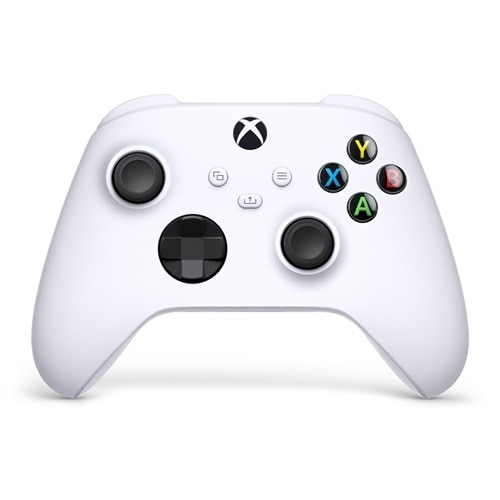
Microsoft Xbox Wireless Controller for Xbox Series X, Xbox Series S, Xbox One, PCs, Android, iOS - Robot White | Dell USA
Elevate your gameExperience the modernized design of the Xbox Wireless Controller, featuring sculpted surfaces and refined geometry for enhanced comfort during gameplay. Stay on target with textured grip and a hybrid D-pad. Seamlessly capture and share content with a dedicated Share button...www.dell.com
- Official source: microsoft.com
- Related coverage: gamestop.com
Microsoft Xbox Wireless Controller - Robot White for Xbox Series X/S, Xbox One, and Windows Devices | GameStop
Buy Microsoft Xbox Wireless Controller - Robot White for Xbox Series X/S, Xbox One, and Windows Devices at GameStop. Find new and pre-owned gaming accessories at great prices. Enjoy fast delivery, in-store pick-up, and free shipping on orders $79+. Buy now, pay later!www.gamestop.com
