

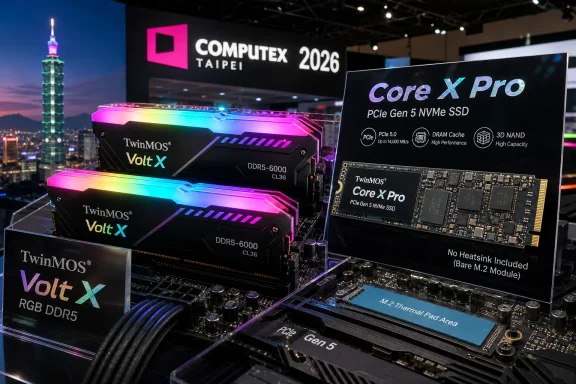
TwinMOS used Computex 2026 in Taipei to show its Volt X RGB DDR5 desktop memory and Core X Pro PCIe Gen 5 NVMe SSD, two enthusiast-facing components aimed at gaming PCs, creator desktops, and high-bandwidth Windows systems. The pitch is familiar: faster memory, brighter lighting, and storage that can push toward the limits of today’s consumer PCIe platform. But the more interesting story is not that TwinMOS has joined the Gen 5 and DDR5 parade. It is that the enthusiast PC market is now mature enough that raw speed alone no longer settles the argument.
Computex has always been part trade show, part weather vane. A company does not need to unveil an architectural breakthrough to reveal something about where the market is headed; sometimes a conventional product tells the story more clearly than an exotic one. TwinMOS’ Volt X RGB DDR5 and Core X Pro Gen 5 SSD sit precisely in that category: not strange, not experimental, but tuned for the mainstream enthusiast desktop as it exists in 2026.
The Volt X RGB DDR5 kit lands in the comfortable zone of DDR5-6000 with CL36 timings. That is not the highest number one can find on a show floor, where memory vendors routinely chase headline speeds for overclocking demonstrations, but it is a speed bin that maps neatly onto the real systems many Windows gamers and DIY builders are assembling. For AMD Ryzen and Intel Core desktops alike, DDR5-6000 has become a kind of practical enthusiast baseline: quick enough to feel premium, common enough to be supported without drama.
The RGB element is also telling. TwinMOS is not pretending this is server memory wearing a heat spreader. The company is selling to the builder who wants a side-panel system to look coherent, and it has done the predictable but necessary work of claiming compatibility with ASUS Aura Sync, GIGABYTE RGB Fusion 2.0, MSI Mystic Light, and ASRock Polychrome Sync. In the enthusiast market, lighting compatibility is no longer a novelty; it is table stakes.
The Core X Pro SSD makes the same sort of argument for storage. A PCIe Gen 5 M.2 drive with 3D TLC NAND, DRAM cache, capacities up to 4TB, and sequential reads quoted at up to 14GB/s is not a budget product hiding behind a gamer label. It is a flagship-class spec sheet, even if the absence of an included heatsink reminds buyers that Gen 5 storage is still inseparable from platform thermals.
That is especially true in 2026, because desktop memory has moved past the awkward early DDR5 period. The first wave of DDR5 platforms often made buyers think about memory training, BIOS revisions, and whether a given EXPO or XMP profile would behave. Today, the market has shifted toward stable sweet spots, and vendors are increasingly packaging those sweet spots with cosmetic differentiation rather than pretending every buyer is a competitive overclocker.
TwinMOS’ decision to sell conventional 32GB-per-module configurations points in the same direction. For Windows gaming, streaming, browser-heavy multitasking, and light creative workloads, 32GB has become the sensible floor for higher-end systems, while 64GB is no longer an exotic workstation indulgence. A single 32GB module is not the way most performance-minded builders will populate a dual-channel desktop, but it gives system integrators and incremental upgraders a straightforward part to work with.
There is a catch, however, and it is one enthusiasts should not ignore. Selling single-module packs puts more responsibility on the buyer to build a matched configuration. Memory may be more standardized than it was in the early DDR5 days, but mixing modules purchased at different times can still create avoidable instability, especially when enabling XMP or EXPO profiles.
That does not make the Volt X RGB a bad product. It makes it a product for buyers who understand that a memory specification is only half the story. The other half is platform validation, motherboard firmware, and whether the kit is being used in the configuration the buyer actually intends to run.
TwinMOS’ support for the major motherboard RGB ecosystems is therefore more practical than it first appears. Builders do not want another resident utility merely to change the color of two DIMMs. They want the memory to appear inside the software they already use, even if that software is itself too heavy, too fragmented, and too eager to run background services.
This is where enthusiast hardware still has a Windows problem. The modern gaming desktop is often a stack of small vendor agents: lighting control, fan curves, motherboard telemetry, mouse profiles, keyboard macros, headset EQ, GPU overlays, game launchers, and update checkers. Each individual component looks reasonable; together they create a software tax that buyers rarely see on the spec sheet.
A memory kit that works with existing RGB platforms at least avoids adding another layer to that pile. It also reflects the reality that the enthusiast market has standardized not on one elegant lighting framework, but on a truce among several motherboard ecosystems. For TwinMOS, compatibility is less about artistic expression than about staying out of the user’s way.
The inclusion of DRAM cache matters. DRAM-less SSDs can be perfectly adequate for everyday client machines, especially with Host Memory Buffer designs, but a flagship Gen 5 drive is expected to sustain more demanding workloads. For large file transfers, game development assets, scratch disks, virtual machines, and local AI-adjacent workflows, controller behavior and cache strategy can matter as much as peak sequential speed.
The use of 3D TLC NAND also keeps the Core X Pro in the part of the market that enthusiasts generally prefer. QLC has made major progress and has a place in high-capacity consumer storage, but TLC remains the safer bet for buyers who care about write endurance, sustained behavior, and performance consistency under heavier workloads. A flagship Gen 5 drive without TLC would invite skepticism.
Still, the quoted 14GB/s read speed should be understood in context. Sequential throughput is the easiest SSD number to market and one of the least representative of everyday Windows responsiveness. Booting, launching apps, loading many games, indexing files, and compiling code often depend more on latency, random I/O, firmware quality, and thermal stability than on whether a drive can hit a perfect laboratory transfer rate.
That does not make the number meaningless. It means the Core X Pro’s value will depend on whether TwinMOS can pair that headline speed with predictable behavior when the drive is hot, partially full, and operating under the sort of mixed workloads real desktops produce.
But “often correct” is not the same as universally safe. PCIe Gen 5 SSDs can run hot, and thermal throttling is not a theoretical concern. A drive that looks spectacular in a short benchmark pass can become less impressive if sustained writes push the controller into temperature limits. Builders who treat the motherboard heatsink as decorative metal rather than a functional thermal component may discover that storage performance is now part of the cooling conversation.
There is also a compatibility upside to skipping the bundled heatsink. Oversized SSD heatsinks can collide with motherboard armor, graphics cards, small-form-factor layouts, or laptop-style enclosures. A bare M.2 module gives users more flexibility, particularly when the board vendor has already designed a thermal solution around its slot layout.
For desktop builders, the practical advice is simple: do not buy a flagship Gen 5 SSD and then bury it under inadequate cooling. The Core X Pro may not bring its own heatsink, but that does not mean it can be treated like an old PCIe Gen 3 boot drive. The motherboard’s M.2 cooling is part of the purchase, whether or not it appears on the SSD box.
This also creates a useful dividing line between spec-sheet shoppers and system builders. The former see 14GB/s and capacity options; the latter ask which M.2 slot connects to the CPU, what shares lanes with the GPU, how the heatsink mounts, and whether the case airflow reaches the board’s storage area. Gen 5 storage rewards that second kind of buyer.
A 4TB Gen 5 SSD is the aspirational option, and it is the one that best matches the promise of the interface. If a buyer is spending for flagship storage, they likely want room for multiple large workloads without constantly shuffling installs. The awkward truth is that many users still buy the fastest drive in too small a capacity, then spend the life of the system managing free space.
Windows itself has become more storage-hungry in less obvious ways. Feature updates, rollback files, shader caches, game launchers, WSL distributions, OneDrive sync roots, local AI models, and browser profiles can quietly turn a comfortable drive into a maintenance chore. Peak SSD speed cannot compensate for a volume that is perpetually near full.
That is why the Core X Pro’s 2TB and 4TB versions are the ones to watch. A Gen 5 SSD only makes sense when it is not merely fast, but spacious enough to host the workloads that benefit from fast storage. Otherwise, the user is paying for bandwidth while still living with the habits of a smaller, older boot drive.
For most gamers, the move from a good PCIe Gen 4 SSD to a flagship Gen 5 SSD will not transform the experience overnight. DirectStorage and asset-heavy engines continue to evolve, but real-world gains remain workload-dependent. The stronger argument for a drive like the Core X Pro is future headroom, heavy local work, and the satisfaction of eliminating storage as the obvious bottleneck.
That is the challenge facing the Core X Pro in particular. A high-end SSD is not only a controller, NAND package, and benchmark claim; it is firmware maturity, thermal tuning, power-loss behavior, endurance rating, support responsiveness, and the company’s willingness to issue updates when edge cases appear. Enthusiasts have learned, sometimes painfully, that the storage market can hide a lot behind a familiar-looking M.2 label.
The same applies to memory, although the risks differ. DDR5 buyers want to know whether the advertised profile behaves across common boards and CPUs. They want QVL appearances, clean SPD programming, and predictable compatibility after BIOS updates. RGB is visible on day one; stability is revealed over months.
This is where Computex showcases are both useful and limited. They tell us what a company wants to sell and how it wants to position itself, but they do not answer the questions that emerge after reviewers run sustained workloads, tear down cooling arrangements, inspect firmware, and test platform compatibility. The products are real enough to matter, but the verdict belongs to the lab and the field.
For Windows enthusiasts, that means TwinMOS’ announcement should be read as a promising entry rather than a completed argument. The specifications put Volt X RGB and Core X Pro in relevant categories. The purchasing decision will depend on price, availability, warranty, firmware transparency, and independent testing.
TwinMOS’ two showcased products illustrate that shift neatly. The Volt X RGB is not chasing the wildest DDR5 frequency on the floor; it is offering a stable-looking high-performance bin with broad RGB compatibility. The Core X Pro does chase a bigger number, but even there the absence of a bundled heatsink pushes the user back toward system-level thinking.
This is a healthier place for the PC market than the period when every upgrade was sold as a miracle cure. A modern Windows desktop is already fast in ways that many users barely exploit. The question is no longer whether a single component can transform the machine, but whether the component fits the system’s workloads, thermals, software stack, and upgrade path.
Gamers should read the Volt X RGB as a straightforward aesthetic-performance part and the Core X Pro as a premium storage option that may be more about capacity and future workloads than today’s average frame rates. Creators and developers may find the SSD more immediately relevant, especially if their work involves large assets, virtualized environments, or repeated transfers. Sysadmins and IT pros, meanwhile, will see the familiar consumer hardware trade-off: impressive specifications paired with a need for validation before deployment.
That last point matters because enthusiast components increasingly bleed into workstation-adjacent builds. A small office editing machine, a developer workstation, or a lab box for local AI experimentation may use the same parts as a gaming PC. When that happens, reliability and manageability become more important than the color of the heat spreader.
The caution is that both products live in categories where the spec sheet can flatten important differences. Two DDR5-6000 CL36 kits can behave differently across motherboards. Two 14GB/s SSDs can diverge sharply once they heat up, fill up, or run through long mixed workloads. Enthusiasts know this, but marketing departments depend on buyers forgetting it.
Pricing will therefore be decisive. If TwinMOS undercuts better-known rivals while maintaining credible warranty coverage and review performance, it could win attention from builders who want high-end specs without paying the brand premium. If pricing lands too close to established names, the company will need more than RGB sync and a large sequential read number to stand out.
Availability will matter too. Memory and SSD launches can look global in a press release but regional in practice. TwinMOS has a presence in markets where some better-known Western enthusiast brands are priced aggressively or inconsistently, and that could shape the Core X Pro’s appeal. A component’s value is always local once shipping, tax, warranty logistics, and retailer support enter the picture.
The best buying posture is patience. Computex is the opening argument, not the closing statement. Wait for retail listings, endurance ratings, warranty terms, controller identification, thermal testing, and motherboard compatibility reports before treating these parts as known quantities.
 TwinMOS Arrives Where the Enthusiast Market Already Lives
Computex has always been part trade show, part weather vane. A company does not need to unveil an architectural breakthrough to reveal something about where the market is headed; sometimes a conventional product tells the story more clearly than an exotic one. TwinMOS’ Volt X RGB DDR5 and Core X Pro Gen 5 SSD sit precisely in that category: not strange, not experimental, but tuned for the mainstream enthusiast desktop as it exists in 2026.The Volt X RGB DDR5 kit lands in the comfortable zone of DDR5-6000 with CL36 timings. That is not the highest number one can find on a show floor, where memory vendors routinely chase headline speeds for overclocking demonstrations, but it is a speed bin that maps neatly onto the real systems many Windows gamers and DIY builders are assembling. For AMD Ryzen and Intel Core desktops alike, DDR5-6000 has become a kind of practical enthusiast baseline: quick enough to feel premium, common enough to be supported without drama.
The RGB element is also telling. TwinMOS is not pretending this is server memory wearing a heat spreader. The company is selling to the builder who wants a side-panel system to look coherent, and it has done the predictable but necessary work of claiming compatibility with ASUS Aura Sync, GIGABYTE RGB Fusion 2.0, MSI Mystic Light, and ASRock Polychrome Sync. In the enthusiast market, lighting compatibility is no longer a novelty; it is table stakes.
The Core X Pro SSD makes the same sort of argument for storage. A PCIe Gen 5 M.2 drive with 3D TLC NAND, DRAM cache, capacities up to 4TB, and sequential reads quoted at up to 14GB/s is not a budget product hiding behind a gamer label. It is a flagship-class spec sheet, even if the absence of an included heatsink reminds buyers that Gen 5 storage is still inseparable from platform thermals.
DDR5-6000 Is the Sensible Speed That Marketing Rarely Celebrates
The most important number attached to Volt X RGB may be the one that looks least dramatic. DDR5-6000 CL36 is a mature enthusiast specification, and maturity matters more than fireworks when the component is supposed to live inside a daily Windows machine. A memory kit that posts, trains, resumes from sleep, and survives firmware updates is more valuable to most users than a kit that wins a screenshot contest.That is especially true in 2026, because desktop memory has moved past the awkward early DDR5 period. The first wave of DDR5 platforms often made buyers think about memory training, BIOS revisions, and whether a given EXPO or XMP profile would behave. Today, the market has shifted toward stable sweet spots, and vendors are increasingly packaging those sweet spots with cosmetic differentiation rather than pretending every buyer is a competitive overclocker.
TwinMOS’ decision to sell conventional 32GB-per-module configurations points in the same direction. For Windows gaming, streaming, browser-heavy multitasking, and light creative workloads, 32GB has become the sensible floor for higher-end systems, while 64GB is no longer an exotic workstation indulgence. A single 32GB module is not the way most performance-minded builders will populate a dual-channel desktop, but it gives system integrators and incremental upgraders a straightforward part to work with.
There is a catch, however, and it is one enthusiasts should not ignore. Selling single-module packs puts more responsibility on the buyer to build a matched configuration. Memory may be more standardized than it was in the early DDR5 days, but mixing modules purchased at different times can still create avoidable instability, especially when enabling XMP or EXPO profiles.
That does not make the Volt X RGB a bad product. It makes it a product for buyers who understand that a memory specification is only half the story. The other half is platform validation, motherboard firmware, and whether the kit is being used in the configuration the buyer actually intends to run.
RGB Has Become Infrastructure, Not Decoration
It is easy to sneer at RGB lighting, and the PC industry has certainly earned some of that mockery. But in 2026, RGB support is no longer just about glowing plastic. It is part of the system-building experience, particularly for Windows users who already juggle motherboard utilities, fan controllers, GPU software, and peripheral suites.TwinMOS’ support for the major motherboard RGB ecosystems is therefore more practical than it first appears. Builders do not want another resident utility merely to change the color of two DIMMs. They want the memory to appear inside the software they already use, even if that software is itself too heavy, too fragmented, and too eager to run background services.
This is where enthusiast hardware still has a Windows problem. The modern gaming desktop is often a stack of small vendor agents: lighting control, fan curves, motherboard telemetry, mouse profiles, keyboard macros, headset EQ, GPU overlays, game launchers, and update checkers. Each individual component looks reasonable; together they create a software tax that buyers rarely see on the spec sheet.
A memory kit that works with existing RGB platforms at least avoids adding another layer to that pile. It also reflects the reality that the enthusiast market has standardized not on one elegant lighting framework, but on a truce among several motherboard ecosystems. For TwinMOS, compatibility is less about artistic expression than about staying out of the user’s way.
Gen 5 SSDs Have Won the Benchmark War and Inherited a Heat Problem
The Core X Pro is the more technically aggressive product of the two. PCIe Gen 5 SSDs have been around long enough that the early shock of 10GB/s-plus sequential reads has worn off, but 14GB/s remains a serious figure for a consumer M.2 drive. On paper, it puts TwinMOS in the same broad performance class as the fastest enthusiast drives built for modern desktop platforms.The inclusion of DRAM cache matters. DRAM-less SSDs can be perfectly adequate for everyday client machines, especially with Host Memory Buffer designs, but a flagship Gen 5 drive is expected to sustain more demanding workloads. For large file transfers, game development assets, scratch disks, virtual machines, and local AI-adjacent workflows, controller behavior and cache strategy can matter as much as peak sequential speed.
The use of 3D TLC NAND also keeps the Core X Pro in the part of the market that enthusiasts generally prefer. QLC has made major progress and has a place in high-capacity consumer storage, but TLC remains the safer bet for buyers who care about write endurance, sustained behavior, and performance consistency under heavier workloads. A flagship Gen 5 drive without TLC would invite skepticism.
Still, the quoted 14GB/s read speed should be understood in context. Sequential throughput is the easiest SSD number to market and one of the least representative of everyday Windows responsiveness. Booting, launching apps, loading many games, indexing files, and compiling code often depend more on latency, random I/O, firmware quality, and thermal stability than on whether a drive can hit a perfect laboratory transfer rate.
That does not make the number meaningless. It means the Core X Pro’s value will depend on whether TwinMOS can pair that headline speed with predictable behavior when the drive is hot, partially full, and operating under the sort of mixed workloads real desktops produce.
The Missing Heatsink Is a Bet on Motherboards
TwinMOS’ decision to ship the Core X Pro without its own cooling solution is defensible, but it is not neutral. The company is effectively assuming that the buyer’s motherboard provides a competent M.2 heatsink, and in the modern enthusiast desktop, that assumption is often correct. Midrange and high-end boards now routinely include metal covers, thermal pads, and dedicated M.2 cooling zones.But “often correct” is not the same as universally safe. PCIe Gen 5 SSDs can run hot, and thermal throttling is not a theoretical concern. A drive that looks spectacular in a short benchmark pass can become less impressive if sustained writes push the controller into temperature limits. Builders who treat the motherboard heatsink as decorative metal rather than a functional thermal component may discover that storage performance is now part of the cooling conversation.
There is also a compatibility upside to skipping the bundled heatsink. Oversized SSD heatsinks can collide with motherboard armor, graphics cards, small-form-factor layouts, or laptop-style enclosures. A bare M.2 module gives users more flexibility, particularly when the board vendor has already designed a thermal solution around its slot layout.
For desktop builders, the practical advice is simple: do not buy a flagship Gen 5 SSD and then bury it under inadequate cooling. The Core X Pro may not bring its own heatsink, but that does not mean it can be treated like an old PCIe Gen 3 boot drive. The motherboard’s M.2 cooling is part of the purchase, whether or not it appears on the SSD box.
This also creates a useful dividing line between spec-sheet shoppers and system builders. The former see 14GB/s and capacity options; the latter ask which M.2 slot connects to the CPU, what shares lanes with the GPU, how the heatsink mounts, and whether the case airflow reaches the board’s storage area. Gen 5 storage rewards that second kind of buyer.
Windows Users Will Feel Capacity Before They Feel 14GB/s
For the WindowsForum audience, the Core X Pro’s capacities may matter more than its peak throughput. The 1TB, 2TB, and 4TB options cover the current enthusiast spread, but the practical center of gravity has moved toward 2TB. Modern games, local media libraries, development environments, and virtual machines have made 1TB feel cramped on a high-end desktop.A 4TB Gen 5 SSD is the aspirational option, and it is the one that best matches the promise of the interface. If a buyer is spending for flagship storage, they likely want room for multiple large workloads without constantly shuffling installs. The awkward truth is that many users still buy the fastest drive in too small a capacity, then spend the life of the system managing free space.
Windows itself has become more storage-hungry in less obvious ways. Feature updates, rollback files, shader caches, game launchers, WSL distributions, OneDrive sync roots, local AI models, and browser profiles can quietly turn a comfortable drive into a maintenance chore. Peak SSD speed cannot compensate for a volume that is perpetually near full.
That is why the Core X Pro’s 2TB and 4TB versions are the ones to watch. A Gen 5 SSD only makes sense when it is not merely fast, but spacious enough to host the workloads that benefit from fast storage. Otherwise, the user is paying for bandwidth while still living with the habits of a smaller, older boot drive.
For most gamers, the move from a good PCIe Gen 4 SSD to a flagship Gen 5 SSD will not transform the experience overnight. DirectStorage and asset-heavy engines continue to evolve, but real-world gains remain workload-dependent. The stronger argument for a drive like the Core X Pro is future headroom, heavy local work, and the satisfaction of eliminating storage as the obvious bottleneck.
TwinMOS Is Competing in Trust as Much as Throughput
TwinMOS is not a new name, and its history in memory gives it credibility that generic newcomers lack. But the enthusiast market is unforgiving because buyers compare not just products, but ecosystems of confidence. Samsung, WD, Crucial, Kingston, Corsair, G.Skill, Seagate, Sabrent, and others have trained buyers to expect visible reviews, firmware support, clear warranty terms, and easy identification of controller and NAND behavior.That is the challenge facing the Core X Pro in particular. A high-end SSD is not only a controller, NAND package, and benchmark claim; it is firmware maturity, thermal tuning, power-loss behavior, endurance rating, support responsiveness, and the company’s willingness to issue updates when edge cases appear. Enthusiasts have learned, sometimes painfully, that the storage market can hide a lot behind a familiar-looking M.2 label.
The same applies to memory, although the risks differ. DDR5 buyers want to know whether the advertised profile behaves across common boards and CPUs. They want QVL appearances, clean SPD programming, and predictable compatibility after BIOS updates. RGB is visible on day one; stability is revealed over months.
This is where Computex showcases are both useful and limited. They tell us what a company wants to sell and how it wants to position itself, but they do not answer the questions that emerge after reviewers run sustained workloads, tear down cooling arrangements, inspect firmware, and test platform compatibility. The products are real enough to matter, but the verdict belongs to the lab and the field.
For Windows enthusiasts, that means TwinMOS’ announcement should be read as a promising entry rather than a completed argument. The specifications put Volt X RGB and Core X Pro in relevant categories. The purchasing decision will depend on price, availability, warranty, firmware transparency, and independent testing.
The Enthusiast PC Is Becoming More Balanced, Not Less Extreme
The easy narrative is that Computex is a speed contest. Memory gets faster, SSDs get faster, GPUs get larger, and every vendor tries to win a few seconds of attention. But the more durable trend in 2026 is balance: components are becoming powerful enough that the bottleneck moves around depending on workload, cooling, firmware, and software.TwinMOS’ two showcased products illustrate that shift neatly. The Volt X RGB is not chasing the wildest DDR5 frequency on the floor; it is offering a stable-looking high-performance bin with broad RGB compatibility. The Core X Pro does chase a bigger number, but even there the absence of a bundled heatsink pushes the user back toward system-level thinking.
This is a healthier place for the PC market than the period when every upgrade was sold as a miracle cure. A modern Windows desktop is already fast in ways that many users barely exploit. The question is no longer whether a single component can transform the machine, but whether the component fits the system’s workloads, thermals, software stack, and upgrade path.
Gamers should read the Volt X RGB as a straightforward aesthetic-performance part and the Core X Pro as a premium storage option that may be more about capacity and future workloads than today’s average frame rates. Creators and developers may find the SSD more immediately relevant, especially if their work involves large assets, virtualized environments, or repeated transfers. Sysadmins and IT pros, meanwhile, will see the familiar consumer hardware trade-off: impressive specifications paired with a need for validation before deployment.
That last point matters because enthusiast components increasingly bleed into workstation-adjacent builds. A small office editing machine, a developer workstation, or a lab box for local AI experimentation may use the same parts as a gaming PC. When that happens, reliability and manageability become more important than the color of the heat spreader.
The Real Purchase Decision Starts After the Booth Demo
The strongest case for TwinMOS’ Computex showing is that neither product feels out of step with the market. Volt X RGB lands in the DDR5-6000 zone that many builders already trust, while Core X Pro offers the Gen 5 performance class expected of a flagship SSD. These are not speculative technologies waiting for the platform to catch up.The caution is that both products live in categories where the spec sheet can flatten important differences. Two DDR5-6000 CL36 kits can behave differently across motherboards. Two 14GB/s SSDs can diverge sharply once they heat up, fill up, or run through long mixed workloads. Enthusiasts know this, but marketing departments depend on buyers forgetting it.
Pricing will therefore be decisive. If TwinMOS undercuts better-known rivals while maintaining credible warranty coverage and review performance, it could win attention from builders who want high-end specs without paying the brand premium. If pricing lands too close to established names, the company will need more than RGB sync and a large sequential read number to stand out.
Availability will matter too. Memory and SSD launches can look global in a press release but regional in practice. TwinMOS has a presence in markets where some better-known Western enthusiast brands are priced aggressively or inconsistently, and that could shape the Core X Pro’s appeal. A component’s value is always local once shipping, tax, warranty logistics, and retailer support enter the picture.
The best buying posture is patience. Computex is the opening argument, not the closing statement. Wait for retail listings, endurance ratings, warranty terms, controller identification, thermal testing, and motherboard compatibility reports before treating these parts as known quantities.
The Computex Signal Behind TwinMOS’ New Parts
TwinMOS’ showcase is less about one company suddenly redefining performance and more about how normalized once-premium features have become. DDR5, ARGB integration, PCIe Gen 5 storage, DRAM-cached controllers, and multi-terabyte M.2 options are now part of the expected enthusiast conversation rather than exotic add-ons.- Volt X RGB DDR5 is positioned as an enthusiast desktop memory product with DDR5-6000 CL36 performance and motherboard RGB ecosystem support.
- The single-module 32GB packaging gives buyers flexibility, but performance-minded users should still think in matched dual-channel configurations.
- Core X Pro is a flagship PCIe Gen 5 NVMe SSD with 1TB, 2TB, and 4TB capacity options, 3D TLC NAND, DRAM cache, and quoted sequential reads up to 14GB/s.
- The lack of an included SSD heatsink makes motherboard M.2 cooling an essential part of the build, not an optional accessory.
- Independent reviews will matter because firmware behavior, thermals, sustained performance, and warranty support cannot be proven by a booth specification.
- For many Windows users, capacity, stability, and platform fit will matter more in daily use than the largest number printed on the box.
References
- Primary source: TechPowerUp
Published: 2026-06-05T23:10:35.751366
TwinMOS Showcases Volt X DDR5 Memory and Core X Pro Gen 5 NVMe SSD at Computex 2026 | TechPowerUp
TwinMOS brought a couple of their high-end memory and storage products targeting gamers and enthusiasts. The TwinMOS Volt X RGB is the company's enthusiast PC DDR5 memory kit that features ARGB LED lighting that can be controlled with popular RGB platforms such as ASUS Aura Sync, GIGABYTE...www.techpowerup.com - Related coverage: twinmos.com
TwinMOS at COMPUTEX Taipei 2026 | Next-Gen Solutions
Join TwinMOS at COMPUTEX Taipei 2026 from June 2-5. Experience the future of speed with our latest VOLTX DDR5 gaming DRAM, CoreX PCIe Gen 5 NVMe SSD & Many morewww.twinmos.com - Related coverage: pokde.net
[COMPUTEX 2026] KLEVV Introduces New Memory and Storage Models, Including Low-Cost Options To Weather The Pricing Storm - Pokde.Net
KLEVV presented new DDR5 memory kits and SSDs, while its sister brand Essencore focused on new enterprise memory solutions at COMPUTEX 2026.pokde.net - Related coverage: ginjfo.com
Computex 26 : KLEVV prépare une offensive DDR5 et SSD Gen5 - GinjFo
Essencore va présenter au Computex 2026 une nouvelle famille de DDR5 pour l’OC, des SSD PCIe Gen5 et des solutions de stockage portables.www.ginjfo.com - Related coverage: mediakompeten.co.id
Biwin Perkenalkan Memori DDR5 dan SSD Generasi Terbaru di Computex 2026
Biwin memperkenalkan jajaran memori DDR5 latensi rendah dan SSD PCIe Gen 5 mutakhir untuk ekosistem AI serta konten kreator di Computex 2026.www.mediakompeten.co.id - Related coverage: pausehardware.com
KLEVV Computex 2026 : CUDIMM 256 Go Et DDR5 EXPO
KLEVV Computex 2026 met en avant un kit 256 Go DDR5-8000 en 2 CUDIMM, de la DDR5-10000 et un premier kit AMD EXPO-ULL CL26.pausehardware.com
- Related coverage: cdrinfo.com
Lexar at COMPUTEX 2026 | CdrInfo.com
www.cdrinfo.com
- Related coverage: windowsforum.com
OCPC Computex 2026 Preview: DDR5 CUDIMM, Gen 5 SSDs, and Creator-First Upgrades | Windows Forum
Overclockers PC used Computex 2026 in Taipei to show new OCPC Pista Black Label and Accelerator DDR5 memory families alongside MFL500 Formula PCIe Gen 5 and...windowsforum.com
