

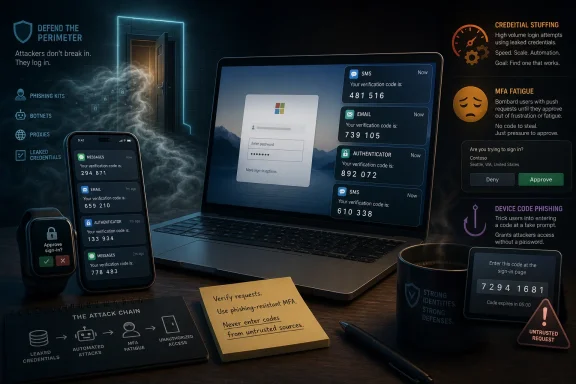
Microsoft users in Portugal and elsewhere have reported receiving unsolicited Microsoft verification codes by SMS, email, and Authenticator prompts in recent weeks, with the most likely causes ranging from credential-stuffing attempts to abuse of legitimate Microsoft Entra and OAuth sign-in flows. The important point is not that every code means an account has been breached. It is that Microsoft’s identity machinery is being touched, repeatedly, by someone other than the account owner. In 2026, an unexpected one-time code is no longer just an annoyance; it is a signal from the perimeter.
The old advice about unexpected login codes was simple: ignore the message and move on. That advice is still technically correct, but it is no longer sufficient. A verification code arriving out of nowhere means an authentication workflow has been triggered, and the question is which workflow, by whom, and with what information.
For consumer Microsoft accounts, the answer may be mundane. Someone may have mistyped a phone number, tried an old password from a breach, or entered the wrong email address into a recovery form. Microsoft’s own support guidance treats unsolicited verification codes as a sign that someone may be trying to access the account, or that another person entered the wrong contact detail.
But the scale and pattern matter. A single stray SMS is background noise. A run of codes over several days, especially across SMS, email, and push notifications, is a different category of event. That pattern suggests either automated testing, targeted harassment of the account’s authentication methods, or a social-engineering setup in which the attacker hopes the victim will eventually disclose or approve something.
The uncomfortable part is that MFA can be both the protection and the alarm bell. When an attacker has a valid password but not the second factor, the account owner may see the prompt. In that moment, MFA is working exactly as designed — but the password has already failed its side of the bargain.
This is not a sophisticated break-in so much as industrial-scale door-rattling. Automated tools try combinations at speed, spread attempts across infrastructure, and look for accounts where password reuse still works. If a password is valid, Microsoft’s sign-in system may challenge for a second factor, and the user sees a code or prompt.
That is why an unsolicited code can be paradoxically reassuring and alarming at the same time. Reassuring, because the attacker apparently did not complete the login. Alarming, because the attacker may have had enough information to reach the MFA stage. For anyone who has reused a Microsoft password on another service, that distinction is not academic.
Password managers and passkeys exist because humans are bad at maintaining unique secrets across dozens of services. The authentication code is often the first visible symptom of a compromise that happened years earlier on a completely different website. The breach may be old; the login attempt is not.
That is where user experience and security telemetry can drift apart. The user receives a code and sees something plainly suspicious. The administrator checks the obvious reports and may not find the event where expected. The result is a dangerous gap: the person at the edge sees smoke, while the control room sees no fire.
SMS sign-in is not inherently malicious. It can be useful for frontline workers, shared-device scenarios, and environments where passwords are a bigger operational burden than phone-based authentication. But it also expands the number of ways a phone number can become a login handle, and phone numbers are not private identifiers. They are printed on business cards, exposed in breaches, traded by data brokers, and scraped from public records.
For Microsoft 365 administrators, this is the part of the story that deserves immediate attention. If users are receiving codes and the tenant’s sign-in logs seem oddly quiet, the answer may be hiding in authentication method policy rather than in the more familiar failed-login dashboard. Security teams should know who is allowed to use SMS for sign-in, why they need it, and whether that policy still matches the organization’s risk appetite.
Push-based MFA made security easier for users, but it also created an approval reflex. A phone buzzes, a banner appears, and the user wants the interruption gone. If the prompt provides little context, or if the user has been trained to approve sign-ins all day, an attacker only needs one careless tap.
Microsoft and other vendors have tried to reduce this risk with number matching, location context, and stronger authentication methods. Those changes help, but they do not erase the underlying lesson. Any authentication factor that asks a tired human to make a fast trust decision can be manipulated.
This is why the distinction between “receiving a code” and “approving a login” matters. A code sitting unused in an SMS inbox is not the same as an approved push notification. But repeated unsolicited prompts create pressure, and pressure is the attacker’s tool. The defensive answer is not merely to ignore the first prompt; it is to remove weak or noisy methods where possible.
Attackers have learned to invert that flow. They generate a real device code, send it to the victim in a phishing lure, and instruct the victim to enter it on Microsoft’s real device login page. The victim sees a familiar Microsoft domain and may even complete MFA successfully. The problem is that the victim is authorizing the attacker’s session or application, not their own.
This is not a classic MFA bypass in the sense that the attacker breaks the second factor. It is more subtle. The victim performs the authentication correctly, and the attacker receives tokens that can grant access without needing the password afterward. That is why security researchers and Microsoft’s own threat intelligence have been paying renewed attention to device code abuse.
For users, the rule should be blunt: never enter a code you did not personally generate as part of a sign-in you initiated. The legitimacy of the Microsoft page is not enough. In device code phishing, the real page is part of the trap.
For administrators, the implications are broader. Device code flow may be unnecessary in many tenants, or necessary only for specific users and applications. Conditional Access, device compliance, app consent controls, and token monitoring become more important because the attack is about authorization, not just initial password theft.
SMS was never designed to be a security channel. It is vulnerable to SIM swapping, number recycling, social engineering, malware on phones, carrier-level weaknesses, and simple message interception. It is also easy for attackers to abuse psychologically because it feels official and urgent.
Still, SMS became popular because it was universal. Almost everyone has a phone number, and almost every phone can receive a text. For years, that convenience made SMS the default “good enough” second factor. The problem is that attackers adapt to what the population actually uses, not to what security architects wish people used.
The move away from SMS will be messy. Some users will lose access to familiar recovery paths. Some organizations will have to support populations that cannot use smartphone apps or hardware security keys. But the strategic direction is right: identity security cannot continue to depend on phone numbers as if they were private, permanent, and hard to hijack.
The password should be changed if there is any chance it was reused or exposed. That change only matters if the new password is unique. Replacing one reused password with another reused password simply resets the countdown until the next credential-stuffing wave.
Users should also review account aliases. A Microsoft account can have multiple aliases, and not all of them need to be allowed for sign-in. One practical defense is to create a less-public Outlook alias, make it the primary sign-in alias, and disable sign-in for older or more exposed aliases. This does not hide the account from Microsoft, but it reduces the usefulness of email addresses that have circulated through breaches and spam lists.
The bigger move is to replace SMS with stronger methods. Microsoft Authenticator is better than SMS when configured correctly, passkeys are better still, and FIDO2 security keys remain the gold standard for users willing to manage physical hardware. The goal is to make the attacker’s possession of an email address, phone number, or old password insufficient to create noise on your account.
The worst response is to tell users to ignore everything unless they approved a prompt. That teaches passivity in a situation where user reports may be the only visible clue. A better process asks when the codes arrived, through which channel, whether a prompt was approved, whether the user recently entered a code on a device login page, and whether the account has unusual app consent or token activity.
Administrators should review Authentication Methods policies in Entra ID, especially SMS and voice options. If SMS sign-in is enabled, it should be justified by a real business need rather than inherited from a pilot or left on because nobody wanted to break a workflow. “Use for sign-in” deserves particular scrutiny because it changes the role of the phone number from recovery contact to authentication identifier.
Conditional Access should also reflect the modern threat model. Legacy authentication should be blocked, risky sign-ins should trigger stronger controls, and device code flow should be restricted where it is not needed. App consent policies should prevent users from casually granting broad permissions to unknown applications.
This is not merely a Microsoft problem. Google, Apple, Okta, Duo, and every identity provider face the same structural tension: make authentication easy enough that users comply, but hard enough that attackers cannot turn convenience into a weapon. Microsoft is getting attention here because Microsoft accounts sit at the center of both consumer Windows life and enterprise productivity.
Attackers exploit that ambiguity. A code could be a failed credential-stuffing attempt, an account recovery probe, an SMS sign-in flow, a mistyped phone number, a device code lure, or the opening move of a phishing conversation. The same symptom can point to different causes, and the right response depends on context.
The common thread is that identity has become the control plane for everything. Email resets passwords. Microsoft 365 stores documents and chats. Azure and Entra govern infrastructure. Windows increasingly nudges users toward cloud-backed identity. If an attacker can manipulate the sign-in process, they may not need malware on the endpoint at all.
That is why the security industry’s migration toward phishing-resistant MFA matters. Passkeys and hardware-backed credentials do not solve every problem, but they reduce the attack surface created by reusable passwords, copyable codes, and approval prompts. They also shift authentication away from secrets that users can be tricked into reading aloud, typing into the wrong box, or approving under pressure.
 The Code Is the Smoke, Not the Fire
The old advice about unexpected login codes was simple: ignore the message and move on. That advice is still technically correct, but it is no longer sufficient. A verification code arriving out of nowhere means an authentication workflow has been triggered, and the question is which workflow, by whom, and with what information.For consumer Microsoft accounts, the answer may be mundane. Someone may have mistyped a phone number, tried an old password from a breach, or entered the wrong email address into a recovery form. Microsoft’s own support guidance treats unsolicited verification codes as a sign that someone may be trying to access the account, or that another person entered the wrong contact detail.
But the scale and pattern matter. A single stray SMS is background noise. A run of codes over several days, especially across SMS, email, and push notifications, is a different category of event. That pattern suggests either automated testing, targeted harassment of the account’s authentication methods, or a social-engineering setup in which the attacker hopes the victim will eventually disclose or approve something.
The uncomfortable part is that MFA can be both the protection and the alarm bell. When an attacker has a valid password but not the second factor, the account owner may see the prompt. In that moment, MFA is working exactly as designed — but the password has already failed its side of the bargain.
Credential Stuffing Turns Old Breaches Into Today’s Notifications
The most boring explanation is also the most common: credential stuffing. Attackers take usernames, email addresses, and passwords leaked from earlier breaches and test them against major services. Microsoft accounts are prime targets because they often unlock email, OneDrive, Xbox, Windows sign-in, Microsoft 365, Azure, and enterprise resources.This is not a sophisticated break-in so much as industrial-scale door-rattling. Automated tools try combinations at speed, spread attempts across infrastructure, and look for accounts where password reuse still works. If a password is valid, Microsoft’s sign-in system may challenge for a second factor, and the user sees a code or prompt.
That is why an unsolicited code can be paradoxically reassuring and alarming at the same time. Reassuring, because the attacker apparently did not complete the login. Alarming, because the attacker may have had enough information to reach the MFA stage. For anyone who has reused a Microsoft password on another service, that distinction is not academic.
Password managers and passkeys exist because humans are bad at maintaining unique secrets across dozens of services. The authentication code is often the first visible symptom of a compromise that happened years earlier on a completely different website. The breach may be old; the login attempt is not.
Microsoft’s Own Sign-In Features Can Make the Trail Harder to Read
The more confusing cases involve features that are legitimate by design. Microsoft Entra ID supports SMS-based sign-in, allowing a user to authenticate with a registered phone number and a one-time passcode rather than a traditional username-and-password flow. In organizations where this is enabled, a code may be generated in ways that do not look like a conventional failed login to administrators expecting a familiar sign-in trail.That is where user experience and security telemetry can drift apart. The user receives a code and sees something plainly suspicious. The administrator checks the obvious reports and may not find the event where expected. The result is a dangerous gap: the person at the edge sees smoke, while the control room sees no fire.
SMS sign-in is not inherently malicious. It can be useful for frontline workers, shared-device scenarios, and environments where passwords are a bigger operational burden than phone-based authentication. But it also expands the number of ways a phone number can become a login handle, and phone numbers are not private identifiers. They are printed on business cards, exposed in breaches, traded by data brokers, and scraped from public records.
For Microsoft 365 administrators, this is the part of the story that deserves immediate attention. If users are receiving codes and the tenant’s sign-in logs seem oddly quiet, the answer may be hiding in authentication method policy rather than in the more familiar failed-login dashboard. Security teams should know who is allowed to use SMS for sign-in, why they need it, and whether that policy still matches the organization’s risk appetite.
MFA Fatigue Is the Attack That Counts on Human Exhaustion
The most visible version of this problem is MFA fatigue, sometimes called MFA bombing. In that attack, the adversary has valid credentials and repeatedly triggers approval requests, hoping the victim will eventually tap approve by mistake or out of frustration. It is a crude technique, but its success comes from its understanding of people rather than cryptography.Push-based MFA made security easier for users, but it also created an approval reflex. A phone buzzes, a banner appears, and the user wants the interruption gone. If the prompt provides little context, or if the user has been trained to approve sign-ins all day, an attacker only needs one careless tap.
Microsoft and other vendors have tried to reduce this risk with number matching, location context, and stronger authentication methods. Those changes help, but they do not erase the underlying lesson. Any authentication factor that asks a tired human to make a fast trust decision can be manipulated.
This is why the distinction between “receiving a code” and “approving a login” matters. A code sitting unused in an SMS inbox is not the same as an approved push notification. But repeated unsolicited prompts create pressure, and pressure is the attacker’s tool. The defensive answer is not merely to ignore the first prompt; it is to remove weak or noisy methods where possible.
Device Code Phishing Moves the Trap Onto Real Microsoft Pages
The nastiest development is OAuth device code phishing, because it abuses trust in legitimate Microsoft infrastructure. The device code flow was built for devices that cannot easily accept a password, such as smart TVs, game consoles, printers, and command-line tools. A device displays a short code, the user enters it on a Microsoft page, and the device receives authorization.Attackers have learned to invert that flow. They generate a real device code, send it to the victim in a phishing lure, and instruct the victim to enter it on Microsoft’s real device login page. The victim sees a familiar Microsoft domain and may even complete MFA successfully. The problem is that the victim is authorizing the attacker’s session or application, not their own.
This is not a classic MFA bypass in the sense that the attacker breaks the second factor. It is more subtle. The victim performs the authentication correctly, and the attacker receives tokens that can grant access without needing the password afterward. That is why security researchers and Microsoft’s own threat intelligence have been paying renewed attention to device code abuse.
For users, the rule should be blunt: never enter a code you did not personally generate as part of a sign-in you initiated. The legitimacy of the Microsoft page is not enough. In device code phishing, the real page is part of the trap.
For administrators, the implications are broader. Device code flow may be unnecessary in many tenants, or necessary only for specific users and applications. Conditional Access, device compliance, app consent controls, and token monitoring become more important because the attack is about authorization, not just initial password theft.
SMS Is Finally Losing Its Security Halo
The surge in unsolicited codes lands at an awkward moment for SMS authentication. Microsoft has been moving toward passkeys and other phishing-resistant methods, and recent reporting indicates the company is phasing out SMS codes for personal account authentication and recovery in favor of stronger alternatives. That shift is overdue.SMS was never designed to be a security channel. It is vulnerable to SIM swapping, number recycling, social engineering, malware on phones, carrier-level weaknesses, and simple message interception. It is also easy for attackers to abuse psychologically because it feels official and urgent.
Still, SMS became popular because it was universal. Almost everyone has a phone number, and almost every phone can receive a text. For years, that convenience made SMS the default “good enough” second factor. The problem is that attackers adapt to what the population actually uses, not to what security architects wish people used.
The move away from SMS will be messy. Some users will lose access to familiar recovery paths. Some organizations will have to support populations that cannot use smartphone apps or hardware security keys. But the strategic direction is right: identity security cannot continue to depend on phone numbers as if they were private, permanent, and hard to hijack.
The Consumer Fix Starts With Aliases, Not Panic
For ordinary Microsoft account holders, the first step is not to panic and not to interact with the message. Do not reply to the SMS. Do not call a number included in a message. Do not click a link from the alert. Go directly to Microsoft’s account security pages through a browser or trusted app and review recent activity, devices, authentication methods, and connected applications.The password should be changed if there is any chance it was reused or exposed. That change only matters if the new password is unique. Replacing one reused password with another reused password simply resets the countdown until the next credential-stuffing wave.
Users should also review account aliases. A Microsoft account can have multiple aliases, and not all of them need to be allowed for sign-in. One practical defense is to create a less-public Outlook alias, make it the primary sign-in alias, and disable sign-in for older or more exposed aliases. This does not hide the account from Microsoft, but it reduces the usefulness of email addresses that have circulated through breaches and spam lists.
The bigger move is to replace SMS with stronger methods. Microsoft Authenticator is better than SMS when configured correctly, passkeys are better still, and FIDO2 security keys remain the gold standard for users willing to manage physical hardware. The goal is to make the attacker’s possession of an email address, phone number, or old password insufficient to create noise on your account.
Enterprise IT Has to Treat User Complaints as Telemetry
In organizations, unsolicited codes should not be dismissed as user confusion. They are low-fidelity signals, but they are still signals. A help desk ticket saying “I keep getting Microsoft codes” may be the first indication of credential stuffing, password reuse, an enabled SMS sign-in policy, or a device code phishing campaign.The worst response is to tell users to ignore everything unless they approved a prompt. That teaches passivity in a situation where user reports may be the only visible clue. A better process asks when the codes arrived, through which channel, whether a prompt was approved, whether the user recently entered a code on a device login page, and whether the account has unusual app consent or token activity.
Administrators should review Authentication Methods policies in Entra ID, especially SMS and voice options. If SMS sign-in is enabled, it should be justified by a real business need rather than inherited from a pilot or left on because nobody wanted to break a workflow. “Use for sign-in” deserves particular scrutiny because it changes the role of the phone number from recovery contact to authentication identifier.
Conditional Access should also reflect the modern threat model. Legacy authentication should be blocked, risky sign-ins should trigger stronger controls, and device code flow should be restricted where it is not needed. App consent policies should prevent users from casually granting broad permissions to unknown applications.
This is not merely a Microsoft problem. Google, Apple, Okta, Duo, and every identity provider face the same structural tension: make authentication easy enough that users comply, but hard enough that attackers cannot turn convenience into a weapon. Microsoft is getting attention here because Microsoft accounts sit at the center of both consumer Windows life and enterprise productivity.
The New Identity Perimeter Is Noisy by Design
A decade ago, a suspicious login attempt might have been visible only to a server log. Today, the user’s phone is part of the alarm system. That is progress, but it also means the perimeter has become noisy, personal, and easy to misunderstand.Attackers exploit that ambiguity. A code could be a failed credential-stuffing attempt, an account recovery probe, an SMS sign-in flow, a mistyped phone number, a device code lure, or the opening move of a phishing conversation. The same symptom can point to different causes, and the right response depends on context.
The common thread is that identity has become the control plane for everything. Email resets passwords. Microsoft 365 stores documents and chats. Azure and Entra govern infrastructure. Windows increasingly nudges users toward cloud-backed identity. If an attacker can manipulate the sign-in process, they may not need malware on the endpoint at all.
That is why the security industry’s migration toward phishing-resistant MFA matters. Passkeys and hardware-backed credentials do not solve every problem, but they reduce the attack surface created by reusable passwords, copyable codes, and approval prompts. They also shift authentication away from secrets that users can be tricked into reading aloud, typing into the wrong box, or approving under pressure.
The Message in the Unrequested Microsoft Code
The practical lesson is not that every unsolicited Microsoft code means disaster. It is that these alerts should be treated as evidence that your identity is being exercised by someone, somewhere. The correct response is calm, direct, and biased toward reducing weak authentication paths.- An unsolicited Microsoft code should be ignored, but the account’s recent activity and authentication methods should still be reviewed.
- Repeated codes over days or weeks are more serious than a single stray message and may indicate credential stuffing, enumeration, or an abused sign-in method.
- SMS should be removed as a primary authentication method wherever passkeys, Authenticator, or security keys are realistic alternatives.
- Microsoft 365 administrators should verify whether SMS sign-in is enabled and whether users are permitted to sign in with phone-number-based one-time codes.
- Users should never enter a code supplied by someone else on a Microsoft device login page, even if the page itself is genuine.
- Reports from users receiving unexpected codes should be treated as security telemetry, not dismissed as nuisance messages.
References
- Primary source: techbit.pt
Published: 2026-06-02T12:12:10.864804
Are you receiving Microsoft Authenticator codes or SMS messages without requesting them? | TechBit
Over the past few weeks, thousands of users across several countries, including Portugal, have been receiving Microsoft authentication codes via SMS, email, techbit.pt
- Related coverage: techradar.com
FBI warns Microsoft 365 is being bombarded with new phishing emails | TechRadar
Here is how to keep your organization safe against the Kali365 phishing threatwww.techradar.com - Official source: learn.microsoft.com
SMS-based user sign-in for Microsoft Entra ID - Microsoft Entra ID | Microsoft Learn
Learn how to configure and enable users to sign-in to Microsoft Entra ID using SMSlearn.microsoft.com - Official source: microsoft.com
Inside an AI‑enabled device code phishing campaign | Microsoft Security Blog
A new wave of device code phishing shows how threat actors are scaling account compromise using AI and end‑to‑end automation. This campaign goes beyond traditional phishing by generating live authentication codes on demand, enabling higher success rates and sustained post‑compromise access.www.microsoft.com - Related coverage: aertous.com
OAuth Consent and Device Code Phishing: The Microsoft Attacks Your Training Does Not Cover | Aertous | Aertous
A technical breakdown of OAuth consent phishing, device code (PIN) phishing, and Adversary-in-the-Middle attacks against Microsoft 365 and Entra ID. How they work at the protocol level, why MFA does not stop them, and what to do about it.www.aertous.com - Official source: support.microsoft.com
Why is Microsoft texting me? | Microsoft Support
Get information about why you are receiving text messages from Microsoft.support.microsoft.com
- Related coverage: purpleshieldsecurity.com
Tycoon2FA Now Bypasses MFA on Microsoft 365 Accounts
Tycoon2FA's new device-code phishing satisfies real Microsoft MFA to hijack M365 accounts. What CISOs need to know about OAuth abuse and Trustifi lures. www.purpleshieldsecurity.com
- Related coverage: securedintel.com
AI-Enabled Device Code Phishing: How Attackers Bypass MFA in Microsoft 365 | Secured Intel
The assumption that multi-factor authentication makes an account impenetrable has cost organizations dearly. In early 2025, Microsoft's threat intelligence team...www.securedintel.com - Related coverage: windowscentral.com
Microsoft plans to end SMS two-factor authentication, potentially setting the pace for a passwordless Windows 11 future: "SMS as MFA is horribly vulnerable on multiple fronts." | Windows Central
Microsoft is scrapping SMS 2FA because it is a leading source of fraud.www.windowscentral.com - Related coverage: pcgamer.com
Microsoft continues to build towards a passwordless future by phasing out an authentication method that's become 'a leading source of fraud' | PC Gamer
Bad news for forgetful folks like me.www.pcgamer.com - Related coverage: audit.wa.gov.au
