

Microsoft Azure CTO Mark Russinovich said in a Microsoft Dev Docs video posted May 6, 2026, that Win32 remains a first-class Windows API in 2026 because decades of applications, tools, and system behaviors were built on top of it. The admission is less a scandal than a reminder of Windows’ central bargain: Microsoft can modernize the shell, security model, and cloud hooks, but it cannot casually break the software civilization that made Windows dominant. Windows 11 may wear acrylic surfaces and AI buttons, yet its most valuable feature is still continuity. That is both Microsoft’s superpower and its trap.
The easy headline is that Windows 11 “still runs on code from the 1990s.” The harder truth is that Windows 11 is useful precisely because it still understands the world the 1990s built. A right-click menu, a desktop application, a file dialog, a window message loop, a system tray utility, a printer configuration tool, a line-of-business database front end — these are not historical curiosities for the people who administer fleets.
Win32 is not merely a museum wing inside Windows. It is the contractual language through which enormous parts of the Windows software economy still speak to the operating system. Microsoft can wrap it, restrict it, virtualize it, document it, and occasionally discourage it, but the company cannot pretend it is gone without detonating the compatibility promise that has defined Windows since the NT era.
That is what makes Russinovich’s comment notable. It is not that some ancient code path survived by accident in a dusty corner of the OS. It is that the Windows API surface Microsoft once expected to supersede has instead become bedrock, the stable layer beneath a generation of attempted reinventions.
The punchline is not that Windows is old. The punchline is that Windows is old in the same way cities are old: modern roads run over older routes, new buildings tie into old utilities, and nobody sane rebuilds the sewer system every time the skyline changes.
That advantage hardened into culture. Windows users expect old apps to work. Developers expect old assumptions to remain mostly true. IT departments expect upgrades to be painful but survivable. Microsoft’s own documentation still treats Win32 as a living desktop application platform, not a deprecated relic preserved only for archaeology.
This is why “legacy” is the wrong insult. Legacy code is often code that survived because it carried economic value. The DLLs, APIs, message pumps, handles, registry keys, shell extensions, COM objects, and installer conventions that make Windows feel untidy are also the connective tissue that lets a 2026 workstation run a surprisingly broad slice of software history.
The same continuity that frustrates designers is what reassures businesses. A hospital workstation, manufacturing control PC, municipal records terminal, law firm document system, or niche engineering tool may not care about Microsoft’s newest app model. It cares that the thing still launches.
Microsoft tried to sell cleaner futures before. WinRT, Windows Store apps, UWP, and other modern Windows frameworks all promised better security boundaries, cleaner deployment, more predictable lifecycles, and a more controlled user experience. Those goals were reasonable. But they ran into the same wall: Windows is not an iPad, and its users did not want it to become one at the cost of their existing software.
Windows 8 tried to pull the platform toward a touch-first, store-mediated, sandboxed model. That strategy underestimated how deeply the desktop remained the center of gravity for Windows users, especially on PCs used for work. The Start screen became the symbol of that miscalculation, but the deeper issue was the attempt to make the desktop feel like a legacy mode before users were ready to leave it.
UWP later softened the pitch, but the divide remained. Developers building serious Windows desktop software still had to ask whether the modern platform gave them enough access, flexibility, performance, and audience reach to justify abandoning proven Win32 patterns. Often, the answer was no.
Yet those efforts were not wasted. Windows today has better app packaging, improved permissions concepts, stronger store distribution options, newer UI frameworks, and a more serious security vocabulary because Microsoft spent years trying to civilize the desktop. Even when the new world failed to replace the old one, pieces of it migrated back into the old world.
That is Microsoft’s actual Windows strategy now: not revolution, but grafting. Win32 persists, while newer frameworks, security controls, web runtimes, package systems, and cloud services attach themselves around it. The OS becomes less a single architecture than a negotiated settlement among eras.
For developers, the web solved problems Windows app models kept complicating. It offered cross-platform reach, continuous deployment, easier distribution, and a familiar security sandbox. For businesses, it reduced dependence on thick clients and local installers. For Microsoft, it became both a threat and a tool.
That is why Windows in 2026 is full of web technology wearing native clothing. Teams, Outlook, widgets, Copilot experiences, and many modern app surfaces increasingly blur the line between local software and browser-delivered interface. Microsoft lost the old dream of making every Windows app a modern Windows app, but it found another route: embed the web and call the result integrated.
This creates its own tension. Enthusiasts complain that Windows feels less native, less coherent, and sometimes heavier than it should. They are not imagining it. A system that preserves Win32 while layering web apps, AI services, telemetry frameworks, cloud accounts, and modern UI shells can feel like several operating systems arguing inside one Start menu.
But that messiness is also the shape of the market. Native Windows software did not disappear. Web software did not stay in the browser. Enterprise management did not stop requiring local control. Security did not stop demanding isolation. Windows has become the place where all these demands collide.
That longevity is not nostalgia. Process Explorer, Autoruns, ProcMon, PsExec, Sysmon, and their siblings survived because Windows administration still requires visibility below the friendly surface. Modern Settings pages and polished dashboards are useful until something breaks in the messy layers underneath. Then administrators reach for tools that show handles, registry writes, process trees, services, drivers, network connections, and persistence points.
Sysmon’s move into Windows as a built-in optional feature is especially telling. A tool born in the Sysinternals world of expert diagnostics has become part of Microsoft’s broader security posture. That is not a relic being indulged; it is a field-proven instrument being absorbed into the platform.
ZoomIt is another small but revealing example. A presentation utility from another era persists because it does exactly what working technologists need: zoom, annotate, explain. It is not glamorous. It is useful. Windows has always had room for this kind of software, and that is why its ecosystem is so hard to replace.
The distinction matters. Old code becomes obsolete when it no longer solves a real problem or when its costs exceed its value. Old code becomes infrastructure when too many important things depend on it and it continues to perform. Win32 is not untouchable because it is beautiful. It is untouchable because it still works at planetary scale.
Win32 was not designed for a world where every consumer laptop is a target and every enterprise endpoint is a potential beachhead. Windows has spent the last two decades compensating with mitigations: address-space randomization, code integrity, virtualization-based security, attack surface reduction rules, application control, sandboxing, exploit protection, reputation systems, and increasingly aggressive defaults.
But mitigation is not the same as simplification. Microsoft can harden Windows around Win32, but it cannot make the platform as clean as one designed from scratch for sandboxed apps and cloud-managed identities. The very thing that makes Windows flexible — broad access to local resources and decades of compatible behaviors — is also what makes it difficult to lock down completely.
This is where the enthusiast and enterprise conversations diverge. Enthusiasts often see legacy layers as clutter or bloat. Security teams see them as attack surface. Application owners see them as business continuity. Microsoft has to satisfy all three groups without fully pleasing any of them.
That is why Windows security strategy increasingly looks like containment rather than replacement. Microsoft is not going to rip out Win32. It is going to put more policy, telemetry, identity, virtualization, and management around the parts of the system it cannot remove.
The desktop is where File Explorer matters. It is where context menus matter. It is where app compatibility matters. It is where shell extensions, taskbar behaviors, tray icons, window snapping, drag-and-drop, keyboard shortcuts, and legacy control panels become more than trivia. They are the muscle memory of work.
This is why Windows 11’s rough edges draw such loud reactions. When Microsoft changes defaults, hides options, pushes account integration, inserts web-backed surfaces, or slows a familiar workflow, users do not experience it as modernization. They experience it as interference with the part of Windows that still belongs to them.
The Win32 revelation lands in that context. It confirms what many Windows users intuitively know: beneath the new paint, the system’s value still comes from the durable desktop contract. Microsoft can add AI, but it cannot make Windows valuable by AI alone. It can promote the Store, but it cannot reduce Windows to Store apps. It can modernize Settings, but it cannot wish away the old control surfaces that still expose necessary knobs.
The company’s challenge is not to make Windows less old. It is to make the old parts feel less neglected.
Win32’s ugly strength is that it has outlived Microsoft’s own fashion cycles. Developers may dislike its verbosity, its C heritage, its uneven documentation history, and its ancient idioms. But they know it is there. They know Microsoft cannot easily abandon it. That makes it a better long-term platform bet than some cleaner frameworks with less institutional gravity.
This is not unique to Microsoft. Every mature platform has this problem. Apple still carries Unix foundations under macOS. Linux desktops still juggle old X11 assumptions even as Wayland advances. The web itself is a monument to compatibility hacks that became standards. The difference is that Windows’ compatibility burden is especially visible because its users span gamers, accountants, schools, factories, governments, developers, and hobbyists running software from wildly different eras.
For new Windows apps, the decision is rarely pure Win32 versus pure modern platform. Developers mix layers. They use Win32 where they need reach or control, WinUI where it helps, web views where cross-platform speed matters, .NET where productivity wins, and packaged deployment where enterprise or Store distribution demands it. Windows development has become a buffet because no single path won.
That fragmentation annoys everyone. It also reflects reality. A platform with Windows’ history cannot converge overnight without burning down the village it is trying to modernize.
Windows is an ecosystem with veto players. Enterprises veto changes by refusing deployments. Developers veto app models by not adopting them. Consumers veto interface changes through backlash and workarounds. Hardware partners veto unrealistic requirements by shipping what sells. Security teams veto permissive defaults. Regulators increasingly veto bundled services and platform favoritism.
Microsoft owns Windows, but it does not fully control Windows culture. That culture is conservative, pragmatic, suspicious of churn, and deeply attached to compatibility. Sometimes that makes Windows worse. Sometimes it saves Windows from Microsoft’s worst instincts.
The persistence of Win32 is therefore not just a technical story. It is governance by installed base. Every old app that still matters casts a vote. Every business process built on a desktop workflow casts a vote. Every sysadmin who delays an upgrade until the vendor certifies support casts a vote. Win32 keeps winning elections because the electorate is enormous.
An AI assistant that cannot understand Win32 applications will be limited. A system automation feature that only works with modern apps will miss the tools businesses actually use. A security model that assumes software arrives neatly packaged from a trusted store will collide with the messy reality of vendors, installers, scripts, drivers, macros, and custom internal tools.
If Microsoft wants AI to matter on Windows, it has to operate across the real Windows estate. That means File Explorer, Office, browsers, command lines, legacy apps, remote sessions, management consoles, and local data. It means the AI PC cannot be a pristine new platform floating above history. It has to crawl through the same old corridors administrators know too well.
This is why the Win32 story should humble the AI hype. The future of Windows will not arrive as a clean replacement. It will arrive as another layer, and its usefulness will depend on how well it cooperates with the layers already there.
That does not mean Microsoft should stop modernizing. It means modernization must be measured by reduced friction, not by how loudly the company declares a new era. Users do not care whether a workflow is native, web-backed, Win32, WinUI, or AI-orchestrated if it is fast, reliable, secure, and under their control.
Source: PCWorld Windows 11 still runs on code from the 1990s, Microsoft admits
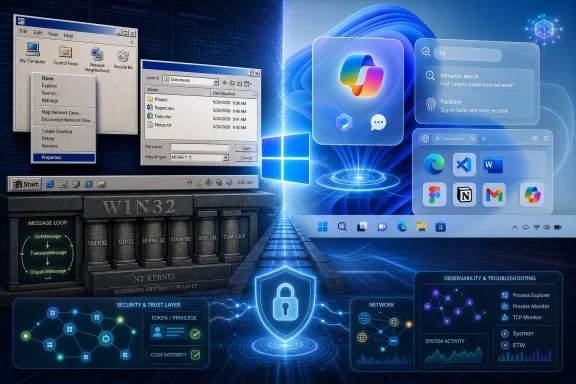 Windows 11 Is Modern Because the Old Code Still Works
The easy headline is that Windows 11 “still runs on code from the 1990s.” The harder truth is that Windows 11 is useful precisely because it still understands the world the 1990s built. A right-click menu, a desktop application, a file dialog, a window message loop, a system tray utility, a printer configuration tool, a line-of-business database front end — these are not historical curiosities for the people who administer fleets.Win32 is not merely a museum wing inside Windows. It is the contractual language through which enormous parts of the Windows software economy still speak to the operating system. Microsoft can wrap it, restrict it, virtualize it, document it, and occasionally discourage it, but the company cannot pretend it is gone without detonating the compatibility promise that has defined Windows since the NT era.
That is what makes Russinovich’s comment notable. It is not that some ancient code path survived by accident in a dusty corner of the OS. It is that the Windows API surface Microsoft once expected to supersede has instead become bedrock, the stable layer beneath a generation of attempted reinventions.
The punchline is not that Windows is old. The punchline is that Windows is old in the same way cities are old: modern roads run over older routes, new buildings tie into old utilities, and nobody sane rebuilds the sewer system every time the skyline changes.
Win32 Won Because Compatibility Beat Purity
Operating system history is littered with clean breaks that made technical sense and commercial trouble. Microsoft has always known this better than most vendors. The company’s core Windows advantage was never just that it shipped a graphical shell or dominated OEM distribution; it was that businesses could keep running what they had already bought, written, debugged, and trained people to use.That advantage hardened into culture. Windows users expect old apps to work. Developers expect old assumptions to remain mostly true. IT departments expect upgrades to be painful but survivable. Microsoft’s own documentation still treats Win32 as a living desktop application platform, not a deprecated relic preserved only for archaeology.
This is why “legacy” is the wrong insult. Legacy code is often code that survived because it carried economic value. The DLLs, APIs, message pumps, handles, registry keys, shell extensions, COM objects, and installer conventions that make Windows feel untidy are also the connective tissue that lets a 2026 workstation run a surprisingly broad slice of software history.
The same continuity that frustrates designers is what reassures businesses. A hospital workstation, manufacturing control PC, municipal records terminal, law firm document system, or niche engineering tool may not care about Microsoft’s newest app model. It cares that the thing still launches.
Microsoft tried to sell cleaner futures before. WinRT, Windows Store apps, UWP, and other modern Windows frameworks all promised better security boundaries, cleaner deployment, more predictable lifecycles, and a more controlled user experience. Those goals were reasonable. But they ran into the same wall: Windows is not an iPad, and its users did not want it to become one at the cost of their existing software.
The Failed Reboots Still Changed Windows
It would be too simple to say WinRT failed and Win32 won. The more interesting story is that Microsoft’s failed API reboots still changed Windows, just not in the way Redmond expected.Windows 8 tried to pull the platform toward a touch-first, store-mediated, sandboxed model. That strategy underestimated how deeply the desktop remained the center of gravity for Windows users, especially on PCs used for work. The Start screen became the symbol of that miscalculation, but the deeper issue was the attempt to make the desktop feel like a legacy mode before users were ready to leave it.
UWP later softened the pitch, but the divide remained. Developers building serious Windows desktop software still had to ask whether the modern platform gave them enough access, flexibility, performance, and audience reach to justify abandoning proven Win32 patterns. Often, the answer was no.
Yet those efforts were not wasted. Windows today has better app packaging, improved permissions concepts, stronger store distribution options, newer UI frameworks, and a more serious security vocabulary because Microsoft spent years trying to civilize the desktop. Even when the new world failed to replace the old one, pieces of it migrated back into the old world.
That is Microsoft’s actual Windows strategy now: not revolution, but grafting. Win32 persists, while newer frameworks, security controls, web runtimes, package systems, and cloud services attach themselves around it. The OS becomes less a single architecture than a negotiated settlement among eras.
The Browser Became the Escape Hatch Microsoft Could Not Control
Russinovich’s mention of the separation between Win32 on the client and the browser world matters because it points to the other platform that refused to die on Microsoft’s schedule. If Microsoft could not fully move Windows developers to its preferred modern app model, the web offered a different exit.For developers, the web solved problems Windows app models kept complicating. It offered cross-platform reach, continuous deployment, easier distribution, and a familiar security sandbox. For businesses, it reduced dependence on thick clients and local installers. For Microsoft, it became both a threat and a tool.
That is why Windows in 2026 is full of web technology wearing native clothing. Teams, Outlook, widgets, Copilot experiences, and many modern app surfaces increasingly blur the line between local software and browser-delivered interface. Microsoft lost the old dream of making every Windows app a modern Windows app, but it found another route: embed the web and call the result integrated.
This creates its own tension. Enthusiasts complain that Windows feels less native, less coherent, and sometimes heavier than it should. They are not imagining it. A system that preserves Win32 while layering web apps, AI services, telemetry frameworks, cloud accounts, and modern UI shells can feel like several operating systems arguing inside one Start menu.
But that messiness is also the shape of the market. Native Windows software did not disappear. Web software did not stay in the browser. Enterprise management did not stop requiring local control. Security did not stop demanding isolation. Windows has become the place where all these demands collide.
Sysinternals Shows the Difference Between Old and Obsolete
The Russinovich video reportedly also touched on Sysinternals, Sysmon, and ZoomIt — tools whose longevity makes the same point from a different angle. Sysinternals began as the kind of deep Windows utility collection power users passed around because Microsoft’s official tools did not expose enough of the system. Decades later, it remains one of the most trusted names in Windows troubleshooting.That longevity is not nostalgia. Process Explorer, Autoruns, ProcMon, PsExec, Sysmon, and their siblings survived because Windows administration still requires visibility below the friendly surface. Modern Settings pages and polished dashboards are useful until something breaks in the messy layers underneath. Then administrators reach for tools that show handles, registry writes, process trees, services, drivers, network connections, and persistence points.
Sysmon’s move into Windows as a built-in optional feature is especially telling. A tool born in the Sysinternals world of expert diagnostics has become part of Microsoft’s broader security posture. That is not a relic being indulged; it is a field-proven instrument being absorbed into the platform.
ZoomIt is another small but revealing example. A presentation utility from another era persists because it does exactly what working technologists need: zoom, annotate, explain. It is not glamorous. It is useful. Windows has always had room for this kind of software, and that is why its ecosystem is so hard to replace.
The distinction matters. Old code becomes obsolete when it no longer solves a real problem or when its costs exceed its value. Old code becomes infrastructure when too many important things depend on it and it continues to perform. Win32 is not untouchable because it is beautiful. It is untouchable because it still works at planetary scale.
Security Makes the Compatibility Bargain More Expensive
The case against legacy code is not imaginary. Every old interface is a promise attackers can study. Every compatibility layer is another place where assumptions from a less hostile computing era meet a threat model shaped by ransomware crews, supply-chain attacks, living-off-the-land techniques, and nation-state operators.Win32 was not designed for a world where every consumer laptop is a target and every enterprise endpoint is a potential beachhead. Windows has spent the last two decades compensating with mitigations: address-space randomization, code integrity, virtualization-based security, attack surface reduction rules, application control, sandboxing, exploit protection, reputation systems, and increasingly aggressive defaults.
But mitigation is not the same as simplification. Microsoft can harden Windows around Win32, but it cannot make the platform as clean as one designed from scratch for sandboxed apps and cloud-managed identities. The very thing that makes Windows flexible — broad access to local resources and decades of compatible behaviors — is also what makes it difficult to lock down completely.
This is where the enthusiast and enterprise conversations diverge. Enthusiasts often see legacy layers as clutter or bloat. Security teams see them as attack surface. Application owners see them as business continuity. Microsoft has to satisfy all three groups without fully pleasing any of them.
That is why Windows security strategy increasingly looks like containment rather than replacement. Microsoft is not going to rip out Win32. It is going to put more policy, telemetry, identity, virtualization, and management around the parts of the system it cannot remove.
The Desktop Is Still the Product Microsoft Cannot Quit
Microsoft’s public messaging around Windows often chases the future: AI PCs, Copilot integration, cloud backup, passkeys, Arm performance, developer productivity, gaming enhancements, and security baselines. Those are real priorities. But the product people actually use every day is still the desktop.The desktop is where File Explorer matters. It is where context menus matter. It is where app compatibility matters. It is where shell extensions, taskbar behaviors, tray icons, window snapping, drag-and-drop, keyboard shortcuts, and legacy control panels become more than trivia. They are the muscle memory of work.
This is why Windows 11’s rough edges draw such loud reactions. When Microsoft changes defaults, hides options, pushes account integration, inserts web-backed surfaces, or slows a familiar workflow, users do not experience it as modernization. They experience it as interference with the part of Windows that still belongs to them.
The Win32 revelation lands in that context. It confirms what many Windows users intuitively know: beneath the new paint, the system’s value still comes from the durable desktop contract. Microsoft can add AI, but it cannot make Windows valuable by AI alone. It can promote the Store, but it cannot reduce Windows to Store apps. It can modernize Settings, but it cannot wish away the old control surfaces that still expose necessary knobs.
The company’s challenge is not to make Windows less old. It is to make the old parts feel less neglected.
Developers Learned to Distrust the Next Big Windows App Model
One reason Win32 persists is that Microsoft trained developers to be skeptical. Over the years, Windows developers have watched preferred technologies rise, get rebranded, get sidelined, or become one option among many. The result is a rational conservatism: if you are building software meant to last, the boring API may be the safer bet.Win32’s ugly strength is that it has outlived Microsoft’s own fashion cycles. Developers may dislike its verbosity, its C heritage, its uneven documentation history, and its ancient idioms. But they know it is there. They know Microsoft cannot easily abandon it. That makes it a better long-term platform bet than some cleaner frameworks with less institutional gravity.
This is not unique to Microsoft. Every mature platform has this problem. Apple still carries Unix foundations under macOS. Linux desktops still juggle old X11 assumptions even as Wayland advances. The web itself is a monument to compatibility hacks that became standards. The difference is that Windows’ compatibility burden is especially visible because its users span gamers, accountants, schools, factories, governments, developers, and hobbyists running software from wildly different eras.
For new Windows apps, the decision is rarely pure Win32 versus pure modern platform. Developers mix layers. They use Win32 where they need reach or control, WinUI where it helps, web views where cross-platform speed matters, .NET where productivity wins, and packaged deployment where enterprise or Store distribution demands it. Windows development has become a buffet because no single path won.
That fragmentation annoys everyone. It also reflects reality. A platform with Windows’ history cannot converge overnight without burning down the village it is trying to modernize.
Microsoft’s Real Admission Is That Windows Is an Ecosystem, Not an OS
The word “admits” makes the PCWorld story sound like Microsoft confessed to a defect. In a narrow sense, yes, it is amusing that a 2026 operating system still depends on an API lineage associated with Windows 95. But the bigger admission is more strategic: Windows is no longer something Microsoft can redesign by decree.Windows is an ecosystem with veto players. Enterprises veto changes by refusing deployments. Developers veto app models by not adopting them. Consumers veto interface changes through backlash and workarounds. Hardware partners veto unrealistic requirements by shipping what sells. Security teams veto permissive defaults. Regulators increasingly veto bundled services and platform favoritism.
Microsoft owns Windows, but it does not fully control Windows culture. That culture is conservative, pragmatic, suspicious of churn, and deeply attached to compatibility. Sometimes that makes Windows worse. Sometimes it saves Windows from Microsoft’s worst instincts.
The persistence of Win32 is therefore not just a technical story. It is governance by installed base. Every old app that still matters casts a vote. Every business process built on a desktop workflow casts a vote. Every sysadmin who delays an upgrade until the vendor certifies support casts a vote. Win32 keeps winning elections because the electorate is enormous.
The AI PC Era Still Has to Pass Through the 1990s
The irony is sharp. Microsoft is trying to define the next PC era around AI acceleration, local models, cloud assistants, semantic search, and context-aware workflows. Yet the success of that future still depends on whether the new layer respects the old one.An AI assistant that cannot understand Win32 applications will be limited. A system automation feature that only works with modern apps will miss the tools businesses actually use. A security model that assumes software arrives neatly packaged from a trusted store will collide with the messy reality of vendors, installers, scripts, drivers, macros, and custom internal tools.
If Microsoft wants AI to matter on Windows, it has to operate across the real Windows estate. That means File Explorer, Office, browsers, command lines, legacy apps, remote sessions, management consoles, and local data. It means the AI PC cannot be a pristine new platform floating above history. It has to crawl through the same old corridors administrators know too well.
This is why the Win32 story should humble the AI hype. The future of Windows will not arrive as a clean replacement. It will arrive as another layer, and its usefulness will depend on how well it cooperates with the layers already there.
That does not mean Microsoft should stop modernizing. It means modernization must be measured by reduced friction, not by how loudly the company declares a new era. Users do not care whether a workflow is native, web-backed, Win32, WinUI, or AI-orchestrated if it is fast, reliable, secure, and under their control.
The Bedrock Under Windows 11 Is Also Its Warning Label
The practical lesson from Russinovich’s comment is not that Windows users should panic about old code. It is that anyone evaluating Microsoft’s desktop strategy should understand how constrained the company really is.- Windows 11 still depends on Win32 because compatibility remains central to the value of Windows as a desktop and enterprise platform.
- Microsoft’s earlier attempts to reboot the Windows app model changed parts of the platform but did not displace the classic desktop.
- The web became the most successful alternative application layer, which is why modern Windows increasingly mixes native components with browser-backed experiences.
- Sysinternals and Sysmon show that old Windows tools can become more important over time when they solve durable administrative and security problems.
- The biggest risk in legacy Windows is not age by itself, but the security and maintenance cost of preserving broad compatibility in a hostile computing environment.
- Microsoft’s AI ambitions will only matter on the PC if they work with the messy, Win32-heavy reality of Windows rather than pretending a cleaner platform already won.
Source: PCWorld Windows 11 still runs on code from the 1990s, Microsoft admits
