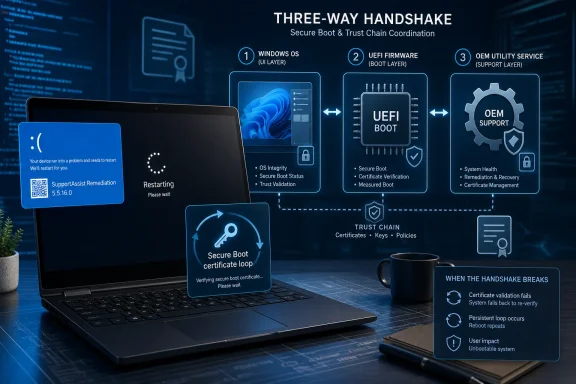
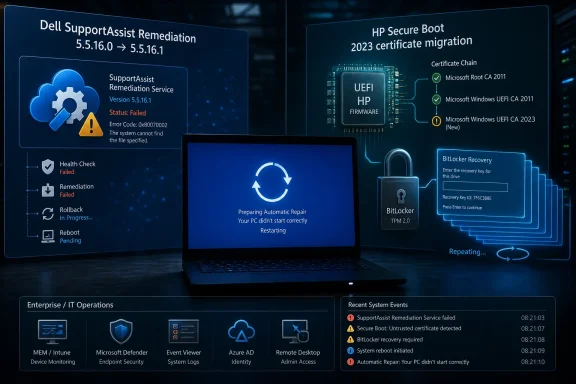
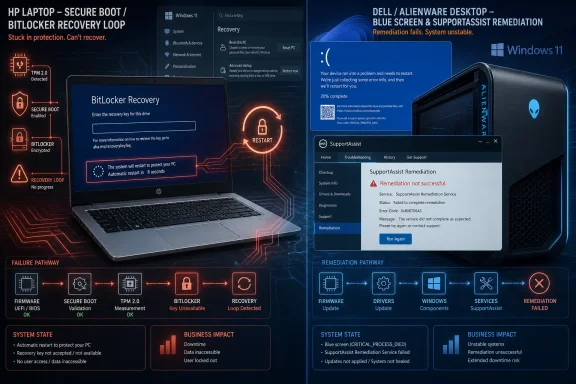
HP’s April 2026 BIOS updates and Dell’s May 2026 SupportAssist Remediation update have caused real Windows 11 failures on affected PCs, including BitLocker recovery loops on HP commercial systems and repeated blue screens on Dell and Alienware machines. The uncomfortable part is that neither incident fits the tidy “Microsoft broke Windows again” story. Windows is still the platform that users see when the machine fails, but the failure path increasingly runs through firmware, drivers, recovery agents, and OEM utilities that Microsoft does not fully control.
That distinction matters because Windows 11 is in the middle of a rare quality reset. Microsoft is trying to clean up years of accumulated distrust around updates, performance, Copilot clutter, and driver instability. But if PC makers keep shipping fragile firmware and privileged support tools, they can undo that work one fleet at a time.
Windows has always been the visible suspect. If a laptop boots into BitLocker recovery, the user sees a Microsoft recovery screen. If a workstation drops into a blue screen, the user sees a Windows stop code. If a driver crashes the kernel, the average owner does not distinguish between Microsoft code, OEM code, silicon vendor code, and a remediation agent quietly installed by the manufacturer.
That ambiguity has been useful for OEMs. It lets manufacturers bundle increasingly powerful software with comparatively little public scrutiny, because any catastrophic failure tends to splash onto the operating system brand first. For years, that was at least partly fair: Windows updates really did break machines, driver delivery through Windows Update really did cause pain, and Windows 11’s early reputation for sluggishness and nagging design choices was earned.
But the latest HP and Dell incidents expose a different ecosystem problem. Windows is now being asked to absorb blame for failures created by the companies selling the hardware. That is not just a messaging issue; it is a reliability model issue.
Modern Windows PCs are not a clean stack with Microsoft at the bottom and the OEM politely above it. Firmware, Secure Boot databases, TPM measurements, driver packages, recovery services, telemetry agents, update helpers, vendor control panels, and hardware diagnostics all sit close enough to the system boundary to break the PC in ways that look indistinguishable from an OS failure. The more OEMs automate maintenance, the more damage they can do when their automation fails.
HP’s faulty BIOS updates, released in early April 2026, collided with that process on commercial machines including EliteBook, ProBook, ZBook, and workstation systems. Affected devices could enter BitLocker recovery, accept a valid recovery key, boot successfully, and then return to recovery again after the next restart. That pattern is particularly brutal because it mimics resolution while guaranteeing repeat failure.
The mechanics are familiar to anyone who has had to explain BitLocker to a frustrated executive at 7:30 in the morning. BitLocker seals access to the encrypted drive against a measured boot state, using the TPM as the place where those measurements become enforceable. If the boot chain changes unexpectedly, BitLocker does not know whether the reason is a legitimate firmware transition, a botched BIOS update, or an attacker tampering with the platform. It errs on the side of asking for the recovery key.
That is the correct security behavior. The broken part is what happened next. On affected HP machines, the Secure Boot 2023 transition could get stuck in an inconsistent state, leaving the system unable to establish a stable new baseline. In practice, every reboot could look suspicious again, which turns BitLocker from a safety net into a loop.
The workaround described by HP and discussed by administrators was not the sort of thing that modern endpoint management is supposed to require. IT staff had to intervene in firmware settings and ensure the relevant 2023 Secure Boot certificates were accepted so Windows could complete the handoff. On a single machine, that is annoying. Across a fleet, it is a scheduling problem, a staffing problem, and a business continuity problem.
This is where security design becomes politically thankless. The user-facing component that refuses to proceed is treated as the guilty party, even when it is the only component behaving defensively. BitLocker is the bouncer at the door; the BIOS update rearranged the guest list.
For administrators, the lesson is not to disable BitLocker or treat recovery prompts as a nuisance to be engineered away. The lesson is that firmware update rings need the same seriousness as OS update rings. BIOS updates should be staged, measured, paused, and verified before they hit broad device populations, especially when they interact with Secure Boot, TPM state, or certificate migration.
The deeper lesson is that OEM firmware has become part of Windows reliability, whether Microsoft likes it or not. A bad BIOS update can now trigger security recovery flows, interrupt certificate transitions, and consume helpdesk capacity in ways that users experience as Windows failure. That makes firmware QA a front-line operating system issue.
Owners of Dell XPS, Alienware, Latitude, Precision, and other systems reported repeated blue screens, in some cases roughly every 30 minutes. Dell’s own community discussions identified the SupportAssist Remediation service, or its Alienware equivalent, as the common factor. The crash signature involved a critical process failure associated with Dell’s remediation component, which is about as on-the-nose as PC reliability failures get.
The timing made the confusion worse. A Patch Tuesday update had landed around the same period, and Windows 11 entered the suspect lineup immediately. That is understandable, given the operating system’s recent reputation, but in this case the crash path ran through Dell’s own software.
The recommended mitigation was blunt: uninstall the offending SupportAssist Remediation service. That may solve the immediate crash loop, but it leaves a credibility hole. If the software marketed as a safety system can become a recurring blue-screen generator, enterprises will reasonably ask whether vendor support agents belong on production endpoints at all.
There is also an architectural concern here. OEM support utilities are no longer harmless tray apps that display warranty status. They install services, drivers, recovery plugins, update components, and privileged processes. They operate close enough to the system core that a bad release can look like kernel instability. That power demands a release discipline many OEM utilities have not historically demonstrated.
Microsoft has been talking about fewer surprise restarts, more update control, performance improvements in File Explorer, less flicker, and a retreat from some of the more irritating Copilot placements across built-in apps. Those changes do not erase the damage done by Windows 11’s worst stretches, but they suggest that the company understands the complaint is not merely about bugs. It is about control.
The most relevant development for OEMs is Microsoft’s Driver Quality Initiative, announced at WinHEC 2026 alongside Cloud-Initiated Driver Recovery. The idea is simple enough: when a bad driver delivered through Windows Update is identified, Microsoft wants the ability to remotely roll affected systems back to a known-good driver without waiting for a hardware partner to move at human speed. If that works as promised, it is a major improvement over the old model, where users could sit with broken machines while vendors prepared and submitted fixes.
That matters because Windows reliability is ecosystem reliability. Microsoft can harden the kernel, tune the shell, and improve update orchestration, but one bad driver can still make the entire system look amateurish. The operating system gets judged at the moment of failure, not at the boundary of responsibility.
Still, Microsoft’s new driver recovery work does not magically solve HP’s BIOS loop or Dell’s SupportAssist crash. Firmware updates and OEM utility services can sit outside the neat rollback path Microsoft is building for Windows Update drivers. That is the important limitation. Microsoft can raise the floor for drivers it brokers, but OEMs still control too much privileged software to be treated as passengers.
The push toward more native code, WinUI improvements, compositor changes, and File Explorer performance work is therefore not just an engineering cleanup. It is a trust project. Users do not experience architectural purity directly, but they do experience the half-second delay before a menu opens, the reload flicker in a built-in app, and the sense that the desktop is waiting on something it should not need.
That is why Microsoft’s retreat from excessive Copilot insertion also matters. The complaint was never only that AI features existed. It was that Microsoft seemed to be spending social capital on promotional surfaces while long-standing basics still felt neglected. Removing unnecessary Copilot entry points from tools like Snipping Tool, Photos, Widgets, and Notepad is a small but telling acknowledgment that Windows users want utility before upsell.
This is where the OEM failures are so damaging. If Microsoft spends a year making Windows feel steadier, and then a vendor BIOS update locks a fleet into BitLocker recovery, the user does not experience “HP firmware instability.” They experience “my Windows laptop is broken.” The platform brand pays the bill.
Windows OEMs have improved since then, especially with AMD’s stronger mobile chips, Intel’s efficiency-focused pivots, and the renewed push around Windows on Arm. But Apple’s advantage has been consistency. A MacBook buyer does not need to know which vendor utility to uninstall, which firmware branch to avoid, or which driver package was pushed through which channel. The hardware-software story is simpler.
The reported MacBook Neo push sharpened that pressure by bringing Apple’s design language and battery narrative closer to budget PC territory. Even if Apple does not dramatically erode Windows market share, it can still force Windows OEMs to compete where they had grown complacent. A credible low-cost Mac changes the conversation around $600 to $800 laptops, especially when memory and storage price pressure make cheap PC configurations harder to sustain.
That does not mean Windows is doomed. Quite the opposite. Windows remains anchored by enterprise infrastructure, game compatibility, software depth, education deployments, government procurement, and decades of operational tooling. Active Directory, Group Policy, Intune, line-of-business applications, peripheral support, and legacy workflows are not vibes; they are switching costs.
But Apple does not need to conquer Windows to hurt it. It only needs to make Windows PCs look unreliable, overstuffed, or cheaply assembled at the margins where buyers are already frustrated. Every OEM-caused blue screen helps Apple’s argument more than any ad campaign could.
That fog is tolerable when the failure is minor. It is intolerable when a recovery utility crashes machines every half hour or a BIOS update forces repeated BitLocker recovery. These are not cosmetic bugs. They are availability failures.
OEMs also have a packaging problem. Too many vendor utilities are installed by default, marked important, or reintroduced through update tools even after administrators remove them. The line between helpful maintenance software and sanctioned bloatware is not drawn by intent; it is drawn by reliability, transparency, and administrative control. If a tool can crash a machine, remove access to storage, alter firmware posture, or affect recovery behavior, it should be treated like production infrastructure.
That means staged rollouts, clear release notes, rollback paths, telemetry gates, and enterprise controls that do not require heroic scripting to disable unwanted components. It also means OEMs should stop treating consumer convenience tools and enterprise fleet software as the same thing. A home user may appreciate a friendly diagnostics dashboard. A sysadmin managing thousands of endpoints wants predictability, documentation, and the ability to say no.
Microsoft has some leverage here, but not infinite leverage. It can tighten certification, improve driver rejection, enforce Windows Update rules, and shame partners through quality metrics. But it cannot fully fix an ecosystem in which manufacturers treat privileged companion software as a branding channel.
For users and administrators, the immediate response should be more skeptical handling of vendor updates. Firmware updates and OEM utilities deserve the same change-management process as Windows cumulative updates, especially on managed fleets. Convenience should not outrank recoverability.
That distinction matters because Windows 11 is in the middle of a rare quality reset. Microsoft is trying to clean up years of accumulated distrust around updates, performance, Copilot clutter, and driver instability. But if PC makers keep shipping fragile firmware and privileged support tools, they can undo that work one fleet at a time.
 The Windows Blame Machine Is Too Convenient for Everyone Else
Windows has always been the visible suspect. If a laptop boots into BitLocker recovery, the user sees a Microsoft recovery screen. If a workstation drops into a blue screen, the user sees a Windows stop code. If a driver crashes the kernel, the average owner does not distinguish between Microsoft code, OEM code, silicon vendor code, and a remediation agent quietly installed by the manufacturer.That ambiguity has been useful for OEMs. It lets manufacturers bundle increasingly powerful software with comparatively little public scrutiny, because any catastrophic failure tends to splash onto the operating system brand first. For years, that was at least partly fair: Windows updates really did break machines, driver delivery through Windows Update really did cause pain, and Windows 11’s early reputation for sluggishness and nagging design choices was earned.
But the latest HP and Dell incidents expose a different ecosystem problem. Windows is now being asked to absorb blame for failures created by the companies selling the hardware. That is not just a messaging issue; it is a reliability model issue.
Modern Windows PCs are not a clean stack with Microsoft at the bottom and the OEM politely above it. Firmware, Secure Boot databases, TPM measurements, driver packages, recovery services, telemetry agents, update helpers, vendor control panels, and hardware diagnostics all sit close enough to the system boundary to break the PC in ways that look indistinguishable from an OS failure. The more OEMs automate maintenance, the more damage they can do when their automation fails.
HP’s BIOS Problem Turned a Security Migration Into a Helpdesk Fire Drill
The HP incident is the more enterprise-shaped disaster because it landed inside a security transition that IT departments cannot simply ignore. Microsoft has been moving Windows devices away from the original Secure Boot certificate chain issued in 2011 toward newer 2023 certificates, with older certificates beginning to age out in 2026. That migration is not cosmetic; Secure Boot exists to establish trust before Windows loads, and certificate rollover is part of keeping that trust model alive.HP’s faulty BIOS updates, released in early April 2026, collided with that process on commercial machines including EliteBook, ProBook, ZBook, and workstation systems. Affected devices could enter BitLocker recovery, accept a valid recovery key, boot successfully, and then return to recovery again after the next restart. That pattern is particularly brutal because it mimics resolution while guaranteeing repeat failure.
The mechanics are familiar to anyone who has had to explain BitLocker to a frustrated executive at 7:30 in the morning. BitLocker seals access to the encrypted drive against a measured boot state, using the TPM as the place where those measurements become enforceable. If the boot chain changes unexpectedly, BitLocker does not know whether the reason is a legitimate firmware transition, a botched BIOS update, or an attacker tampering with the platform. It errs on the side of asking for the recovery key.
That is the correct security behavior. The broken part is what happened next. On affected HP machines, the Secure Boot 2023 transition could get stuck in an inconsistent state, leaving the system unable to establish a stable new baseline. In practice, every reboot could look suspicious again, which turns BitLocker from a safety net into a loop.
The workaround described by HP and discussed by administrators was not the sort of thing that modern endpoint management is supposed to require. IT staff had to intervene in firmware settings and ensure the relevant 2023 Secure Boot certificates were accepted so Windows could complete the handoff. On a single machine, that is annoying. Across a fleet, it is a scheduling problem, a staffing problem, and a business continuity problem.
BitLocker Did Its Job, Which Is Exactly Why Users Blamed It
The temptation is to describe the HP case as “BitLocker broke,” but that gets the causality backward. BitLocker reacted to a boot-state mismatch. It did not create the inconsistent firmware state, and it did not decide that HP’s BIOS update should leave certain systems in a loop.This is where security design becomes politically thankless. The user-facing component that refuses to proceed is treated as the guilty party, even when it is the only component behaving defensively. BitLocker is the bouncer at the door; the BIOS update rearranged the guest list.
For administrators, the lesson is not to disable BitLocker or treat recovery prompts as a nuisance to be engineered away. The lesson is that firmware update rings need the same seriousness as OS update rings. BIOS updates should be staged, measured, paused, and verified before they hit broad device populations, especially when they interact with Secure Boot, TPM state, or certificate migration.
The deeper lesson is that OEM firmware has become part of Windows reliability, whether Microsoft likes it or not. A bad BIOS update can now trigger security recovery flows, interrupt certificate transitions, and consume helpdesk capacity in ways that users experience as Windows failure. That makes firmware QA a front-line operating system issue.
Dell’s Support Tool Became the Crash Vector
Dell’s May 2026 problem was less cryptographic and more absurd. SupportAssist exists to keep Dell PCs healthy. It detects hardware issues, coordinates updates, supports recovery workflows, and is supposed to reduce the amount of time users spend diagnosing their own machines. In this case, version 5.5.16.0 of the SupportAssist Remediation service became the thing making machines unusable.Owners of Dell XPS, Alienware, Latitude, Precision, and other systems reported repeated blue screens, in some cases roughly every 30 minutes. Dell’s own community discussions identified the SupportAssist Remediation service, or its Alienware equivalent, as the common factor. The crash signature involved a critical process failure associated with Dell’s remediation component, which is about as on-the-nose as PC reliability failures get.
The timing made the confusion worse. A Patch Tuesday update had landed around the same period, and Windows 11 entered the suspect lineup immediately. That is understandable, given the operating system’s recent reputation, but in this case the crash path ran through Dell’s own software.
The recommended mitigation was blunt: uninstall the offending SupportAssist Remediation service. That may solve the immediate crash loop, but it leaves a credibility hole. If the software marketed as a safety system can become a recurring blue-screen generator, enterprises will reasonably ask whether vendor support agents belong on production endpoints at all.
There is also an architectural concern here. OEM support utilities are no longer harmless tray apps that display warranty status. They install services, drivers, recovery plugins, update components, and privileged processes. They operate close enough to the system core that a bad release can look like kernel instability. That power demands a release discipline many OEM utilities have not historically demonstrated.
Microsoft Is Finally Treating Driver Quality as a Platform Problem
The awkward timing for HP and Dell is that Microsoft has spent 2026 trying to make the case that Windows quality is being rebuilt rather than merely rebranded. In March, Windows chief Pavan Davuluri publicly framed quality, reliability, and performance as central priorities. That sort of statement is easy to dismiss as corporate throat-clearing, but the follow-through has been more concrete than usual.Microsoft has been talking about fewer surprise restarts, more update control, performance improvements in File Explorer, less flicker, and a retreat from some of the more irritating Copilot placements across built-in apps. Those changes do not erase the damage done by Windows 11’s worst stretches, but they suggest that the company understands the complaint is not merely about bugs. It is about control.
The most relevant development for OEMs is Microsoft’s Driver Quality Initiative, announced at WinHEC 2026 alongside Cloud-Initiated Driver Recovery. The idea is simple enough: when a bad driver delivered through Windows Update is identified, Microsoft wants the ability to remotely roll affected systems back to a known-good driver without waiting for a hardware partner to move at human speed. If that works as promised, it is a major improvement over the old model, where users could sit with broken machines while vendors prepared and submitted fixes.
That matters because Windows reliability is ecosystem reliability. Microsoft can harden the kernel, tune the shell, and improve update orchestration, but one bad driver can still make the entire system look amateurish. The operating system gets judged at the moment of failure, not at the boundary of responsibility.
Still, Microsoft’s new driver recovery work does not magically solve HP’s BIOS loop or Dell’s SupportAssist crash. Firmware updates and OEM utility services can sit outside the neat rollback path Microsoft is building for Windows Update drivers. That is the important limitation. Microsoft can raise the floor for drivers it brokers, but OEMs still control too much privileged software to be treated as passengers.
The Native Shell Push Is About Trust as Much as Speed
Microsoft’s 2026 Windows work is not limited to driver rollback. The company has also been signaling a broader effort to make Windows 11 feel less like a collection of bolted-on web surfaces and more like a coherent native desktop again. The Start menu, File Explorer, and parts of the shell have become symbols of Windows 11’s drift: attractive enough in screenshots, but too often laggy, inconsistent, or oddly layered in day-to-day use.The push toward more native code, WinUI improvements, compositor changes, and File Explorer performance work is therefore not just an engineering cleanup. It is a trust project. Users do not experience architectural purity directly, but they do experience the half-second delay before a menu opens, the reload flicker in a built-in app, and the sense that the desktop is waiting on something it should not need.
That is why Microsoft’s retreat from excessive Copilot insertion also matters. The complaint was never only that AI features existed. It was that Microsoft seemed to be spending social capital on promotional surfaces while long-standing basics still felt neglected. Removing unnecessary Copilot entry points from tools like Snipping Tool, Photos, Widgets, and Notepad is a small but telling acknowledgment that Windows users want utility before upsell.
This is where the OEM failures are so damaging. If Microsoft spends a year making Windows feel steadier, and then a vendor BIOS update locks a fleet into BitLocker recovery, the user does not experience “HP firmware instability.” They experience “my Windows laptop is broken.” The platform brand pays the bill.
Apple’s Pressure Is Real, Even If the Mac Is Not About to Eat Windows
The broader market context makes this more urgent. Apple has spent the Apple Silicon era attacking the emotional weak points of the Windows PC: battery life, fan noise, build quality, standby reliability, and the feeling that the machine will simply be ready when opened. The M1 was the opening shot, but the significance was not just speed. It changed what mainstream buyers expected from a laptop.Windows OEMs have improved since then, especially with AMD’s stronger mobile chips, Intel’s efficiency-focused pivots, and the renewed push around Windows on Arm. But Apple’s advantage has been consistency. A MacBook buyer does not need to know which vendor utility to uninstall, which firmware branch to avoid, or which driver package was pushed through which channel. The hardware-software story is simpler.
The reported MacBook Neo push sharpened that pressure by bringing Apple’s design language and battery narrative closer to budget PC territory. Even if Apple does not dramatically erode Windows market share, it can still force Windows OEMs to compete where they had grown complacent. A credible low-cost Mac changes the conversation around $600 to $800 laptops, especially when memory and storage price pressure make cheap PC configurations harder to sustain.
That does not mean Windows is doomed. Quite the opposite. Windows remains anchored by enterprise infrastructure, game compatibility, software depth, education deployments, government procurement, and decades of operational tooling. Active Directory, Group Policy, Intune, line-of-business applications, peripheral support, and legacy workflows are not vibes; they are switching costs.
But Apple does not need to conquer Windows to hurt it. It only needs to make Windows PCs look unreliable, overstuffed, or cheaply assembled at the margins where buyers are already frustrated. Every OEM-caused blue screen helps Apple’s argument more than any ad campaign could.
The PC Ecosystem Has an Accountability Gap
The central problem is that Windows PCs are sold as integrated products but governed as a loose federation. Microsoft supplies the OS, silicon vendors supply platform drivers, OEMs supply firmware and utilities, component vendors supply their own packages, and enterprises layer management agents on top. When everything works, this openness is Windows’ greatest strength. When something breaks, responsibility diffuses into fog.That fog is tolerable when the failure is minor. It is intolerable when a recovery utility crashes machines every half hour or a BIOS update forces repeated BitLocker recovery. These are not cosmetic bugs. They are availability failures.
OEMs also have a packaging problem. Too many vendor utilities are installed by default, marked important, or reintroduced through update tools even after administrators remove them. The line between helpful maintenance software and sanctioned bloatware is not drawn by intent; it is drawn by reliability, transparency, and administrative control. If a tool can crash a machine, remove access to storage, alter firmware posture, or affect recovery behavior, it should be treated like production infrastructure.
That means staged rollouts, clear release notes, rollback paths, telemetry gates, and enterprise controls that do not require heroic scripting to disable unwanted components. It also means OEMs should stop treating consumer convenience tools and enterprise fleet software as the same thing. A home user may appreciate a friendly diagnostics dashboard. A sysadmin managing thousands of endpoints wants predictability, documentation, and the ability to say no.
Microsoft has some leverage here, but not infinite leverage. It can tighten certification, improve driver rejection, enforce Windows Update rules, and shame partners through quality metrics. But it cannot fully fix an ecosystem in which manufacturers treat privileged companion software as a branding channel.
The Fix-Windows Campaign Now Runs Through HP and Dell
The practical takeaway is not that Windows 11 is suddenly innocent. Microsoft earned much of the skepticism it faces, and one good quality campaign does not erase years of update fatigue. The point is narrower and more useful: the next phase of Windows reliability depends as much on OEM discipline as on Microsoft engineering.For users and administrators, the immediate response should be more skeptical handling of vendor updates. Firmware updates and OEM utilities deserve the same change-management process as Windows cumulative updates, especially on managed fleets. Convenience should not outrank recoverability.
- HP commercial systems that received early April 2026 BIOS updates should be screened for repeated BitLocker recovery behavior and Secure Boot 2023 migration status before broader deployment continues.
- Dell and Alienware systems running SupportAssist Remediation 5.5.16.0 should be treated as candidates for removal or mitigation if they show repeated critical-process blue screens.
- Firmware updates should be piloted in rings, with BitLocker recovery keys escrowed and accessible before deployment begins.
- OEM support utilities should not be assumed safe merely because they came preinstalled or arrived through a vendor update channel.
- Microsoft’s driver rollback work may reduce Windows Update driver disasters, but it does not eliminate the need to govern BIOS packages, recovery agents, and manufacturer services separately.
- The Windows PC ecosystem will not regain user trust unless OEMs treat bundled software as reliability-critical infrastructure rather than optional brand garnish.
References
- Primary source: Windows Latest
Published: Sun, 07 Jun 2026 20:38:37 GMT
Not Microsoft, but OEMs are quietly bricking Windows 11 PCs: Everything you need to know
Microsoft is fixing Windows 11, but buggy HP BIOS updates and Dell SupportAssist apps are bricking PCs with BSODs and BitLocker recovery loops www.windowslatest.com
- Related coverage: tomshardware.com
Dell SupportAssist update is crashing PCs with constant blue screens and reboot loops — the boot service built for system recovery is the culprit of unending instability | Tom's Hardware
Version 5.5.16.0 of Dell's SupportAssist Remediation software is the culprit.www.tomshardware.com - Related coverage: windowscentral.com
Dell SupportAssist is crashing some Windows 11 PCs, causing them to enter reboot loops. Here's how to stop it. | Windows Central
A faulty Dell SupportAssist update is triggering BSOD crashes on Windows 11, but the company recommends uninstalling the tool.www.windowscentral.com - Related coverage: windowsnews.ai
HP BIOS via Windows Update Triggers BitLocker Recovery Loop on EliteBooks - Windows News
HP BIOS updates via Windows Update are triggering endless BitLocker recovery prompts on commercial Windows 11 PCs. Learn why it's happening, which models...windowsnews.ai - Related coverage: windowsreport.com
HP Confirms BIOS Update Bug Causing BitLocker Recovery Loops on Windows 11 PCs
HP has confirmed a faulty BIOS update causing BitLocker recovery loops and boot failures on some Windows 11 commercial PCs windowsreport.com
- Related coverage: adslzone.net
El fallo que está bloqueando Windows: una de las marcas de ordenador más reconocida tiene un grave problema en su software
Dell admite que v5.5.16.0 de SupportAssist bloquea miles de PCs. Aprende a desinstalarla en 4 pasos para estabilizar tu equipo. www.adslzone.net
- Official source: blogs.windows.com
Our commitment to Windows quality
Hello Windows Insiders, I want to speak to you directly, as an engineer who has spent his career building technology that people depend on every day. Windows touches more people's lives than almost any technology on Earth. Every day, we hear from thblogs.windows.com - Related coverage: pcgamer.com
Microsoft says it's going to 'fundamentally raise the bar' on driver quality, reliability and security across Windows | PC Gamer
Start your engines.www.pcgamer.com