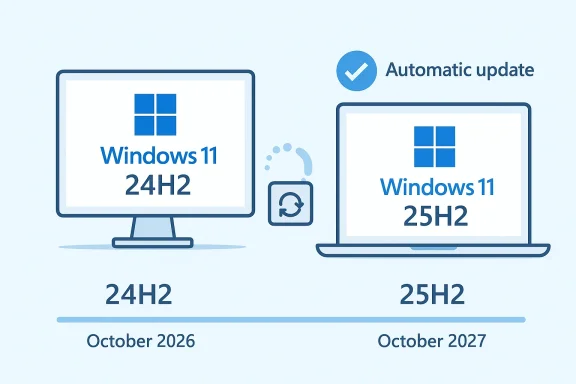
Microsoft is now using its Windows Update machinery to push Windows 11, version 25H2, onto eligible devices still running 24H2, and the move is less dramatic than it sounds. Because 24H2 and 25H2 share the same core operating system and the new features are already dormant inside monthly quality updates, the upgrade is more like flipping a switch than reinstalling Windows from scratch. Microsoft’s own guidance says the rollout starts first on eligible 24H2 systems with the “Get the latest updates as soon as they’re available” toggle enabled, and it will expand gradually over the coming months.
That detail matters because the internet’s usual “forced update” framing is only partly accurate. The company is not shipping a brand-new OS image so much as activating functionality that already arrived in the servicing stream, which is why Microsoft describes 25H2 as a fast, single-restart enablement package. Still, the policy shift is real: unmanaged consumer devices are being shepherded toward the next version automatically, and Microsoft is making clear that staying on 24H2 is no longer the intended end state for most Home and Pro users.
Windows feature updates used to feel like major software events. They came with longer install windows, more obvious risk, and a clear sense that the machine was being moved to a different release train. Windows 11 25H2 changes that pattern by leaning on the shared-servicing model Microsoft has been building for years, where new features arrive in advance, lie dormant, and are turned on later through a small enablement package.
That model is not accidental. Microsoft has spent the last few cycles reducing the friction between versions by aligning the core OS files across adjacent releases, especially for 24H2 and 25H2. The practical result is that the update is closer to a state transition than a full migration, which explains why Microsoft emphasizes lower downtime and a single restart rather than a multi-step feature install.
The timing is also governed by servicing and lifecycle pressure. Microsoft’s release health page for Windows 11 24H2 now tells users that 25H2 is available on eligible devices, while the support window makes the logic obvious: the newer release buys consumers more runway and gives Microsoft a cleaner base to standardize around. That is classic Windows strategy, but the delivery is increasingly subtle.
There is also a historical reason Microsoft is comfortable being more assertive. The company has spent years trying to reduce update fragmentation across the Windows ecosystem, because version splits create support complexity, testing overhead, and uneven feature adoption. By making 25H2 a lightweight activation rather than a full rebuild, Microsoft lowers the resistance to upgrading while keeping the servicing stack unified.
At the same time, Microsoft is clearly trying to preserve the appearance of user choice. The rollout is phased, the toggle still matters for when the update arrives, and managed environments have policy controls. In other words, this is automatic, but it is not random; it is a tightly managed deployment designed to look smooth to consumers and predictable to IT.
That architecture gives Microsoft more control over rollout quality. Instead of shipping a sprawling OS image and hoping every subsystem behaves, the company can pre-stage the bits and then turn them on once the release is judged ready. It is a much more conservative engineering model than the marketing language suggests, and that is precisely why it works.
That also explains why the rollout feels unusually quiet. There is no massive download footprint, no dramatic “installing version X” ceremony, and no heavy migration event that forces people to think too hard about what changed. Microsoft is betting that low-friction upgrades are more likely to succeed, especially on consumer systems where users simply want the machine to remain current. That is the strategic logic behind the forceful delivery.
This also helps Microsoft avoid a repeat of the update-reliability headaches that have dogged Windows servicing in recent months. Gradual rollout lets Microsoft watch telemetry, pull back if something breaks, and avoid lighting up every eligible device at once. Given the company’s recent history with preview update issues, that caution looks prudent rather than timid.
In practice, Microsoft has long used telemetry-driven targeting and staged rollout logic to decide when and where updates are offered. The company may well use machine learning in parts of that decision stack, but the publicly documented behavior is still better understood as policy-guided update orchestration. That is a more boring explanation, but it is also the one with the clearest evidence behind it. Boring here means dependable.
This distinction matters for trust. Users are less likely to resist an update if they see it as a predictable servicing step rather than an opaque AI decision. By contrast, overplaying the ML angle risks making the rollout sound more experimental than it really is, which is a poor message for a company trying to reassure people about update quality.
For readers, that means the practical question is not whether AI is choosing the upgrade. The practical question is whether Microsoft’s servicing system is now mature enough to activate a new Windows release with minimal drama. On that measure, the 25H2 rollout looks like an intentional test of low-friction lifecycle management.
The downside is less obvious but still real. Automatic upgrades reduce the chance that a consumer can stay frozen on a familiar release for long, and some users simply prefer to delay new versions until they have seen enough feedback. Microsoft is clearly prioritizing ecosystem consistency over that kind of cautious consumer inertia.
This is not necessarily a bad thing. Most consumer PCs benefit from staying on a supported release with the newest servicing improvements, and the enablement-package model keeps disruption modest. But the fact that Microsoft is pushing the update automatically means the era of casual version hoarding is increasingly ending for mainstream users.
That tension is central to modern Windows. Microsoft wants upgrades to be invisible until they are needed, while power users want visibility and control long before the update reaches their machine. The 25H2 push sits right in the middle of that debate.
The enablement-package approach is attractive for IT because it reduces deployment complexity. Instead of preparing for a full OS migration event, admins can treat 25H2 more like a scoped activation, which is easier to schedule, test, and support. In large fleets, the difference between a one-restart activation and a heavyweight version jump is substantial.
That matters because IT teams care less about headline features and more about operational stability. A quiet enablement package is easier to fold into a monthly maintenance cycle than a disruptive feature upgrade, especially in environments with line-of-business apps, compliance checks, and scheduled change windows. Quiet updates are often the best kind.
In a healthy world, that pressure is manageable because the technical delta between 24H2 and 25H2 is small. In a less healthy world, any servicing issue, policy conflict, or compatibility edge case could turn an otherwise easy activation into another helpdesk ticket. Microsoft is betting the former, but IT will still be the final judge.
It also helps Microsoft counter the perception that Windows upgrades are disruptive compared with competing platforms. If a Windows feature update can be activated in one restart, Microsoft can argue that the maintenance experience is now closer to the frictionless models users associate with mobile platforms and modern cloud-managed devices. That is as much a branding win as a technical one.
For Apple, that expectation is already baked into macOS and iOS-style update habits. For Linux desktop distributions, the picture is more fragmented, but the pressure is similar: users increasingly expect significant version changes to be low-stress and routine. Microsoft is simply applying that expectation to the mainstream PC base at scale.
That makes the rollout an ecosystem play, not a mere version bump. The smoother Microsoft can make the transition, the easier it becomes to standardize features, servicing rules, and support expectations across the Windows base. In a fragmented PC market, standardization is leverage.
This also explains why the Windows 11 25H2 rollout feels so similar to other quiet platform maintenance stories Microsoft has been telling this year. The company wants Windows to be as modular as its cloud services: consistent underneath, flexible on top, and capable of being adjusted without a full reset. That is a very modern approach to desktop operating systems.
It also creates more predictable support semantics. Once 24H2 and 25H2 share the same servicing base, Microsoft can handle many fixes, hotpatches, and cumulative updates with less branch-specific overhead. That benefits the company internally and simplifies life for some admins externally.
That is why recent Windows servicing issues matter so much. Every failed preview, blocked install, or broken authentication flow makes it harder for users to trust an update that is supposed to be seamless. Microsoft is trying to build confidence through engineering, but confidence is also a communication problem.
A second issue is how Microsoft communicates the update to mainstream users. If the company keeps emphasizing machine learning in headlines while the real mechanism is simply a controlled feature rollout, the messaging may generate more confusion than clarity. The best outcome would be a straightforward explanation that 25H2 is a supported, lightweight activation delivered through familiar Windows Update channels.
Microsoft’s push to move Windows 11 24H2 users toward 25H2 is best understood as a maturity play, not a spectacle. The company is shrinking the distance between “new version” and “normal update,” and that may be the most important Windows story of the year. If the rollout remains stable, it will strengthen Microsoft’s case that the future of Windows is not periodic upheaval, but continuous, controlled evolution.
Source: TweakTown Microsoft is automatically updating Windows 11 24H2 to 25H2 using machine learning
Source: TechPowerUp Microsoft is Forcing Windows 11 25H2 Update to 24H2 Users
That detail matters because the internet’s usual “forced update” framing is only partly accurate. The company is not shipping a brand-new OS image so much as activating functionality that already arrived in the servicing stream, which is why Microsoft describes 25H2 as a fast, single-restart enablement package. Still, the policy shift is real: unmanaged consumer devices are being shepherded toward the next version automatically, and Microsoft is making clear that staying on 24H2 is no longer the intended end state for most Home and Pro users.
 Background
Windows feature updates used to feel like major software events. They came with longer install windows, more obvious risk, and a clear sense that the machine was being moved to a different release train. Windows 11 25H2 changes that pattern by leaning on the shared-servicing model Microsoft has been building for years, where new features arrive in advance, lie dormant, and are turned on later through a small enablement package.That model is not accidental. Microsoft has spent the last few cycles reducing the friction between versions by aligning the core OS files across adjacent releases, especially for 24H2 and 25H2. The practical result is that the update is closer to a state transition than a full migration, which explains why Microsoft emphasizes lower downtime and a single restart rather than a multi-step feature install.
The timing is also governed by servicing and lifecycle pressure. Microsoft’s release health page for Windows 11 24H2 now tells users that 25H2 is available on eligible devices, while the support window makes the logic obvious: the newer release buys consumers more runway and gives Microsoft a cleaner base to standardize around. That is classic Windows strategy, but the delivery is increasingly subtle.
There is also a historical reason Microsoft is comfortable being more assertive. The company has spent years trying to reduce update fragmentation across the Windows ecosystem, because version splits create support complexity, testing overhead, and uneven feature adoption. By making 25H2 a lightweight activation rather than a full rebuild, Microsoft lowers the resistance to upgrading while keeping the servicing stack unified.
At the same time, Microsoft is clearly trying to preserve the appearance of user choice. The rollout is phased, the toggle still matters for when the update arrives, and managed environments have policy controls. In other words, this is automatic, but it is not random; it is a tightly managed deployment designed to look smooth to consumers and predictable to IT.
What Microsoft Actually Changed
The most important thing to understand is that Windows 11 25H2 is not a traditional “big bang” release. Microsoft says 24H2 and 25H2 share an identical set of system files, and the new functionality already exists in dormant form in the latest monthly updates for 24H2. The enablement package simply activates those features with a small, quick installation process.That architecture gives Microsoft more control over rollout quality. Instead of shipping a sprawling OS image and hoping every subsystem behaves, the company can pre-stage the bits and then turn them on once the release is judged ready. It is a much more conservative engineering model than the marketing language suggests, and that is precisely why it works.
Why the enablement package matters
The enablement package is the key mechanism here, and Microsoft’s support documentation is explicit about its role. It upgrades supported 24H2 systems to 25H2 with a single restart, which reduces downtime and simplifies deployment across both consumer and managed environments. For users, the update should feel closer to a cumulative patch than a full operating system transition.That also explains why the rollout feels unusually quiet. There is no massive download footprint, no dramatic “installing version X” ceremony, and no heavy migration event that forces people to think too hard about what changed. Microsoft is betting that low-friction upgrades are more likely to succeed, especially on consumer systems where users simply want the machine to remain current. That is the strategic logic behind the forceful delivery.
- The update is scoped, not sprawling.
- It activates features already present in the OS.
- It requires only one restart.
- It is designed to reduce downtime and support burden.
- It keeps 24H2 and 25H2 on the same servicing foundation.
Why Microsoft is using a phased rollout
Microsoft’s release-health language shows that 25H2 is being offered first to eligible 24H2 devices with the latest updates toggle enabled, then expanded over time. That is a standard controlled feature rollout pattern, but in this case it is applied to a version upgrade rather than a single feature. The distinction is important because it tells us Microsoft now treats version migration as just another step in gradual delivery.This also helps Microsoft avoid a repeat of the update-reliability headaches that have dogged Windows servicing in recent months. Gradual rollout lets Microsoft watch telemetry, pull back if something breaks, and avoid lighting up every eligible device at once. Given the company’s recent history with preview update issues, that caution looks prudent rather than timid.
- Early users act as a real-world test pool.
- Microsoft can pause or narrow the rollout if issues appear.
- Consumers experience fewer surprises than with a mass in-place upgrade.
- IT admins still retain policy control in managed fleets.
- The update experience is meant to feel routine, not disruptive.
Why the “Machine Learning” Angle Is Misleading
Some coverage has leaned heavily on the phrase “machine learning” to describe the rollout, but that wording can obscure what is actually happening. The core mechanism Microsoft is describing publicly is a controlled feature rollout delivered through Windows Update, not some magical AI agent independently deciding which PCs should upgrade. The important part is the deployment system, not the buzzword.In practice, Microsoft has long used telemetry-driven targeting and staged rollout logic to decide when and where updates are offered. The company may well use machine learning in parts of that decision stack, but the publicly documented behavior is still better understood as policy-guided update orchestration. That is a more boring explanation, but it is also the one with the clearest evidence behind it. Boring here means dependable.
Machine learning versus servicing policy
The phrase “machine learning” sounds more advanced than “staged deployment,” but the end result for users is the same: Microsoft decides when a device is ready and then offers the upgrade through Windows Update. That system can certainly be informed by automated analysis, yet the visible mechanism is the ordinary Windows servicing pipeline.This distinction matters for trust. Users are less likely to resist an update if they see it as a predictable servicing step rather than an opaque AI decision. By contrast, overplaying the ML angle risks making the rollout sound more experimental than it really is, which is a poor message for a company trying to reassure people about update quality.
- The public evidence points to controlled rollout, not autonomous AI.
- “Machine learning” is likely part of Microsoft’s internal decisioning, not the user-facing story.
- The upgrade still depends on Windows Update policies and eligibility.
- The rollout is better viewed as servicing automation than AI magic.
- User trust depends on the update feeling predictable.
Why the terminology matters for coverage
This is one of those cases where headlines can distort the engineering reality. Saying Microsoft is “using machine learning” is not false in a broad sense, but it may suggest a more novel process than the company is actually deploying. The real story is the increasing sophistication of Windows Update as a delivery platform.For readers, that means the practical question is not whether AI is choosing the upgrade. The practical question is whether Microsoft’s servicing system is now mature enough to activate a new Windows release with minimal drama. On that measure, the 25H2 rollout looks like an intentional test of low-friction lifecycle management.
Consumer Impact
For everyday users, the upside is obvious: less waiting, less data churn, and fewer reasons to fear a feature upgrade. A 25H2 install should feel much closer to a routine monthly update than the disruptive version changes Windows users remember from earlier eras. That is especially appealing for people who do not want to babysit their machines.The downside is less obvious but still real. Automatic upgrades reduce the chance that a consumer can stay frozen on a familiar release for long, and some users simply prefer to delay new versions until they have seen enough feedback. Microsoft is clearly prioritizing ecosystem consistency over that kind of cautious consumer inertia.
What Home users should expect
Home and Pro users on unmanaged PCs are the center of this rollout. Microsoft’s release-health guidance says eligible 24H2 devices with the latest updates toggle enabled are first in line, and the company has signaled that availability will keep widening. That means consumers should assume 25H2 is coming unless they actively manage update timing.This is not necessarily a bad thing. Most consumer PCs benefit from staying on a supported release with the newest servicing improvements, and the enablement-package model keeps disruption modest. But the fact that Microsoft is pushing the update automatically means the era of casual version hoarding is increasingly ending for mainstream users.
- Faster installation than a full feature upgrade.
- Lower risk of a long downtime window.
- Better access to the newest support baseline.
- Less room for users to remain on an older version by habit.
- A more opinionated Windows Update experience overall.
Why consumers may still be uneasy
The concern is not the technical method; it is the pattern. Users have watched Windows updates become more assertive over time, and even a well-designed rollout can feel intrusive when the system begins making more decisions on its own. The more invisible the upgrade path becomes, the easier it is for users to feel they are losing control.That tension is central to modern Windows. Microsoft wants upgrades to be invisible until they are needed, while power users want visibility and control long before the update reaches their machine. The 25H2 push sits right in the middle of that debate.
Enterprise and IT Administration Impact
In enterprise environments, the story is more nuanced. Microsoft’s support materials and IT-facing documentation make it clear that 25H2 is available through the usual management channels, including Windows Server Update Services, Windows Update client policies, and the Microsoft 365 admin center. That means organizations retain the ability to steer adoption rather than simply absorb it.The enablement-package approach is attractive for IT because it reduces deployment complexity. Instead of preparing for a full OS migration event, admins can treat 25H2 more like a scoped activation, which is easier to schedule, test, and support. In large fleets, the difference between a one-restart activation and a heavyweight version jump is substantial.
Why managed devices are different
Managed devices do not live in the same update universe as consumer PCs. Group policy, MDM, WSUS, and configuration baselines all give IT departments leverage to stage the move at the right time, which is exactly what Microsoft wants in enterprise settings. The company benefits when business upgrades happen on Microsoft’s terms, but enterprises still get room to validate compatibility first.That matters because IT teams care less about headline features and more about operational stability. A quiet enablement package is easier to fold into a monthly maintenance cycle than a disruptive feature upgrade, especially in environments with line-of-business apps, compliance checks, and scheduled change windows. Quiet updates are often the best kind.
- Easier change control.
- Better fit with standard maintenance windows.
- Lower testing overhead than a full OS reimage.
- More predictable deployment across mixed hardware.
- Stronger alignment with Microsoft’s servicing model.
The enterprise trade-off
The trade-off is that Microsoft’s increasingly opinionated update strategy may narrow the practical gap between “available” and “inevitable.” Even if admins can defer, the company is clearly designing the ecosystem to favor newer supported versions sooner rather than later. That may be efficient for Microsoft, but it also increases the pressure on IT teams to keep pace.In a healthy world, that pressure is manageable because the technical delta between 24H2 and 25H2 is small. In a less healthy world, any servicing issue, policy conflict, or compatibility edge case could turn an otherwise easy activation into another helpdesk ticket. Microsoft is betting the former, but IT will still be the final judge.
Competitive and Market Implications
This rollout also reveals something important about Microsoft’s competitive posture. By making version upgrades smoother and more automatic, Windows becomes less of a product users “move to” and more of a platform that quietly evolves around them. That is exactly the kind of operating-system behavior Microsoft wants in an era when device loyalty is increasingly tied to convenience and continuity.It also helps Microsoft counter the perception that Windows upgrades are disruptive compared with competing platforms. If a Windows feature update can be activated in one restart, Microsoft can argue that the maintenance experience is now closer to the frictionless models users associate with mobile platforms and modern cloud-managed devices. That is as much a branding win as a technical one.
How rivals are affected
Competitors do not need to match Windows feature-for-feature to feel this pressure. They need only respond to the broader expectation that operating systems should evolve transparently, without forcing users through painful upgrade rituals. Microsoft’s move raises the bar for how seamless desktop servicing should feel.For Apple, that expectation is already baked into macOS and iOS-style update habits. For Linux desktop distributions, the picture is more fragmented, but the pressure is similar: users increasingly expect significant version changes to be low-stress and routine. Microsoft is simply applying that expectation to the mainstream PC base at scale.
- Seamless upgrades become the new baseline.
- User patience for disruptive installs continues to shrink.
- Windows Update becomes a strategic product, not a background utility.
- Platform loyalty increasingly depends on trust in servicing.
- Microsoft sets expectations for the broader desktop market.
Why this is strategically important for Microsoft
Microsoft has always understood that Windows is not just an operating system; it is the delivery layer for the rest of the company’s ecosystem. If updates are reliable and quiet, users are more willing to stay current, and that keeps them in sync with Microsoft’s evolving security, app, and AI stack. A successful 25H2 rollout therefore helps more than just Windows.That makes the rollout an ecosystem play, not a mere version bump. The smoother Microsoft can make the transition, the easier it becomes to standardize features, servicing rules, and support expectations across the Windows base. In a fragmented PC market, standardization is leverage.
Microsoft’s Servicing Strategy in 2026
If there is a larger lesson here, it is that Microsoft is no longer treating Windows servicing as a single binary choice between “installed” and “not installed.” The company is building a layered model in which features are preloaded, dormant, activated later, and delivered through increasingly small deltas. That is a mature servicing architecture, even if the messaging around it can be clumsy.This also explains why the Windows 11 25H2 rollout feels so similar to other quiet platform maintenance stories Microsoft has been telling this year. The company wants Windows to be as modular as its cloud services: consistent underneath, flexible on top, and capable of being adjusted without a full reset. That is a very modern approach to desktop operating systems.
The upside of modular servicing
Modular servicing gives Microsoft more room to separate quality from activation. Features can be validated earlier, distributed in monthly updates, and turned on only when the company is comfortable with the rollout curve. That should reduce the blast radius of version upgrades, especially compared with older Windows release cycles.It also creates more predictable support semantics. Once 24H2 and 25H2 share the same servicing base, Microsoft can handle many fixes, hotpatches, and cumulative updates with less branch-specific overhead. That benefits the company internally and simplifies life for some admins externally.
- New features can be staged before activation.
- Support and servicing can stay aligned across versions.
- Fewer upgrade surprises should reach end users.
- Microsoft can react faster to rollout issues.
- The platform becomes easier to manage at scale.
The downside of invisible complexity
The downside is that invisible complexity can become user-hostile when things go wrong. If users do not understand what changed, they are less forgiving when the update does not behave as expected. The more Microsoft abstracts the process, the more important transparency becomes when the abstraction fails.That is why recent Windows servicing issues matter so much. Every failed preview, blocked install, or broken authentication flow makes it harder for users to trust an update that is supposed to be seamless. Microsoft is trying to build confidence through engineering, but confidence is also a communication problem.
Strengths and Opportunities
Microsoft’s 25H2 approach has several clear advantages, both for users and for the company. It reduces upgrade friction, keeps devices on a supported branch, and lets Microsoft activate features without forcing a heavy migration event. In a year defined by servicing reliability concerns, that is a meaningful step toward a more mature Windows update experience.- Single-restart installation lowers downtime.
- Shared OS files reduce upgrade complexity.
- Phased rollout limits the blast radius of bugs.
- Consumer machines stay more consistently up to date.
- Enterprise admins can still manage timing through policy.
- Support alignment becomes easier across 24H2 and 25H2.
- User trust can improve if the rollout stays quiet and predictable.
Risks and Concerns
The biggest risk is not that 25H2 is technically aggressive; it is that users may perceive the rollout as more opaque and less voluntary than they would like. Even a well-engineered automatic upgrade can trigger resistance if people feel the system is making decisions for them without enough visibility. Perception matters almost as much as engineering here.- Loss of perceived control for home users.
- Misleading “machine learning” framing could confuse readers.
- Any servicing bug could damage confidence in automatic upgrades.
- Compatibility issues may still surface in edge-case hardware or apps.
- Enterprise policy conflicts could complicate rollout timing.
- Silent activation model may frustrate users who prefer explicit upgrade prompts.
- Support burden can rise if people do not understand what 25H2 changes.
What to Watch Next
The next few months will tell us whether Microsoft’s 25H2 strategy is a model for the future or just a particularly smooth chapter in the current release cycle. The main question is whether the broadening rollout stays quiet as it reaches more Home and Pro systems, or whether some subgroup of hardware and software combinations exposes new friction. If the rollout remains uneventful, Microsoft will have a strong case for making enablement-package upgrades the default style of version transition.A second issue is how Microsoft communicates the update to mainstream users. If the company keeps emphasizing machine learning in headlines while the real mechanism is simply a controlled feature rollout, the messaging may generate more confusion than clarity. The best outcome would be a straightforward explanation that 25H2 is a supported, lightweight activation delivered through familiar Windows Update channels.
Key items to monitor
- Whether the rollout expands beyond the initial eligible 24H2 cohort.
- Whether Microsoft introduces new safeguards or telemetry-based controls.
- Whether consumer feedback remains positive as the update becomes more visible.
- Whether enterprises encounter any policy or compatibility edge cases.
- Whether Microsoft uses the same enablement model more aggressively in future releases.
Microsoft’s push to move Windows 11 24H2 users toward 25H2 is best understood as a maturity play, not a spectacle. The company is shrinking the distance between “new version” and “normal update,” and that may be the most important Windows story of the year. If the rollout remains stable, it will strengthen Microsoft’s case that the future of Windows is not periodic upheaval, but continuous, controlled evolution.
Source: TweakTown Microsoft is automatically updating Windows 11 24H2 to 25H2 using machine learning
Source: TechPowerUp Microsoft is Forcing Windows 11 25H2 Update to 24H2 Users