

Anyone installing Windows 11 from scratch in 2026 still encounters an operating system that strongly nudges them toward a Microsoft account, OneDrive, Edge, Bing, Microsoft 365, diagnostic sharing, personalization toggles, and cloud-connected defaults before the desktop ever becomes theirs. That is the plain complaint behind PCWorld’s latest broadside, but it is also bigger than one writer’s irritation. Windows is not collapsing because it lacks features, compatibility, or engineering muscle. It is losing goodwill because Microsoft increasingly treats the PC as an entry point into a services funnel rather than as a machine the user controls.
The uncomfortable part is that both things can be true at once. Windows 11 is a modern, secure, capable operating system with deep hardware support and unmatched mainstream software compatibility. It is also, too often, a product that behaves as if the user’s first job is to decline Microsoft’s business strategy.
That tension has become the defining Windows argument of the post-Windows 10 era. The old Windows bargain was simple: buy the PC, install the software, tolerate the rough edges, and get on with your life. The new bargain is cloudier, literally and commercially, and the people who love PCs are noticing.
The out-of-box experience has always been political. Every installer tells you what a company thinks matters, and Windows 11’s setup process says Microsoft thinks identity, cloud storage, telemetry, subscriptions, and ecosystem gravity matter before local ownership does.
That is not paranoia. Microsoft’s account-first design links Windows to OneDrive, Microsoft 365, the Store, Edge sync, device recovery, Windows Backup, BitLocker recovery keys, Game Pass, Copilot-related services, and ad personalization plumbing. Some of those integrations are genuinely useful. A Microsoft account can make a stolen laptop easier to lock down, a replaced PC easier to restore, and a forgotten recovery key easier to find.
But usefulness is not the same as neutrality. The objection is not that Microsoft offers services; it is that Windows increasingly frames those services as the default path and treats local-first computing as an exception, a detour, or a workaround. That shift matters because setup is where less technical users form their baseline expectations. If the path of least resistance is “sign in, sync, back up, personalize, subscribe,” many people will do it without quite understanding what has changed.
For enthusiasts, this is annoying because they know the old routes. For normal users, it is consequential because the language of setup screens often blends security, convenience, backup, personalization, and marketing into one pleasant stream of “recommended” choices. The cumulative effect is a system that feels less installed than enrolled.
Windows used to ask, in effect, “What do you want to run?” Windows 11 increasingly asks, “Which Microsoft services may we attach to this device?” That is a different relationship.
“Recommended” is one of those words that sounds helpful until you ask who is doing the recommending and why. In Windows, it can mean recent files, recently installed apps, Microsoft suggestions, cloud prompts, or nudges toward software and services the user did not go looking for. The line between assistance and advertising is no longer obvious, and that ambiguity is the problem.
Microsoft would argue that this is how modern platforms work. Apple promotes iCloud, Google promotes Drive and Chrome, Amazon promotes Prime, and Samsung promotes its own services on phones and TVs. That comparison is true as far as it goes, but it undersells the historical role of Windows. The PC was never supposed to be a sealed appliance or a storefront with a keyboard. It was the general-purpose computer for everyone else.
That general-purpose identity is why Windows users react so strongly to product placement inside the shell. A Start menu suggestion is not just an ad in an app. It appears in the layer of software that mediates access to everything else. When the operating system itself starts pushing preferences, the user can reasonably wonder whether Windows is still an impartial platform.
The browser wars never really ended; they moved into the taskbar, widgets panel, search box, default-app settings, and system links. Edge may be a good browser. Bing may be better than its reputation. OneDrive may be excellent for people already living inside Microsoft 365. None of that justifies an OS that keeps asking users to reconsider choices they already made.
A default is a decision made at scale. If Windows Search routes web results through Bing, millions of users will use Bing who never consciously chose it. If widgets open Edge, Edge gains sessions that are not the result of browser preference. If OneDrive backup is promoted during setup, Microsoft gains cloud storage relationships before a user has compared alternatives. Each small default is defensible in isolation; together they create an ecosystem tax.
This is why the “you can change it” defense often lands badly. Technically literate users know that changing Windows defaults can involve multiple settings pages, per-protocol associations, buried toggles, browser nags, search behavior that ignores the user’s browser, and occasional post-update reminders. The issue is not whether escape is possible. It is whether escape should be necessary.
The same logic applies to local accounts. Microsoft can plausibly say that online accounts improve security, recovery, synchronization, and subscription access. Yet the company’s steady pressure away from local setup has made offline accounts feel like a legacy mode rather than a first-class choice. For an operating system installed on privately owned hardware, that inversion is culturally important.
A PC is not a phone, at least not in the minds of the people who still care deeply about PCs. It is a modular, user-directed, repairable, configurable machine. When Windows behaves more like a managed consumer endpoint, enthusiasts see not modernization but enclosure.
The harder question is whether users understand what they are consenting to and whether Microsoft has earned the trust necessary to ask for that consent repeatedly. On that front, the experience is weaker. Setup screens and settings pages frequently divide data collection into categories that sound benign, while the practical implications are scattered across privacy dashboards, account pages, advertising IDs, app permissions, browser settings, and cloud-service controls.
That complexity benefits the platform owner. A user who wants to minimize data sharing must know where to look, which toggles matter, which settings are device-level, which are account-level, and which are service-specific. A user who simply clicks through gets a much more connected system by default.
This is where the Windows-as-service model collides with the Windows-as-tool memory. If Windows is merely the software that runs your PC, then telemetry should be minimal, transparent, and easy to refuse. If Windows is a cloud-connected service layer, telemetry becomes a continuous input into product improvement, security, advertising, and personalization. Microsoft largely operates from the second premise, while many users still judge it by the first.
For businesses, schools, public agencies, and regulated organizations, this is not just a vibe. It is a governance issue. Where does data go? Which tenant controls it? What happens when user identity, device configuration, storage, collaboration, endpoint security, and productivity apps all live under one vendor’s umbrella? The convenience is real, but so is the dependency.
Microsoft’s stack is compelling because it is integrated. Windows, Office, Teams, OneDrive, SharePoint, Entra ID, Intune, Defender, Azure, and Copilot licensing can form a coherent enterprise environment with strong administration and security tooling. For many organizations, no competitor offers the same breadth with the same procurement simplicity.
The problem is that breadth becomes gravity. Once documents, identities, endpoint policies, collaboration histories, mailboxes, file permissions, security alerts, and workflows are tied into Microsoft’s cloud, switching is no longer a software migration. It is an institutional transplant. That makes price increases, licensing changes, product bundling, data-residency concerns, and feature deprecations much more powerful than they would be in a looser market.
Public-sector discomfort matters because governments tend to ask the questions consumers feel but cannot formalize. Who owns the data? Who controls the update channel? Who can audit the system? What happens if legal obligations in one jurisdiction conflict with policy commitments in another? What is the exit plan?
Windows on the desktop is only one piece of that story, but it is the symbolic one. It is the place where ordinary users encounter the same strategic push that enterprise buyers see in licensing documents. The Microsoft account prompt and the Microsoft 365 enterprise agreement are different instruments playing the same tune.
Microsoft 365, OneDrive storage, Game Pass, cloud backup, Copilot subscriptions, and enterprise service plans alter that emotional contract. They can be good deals, especially when they replace messy local management with automatic updates and cross-device continuity. But they also change software from a possession into a relationship the vendor can reprice, repackage, and reframe.
Home users feel this as subscription fatigue. Businesses feel it as licensing complexity. Administrators feel it as portal sprawl. Everyone feels it when a feature that used to be local becomes cloud-mediated, account-bound, or tier-dependent.
The danger for Microsoft is not that subscriptions are inherently unpopular. People pay for services they value. The danger is that Windows increasingly appears to be designed around making those services unavoidable. The operating system becomes the lobby of the subscription hotel.
That perception is corrosive even when the individual services are high quality. A user might like OneDrive and still resent being nudged toward folder backup during setup. A user might like Edge and still resent system links that privilege it. A user might subscribe to Microsoft 365 and still dislike Windows behaving as if every local PC is incomplete until attached to a cloud account.
But technical justification does not erase practical consequence. Many Windows 10 machines that still browse the web, run Office, join video calls, play older games, and serve as perfectly adequate household PCs cannot officially move to Windows 11. The result is an artificial cliff for hardware that may not feel obsolete to its owners.
That cliff became sharper after Windows 10 reached the end of regular support on October 14, 2025. Microsoft’s Extended Security Updates program gives some users more time, and recent reporting indicates Microsoft has extended consumer options in ways that reduce immediate panic. But the broader message remains: the old PC you own may work, but it no longer fits Microsoft’s supported future.
For security professionals, Microsoft’s position is easy to understand. Unsupported operating systems become risk magnets. Old firmware, weak boot chains, missing TPM capabilities, and inconsistent driver support make the ecosystem harder to defend. If Microsoft wants Windows to withstand modern attacks, it cannot support every machine forever.
For users and sustainability advocates, the answer is equally obvious. Throwing away functional hardware because the operating system moved the baseline is wasteful, expensive, and alienating. The right security architecture can still produce bad social outcomes if the migration path is too narrow.
This is where Windows 11’s trust problem intersects with the environment. Microsoft and its hardware partners talk about sustainability, repairability, carbon goals, and responsible lifecycle management. Yet the Windows 11 transition has placed millions of otherwise useful machines in a gray zone between “works fine” and “officially unwelcome.”
This does not mean Linux is a drop-in Windows replacement. It is not. Some commercial software remains Windows-only. Certain anti-cheat systems still cause trouble. Creative workflows can be fragile. Enterprise management may be harder outside organizations already invested in Linux tooling. Hardware support is better than its reputation but still uneven in edge cases.
The point is not that everyone should switch. The point is that more users can now imagine switching. That alone weakens Microsoft’s old assumption that Windows dissatisfaction has nowhere to go.
Gaming is especially important because it used to be Windows’ emotional fortress. If you were a PC gamer, Windows was the default and often the only sane choice. Steam Deck did not eliminate that advantage, but it proved that a Linux-based gaming experience could be mainstream, polished, and commercially meaningful. Once that mental barrier falls, the Windows license looks less like the definition of a PC and more like one option among several.
Microsoft should worry less about immediate Linux market share and more about the cultural shift. The users experimenting with Bazzite, Fedora, Arch, Mint, Pop!_OS, or SteamOS-like environments are often the same users who once evangelized Windows to family, friends, and workplaces. Losing the enthusiasts does not kill a platform overnight. It changes who explains it to everyone else.
That is why the “just switch to Linux” argument is so often unserious in professional settings. Organizations do not run operating systems in the abstract. They run workflows, compliance regimes, help-desk scripts, procurement policies, device fleets, browser dependencies, line-of-business apps, VPN clients, endpoint detection tools, and decades of accumulated exceptions.
Microsoft knows this. Every platform owner knows when users are locked in by ecosystem reality rather than pure preference. The risk is that this knowledge creates complacency. If customers cannot easily leave, the temptation to extract more value from them grows.
That extraction does not have to look malicious. It can look like helpful prompts, recommended settings, integrated cloud backup, security baselines, browser improvements, productivity trials, AI features, and licensing simplification. But from the user’s side of the screen, intent matters less than repetition. A thousand small nudges eventually feel like a shove.
The irony is that Windows’ technical strength makes the irritation more painful. People are not angry because Windows is useless. They are angry because they still need it, still understand its strengths, and still remember when it seemed more content to be the stage rather than the show.
AI features need context to be useful. Context means documents, messages, windows, history, preferences, images, voice, meetings, search behavior, and organizational data. Microsoft will say, often correctly, that it can process this securely, respect enterprise controls, and provide opt-outs. Users will ask, also reasonably, why the operating system needs to know so much in the first place.
This is where trust becomes infrastructure. If people believe Microsoft respects boundaries, AI integration may feel like convenience. If they believe Microsoft uses Windows to push ecosystem adoption, AI integration may feel like surveillance with a productivity demo.
The Recall controversy on Copilot+ PCs already showed how quickly a technically ambitious Windows feature can become a privacy flashpoint. Even if Microsoft improves security architecture, changes defaults, and communicates more clearly, the episode exposed a basic sensitivity: users do not want the operating system to become an always-watching assistant unless they have explicitly asked for that relationship.
Windows AI could be powerful. It could also become the final proof, for skeptics, that Microsoft no longer sees the OS as a quiet foundation. The company’s challenge is not merely to build clever features. It is to convince users that saying no will remain meaningful.
It could offer a clear local-account path during setup without treating it as an advanced maneuver. It could consolidate privacy choices into a plain-language screen that distinguishes required security telemetry from optional personalization and advertising. It could stop using system surfaces for subscription prompts after a user declines. It could honor default browser and search preferences across widgets, search, help links, and system content. It could make OneDrive backup a user-initiated feature rather than a setup-stage funnel.
None of these changes would require Microsoft to abandon its services business. They would require the company to accept that trust is also a platform feature. The users most irritated by Windows 11 are often not anti-Microsoft zealots. Many use Office, Xbox, GitHub, Azure, Visual Studio Code, Teams, or OneDrive by choice. What they reject is the feeling that Windows is being used to manufacture that choice.
There is a market for a calmer Windows. Call it enthusiast mode, local-first mode, professional mode, or simply better defaults. The name matters less than the posture: install cleanly, ask honestly, respect decisions, and disappear when not needed.
Microsoft’s defenders sometimes argue that ordinary users benefit from defaults and would be worse off with too many choices. That is partly true. But respecting choice does not mean dumping complexity on novices. It means separating security-critical defaults from commercial preferences and making refusal durable.
That belief may sound nostalgic, but it is not obsolete. The PC remains the most flexible computing device most people can buy. It can be a workstation, game console, lab machine, writing desk, media server, development box, accessibility tool, classroom device, or repairable family hand-me-down. That flexibility depends on operating systems that preserve user agency.
Windows has historically been messy in ways that reflected the openness of the ecosystem. Drivers conflicted. OEMs bundled junk. Settings multiplied. Legacy APIs lingered. Power users complained, but they also understood that the chaos was part of the bargain. Windows ran nearly everything on nearly anything.
The new frustration is different because it feels less like ecosystem mess and more like deliberate channeling. Users can forgive rough edges. They are less forgiving when the OS seems to be steering them toward a revenue model.
Microsoft should take that distinction seriously. The company does not need to turn Windows into Linux, remove every cloud feature, or pretend the internet does not exist. It needs to remember that the PC’s greatest advantage is not integration. It is sovereignty.
Microsoft’s stated rationale, according to the report, is to reduce setup confusion, prevent incomplete configurations, and ensure users receive security, backup, personalization, Store, OneDrive, and Copilot-related benefits tied to a Microsoft account.
The practical impact is sharper for users and small offices with unreliable connectivity. Eastleigh Voice frames the issue around Kenyan users, particularly in rural or low-bandwidth areas, where offline installation can be a necessity rather than a preference. Older installation media may still permit local-account setup when disconnected from the internet, but the report warns that this loophole may not survive future updates.
For admins and power users, the development reinforces the article’s core concern: local-first Windows setup is moving from discouraged to actively constrained, at least in Microsoft’s test builds. Enterprise and domain-joined scenarios may still have managed exceptions, but ordinary Home and Pro installs appear to be losing the escape routes enthusiasts have relied on for years.
The uncomfortable part is that both things can be true at once. Windows 11 is a modern, secure, capable operating system with deep hardware support and unmatched mainstream software compatibility. It is also, too often, a product that behaves as if the user’s first job is to decline Microsoft’s business strategy.
That tension has become the defining Windows argument of the post-Windows 10 era. The old Windows bargain was simple: buy the PC, install the software, tolerate the rough edges, and get on with your life. The new bargain is cloudier, literally and commercially, and the people who love PCs are noticing.
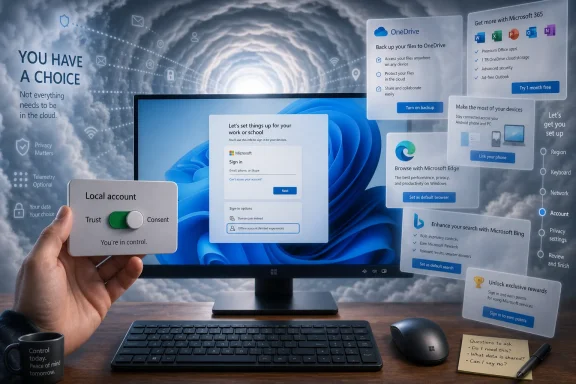 Microsoft Turned Setup Into the First Upsell
The out-of-box experience has always been political. Every installer tells you what a company thinks matters, and Windows 11’s setup process says Microsoft thinks identity, cloud storage, telemetry, subscriptions, and ecosystem gravity matter before local ownership does.That is not paranoia. Microsoft’s account-first design links Windows to OneDrive, Microsoft 365, the Store, Edge sync, device recovery, Windows Backup, BitLocker recovery keys, Game Pass, Copilot-related services, and ad personalization plumbing. Some of those integrations are genuinely useful. A Microsoft account can make a stolen laptop easier to lock down, a replaced PC easier to restore, and a forgotten recovery key easier to find.
But usefulness is not the same as neutrality. The objection is not that Microsoft offers services; it is that Windows increasingly frames those services as the default path and treats local-first computing as an exception, a detour, or a workaround. That shift matters because setup is where less technical users form their baseline expectations. If the path of least resistance is “sign in, sync, back up, personalize, subscribe,” many people will do it without quite understanding what has changed.
For enthusiasts, this is annoying because they know the old routes. For normal users, it is consequential because the language of setup screens often blends security, convenience, backup, personalization, and marketing into one pleasant stream of “recommended” choices. The cumulative effect is a system that feels less installed than enrolled.
Windows used to ask, in effect, “What do you want to run?” Windows 11 increasingly asks, “Which Microsoft services may we attach to this device?” That is a different relationship.
The Start Menu Became a Billboard With a Search Box
The Start menu is where Microsoft’s trust problem becomes visible. It is the front door of the operating system, and for decades it carried a simple promise: your apps, your files, your machine. Windows 11’s version is cleaner than the chaotic live-tile years, but it still inherits the larger disease of modern software: every surface is a candidate for recommendation.“Recommended” is one of those words that sounds helpful until you ask who is doing the recommending and why. In Windows, it can mean recent files, recently installed apps, Microsoft suggestions, cloud prompts, or nudges toward software and services the user did not go looking for. The line between assistance and advertising is no longer obvious, and that ambiguity is the problem.
Microsoft would argue that this is how modern platforms work. Apple promotes iCloud, Google promotes Drive and Chrome, Amazon promotes Prime, and Samsung promotes its own services on phones and TVs. That comparison is true as far as it goes, but it undersells the historical role of Windows. The PC was never supposed to be a sealed appliance or a storefront with a keyboard. It was the general-purpose computer for everyone else.
That general-purpose identity is why Windows users react so strongly to product placement inside the shell. A Start menu suggestion is not just an ad in an app. It appears in the layer of software that mediates access to everything else. When the operating system itself starts pushing preferences, the user can reasonably wonder whether Windows is still an impartial platform.
The browser wars never really ended; they moved into the taskbar, widgets panel, search box, default-app settings, and system links. Edge may be a good browser. Bing may be better than its reputation. OneDrive may be excellent for people already living inside Microsoft 365. None of that justifies an OS that keeps asking users to reconsider choices they already made.
Defaults Are Where Platform Power Hides
The fight over Windows defaults is not really about whether Firefox, Chrome, Dropbox, LibreOffice, or Google Drive can be installed. Of course they can. The fight is over friction, and platform companies understand friction better than almost anyone.A default is a decision made at scale. If Windows Search routes web results through Bing, millions of users will use Bing who never consciously chose it. If widgets open Edge, Edge gains sessions that are not the result of browser preference. If OneDrive backup is promoted during setup, Microsoft gains cloud storage relationships before a user has compared alternatives. Each small default is defensible in isolation; together they create an ecosystem tax.
This is why the “you can change it” defense often lands badly. Technically literate users know that changing Windows defaults can involve multiple settings pages, per-protocol associations, buried toggles, browser nags, search behavior that ignores the user’s browser, and occasional post-update reminders. The issue is not whether escape is possible. It is whether escape should be necessary.
The same logic applies to local accounts. Microsoft can plausibly say that online accounts improve security, recovery, synchronization, and subscription access. Yet the company’s steady pressure away from local setup has made offline accounts feel like a legacy mode rather than a first-class choice. For an operating system installed on privately owned hardware, that inversion is culturally important.
A PC is not a phone, at least not in the minds of the people who still care deeply about PCs. It is a modular, user-directed, repairable, configurable machine. When Windows behaves more like a managed consumer endpoint, enthusiasts see not modernization but enclosure.
Privacy Settings Became a Test of Reading Stamina
The privacy debate around Windows is often muddied by absolutism. Windows 11 does collect diagnostic data, but not all telemetry is sinister. Crash reports help fix bugs. Hardware and driver signals help Microsoft maintain compatibility across a staggeringly broad PC ecosystem. Security services need cloud intelligence to detect threats quickly.The harder question is whether users understand what they are consenting to and whether Microsoft has earned the trust necessary to ask for that consent repeatedly. On that front, the experience is weaker. Setup screens and settings pages frequently divide data collection into categories that sound benign, while the practical implications are scattered across privacy dashboards, account pages, advertising IDs, app permissions, browser settings, and cloud-service controls.
That complexity benefits the platform owner. A user who wants to minimize data sharing must know where to look, which toggles matter, which settings are device-level, which are account-level, and which are service-specific. A user who simply clicks through gets a much more connected system by default.
This is where the Windows-as-service model collides with the Windows-as-tool memory. If Windows is merely the software that runs your PC, then telemetry should be minimal, transparent, and easy to refuse. If Windows is a cloud-connected service layer, telemetry becomes a continuous input into product improvement, security, advertising, and personalization. Microsoft largely operates from the second premise, while many users still judge it by the first.
For businesses, schools, public agencies, and regulated organizations, this is not just a vibe. It is a governance issue. Where does data go? Which tenant controls it? What happens when user identity, device configuration, storage, collaboration, endpoint security, and productivity apps all live under one vendor’s umbrella? The convenience is real, but so is the dependency.
Europe’s Microsoft Skepticism Is a Warning, Not a Sideshow
The recurring European interest in open source desktops, sovereign clouds, LibreOffice deployments, Linux pilots, and Microsoft 365 alternatives is often mocked because some projects stall, reverse, or end in compromise. That mockery misses the point. The persistence of these efforts shows that institutional buyers understand the strategic cost of convenience.Microsoft’s stack is compelling because it is integrated. Windows, Office, Teams, OneDrive, SharePoint, Entra ID, Intune, Defender, Azure, and Copilot licensing can form a coherent enterprise environment with strong administration and security tooling. For many organizations, no competitor offers the same breadth with the same procurement simplicity.
The problem is that breadth becomes gravity. Once documents, identities, endpoint policies, collaboration histories, mailboxes, file permissions, security alerts, and workflows are tied into Microsoft’s cloud, switching is no longer a software migration. It is an institutional transplant. That makes price increases, licensing changes, product bundling, data-residency concerns, and feature deprecations much more powerful than they would be in a looser market.
Public-sector discomfort matters because governments tend to ask the questions consumers feel but cannot formalize. Who owns the data? Who controls the update channel? Who can audit the system? What happens if legal obligations in one jurisdiction conflict with policy commitments in another? What is the exit plan?
Windows on the desktop is only one piece of that story, but it is the symbolic one. It is the place where ordinary users encounter the same strategic push that enterprise buyers see in licensing documents. The Microsoft account prompt and the Microsoft 365 enterprise agreement are different instruments playing the same tune.
Subscriptions Changed the Emotional Contract
The move from ownership to subscription is not unique to Microsoft, but Windows makes the shift feel personal because the PC has traditionally been the user’s domain. You bought the machine. You bought the software. You kept using both until something broke, became insecure, or no longer met your needs.Microsoft 365, OneDrive storage, Game Pass, cloud backup, Copilot subscriptions, and enterprise service plans alter that emotional contract. They can be good deals, especially when they replace messy local management with automatic updates and cross-device continuity. But they also change software from a possession into a relationship the vendor can reprice, repackage, and reframe.
Home users feel this as subscription fatigue. Businesses feel it as licensing complexity. Administrators feel it as portal sprawl. Everyone feels it when a feature that used to be local becomes cloud-mediated, account-bound, or tier-dependent.
The danger for Microsoft is not that subscriptions are inherently unpopular. People pay for services they value. The danger is that Windows increasingly appears to be designed around making those services unavoidable. The operating system becomes the lobby of the subscription hotel.
That perception is corrosive even when the individual services are high quality. A user might like OneDrive and still resent being nudged toward folder backup during setup. A user might like Edge and still resent system links that privilege it. A user might subscribe to Microsoft 365 and still dislike Windows behaving as if every local PC is incomplete until attached to a cloud account.
Windows 11’s Hardware Line Still Cuts Through Working PCs
The Windows 11 hardware requirements remain the most defensible and most politically damaging part of Microsoft’s strategy. TPM 2.0, Secure Boot, virtualization-based security, and modern CPU baselines are not arbitrary nonsense. They support a security model that is harder to retrofit onto the long tail of older PCs.But technical justification does not erase practical consequence. Many Windows 10 machines that still browse the web, run Office, join video calls, play older games, and serve as perfectly adequate household PCs cannot officially move to Windows 11. The result is an artificial cliff for hardware that may not feel obsolete to its owners.
That cliff became sharper after Windows 10 reached the end of regular support on October 14, 2025. Microsoft’s Extended Security Updates program gives some users more time, and recent reporting indicates Microsoft has extended consumer options in ways that reduce immediate panic. But the broader message remains: the old PC you own may work, but it no longer fits Microsoft’s supported future.
For security professionals, Microsoft’s position is easy to understand. Unsupported operating systems become risk magnets. Old firmware, weak boot chains, missing TPM capabilities, and inconsistent driver support make the ecosystem harder to defend. If Microsoft wants Windows to withstand modern attacks, it cannot support every machine forever.
For users and sustainability advocates, the answer is equally obvious. Throwing away functional hardware because the operating system moved the baseline is wasteful, expensive, and alienating. The right security architecture can still produce bad social outcomes if the migration path is too narrow.
This is where Windows 11’s trust problem intersects with the environment. Microsoft and its hardware partners talk about sustainability, repairability, carbon goals, and responsible lifecycle management. Yet the Windows 11 transition has placed millions of otherwise useful machines in a gray zone between “works fine” and “officially unwelcome.”
Linux’s Best Marketing Is Now Windows Itself
Linux on the desktop has been “almost ready” for so long that the phrase became a punchline. Yet the last few years have changed the practical calculation, especially for gamers and technically curious home users. Proton, Steam Deck, better GPU drivers, Flatpak distribution, and gaming-focused Linux projects have made the non-Windows PC less exotic than it used to be.This does not mean Linux is a drop-in Windows replacement. It is not. Some commercial software remains Windows-only. Certain anti-cheat systems still cause trouble. Creative workflows can be fragile. Enterprise management may be harder outside organizations already invested in Linux tooling. Hardware support is better than its reputation but still uneven in edge cases.
The point is not that everyone should switch. The point is that more users can now imagine switching. That alone weakens Microsoft’s old assumption that Windows dissatisfaction has nowhere to go.
Gaming is especially important because it used to be Windows’ emotional fortress. If you were a PC gamer, Windows was the default and often the only sane choice. Steam Deck did not eliminate that advantage, but it proved that a Linux-based gaming experience could be mainstream, polished, and commercially meaningful. Once that mental barrier falls, the Windows license looks less like the definition of a PC and more like one option among several.
Microsoft should worry less about immediate Linux market share and more about the cultural shift. The users experimenting with Bazzite, Fedora, Arch, Mint, Pop!_OS, or SteamOS-like environments are often the same users who once evangelized Windows to family, friends, and workplaces. Losing the enthusiasts does not kill a platform overnight. It changes who explains it to everyone else.
The Enterprise Still Needs Windows, Which Makes the Irritation Worse
For all the criticism, Windows remains deeply entrenched because it solves real problems. It runs the business software. It supports the weird scanner driver. It joins the domain, enrolls in management, runs the security agent, launches the accounting package, supports the CAD tool, and plays the game. Its compatibility moat is not marketing; it is accumulated history.That is why the “just switch to Linux” argument is so often unserious in professional settings. Organizations do not run operating systems in the abstract. They run workflows, compliance regimes, help-desk scripts, procurement policies, device fleets, browser dependencies, line-of-business apps, VPN clients, endpoint detection tools, and decades of accumulated exceptions.
Microsoft knows this. Every platform owner knows when users are locked in by ecosystem reality rather than pure preference. The risk is that this knowledge creates complacency. If customers cannot easily leave, the temptation to extract more value from them grows.
That extraction does not have to look malicious. It can look like helpful prompts, recommended settings, integrated cloud backup, security baselines, browser improvements, productivity trials, AI features, and licensing simplification. But from the user’s side of the screen, intent matters less than repetition. A thousand small nudges eventually feel like a shove.
The irony is that Windows’ technical strength makes the irritation more painful. People are not angry because Windows is useless. They are angry because they still need it, still understand its strengths, and still remember when it seemed more content to be the stage rather than the show.
Microsoft’s AI Ambitions Could Deepen the Rift
The next version of this fight will not be about OneDrive alone. It will be about AI woven into the operating system, the productivity suite, the browser, search, screenshots, file history, meetings, and device management. Microsoft has already signaled that Copilot and AI PCs are central to its Windows strategy, and that makes the old concerns about accounts, telemetry, defaults, and cloud dependence feel like a preview.AI features need context to be useful. Context means documents, messages, windows, history, preferences, images, voice, meetings, search behavior, and organizational data. Microsoft will say, often correctly, that it can process this securely, respect enterprise controls, and provide opt-outs. Users will ask, also reasonably, why the operating system needs to know so much in the first place.
This is where trust becomes infrastructure. If people believe Microsoft respects boundaries, AI integration may feel like convenience. If they believe Microsoft uses Windows to push ecosystem adoption, AI integration may feel like surveillance with a productivity demo.
The Recall controversy on Copilot+ PCs already showed how quickly a technically ambitious Windows feature can become a privacy flashpoint. Even if Microsoft improves security architecture, changes defaults, and communicates more clearly, the episode exposed a basic sensitivity: users do not want the operating system to become an always-watching assistant unless they have explicitly asked for that relationship.
Windows AI could be powerful. It could also become the final proof, for skeptics, that Microsoft no longer sees the OS as a quiet foundation. The company’s challenge is not merely to build clever features. It is to convince users that saying no will remain meaningful.
A Better Windows Is Not Hard to Imagine
The strange thing about the current Windows backlash is that the remedy is not mysterious. Microsoft could keep the security model, the cloud integrations, the enterprise manageability, the Microsoft 365 hooks, and the AI roadmap while making the system feel dramatically more respectful.It could offer a clear local-account path during setup without treating it as an advanced maneuver. It could consolidate privacy choices into a plain-language screen that distinguishes required security telemetry from optional personalization and advertising. It could stop using system surfaces for subscription prompts after a user declines. It could honor default browser and search preferences across widgets, search, help links, and system content. It could make OneDrive backup a user-initiated feature rather than a setup-stage funnel.
None of these changes would require Microsoft to abandon its services business. They would require the company to accept that trust is also a platform feature. The users most irritated by Windows 11 are often not anti-Microsoft zealots. Many use Office, Xbox, GitHub, Azure, Visual Studio Code, Teams, or OneDrive by choice. What they reject is the feeling that Windows is being used to manufacture that choice.
There is a market for a calmer Windows. Call it enthusiast mode, local-first mode, professional mode, or simply better defaults. The name matters less than the posture: install cleanly, ask honestly, respect decisions, and disappear when not needed.
Microsoft’s defenders sometimes argue that ordinary users benefit from defaults and would be worse off with too many choices. That is partly true. But respecting choice does not mean dumping complexity on novices. It means separating security-critical defaults from commercial preferences and making refusal durable.
The Old PC Bargain Is Still Worth Saving
The PCWorld complaint resonates because it is not really anti-Windows. It is pro-PC. It comes from the belief that a personal computer should feel personal: configurable, durable, locally useful, and not constantly negotiating on behalf of a vendor.That belief may sound nostalgic, but it is not obsolete. The PC remains the most flexible computing device most people can buy. It can be a workstation, game console, lab machine, writing desk, media server, development box, accessibility tool, classroom device, or repairable family hand-me-down. That flexibility depends on operating systems that preserve user agency.
Windows has historically been messy in ways that reflected the openness of the ecosystem. Drivers conflicted. OEMs bundled junk. Settings multiplied. Legacy APIs lingered. Power users complained, but they also understood that the chaos was part of the bargain. Windows ran nearly everything on nearly anything.
The new frustration is different because it feels less like ecosystem mess and more like deliberate channeling. Users can forgive rough edges. They are less forgiving when the OS seems to be steering them toward a revenue model.
Microsoft should take that distinction seriously. The company does not need to turn Windows into Linux, remove every cloud feature, or pretend the internet does not exist. It needs to remember that the PC’s greatest advantage is not integration. It is sovereignty.
The Windows Loyalists Are Sending a Very Specific Warning
The most useful reading of this backlash is not that Windows users hate change. It is that they can distinguish modernization from monetization, and they are increasingly suspicious when Microsoft blurs the two. The warning signs are concrete enough that Redmond should not need another telemetry dashboard to understand them.- Windows 11’s setup experience has become a symbol of Microsoft’s account-first, cloud-first priorities rather than a neutral introduction to a new PC.
- Start menu recommendations, Edge routing, Bing defaults, and OneDrive prompts feel more intrusive because they appear inside the operating system shell rather than inside optional apps.
- Windows 10’s end of regular support turned Windows 11’s hardware requirements from an abstract security policy into a real replacement decision for owners of functional PCs.
- Linux is not replacing Windows for everyone, but gaming improvements and Steam Deck momentum have made it a credible escape route for more enthusiasts than before.
- Microsoft’s coming AI push will succeed or fail partly on whether users believe Windows still respects consent, defaults, and local control.
- The strongest criticism is coming from people who still value the PC and often still need Windows, which makes their loss of trust more important than casual platform rivalry.
Update: Insider builds close Windows 11 local-account bypasses (July 8, 2026)
Eastleigh Voice reports that recent Windows 11 Insider Preview builds now block several well-known setup workarounds used to create local offline accounts, including commands such as “bypassnro” and “start ms-cxh:localonly.” The change affects Windows 11 Home and Pro setup paths, where users are pushed back to Microsoft account sign-in instead of completing installation locally.Microsoft’s stated rationale, according to the report, is to reduce setup confusion, prevent incomplete configurations, and ensure users receive security, backup, personalization, Store, OneDrive, and Copilot-related benefits tied to a Microsoft account.
The practical impact is sharper for users and small offices with unreliable connectivity. Eastleigh Voice frames the issue around Kenyan users, particularly in rural or low-bandwidth areas, where offline installation can be a necessity rather than a preference. Older installation media may still permit local-account setup when disconnected from the internet, but the report warns that this loophole may not survive future updates.
For admins and power users, the development reinforces the article’s core concern: local-first Windows setup is moving from discouraged to actively constrained, at least in Microsoft’s test builds. Enterprise and domain-joined scenarios may still have managed exceptions, but ordinary Home and Pro installs appear to be losing the escape routes enthusiasts have relied on for years.
References
- Primary source: PCWorld
Published: Wed, 01 Jul 2026 10:30:00 GMT
I love the PC, but I’m no longer a fan of Windows | PCWorld
Windows used to be the very foundation of the PC. Today, many users are put off by the requirement to create an account, ads, bloatware, privacy concerns, and high hardware requirements. Why Microsoft’s approach is a problem.www.pcworld.com - Related coverage: windowscentral.com
Windows 10 support has ended: Discover how to keep your device secure beyond October 2025 | Windows Central
Mainstream support for Windows 10 ended in October 2025. That means the OS no longer receives security updates automatically, and you must take action to ensure your devices remain secure when connected to the internet.www.windowscentral.com - Related coverage: tomshardware.com
Microsoft extends free Windows 10 security updates for a second year — program now ends on October 12, 2027 | Tom's Hardware
Just as the memory shortage pushes PC prices even higher.www.tomshardware.com - Related coverage: techradar.com
Microsoft extends Windows 10 support out of the blue — consumers now get updates for another year to October 2027 | TechRadar
Windows 10 stays alive for another year with an extension for extended supportwww.techradar.com - Related coverage: pcgamer.com
Windows 10 gets yet another year of life as Microsoft extends security updates into 2027 | PC Gamer
Vive la Windows 10!www.pcgamer.com - Official source: microsoft.com
End of support for Windows 10, Windows 8.1, and Windows 7 | Microsoft Windows
Make a smooth transition to Windows 11 from your unsupported operating system with help from Microsoft. Enjoy the benefits of upgrading to a Windows 11 PC.www.microsoft.com
- Official source: support.microsoft.com
Change From a Local Account to a Microsoft Account in Windows | Microsoft Support
Learn how to change your Windows sign in from a local account to a Microsoft account to sync your settings across all your devices.support.microsoft.com - Official source: learn.microsoft.com
Windows 10 reaching end of support - Microsoft Lifecycle | Microsoft Learn
Announcing Windows 10 reaching end of support.learn.microsoft.com - Official source: techcommunity.microsoft.com
- Official source: answers.microsoft.com
I got a notice saying Windows 10 support ends on October 14, 2025, and I want to know if my PC qualifies for the free Windows 11 upgrade. - Microsoft Q&A
System Information: OS Version: Windows 10 Version 22H2 Processor: AMD A10-5750M APU @ 2.50 GHz RAM: 8.00 GB Graphics: AMD Radeon HD 8650G (750 MB) Storage: 932 GB HDD System type: 64-bit operating system, x64-based processor What I Tried: …answers.microsoft.com - Related coverage: howtogeek.com
How to Set Up Windows 11 Without a Microsoft Account
Did anyone ask for compulsory Microsoft logins? www.howtogeek.com
- Official source: blogs.windows.com
How to prepare for Windows 10 end of support by moving to Windows 11 today
As we approach the end of support for Windows 10 on Oct. 14, 20251, we want to ensure you are well-prepared for the transition to Windows 11. This mblogs.windows.com - Related coverage: transparity.com
- Related coverage: delltechnologies.com
Last edited:

