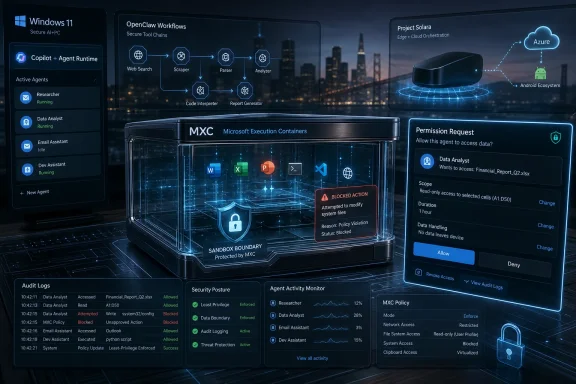
Microsoft used Build 2026 in San Francisco to recast Windows 11 as the operating system for local AI agents, pairing OpenClaw on Windows, Microsoft Execution Containers, Scout, and Project Solara with new hardware meant to make autonomous software feel deployable on real PCs. The pitch was not merely that Windows can run AI. It was that Windows can restrain it, identify it, audit it, and eventually make it ordinary. That is a far more consequential claim than another Copilot sidebar, because it asks users and administrators to accept a new class of actor inside the PC.
For the first few years of the AI PC era, Microsoft’s Windows strategy could be summarized as AI beside the desktop. Copilot lived in panels, search boxes, context menus, and marketing decks. Even Recall, the most controversial of the Copilot+ PC features, was still framed as an assistive memory layer for a human operator.
Build 2026 changed the grammar. Microsoft’s message was no longer that AI will answer questions while you use Windows. It was that agents will use Windows too.
That distinction matters. A chatbot can be wrong, annoying, or invasive, but it is usually bounded by conversation. An agent that can read files, manipulate windows, run commands, call services, and chain tasks across local and cloud resources becomes something closer to a delegated user. Microsoft is now trying to design Windows around that reality before the ecosystem designs around it without Microsoft.
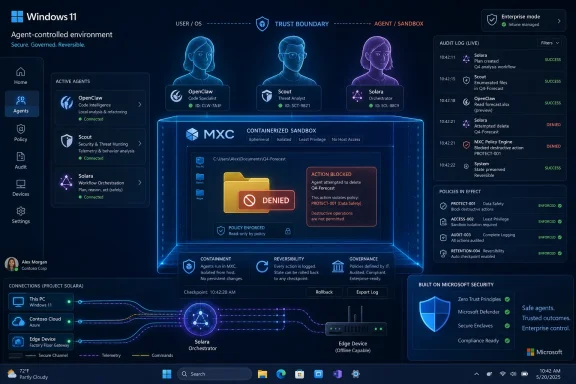
The OpenClaw demo captured the shift with almost theatrical clarity. Microsoft did not show an agent succeeding at a dazzling creative task. It showed an agent trying to delete a folder and failing because the operating system’s policy layer stopped it. That was the keynote in miniature: the future of Windows is not the AI doing whatever it wants; it is Windows deciding what the AI is allowed to do.
This is also why the company’s rhetoric around agents feels more serious than another productivity software cycle. If Microsoft can persuade enterprises that Windows is the safe place to run agents, it can keep the PC relevant as work drifts into cloud services, browser tabs, and model-hosted workflows. If it cannot, Windows risks becoming the screen on which someone else’s agentic platform happens to be displayed.
That is a very Microsoft solution to a very Microsoft problem. The company knows that autonomous agents are interesting precisely because they can take action, and terrifying for the same reason. A useful agent needs enough access to be dangerous; a safe agent needs enough restraint to remain trustworthy.
The folder-deletion demo worked because it made this tradeoff visible. A user or administrator marks a folder as read-only to the agent. The agent receives a destructive instruction. Windows enforces the boundary. The audience laughs because the system behaves like a misbehaving intern who has been locked out of the file cabinet.
But the laughter should not obscure the engineering challenge. Agent containment is not just a prettier version of application permissions. Traditional apps usually have relatively stable intent: a browser browses, an editor edits, a sync client syncs. Agents are designed to improvise. They interpret goals, choose tools, execute sequences, and may interact with other agents or services along the way.
That means the old permission model becomes brittle. “Allow access to Documents” is too broad when the software might decide to summarize a contract, email an attachment, rename a directory, execute a script, or hand a file to a remote model. Microsoft’s bet is that identity, policy, sandboxing, and audit trails can be made agent-aware enough to turn this chaos into something administrators can govern.
That is why MXC is the hinge of the Build story. Scout may get the headlines, OpenClaw may get the developer excitement, and Project Solara may get the futurist gloss. But MXC is the part that says Microsoft understands the first objection everyone will raise: What happens when the agent does something stupid?
Windows has always been a broker of trust. It mediates user accounts, process isolation, device access, file permissions, certificate stores, endpoint protection, and management policy. The agent era pressures every one of those layers because the actor inside the machine is no longer necessarily the person at the keyboard.
Microsoft’s emerging answer is to make the agent legible to the platform. Agents need identities distinct from human users. Their activity needs attribution. Their filesystem access needs boundaries. Their tool use needs policy. Their local and cloud execution needs a management story that fits into the enterprise stack rather than bypassing it.
That sounds dry, but it may be the difference between agentic computing becoming deployable and agentic computing remaining a hobbyist stunt performed on sacrificial hardware. OpenClaw’s early reputation was built partly on the thrill of giving a model too much power and watching what happened. That is exciting on a spare machine. It is unacceptable on a CFO’s laptop.
The Windows pitch is therefore conservative beneath its futuristic skin. Microsoft is saying: yes, agents are coming, but they will not be allowed to become feral processes wandering the endpoint. They will have badges, fences, logs, and rules.
This is the company’s strongest argument, because it plays to Windows’ institutional role. Apple can sell a cleaner personal experience. Google can sell cloud-native ubiquity. Open-source developers can move faster. Microsoft can tell a bank, hospital, manufacturer, or government agency that agent behavior will be governable inside the same administrative universe that already manages users, endpoints, compliance, and identity.
That is not an accident. Developers tend to gather around tools that expose power before they expose polish. OpenClaw’s appeal was that it made agentic control of a machine tangible. It was messy, risky, and experimental, but it showed what people actually wanted to try: not another chat window, but a system that could operate software.
By bringing OpenClaw onto Windows and pairing it with MXC, Microsoft is attempting a familiar maneuver. It wants to absorb the creative chaos of an external developer movement while selling the controls that make it acceptable to enterprises. This is not so different from how Microsoft repositioned itself around Linux, GitHub, and open-source development in the previous decade. The company no longer needs to own the cultural center of developer experimentation to profit from becoming its safest production environment.
There is a strategic humility here, though not an altruistic one. Microsoft appears to understand that it cannot simply declare Copilot to be the universal agent framework and expect developers to salute. The ecosystem is too fragmented, too fast-moving, and too allergic to locked-down abstractions. Supporting OpenClaw lets Microsoft meet developers where the heat already is.
At the same time, the company is putting a Windows-shaped frame around that energy. Native support, containerized execution, enterprise policy, local model hardware, and management integration all point in one direction: build the wild thing if you must, but run it here, under our guardrails.
That is a stronger developer pitch than another AI SDK layered over Azure. It acknowledges that serious agentic workflows will cross boundaries: local files, shells, browsers, cloud APIs, identity providers, company data, and model endpoints. The operating system cannot be incidental in that world. It has to become part of the agent runtime.
That is where Microsoft’s argument remains weakest. The company can describe a world in which you tell your PC to do things while you are away, and the PC completes them. Jensen Huang’s vision of texting a computer and asking it to get coding done is compelling for developers, executives, and anyone who already thinks in workflows. It is less obvious for the median Windows user whose daily computing life is a patchwork of browsers, messaging apps, Office files, games, photos, and administrative chores.
The risk is that Scout becomes another feature users must learn before they understand why they need it. Microsoft has lived this problem before. Cortana never became the ambient productivity layer Windows was promised to receive. Widgets and Start menu web integrations have often felt more like distribution channels than user benefits. Copilot itself has been repositioned repeatedly as Microsoft searched for the right surface area.
Agents add a sharper edge to that adoption problem. A passive AI feature can be ignored. An autonomous one asks for trust. It wants access, context, and permission to act. If Microsoft cannot make the value immediate, users will focus on the risk.
The obvious consumer use cases are still strangely mundane: organize files, summarize what changed while I was away, fill out forms, manage settings, prepare travel logistics, clean up downloads, reconcile calendar conflicts, draft emails based on local documents. These are useful, but they are also the kind of tasks where one bad action can destroy confidence. A personal agent that saves ten minutes and then misfiles a tax document is not a productivity revolution. It is a support incident with branding.
Microsoft’s challenge with Scout is not to prove that agents can do things. It is to prove that users can predict and reverse what agents do. In consumer Windows, trust is not earned by a keynote demo. It is earned by undo buttons, transparent logs, conservative defaults, and the absence of nasty surprises.
The lesson is not that users hate AI. It is that users hate feeling volunteered into Microsoft’s experiments. Windows is not a disposable app. It is the environment where people keep work, finances, photos, credentials, private conversations, medical documents, and company secrets. Any feature that watches, remembers, acts, or delegates inside that environment enters a zone of unusually high sensitivity.
Agents are more sensitive than Recall because they combine observation with action. A memory feature can expose data if designed badly. An agent can expose data and change state. It can move, delete, submit, approve, install, execute, and communicate. That makes the safety story non-negotiable.
Build 2026 suggests Microsoft understands this better than it did during the first Recall reveal. The company led with containment. It showed failure as success. It emphasized administrator control. It put guardrails in the same sentence as capability. That is the right order.
But memory is long in Windows land. Enthusiasts and admins remember forced upgrades, unwanted consumer integrations, telemetry arguments, Edge prompts, Start menu ads, and features that seemed designed more for Microsoft’s strategy than the user’s preference. Even if MXC is technically sound, Microsoft will have to overcome a trust deficit of its own making.
The company should resist the temptation to smuggle agents into Windows as default magic. The fastest way to poison Scout would be to make it feel unavoidable. The safest path is slower: explicit setup, narrow permissions, obvious indicators, local-first options, clean disablement, enterprise kill switches, and logs that a human can understand.
The first AI PC wave was muddled because the value of the neural processing unit was not always obvious. Users were told that new silicon would enable local AI, but many flagship experiences either did not ship, did not require the hardware in a clearly compelling way, or were cloud-connected enough to blur the distinction. The agentic pitch gives local compute a cleaner job: run models and workflows near the user’s data, under local policy, with lower latency and better control.
That does not mean every agent will be fully local. The practical future is hybrid. Some models will run on-device. Some tool calls will hit cloud services. Some enterprise agents will live in managed backends. Some consumer requests will move between local context and remote reasoning. Microsoft’s “chip-to-cloud” language exists because the company knows the boundary will be porous.
Still, hardware matters because agent autonomy changes the economics of waiting. A chatbot can take a few seconds to answer. An agent performing multi-step work may need to observe state, plan, call tools, validate results, and recover from errors. If each step depends on cloud latency and remote context transfer, the experience can feel fragile. Local inference and local execution reduce some of that drag.
There is also a privacy argument, though Microsoft will have to be careful not to overstate it. Running part of an agent locally does not automatically make the whole workflow private. The relevant question is not where the model sits at one moment, but what data flows where, under whose identity, with what retention, and with what administrative controls. Local hardware is necessary for the agentic Windows story. It is not sufficient.
Project Solara pushes this one step further by imagining devices built around agents rather than apps. That is the most radical part of Microsoft’s Build vision, and perhaps the most revealing. If an agent can understand intent and coordinate services, the traditional application grid starts to look like a legacy interface. The PC becomes less a place where humans operate programs and more a place where software entities negotiate tasks.
This does not mean Microsoft is abandoning Windows. Quite the opposite: Build positioned Windows 11 as the trusted development and execution platform for agents on PCs. But Solara suggests Microsoft is hedging against a future in which the PC is not the only, or even the primary, place where agentic computing happens.
That is strategically sensible. If agents become the interface layer, the device underneath may matter less to users. A task might begin on a phone-like object, continue on a desktop, call into cloud services, and finish on a shared workplace device. In that world, Microsoft wants the identity, development tools, model services, and management fabric to matter even when the endpoint is not a conventional Windows PC.
For Windows enthusiasts, this is both exciting and uncomfortable. The exciting version is that Windows becomes the power-user anchor in a larger agent ecosystem, the place where serious local work, development, gaming, creative production, and managed enterprise computing continue to live. The uncomfortable version is that Microsoft’s own future-of-computing experiments no longer require Windows at the center.
That tension has existed for years. Microsoft’s cloud business made the company less dependent on Windows revenue. Microsoft 365 made the company less dependent on Windows as the only client. Android support, Linux integration, web apps, and cross-platform development all loosened the old operating-system monopoly. Agents accelerate the same trend by moving value from the app surface to the orchestration layer.
The irony is that Windows may have to become more technically important at the exact moment it becomes less conceptually central. If agents need a secure, capable, locally managed execution environment, Windows has a major role. But if users increasingly think in terms of intents rather than apps, Windows’ traditional desktop identity becomes harder to defend as the main event.
The practical questions are immediate. Which agents are allowed to run? Which identities do they use? Can an agent access local files, network shares, SharePoint, Teams, email, browser sessions, terminals, credential stores, or line-of-business apps? Can its actions be replayed in an audit? Can it be paused globally? Can it be prevented from exfiltrating data through an approved but inappropriate channel?
MXC answers some of these questions at the containment layer, but containment is only part of governance. Enterprises will need policy templates, telemetry, incident response playbooks, user training, procurement rules, and legal guidance. They will also need to distinguish between agents that merely assist a person and agents that act with delegated authority.
That distinction will become the new help desk nightmare. If an agent submits a purchase order, changes a spreadsheet, sends a customer email, or deletes a folder it was technically allowed to delete, who is responsible? The user who issued the goal? The developer who built the agent? The administrator who permitted the tool? The vendor whose model interpreted the instruction? The organization that failed to define policy?
Microsoft can smooth the technical surface, but it cannot eliminate the organizational ambiguity. Agentic systems blur intent and execution. A human may say “clean this up,” while the agent decides what “clean” means operationally. That is not how compliance departments prefer work to happen.
The best near-term enterprise deployments will be narrow, boring, and heavily logged. Agents will handle constrained workflows where success is measurable and permissions are minimal. They will not be given free rein over the desktop. The companies that treat agents as magical digital employees will rediscover, at scale, why interns get supervision.
The instability is equally obvious. The abstractions are young. The security model will evolve. User expectations are not settled. Model capabilities are uneven. Local hardware differs dramatically across the installed base. Enterprises will apply divergent policies. The same agent may behave differently depending on whether it runs on a high-end AI workstation, a Copilot+ laptop, a cloud-hosted environment, or a locked-down corporate PC.
This is why Microsoft’s native-Windows messaging at Build matters alongside the AI announcements. If agents are going to operate apps, apps need to expose reliable surfaces. Web wrappers and brittle UI automation can work for demos, but agentic workflows need APIs, accessibility metadata, structured actions, state awareness, and predictable error handling. A desktop full of opaque windows is a hostile environment for automation.
In that sense, the agentic future may force long-overdue improvements in Windows application quality. Developers who want their software to be usable by agents will need to make it more observable and controllable. That could benefit human users too. Better accessibility, clearer state models, richer automation hooks, and more native performance are not only good for agents.
But there is a danger of developers optimizing for machine operators at the expense of people. If the future of an app is an agent calling its functions invisibly, the user interface may receive less care. Microsoft will need to ensure that agent-readiness complements human usability rather than replacing it. Windows became dominant because people could sit down and operate it. A platform that is elegant only to agents would be a strange kind of regression.
That changes the meaning of the personal computer. Jensen Huang’s line about the PC evolving from a personal computer to a personal AI is catchy because it captures a real shift. But it also softens the loss embedded in the phrase. A personal computer is a tool directly manipulated by its owner. A personal AI is an intermediary.
Intermediaries can be powerful. They can compress complexity, reduce drudgery, and make computers accessible to people who never cared to learn the machinery underneath. They can also obscure causality. When an agent does something, the user may not know which app it touched, which model it queried, which data it used, or which assumption drove the result.
Windows has lived through abstraction waves before. The graphical interface abstracted commands. Search abstracted file paths. Cloud sync abstracted storage location. App stores abstracted installation. Agents abstract action itself. That is a much bigger leap.
The optimistic case is that Windows becomes calmer because users stop babysitting software. The pessimistic case is that Windows becomes less comprehensible because invisible actors are constantly mediating the machine. The difference will come down to design discipline: visible consent, inspectable actions, reversible changes, and defaults that respect the user’s caution.
Microsoft’s challenge is cultural as much as technical. The company must prove it can resist dark patterns in a domain where nudging users into broader permissions will always be tempting. An agent that works better with more access creates a permanent pressure to ask for more access. Windows must not become a funnel that trains users to click “allow” until the assistant is effectively root with a friendly avatar.
Yet Microsoft’s Windows agent story deserves attention because it is not purely utopian. The company did not simply say the agent will do your work. It said the agent might try to delete your files, and here is the system that stops it. That is a more honest starting point than much of the AI industry has offered.
The hard part begins after the keynote. Preview technologies must become dependable. Permission models must survive adversarial prompts and confused users. Developers must build useful agents rather than impressive toys. Hardware must justify its cost. Scout must prove that ordinary people want delegation, not just demos. Administrators must receive tools that are understandable at 2 a.m. during an incident.
Microsoft’s advantage is that it owns the place where these questions collide. Windows is messy because the real world is messy: old apps, new frameworks, local files, enterprise policies, peripheral drivers, browser sessions, games, malware, accessibility tools, scripts, and users who do unexpected things. If agentic computing can be made safe there, it has a chance of being made safe anywhere.
That is also why the stakes are higher than the usual Build cycle. Windows has spent years defending its relevance against mobile platforms, web apps, and cloud-first work. Agents give Microsoft a way to argue that the PC is not obsolete; it is the most important controlled execution environment in the AI stack. But that argument only works if control is real.
 Microsoft Has Stopped Selling AI as a Feature and Started Selling It as a Tenant
For the first few years of the AI PC era, Microsoft’s Windows strategy could be summarized as AI beside the desktop. Copilot lived in panels, search boxes, context menus, and marketing decks. Even Recall, the most controversial of the Copilot+ PC features, was still framed as an assistive memory layer for a human operator.Build 2026 changed the grammar. Microsoft’s message was no longer that AI will answer questions while you use Windows. It was that agents will use Windows too.
That distinction matters. A chatbot can be wrong, annoying, or invasive, but it is usually bounded by conversation. An agent that can read files, manipulate windows, run commands, call services, and chain tasks across local and cloud resources becomes something closer to a delegated user. Microsoft is now trying to design Windows around that reality before the ecosystem designs around it without Microsoft.
The OpenClaw demo captured the shift with almost theatrical clarity. Microsoft did not show an agent succeeding at a dazzling creative task. It showed an agent trying to delete a folder and failing because the operating system’s policy layer stopped it. That was the keynote in miniature: the future of Windows is not the AI doing whatever it wants; it is Windows deciding what the AI is allowed to do.
This is also why the company’s rhetoric around agents feels more serious than another productivity software cycle. If Microsoft can persuade enterprises that Windows is the safe place to run agents, it can keep the PC relevant as work drifts into cloud services, browser tabs, and model-hosted workflows. If it cannot, Windows risks becoming the screen on which someone else’s agentic platform happens to be displayed.
The Demo Was a Security Argument Disguised as Product Theater
The most important part of the OpenClaw presentation was not OpenClaw. It was Microsoft Execution Containers, or MXC, the new containment layer Microsoft says is designed to give developers and IT administrators a policy-driven way to define what agents can access on Windows and WSL.That is a very Microsoft solution to a very Microsoft problem. The company knows that autonomous agents are interesting precisely because they can take action, and terrifying for the same reason. A useful agent needs enough access to be dangerous; a safe agent needs enough restraint to remain trustworthy.
The folder-deletion demo worked because it made this tradeoff visible. A user or administrator marks a folder as read-only to the agent. The agent receives a destructive instruction. Windows enforces the boundary. The audience laughs because the system behaves like a misbehaving intern who has been locked out of the file cabinet.
But the laughter should not obscure the engineering challenge. Agent containment is not just a prettier version of application permissions. Traditional apps usually have relatively stable intent: a browser browses, an editor edits, a sync client syncs. Agents are designed to improvise. They interpret goals, choose tools, execute sequences, and may interact with other agents or services along the way.
That means the old permission model becomes brittle. “Allow access to Documents” is too broad when the software might decide to summarize a contract, email an attachment, rename a directory, execute a script, or hand a file to a remote model. Microsoft’s bet is that identity, policy, sandboxing, and audit trails can be made agent-aware enough to turn this chaos into something administrators can govern.
That is why MXC is the hinge of the Build story. Scout may get the headlines, OpenClaw may get the developer excitement, and Project Solara may get the futurist gloss. But MXC is the part that says Microsoft understands the first objection everyone will raise: What happens when the agent does something stupid?
Windows Wants to Become the Trust Boundary for Software That Won’t Sit Still
There is a reason Microsoft is presenting agent safety as an operating-system function rather than merely an app feature. If every agent ships with its own security model, enterprise IT will be condemned to a new version of shadow IT, except the shadow software can now operate a computer.Windows has always been a broker of trust. It mediates user accounts, process isolation, device access, file permissions, certificate stores, endpoint protection, and management policy. The agent era pressures every one of those layers because the actor inside the machine is no longer necessarily the person at the keyboard.
Microsoft’s emerging answer is to make the agent legible to the platform. Agents need identities distinct from human users. Their activity needs attribution. Their filesystem access needs boundaries. Their tool use needs policy. Their local and cloud execution needs a management story that fits into the enterprise stack rather than bypassing it.
That sounds dry, but it may be the difference between agentic computing becoming deployable and agentic computing remaining a hobbyist stunt performed on sacrificial hardware. OpenClaw’s early reputation was built partly on the thrill of giving a model too much power and watching what happened. That is exciting on a spare machine. It is unacceptable on a CFO’s laptop.
The Windows pitch is therefore conservative beneath its futuristic skin. Microsoft is saying: yes, agents are coming, but they will not be allowed to become feral processes wandering the endpoint. They will have badges, fences, logs, and rules.
This is the company’s strongest argument, because it plays to Windows’ institutional role. Apple can sell a cleaner personal experience. Google can sell cloud-native ubiquity. Open-source developers can move faster. Microsoft can tell a bank, hospital, manufacturer, or government agency that agent behavior will be governable inside the same administrative universe that already manages users, endpoints, compliance, and identity.
OpenClaw Gives Microsoft a Developer Story It Could Not Invent Alone
Microsoft’s embrace of OpenClaw is notable because it borrows energy from outside the company’s own AI branding. After years of Copilot-first messaging, Build 2026 gave stage time to an open-source agent framework that became popular precisely because it felt less constrained than the polished assistant experiences shipped by major vendors.That is not an accident. Developers tend to gather around tools that expose power before they expose polish. OpenClaw’s appeal was that it made agentic control of a machine tangible. It was messy, risky, and experimental, but it showed what people actually wanted to try: not another chat window, but a system that could operate software.
By bringing OpenClaw onto Windows and pairing it with MXC, Microsoft is attempting a familiar maneuver. It wants to absorb the creative chaos of an external developer movement while selling the controls that make it acceptable to enterprises. This is not so different from how Microsoft repositioned itself around Linux, GitHub, and open-source development in the previous decade. The company no longer needs to own the cultural center of developer experimentation to profit from becoming its safest production environment.
There is a strategic humility here, though not an altruistic one. Microsoft appears to understand that it cannot simply declare Copilot to be the universal agent framework and expect developers to salute. The ecosystem is too fragmented, too fast-moving, and too allergic to locked-down abstractions. Supporting OpenClaw lets Microsoft meet developers where the heat already is.
At the same time, the company is putting a Windows-shaped frame around that energy. Native support, containerized execution, enterprise policy, local model hardware, and management integration all point in one direction: build the wild thing if you must, but run it here, under our guardrails.
That is a stronger developer pitch than another AI SDK layered over Azure. It acknowledges that serious agentic workflows will cross boundaries: local files, shells, browsers, cloud APIs, identity providers, company data, and model endpoints. The operating system cannot be incidental in that world. It has to become part of the agent runtime.
Scout Is the Consumer Wedge, but Microsoft Still Has to Prove the Need
Scout, Microsoft’s OpenClaw-based personal agent, is the product that will test whether normal users actually want this future. Enterprise buyers can justify agents with dashboards, ticket queues, workflow automation, and labor economics. Consumers are harder. They do not buy an assistant because it is agentic; they buy it because it reliably saves time without making them nervous.That is where Microsoft’s argument remains weakest. The company can describe a world in which you tell your PC to do things while you are away, and the PC completes them. Jensen Huang’s vision of texting a computer and asking it to get coding done is compelling for developers, executives, and anyone who already thinks in workflows. It is less obvious for the median Windows user whose daily computing life is a patchwork of browsers, messaging apps, Office files, games, photos, and administrative chores.
The risk is that Scout becomes another feature users must learn before they understand why they need it. Microsoft has lived this problem before. Cortana never became the ambient productivity layer Windows was promised to receive. Widgets and Start menu web integrations have often felt more like distribution channels than user benefits. Copilot itself has been repositioned repeatedly as Microsoft searched for the right surface area.
Agents add a sharper edge to that adoption problem. A passive AI feature can be ignored. An autonomous one asks for trust. It wants access, context, and permission to act. If Microsoft cannot make the value immediate, users will focus on the risk.
The obvious consumer use cases are still strangely mundane: organize files, summarize what changed while I was away, fill out forms, manage settings, prepare travel logistics, clean up downloads, reconcile calendar conflicts, draft emails based on local documents. These are useful, but they are also the kind of tasks where one bad action can destroy confidence. A personal agent that saves ten minutes and then misfiles a tax document is not a productivity revolution. It is a support incident with branding.
Microsoft’s challenge with Scout is not to prove that agents can do things. It is to prove that users can predict and reverse what agents do. In consumer Windows, trust is not earned by a keynote demo. It is earned by undo buttons, transparent logs, conservative defaults, and the absence of nasty surprises.
Recall’s Shadow Still Hangs Over the Agentic Desktop
Microsoft’s agent push arrives after the company already learned how quickly AI features can trigger privacy backlash. Recall was pitched as a powerful local memory system for Copilot+ PCs, but its original unveiling raised obvious concerns about screenshots, sensitive information, and whether users truly understood what was being captured. Microsoft subsequently changed the rollout and hardened the feature, but the reputational lesson remains.The lesson is not that users hate AI. It is that users hate feeling volunteered into Microsoft’s experiments. Windows is not a disposable app. It is the environment where people keep work, finances, photos, credentials, private conversations, medical documents, and company secrets. Any feature that watches, remembers, acts, or delegates inside that environment enters a zone of unusually high sensitivity.
Agents are more sensitive than Recall because they combine observation with action. A memory feature can expose data if designed badly. An agent can expose data and change state. It can move, delete, submit, approve, install, execute, and communicate. That makes the safety story non-negotiable.
Build 2026 suggests Microsoft understands this better than it did during the first Recall reveal. The company led with containment. It showed failure as success. It emphasized administrator control. It put guardrails in the same sentence as capability. That is the right order.
But memory is long in Windows land. Enthusiasts and admins remember forced upgrades, unwanted consumer integrations, telemetry arguments, Edge prompts, Start menu ads, and features that seemed designed more for Microsoft’s strategy than the user’s preference. Even if MXC is technically sound, Microsoft will have to overcome a trust deficit of its own making.
The company should resist the temptation to smuggle agents into Windows as default magic. The fastest way to poison Scout would be to make it feel unavoidable. The safest path is slower: explicit setup, narrow permissions, obvious indicators, local-first options, clean disablement, enterprise kill switches, and logs that a human can understand.
The Hardware Story Is Really About Where the Agent Lives
Build’s hardware emphasis was not incidental. Local agents need compute, and local trust is easier to argue when sensitive workflows do not have to leave the machine for every inference. Microsoft’s focus on AI-capable PCs, developer boxes, and hardware like Nvidia RTX Spark-powered systems is part of a broader attempt to give the agent a physical home.The first AI PC wave was muddled because the value of the neural processing unit was not always obvious. Users were told that new silicon would enable local AI, but many flagship experiences either did not ship, did not require the hardware in a clearly compelling way, or were cloud-connected enough to blur the distinction. The agentic pitch gives local compute a cleaner job: run models and workflows near the user’s data, under local policy, with lower latency and better control.
That does not mean every agent will be fully local. The practical future is hybrid. Some models will run on-device. Some tool calls will hit cloud services. Some enterprise agents will live in managed backends. Some consumer requests will move between local context and remote reasoning. Microsoft’s “chip-to-cloud” language exists because the company knows the boundary will be porous.
Still, hardware matters because agent autonomy changes the economics of waiting. A chatbot can take a few seconds to answer. An agent performing multi-step work may need to observe state, plan, call tools, validate results, and recover from errors. If each step depends on cloud latency and remote context transfer, the experience can feel fragile. Local inference and local execution reduce some of that drag.
There is also a privacy argument, though Microsoft will have to be careful not to overstate it. Running part of an agent locally does not automatically make the whole workflow private. The relevant question is not where the model sits at one moment, but what data flows where, under whose identity, with what retention, and with what administrative controls. Local hardware is necessary for the agentic Windows story. It is not sufficient.
Project Solara pushes this one step further by imagining devices built around agents rather than apps. That is the most radical part of Microsoft’s Build vision, and perhaps the most revealing. If an agent can understand intent and coordinate services, the traditional application grid starts to look like a legacy interface. The PC becomes less a place where humans operate programs and more a place where software entities negotiate tasks.
Project Solara Shows Microsoft Looking Past Windows Without Saying So Too Loudly
The most provocative thing about Project Solara is that it is not simply “Windows, but more AI.” Microsoft describes a platform for agent-first devices, reportedly using a lightweight edge operating system based on the Android Open Source Project rather than traditional Windows. That should make every Windows watcher sit up.This does not mean Microsoft is abandoning Windows. Quite the opposite: Build positioned Windows 11 as the trusted development and execution platform for agents on PCs. But Solara suggests Microsoft is hedging against a future in which the PC is not the only, or even the primary, place where agentic computing happens.
That is strategically sensible. If agents become the interface layer, the device underneath may matter less to users. A task might begin on a phone-like object, continue on a desktop, call into cloud services, and finish on a shared workplace device. In that world, Microsoft wants the identity, development tools, model services, and management fabric to matter even when the endpoint is not a conventional Windows PC.
For Windows enthusiasts, this is both exciting and uncomfortable. The exciting version is that Windows becomes the power-user anchor in a larger agent ecosystem, the place where serious local work, development, gaming, creative production, and managed enterprise computing continue to live. The uncomfortable version is that Microsoft’s own future-of-computing experiments no longer require Windows at the center.
That tension has existed for years. Microsoft’s cloud business made the company less dependent on Windows revenue. Microsoft 365 made the company less dependent on Windows as the only client. Android support, Linux integration, web apps, and cross-platform development all loosened the old operating-system monopoly. Agents accelerate the same trend by moving value from the app surface to the orchestration layer.
The irony is that Windows may have to become more technically important at the exact moment it becomes less conceptually central. If agents need a secure, capable, locally managed execution environment, Windows has a major role. But if users increasingly think in terms of intents rather than apps, Windows’ traditional desktop identity becomes harder to defend as the main event.
Enterprise IT Will Like the Controls and Fear the Blast Radius
For administrators, the Build 2026 message is a mix of relief and dread. Relief, because Microsoft is at least building the control plane before agents flood the endpoint. Dread, because the very existence of that control plane confirms that agents are about to become another thing IT must inventory, secure, patch, govern, explain, and sometimes forbid.The practical questions are immediate. Which agents are allowed to run? Which identities do they use? Can an agent access local files, network shares, SharePoint, Teams, email, browser sessions, terminals, credential stores, or line-of-business apps? Can its actions be replayed in an audit? Can it be paused globally? Can it be prevented from exfiltrating data through an approved but inappropriate channel?
MXC answers some of these questions at the containment layer, but containment is only part of governance. Enterprises will need policy templates, telemetry, incident response playbooks, user training, procurement rules, and legal guidance. They will also need to distinguish between agents that merely assist a person and agents that act with delegated authority.
That distinction will become the new help desk nightmare. If an agent submits a purchase order, changes a spreadsheet, sends a customer email, or deletes a folder it was technically allowed to delete, who is responsible? The user who issued the goal? The developer who built the agent? The administrator who permitted the tool? The vendor whose model interpreted the instruction? The organization that failed to define policy?
Microsoft can smooth the technical surface, but it cannot eliminate the organizational ambiguity. Agentic systems blur intent and execution. A human may say “clean this up,” while the agent decides what “clean” means operationally. That is not how compliance departments prefer work to happen.
The best near-term enterprise deployments will be narrow, boring, and heavily logged. Agents will handle constrained workflows where success is measurable and permissions are minimal. They will not be given free rein over the desktop. The companies that treat agents as magical digital employees will rediscover, at scale, why interns get supervision.
Developers Are Being Asked to Build for a Moving Target
For developers, Microsoft’s agentic Windows push is both an opportunity and an unstable specification. The opportunity is obvious: a new platform layer creates room for tools, frameworks, monitoring systems, permission managers, enterprise agents, UI conventions, testing harnesses, and vertical applications. If Microsoft succeeds, agent-ready Windows software becomes a real market.The instability is equally obvious. The abstractions are young. The security model will evolve. User expectations are not settled. Model capabilities are uneven. Local hardware differs dramatically across the installed base. Enterprises will apply divergent policies. The same agent may behave differently depending on whether it runs on a high-end AI workstation, a Copilot+ laptop, a cloud-hosted environment, or a locked-down corporate PC.
This is why Microsoft’s native-Windows messaging at Build matters alongside the AI announcements. If agents are going to operate apps, apps need to expose reliable surfaces. Web wrappers and brittle UI automation can work for demos, but agentic workflows need APIs, accessibility metadata, structured actions, state awareness, and predictable error handling. A desktop full of opaque windows is a hostile environment for automation.
In that sense, the agentic future may force long-overdue improvements in Windows application quality. Developers who want their software to be usable by agents will need to make it more observable and controllable. That could benefit human users too. Better accessibility, clearer state models, richer automation hooks, and more native performance are not only good for agents.
But there is a danger of developers optimizing for machine operators at the expense of people. If the future of an app is an agent calling its functions invisibly, the user interface may receive less care. Microsoft will need to ensure that agent-readiness complements human usability rather than replacing it. Windows became dominant because people could sit down and operate it. A platform that is elegant only to agents would be a strange kind of regression.
The Old Windows Contract Is Being Rewritten
For decades, the implicit Windows contract was simple: the user is in charge, applications request access, and the operating system mediates the relationship imperfectly but recognizably. Malware broke that contract by deception. Enterprise management modified it by policy. Cloud services stretched it across devices. Agents rewrite it more fundamentally because the user may intentionally delegate control to software that then makes its own operational choices.That changes the meaning of the personal computer. Jensen Huang’s line about the PC evolving from a personal computer to a personal AI is catchy because it captures a real shift. But it also softens the loss embedded in the phrase. A personal computer is a tool directly manipulated by its owner. A personal AI is an intermediary.
Intermediaries can be powerful. They can compress complexity, reduce drudgery, and make computers accessible to people who never cared to learn the machinery underneath. They can also obscure causality. When an agent does something, the user may not know which app it touched, which model it queried, which data it used, or which assumption drove the result.
Windows has lived through abstraction waves before. The graphical interface abstracted commands. Search abstracted file paths. Cloud sync abstracted storage location. App stores abstracted installation. Agents abstract action itself. That is a much bigger leap.
The optimistic case is that Windows becomes calmer because users stop babysitting software. The pessimistic case is that Windows becomes less comprehensible because invisible actors are constantly mediating the machine. The difference will come down to design discipline: visible consent, inspectable actions, reversible changes, and defaults that respect the user’s caution.
Microsoft’s challenge is cultural as much as technical. The company must prove it can resist dark patterns in a domain where nudging users into broader permissions will always be tempting. An agent that works better with more access creates a permanent pressure to ask for more access. Windows must not become a funnel that trains users to click “allow” until the assistant is effectively root with a friendly avatar.
The Future Microsoft Showed Is Impressive Because It Admits the Problem
The easy reaction to Build 2026 is cynicism. The industry has overpromised AI so relentlessly that every new agent demo arrives carrying the baggage of the last dozen. We have seen assistants that hallucinate, summarizers that miss the point, automation tools that break on changed layouts, and productivity features that feel more useful to the vendor’s stock narrative than to the user.Yet Microsoft’s Windows agent story deserves attention because it is not purely utopian. The company did not simply say the agent will do your work. It said the agent might try to delete your files, and here is the system that stops it. That is a more honest starting point than much of the AI industry has offered.
The hard part begins after the keynote. Preview technologies must become dependable. Permission models must survive adversarial prompts and confused users. Developers must build useful agents rather than impressive toys. Hardware must justify its cost. Scout must prove that ordinary people want delegation, not just demos. Administrators must receive tools that are understandable at 2 a.m. during an incident.
Microsoft’s advantage is that it owns the place where these questions collide. Windows is messy because the real world is messy: old apps, new frameworks, local files, enterprise policies, peripheral drivers, browser sessions, games, malware, accessibility tools, scripts, and users who do unexpected things. If agentic computing can be made safe there, it has a chance of being made safe anywhere.
That is also why the stakes are higher than the usual Build cycle. Windows has spent years defending its relevance against mobile platforms, web apps, and cloud-first work. Agents give Microsoft a way to argue that the PC is not obsolete; it is the most important controlled execution environment in the AI stack. But that argument only works if control is real.
The Claw Marks Microsoft Wants Administrators to Notice
The concrete story from Build is narrower than the keynote’s science-fiction sweep, but it is more useful for anyone who actually has to run Windows machines. Microsoft is trying to turn agentic AI from a risky developer craze into a managed platform capability, and the first proof point is whether MXC can make dangerous software boring enough to deploy.- Microsoft is positioning Windows 11 as a host for AI agents, not merely as a client for Copilot-style assistance.
- Microsoft Execution Containers are the central security mechanism in the pitch because they promise OS-enforced boundaries for agent access and activity.
- OpenClaw gives Microsoft a credible developer bridge into the agent ecosystem, while Scout will test whether consumers want the same model in a packaged Microsoft experience.
- Project Solara shows that Microsoft’s agent strategy extends beyond traditional Windows PCs, even as Windows remains the company’s strongest trust boundary for local execution.
- Enterprise adoption will depend less on flashy agent demos than on identity, logging, policy enforcement, reversibility, and the ability to say no.
- The consumer version will succeed only if Microsoft makes agent behavior visible, limited, and easy to undo.
References
- Primary source: PCMag
Published: 2026-06-06T13:10:23.642651
I Saw the Future of Windows at Microsoft Build, and It's Unrecognizable | PCMag
OpenClaw AI agents were a big hit with the Build crowd, and Microsoft is making Windows increasingly friendly to non-human users.www.pcmag.com - Related coverage: windowscentral.com
Microsoft outlines its vision for “the next computer” with Project Solara, an agentic platform that exists liminally in your pocket and on your desk | Windows Central
After Windows Phone, Microsoft is eager to get ahead of the next paradigm shift in computing, and it's betting big on an agentic hardware and software future.www.windowscentral.com - Related coverage: techradar.com
Microsoft Build 2026 — all the news and updates as it happened | TechRadar
Everything we saw at Microsoft Build 2026www.techradar.com - Related coverage: tomsguide.com
The future of Windows 11 — what is Microsoft building next? | Tom's Guide
The latest Microsoft Build keynote pointed to a future for Windows 11 where the focus is on deeply baked in agentic systems that could transform the way you work.www.tomsguide.com - Related coverage: techcrunch.com
Microsoft launches Scout, an OpenClaw-inspired personal assistant | TechCrunch
Launched at Build, Microsoft Scout is a new AI assistant meant to bring the power and flexibility of OpenClaw into the Microsoft 365 system.techcrunch.com - Official source: blogs.microsoft.com
Microsoft Build 2026: Be yourself at work - The Official Microsoft Blog
Platforms shift when developers build. We explore, choose tools, dream, create. This platform shift comes with more information than ever, ready at your fingertips. This shift, it’s about building fast AND THEN: it’s about building, operating, optimizing and observing. Securing your...blogs.microsoft.com
- Official source: blogs.windows.com
Build 2026: Furthering Windows as the trusted platform for development
Build is one of our favorite moments each year - a chance to connect with the global developer community and share what we’ve been building. Over the past year, we have connected with many developers pushing the boundaries of what’s possible onblogs.windows.com - Related coverage: tomshardware.com
Microsoft unveils Project Solara AI, a chip-to-cloud platform built to power a new generation of 'agent-first' enterprise devices — hardware designed to run AI agents instead of traditional apps | Tom's Hardware
Microsoft ditches Windows to build OS on Androidwww.tomshardware.com - Related coverage: windowslatest.com
Microsoft pledges to make Windows 11 the OS for building AI, after years of Copilot backlash
Microsoft is turning Windows 11 into agent-native at Build 2026, adding local AI models and OS-level security to fix its developer platform. www.windowslatest.com
- Official source: commandline.microsoft.com
Composing a new platform for agent-first devices - Command Line
New interaction technology enables new types of computers. Learn more about Microsoft’s Project Solara.commandline.microsoft.com - Official source: news.microsoft.com
Microsoft Build en directo
El lugar donde seguir en tiempo real las últimas noticias a medida que se anuncien desde el Microsoft Build, los días 2 y 3 de junio de 2026.news.microsoft.com - Related coverage: computerworld.com
Microsoft unveils Scout, an autonomous AI agent built on OpenClaw – Computerworld
Scout is the first of a new breed of ‘autopilot’ agents in Microsoft 365 that can carry out tasks independently. www.computerworld.com
- Related coverage: gigazine.net
MicrosoftがOpenClawベースの常時稼働型AIエージェント「Scout」を発表、ユーザーの代わりに仕事を進める「Autopilot」第1弾 - GIGAZINE
Microsoftが、Microsoft 365向けの常時稼働型AIエージェント「Microsoft Scout」を発表しました。ScoutはAIエージェントフレームワークである「OpenClaw」の技術を基盤としており、ユーザーが毎回指示を出さなくてもバックグラウンドで作業を進める「Autopilot」という新カテゴリの最初のエージェントとして位置付けられています。gigazine.net - Official source: learn.microsoft.com
openclaw-dev - Code Samples | Microsoft Learn
Deploy OpenClaw with Azure OpenAI using one CLI command. Chat in the browser by default; optionally add Microsoft Teams to use it from your phone.learn.microsoft.com