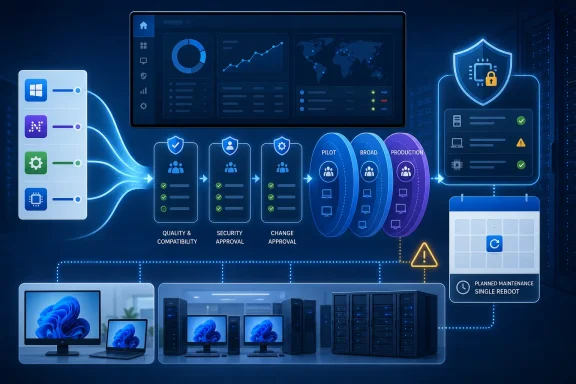
Use one maintenance window for Windows quality updates, routine .NET servicing, and validated routine drivers, but do not automatically admit firmware until Microsoft documents granular commercial controls and each hardware family passes a separate gate. A unified restart can reduce disruption; it should not become a unified enterprise approval path.
Microsoft announced the coordinated update model on April 24, 2026, and began testing it in Windows 11 Insider Experimental Preview Build 26300.8687 on June 12. According to Microsoft’s announcement, the model coordinates driver, .NET, firmware, and monthly quality updates around one installation and restart event. Microsoft has not yet published the commercial controls administrators would need to configure separate approval paths safely across managed fleets.
The operational benefit is straightforward: eligible updates can wait for the next scheduled Windows quality update and then install through a coordinated restart. The test also allows users to install available updates earlier instead of waiting for that event.
Because this behavior is in an Experimental Insider rollout, enterprises should treat it as a direction of travel, not a guaranteed one-restart policy or a production commitment for all retail and managed devices. The exact behavior available to commercial customers will depend on controls Microsoft says it will detail later.
A shared maintenance window does not give every payload the same dependencies, failure impact, or recovery path. Windows quality updates change serviced operating-system components. .NET updates can affect managed applications and runtimes. Drivers connect Windows to particular hardware. Firmware changes code associated with a device or platform.
Microsoft’s Windows hardware documentation also distinguishes the delivery mechanics. Firmware distributed through Windows Update can be packaged through the driver infrastructure, with the payload passed through Plug and Play for installation. Sharing that infrastructure does not make firmware operationally equivalent to an ordinary driver or cumulative update.
Administrators should therefore separate two decisions:
WindowsForum members following Build 26300.8687 have consistently identified fewer restart prompts as the immediate benefit. Their reports also support the more cautious enterprise conclusion: routine driver and .NET servicing can move toward the monthly quality-update rhythm when the model becomes commercially manageable, while firmware still needs separate treatment.
Drivers require more selectivity. A routine driver can share the monthly window where existing pilot data shows that the exact package behaves reliably on the organization’s affected hardware models and workloads. That should not be inferred from the driver’s category, age, or appearance in Windows Update.
A practical enterprise policy can admit .NET or a driver to the normal monthly cadence when:
The appropriate goal is consolidated scheduling, not consolidated observability. Approval records, installation status, exceptions, and ownership should remain visible even when several packages use the same restart.
WindowsForum’s coverage of the first 26300.8687 test emphasized that distinction. Reports about the coordinated Windows Update experience described a user-facing reduction in restarts, while the enterprise analysis recommended combining routine driver and .NET servicing only when granular management makes that practical.
That difference should shape enterprise policy. Firmware delivery can create hardware-level recovery and support considerations, so organizations should assign ownership before deployment rather than assuming the Windows quality-update process covers every possible outcome.
Recommended firmware controls include:
Firmware may eventually use the same maintenance window as other updates. It should enter that window only after its hardware-family gate passes. Microsoft has not yet documented whether the commercial implementation will provide the independent approval and pause controls necessary to enforce that distinction.
A sensible design uses three related approval tracks.
The monthly quality and .NET track can share pilot, broad, and critical-device rings where existing pilot results support that arrangement. Application validation remains necessary even if the maintenance dates are aligned.
The routine-driver track can use the same dates while applying hardware and workload filters. Approval for one driver or device family should not automatically approve an unrelated package.
The firmware track remains hardware-specific. Its pilot population should represent the exact models and configurations affected, with a named recovery owner and an evidence-based deployment decision.
The resulting process is simple:
WindowsForum reports on Build 29617.1000, released to the Experimental Future Platforms track on June 26, continued to frame one monthly restart as the consequential goal. Reports looking more broadly at Windows Update in 2026 likewise described a move toward more predictable restarts and clearer controls. Neither direction eliminates the need to verify what commercial policy settings Microsoft ultimately ships.
A pilot should track more than whether the device restarted once. Record which updates were offered, which were approved, which waited for the coordinated event, which installed, and which failed or remained pending.
After the restart, verify that:
The central unanswered questions concern control boundaries. Administrators need to know whether they can approve a quality update while holding firmware, separate device families or driver packages, apply distinct deadlines, pause one update class, and identify the component responsible for a failed installation.
Until Microsoft publishes those commercial controls, organizations should not merge their existing approval rings based on the Insider experience. They should map which validated .NET and routine driver packages can share the monthly schedule, define firmware ownership by hardware family, and specify the evidence required for admission.
Microsoft’s coordinated model could make Windows 11 maintenance less disruptive. The enterprise milestone is not simply wider availability; it is the arrival of granular commercial controls that let IT coordinate the restart while keeping firmware risk, approval, and accountability separate.
Microsoft announced the coordinated update model on April 24, 2026, and began testing it in Windows 11 Insider Experimental Preview Build 26300.8687 on June 12. According to Microsoft’s announcement, the model coordinates driver, .NET, firmware, and monthly quality updates around one installation and restart event. Microsoft has not yet published the commercial controls administrators would need to configure separate approval paths safely across managed fleets.
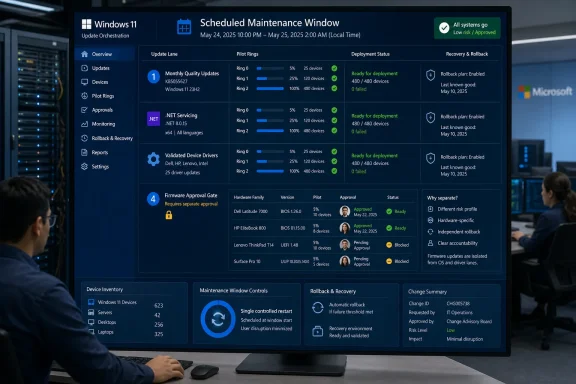 One Restart Changes the Calendar, Not the Risk
The operational benefit is straightforward: eligible updates can wait for the next scheduled Windows quality update and then install through a coordinated restart. The test also allows users to install available updates earlier instead of waiting for that event.Because this behavior is in an Experimental Insider rollout, enterprises should treat it as a direction of travel, not a guaranteed one-restart policy or a production commitment for all retail and managed devices. The exact behavior available to commercial customers will depend on controls Microsoft says it will detail later.
A shared maintenance window does not give every payload the same dependencies, failure impact, or recovery path. Windows quality updates change serviced operating-system components. .NET updates can affect managed applications and runtimes. Drivers connect Windows to particular hardware. Firmware changes code associated with a device or platform.
Microsoft’s Windows hardware documentation also distinguishes the delivery mechanics. Firmware distributed through Windows Update can be packaged through the driver infrastructure, with the payload passed through Plug and Play for installation. Sharing that infrastructure does not make firmware operationally equivalent to an ordinary driver or cumulative update.
Administrators should therefore separate two decisions:
- Whether updates can share an installation and restart window.
- Whether those updates should share approval, deployment, rollback, and ownership rules.
WindowsForum members following Build 26300.8687 have consistently identified fewer restart prompts as the immediate benefit. Their reports also support the more cautious enterprise conclusion: routine driver and .NET servicing can move toward the monthly quality-update rhythm when the model becomes commercially manageable, while firmware still needs separate treatment.
Routine Drivers and .NET Fit the Monthly Ring
Routine .NET servicing is a strong candidate for consolidation with the monthly Windows quality update where existing pilot data shows that Windows and .NET changes can be validated against the same business applications, automated workflows, and endpoint configurations.Drivers require more selectivity. A routine driver can share the monthly window where existing pilot data shows that the exact package behaves reliably on the organization’s affected hardware models and workloads. That should not be inferred from the driver’s category, age, or appearance in Windows Update.
A practical enterprise policy can admit .NET or a driver to the normal monthly cadence when:
- The affected software or hardware population is accurately inventoried.
- The exact package has passed a representative pilot.
- The organization has a documented recovery or mitigation path.
- Support teams can determine which component changed.
- Reporting continues to identify the quality update, .NET package, and individual driver package separately.
The appropriate goal is consolidated scheduling, not consolidated observability. Approval records, installation status, exceptions, and ownership should remain visible even when several packages use the same restart.
WindowsForum’s coverage of the first 26300.8687 test emphasized that distinction. Reports about the coordinated Windows Update experience described a user-facing reduction in restarts, while the enterprise analysis recommended combining routine driver and .NET servicing only when granular management makes that practical.
Firmware Still Needs Its Own Gate
Firmware should remain in a separately governed lane because its risk follows exact hardware families and configurations. Two PCs on the same Windows 11 build may have different firmware targets, platform implementations, peripherals, power conditions, and recovery capabilities.That difference should shape enterprise policy. Firmware delivery can create hardware-level recovery and support considerations, so organizations should assign ownership before deployment rather than assuming the Windows quality-update process covers every possible outcome.
Recommended firmware controls include:
- Approval by exact hardware family and applicable configuration.
- Validation on representative devices using the organization’s real storage, docking, graphics, security, and peripheral setup.
- A defined owner for devices that do not return to normal service after installation.
- A documented assessment of whether rollback or another recovery method is supported for the package.
- The ability to pause firmware without pausing the monthly quality update.
- Confirmation that inventory and reporting can show the intended and installed firmware versions.
Firmware may eventually use the same maintenance window as other updates. It should enter that window only after its hardware-family gate passes. Microsoft has not yet documented whether the commercial implementation will provide the independent approval and pause controls necessary to enforce that distinction.
Build Rings Around Failure Domains
Organizations can prepare a policy design now, but they cannot yet configure a definitive enterprise model for the Experimental feature. Microsoft still needs to explain how commercial administrators can separate update types, hardware models, deadlines, approvals, and exceptions.A sensible design uses three related approval tracks.
The monthly quality and .NET track can share pilot, broad, and critical-device rings where existing pilot results support that arrangement. Application validation remains necessary even if the maintenance dates are aligned.
The routine-driver track can use the same dates while applying hardware and workload filters. Approval for one driver or device family should not automatically approve an unrelated package.
The firmware track remains hardware-specific. Its pilot population should represent the exact models and configurations affected, with a named recovery owner and an evidence-based deployment decision.
The resulting process is simple:
- Quality updates and validated routine .NET servicing enter the monthly pilot.
- Routine drivers join that window only after package- and device-specific validation.
- Firmware remains excluded by default.
- A firmware package enters the shared window only after its hardware-family gate passes.
- Reporting and incident response continue to identify each package independently.
WindowsForum reports on Build 29617.1000, released to the Experimental Future Platforms track on June 26, continued to frame one monthly restart as the consequential goal. Reports looking more broadly at Windows Update in 2026 likewise described a move toward more predictable restarts and clearer controls. Neither direction eliminates the need to verify what commercial policy settings Microsoft ultimately ships.
Compact Preparation Checklist
Before testing or planning around the coordinated model, IT teams should complete this checklist:- Open Settings > Windows Update > Update history and record the quality, .NET, driver, and firmware entries visible before and after the test.
- Open Device Manager and capture the affected devices, driver versions, hardware IDs where needed, and any warning states.
- Use the organization’s existing update-management reporting console to confirm offers, approvals, installation results, failures, deadlines, and device scope.
- Inventory devices by exact hardware family, not only by Windows edition or update ring.
- Identify which .NET and routine driver packages already have favorable pilot data for the affected applications and hardware.
- Keep firmware out of automatic admission rules until the exact package passes its hardware-family validation gate.
- Assign recovery and escalation ownership before approving firmware.
- Verify that reports can distinguish every package installed during the shared maintenance event.
- Document the criteria for pausing one update class while allowing another to proceed.
Verification Must Go Beyond the Restart Counter
Build 26300.8687 does not establish a universal retail capability or a guaranteed reboot count. It tests coordinated behavior in an Experimental rollout, and Microsoft has said that commercial details will come later.A pilot should track more than whether the device restarted once. Record which updates were offered, which were approved, which waited for the coordinated event, which installed, and which failed or remained pending.
After the restart, verify that:
- The expected quality update appears in Settings > Windows Update > Update history.
- Applicable .NET, driver, and firmware entries appear in update history or management reporting.
- Device Manager shows the expected devices without new warning states.
- Driver and firmware versions match the packages intended for that hardware family.
- Role-specific functions such as networking, docking, audio, graphics, storage, security controls, and business applications still work.
Exceptions Will Define the Enterprise Model
“One monthly restart” should be treated as a scheduling objective rather than an absolute promise. Users may initiate available updates before the coordinated event, failures may require remediation, and a package may be withheld from a device or hardware family.The central unanswered questions concern control boundaries. Administrators need to know whether they can approve a quality update while holding firmware, separate device families or driver packages, apply distinct deadlines, pause one update class, and identify the component responsible for a failed installation.
Until Microsoft publishes those commercial controls, organizations should not merge their existing approval rings based on the Insider experience. They should map which validated .NET and routine driver packages can share the monthly schedule, define firmware ownership by hardware family, and specify the evidence required for admission.
Frequently Asked Questions
Should enterprises combine all Windows updates into one approval ring?
No. Quality updates, validated routine .NET servicing, and selected routine drivers can share a maintenance window where pilot data supports it. Firmware should retain a separate hardware-specific approval gate.Does Build 26300.8687 guarantee one restart each month?
No. It is an Experimental Insider test of coordinated updates, not a universal one-restart guarantee for retail or commercially managed Windows 11 devices.Can firmware use the same maintenance window?
Yes, but only after the exact package passes validation for the affected hardware family. Sharing a window should not remove separate approval, reporting, pause, recovery, or ownership requirements.What should IT do before Microsoft publishes commercial controls?
Inventory hardware families, review Settings > Windows Update > Update history, capture relevant information in Device Manager, validate reporting in the organization’s update-management console, and define separate admission criteria for .NET, drivers, and firmware.Microsoft’s coordinated model could make Windows 11 maintenance less disruptive. The enterprise milestone is not simply wider availability; it is the arrival of granular commercial controls that let IT coordinate the restart while keeping firmware risk, approval, and accountability separate.
References
- Primary source: learn.microsoft.com
Update Device Firmware Using Windows Update - Windows drivers | Microsoft Learn
This article describes how to update your device's firmware using the Windows Update (WU) service.learn.microsoft.com - Independent coverage: techcommunity.microsoft.com
- Independent coverage: betawiki.net
- Independent coverage: blogs.windows.com
Announcing new builds for July 6 2026
Hello Windows Insiders, We have new releases today with builds across Beta and Experimental. New builds this week Today we are releasing new Windows 11 Insider Preview Builds. As a reminder, all Insiders can find the relblogs.windows.com - Independent coverage: techspot.com
Microsoft is making Windows 11 updates require just one reboot instead of several | TechSpot
As part of the new update policy, Microsoft will bundle all available updates – including security patches, driver releases, bug fixes, firmware revisions, and .NET packages –...www.techspot.com - Primary source: WindowsForum
Windows 11 Build 26300.8687 Tests One Restart for .NET, Drivers and Firmware | Windows Forum
Enterprises should combine routine driver and .NET servicing with Windows monthly quality updates when Microsoft’s unified restart model becomes...windowsforum.com