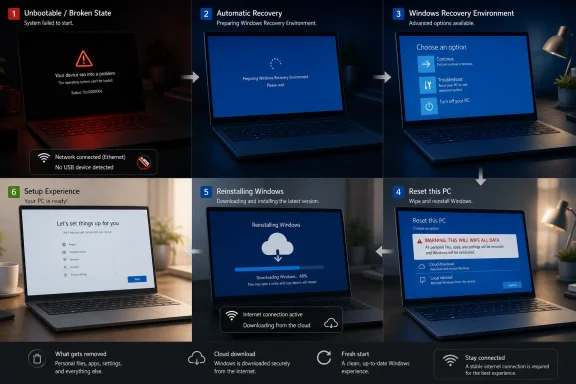
A hidden Windows 11 recovery option called Cloud Rebuild has appeared in recent Experimental 25H2 builds, according to Windows enthusiast XenoPanther and reporting by Windows Report and Pureinfotech, suggesting Microsoft is testing a cloud-based reinstall path inside Windows Recovery Environment. The important part is not that Windows can already download itself from the cloud; it can. The important part is where Microsoft appears to be placing the feature: closer to the moment when a PC has failed to boot and the user has run out of obvious choices. If Cloud Rebuild becomes a real shipping feature, Windows recovery may finally start looking less like a toolkit for technicians and more like a service pipeline for broken machines.
For decades, Windows recovery has carried the smell of a workbench. A failing PC meant bootable media, BIOS menus, recovery partitions, driver packages, vendor images, command prompts, and that familiar sinking feeling that the repair process might be more fragile than the machine being repaired. Microsoft has improved this story in pieces, but the overall experience has often remained stubbornly old-fashioned: Windows is a cloud-connected operating system right up until it breaks, at which point users are frequently thrown back into local tools and guesswork.
Cloud Rebuild, as described in early testing, looks like Microsoft’s next attempt to close that gap. XenoPanther reportedly found the option inside WinRE under Advanced options, not buried inside the existing Reset this PC workflow. During testing, it downloaded a fresh Windows image and drivers from Microsoft’s servers, then performed what sounded like a destructive rebuild that removed apps, settings, and personal files.
That last detail matters. This is not a magic undo button, and anyone treating it as one is likely to be disappointed. The feature, at least in its current hidden form, appears closer to a last-resort reinstall than a gentle repair. But its presence inside WinRE hints at a more interesting direction: Microsoft wants the recovery environment itself to become connected, serviced, and capable of making decisions.
The old recovery model assumed the user or administrator brought the fix. The emerging model assumes the fix can be fetched.
The existing cloud download feature is mostly a user-initiated reinstall path from within the reset experience. It is useful when local files are damaged or when the user wants a cleaner source than the image already sitting on the PC. But it still lives inside a familiar reset framework: you decide to reset, choose options, and let Windows reinstall itself.
Cloud Rebuild appearing as a separate WinRE option suggests Microsoft may be experimenting with a more direct recovery-stage primitive. In plain English, that means Microsoft may want WinRE to have a distinct “rebuild this device from the cloud” capability that can be invoked after other recovery steps fail. That is a subtle but meaningful shift.
A reset is something a user requests. A rebuild is something a recovery system might recommend.
Microsoft’s own Learn documentation describes Quick Machine Recovery as available on Windows 11 24H2 build 26100.4700 or later. It is built on Startup Repair, but instead of relying only on local recovery logic, it can connect to the network, query Windows Update, and apply remediation packages. Microsoft’s support material frames it especially around widespread boot problems, the sort of incident where a bad update, driver, or configuration issue strands many PCs at once.
That is where Cloud Rebuild starts to look less like a duplicate button and more like a missing rung on the ladder. Quick Machine Recovery can try to find a known fix. If a known fix exists, Microsoft can push remediation through the recovery path and potentially rescue devices without hands-on intervention. But if no targeted remediation exists, the system needs somewhere to go next.
Today, that “next” step is often human escalation. An IT admin touches the machine, a user calls support, someone creates installation media, or the device gets reimaged through enterprise tooling. Cloud Rebuild could become the handoff between automated repair and full reinstall: not a cure for every failure, but a cleaner fallback when the repair pipeline has nothing left to apply.
The hardest failures are not the ones where Windows is misbehaving after login. They are the failures where the machine never gets far enough for the normal management stack to help. Intune, ConfigMgr, remote support tools, endpoint detection agents, and helpdesk scripts are all less useful when the device cannot boot into a state where they run.
Quick Machine Recovery is Microsoft’s answer to that class of problem. Cloud Rebuild may be the heavier tool that sits behind it. If Quick Machine Recovery is the cloud-delivered patch for a known boot issue, Cloud Rebuild is the cloud-delivered reinstall for machines that cannot be patched back into life.
That distinction is crucial for sysadmins. A remediation preserves the machine’s existing state as much as possible. A rebuild may sacrifice local state to restore operability. In a world of OneDrive Known Folder Move, Enterprise State Roaming, Autopilot, Intune, and cloud-managed identity, Microsoft can increasingly argue that a fast destructive rebuild is preferable to a slow manual rescue.
Recovery is the lagging piece. It is the part of the lifecycle that still too often assumes local media, local partitions, local admin knowledge, or OEM-specific rescue images. Cloud Rebuild fits Microsoft’s broader thesis that the endpoint should be restorable from service-side state.
That thesis is attractive to Microsoft because it reduces support complexity. It is attractive to enterprises because it reduces deskside labor. It is attractive to users because it turns a dead PC into something closer to a failed phone: painful, perhaps, but recoverable through a guided online process.
The risk is that Windows PCs are not phones. They have decades of application baggage, driver variation, peripheral oddities, local workflows, dual-boot setups, custom partitions, and user data living in places no cloud sync policy has ever touched. A cloud rebuild can make recovery cleaner, but it cannot make the Windows ecosystem simple by decree.
Placing a cloud rebuild option there changes the psychology of the recovery process. Instead of presenting users with a maze of startup settings, command-line tools, uninstall options, restore points, and reset flows, Microsoft can present a more linear escalation path: try automated repair, try cloud remediation, then rebuild from trusted cloud media if needed.
That is a more modern experience, but it is also a more paternalistic one. The more recovery becomes automated, the more users and administrators need to trust Microsoft’s decision tree. When does Windows decide the local installation is unsalvageable? What warnings appear before data is erased? How does the system handle BitLocker? What happens on metered, captive-portal, or enterprise-authenticated networks? Can administrators suppress or configure the option?
Those details will determine whether Cloud Rebuild becomes a beloved safety net or another support script that starts with “make sure you have a backup.”
For a consumer laptop from a major OEM, Cloud Rebuild might be able to pull enough drivers to reach a functional desktop. For a self-built desktop with unusual hardware, it may produce a generic but usable installation. For a corporate fleet, driver success depends on whether the rebuilt machine can rejoin the management channel quickly enough to receive the rest of its configuration.
That is why Microsoft’s enterprise recovery strategy cannot stop at downloading Windows. A rebuild is only useful if the device can land back in a managed, compliant, secure state. For businesses, the destination is not “a clean desktop.” The destination is “a device back under policy, patched, encrypted, inventoried, and ready for the user.”
Cloud Rebuild will be judged by what happens after the progress bar finishes.
Microsoft can mitigate that with warnings, policy controls, backup integration, and clearer language. It cannot eliminate the underlying tradeoff. If Windows cannot boot and targeted repair fails, the system may have to choose between preserving a broken installation and restoring a working one. In consumer support, that choice is emotionally charged. In enterprise IT, it is operationally familiar.
This is where Microsoft’s cloud ecosystem becomes both the selling point and the pressure tactic. The more user data lives in OneDrive and the more apps are redeployed through Microsoft Store, Winget, Intune, or enterprise portals, the less destructive a destructive rebuild feels. The user still loses local-only data and unsynced state, but the business can argue that the device is disposable.
That argument is rational. It is also a reminder that backup discipline remains non-negotiable. Cloud Rebuild may reduce the need for installation media, but it does not repeal the laws of data protection.
That split makes sense. Consumers need help because they lack recovery infrastructure. Enterprises need control because they already have policies, compliance requirements, and change-management processes. A home user may welcome Windows automatically checking for a cloud fix after repeated boot failures. A regulated business may want to decide exactly when that happens, on which network, and under what recovery policy.
Cloud Rebuild will probably need the same dual personality. For consumers, it should be simple, obvious, and difficult to trigger accidentally. For enterprises, it should be configurable, auditable, and integrated into device lifecycle tooling. The same feature can be a lifeline in a living room and a governance problem in a bank.
Microsoft’s challenge is that Windows must serve both audiences without making either feel like an afterthought.
That makes WinRE more powerful, but power brings a larger attack surface and more operational complexity. A recovery environment that connects to networks and downloads fixes must be secure by design. It must validate what it receives. It must handle credentials carefully. It must behave predictably on encrypted devices. It must avoid becoming a bypass path around enterprise controls.
Microsoft knows this, and the company’s documentation describes Quick Machine Recovery as using a secure and connected recovery environment. But the implementation details matter, especially for administrators who already worry about boot-chain integrity, BitLocker recovery events, supply-chain risk, and unauthorized reinstall paths.
A connected WinRE is a necessary evolution. It is also the sort of feature that deserves scrutiny before it becomes invisible infrastructure.
That is the right model because users do not want recovery options; they want recovery outcomes. “Startup Repair,” “System Restore,” “Uninstall Updates,” “Command Prompt,” and “Reset this PC” are meaningful to technicians, but they are not a strategy. They are a set of doors, and many users have no idea which one hides the exit.
Cloud Rebuild could make that door system less chaotic. Not by removing advanced tools, which IT pros still need, but by placing the heavy last-resort action in a sequence that makes sense. If Microsoft can make the feature state-aware, policy-aware, and honest about data loss, it could reduce the number of times users and helpdesks fall back to external media.
That is the quiet ambition here: fewer rescue USB drives, fewer support articles that begin with another working PC, and fewer hours spent explaining boot order to someone whose machine is already broken.
The early test also produced at least one sign-in error, according to the report. That is not shocking for hidden functionality, but it is a reminder that this is not a finished consumer experience. Recovery features have to work under stress, on damaged systems, with impatient users, and often with poor network conditions. A feature that is merely promising in a lab can become dangerous if it is confusing in a crisis.
The internal references reportedly found around Cloud Rebuild, including strings tied to servicing and WinRE user experience, make the feature look intentional rather than accidental. References to Quick Machine Recovery documentation strengthen the case that Microsoft is thinking about integration. But none of that equals a rollout plan.
The correct posture is guarded optimism. Cloud Rebuild looks strategically coherent. It is not yet a product promise.
These are not edge questions. They are the difference between a recovery feature and a compliance incident. A cloud rebuild that returns a sales laptop to service in an hour is a win. A cloud rebuild that wipes unsynced engineering files, breaks a kiosk build, or drops a device out of management is a ticket storm.
Microsoft’s existing Quick Machine Recovery documentation already points toward administrative configuration through settings, command-line configuration, and the Recovery CSP. That is encouraging because it suggests Microsoft understands recovery as a policy surface, not just a consumer convenience. Cloud Rebuild should follow that model from the beginning if it ships.
The best enterprise recovery feature is the one the admin can trust before the outage.
“Cloud Rebuild” is harsher, but perhaps more honest. It tells the user that the PC is being rebuilt, not merely refreshed. It also implies a source of truth outside the damaged installation, which is exactly the point.
Microsoft should lean into that clarity if the feature ships. The recovery interface needs plain language: what will be erased, what may be restored, what account is needed afterward, how long it may take, and whether the user should stop if files are not backed up. Recovery UX is not the place for euphemism.
A broken PC is already a moment of low trust. Clear language is part of the repair.
PCs are harder, but user patience has changed. A Windows laptop that needs another PC to create a bootable USB feels archaic to someone who has restored an iPhone from iCloud or an Android device from a Google account. The comparison is not technically fair, but it is psychologically real.
Cloud Rebuild is Microsoft’s attempt to make the PC feel less exceptional in failure. If your apps, files, identity, browser state, passwords, and policies are already cloud-linked, then the operating system itself should be recoverable from the cloud too. That is the consumer logic. The enterprise logic is similar: if provisioning is cloud-driven, recovery should be cloud-driven as well.
The catch is that PCs still carry more local complexity than phones. Microsoft can narrow the gap, but it cannot pretend the gap is gone.
Together, these features describe a more layered recovery model. First, fix the specific failure. Then roll back if possible. Then rebuild if necessary. That is how IT departments already think, but Windows has not always presented it cleanly to users or embedded it deeply enough into the operating system.
This is the difference between adding recovery tools and designing a recovery strategy. Tools accumulate. Strategies define order, responsibility, and fallback behavior. Microsoft appears to be moving toward the latter, and that is overdue.
The test will be whether Windows can make that strategy understandable without hiding too much from the people responsible for supporting it.
The official notes confirm several details that were previously based on early testing: Cloud rebuild runs from WinRE, downloads the target Windows image and device drivers from Windows Update, and is intended to restore the PC to a clean, known-good state without USB media, a custom image, or reliance on the damaged local installation. Insiders can launch it from Troubleshoot > Recovery and uninstall > Cloud rebuild, connect via Ethernet or Wi-Fi inside WinRE, review the target build, edition, and language, and then accept a data-loss warning before proceeding.
The same changelog also adds useful context for enterprise recovery: starting with Windows 11 version 26H2, Windows settings backup and restore will be enabled by default on eligible Microsoft Entra joined or hybrid joined devices, while admins retain policy control. That does not make Cloud rebuild non-destructive, but it shows Microsoft pairing heavier recovery actions with more default state backup for commercial devices.

 www.neowin.net
The report also says Microsoft plans Intune integration for managed enterprise PCs, positioning Cloud Rebuild as part of a wider recovery stack for business devices rather than only a consumer-facing WinRE option. If that integration lands, admins could eventually get a cleaner path from failed boot state to cloud-driven rebuild and re-enrollment.
The practical caveat remains unchanged: Cloud Rebuild is a clean reinstall, not a file-preserving repair. Tbreak reiterates that it requires a working internet connection in recovery and offers no option to keep apps or local files, so USB media and reliable backups remain important fallback protections.

The report also sharpens the warning around data loss, saying Cloud Rebuild deletes existing files and reformats the storage device as part of the recovery process. That reinforces that this is a bare-metal recovery-style reinstall, not a safer variant of Reset this PC.
PCWorld further frames the current preview as aimed at system administrators rather than home users, largely because of that destructive behavior. For IT pros, the practical takeaway is that Cloud Rebuild may become a useful no-USB recovery option, but only if backup, device enrollment, and post-rebuild provisioning are already in place.

The new detail for admins is the claim that Point-in-Time Restore began rolling out in June through the KB5095093 update, giving Microsoft’s recovery stack a clearer sequence: snapshot rollback where possible, cloud remediation for managed boot failures, and Cloud Rebuild as the heavier reinstall option when the local Windows installation cannot be trusted.
DigitBin also notes that Microsoft’s recent resiliency work includes a post-BSOD recommendation to run a memory scan, aimed at catching faulty RAM after crashes. That does not change Cloud Rebuild’s destructive nature, but it reinforces the direction of travel: Microsoft is trying to move more failure handling into guided Windows workflows before users or IT teams reach for external tools.
 Microsoft Is Moving Recovery Out of the USB-Stick Era
For decades, Windows recovery has carried the smell of a workbench. A failing PC meant bootable media, BIOS menus, recovery partitions, driver packages, vendor images, command prompts, and that familiar sinking feeling that the repair process might be more fragile than the machine being repaired. Microsoft has improved this story in pieces, but the overall experience has often remained stubbornly old-fashioned: Windows is a cloud-connected operating system right up until it breaks, at which point users are frequently thrown back into local tools and guesswork.Cloud Rebuild, as described in early testing, looks like Microsoft’s next attempt to close that gap. XenoPanther reportedly found the option inside WinRE under Advanced options, not buried inside the existing Reset this PC workflow. During testing, it downloaded a fresh Windows image and drivers from Microsoft’s servers, then performed what sounded like a destructive rebuild that removed apps, settings, and personal files.
That last detail matters. This is not a magic undo button, and anyone treating it as one is likely to be disappointed. The feature, at least in its current hidden form, appears closer to a last-resort reinstall than a gentle repair. But its presence inside WinRE hints at a more interesting direction: Microsoft wants the recovery environment itself to become connected, serviced, and capable of making decisions.
The old recovery model assumed the user or administrator brought the fix. The emerging model assumes the fix can be fetched.
Cloud Download Was the Prototype, Not the Destination
Windows 10 and Windows 11 already include a cloud download option for Reset this PC, so it is tempting to dismiss Cloud Rebuild as a renamed reset button. XenoPanther reportedly made a similar observation, noting that the current implementation behaves much like Microsoft’s existing cloud reset process. That may be true today, but it misses the architectural clue.The existing cloud download feature is mostly a user-initiated reinstall path from within the reset experience. It is useful when local files are damaged or when the user wants a cleaner source than the image already sitting on the PC. But it still lives inside a familiar reset framework: you decide to reset, choose options, and let Windows reinstall itself.
Cloud Rebuild appearing as a separate WinRE option suggests Microsoft may be experimenting with a more direct recovery-stage primitive. In plain English, that means Microsoft may want WinRE to have a distinct “rebuild this device from the cloud” capability that can be invoked after other recovery steps fail. That is a subtle but meaningful shift.
A reset is something a user requests. A rebuild is something a recovery system might recommend.
Quick Machine Recovery Is the Missing Context
The strongest reason to take Cloud Rebuild seriously is not the hidden menu entry itself. It is the timing. Microsoft has been documenting and expanding Quick Machine Recovery, a Windows 11 feature designed to recover devices that encounter critical boot failures by using a connected Windows Recovery Environment to scan Windows Update for remediations.Microsoft’s own Learn documentation describes Quick Machine Recovery as available on Windows 11 24H2 build 26100.4700 or later. It is built on Startup Repair, but instead of relying only on local recovery logic, it can connect to the network, query Windows Update, and apply remediation packages. Microsoft’s support material frames it especially around widespread boot problems, the sort of incident where a bad update, driver, or configuration issue strands many PCs at once.
That is where Cloud Rebuild starts to look less like a duplicate button and more like a missing rung on the ladder. Quick Machine Recovery can try to find a known fix. If a known fix exists, Microsoft can push remediation through the recovery path and potentially rescue devices without hands-on intervention. But if no targeted remediation exists, the system needs somewhere to go next.
Today, that “next” step is often human escalation. An IT admin touches the machine, a user calls support, someone creates installation media, or the device gets reimaged through enterprise tooling. Cloud Rebuild could become the handoff between automated repair and full reinstall: not a cure for every failure, but a cleaner fallback when the repair pipeline has nothing left to apply.
The CrowdStrike Lesson Still Hangs Over Windows Recovery
Microsoft does not need to say the quiet part out loud for the industry to hear it. The July 2024 CrowdStrike outage exposed how brittle endpoint recovery can become when huge numbers of Windows machines fail before normal management agents, remote tools, and user workflows are available. That incident was not caused by Microsoft, but it became a Windows recovery story because Windows was the platform sitting at the blue screen.The hardest failures are not the ones where Windows is misbehaving after login. They are the failures where the machine never gets far enough for the normal management stack to help. Intune, ConfigMgr, remote support tools, endpoint detection agents, and helpdesk scripts are all less useful when the device cannot boot into a state where they run.
Quick Machine Recovery is Microsoft’s answer to that class of problem. Cloud Rebuild may be the heavier tool that sits behind it. If Quick Machine Recovery is the cloud-delivered patch for a known boot issue, Cloud Rebuild is the cloud-delivered reinstall for machines that cannot be patched back into life.
That distinction is crucial for sysadmins. A remediation preserves the machine’s existing state as much as possible. A rebuild may sacrifice local state to restore operability. In a world of OneDrive Known Folder Move, Enterprise State Roaming, Autopilot, Intune, and cloud-managed identity, Microsoft can increasingly argue that a fast destructive rebuild is preferable to a slow manual rescue.
Microsoft Is Recasting Windows as a Recoverable Endpoint
The bigger product strategy is visible if you stop looking at Cloud Rebuild as a standalone feature. Microsoft has been moving Windows management toward a model where the device is less sacred than the identity, policy, and data attached to it. Autopilot made provisioning less image-centric. Intune made policy less domain-bound. OneDrive and Microsoft 365 made user data more portable. Windows Update for Business made patching more cloud-governed.Recovery is the lagging piece. It is the part of the lifecycle that still too often assumes local media, local partitions, local admin knowledge, or OEM-specific rescue images. Cloud Rebuild fits Microsoft’s broader thesis that the endpoint should be restorable from service-side state.
That thesis is attractive to Microsoft because it reduces support complexity. It is attractive to enterprises because it reduces deskside labor. It is attractive to users because it turns a dead PC into something closer to a failed phone: painful, perhaps, but recoverable through a guided online process.
The risk is that Windows PCs are not phones. They have decades of application baggage, driver variation, peripheral oddities, local workflows, dual-boot setups, custom partitions, and user data living in places no cloud sync policy has ever touched. A cloud rebuild can make recovery cleaner, but it cannot make the Windows ecosystem simple by decree.
The WinRE Placement Changes the Psychology of Failure
The location of Cloud Rebuild inside Windows Recovery Environment is more than UI trivia. WinRE is where Windows sends users when the normal contract has already broken. It is a liminal space between “my PC is fine” and “I need another machine to fix this machine.”Placing a cloud rebuild option there changes the psychology of the recovery process. Instead of presenting users with a maze of startup settings, command-line tools, uninstall options, restore points, and reset flows, Microsoft can present a more linear escalation path: try automated repair, try cloud remediation, then rebuild from trusted cloud media if needed.
That is a more modern experience, but it is also a more paternalistic one. The more recovery becomes automated, the more users and administrators need to trust Microsoft’s decision tree. When does Windows decide the local installation is unsalvageable? What warnings appear before data is erased? How does the system handle BitLocker? What happens on metered, captive-portal, or enterprise-authenticated networks? Can administrators suppress or configure the option?
Those details will determine whether Cloud Rebuild becomes a beloved safety net or another support script that starts with “make sure you have a backup.”
The Driver Question Is Where the Magic Gets Hard
The reported test behavior included downloading required drivers from Microsoft’s servers. That sounds reassuring, but drivers are where any universal Windows recovery feature meets reality. Microsoft Update has a large driver catalog, yet PC recovery often fails at the margins: storage controllers, Wi-Fi adapters, weird touchpads, OEM utilities, firmware dependencies, GPU switching, enterprise VPN pre-login requirements, and devices whose “working” state depends on vendor customization.For a consumer laptop from a major OEM, Cloud Rebuild might be able to pull enough drivers to reach a functional desktop. For a self-built desktop with unusual hardware, it may produce a generic but usable installation. For a corporate fleet, driver success depends on whether the rebuilt machine can rejoin the management channel quickly enough to receive the rest of its configuration.
That is why Microsoft’s enterprise recovery strategy cannot stop at downloading Windows. A rebuild is only useful if the device can land back in a managed, compliant, secure state. For businesses, the destination is not “a clean desktop.” The destination is “a device back under policy, patched, encrypted, inventoried, and ready for the user.”
Cloud Rebuild will be judged by what happens after the progress bar finishes.
Data Loss Is Not a Footnote
The early report says Cloud Rebuild wiped apps, settings, and personal files during testing. That may reflect the current hidden implementation rather than final behavior, but it should not be softened. A recovery feature that deletes local data is not merely a recovery feature; it is a disaster recovery feature.Microsoft can mitigate that with warnings, policy controls, backup integration, and clearer language. It cannot eliminate the underlying tradeoff. If Windows cannot boot and targeted repair fails, the system may have to choose between preserving a broken installation and restoring a working one. In consumer support, that choice is emotionally charged. In enterprise IT, it is operationally familiar.
This is where Microsoft’s cloud ecosystem becomes both the selling point and the pressure tactic. The more user data lives in OneDrive and the more apps are redeployed through Microsoft Store, Winget, Intune, or enterprise portals, the less destructive a destructive rebuild feels. The user still loses local-only data and unsynced state, but the business can argue that the device is disposable.
That argument is rational. It is also a reminder that backup discipline remains non-negotiable. Cloud Rebuild may reduce the need for installation media, but it does not repeal the laws of data protection.
Consumer Windows Gets the Benefit of Enterprise Plumbing
One interesting thread in Microsoft’s recovery work is how enterprise-grade ideas keep drifting into consumer Windows. Quick Machine Recovery is highly relevant to IT administrators, especially in fleet scenarios, but Microsoft’s documentation also describes default behavior for unmanaged Home and Pro devices. On non-enterprise-managed systems, cloud remediation is enabled by default with a one-time scan, while enterprise-managed systems get more deliberate administrative control.That split makes sense. Consumers need help because they lack recovery infrastructure. Enterprises need control because they already have policies, compliance requirements, and change-management processes. A home user may welcome Windows automatically checking for a cloud fix after repeated boot failures. A regulated business may want to decide exactly when that happens, on which network, and under what recovery policy.
Cloud Rebuild will probably need the same dual personality. For consumers, it should be simple, obvious, and difficult to trigger accidentally. For enterprises, it should be configurable, auditable, and integrated into device lifecycle tooling. The same feature can be a lifeline in a living room and a governance problem in a bank.
Microsoft’s challenge is that Windows must serve both audiences without making either feel like an afterthought.
The Recovery Environment Is Becoming a Mini Operating System
WinRE used to feel like a small emergency shell attached to Windows. Increasingly, Microsoft appears to be turning it into a connected recovery platform. Quick Machine Recovery requires networking, policy, Windows Update integration, and a flow for applying remediations before the full OS is available. Cloud Rebuild would add image acquisition and possibly driver selection to that same pre-boot world.That makes WinRE more powerful, but power brings a larger attack surface and more operational complexity. A recovery environment that connects to networks and downloads fixes must be secure by design. It must validate what it receives. It must handle credentials carefully. It must behave predictably on encrypted devices. It must avoid becoming a bypass path around enterprise controls.
Microsoft knows this, and the company’s documentation describes Quick Machine Recovery as using a secure and connected recovery environment. But the implementation details matter, especially for administrators who already worry about boot-chain integrity, BitLocker recovery events, supply-chain risk, and unauthorized reinstall paths.
A connected WinRE is a necessary evolution. It is also the sort of feature that deserves scrutiny before it becomes invisible infrastructure.
The Manual Recovery Menu Is Giving Way to an Escalation Pipeline
The most compelling version of this future is not a menu full of more recovery buttons. It is a pipeline. Windows detects repeated boot failure, enters WinRE, checks for known remediations, applies one if available, retries if configured, and then offers a clearly labeled rebuild path if the device remains unrecoverable.That is the right model because users do not want recovery options; they want recovery outcomes. “Startup Repair,” “System Restore,” “Uninstall Updates,” “Command Prompt,” and “Reset this PC” are meaningful to technicians, but they are not a strategy. They are a set of doors, and many users have no idea which one hides the exit.
Cloud Rebuild could make that door system less chaotic. Not by removing advanced tools, which IT pros still need, but by placing the heavy last-resort action in a sequence that makes sense. If Microsoft can make the feature state-aware, policy-aware, and honest about data loss, it could reduce the number of times users and helpdesks fall back to external media.
That is the quiet ambition here: fewer rescue USB drives, fewer support articles that begin with another working PC, and fewer hours spent explaining boot order to someone whose machine is already broken.
Hidden Build Features Are Promises Written in Pencil
There is a reason to be cautious. Cloud Rebuild has not been formally announced for general availability in this newly spotted form. It was found in Experimental Windows 11 25H2 builds, and hidden Windows features often change names, move locations, ship in altered form, or disappear entirely. Microsoft tests plenty of plumbing before deciding whether it deserves a public switch.The early test also produced at least one sign-in error, according to the report. That is not shocking for hidden functionality, but it is a reminder that this is not a finished consumer experience. Recovery features have to work under stress, on damaged systems, with impatient users, and often with poor network conditions. A feature that is merely promising in a lab can become dangerous if it is confusing in a crisis.
The internal references reportedly found around Cloud Rebuild, including strings tied to servicing and WinRE user experience, make the feature look intentional rather than accidental. References to Quick Machine Recovery documentation strengthen the case that Microsoft is thinking about integration. But none of that equals a rollout plan.
The correct posture is guarded optimism. Cloud Rebuild looks strategically coherent. It is not yet a product promise.
Enterprise IT Will Want the Policy Before the Button
For administrators, the feature’s value depends less on the button and more on the controls around it. Can Cloud Rebuild be disabled? Can it be allowed only on managed networks? Can it preserve enrollment state? Can it trigger Autopilot or an Intune-driven restoration path? Can it report recovery attempts to administrators? Can it be blocked on devices with legal hold, local data sensitivity, or specialized workloads?These are not edge questions. They are the difference between a recovery feature and a compliance incident. A cloud rebuild that returns a sales laptop to service in an hour is a win. A cloud rebuild that wipes unsynced engineering files, breaks a kiosk build, or drops a device out of management is a ticket storm.
Microsoft’s existing Quick Machine Recovery documentation already points toward administrative configuration through settings, command-line configuration, and the Recovery CSP. That is encouraging because it suggests Microsoft understands recovery as a policy surface, not just a consumer convenience. Cloud Rebuild should follow that model from the beginning if it ships.
The best enterprise recovery feature is the one the admin can trust before the outage.
The Name Signals a More Honest Reset
“Reset this PC” has always been a slightly polite phrase. It sounds reversible, tidy, almost therapeutic. In practice, reset options can be confusing, and the distinction between keeping files, removing apps, using local media, downloading from the cloud, and dealing with OEM customizations is not always intuitive.“Cloud Rebuild” is harsher, but perhaps more honest. It tells the user that the PC is being rebuilt, not merely refreshed. It also implies a source of truth outside the damaged installation, which is exactly the point.
Microsoft should lean into that clarity if the feature ships. The recovery interface needs plain language: what will be erased, what may be restored, what account is needed afterward, how long it may take, and whether the user should stop if files are not backed up. Recovery UX is not the place for euphemism.
A broken PC is already a moment of low trust. Clear language is part of the repair.
The Real Competition Is the Smartphone Recovery Model
Windows users often compare Windows recovery with older versions of Windows. Microsoft is competing against a different expectation now. Phones have trained people to believe that a device can be erased, reactivated, restored from cloud state, and made useful again without hunting for installation media.PCs are harder, but user patience has changed. A Windows laptop that needs another PC to create a bootable USB feels archaic to someone who has restored an iPhone from iCloud or an Android device from a Google account. The comparison is not technically fair, but it is psychologically real.
Cloud Rebuild is Microsoft’s attempt to make the PC feel less exceptional in failure. If your apps, files, identity, browser state, passwords, and policies are already cloud-linked, then the operating system itself should be recoverable from the cloud too. That is the consumer logic. The enterprise logic is similar: if provisioning is cloud-driven, recovery should be cloud-driven as well.
The catch is that PCs still carry more local complexity than phones. Microsoft can narrow the gap, but it cannot pretend the gap is gone.
The Windows 11 Recovery Story Is Finally Becoming Coherent
The scattered pieces are starting to align. Quick Machine Recovery handles known boot-breaking incidents through cloud remediation. Point-in-Time Restore, which PCWorld reported Microsoft discussed as part of its newer recovery direction, suggests faster rollback ambitions for managed environments. Cloud Rebuild points toward a fresh install path when repair and rollback are not enough.Together, these features describe a more layered recovery model. First, fix the specific failure. Then roll back if possible. Then rebuild if necessary. That is how IT departments already think, but Windows has not always presented it cleanly to users or embedded it deeply enough into the operating system.
This is the difference between adding recovery tools and designing a recovery strategy. Tools accumulate. Strategies define order, responsibility, and fallback behavior. Microsoft appears to be moving toward the latter, and that is overdue.
The test will be whether Windows can make that strategy understandable without hiding too much from the people responsible for supporting it.
The Cloud Rebuild Clues Point to a Bigger Windows Bet
Cloud Rebuild is still hidden, still unofficial in this form, and still subject to change, but the practical implications are already clear enough to sketch.- Cloud Rebuild appears to be a WinRE-based cloud reinstall path, not merely another visible entry inside the current Reset this PC workflow.
- Early testing reportedly removed apps, settings, and personal files, so the feature should be treated as destructive unless Microsoft later documents preservation options.
- Microsoft’s Quick Machine Recovery work provides the strongest context, because it already turns WinRE into a connected environment that can seek cloud remediations for boot failures.
- The most useful version of Cloud Rebuild would appear after automated repair fails, giving users and administrators a cleaner fallback than installation media.
- Enterprise adoption will depend on policy controls, auditability, network behavior, BitLocker handling, driver reliability, and post-rebuild management enrollment.
- Consumers may benefit most if Microsoft explains the feature plainly and ties it to backup, account recovery, and device restoration rather than presenting it as a magic repair button.
Update: Microsoft officially previews Cloud rebuild in Experimental builds (July 7, 2026)
Microsoft has now documented Cloud rebuild in Windows 11 Experimental build 26300.8772 for 26H2, moving the feature from hidden build discovery to an acknowledged Insider preview. Neowin reports that Microsoft’s changelog describes it as a recovery option that performs a full OS reinstall even when Windows will not boot.The official notes confirm several details that were previously based on early testing: Cloud rebuild runs from WinRE, downloads the target Windows image and device drivers from Windows Update, and is intended to restore the PC to a clean, known-good state without USB media, a custom image, or reliance on the damaged local installation. Insiders can launch it from Troubleshoot > Recovery and uninstall > Cloud rebuild, connect via Ethernet or Wi-Fi inside WinRE, review the target build, edition, and language, and then accept a data-loss warning before proceeding.
The same changelog also adds useful context for enterprise recovery: starting with Windows 11 version 26H2, Windows settings backup and restore will be enabled by default on eligible Microsoft Entra joined or hybrid joined devices, while admins retain policy control. That does not make Cloud rebuild non-destructive, but it shows Microsoft pairing heavier recovery actions with more default state backup for commercial devices.
New Windows 11 Experimental builds bring Cloud rebuild recovery option and movable taskbar - Neowin
New Windows 11 Insider builds for the Experimental channel, 26300.8772 and 28120.2387, are now live. See what's new.
www.neowin.net
Update: New report points to rollout timing and Intune plans (July 7, 2026)
Tbreak’s follow-up report adds a tentative availability window for Cloud Rebuild, saying the feature is now limited to Windows Insider preview builds but is expected to reach general users “in the coming months.” That moves the story slightly beyond Microsoft’s preview documentation, which confirms the feature but does not by itself make it broadly available.The report also says Microsoft plans Intune integration for managed enterprise PCs, positioning Cloud Rebuild as part of a wider recovery stack for business devices rather than only a consumer-facing WinRE option. If that integration lands, admins could eventually get a cleaner path from failed boot state to cloud-driven rebuild and re-enrollment.
The practical caveat remains unchanged: Cloud Rebuild is a clean reinstall, not a file-preserving repair. Tbreak reiterates that it requires a working internet connection in recovery and offers no option to keep apps or local files, so USB media and reliable backups remain important fallback protections.
Windows 11 Cloud Rebuild: Reinstall Windows Without a USB Drive
Microsoft's new Cloud Rebuild recovery method lets an unbootable Windows 11 PC download a fresh OS image and all its drivers from Windows Update, with no USB installer needed. It's rolling out to Windows Insiders now.
tbreak.com
Update: PCWorld says Cloud Rebuild was first announced at Ignite 2025 (July 7, 2026)
PCWorld adds one useful timeline detail: Cloud Rebuild was apparently first announced by Microsoft at Ignite 2025, meaning the feature was not only a hidden Insider discovery before this week’s changelog but part of Microsoft’s broader recovery roadmap.The report also sharpens the warning around data loss, saying Cloud Rebuild deletes existing files and reformats the storage device as part of the recovery process. That reinforces that this is a bare-metal recovery-style reinstall, not a safer variant of Reset this PC.
PCWorld further frames the current preview as aimed at system administrators rather than home users, largely because of that destructive behavior. For IT pros, the practical takeaway is that Cloud Rebuild may become a useful no-USB recovery option, but only if backup, device enrollment, and post-rebuild provisioning are already in place.
Windows 11's new Cloud Rebuild can fix your PC even when it won't boot | PCWorld
A new Windows 11 recovery feature called Cloud Rebuild can restore an unbootable PC to a clean state, no USB drive required.
www.pcworld.com
Update: DigitBin ties Cloud Rebuild to wider resiliency rollout (July 7, 2026)
DigitBin’s report adds more framing around Microsoft’s broader Windows Resiliency Initiative, placing Cloud Rebuild alongside Point-in-Time Restore and Quick Machine Recovery rather than treating it as a standalone recovery button.The new detail for admins is the claim that Point-in-Time Restore began rolling out in June through the KB5095093 update, giving Microsoft’s recovery stack a clearer sequence: snapshot rollback where possible, cloud remediation for managed boot failures, and Cloud Rebuild as the heavier reinstall option when the local Windows installation cannot be trusted.
DigitBin also notes that Microsoft’s recent resiliency work includes a post-BSOD recommendation to run a memory scan, aimed at catching faulty RAM after crashes. That does not change Cloud Rebuild’s destructive nature, but it reinforces the direction of travel: Microsoft is trying to move more failure handling into guided Windows workflows before users or IT teams reach for external tools.
References
- Primary source: Windows Report
Published: 2026-07-06T16:10:14.735840
Windows 11 Could Soon Get Cloud Rebuild Feature to Recover PCs
Microsoft is testing a hidden Cloud Rebuild feature in Windows 11 that could make recovering broken PCs much easier in the future. windowsreport.com
- Official source: learn.microsoft.com
Quick Machine Recovery | Microsoft Learn
Learn about quick machine recovery and how to configure it with the RemoteRemediation configuration service provider (CSP).learn.microsoft.com - Official source: support.microsoft.com
Quick Machine Recovery in Windows | Microsoft Support
Learn about Quick Machine Recovery in Windows.support.microsoft.com - Related coverage: windowscentral.com
How Windows 11 can now repair itself after a boot failure | Windows Central
Windows 11 now has Quick Machine Recovery to fix boot failures faster, and in this guide, I'll explain the steps to enable it.www.windowscentral.com - Related coverage: pcworld.com
Windows 11 is getting easier to fix, thanks to two new recovery tools | PCWorld
Point-in-Time Restore and Cloud Rebuild are expected to arrive sometime in the first half of 2026.www.pcworld.com - Related coverage: allthings.how
Windows 11 recovery is getting smarter with Point‑in‑Time Restore and Cloud Rebuild
New tools in Windows 11 focus on fast rollbacks, cloud reinstalls, and remote control when updates or drivers take PCs offline.allthings.how
- Related coverage: windowslatest.com
I tried Quick Machine Recovery in Windows 11, and it's one of the best features that you should use
Quick Machine Recovery for Windows 11 promises to reduce downtime by automatically diagnosing and fixing boot failures using cloud remediation www.windowslatest.com
- Related coverage: thurrott.com
Quick Machine Recovery (25H2) - Thurrott.com
Quick Machine Recovery (QMR) is a new Windows 11 recovery option that enables your PC to automatically recover from critical issues.www.thurrott.com - Official source: techcommunity.microsoft.com
- Official source: news.microsoft.com
- Related coverage: formatio.info
Last edited: