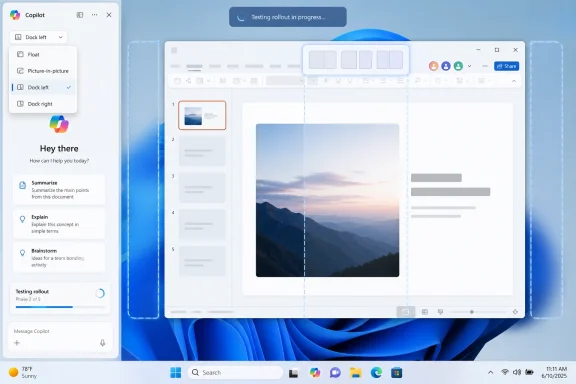
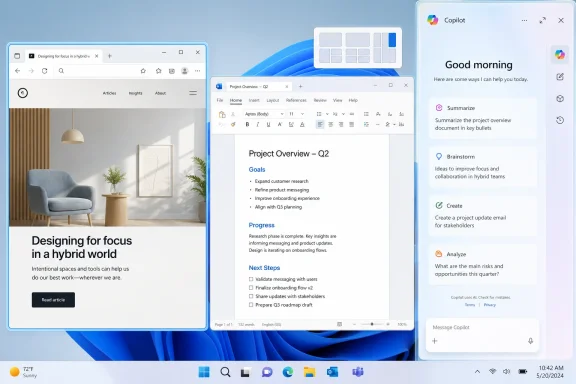
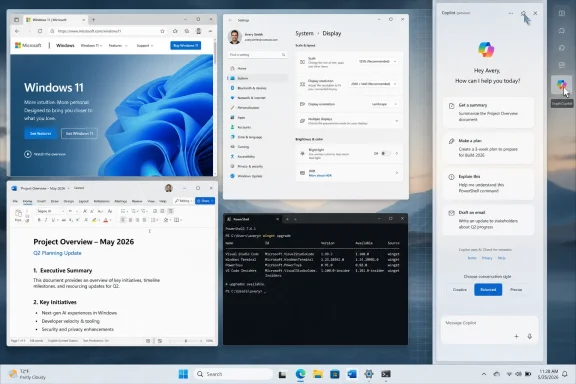
Microsoft is testing a new Windows 11 Copilot interface that can dock the AI assistant to the left or right edge of the desktop, resizing open apps around it, according to a May 24 report from Windows Latest based on hands-on testing. The move matters because it effectively brings Copilot back to the place Microsoft first imagined for it: not as a conventional app, but as an ambient panel beside the work users are already doing. That is both the most coherent version of Copilot on Windows and the one most likely to irritate people who already think the operating system has become too eager to rearrange itself around Microsoft’s AI strategy.
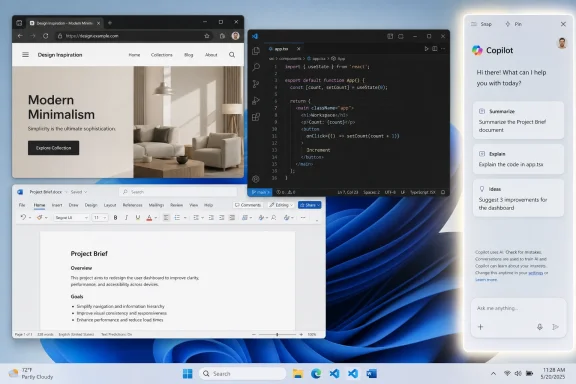
The reported feature is optional for now. Copilot still opens as an app by default, but a new title-bar menu exposes layout choices that include the existing app window, a picture-in-picture style mode, and left- or right-docked panels. Once docked, Copilot behaves less like another window in the stack and more like a reserved slice of the desktop, pushing File Explorer or other full-screen windows into the remaining space.
That sounds like a small user-interface experiment. It is not. It is Microsoft revisiting one of the central unresolved questions of the AI PC era: whether an assistant belongs inside the operating system as a spatial layer, or whether it should remain just another app with a shiny icon and a subscription funnel behind it.
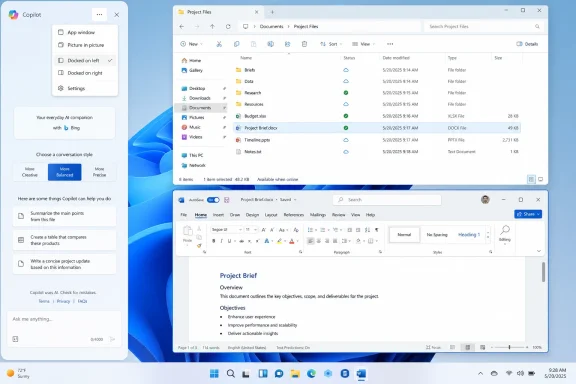
Windows desktop showing Copilot sidebar, a File Explorer project list, and a Word “Project Brief” document.Microsoft Has Returned to the Scene of Its First Copilot Bet​

The original Windows Copilot pitch was conceptually simple. Put a conversational assistant at the side of the desktop, let users ask questions, change settings, summarize what they are looking at, and keep their apps visible while the assistant answers. It was Windows Sidebar reborn for the generative AI age, only with a chat model instead of gadgets.
The problem was that the first implementation never lived up to the implied intimacy of that placement. A sidebar that feels native has to understand the desktop, respect window management, and perform system tasks quickly enough that it feels like part of Windows. Early Copilot in Windows too often felt like a web service wearing an operating-system costume.
Microsoft then did what Microsoft often does when a Windows shell idea hits friction: it moved the experience out of the shell and into an app. With Windows 11 version 24H2 and related updates, Copilot’s integration was loosened, and the assistant became something users could pin, resize, move, or ignore more like a normal application. That change had real advantages. It made Copilot less presumptuous, reduced the sense that AI had been bolted into the taskbar, and gave Microsoft a cleaner way to update the experience through the Store.
But it also quietly weakened the case for calling Copilot a Windows feature. If Copilot is just a web app, users judge it like any other web app. If it cannot control Windows, understand the current context, or offer a materially better workflow than opening a browser tab, the desktop icon becomes more marketing than utility.
The new docking test is therefore not just a nostalgic return to the sidebar. It is an admission that Copilot as a floating app does not fully answer the question Microsoft itself created. An assistant that is supposed to help with what is on your PC needs a durable relationship to the workspace, and the desktop edge remains the most obvious real estate Microsoft can claim without inventing an entirely new interaction model.

The Sidebar Was Always the More Honest Interface​

There is a reason the docked panel keeps coming back. For all the groaning that accompanies Microsoft’s AI branding, the sidebar metaphor actually fits the job better than a conventional app window. A chat assistant is not a document, a spreadsheet, or a browser. It is a companion surface, something users consult while doing something else.
That is why a floating Copilot window feels conceptually weak on a desktop operating system. It competes with the work instead of inhabiting the margin around it. Users either cover their content with the assistant, shrink their work manually, or Alt-Tab between the thing they are doing and the tool supposedly helping them do it.
A docked Copilot panel solves that spatial problem by making the trade explicit. The user gives up part of the display, and Windows gives the assistant a stable place to live. The rest of the desktop adapts. In theory, that is cleaner than having an AI window wander across the screen, obscure a dialog box, or fight with Snap Layouts.
The Windows Latest screenshots and description suggest Microsoft is treating this as separate from the standard Snap Layouts feature, even though the menu visually echoes Windows 11’s snap affordances. That distinction matters. Snap is about arranging ordinary windows. Docked Copilot is about reserving space for a privileged interface that is not quite an app and not quite part of the shell.
That in-between status is exactly where Microsoft keeps getting into trouble. If Copilot is a normal app, it should behave like a normal app. If it is part of Windows, it should earn the privileges and consistency users expect from the shell. The docked sidebar tries to split the difference, which may be practical engineering but is also a reminder that Microsoft still has not settled the product grammar.

Optional Is Doing a Lot of Work Here​

The most important word in the current report is “optional.” If Copilot docking remains a user-invoked layout choice, it is much easier to defend. Windows already offers users many ways to allocate space: Snap Layouts, virtual desktops, taskbar pinning, widgets, Edge sidebars, PowerToys FancyZones, and app-specific panes. A Copilot dock can be another tool in that toolbox.
The trouble is that Microsoft’s recent history gives users reason to scrutinize every AI surface for signs of future default behavior. The company has repeatedly inserted Copilot into places where users did not necessarily ask for it: the taskbar, the keyboard, Edge, Microsoft 365 apps, Windows Search-adjacent experiences, and now, increasingly, contextual flows around screen content and agents. Even when individual features are defensible, the aggregate effect can feel like an operating system being reorganized around an upsell.
That perception is not solved by saying a feature is optional during testing. Windows users have learned that preview options can become defaults, defaults can become recommendations, and recommendations can become nagging surfaces. If Microsoft wants the docked Copilot panel to be received as a useful layout mode rather than another annexation of desktop space, it needs to keep user control visible and durable.
That means no surprise docking after updates. No “recommended” first-run tour that makes declining feel like dismissing a security warning. No auto-opening panel because an Outlook link, Edge page, screenshot, or copied paragraph looks like something AI could summarize. The fastest way to ruin a potentially useful sidebar is to make it feel like a roommate who keeps moving the furniture.
There is a defensible version of this feature. It is one where the user chooses Copilot’s placement, Windows remembers that choice, admins can govern it, and nothing in the OS treats the assistant as more important than the app the user actually opened.

A Web App Can Dock, but It Still Has to Feel Native​

The recurring complaint around Copilot on Windows is not simply that it uses web technologies. Windows users already live with WebView2, Electron, PWAs, and browser-backed app shells across the modern desktop. The problem is that Copilot’s strategic importance has often exceeded its native polish.
If Microsoft wants to reserve a strip of the Windows desktop for an AI assistant, the assistant has to behave with the predictability of the shell. It must launch quickly, remember its state, scale properly across DPI settings, respect multiple monitors, avoid janky resizing, and survive network hiccups gracefully. It also has to feel like it belongs next to File Explorer, Settings, Terminal, and the Office apps that Microsoft wants it to augment.
A private Edge instance or WebView-backed wrapper may help Microsoft ship faster and keep the Copilot service consistent across platforms. It may also simplify account handling, isolation, or feature delivery. But users do not experience architecture diagrams. They experience lag, memory use, inconsistent title bars, odd focus behavior, and whether a panel feels like part of Windows or a web page that escaped the browser.
This is where Microsoft’s “native” messaging around Copilot has repeatedly run into skepticism. To a developer, “native” may mean access to platform APIs, packaging, windowing, notifications, or an installed app model. To a user, native means it opens instantly, follows Windows conventions, and does not feel like a website with a close button.
Docking raises the bar. A floating web app can be mediocre and merely ignored. A docked assistant that resizes the desktop becomes part of the workspace contract. If it stutters, crashes, or redraws like a browser tab, the irritation is amplified because it is occupying a fixed part of the screen.

Window Management Is the Real Product Surface​

Windows 11’s most successful interface work has often been mundane. Snap Layouts, better window grouping, virtual desktops, and incremental taskbar refinements are not glamorous, but they shape how people actually use PCs. A docked Copilot panel belongs to that lineage more than to the chatbot hype cycle.
That is why this test is more interesting than yet another Copilot button. The button is a distribution mechanism. The dock is a workflow claim. Microsoft is saying, implicitly, that AI should be persistent enough to deserve the same kind of spatial treatment as a productivity pane in Outlook or a properties panel in a creative app.
The risk is that Windows becomes crowded with semi-persistent surfaces. Edge has its sidebar. Widgets have their board. Teams and Outlook have their own Copilot panes. Microsoft 365 apps have contextual Copilot experiences. Windows itself has taskbar entry points, hardware keys, and system-level AI features on Copilot+ PCs. Users can only tolerate so many panels before “assistance” becomes visual debt.
A coherent system would define when Copilot is global, when it is app-specific, and when it should disappear. A global dock makes sense for cross-app help, general chat, PC guidance, and tasks that span files or windows. It makes less sense when the user is already in Word, Excel, Outlook, Teams, or Edge, where Copilot’s value depends on deep application context.
Microsoft’s challenge is not adding another surface. It is deciding which surface wins when they overlap. If the answer is “all of them,” Windows will feel less intelligent, not more.

The Enterprise Angle Is Control, Not Curiosity​

Consumer reaction to Copilot tends to revolve around annoyance, usefulness, and whether the AI features justify their prominence. Enterprise IT sees a different problem: governance. A docked assistant that sits beside work documents, browser sessions, customer data, and internal tools immediately raises questions about data boundaries, identity, logging, and policy.
Microsoft has spent the last two years trying to separate consumer Copilot from Microsoft 365 Copilot, Copilot Chat, and managed enterprise experiences. That distinction is meaningful on paper, but it can become blurry on a shared Windows desktop if the same brand appears in multiple places with different capabilities and compliance assumptions. Users do not always know which Copilot they are talking to.
The reported docked mode does not, by itself, create a new data policy problem. A panel can be governed like any other app surface if Microsoft exposes the right controls. But the more system-adjacent Copilot feels, the more administrators will want certainty that it can be disabled, removed, redirected, or configured according to organizational policy.
This is especially true in regulated environments, education, government, health care, and companies still working through whether generative AI may touch sensitive material. A docked panel that resizes apps may be harmless in a home office. On a locked-down fleet, it is another visible reminder that Microsoft’s AI roadmap can alter the desktop faster than procurement, security review, and user training cycles can absorb.
For admins, the best version of this feature is boring. It is documented, policy-controlled, removable where appropriate, and quiet by default on managed devices that have not opted in. Microsoft’s consumer ambitions should not become another help desk ticket category.

The Copilot Key Needs a Better Destination​

The hardware Copilot key was supposed to symbolize a new era of Windows PCs. In practice, it also exposed the awkwardness of launching a half-settled software experience with a physical keycap. A key is a promise. If pressing it opens something that feels like a web app in flux, the promise feels premature.
A docked Copilot panel gives that key a more plausible destination. Pressing a dedicated AI key to reveal a stable side panel beside your work makes more sense than launching a floating window that users may immediately resize or close. The gesture maps better to the mental model: summon the assistant, keep working, dismiss it when done.
Microsoft has also moved toward more flexible handling of the Copilot key, including ways for organizations or users to remap or configure behavior. That flexibility is wise. Hardware outlives software experiments, and the worst outcome for Microsoft would be a generation of keyboards bearing a key that users associate with clutter rather than utility.
The sidebar can help rehabilitate that hardware bet, but only if it is fast and contextually useful. If pressing the key opens a panel that can reason about the active window, help with a setting, summarize selected text with permission, or guide a workflow without hijacking focus, users may come to see it as a legitimate input method. If it opens a generic chat box with branding, the key will remain a punchline.
The lesson is simple: hardware affordances magnify software confidence. Microsoft should not ask OEMs and users to make permanent room on keyboards for an experience whose basic windowing model keeps changing.

Microsoft’s AI PC Story Still Has Two Competing Centers​

Part of the confusion around Copilot on Windows comes from Microsoft trying to tell two AI PC stories at once. One story is cloud Copilot: a service reachable from Windows, Edge, Microsoft 365, mobile apps, and the web. The other is local AI on Copilot+ PCs: Recall, Click to Do, semantic search, Studio Effects, Live Captions, image generation and editing features, and Settings agents backed by NPUs and system integration.
The docked Copilot panel sits between these stories. It is a Windows surface, but not necessarily a local AI feature. It feels like the face of the AI PC, but much of its intelligence may still depend on cloud services, account state, regional availability, and licensing. That makes the user experience hard to explain.
For an enthusiast, these distinctions are manageable. For normal users, they are not. They see a Copilot button, a Copilot app, Microsoft 365 Copilot, Copilot Chat, Copilot+ PC features, Copilot in Edge, Copilot in Office, and possibly a Copilot key. Some of these things are free, some are paid, some are local, some are cloud, some are managed by IT, and some change depending on region.
A docked Windows sidebar could become the organizing layer that makes this sprawl understandable. It could be the place where the OS-level assistant explains what it can do, which account it is using, and what data it can access. But that requires restraint and clarity. If it becomes merely another promotional surface for whatever Copilot SKU Microsoft wants to push this quarter, it will deepen the confusion.
The irony is that the old sidebar idea may be the cleanest way to simplify the AI PC message. But only if Microsoft stops treating Copilot as a brand to scatter everywhere and starts treating it as an interaction model with rules.

Users Do Not Hate AI Panels; They Hate Losing Agency​

It is tempting to frame every Copilot backlash as anti-AI sentiment. That is too easy. Windows users have long embraced panels, launchers, docks, overlays, and automation tools when those tools save time and remain under user control. PowerToys exists because power users want more ways to bend the desktop to their workflows.
The objection is not that Copilot can occupy the side of the screen. The objection is that Microsoft has too often acted as if occupying the side of the screen is a product victory in itself. Presence is not usefulness. A button is not integration. A panel is not context.
The docked Copilot mode becomes valuable only when it does things that justify its space. It should understand the active app when permitted. It should help with Windows settings better than a search box. It should handle files in a way that respects local and enterprise boundaries. It should make multitasking easier, not merely rearrange windows to accommodate a chat transcript.
There is also an accessibility and ergonomics dimension. A stable side panel can be useful for users who benefit from persistent assistance, dictation, reading support, translation, or step-by-step guidance. But those benefits depend on predictable behavior. If the panel appears unexpectedly or steals focus, it becomes another obstacle.
Agency is the dividing line. A user-invoked dock is a feature. An auto-summoned dock is an intrusion. Microsoft should know by now that Windows users can tolerate almost any advanced feature if they believe they are the ones driving.

The Return of the Sidebar Exposes a Strategy Still in Draft​

The most telling part of this reported change is not the engineering. It is the loop. Microsoft launched Copilot as a sidebar, moved away from the sidebar toward a standalone app, experimented with native and web-backed app identities, and is now testing a docked mode that recreates much of the original spatial idea with more user choice.
That loop is not necessarily incompetence. Modern Windows is developed in public through Insider builds, Store updates, staged rollouts, and A/B tests. Microsoft should experiment, and Copilot is too new a category for every interaction pattern to be obvious in advance.
But there is a difference between iteration and churn. Users can feel when a company is refining a product toward a stable destination. They can also feel when the destination keeps moving because the company’s strategic urgency is ahead of its design clarity.
Copilot on Windows has often felt like the latter. The service is important to Microsoft’s business strategy, so it must be visible. The operating system is the most valuable real estate Microsoft controls, so Copilot must appear there. But the exact reason it belongs in Windows, rather than Edge or Microsoft 365, has not always been obvious in daily use.
The docked sidebar is promising because it finally aligns form and ambition. If Copilot is supposed to be a helper beside your work, then put it beside your work. The danger is that Microsoft may mistake that alignment for completion. The sidebar is a container, not the product.

The Docked Copilot Era Will Be Judged by the Small Stuff​

The concrete details will decide whether this feature earns trust. Enthusiasts will test memory usage, process behavior, multi-monitor quirks, title-bar consistency, DPI scaling, offline handling, and whether the panel respects existing Snap groups. IT pros will look for policy controls, uninstall behavior, account separation, and whether the experience changes between consumer and managed machines.
Microsoft also needs to be careful about how docked Copilot interacts with Windows 11’s existing windowing system. If it creates a special reserved area, users should understand when that area is active and how to reclaim it. If it imitates Snap Layouts visually, it should not confuse users about whether Copilot is part of a standard snap group. If it can sit on the left or right, it should behave consistently with taskbar placement, accessibility settings, and right-to-left language environments.
These are not pedantic concerns. Windows succeeds or fails on millions of tiny expectations. A sidebar that moves desktop icons strangely, breaks full-screen assumptions, or fights with games and remote desktop sessions will quickly turn from “AI productivity” into “disable this thing.”
There is also the question of performance on ordinary PCs. Microsoft’s AI marketing increasingly leans on Copilot+ hardware, but most Windows 11 machines in the field are not shiny new NPU-forward laptops. A docked Copilot panel must not make midrange business laptops feel like they are carrying an always-on browser tax. If the assistant wants permanent screen space, it needs to be modest with memory, CPU, and attention.
The implementation can be web-backed. It cannot feel cheap.

This Is the Version Microsoft Should Have Shipped More Patiently​

The charitable reading is that Microsoft is finding its way toward the right model. Start with a bold sidebar, learn that the integration was too thin, move to an app to reduce shell coupling, then bring back docking once the app has enough windowing maturity and optionality. That is a plausible product evolution.
The less charitable reading is that Microsoft is circling the same idea because it never solved the hard part: making Copilot truly useful inside Windows. The sidebar was not the mistake. The mistake was assuming that a chat service in a sidebar would automatically become a Windows assistant.
A genuinely Windows-native Copilot would not merely answer questions. It would help diagnose why Bluetooth is failing, explain which startup apps are slowing boot, create a sensible Focus session, compare two folders, summarize a local PDF with permission, draft a PowerShell command safely, and hand off tasks to apps without pretending everything is a chatbot conversation. Some of that future is visible in Microsoft’s broader Windows AI work, especially on Copilot+ PCs. Much of it is still unevenly distributed across apps, services, and previews.
Docking is therefore best understood as infrastructure for a better assistant, not evidence that the better assistant has arrived. It gives Copilot the right physical place on the desktop. Now Microsoft has to justify the rent.

The Sidebar’s Second Chance Comes With Conditions​

The reported docking test points toward a Copilot experience that could be more coherent than the floating app era, but coherence will depend on Microsoft resisting its worst distribution instincts. A side panel is useful when it is summoned, predictable, governed, and genuinely contextual. It is resented when it is promotional, automatic, or vague about what it can see.
  • Microsoft is reportedly testing left- and right-docked Copilot layouts that resize the Windows 11 desktop around the assistant.
  • The feature appears optional in current testing, with Copilot still opening as a normal app by default.
  • The design revives the original Windows Copilot sidebar concept while adding more user control than the first implementation offered.
  • The docked mode increases pressure on Microsoft to make Copilot feel native, fast, and consistent despite its web-backed history.
  • Enterprise acceptance will depend on clear policies for disabling, removing, configuring, and governing the Copilot app.
  • The feature will succeed only if it makes Copilot more contextually useful, not merely more visible.
Microsoft’s latest Copilot experiment is a reminder that the company’s AI ambitions are not held back by a lack of entry points; they are held back by the absence of a settled contract with the user. A docked sidebar may be the right shape for an assistant that lives beside the work, but Windows users will judge it by whether it respects their space, their policies, and their intent. If Microsoft gets that balance right, Copilot could finally feel less like an overlay on Windows and more like a tool that belongs there; if it gets it wrong, the sidebar’s return will simply prove that even AI can make the same old desktop mistakes twice.

References​

  1. Primary source: Windows Latest
    Published: Sun, 24 May 2026 01:04:15 GMT
  2. Official source: support.microsoft.com
  3. Official source: learn.microsoft.com
  4. Official source: microsoft.com
  5. Related coverage: pcworld.com
  6. Related coverage: windowscentral.com
 

Microsoft is testing a docked Copilot sidebar for Windows 11 in May 2026, according to Windows Latest, giving the assistant options to pin itself to the left or right edge of the desktop while open windows resize around it. The change is small in interface terms but large in operating-system politics. Microsoft is again asking whether AI should behave like an app users summon, or like a workspace surface Windows makes room for.
That distinction matters because Copilot’s Windows story has been a moving target. It has been a taskbar button, a right-side panel, a web-backed app, a more conventional app window, and now, apparently, a dockable companion that can claim permanent territory on the screen. The test suggests Microsoft has not abandoned the idea that Copilot belongs in the shell; it has merely learned to wrap that ambition in user choice.

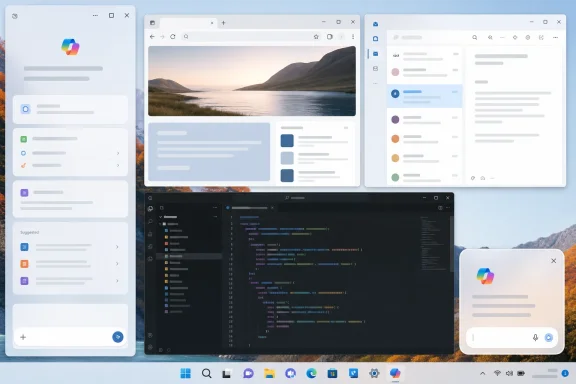
Collage of multiple desktop windows showing web, email, and code editor interfaces over a scenic background.Microsoft Reopens the Sidebar Case It Never Really Closed​

The reported test gives Copilot four layout states: the current app view, picture-in-picture, docking to the left, and docking to the right. The important part is not that a window can sit on the edge of the display. Windows users have been dragging chat apps, mail clients, monitoring dashboards, and browser panes to the side for decades.
The important part is that Copilot, once docked, reportedly causes the desktop and open apps to resize around it. That makes the assistant more like a reserved region of the workspace than a floating window. It is a familiar idea from old desktop sidebars, task panes, and application palettes, but this time the pane is not a clock, widget feed, or tool inspector. It is Microsoft’s AI front end.
That is why the optional nature of the feature matters. If Windows Latest’s description holds through broader testing, Microsoft is not forcing the docked layout as the default Copilot experience. The standard behavior still opens Copilot as an app, while the new snapping options live behind a drop-down in the title bar.
That is the product compromise Microsoft keeps circling. It wants Copilot to feel ambient without repeating the backlash that comes when ambient turns into unavoidable. Docking is a way to say “always available” without saying “always imposed.”

The Desktop Is the Product, Not the Wallpaper​

Desktop real estate has always been a proxy fight over control. The taskbar, Start menu, system tray, notification center, widgets board, search box, and snap layouts are not just interface furniture. They determine what Windows thinks users should see first, what actions require friction, and which services earn privileged placement.
A docked Copilot sidebar would put AI into that same category. It would not simply be another application competing for focus. It would become part of the geometry of the desktop, with Windows making other windows accommodate it.
That geometry has practical consequences. On a 32-inch monitor, a persistent Copilot strip may feel like a reasonable exchange for fast access to summarization, drafting, troubleshooting, or search. On a 13-inch laptop, it could turn a cramped workspace into a negotiation. The same design that looks elegant in a marketing capture can feel like trespass when Excel, Visual Studio Code, Outlook, Teams, and a browser are already fighting for pixels.
Microsoft knows this because Windows has spent the last several years making window management a selling point. Snap Layouts, Snap Groups, virtual desktops, and improved multi-monitor behavior are all attempts to make the OS feel less chaotic. A docked assistant plugs directly into that system. If done well, it becomes another manageable layout. If done poorly, it becomes a permanent shove.

Copilot Keeps Oscillating Between App and Shell​

The Copilot interface has been through enough revisions that the revisions themselves have become the story. Microsoft originally pitched Copilot in Windows as a shell-adjacent assistant, sitting in a side panel and promising to help users act across apps and settings. Later, the company moved toward a more app-like Copilot experience, aligning it with a broader cross-platform Copilot strategy rather than treating it as a purely Windows-native control surface.
That move made sense. A conventional app is easier to update, easier to explain, and less likely to alarm administrators who do not want a cloud assistant welded into the operating system. It also lowered the symbolic temperature. Copilot as an app can be ignored; Copilot as the desktop’s reserved sidecar cannot.
The reported docked mode cuts across that distinction. It keeps the app model but restores some of the old shell-panel behavior. The title bar remains the place where users discover layout choices, yet the effect of docking reaches beyond the app’s rectangle into the rest of the desktop.
That is a very Microsoft compromise: technically optional, visually prominent, strategically persistent. The company is not choosing between app and shell. It is building a ladder between them.

Optional Is Doing a Lot of Work​

The word “optional” deserves scrutiny because Windows users have learned to read it carefully. A feature can be optional in the sense that a user must enable it. It can also be optional in the sense that it appears during setup, gets promoted in a taskbar search box, reappears after an update, or becomes the default for new devices.
For now, the reported behavior appears restrained. Copilot still opens in its current app-style view by default, and the docked modes are exposed as layout choices. That is the right boundary for a test. It lets Microsoft measure whether people actually want Copilot occupying persistent screen space rather than merely measuring whether they tolerate it when placed there.
But staged rollouts are also how Windows normalizes new defaults. Microsoft often tests affordances, watches telemetry, revises the language, and then expands visibility. If a docked Copilot sidebar shows strong engagement among Insiders or selected users, the temptation to make it more discoverable will be obvious.
The company’s problem is that AI features are now judged not only by utility but by manners. Users may accept an assistant that waits to be called. They may reject one that acts like it has a lease on their desktop.

A Sidebar Is a Workflow Claim​

The docked layout is best understood as a workflow claim: Microsoft believes enough users will want to keep an AI chat surface visible while doing other work. That assumption is plausible. People already keep messaging windows, documentation, terminals, browser references, and note-taking apps pinned beside their main task.
Copilot’s advantage is that it can be many of those things at once. It can draft text while Outlook is open, explain an error while a terminal sits nearby, summarize copied material, or help rewrite a document without forcing a full context switch. A docked assistant makes that pattern feel less like opening a separate destination and more like consulting a colleague sitting at the edge of the screen.
The risk is that general-purpose AI panes are not always good neighbors. They can be visually noisy, network-dependent, inconsistent, and too eager to mediate tasks that users would rather complete directly. The more permanent the assistant’s placement, the less tolerance users will have for latency, hallucinated answers, or promotional prompts.
Persistent UI raises expectations. If Copilot wants a permanent seat, it has to behave like infrastructure, not a demo.

The Enterprise Problem Is Bigger Than Pixel Loss​

For IT departments, the docked sidebar is less about taste and more about governance. A resizable, dockable Copilot experience touches application compatibility, user training, privacy posture, support scripts, screenshots in documentation, and the politics of AI enablement across fleets.
Many organizations are still deciding where Microsoft’s AI stack belongs. Some have embraced Microsoft 365 Copilot for specific roles. Others are cautious because of licensing, data boundaries, compliance obligations, or simple uncertainty about measurable productivity gains. Windows-level visibility complicates that decision, because it can make Copilot feel present even where a company has not fully committed to AI-assisted workflows.
A docked mode also creates mundane support questions. Does it persist across reboots? Does it behave consistently across multiple monitors? Does it interact cleanly with remote desktop sessions? Does it respect enterprise policy controls? Does it resize legacy apps in ways that break fixed-width interfaces or line-of-business software?
Those are not glamorous questions, but they are the questions that decide whether a feature is welcomed or disabled. Enterprise Windows is full of technically impressive ideas that became help-desk liabilities because they changed a visible workflow faster than documentation, policy, and user habits could adapt.

Developers Will Notice the Resize Before Users Name It​

Application developers may not care whether the pane says Copilot, Teams, or Contoso Helper. They care that Windows is creating another layout state users can inhabit. If the desktop area shrinks when Copilot docks, apps need to respond gracefully.
Modern responsive apps should handle that. Many will. But Windows remains a platform with old Win32 tools, fixed layouts, specialized dashboards, Electron apps with inconsistent scaling behavior, and enterprise software designed for assumptions that died three monitor generations ago. A docked sidebar can expose sloppy resizing logic fast.
The problem is not new. Snap Layouts already encouraged developers to think harder about window sizes, density, and adaptive UI. The difference is persistence. A snapped window is usually an arrangement among apps. A docked Copilot sidebar could become an arrangement between apps and the operating system’s AI layer.
That is a subtle but important distinction. Developers are used to competing with other windows. They are less accustomed to yielding space to a Microsoft-controlled assistant that may be promoted as part of the default Windows experience.

The Picture-in-Picture Option Shows Microsoft Knows the Trade-Off​

The reported picture-in-picture mode is not an incidental detail. It suggests Microsoft understands that docking is only one version of “keep Copilot nearby.” Some users may want a small floating assistant that can hover without reorganizing their whole workspace.
That mode could be especially useful for short interactions. A user asking for a quick rewrite, command explanation, or calculation may not need Windows to reflow the desktop. A compact floating window gives Copilot presence without making it architecture.
The presence of both PiP and docked modes points to a broader design direction: Copilot as a shape-shifting surface. Sometimes it is an app. Sometimes it is a small overlay. Sometimes it is a left or right rail. Microsoft appears to be testing whether the assistant should adapt to the user’s workspace rather than forcing a single canonical form.
That is the right instinct, but it creates its own complexity. Too many modes can make a feature feel unfinished. If users must discover hidden title-bar menus to understand how Copilot behaves, Microsoft may have solved the layout problem while creating a discoverability problem.

The Left Edge Is More Interesting Than It Looks​

Docking to the right edge is predictable because Copilot has often lived near the right side of the Windows desktop. Docking to the left is more provocative. The left edge is psychologically and practically closer to Start, search, pinned apps, navigation panes, and document outlines.
A left-docked Copilot could feel less like a notification-adjacent panel and more like a command surface. That may be useful for users who treat AI as a launcher, summarizer, or guide through work. It may also collide with established app conventions, especially in tools where left rails already carry file trees, inboxes, channel lists, or project navigation.
The availability of both edges is important for multi-monitor setups. Users often have one display reserved for communication or reference material and another for primary work. Giving Copilot a choice of edge may reduce friction, particularly for people who prefer the assistant on a secondary display.
Still, edge choice does not answer the deeper question. If Copilot is docked, it becomes a neighbor every app must live beside. Whether that neighbor sits on the left or right matters less than whether users believe it earns the rent.

Microsoft Is Still Searching for the AI Equivalent of the Taskbar​

The taskbar succeeded because it solved a universal problem: switching between things. The Start menu succeeded because it gave Windows a durable place to begin. Snap succeeded because window chaos is a daily annoyance. Copilot’s challenge is that AI assistance is powerful but uneven; it does not yet map cleanly to one universal desktop gesture.
That is why Microsoft keeps experimenting with Copilot entry points. A keyboard key suggests instant invocation. A taskbar icon suggests an app. A sidebar suggests a companion. Context menus in apps suggest task-specific augmentation. Each model tells users a different story about what Copilot is for.
The docked sidebar is the most assertive of these stories short of making AI inseparable from the shell. It says Copilot is not merely something you open when you remember it exists. It is something that can sit beside the work and participate continuously.
That may be the right model for some people. Developers debugging unfamiliar code, analysts comparing documents, students summarizing readings, and support technicians walking through error messages may all benefit from a persistent assistant. But Windows is too broad a platform for one usage pattern to become destiny.

The Backlash Risk Comes From Accumulation, Not One Menu​

On its own, a docked Copilot option is unlikely to trigger a revolt. It is optional, hidden behind a menu, and limited to a staged rollout. The backlash risk comes from accumulation.
Windows users have watched Microsoft attach AI to search, Edge, Office, Paint, Notepad, Photos, the taskbar, and dedicated Copilot apps. Some of those integrations are useful. Some are harmless. Some feel like product strategy leaking into places where users expected quiet tools.
A docked sidebar lands in that context. People who like Copilot may see it as overdue polish. People who dislike Microsoft’s AI push may see it as another attempt to normalize an assistant they did not ask for. Both reactions are predictable because the feature is not only a feature; it is part of a campaign.
Microsoft can blunt that reaction by being boringly clear. The setting should be easy to find, easy to disable, and stable across updates. Enterprise controls should be explicit. The feature should not hijack existing gestures or replace long-standing desktop affordances without consent.
The lesson of modern Windows is that users will tolerate experiments when they feel reversible. They become hostile when reversibility starts to feel temporary.

The Real Test Is Whether Copilot Can Be Quietly Useful​

The docked sidebar’s success will not be determined by the elegance of the menu. It will be determined by whether Copilot becomes useful enough to justify being visible for hours at a time. That is a much higher bar than occasional novelty.
A persistent assistant must be fast, context-aware, respectful of privacy settings, and predictable in how it handles user data. It should not require users to babysit prompts. It should not generate confident nonsense in the middle of administrative work. It should not turn every blank state into an upsell.
The best version of docked Copilot would fade into the workflow until needed, then return useful answers without making the user feel they have left the task. The worst version would be a branded rectangle that consumes screen space while offering generic chatbot output. The difference between those outcomes is not layout. It is product discipline.
Microsoft has the pieces to make the good version plausible. It controls Windows, Microsoft 365, Edge, developer tooling, identity, cloud services, and the Copilot brand. But integration is only valuable when it reduces friction. If it merely increases the number of places AI can appear, users will treat it as clutter with a subscription strategy.

The Copilot Rail Has to Earn Its Pixels​

The practical meaning of this test is narrow but concrete. Microsoft is exploring a way for Copilot to become a persistent desktop companion without making that mode the default. For Windows enthusiasts, it is another sign that the Copilot app era did not end Microsoft’s shell ambitions. For IT pros, it is a preview of the next policy and training conversation.
The most useful reading is neither panic nor hype. Docking is a normal desktop capability being applied to an unusually strategic app. That makes the feature technically ordinary and politically loaded at the same time.
  • Microsoft is reportedly testing Copilot layout choices that include the existing app view, picture-in-picture mode, and docking to either side of the Windows 11 desktop.
  • The docked mode reportedly resizes the desktop and open apps around Copilot, making it more consequential than a simple floating window.
  • The default Copilot behavior reportedly remains app-like for now, which makes the docked sidebar an optional experiment rather than a forced redesign.
  • The feature will matter most on smaller screens, multi-monitor setups, and enterprise desktops where persistent UI changes can disrupt established workflows.
  • The test shows Microsoft is still trying to define whether Copilot belongs beside Windows applications, inside them, or in the operating system’s own interface layer.
Microsoft’s docked Copilot experiment is best read as a trial balloon for the next phase of Windows AI: less spectacular than a new model announcement, but more revealing about how the company wants people to work. If Microsoft keeps the feature optional, manageable, and genuinely useful, it could become a sensible power-user layout. If it becomes another surface where strategy outruns restraint, the sidebar will remind users that even in the age of AI, the most valuable thing on a Windows desktop is still space they control.

References​

  1. Primary source: Let's Data Science
    Published: 2026-05-24T01:05:08.354050
  2. Related coverage: windowslatest.com
  3. Related coverage: windowscentral.com
  4. Related coverage: techradar.com
  5. Official source: learn.microsoft.com
  6. Official source: news.microsoft.com
 

Microsoft is testing a new Copilot layout for Windows 11 in May 2026 that lets the AI assistant dock to the left or right edge of the desktop, resizing open apps around it instead of behaving only as a standalone window. The move is less a new idea than a return to Microsoft’s first instinct for Copilot: make AI spatially persistent inside Windows. The difference this time is that Microsoft appears to be trying to make the sidebar optional, movable, and less presumptive. That matters because Windows users have already shown they will tolerate AI helpers more readily when they behave like tools, not billboards.

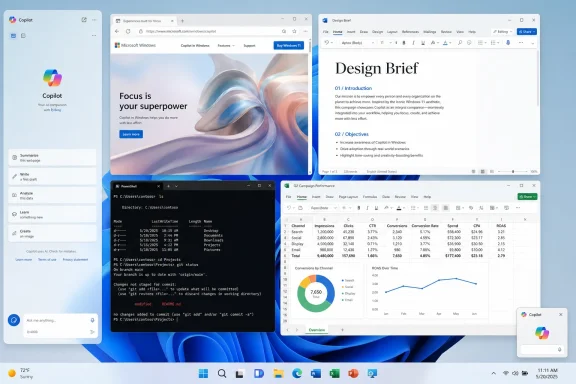
Screenshot collage showing Microsoft Copilot with Windows, Word doc, Excel charts, and PowerShell terminal.Microsoft Returns to the Sidebar It Once Walked Away From​

The new Copilot behavior is being described as a docking mode rather than a normal Windows 11 Snap Layout. That distinction is important. Snap Layouts arrange ordinary windows into zones; this new Copilot treatment gives the assistant its own side-anchored state, with the rest of the desktop adapting around it.
That makes Copilot feel less like a chatbot app and more like a panel in the operating system. Once docked, it can sit beside documents, browser tabs, terminals, spreadsheets, or chat windows without floating over them. Windows reportedly shifts the remaining workspace to accommodate the panel, and even small details such as desktop watermark placement move out of the way.
There is also a picture-in-picture-style option for users who want Copilot visible without giving it a full column of screen real estate. That suggests Microsoft is not merely rebuilding the original sidebar, but trying to define a small family of AI window states: app, dock, and always-visible compact assistant.
The irony is hard to miss. Copilot first arrived in Windows 11 as a side panel, then became a more conventional app, then shifted again into a web-backed experience. Now Microsoft is circling back to the spatial metaphor it began with, but with a more cautious user interface.

The Old Copilot Sidebar Was a Product Strategy Wearing a Window​

The first Windows Copilot sidebar was never just a place to type prompts. It was Microsoft’s claim that AI belonged next to every task, not inside one app. That was the right strategic instinct, but the wrong implementation.
The original design made Copilot feel stapled to Windows rather than integrated with it. It took up space, behaved differently from normal windows, and often felt like an overlay from Microsoft’s roadmap rather than a feature responding to user demand. For enthusiasts and administrators, that difference matters. Windows has decades of muscle memory built around predictable windows, taskbar states, and user-controlled placement.
By shifting Copilot into a standalone app, Microsoft implicitly admitted that the first pass had overreached. A regular app can be closed, resized, ignored, pinned, or uninstalled depending on policy and region. It fits the Windows model better, even if it also makes Copilot easier to forget.
The new docked mode tries to split the difference. It gives Microsoft the persistent AI surface it wants while giving users more say over where and when that surface appears. That is not a cosmetic refinement; it is the central design question for AI in operating systems.

The Gemini Comparison Shows Where the Industry Is Heading​

Digital Trends’ comparison to Gemini in Chrome is apt because browsers and operating systems are converging around the same AI layout: a persistent side panel that can inspect or assist with the thing you are already doing. Google wants Gemini beside tabs. Microsoft wants Copilot beside the desktop.
The side panel has become the default AI shape because it solves two problems at once. It keeps the assistant close enough to feel contextual, but separate enough that the user still sees the original work. A chatbot in a full-screen app asks the user to change contexts; a sidebar implies that the assistant is part of the current context.
That is why AI companies keep returning to this interface even after users complain about clutter. The economics of AI features depend on repeated use, and repeated use depends on visibility. If Copilot lives behind an icon, engagement falls to people who already know they want it. If Copilot lives beside the work surface, it can become a habit.
The risk is that a habit can easily become an imposition. A browser sidebar is one thing; an operating-system sidebar is another. Chrome can claim Gemini is helping with the current website. Windows has to justify why an assistant should sit beside everything.

Docking Is Not Snapping, and That Difference Will Matter to Power Users​

Windows users already understand Snap Layouts. They know how to drag a window to an edge, split the screen, build a quadrant layout, and move on. If Copilot’s new docking menu looks similar but operates independently, Microsoft is creating a parallel window-management vocabulary.
That may be defensible. AI assistants are not quite normal apps. They are meant to persist across tasks, ingest context, and remain available while the user works elsewhere. A docked assistant that resizes other windows is closer to a system panel than a standard application window.
But power users are rightly suspicious of special window rules. The more exceptions Microsoft adds, the more Windows feels like a negotiation between the user’s layout and Microsoft’s preferred surface. A developer with a terminal, browser, debugger, and documentation already has a carefully tuned desktop. A Copilot panel that behaves outside the usual Snap model needs to earn its special status.
The best version of this feature would make docking feel like an extension of Windows window management, not a Copilot privilege. The worst version would make it feel like yet another AI affordance that bypasses conventions other apps have to follow.

Microsoft’s AI Problem Is Not Availability, It Is Trust​

Copilot is not hard to find in Microsoft’s ecosystem. It has appeared in Windows, Edge, Microsoft 365, Paint, Notepad, Snipping Tool, File Explorer experiments, and the dedicated Copilot app. The problem is not that users lack entry points. The problem is that many users do not trust those entry points to respect the work they were already doing.
That is why the docking behavior is more interesting than another Copilot button. A button asks for attention. A docked workspace promises coexistence. The question is whether Microsoft can keep that promise.
A sidebar that opens only when the user chooses it is fundamentally different from one that appears because an app, link, document, or workflow triggered it. Users may accept persistent AI if they control persistence. They are far less likely to accept AI that treats the desktop as an advertising surface.
This is especially true for WindowsForum’s core audience. Enthusiasts can forgive unfinished features if they are optional. Sysadmins can plan around new surfaces if policy controls are clear. Security-minded users can evaluate AI features if permissions are explicit. What none of those groups like is ambiguity about what is running, what it can see, and why it appeared.

The Web Wrapper Question Still Hangs Over the Whole Experiment​

The Windows Latest report that prompted this round of coverage also notes Copilot’s web-backed nature. That has been a recurring tension in Microsoft’s AI rollout. Copilot is marketed as part of Windows, but much of the experience has behaved like a web app in native clothing.
There are practical reasons for that. Web delivery lets Microsoft update Copilot quickly, test interface changes server-side, and keep the AI experience aligned across Windows, Edge, and the broader Microsoft account ecosystem. For an AI product evolving weekly, the old Windows model of slow, deeply native components is a poor fit.
But users notice when a supposedly integrated Windows feature feels like a browser frame. They notice performance quirks, inconsistent controls, account friction, and UI elements that do not quite match the operating system. A docked sidebar intensifies that scrutiny because it makes Copilot feel more system-level than a standalone app.
If Microsoft wants Copilot to occupy desktop space persistently, the assistant has to meet a higher bar. It cannot merely be a website that has learned to push windows aside. It has to feel reliable, policy-aware, resource-conscious, and predictable in the same way users expect core Windows components to behave.

Enterprise IT Will Ask the Questions Microsoft Least Wants to Answer​

For consumers, the new sidebar is mostly a usability story. For managed environments, it is a governance story. Every new Copilot surface raises questions about identity, data boundaries, compliance, telemetry, and administrative control.
The distinction between consumer Copilot, Microsoft 365 Copilot, Copilot Chat, Edge Copilot, and Windows Copilot has already been muddy for normal users. In enterprise settings, that confusion is more than branding noise. It affects which accounts can sign in, what data can be referenced, where prompts are processed, and which policies apply.
A docked Copilot panel also changes the optics of deployment. A standalone app can be treated as one more application in inventory. A panel that reshapes the Windows desktop feels closer to shell behavior, and shell behavior gets much more attention from IT departments.
Administrators will want clear answers before this becomes mainstream. Can it be disabled? Can docking be blocked while the app remains available? Does it behave differently under Entra ID versus a personal Microsoft account? Does it respect existing Copilot policies, Edge policies, and Windows feature controls? If Microsoft cannot make those answers simple, the sidebar will become another reason enterprises delay or suppress consumer-facing AI features.

The Best Case Is a Workbench, Not a Billboard​

There is a genuinely useful version of this. Imagine a Copilot sidebar that sits beside a PowerShell session while helping explain an error, next to Event Viewer while summarizing logs, beside a browser while comparing documentation, or next to a Word document while turning meeting notes into a draft. The sidebar form makes sense when the assistant is anchored to a task rather than interrupting it.
The picture-in-picture mode could also prove valuable. A small always-on-top assistant is less disruptive than a full panel and better suited for quick reference, dictation, translation, or short command-style interactions. In that form, Copilot becomes a utility, closer to a calculator or clipboard manager than a second workspace.
The key is restraint. Microsoft does not need Copilot to occupy every possible UI surface. It needs Copilot to show up in a few places where the form factor makes the task easier. Docking is a sensible affordance when the user is deliberately working with AI and another app at the same time.
That is why this experiment deserves more credit than another random Copilot icon. It addresses a real workflow problem: how to keep an assistant visible without forcing users to juggle a floating window. If Microsoft can keep the feature user-initiated, it may have found one of the less annoying ways to make Copilot present.

The Worst Case Is Another Exception in an Already Noisy Windows​

Windows 11 has spent much of its life recovering from decisions that made the operating system feel less flexible than its predecessors. Taskbar limitations, redesigned context menus, Start menu tradeoffs, and shifting AI placements have all fed a perception that Microsoft sometimes optimizes Windows for strategy before workflow.
A special Copilot docking mode could reinforce that perception if it feels like an exception built for Microsoft’s priorities. Users notice when old customization options take years to return while new AI surfaces arrive with privileged placement. They notice when the desktop becomes less about their chosen layout and more about the company’s current growth category.
The comparison with the returning taskbar flexibility in recent Windows 11 testing is instructive. Microsoft appears to be rediscovering that users value control over where interface elements live. A dockable Copilot could fit that philosophy if it respects user choice. It could clash with it if the assistant becomes another semi-permanent inhabitant of screen space that users have to manage around.
Windows has always been at its best when it gives users powerful defaults without locking them into Microsoft’s preferred workflow. The sidebar will be judged by that standard, not by how neatly it matches Google’s Gemini panel.

The Small Menu That Carries Microsoft’s Bigger AI Reset​

The most revealing part of this change may be the dropdown itself. A title-bar menu that lets users choose app mode, side docking, or compact visibility is not flashy. It is almost boring. That is precisely why it may be the right direction.
Microsoft’s most controversial AI moves have tended to be loud: new buttons, new branding, new keyboard keys, new prompts, new app integrations. The quieter path is to make Copilot behave like a tool with modes. Tools can be configured. Tools can be summoned. Tools can stay out of the way.
That shift would align with a broader course correction. After user pushback against Copilot sprawl across built-in apps, Microsoft has signaled a desire to remove unnecessary AI entry points and focus on experiences that are actually useful. A docked Copilot sidebar is useful only if it replaces clutter with coherence.
The danger is that Microsoft treats the sidebar as one more channel for engagement instead of one more option for users. The same interface can be either respectful or irritating depending on whether it waits to be invited. The implementation details will decide which version Windows users get.

The Screen Edge Is Becoming the New AI Battleground​

The fight over AI assistants is increasingly a fight over the edge of the screen. Browsers want the right rail. Productivity suites want floating buttons. Operating systems want panels, overlays, recall surfaces, and contextual actions. Everyone wants to be close enough to the user’s work to claim relevance.
That creates a new kind of UI competition. It is not just Microsoft versus Google versus OpenAI. It is Copilot versus notifications, widgets, taskbars, sidebars, snapped apps, browser panels, chat clients, and the user’s own need for empty space. On a 34-inch ultrawide monitor, a persistent AI rail may feel luxurious. On a 13-inch laptop, it may feel like rent-seeking.
Microsoft’s advantage is that it controls Windows. Microsoft’s liability is also that it controls Windows. Users hold operating-system changes to a different standard because there is no simple tab to close when the shell itself starts making room for AI.
The sidebar therefore becomes a test of Microsoft’s maturity in the AI era. Can it integrate Copilot where the operating system can genuinely help, while resisting the urge to turn every blank edge into a prompt surface? That is the difference between platform integration and platform abuse.

The Copilot Sidebar Will Succeed Only If It Behaves Like a Choice​

The practical lesson from this experiment is not that Microsoft has discovered a perfect AI interface. It is that Microsoft is inching toward a more defensible bargain: Copilot can be persistent if persistence is user-controlled. That bargain needs to survive the rollout.
  • Microsoft is reportedly testing a docked Copilot mode that can attach to either side of the Windows 11 desktop and resize other windows around it.
  • The new layout is separate from standard Snap Layouts, which means it may behave more like a special assistant panel than a normal snapped app.
  • The design revives the original Windows Copilot sidebar concept, but with more placement control and an additional compact visibility mode.
  • The feature’s reception will depend heavily on whether it opens only by user choice or begins appearing automatically in response to Microsoft-defined workflows.
  • Enterprise acceptance will require clear policy controls, identity boundaries, and predictable behavior across consumer and Microsoft 365 Copilot experiences.
  • The broader lesson is that AI assistants need to earn persistent screen space by being useful, quiet, and easy to dismiss.
If Microsoft is smart, it will treat this as a humility test rather than a growth hack. The company already knows how to put Copilot everywhere; the harder task is learning where it belongs. A docked sidebar could become one of the first Windows AI interfaces that feels genuinely practical, but only if Microsoft remembers that the most valuable real estate in Windows is not the left edge or the right edge of the screen. It is the user’s willingness to keep trusting the operating system underneath their work.

References​

  1. Primary source: Digital Trends
    Published: Mon, 25 May 2026 11:30:12 GMT
  2. Related coverage: windowscentral.com
  3. Related coverage: windowslatest.com
  4. Related coverage: windowsreport.com
  5. Related coverage: arstechnica.com
  6. Related coverage: techspot.com
 

Microsoft is testing a new Copilot window mode for Windows 11 that lets the AI assistant dock as a persistent sidebar on the left or right edge of the desktop, according to reporting published May 24 and amplified May 25, 2026. The feature does not reinvent Copilot so much as revive an old argument about where Microsoft thinks AI belongs: in front of users, even when users have not asked for it. For enthusiasts and administrators, the issue is not merely that a sidebar consumes pixels. It is that Windows is again treating attention as a platform resource Microsoft can reallocate.
The docked Copilot experiment is, on its face, modest. The app still opens as a floating window by default, and the new title-bar menu reportedly offers snapping choices rather than forcing the assistant into place. But Windows users have learned to read “optional” AI affordances with suspicion, because Microsoft’s recent Copilot history has been a cycle of insertion, backlash, partial retreat, and reinsertion somewhere else.
That is why this sidebar matters more than its dimensions. It is a test of whether Microsoft has internalized the criticism of its Copilot push, or merely learned to soften the rollout language while continuing the same campaign.

Three-pane desktop screenshot showing a web page design, code editor, and Copilot chat.The Sidebar Is Back Because Microsoft Never Stopped Wanting One​

The irony of the new Copilot docking option is that it looks less like a bold new interface idea than a return to where Windows Copilot began. Microsoft originally pitched Copilot in Windows as an OS-level assistant that lived at the side of the desktop, ready to answer questions and manipulate settings. Then the company backed away from that deeper integration and shifted Copilot into a more conventional app-like experience.
That retreat made sense. A sidebar that reshapes the desktop is not just another window. It changes how other windows behave, how workspaces are arranged, and how much control users feel they have over the environment they use all day.
The new experiment appears to split the difference. Copilot is not being welded into the shell as an unavoidable pane, but it can reportedly be pinned to an edge and push other apps aside. That gives Microsoft the visual permanence it wants without quite admitting it is rebuilding the original Windows Copilot sidebar.
For heavy Copilot users, that may be useful. A persistent chat pane could make sense on an ultrawide monitor, a developer workstation, or a multi-display setup where one strip of screen can be sacrificed to a standing assistant. The problem is that most Windows PCs are not arranged like product-demo rigs. They are laptops, classroom machines, office desktops, and shared workstations where every inch of screen already has a job.
On a 15-inch laptop, a pinned assistant is not ambient computing. It is a rent increase.

Screen Real Estate Is Not a Cosmetic Complaint​

It is tempting to dismiss complaints about a sidebar as aesthetic grumbling. Windows has had side panels, taskbars, widgets, notification drawers, and snapped layouts for years. Users can resize windows. Monitors are cheap. Power users adapt.
But screen real estate is not merely visual space; it is working memory made visible. A spreadsheet user needs columns. A developer needs code, terminal output, documentation, and logs. A sysadmin remoting into servers may already be dealing with nested desktops and constrained display scaling. A student on a compact laptop might have a browser, notes, and a video call fighting for the same pixels.
When Microsoft docks Copilot, even optionally, it is making a claim that the assistant deserves a privileged position in that competition. That claim has not yet been earned for many users.
The comparison with classic Windows features is instructive. The taskbar persists because it is a launcher, switcher, status surface, and system affordance in one. The Start menu persists because it remains a central navigation model even after decades of redesigns. Copilot, by contrast, is still trying to prove whether it is a productivity layer, a search box with a personality, a web chatbot, a subscription funnel, or all of the above.
A persistent UI element can be forgiven when it is indispensable. It becomes irritating when it is aspirational.

Microsoft’s AI Problem Is Placement, Not Just Quality​

Microsoft often talks about Copilot in terms of capability: better models, richer app integrations, smarter context, faster responses. Those things matter. But on Windows, the more urgent problem is placement.
The company has repeatedly tried to put Copilot where users cannot miss it. It has appeared in taskbars, keyboards, Edge, Office surfaces, and Windows apps. Some of these integrations make sense in isolation. A writing assistant in Word is not inherently absurd. A code assistant in a developer workflow can be genuinely valuable. A summarization tool in an inbox may save time.
The trouble begins when every surface becomes a Copilot surface. At that point the assistant stops feeling like a tool and starts feeling like a campaign.
That is the lens through which users will interpret the dockable sidebar. Microsoft may see it as a convenience feature for people who use Copilot constantly. Skeptical users will see another beachhead.
The distinction matters because Windows is not a single-purpose web app. It is the substrate for everything else. When Microsoft changes the default posture of Windows around its own services, users judge the move not only on utility but on trust. Is the OS helping them do their work, or is it steering them toward Microsoft’s strategic priorities?
With Copilot, Microsoft has too often made the second answer too easy.

The Copilot Key Became a Hardware Lesson in User Consent​

The dedicated Copilot key is the cleanest example of how Microsoft’s AI ambitions collided with user expectations. Introduced on newer Windows PCs as part of the Copilot+ PC era, the key was meant to signal a new phase of personal computing. In practice, it also displaced familiar keyboard functionality for some users, including the right Ctrl or context menu key positions that mattered to established workflows.
That may sound niche until you remember that Windows is a platform of niches. Accessibility users, screen reader users, programmers, keyboard-heavy administrators, multilingual typists, and power users all have muscle memory built around keys that casual users may never touch. Replacing one of those keys with a branded AI launcher was never a neutral act.
Microsoft’s decision to allow broader remapping later this year is therefore more than a convenience update. It is an admission that the company’s first instinct — put Copilot on the keyboard and assume the ecosystem will adapt — was too blunt.
The concession also undercuts the inevitability story around Copilot. If the key can be remapped, then Copilot’s privileged placement is not a technical necessity. It is a product choice. And if it is a product choice, users are entitled to ask why so many of those choices seem to start with visibility rather than demonstrated need.
The sidebar inherits that same suspicion. Today it is a menu option. Tomorrow users will wonder whether it becomes a first-run prompt, a recommended layout, an enterprise default, or an accidental nuisance after an update.

Optional Features Still Shape the Operating System​

Microsoft defenders will reasonably point out that the docked sidebar is not mandatory, at least in the current reporting. Copilot still launches in a floating window by default. Users who do not want a pinned assistant can ignore the snapping menu. That is better than coercion.
But optionality is not binary. Windows has a long history of optional features that become harder to avoid through defaults, nudges, account prompts, reminders, taskbar pins, setup screens, and “recommended” experiences. The burden rarely arrives all at once. It accumulates.
A feature can be technically optional and still change the emotional weather of the OS. If users repeatedly encounter Copilot entry points in places where they expected documents, settings, notifications, shortcuts, or clean application chrome, they will experience the system as less respectful even if each individual surface can be dismissed.
This is especially true for administrators. In managed environments, the question is not whether one person can ignore a button. It is whether thousands of users will ask the help desk why an assistant appeared, whether policies exist to control it, whether the UI affects training material, and whether the feature changes behavior after monthly updates.
For IT, “optional” means little unless it is governable, documentable, and stable.
That is where Microsoft still has work to do. Copilot is moving quickly across consumer and commercial Windows experiences, but the management story often feels like it is catching up to the marketing story. Enterprises can tolerate innovation. They are less forgiving of surprise.

The Backlash Is Starting to Bend the Roadmap​

The most interesting part of the current Copilot moment is not the sidebar itself. It is that Microsoft appears to be adjusting its behavior under pressure.
The Copilot key remapping change is one example. Reports that Microsoft has pulled back or reconsidered some Copilot integrations in Windows notifications, Settings, Notepad, and other system-adjacent surfaces point in the same direction. The company is not abandoning AI, but it seems to understand that indiscriminate placement is creating resistance.
That resistance is not anti-AI in any simple sense. Many of the same users who complain about Copilot in Windows use GitHub Copilot, ChatGPT, local models, transcription tools, image generators, or AI-assisted search. The objection is not that AI exists. The objection is that Microsoft keeps trying to make Copilot feel inevitable before it feels essential.
This distinction is crucial. Windows users are not asking Microsoft to stop experimenting. They are asking the company to stop confusing experimentation with entitlement.
A dockable Copilot sidebar could be a perfectly reasonable feature if it is framed and implemented with restraint. Keep it off by default. Make it easy to close. Do not restore it after updates. Do not nag users into pinning it. Give administrators policy controls. Do not treat refusal as a temporary state to be revisited in the next feature drop.
In other words, let the feature win by being useful.

The Old Desktop Contract Is Under Negotiation Again​

Windows has always been a compromise between Microsoft’s ambitions and the user’s sense of ownership. The Start menu, taskbar, File Explorer, Control Panel, Settings, widgets, search, Edge integration, account prompts, and cloud backup nudges all sit somewhere along that line. Copilot is only the latest and loudest negotiation.
What makes this moment different is that AI is not just another bundled app. Microsoft is positioning Copilot as a new interface layer, a way to mediate tasks across applications, files, web content, and system settings. If that vision works, it could genuinely change how people use PCs. If it fails, it becomes Clippy with a budget and a subscription strategy.
The sidebar is a physical manifestation of that bet. It says Copilot is not content to be summoned. It wants to reside.
That may be the correct long-term direction for some users. Assistants are more useful when they are contextually available, and chat interfaces lose friction when they do not require a separate trip to a browser or app. Microsoft is not wrong to explore more persistent forms.
But persistence must be earned carefully on a platform as broad as Windows. The OS is used by gamers, accountants, teachers, lawyers, hospital staff, factory operators, developers, students, and retirees. A UI idea that feels clever in a Microsoft demo can feel intrusive in a shipping department, exam room, or remote desktop session.
The desktop contract has always been simple: users arrange their tools, and the operating system stays mostly out of the way. Copilot challenges that contract by asking for a permanent seat at the table. Microsoft needs to prove it is a colleague, not a billboard.

Where This Lands for Windows Enthusiasts and IT Pros​

For Windows enthusiasts, the new docked Copilot mode is another reminder that the most important Windows changes are not always kernel-level, security-related, or performance-driven. Sometimes the fight is over defaults, pixels, and who gets to decide what belongs on the desktop.
For administrators, the practical concerns are sharper. Any persistent assistant raises questions about data handling, user training, support documentation, policy controls, and licensing boundaries. Even if the consumer Copilot app is harmless in one context, the perception of AI embedded throughout Windows can complicate enterprise messaging around approved tools and data governance.
For developers and power users, the reaction will depend heavily on execution. A sidebar that can stay open beside documentation, shell output, or a browser could be useful. A sidebar that steals focus, reappears unexpectedly, or behaves like a promotional surface will be disabled, scripted around, or mocked into oblivion.
For Microsoft, the danger is fatigue. Every over-eager Copilot insertion trains users to dismiss the next one before evaluating it. That is a bad place for a platform vendor to be, especially when it is trying to convince users that AI is not a gimmick but a new computing layer.
The company still has the advantage of distribution. Windows is everywhere, Office is entrenched, Edge is built in, and Copilot is attached to one of the most powerful enterprise software businesses in the world. But distribution can create exposure, not affection. The latter requires restraint.

The Pixels Microsoft Wants Must Be Earned​

The docked sidebar is not a disaster. It is not spyware, not a forced replacement shell, and not the end of the Windows desktop. It is a small feature with a large symbolic footprint, arriving after months of user irritation over Copilot’s expanding presence.
That symbolism is why the execution matters so much now.
  • The new Copilot sidebar reportedly lets users dock the assistant to the left or right edge of the Windows desktop while keeping the floating-window mode available.
  • The feature is easier to justify on large, ultrawide, or multi-monitor setups than on mainstream laptop displays where horizontal space is scarce.
  • Microsoft’s coming Copilot key remapping option shows that user backlash can still force changes to the company’s AI rollout.
  • The central complaint is not that Copilot exists, but that Microsoft keeps placing it in prominent surfaces before many users see enough value to justify the intrusion.
  • Enterprise adoption will depend less on flashy UI experiments than on predictable defaults, policy control, privacy clarity, and the ability to turn things off cleanly.
Microsoft can still make Copilot a meaningful part of Windows, but it will not get there by treating the desktop as unused inventory. The next phase of AI in Windows should be quieter, more controllable, and more obviously helpful than the last one. If Copilot deserves a permanent place on the screen, users will pin it there themselves; if Microsoft has to keep finding new ways to put it in front of them, that is the answer already.

References​

  1. Primary source: TechSpot
    Published: Mon, 25 May 2026 16:12:24 GMT
  2. Related coverage: windowscentral.com
  3. Related coverage: techradar.com
  4. Related coverage: windowslatest.com
  5. Related coverage: techtimes.com
  6. Related coverage: business-standard.com
 

Microsoft is rolling out a Copilot app update for Windows 11 that adds a docked sidebar mode, letting the AI assistant pin itself to the left or right edge of the desktop while open windows resize around it. The feature, first reported by Windows Latest and amplified by TweakTown, is not a full return to the original 2023 Copilot panel, but it is close enough to make the direction unmistakable. After months of retreating from some of Windows 11’s more intrusive AI surfaces, Microsoft is again testing whether Copilot belongs not merely in Windows, but beside everything you do in Windows. The technical change is small; the strategic signal is not.

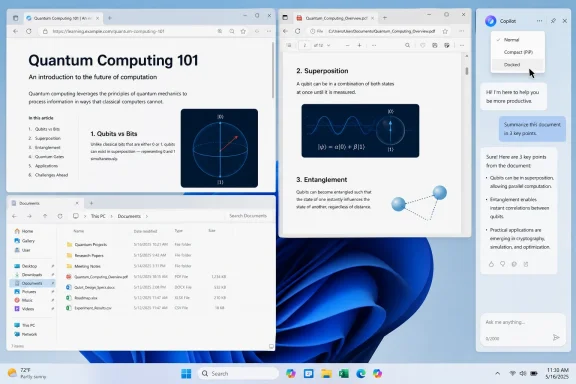
Screenshot of a Windows desktop showing a quantum computing PDF with sections on qubits, superposition, and entanglement.Microsoft Rediscovers the Edge of the Screen​

The new Copilot behavior arrives through the Copilot app rather than as a traditional Windows shell feature, which is an important distinction. Users see a dropdown in the Copilot window’s title bar with layout choices: a normal app window, a compact picture-in-picture style mode, and new left- or right-docked placements. Choose one of the docked modes, and Windows gives Copilot a fixed strip of desktop territory while compressing other windows into the remaining space.
That sounds like Snap Assist with branding, but it behaves more like a revival of a familiar argument. In 2023, Microsoft shipped Copilot in Windows as a right-side panel that sat alongside applications. It was pitched as a system-level assistant, but the implementation felt like a web chatbot stapled to the shell. Microsoft later pulled back, turning Copilot into a more conventional app and moving away from the idea that it should always occupy privileged desktop space.
Now the idea is back with better manners. The new version reportedly gives users more control over placement and mode, and it does not appear to force the sidebar open by default. But Microsoft is still reintroducing the same fundamental bargain: Copilot becomes more useful by being more persistent, and it becomes more persistent by taking room away from the work you were already doing.
That is why this update has irritated people beyond the usual anti-AI reflex. The complaint is not simply that Copilot exists. It is that Windows 11 keeps changing its mind about whether the operating system is a neutral workspace or a sales floor for Microsoft’s next platform bet.

The Sidebar Was Never Just a Window​

On paper, a docked Copilot panel is easy to defend. Modern displays are wide, users multitask constantly, and AI assistants are more useful when context is visible. A chatbot that hides behind Alt-Tab is less likely to become a daily habit than one that can stay open while you read a PDF, compare settings, or draft an email.
That is the charitable interpretation, and it is not wrong. Microsoft has spent decades building productivity surfaces around the idea that adjacent information is powerful. Outlook’s reading pane, Edge’s sidebar, Windows widgets, Teams panels, Office task panes, and Visual Studio tool windows all reflect the same interface philosophy: give the user a main canvas and flank it with contextual tools.
The problem is that Windows is not Word, Outlook, or Visual Studio. A document editor can assume the user is working inside one application. The operating system cannot. When Microsoft reserves desktop space for Copilot, it is not merely adding a pane to an app; it is proposing that an AI assistant deserves equal billing with every app.
That makes the sidebar politically charged in a way a resizable window is not. A window is a citizen of the desktop. A docked side panel is closer to infrastructure. It says: this thing belongs at the edge of your workflow, always ready, always visible, always one glance away from becoming the center of attention.

Windows 11’s Copilot Story Keeps Folding Back on Itself​

The awkwardness is intensified by Microsoft’s own recent history. In the last year, the company has been trying to project a more disciplined Windows 11 story under a quality push commonly described around performance, craft, and reliability. That effort has included a visible softening of the Copilot-everywhere posture that defined Microsoft’s first AI wave.
Microsoft has acknowledged, directly and indirectly, that some Copilot entry points were getting in the way. It has moved to reduce unnecessary Copilot surfaces in parts of Windows, and it has said a Windows 11 update will let users remap the dedicated Copilot key to behave like a Context Menu key or Right Ctrl key. That is not a minor concession. It is Microsoft admitting that the physical AI button it pushed onto new PCs disrupted established keyboard workflows for some users.
Against that backdrop, the docked sidebar looks like institutional muscle memory. One part of Microsoft is cleaning up the overreach; another part is trying to put Copilot back where users cannot miss it. The company may see no contradiction because the new sidebar is optional. Users who want it can dock it; users who do not can ignore it.
But Windows users have learned to judge Microsoft not only by defaults, but by direction. Optional features have a way of becoming promoted features. Promoted features have a way of becoming onboarding prompts. Onboarding prompts have a way of becoming toggles that return after updates, account sign-ins, or policy changes. The suspicion around Copilot is not paranoia; it is pattern recognition.

The Real Cost Is Not AI, It Is Attention​

The screen-space complaint may sound petty until you try to work on a 13-inch laptop, a budget 1080p monitor, or a remote desktop session. A persistent sidebar has a real ergonomic cost. It shortens lines, compresses file lists, squeezes browser tabs, and turns already crowded business apps into narrower versions of themselves.
That matters because Windows remains the operating system of forms, grids, consoles, ticketing systems, spreadsheets, admin portals, virtual machines, and browser-based line-of-business tools. Many of those interfaces are not designed with elegant responsiveness. They break, wrap, hide controls, or become tedious when deprived of horizontal space.
Microsoft’s AI vision assumes Copilot is worth that trade. For some users, it may be. Developers comparing code snippets, administrators looking up PowerShell syntax, students summarizing documents, and office workers drafting responses may find a docked assistant genuinely helpful. The interface becomes less annoying when it supports a task the user already intended to perform.
The danger is designing Windows as if that is the default posture for everyone. Most desktop work is not a continuous conversation with an assistant. It is switching, scanning, editing, dragging, comparing, authenticating, waiting, and occasionally swearing at a portal that only works correctly in one browser. A sidebar that steals space from those activities has to earn its rent every minute it remains visible.

Microsoft Is Still Searching for Copilot’s Native Shape​

The back-and-forth around Copilot reveals a deeper product problem: Microsoft still has not found the native form of AI in Windows. Is Copilot a chatbot? A search box? A shell extension? A keyboard key? A sidebar? A floating button? A voice layer? A set of local actions on Copilot+ PCs? The answer, so far, has been “yes,” and that is precisely the issue.
When a product has a clear job, the interface usually settles down. The Start menu launches things. The taskbar tracks things. File Explorer manages files. Settings configures the system. Copilot, by contrast, keeps changing costume because its job keeps expanding faster than its usefulness can be proven.
Microsoft wants Copilot to be a general assistant, but general assistants are hard to place. Put it in the taskbar and it feels like search. Put it in apps and it feels like clutter. Put it on the keyboard and it feels presumptuous. Put it in a sidebar and it feels like a tenant claiming part of the office before paying rent.
This is not only a design problem. It is a business problem wearing a design hat. Microsoft has invested heavily in AI infrastructure, branded a generation of PCs around Copilot, and made AI central to its enterprise pitch. Windows cannot be allowed to look indifferent to that strategy. The result is an operating system that sometimes feels less like it is discovering user demand than staging product-market fit in public.

Optional Is Better Than Inevitable, But It Is Not Enough​

To Microsoft’s credit, the reported docked mode appears to be more flexible than the original Copilot sidebar. Users can choose left or right placement, stick with a normal window, or use a smaller floating mode. That is a better approach than hard-wiring Copilot into the desktop as a single privileged panel.
Choice matters. A docked assistant can be useful on ultrawide monitors, multi-monitor setups, or desks where Copilot is treated like a research companion. On a 34-inch display, a sidebar may feel like a harmless strip. On a laptop screen, it may feel like a tax.
The trouble is that Microsoft’s consumer Windows UX often blurs the line between offering and nudging. A feature can be optional in the strict technical sense while still being repeatedly advertised, suggested, restored, or made difficult to remove cleanly. Windows 11 users have seen this dynamic with Edge prompts, Microsoft account messaging, widgets, OneDrive setup flows, and other surfaces where Microsoft’s ecosystem goals poke through the glass.
That is why the trust issue matters more than the pixels. If Copilot docking remains a user-invoked window layout, it is defensible. If it becomes a default, a recurring suggestion, or a resurrected panel after updates, it will confirm the worst fears of users who already see Windows as increasingly willing to interrupt them for Microsoft’s strategic priorities.

Enterprise IT Will See a Governance Problem Before a Productivity Feature​

For administrators, the docked sidebar is less about annoyance and more about control. Consumer Copilot, Microsoft 365 Copilot, Copilot in Edge, Copilot in Windows, Copilot+ PC features, and third-party AI tools are not interchangeable from a compliance standpoint. They may differ in data handling, licensing, auditability, retention, tenant boundaries, and policy controls.
That makes UI prominence a governance issue. If a Windows desktop visibly promotes an AI assistant that is not part of an organization’s approved workflow, help desks inherit the confusion. Users do not care which Copilot is which. They see the logo, type a question, and assume the company has blessed the experience.
This is where Microsoft’s branding strategy collides with enterprise reality. “Copilot” is a powerful umbrella brand for marketing, but it is an imprecise operational category. The Copilot that drafts a Word document under a Microsoft 365 license is not the same thing as a consumer-facing app pinned to a desktop, even if the iconography encourages users to collapse the distinction.
Admins can manage or disable Copilot surfaces through policy depending on environment, edition, and product. But every new entry point raises the burden of verification. Is this controlled by the same policy as before? Is it an app update rather than an OS update? Does it respect existing configuration? Does it appear for local accounts, Entra-joined devices, managed desktops, or only certain channels? Those are not philosophical objections. They are Tuesday morning ticket generators.

The Edge Wrapper Problem Still Haunts the Experience​

Another reason the sidebar revival lands awkwardly is that the Copilot app on Windows has often felt less native than its placement suggests. Reports and user inspection have repeatedly described it as web-backed, closely tied to Edge/WebView-style plumbing rather than a deeply integrated Windows component. That is not automatically bad; web technology powers plenty of modern desktop apps.
But it weakens Microsoft’s case when the company asks for privileged desktop real estate. If Copilot is going to sit beside File Explorer, Visual Studio Code, Outlook, and a browser as a persistent assistant, users will expect it to behave with the responsiveness, polish, keyboard handling, memory discipline, and offline tolerance of a first-class Windows feature. A web wrapper can meet that bar, but it has to prove itself.
The old Copilot panel often failed that vibe test. It felt like Microsoft had taken the web version of its assistant and given it a reserved seat in the Windows shell. That was precisely the wrong order of operations. Users are more forgiving when a beloved native capability gets a web-connected feature. They are less forgiving when a web service arrives first and asks for native privilege later.
The new docking mode may be smoother. It may simply use Windows’ window-management capabilities in a more predictable way. But Microsoft is still asking users to accept a lot of strategic weight on top of an app whose identity has shifted repeatedly.

The Comparison With Edge Cuts Both Ways​

There is an obvious precedent for this idea: Edge’s sidebar. Microsoft’s browser has long experimented with side panels for search, shopping, apps, Office, and Copilot. Some users dislike the clutter, but others genuinely value having tools adjacent to web content. Browser sidebars make sense because the browser is already a container for many tasks.
Bringing that pattern to Windows is more ambitious. The desktop is the container above the containers. A sidebar at the OS level reaches across applications, which is exactly what makes it powerful and exactly what makes it invasive.
Microsoft is not alone in this direction. Google has been pushing Gemini into Chrome and Android. Apple is weaving Apple Intelligence across macOS and iOS. The entire industry is trying to turn AI from a destination into an ambient layer. The question is not whether Windows will have AI. It will. The question is whether Microsoft can integrate it without making the desktop feel like a billboard with window management.
A good OS-level assistant should appear when intent is clear and disappear when it is not needed. The best version of Copilot in Windows might be less like a sidebar and more like a set of context-aware commands, local actions, and explainable automations that respect user control. The sidebar is a visible, easy-to-demo version of the future. It is not necessarily the best one.

Users Wanted Craft, Not Another Place for Copilot to Sit​

Microsoft’s quality push around Windows 11 resonated because users have practical grievances. They want faster context menus, fewer inconsistent dialogs, cleaner Settings migration, better reliability after updates, less advertising, more coherent defaults, and fewer half-finished surfaces. They want Windows to feel designed rather than assembled from competing internal roadmaps.
Copilot’s sidebar revival risks landing as the opposite message. Even if technically optional, it tells users that Microsoft still has engineering and design attention available for making AI more present. That does not mean the same team would otherwise be fixing File Explorer bugs or Control Panel leftovers, but users do not experience corporate org charts. They experience priorities.
This is the curse of high-visibility AI work. Every new Copilot surface becomes a referendum on everything else Windows has not fixed. A rough animation in Settings, a slow search result, a nag to use Edge, a broken driver after Patch Tuesday — all of it becomes part of the emotional context in which users judge a sidebar.
That is unfair in a narrow engineering sense and entirely predictable in a product sense. Trust is cumulative. When users believe the operating system is serving them, new features get curiosity. When users believe the operating system is serving the vendor, new features get suspicion.

The Feature Can Be Good and Still Be the Wrong Signal​

It is worth separating the implementation from the symbolism. A docked Copilot mode is not inherently bad. In fact, it is probably better than a floating bubble that blocks content unpredictably or an assistant buried so deeply that nobody remembers to use it. Docking is at least honest about the space it consumes.
For people who actively use Copilot, the feature may be a genuine improvement. A persistent pane can support multi-step work better than a transient popup. It can keep a conversation visible while users test instructions, compare generated text, or refine a plan. It can reduce window juggling and make the assistant feel less like a separate destination.
But Windows is a general-purpose platform, and general-purpose platforms must be careful with defaults, affordances, and implied hierarchy. Microsoft can build this feature in a user-respecting way, but that requires restraint. The sidebar should stay off until requested, stay gone when dismissed, respect policy, avoid update-driven reappearances, and provide clean removal paths for people and organizations that do not want it.
That sounds simple. It has not always been Microsoft’s strong suit.

The Desktop Is Becoming Negotiated Territory​

The Copilot sidebar episode fits a larger shift in operating-system design. The desktop used to be mostly a place where users arranged their chosen tools. Increasingly, it is also where platform owners negotiate recurring relationships: cloud storage, account identity, browser defaults, app stores, subscriptions, widgets, security prompts, and now AI assistants.
Some of these relationships are useful. Microsoft account integration can simplify backup and device setup. OneDrive can save users from local-drive disasters. Defender has improved the baseline security of consumer PCs. Copilot might eventually help normal people perform tasks that used to require search, forums, or a patient relative.
But every added relationship competes for attention. The operating system becomes less a quiet substrate and more a host of standing invitations. Try this. Sign in here. Back up that. Open this in Edge. Ask Copilot. Restore these settings. Finish setting up your PC. The cumulative effect is a desktop that feels less private, even when no single prompt is outrageous.
A docked Copilot panel is therefore not just another layout. It is a claim on the most valuable remaining resource in personal computing: uninterrupted attention.

The Sidebar Bargain Microsoft Now Has to Keep​

This update will not be judged only by whether the panel works. It will be judged by whether Microsoft behaves as if user consent matters after the novelty fades. The company can still make the feature a net positive, but only if it treats docking as a tool rather than a campaign.
  • The docked Copilot mode should remain explicitly user-initiated rather than becoming a default placement after updates or sign-ins.
  • The sidebar should remember dismissal and layout preferences reliably across reboots, app updates, and Windows feature updates.
  • Enterprise policies should clearly distinguish consumer Copilot experiences from Microsoft 365 Copilot and other managed AI services.
  • The app should offer a clean uninstall or disable path that does not leave broken shell integrations, zombie shortcuts, or recurring prompts.
  • Microsoft should prioritize native-feeling performance and accessibility if it expects Copilot to occupy persistent desktop space.
  • The company should measure success by repeated voluntary use, not by how many times Windows can surface another Copilot entry point.
The good version of this story is that Microsoft is giving Copilot users another layout while leaving everyone else alone. The bad version is that Windows 11 is again being used to normalize a product Microsoft wants users to adopt before the user experience has earned that place. The difference will come down less to the sidebar itself than to the defaults, prompts, policies, and persistence around it.
Microsoft does not need to hide Copilot to make Windows users happy, but it does need to stop making every Copilot experiment feel like a territorial dispute. If AI is going to become a durable part of Windows, it has to feel like a capability the user summons, not a roommate the operating system keeps moving back in. The sidebar may be useful for some, irritating for others, and forgettable for many, but it points to the larger test Microsoft still has not passed: proving that the future of Windows can be intelligent without becoming pushy.

References​

  1. Primary source: TweakTown
    Published: Tue, 26 May 2026 00:40:07 GMT
  2. Related coverage: windowscentral.com
  3. Official source: support.microsoft.com
  4. Related coverage: digitaltrends.com
  5. Related coverage: techspot.com
  6. Related coverage: windowsreport.com
 

Microsoft is testing a new Windows 11 Copilot app update in late May 2026 that restores a docked sidebar mode, letting the assistant pin to the left or right edge of the desktop while other open windows resize around it. The move is not a full product reversal yet, because the feature is rolling out gradually and has not been confirmed for stable availability. But as a signal, it is hard to miss: after two years of trying to decide whether Copilot belongs inside Windows, beside Windows, or merely on top of Windows, Microsoft is edging back toward the place it started.

Windows desktop showing a Copilot testing rollout overlay and a document layout editor with image preview.Microsoft Rediscovers the Edge of the Screen​

The first Windows Copilot experience made a clear bet. It lived as a side panel, visually attached to the desktop and treated less like an app than a system companion. That approach was inelegant in places, but it made conceptual sense: if Copilot was supposed to be part of Windows, it needed to behave like part of Windows.
Microsoft later retreated from that model. Copilot became a floating app, then a web-flavored app, then something closer to a conventional window. Each pivot lowered the temperature around forced AI integration but also made Copilot feel less essential. A floating chatbot is easier to ignore than a system sidebar, and that was both the point and the problem.
The new test tries to split the difference. Copilot still opens as a floating window by default, but a title-bar menu now offers layout choices including floating mode, picture-in-picture mode, and docking to either side of the desktop. Once docked, Copilot claims its strip of screen real estate and Windows resizes other apps around it.
That behavior matters because it is not just cosmetic. A window that floats over your work is an interruption. A pane that causes the workspace to reflow is a claim of permanence.

The Sidebar Was Never Just a Layout​

Microsoft’s Copilot problem has always been partly architectural and partly political. The company wants AI to feel native to Windows, but every attempt to make it native has triggered a familiar suspicion among users: that Windows is being turned into distribution infrastructure for Microsoft’s next business priority.
A docked sidebar is therefore more than a UI option. It revives the original Windows Copilot promise that the assistant can sit beside your apps as a persistent context layer. The desktop becomes a stage with Copilot always available at the edge, not a place where Copilot must be summoned like any other app.
For some users, that is exactly what an assistant should be. Developers might use it as a scratchpad beside Visual Studio Code. Office users might keep it open while drafting. Students might ask it to summarize a PDF while notes sit in another window. On ultrawide monitors, a docked AI pane could be genuinely useful.
On laptops, the calculus changes. A persistent sidebar on a 13-inch or 14-inch screen is not a convenience; it is a tax. Microsoft appears to understand that by leaving floating mode as the default, but defaults have a way of changing once telemetry tells a product team what it wants to hear.

Six Copilots Later, the Strategy Still Looks Unsettled​

The awkwardness is not that Microsoft is testing a sidebar again. Product teams should test, discard, and revisit ideas. The awkwardness is that Copilot on Windows has already moved through enough identities that the redesign itself has become the story.
In less than two years, Windows users have seen Copilot as a taskbar-launched side panel, a standalone app, a web-backed experience, a more native-looking app, an Edge-based wrapper, and now a dockable companion that resembles the original panel. Windows Latest counts the current experiment as the sixth distinct Copilot UI approach in that period. That is not iteration so much as product whiplash.
The churn reflects a deeper contradiction. Microsoft insists Copilot is central to the future of Windows, yet it has struggled to make Copilot feel central without making it feel intrusive. The company keeps oscillating between system integration and user retreat, between “this is the future of computing” and “don’t worry, it is just an app.”
That uncertainty creates real consequences. Consumers learn to wait before building habits around a feature. IT departments learn to delay policy decisions until the dust settles. Developers learn that Microsoft’s AI surface area may change faster than their documentation, training material, or internal support playbooks can keep up.

The Edge Wrapper Raises Old Windows Suspicions​

One of the stranger details in the current Copilot story is that the Windows app is reportedly an Edge-based wrapper bundled with a private copy of Microsoft Edge. That does not automatically make the app suspicious or bloated; Chromium and WebView-style shells are common ways to ship fast-moving services on desktop platforms. But on Windows, Edge is never just Edge.
Microsoft has spent years testing the patience of users by placing Edge in update flows, search results, default-app prompts, widgets, and system experiences. Even when a specific Edge dependency is technically defensible, the surrounding history makes users skeptical. A bundled browser runtime inside an AI assistant is the sort of implementation detail that becomes a trust issue because Windows users have seen this movie before.
The docking feature may or may not depend on that bundled Edge instance. Microsoft has not publicly explained the connection. But the lack of explanation leaves room for the usual interpretation: Windows is again carrying extra Microsoft infrastructure to support a Microsoft service that Microsoft wants more people to use.
That perception is especially dangerous for Copilot because AI features already ask users to accept new forms of mediation. The assistant is not merely rendering a web page; it may summarize, infer, transform, and, in some modes, observe context. If Microsoft wants that layer to be trusted, the packaging needs to feel boringly transparent. Right now, it does not.

The Pullback and the Push Forward Are Happening at the Same Time​

The sidebar test lands at a peculiar moment because Microsoft has also been reducing Copilot’s visible footprint in parts of Windows 11. Since March, the company has reportedly removed or renamed Copilot-facing buttons in apps including Notepad, Snipping Tool, and Photos. The trend suggested a company learning that scattering AI buttons across small utilities can make Windows feel more cluttered than intelligent.
That pullback was easy to read as humility. Perhaps Microsoft had noticed that users do not want every text box, screenshot, and image viewer to become a prompt surface. Perhaps Copilot would become more deliberate, less omnipresent, and easier to summon only when wanted.
The docked sidebar complicates that reading. Instead of many little Copilot buttons, Microsoft may be testing one big Copilot place. That could be a healthier model, but it still preserves the larger ambition: Copilot as a standing presence in the Windows workspace.
In fairness, consolidation is not the same as retreat. Removing Copilot buttons from utility apps while improving the main Copilot app could be a coherent strategy. The better version of this plan is simple: stop sprinkling AI into every corner, build one capable assistant, and let users decide when it deserves screen space.

Snap Layouts Already Had a Job​

The new docking behavior visually resembles Snap Layouts, but it reportedly operates separately from Windows’ native snapping system. That distinction will matter to power users, because Windows already has a window-management language. When Microsoft creates a parallel one for Copilot, it risks making Copilot feel exempt from the rules that apply to everything else.
Snap Layouts succeeded because they improved an old Windows behavior without turning it into a product campaign. They gave users a faster way to arrange work. They did not ask users to adopt a brand identity or accept a new computing philosophy.
Copilot docking is different. It is not merely another window layout; it is a privileged arrangement for one Microsoft-controlled assistant. If it behaves predictably, respects screen size, and works cleanly with existing snapped apps, most users may not care. If it breaks layouts, steals width unexpectedly, or fails to remember user preferences, it will reinforce the idea that AI features get special treatment at the expense of the desktop.
The best implementation would make Copilot feel like a good citizen of Windows windowing. The worst would make it feel like a pane that has diplomatic immunity.

Copilot Vision Is the Unanswered Question​

The most important unresolved question is whether docking will intersect with Copilot Vision, Microsoft’s feature direction that lets the assistant see what is on the user’s screen in supported contexts. A docked Copilot that sits beside apps is one thing. A docked Copilot that can observe the screen is another.
There is nothing inherently wrong with an assistant that can see what the user asks it to see. In fact, screen-aware AI could be one of the few desktop AI features that feels genuinely new rather than bolted on. Troubleshooting a settings page, explaining a spreadsheet, comparing two documents, or helping a user understand an error dialog are all plausible use cases.
But the permission model becomes everything. Users need clear signals about when the assistant can see screen content, what content is being processed, whether data is retained, and whether organizational policies can reliably block or limit that behavior. A docked interface could make Copilot Vision feel natural, but it could also make it feel ambient in a way that alarms security-conscious users.
For enterprises, “AI can see my screen” is not a feature description. It is a governance meeting.

The Admin Problem Is Bigger Than the Consumer Annoyance​

For home users, the Copilot sidebar debate is mostly about preference. Some will like it, some will disable it, and some will never notice. For administrators, the issue is operational control.
Windows fleets depend on predictability. If Copilot changes form every few months, policies, user training, help-desk scripts, and compliance reviews all need to chase a moving target. It is one thing to manage an optional app. It is another to manage an AI-branded system companion whose UI, packaging, and integration points keep shifting.
The Edge-based packaging adds another wrinkle. Enterprises already manage Edge, WebView components, Microsoft 365 Copilot, Windows Copilot policies, and browser access controls. A Copilot app that ships with its own private Edge copy may be technically isolated, but administrators will still want to know how it updates, how it is inventoried, how it is blocked, and what attack surface it represents.
Microsoft has policy tools for many of these concerns, and Windows management has become more cloud-centered and granular over time. But the enterprise frustration is not only whether a toggle exists. It is whether the product strategy stabilizes long enough for the toggle to mean the same thing next quarter.

The Secure Boot Deadline Makes the AI Churn Look Smaller​

While Copilot gets the headlines, the more consequential Windows deadline is approaching underneath it. Secure Boot certificates originally issued in 2011 begin expiring in June 2026, with June 24 identified as the first major date in the timeline. Microsoft has been urging organizations to update devices so they can move to newer certificate chains and avoid a degraded security posture.
This is the kind of Windows work that does not produce flashy demos. It is also the kind that matters most. Boot trust, certificate revocation, firmware readiness, and update compliance are the unglamorous foundations that keep Windows fleets defensible.
The juxtaposition is telling. On one side, Microsoft is still refining where an AI assistant should sit on the desktop. On the other, administrators are trying to ensure that devices keep receiving the Secure Boot trust updates they need. One problem is about product identity; the other is about platform maintenance.
That does not mean Microsoft should stop building Copilot. It does mean the company’s Windows message has to serve two audiences at once. Enthusiasts may argue about the sidebar. IT pros are asking whether their machines will boot securely and remain manageable after certificate rollover.

Microsoft’s Real Challenge Is Earning the Right to Be Persistent​

A persistent desktop companion is not a bad idea. The history of computing is full of persistent aids: docks, taskbars, sidebars, launchers, notification centers, widgets, and command palettes. The issue is that persistence must be earned.
Users tolerate the taskbar because it is useful every day. They tolerate system trays because background utilities need a place to live. They tolerate snapped windows because the user chooses the arrangement. Copilot, by contrast, is still trying to prove that it is useful enough to deserve permanence.
That proof cannot come from placement alone. Putting Copilot on the edge of the screen does not make it central to work. It only makes it visible. The assistant has to be fast, contextually competent, respectful of privacy, and predictable across updates.
Microsoft’s repeated UI pivots suggest that the company has been trying to solve adoption through surface area. If users do not use Copilot in the taskbar, make it a sidebar. If the sidebar feels too heavy, make it an app. If the app feels forgettable, dock it. The missing piece is not a perfect rectangle; it is a settled answer to why the user should keep Copilot open.

The Windows Desktop Cannot Become a Billboard​

The worst version of Windows AI would turn the desktop into a promotional surface. Every app would advertise assistance. Every blank space would become an upsell. Every workflow would contain a reminder that Microsoft would prefer the user to ask Copilot.
The better version is quieter and harder to build. Copilot would appear when it can reduce friction, disappear when it cannot, and respect the difference between consumer curiosity and enterprise risk. It would integrate deeply where context matters and stay out of legacy utilities where the AI value is thin.
The docked sidebar could fit that better version. A user-controlled, persistent pane is cleaner than a dozen scattered buttons. It gives Copilot a home, and it lets users decide whether that home deserves space on their desktop.
But Microsoft’s recent history means it does not get the benefit of the doubt automatically. Windows users have learned to watch not only what a feature does today, but where Microsoft might push it tomorrow.

The Sidebar Test Says More Than Microsoft Probably Intended​

The concrete facts are modest, but the implications are larger.
  • Microsoft is testing a Copilot app update for Windows 11 that can dock the assistant to the left or right edge of the desktop.
  • The docked mode resizes the remaining workspace instead of merely floating above open apps.
  • The feature is separate from ordinary Snap Layouts, even though it resembles snapping visually.
  • The rollout is gradual, and Microsoft has not confirmed whether this mode will ship broadly.
  • The test follows several Copilot UI reversals, making Windows’ AI strategy look unsettled rather than merely iterative.
  • The change arrives as administrators also face the more urgent June 2026 Secure Boot certificate transition.
The charitable interpretation is that Microsoft is learning. It is pulling Copilot out of places where it feels ornamental and giving the assistant a more deliberate desktop presence. The skeptical interpretation is that Microsoft is still searching for a shape that makes Copilot harder to ignore without making users angrier.
Both can be true. Windows is mature enough that every new persistent surface has to justify itself, and AI is new enough that Microsoft is still discovering where it belongs. The docked Copilot sidebar may become a useful compromise, or it may become another short-lived experiment in a long line of Windows AI redesigns. What matters now is whether Microsoft can stop treating placement as strategy and start proving, in the daily routines of users and administrators, that Copilot deserves the space it wants to occupy.

References​

  1. Primary source: Notebookcheck
    Published: Tue, 26 May 2026 07:03:00 GMT
  2. Related coverage: windowscentral.com
  3. Official source: support.microsoft.com
  4. Related coverage: windowslatest.com
  5. Related coverage: digitaltrends.com
  6. Related coverage: hartware.de
 

Microsoft is rolling out new Copilot docking options for Windows 11 in late May 2026, letting the AI assistant pin itself to the left or right side of the desktop and resize open apps around it. The feature is optional for now, but its symbolism is not. After weeks of reporting that Microsoft wanted to reduce AI clutter in Windows, Copilot is again being treated less like an app and more like a piece of the operating system’s furniture.

Screenshot of Microsoft Copilot helping draft and summarize a “Project Overview – Q2” document in Word.Microsoft’s AI Retreat Now Has an Asterisk​

The awkward part is not that Microsoft added another windowing option. Windows has always been an operating system of overlapping panes, snapped layouts, sidebars, flyouts, panels, and taskbar experiments that come and go as Redmond changes its mind. The problem is that Copilot’s new docked mode arrives immediately after Microsoft began signaling that it had heard the complaints about AI sprawl.
That makes this less a story about a sidebar than a story about trust. Users were told, directly and indirectly, that the company understood Windows 11 had become too noisy: too many prompts, too many assistant buttons, too many “helpful” surfaces appearing in places where people simply wanted Notepad, Paint, Snipping Tool, File Explorer, or Office to behave predictably. Then Copilot reappears in a form that literally shifts other apps aside.
The move also revives one of the original objections to Copilot in Windows. The first built-in Windows Copilot experience was not just another app you launched when needed; it was a sidebar that occupied a privileged edge of the desktop. Microsoft later moved toward a more conventional app model, which made Copilot easier to mentally categorize as software rather than infrastructure. Docking it back into the desktop undoes some of that separation.
There is a charitable interpretation. Microsoft may simply be giving users more layout choices, and a docked assistant can be genuinely useful on ultrawide monitors, multi-display setups, and workflows where chat, search, and summarization sit beside a browser or document editor. But Windows is not judged only by what power users can configure. It is judged by what ordinary users are made to notice.

The Sidebar Is a Product Strategy Wearing a Window Frame​

A docked Copilot panel is not technically the same thing as the old shell-integrated Copilot sidebar. The current implementation appears to sit closer to the modern Copilot app experience, with window controls and a menu for layout choices. It can float, dock left, dock right, or remain in a more familiar app-style window.
But user perception rarely respects architectural distinctions. If a thing pins to the edge of the desktop, forces other windows to make room, and behaves like a persistent assistant surface, it will be experienced as part of Windows. That is why the distinction between “app” and “system feature” matters less than Microsoft sometimes seems to think.
For years, Microsoft has used Windows as the most valuable distribution channel it owns. Internet Explorer, Edge, OneDrive, Teams, Widgets, Microsoft account nudges, Bing search, and now Copilot have all benefited from the same strategic reality: the desktop is where attention begins. When Microsoft wants a product to become habitual, Windows is the fastest path to habit.
The new docking option continues that tradition. It says Copilot is not merely something you install or ignore. It is something the desktop is prepared to accommodate.
That accommodation is the heart of the backlash. Users do not object only to the existence of AI. Many object to the presumption that AI deserves default proximity to every task. A docked assistant that resizes the workspace communicates priority, even if Microsoft calls it optional.

Optional Features Still Change the Temperature of Windows​

Microsoft’s defenders have an obvious point: no one is being forced to dock Copilot. The floating quick view remains the primary experience for many users, and the new docking modes appear to be part of a gradual rollout rather than a universal mandate. In strict product terms, more placement options can be framed as user choice.
But Windows users have been trained to distrust that framing. Optional features have a habit of becoming promoted features, and promoted features have a habit of becoming defaults. Even when they do not, they add to the cognitive burden of an operating system that already asks users to decline, dismiss, hide, uninstall, disable, or group-policy their way back to calm.
This is especially true for administrators. In a managed environment, the question is not whether an individual user can avoid a feature today. The question is whether IT can explain, control, audit, suppress, and support the behavior across fleets of PCs with different update rings, editions, policies, hardware, and regional settings.
For home users, the annoyance is simpler. If a PC owner bought a laptop to run browsers, games, schoolwork, tax software, or creative tools, Copilot’s prominence can feel like an advertisement embedded into the workspace. It may be useful. It may also be unwanted. Windows increasingly struggles to distinguish those two states.
The old Microsoft answer was discoverability. Users cannot benefit from a feature they never find. The new Windows problem is that discoverability has become indistinguishable from insistence.

Windows K2 Was Supposed to Be the Humility Moment​

The broader backdrop is Microsoft’s reported Windows K2 effort, a behind-the-scenes push to address user frustration with Windows 11’s performance, reliability, bloat, and overbearing AI visibility. Reporting around K2 has described a company trying to regain trust by improving the parts of Windows people touch every day: File Explorer responsiveness, update control, taskbar flexibility, widgets, and the proliferation of Copilot entry points.
That was a sensible course correction. Windows 11’s biggest wounds have not all come from missing features or technical defects. Many came from a tone problem. Microsoft often behaved as though it knew what users should want better than users did, then appeared surprised when those users resented being steered.
The Copilot rollback narrative fit neatly into that humility arc. Remove AI where it does not clearly help. Reduce unnecessary assistant buttons. Stop placing Copilot into small utilities where the utility’s value is precisely that it is small, fast, and focused. Treat AI as a capability, not a compulsory design language.
The docked sidebar complicates that story. It does not prove Microsoft abandoned K2, and it does not mean every rollback was cosmetic. But it does show the tension inside the company’s Windows strategy: one team is trying to make the operating system quieter, while another imperative keeps making Copilot louder.
That conflict is not accidental. Microsoft has bet heavily on AI across consumer software, enterprise productivity, developer tooling, cloud services, and PC hardware. Windows cannot be exempt from that campaign. The question is whether it can participate without becoming the campaign.

The Copilot App Keeps Changing Because Microsoft Has Not Settled the Contract​

Copilot on Windows has had an unusually restless design life. It has been a sidebar, a taskbar presence, a web-powered assistant, a more app-like surface, a keyboard key, and now a dockable panel with echoes of its earlier self. That churn suggests Microsoft is still searching for the right social contract between AI and the desktop.
The old contract of Windows apps was simple. You opened programs, placed them where you wanted, and closed them when you were done. Operating system components sat at the edges: Start, taskbar, notification area, Action Center, system tray, settings flyouts. The user’s work occupied the middle.
AI assistants blur that model. They are not exactly apps, because they are meant to accompany many tasks. They are not exactly system controls, because they rely on cloud services, accounts, models, subscriptions, and rapidly changing product behavior. They are not exactly search, chat, automation, help, or accessibility tools, though they borrow from all of them.
Microsoft’s challenge is that Copilot wants to be ambient, but users often want software to be bounded. Docking is an ambient gesture. It says the assistant should be alongside the work, not merely summoned into it. That is powerful when wanted and intrusive when not.
This is why the sidebar debate matters more than its pixels. The design is a negotiation over whether AI is a tool in the toolbox or a standing participant in every computing session.

The Old Windows Bargain Is Under Strain​

Windows earned its dominance in part by being a general-purpose platform. It was messy, backwards-compatible, endlessly configurable, occasionally maddening, and valuable precisely because it ran what users needed. The operating system could be opinionated, but it usually left room for escape.
Windows 11 has tested that bargain. Hardware requirements excluded capable PCs. The redesigned taskbar initially removed long-standing options. Start menu recommendations blurred the line between productivity and promotion. Microsoft account nudges became harder to avoid. Edge and Bing surfaces appeared where many users expected neutral system behavior.
Copilot sits on top of those accumulated grievances. A user annoyed by one AI button might shrug. A user annoyed by years of defaults, dark patterns, telemetry anxiety, account pressure, and promotional tiles will see that same button as one more exhibit in a much larger case.
This is why Microsoft’s “but it is optional” defense lands poorly. Optionality is meaningful only when the user believes the vendor respects the option. If the path to a quieter Windows requires registry edits, Group Policy, enterprise licensing, PowerShell, third-party debloat tools, or constant vigilance after feature updates, then optionality becomes a technicality.
The docked sidebar is not the worst thing Microsoft has done to Windows. It is simply a very visible reminder that the company’s incentives are not always aligned with the user’s desire for a calm desktop.

Enterprise IT Will Read This as Another Control Surface to Police​

For enterprises, Copilot’s visibility is not just a taste issue. It is a governance issue. An AI assistant that sits beside work raises questions about data handling, licensing, tenant boundaries, compliance, user training, support tickets, and whether consumer-facing Copilot behavior differs from managed Microsoft 365 Copilot deployments.
A docked panel can be especially awkward in regulated environments. Users may not know what data should or should not be pasted into an assistant. They may not understand the difference between a work account experience and a personal Microsoft account experience. They may assume that because something appears in Windows, it has been approved by IT.
That assumption creates risk. Administrators then need policy clarity: Can Copilot be removed? Can it be hidden? Can docking be disabled separately from the app? Does the setting roam? Does it differ between Windows editions? Does an update reintroduce the surface? Does the Copilot key summon the same experience? These are not philosophical objections. They are deployment questions.
Microsoft has become better at providing management controls for some of its AI features, particularly on the enterprise side. But the Windows consumer and prosumer surface remains noisy enough that many administrators will treat every new Copilot affordance as another thing to test before broad deployment.
That is the hidden cost of AI enthusiasm. Every new entry point creates work for someone who did not ask for it.

The Copilot Key Was the Hardware Version of the Same Argument​

The controversy over the dedicated Copilot key on newer PCs belongs in the same story. Microsoft and its hardware partners introduced a physical key for invoking the assistant, displacing long-standing keyboard real estate on some devices. For Microsoft, this was a clear signal that the AI PC era had arrived. For many users, it was a reminder that the company was willing to change muscle memory to promote a service.
The later promise to offer more remapping options was a concession to reality. Some users rely on right Ctrl or context-menu behavior. Some workflows are built around decades of keyboard habits. Accessibility, remote desktop work, development tools, and specialized software all suffer when a platform owner treats input conventions as marketing surfaces.
The Copilot sidebar produces the same reaction through layout rather than hardware. It asks the desktop to make room. The key asked the keyboard to make room. In both cases, Microsoft’s AI strategy is spatial: claim a place where attention already flows.
That spatial strategy is why people react so strongly. Software features can be ignored. Spatial claims must be navigated.

AI Visibility Is Not the Same as AI Value​

Microsoft’s strongest argument for Copilot is that many users will not understand its value until it is close at hand. The company believes assistants can summarize, draft, explain, search, automate, troubleshoot, and bridge gaps between applications. If that vision works, Copilot could become a meaningful productivity layer rather than a novelty chatbot.
The problem is that visibility is not proof of usefulness. Putting an assistant beside every task does not make it valuable in every task. It can just as easily make the assistant feel needy, like a product still trying to justify its budget.
Windows users have seen this before. Widgets promised glanceable information but often became a feed surface. Search promised local discovery but too often pushed web results. Edge integration promised continuity but frequently looked like browser promotion. Microsoft’s product instincts are sometimes strongest when building useful infrastructure, and weakest when deciding how aggressively to surface it.
The right question is not whether Copilot should be in Windows. It is whether Copilot appears at the moment of need, in the shape best suited to that need, with user consent that persists across updates. A docked sidebar may satisfy that standard for some users. It will violate it for others.
That is why Microsoft needs restraint more than another layout mode.

The Return of the Sidebar Shows Microsoft Is Still Designing for the Demo​

A docked AI sidebar demos beautifully. Put a document on one side, Copilot on the other, ask for a summary, rewrite a paragraph, compare a webpage, generate a checklist, and the future of computing looks obvious. The assistant is present, contextual, and visually integrated into the workspace.
Real desktops are less elegant. People work on 13-inch laptop screens, remote sessions, legacy apps, virtual desktops, multi-window research piles, full-screen IDEs, games, spreadsheets, accessibility tools, and line-of-business applications designed in another decade. Screen real estate is not abstract. It is contested territory.
When Copilot pushes apps aside, Microsoft is making a bet that the assistant deserves the space more than whatever was already there. Even if that bet is user-triggered, the design language carries a hierarchy. The assistant is not merely another rectangle. It is a rectangle with the power to reorganize the rest.
That may be acceptable if Copilot becomes indispensable. But indispensability cannot be declared through UI. It has to be earned through reliability, speed, privacy clarity, and a consistent sense that the tool is helping rather than hovering.
Microsoft’s current problem is that its AI surfaces often arrive before that trust has been earned.

The Web Wrapper Question Keeps Haunting Native Windows​

Another irritant is the perception that Copilot on Windows is increasingly a web experience wearing native clothes. Reports have described the modern Copilot app as Edge-based or web-powered, which aligns with Microsoft’s broader strategy of delivering fast-changing AI features through web technologies rather than slow-moving native Windows components.
There are practical reasons for that. AI products change quickly. Models, interfaces, safety layers, authentication flows, and feature sets evolve faster than the Windows shell. A web-based Copilot lets Microsoft update the assistant without waiting for full operating system releases.
But Windows users are sensitive to web wrappers, especially when they consume more memory, feel less integrated, or behave inconsistently beside native apps. A docked web-based assistant can therefore feel like the worst of both worlds: privileged enough to reshape the desktop, but not native enough to feel like a disciplined system component.
This is a broader Windows tension. Microsoft wants the operating system to be a modern service layer tied to cloud intelligence. Many users still want it to be a fast, local, stable environment that launches their software and gets out of the way. Copilot is where those visions collide most visibly.
The company can bridge that gap, but not through placement alone. It needs the AI experience to feel technically excellent, administratively controllable, and respectful of local context.

The Backlash Is Not Anti-AI So Much as Anti-Presumption​

It is tempting to frame user anger as reflexive anti-AI sentiment. That is too easy. Many Windows enthusiasts use AI tools daily. Developers use code assistants. Writers use summarizers. Administrators use scripts and chat-based troubleshooting. Students, researchers, and office workers experiment with these systems because they can be genuinely useful.
The objection is not necessarily to AI. It is to presumption.
Users object when AI appears in places where it was not requested. They object when removal is unclear. They object when a feature feels like a service funnel. They object when an operating system designed for general-purpose computing starts behaving as though one vendor’s assistant is a first-class citizen and everything else is a tenant.
That distinction matters because it points to a solution. Microsoft does not need to abandon Copilot in Windows. It needs to make Copilot feel invited. That means clear controls, durable choices, quiet defaults, transparent account boundaries, and no sense that every update is another attempt to re-win attention that users already withheld.
A docked sidebar could be part of that future if it is genuinely user-owned. It becomes a problem when it looks like the old visibility campaign returning through a side door.

Microsoft’s Competitors Are Watching the Desktop Politics​

Apple, Google, and Linux distributions face their own AI integration questions. Apple has leaned into system-level intelligence while emphasizing privacy and context. Google is weaving Gemini into Android, ChromeOS, Workspace, and search. Linux desktops, fragmented by nature, are less likely to impose one assistant globally, but distributions and desktop environments will not be immune to AI pressure forever.
Microsoft’s difference is Windows’ installed base and enterprise centrality. A Windows design choice affects schools, governments, hospitals, factories, small businesses, gamers, developers, home offices, and industrial workflows. The same Copilot icon means different things in each setting.
That breadth makes restraint more important, not less. Consumer platforms can move fast and absorb backlash as churn. Windows has to carry decades of expectations. It is both a modern product and a compatibility promise.
If Microsoft treats Windows primarily as an AI distribution mechanism, it risks weakening the neutrality that made Windows valuable. If it treats AI as an optional capability inside a user-controlled platform, it has a better chance of making Copilot useful without making Windows feel captured by it.
The docked sidebar is a small feature. But in platform politics, small features can reveal large assumptions.

The Sidebar Is Small, but the Signal Is Loud​

Microsoft’s latest Copilot move should not be exaggerated into a catastrophe. A docking menu is not Recall. It is not a forced cloud backup. It is not an unremovable system process with no policy controls. For many users, it may remain an ignored option tucked inside a title-bar menu.
Still, Windows history teaches that defaults, affordances, and placement matter. The first version of a feature often tells us less than the direction of travel. Copilot’s direction of travel still points toward greater ambient presence, even as Microsoft says it is trimming unnecessary AI from places where it does not belong.
That contradiction will define the next phase of Windows 11. Microsoft wants credit for listening, but it also wants the desktop to prepare for an AI-first future. Users want improvements, but they also want proof that “AI-first” does not mean “user-second.”
The practical outcome will depend on implementation. If docking is discoverable but not nagging, persistent but not defaulted, controllable by policy, and removable where unwanted, the controversy may fade. If it becomes another promoted surface that reappears after updates or resists clean removal, it will reinforce every suspicion Windows users already have.
Microsoft has enough goodwill problems with Windows that it should not spend trust casually.

The Copilot Bargain Windows Users Will Actually Accept​

The most concrete lessons from this episode are not complicated. They are the same lessons Microsoft keeps being forced to relearn every few years, usually after a wave of forum threads, admin complaints, and angry screenshots.
  • Copilot’s new docked mode lets the assistant pin to the left or right side of the Windows 11 desktop and resize other apps around it.
  • The feature is still rolling out, and the floating Copilot view remains the less intrusive default experience for many users.
  • The timing is politically awkward because Microsoft has recently signaled that it wants to reduce unnecessary Copilot visibility and Windows bloat.
  • The backlash is less about a single sidebar than about whether Windows is becoming a delivery vehicle for Microsoft’s AI strategy.
  • Enterprise administrators will care most about policy controls, account boundaries, uninstall behavior, and whether updates preserve user and IT choices.
  • Microsoft can make Copilot acceptable only if the assistant is useful, quiet when unwanted, and genuinely optional across consumer and managed PCs.
Microsoft’s opportunity is still real. A well-designed assistant that respects the desktop could make Windows more capable without making it more annoying. But the company has to stop confusing proximity with trust, because the future of AI on Windows will not be won by pushing apps aside; it will be won when users decide, without being prodded, that Copilot has earned the space.

References​

  1. Primary source: TechRadar
    Published: Tue, 26 May 2026 11:24:13 GMT
  2. Related coverage: windowscentral.com
  3. Related coverage: windowslatest.com
  4. Related coverage: techspot.com
  5. Related coverage: tweaktown.com
  6. Related coverage: hartware.de
 

Microsoft is testing a restored docked Copilot sidebar for Windows 11 in late May 2026, giving the AI assistant an optional mode that pins it to the side of the desktop and resizes open windows instead of floating over them. The change sounds small, almost cosmetic, until you remember how much of Windows is really a negotiation over space, attention, and defaults. Microsoft is no longer merely asking whether Copilot should be in Windows; it is testing how much of the desktop Copilot is allowed to occupy. That makes the docked sidebar less a nostalgic return than a fresh attempt to make AI feel like part of the operating system’s furniture.

Screenshot collage showing Windows 11 settings, a Word document, PowerShell output, and Copilot chat.Microsoft Reopens the Door It Closed Last Year​

The first version of Copilot in Windows 11 arrived with a blunt promise: the AI assistant would sit at the edge of the desktop, ready to answer questions, adjust settings, and eventually mediate more of the operating system. It was not subtle. It was a sidebar, a button, a brand mark, and a thesis about where Microsoft thought personal computing was headed.
Then Microsoft backed away from that model. The old Copilot in Windows sidebar gave way to a more conventional app-like experience, and enterprise documentation framed the change as part of a broader shift toward Microsoft 365 Copilot Chat and a lighter prompt experience tied to the Copilot key or keyboard shortcut. The assistant became less of a Windows pane and more of a service you opened.
The new docking option complicates that retreat. According to reports from gHacks and others, Copilot can once again be placed at the edge of the screen, with Windows resizing the desktop work area so that other applications make room. That is the important distinction: this is not just a window that happens to be tall and narrow. It is a window that asks the shell to treat it as something adjacent to your work, not merely another app competing with it.
That distinction matters because Microsoft has been trying to square two incompatible reactions to Copilot. Users dislike feeling ambushed by AI buttons in every corner of the interface, but Microsoft wants Copilot to be visible enough that people actually use it. Docking is the compromise: less pushy than a floating overlay, more persistent than an app buried in Alt-Tab.

The Desktop Resize Is the Product Decision​

The headline feature is not that Copilot can sit on the side. Windows users have been placing chat apps, terminals, file managers, and browser windows along screen edges for decades. The real feature is that Windows can shrink the usable desktop area around Copilot, moving other windows out of the way.
That makes the docked Copilot closer in spirit to the taskbar than to a normal app window. The taskbar claims space because the system treats it as infrastructure. A snapped window uses space because the user chose a layout. A docked assistant sits somewhere between those models, and that in-between state is where the controversy lives.
If Copilot floats, it is easy to dismiss as clutter. If Copilot docks, it becomes a participant in layout management. It can remain visible while you write, browse, troubleshoot, or compare documents, and the operating system behaves as though its presence is legitimate enough to reorganize the workspace.
This is why the feature may feel more consequential to power users than to casual users. A person with one browser window and a 27-inch monitor may see a harmless convenience. Someone managing terminals, virtual machines, documentation, Teams, Outlook, and remote sessions may see a new claimant on pixels that were already scarce.

Optional Is Doing a Lot of Work​

The reports so far describe the docking mode as optional, and that word is carrying most of the political weight. Microsoft has learned, sometimes painfully, that AI features land differently when users feel they are being invited rather than drafted. The recent Copilot backlash was not only about AI; it was about placement.
Windows users tend to tolerate ambitious features when they are discoverable and reversible. They rebel when those features feel like advertising campaigns wearing system chrome. The difference between a tool and an intrusion is often one default, one toggle, or one immovable button.
The docked Copilot experiment appears designed to avoid the worst version of that mistake. If the mode requires deliberate activation and can be dismissed cleanly, it gives Microsoft room to study behavior without making every desktop look like a Copilot demo booth. If it becomes the default posture for new devices or gets tied too tightly to taskbar prompts, the same feature will read very differently.
That is the pattern Microsoft keeps running into with AI in Windows. The company is not simply shipping capabilities; it is testing users’ tolerance for ambient assistance. Every entry point is also a referendum.

A Sidebar Is Old Windows Language for a New AI Bet​

There is a reason the restored sidebar feels familiar. Windows has a long history of edge-resident UI, from the taskbar to Charms to Widgets to notification panels and snapped apps. Microsoft keeps returning to the edge of the screen because edges promise availability without full interruption.
The old Copilot sidebar fit that tradition, but it arrived before Microsoft had a stable story for what Copilot in Windows was supposed to do. Was it a web chatbot? A settings helper? A bridge to Microsoft 365? A local AI agent? A search replacement? The interface suggested permanence, while the feature set often felt provisional.
That mismatch helped make the original sidebar vulnerable. A docked panel that can explain a setting, summarize a page, or draft text is useful. A docked panel that mostly routes users to web answers and brand experiences feels like sponsored whitespace.
The new version arrives in a different context. Microsoft has spent the last two years turning Copilot from a single product name into a family of services, apps, agents, and hardware affordances. The docked sidebar is not just returning to the desktop; it is returning after the Copilot stack has become more complicated.

The Copilot Key Needed a Destination​

The hardware Copilot key was always an unusually physical bet on a software habit. Microsoft and its PC partners carved a new key into keyboards before the everyday Copilot workflow had fully settled. That created a basic UX problem: when users press the key, what should happen?
Microsoft’s enterprise guidance has described a streamlined prompt experience and a path into the full Microsoft 365 Copilot app. That makes sense for managed environments, especially where Microsoft wants the assistant to respect work identity, enterprise data protection, and administrator policy. But for consumer Windows, a prompt box alone risks feeling ephemeral.
A docked mode gives the key and taskbar entry points a more satisfying endpoint. Press the key, ask something, expand into a persistent side panel, keep working. That is a plausible workflow, and it maps neatly onto Microsoft’s ambition to make AI assistance continuous rather than episodic.
The risk is that continuity can become pressure. If every keyboard, taskbar, app ribbon, and browser sidebar points toward Copilot, then the docked panel is not merely a convenience. It is the place where all those nudges converge.

Microsoft Is Trying to Undo AI Bloat Without Undoing AI​

The timing is awkward for a reason. Microsoft has recently been walking back some Copilot branding and entry points in Windows 11 apps, a move widely interpreted as an admission that the company had overreached. Users complained about Copilot appearing in too many places, often without enough practical value to justify the attention tax.
The docked sidebar might look like a contradiction: Microsoft says it is reducing Copilot clutter, then restores one of Copilot’s most visually prominent forms. But the two moves can also be read as part of the same cleanup campaign. Microsoft may be trying to remove scattered AI buttons from individual apps while concentrating Copilot into fewer, more coherent surfaces.
That would be a more defensible strategy. A single optional docked assistant is easier to understand than half a dozen app-specific icons whose capabilities vary wildly. It gives users one place to go for AI help, and it gives administrators one more obvious thing to govern.
Still, users will judge the implementation, not the theory. If Copilot is less present in Notepad but more insistent on the desktop, the net feeling may still be that Windows is being reoriented around Microsoft’s AI business. Consolidation is only a reduction if the remaining surface behaves with restraint.

IT Departments Will See a Shell Change, Not a Chatbot Change​

For home users, a docked Copilot panel is a question of taste and usefulness. For IT administrators, it is a shell integration that may affect training, support, policy, screenshots, help desk scripts, and user expectations. That puts it in a different category from a web app update.
Enterprise Windows environments are built on predictability. Administrators care whether a feature can be disabled, whether it respects account boundaries, whether it leaks context into consumer services, and whether it changes workflows that users rely on. A docked assistant that resizes windows touches the visible behavior of the desktop, even if it does not alter underlying security boundaries.
The key enterprise question is whether the feature is governed like a serious Windows component or shipped like a consumer engagement experiment. Microsoft has already provided administrative paths for managing Copilot app deployment and hardware-key behavior in commercial contexts. A docked desktop mode will need the same level of policy clarity if it moves beyond testing.
There is also a support burden hiding in the UI. When a user says, “my apps moved,” the answer may be Copilot. When screen-sharing sessions look different, the answer may be Copilot. When a training document assumes full-width windows, the answer may again be Copilot. Small shell features have a way of becoming help desk tickets when they roll out unevenly.

The Privacy Debate Moves From Data to Line of Sight​

Copilot’s most sensitive Windows debates have often centered on what the assistant can see. Features such as Copilot Vision and the broader Copilot+ PC push have sharpened user concern around screen context, screenshots, local AI processing, cloud services, and consent. Docking does not necessarily change those data flows, but it changes the emotional geometry of the desktop.
A floating assistant feels temporary. A docked assistant feels present. That presence can be reassuring if the user asked for help and understands the boundaries. It can be unnerving if the assistant appears to sit beside everything the user does, even when it is not actively reading the screen.
Microsoft will need to be precise about the distinction. A panel being visible is not the same as a panel having access to all visible content. But the average user does not parse UI architecture that way. If Copilot is parked next to a bank statement, medical portal, password manager, or corporate document, perception becomes part of the privacy experience.
This is especially true because AI assistants are judged by a different standard than traditional utilities. Users expect a clipboard manager or taskbar to be passive. They expect an AI assistant to infer, summarize, and act. Once Copilot is visually integrated with the work area, Microsoft has to earn trust not just through permissions, but through restraint.

The Snap Comparison Helps, but Only So Much​

Some early descriptions compare the docked Copilot behavior to Snap layouts, and the comparison is useful up to a point. Snap is one of Windows 11’s best productivity features because it helps users impose order on the desktop. It is predictable, visible, and user-directed.
Copilot docking borrows that language but changes the premise. Snap arranges apps the user already chose to open. A docked assistant is a specialized companion that Microsoft wants users to keep nearby. The layout mechanism may be similar, but the business logic is different.
That does not make the feature bad. In fact, if Microsoft implements it with the discipline of Snap, it could be one of the more acceptable ways to integrate Copilot. Let the user decide the edge, the width, the persistence, and the dismissal behavior. Make it obvious when the assistant is docked versus merely snapped. Remember the arrangement across sessions only when the user asks.
The danger is that Microsoft treats Snap as permission to normalize Copilot’s presence. Users like layout tools because they expand control. They dislike promotional UI because it narrows control. Docked Copilot will live or die on which side of that line it lands.

Windows Is Becoming a Negotiation Between Apps and Agents​

The docked sidebar also hints at a broader shift in Windows design. For decades, the desktop has been organized around applications: windows, icons, taskbar buttons, file associations, and notifications. AI assistants introduce another actor into that model: the agent that sits across apps rather than inside one.
That is why Microsoft keeps struggling to place Copilot. If Copilot is an app, it is too easy to ignore. If it is part of every app, it becomes noise. If it is part of the shell, it becomes controversial. There is no neutral location for an assistant that wants to help everywhere.
Docking is an attempt to make the agent spatially legible. It says: here is the assistant, here is your work, and both can coexist. That is a cleaner metaphor than sprinkling Copilot icons across every toolbar.
But the metaphor only works if Copilot becomes genuinely useful across contexts. A docked assistant that can help troubleshoot Windows errors, explain settings, summarize documents, manage calendar friction, and respect enterprise boundaries has a case for permanence. A docked assistant that mostly answers generic web prompts is just another panel.

The Consumer Desktop Is the Test Bed for the Enterprise Pitch​

Microsoft often uses consumer Windows as a proving ground for interaction patterns that later matter commercially. The docked sidebar may follow that path. If users accept Copilot as a persistent desktop companion at home, the enterprise pitch becomes easier: the assistant is not another app to train people on, but a familiar layer of the Windows experience.
That is valuable to Microsoft because Copilot adoption is not just a technical deployment problem. It is a habit problem. Companies can buy licenses, deploy apps, and pin taskbar icons, but they cannot force employees to incorporate AI into daily work unless the workflow is convenient and credible.
A docked assistant is one way to reduce friction. It keeps the chat surface visible while the user works in Word, Excel, Edge, Teams, line-of-business apps, or remote desktops. It also turns Copilot into something closer to a shared workspace tool than a destination.
Yet enterprise buyers will also be the least forgiving audience. They will ask what data is used, which tenant identity is active, how consumer and work experiences are separated, how the feature is disabled, and whether it behaves consistently across Windows 11 versions. Microsoft cannot rely on novelty there. It has to deliver administrative calm.

The Real Competition Is Not ChatGPT, but Muscle Memory​

It is tempting to view every Copilot change as part of Microsoft’s competition with OpenAI’s ChatGPT, Google’s Gemini, Anthropic’s Claude, or whatever assistant happens to be climbing the charts this quarter. That is true at the service level. At the Windows level, the deeper competitor is muscle memory.
Windows users already know how to search the Start menu, snap windows, open a browser, ask a search engine, right-click a file, or message a colleague. Copilot has to earn a place among those gestures. A docked panel is a bid to become part of the choreography.
The best version of this future is mundane. A user keeps Copilot docked while fixing a driver issue, comparing two settings pages, rewriting an email, or translating an error message. The assistant is there, useful, and dismissible. Nobody writes a think piece because the feature has become boring in the good way.
The worst version is also easy to imagine. Copilot opens too often, takes too much space, confuses work and consumer contexts, and becomes another thing power users disable after installation. Microsoft has lived this cycle before with widgets, recommendations, Edge prompts, and Start menu experiments. Windows users have long memories for features that behave like campaigns.

The Feature’s Success Depends on Restraint, Not Ambition​

Microsoft’s ambition for Copilot is not in doubt. The company has reorganized products, branding, hardware, cloud services, and developer platforms around AI assistance. The question is whether Windows can absorb that ambition without making the desktop feel less like the user’s workspace.
The docked sidebar is a revealing test because it is both modest and symbolic. Technically, it is a layout option. Strategically, it is a claim that Copilot deserves reserved space on the desktop. Those two truths will collide in user reaction.
Restraint would mean making the feature easy to discover but easier to ignore. It would mean honoring user choices across updates. It would mean not using the docked panel as a billboard for unrelated Copilot upsells. It would mean giving administrators clean controls before the feature becomes broadly visible in managed environments.
Ambition without restraint would produce the opposite: a panel that keeps returning, a taskbar that keeps pointing, and settings that keep changing names as Microsoft chases engagement. Users do not need to be anti-AI to reject that. They only need to be pro-desktop.

The Docked Panel Tells Us Where Windows Is Heading​

The concrete lessons from this experiment are less about one sidebar than about Microsoft’s evolving model for AI on the PC. Copilot is being shaped into something that can be invoked, pinned, expanded, governed, and eventually woven through the operating system. The docked mode gives that strategy a visible outline.
  • Microsoft is testing a docked Copilot mode that can reserve space at the side of the Windows 11 desktop and shift other open windows out of the way.
  • The feature appears to be optional in current testing, which is crucial because user resistance to Copilot has centered as much on forced placement as on AI itself.
  • The return of a sidebar does not simply reverse Microsoft’s earlier retreat; it reframes Copilot as a more deliberate desktop companion rather than scattered app-level branding.
  • Administrators should watch for policy controls, deployment behavior, and account-boundary documentation before treating the feature as enterprise-ready.
  • The privacy argument will depend less on the panel’s shape than on what Copilot can access, when it can access it, and how clearly Windows communicates that to users.
  • The feature will succeed only if it behaves like a productivity tool the user controls, not like an engagement surface Microsoft controls.
The docked Copilot sidebar is not the biggest Windows 11 change Microsoft will ship, but it may be one of the clearest signals of the company’s current operating-system philosophy: AI should not merely answer from a tab, it should occupy a place in the workspace. Whether that place becomes useful real estate or another contested patch of Microsoft-controlled pixels will depend on the defaults, the policies, and the discipline Microsoft shows between testing and release. For now, the smartest read is that Windows is not done arguing with itself about Copilot — it is just moving the argument to the edge of the screen.

References​

  1. Primary source: gHacks
    Published: Thu, 28 May 2026 07:06:28 GMT
  2. Independent coverage: Let's Data Science
    Published: Thu, 28 May 2026 07:06:28 GMT
  3. Related coverage: windowslatest.com
  4. Official source: learn.microsoft.com
  5. Related coverage: windowscentral.com
  6. Related coverage: windowsreport.com
 

Back
Top