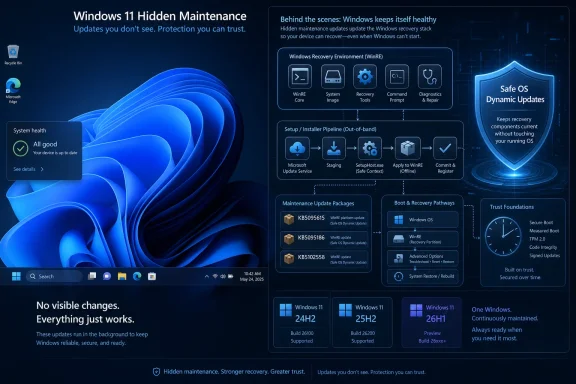
Microsoft released Windows 11 Dynamic Updates KB5102558, KB5095615, and KB5095186 on June 23, 2026, targeting Setup and Windows Recovery Environment components for Windows 11 versions 24H2, 25H2, and the emerging 26H1 branch. The updates landed beside the latest optional preview update, but they tell a different story from the usual changelog drama. Microsoft is not just polishing the visible OS; it is servicing the machinery that decides whether upgrades complete cleanly and whether recovery tools work when the desktop does not. That makes these quiet packages more important than their forgettable KB numbers suggest.
Dynamic Updates are the kind of Windows plumbing most users never see, which is precisely why they matter. They are applied at the start of a feature update, before the new operating system is laid down, and they refresh Setup files, Safe OS components, recovery images, servicing stack pieces, and in some scenarios drivers and language-related content. In ordinary language, they update the updater before the update gets to do its work.
That distinction matters because Windows upgrades are not single-file transactions. They are a choreography involving the running OS, Windows Setup, offline images, recovery components, compatibility checks, rollback logic, language packs, Features on Demand, and the servicing stack. If any of those pieces is stale, the user may experience the failure as a generic installation error, a rollback, a missing feature, or a recovery environment that cannot repair what it is supposed to repair.
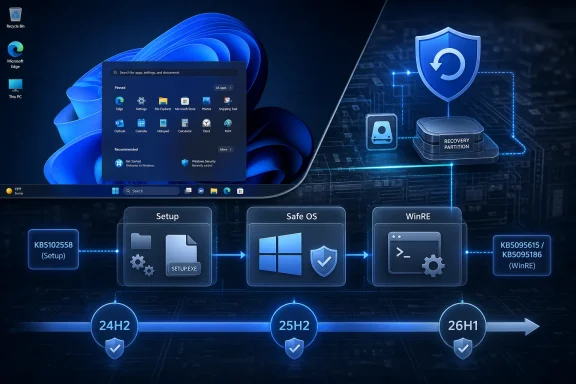
KB5102558 is the Setup Dynamic Update for Windows 11 versions 24H2 and 25H2. It refreshes Windows Setup binaries and installation files used during feature updates, which puts it in the category of updates that influence the upgrade process rather than the post-login desktop. KB5095615 is the Safe OS Dynamic Update for the same 24H2 and 25H2 line, updating the Windows Recovery Environment, or WinRE, to version 10.0.26100.8737.
Microsoft also released KB5095186 for Windows 11 version 26H1, updating that branch’s WinRE to version 10.0.28000.2335. That package matters less because 26H1 is not the mainstream production target for most users today, and more because it shows Microsoft is already servicing recovery infrastructure in the next development line. The company is laying track while the train is still being assembled.
A feature update is closer to a controlled migration than a patch. Windows has to preserve user data, installed applications, device drivers, region and language configuration, optional components, BitLocker state, recovery options, and enough rollback capability to escape disaster if the new image fails. Dynamic Update exists because the setup media or feature update payload that begins this process may not contain the latest fixes for actually completing it.
That is why the timing of KB5102558 and KB5095615 is notable. They arrived alongside the latest C-release preview update, KB5095093, but they are not merely another entry in the monthly update ledger. C-release previews are optional quality updates for the running OS; Dynamic Updates are part of the upgrade path itself. One changes what Windows is after installation. The other changes how Windows gets there.
For administrators, that difference is not academic. A broken cumulative update can often be deferred, uninstalled, or contained through rings. A broken feature update workflow can burn deployment windows, trigger help desk volume, and leave machines in inconsistent states that are harder to diagnose remotely. Microsoft’s quiet investment here is a reminder that the least glamorous part of Windows is often the part that determines whether IT gets to sleep.
The problem is that WinRE lives in a world of constraints. It is commonly stored in a recovery partition whose size and layout may date back years. It has to understand modern storage controllers, security settings, encryption states, boot configuration, and update mechanics. If that recovery image lags behind the OS it is supposed to rescue, the result is not just untidiness; it can become a genuine operational weakness.
KB5095615 and KB5095186 therefore deserve attention because they update the recovery environment itself. For Windows 11 24H2 and 25H2, the expected WinRE version after KB5095615 is 10.0.26100.8737. For Windows 11 26H1, KB5095186 brings WinRE to 10.0.28000.2335. These numbers will not help a consumer decide whether to click “Check for updates,” but they are exactly the kind of numbers administrators should care about when validating deployment baselines.
The industry has learned the hard way that recovery partitions are not theoretical. When recovery updates fail because partitions are too small, or when devices cannot enter the expected repair flow, the cleanup is messy. Microsoft can improve the recovery environment indefinitely, but enterprises still need to know whether their device fleets have enough partition space, correct WinRE registration, and predictable BitLocker handling.
KB5102558 applies to Setup for both 24H2 and 25H2. KB5095615 applies to the Safe OS recovery layer for both releases. In practical terms, Microsoft is preparing the same upgrade and recovery scaffolding for the currently deployed 24H2 population and the 25H2 path many organizations will evaluate or adopt next.
This is where Dynamic Updates become part of Microsoft’s feature-update strategy. If 25H2 is meant to be a lower-friction move from 24H2, the reliability of Setup and recovery components becomes a selling point even when Microsoft does not market it that way. The less visible the upgrade feels, the more important it is that the invisible pieces are current.
There is also a risk hidden inside that convenience. Shared servicing can make IT workflows easier, but it can blur version boundaries for users and support staff. A device may report one OS build, carry recovery components with related but distinct versioning, and receive setup packages that appear only during upgrade scenarios. The Windows servicing model has become less about a single installed version and more about a layered state that must be understood in context.
Microsoft’s public Windows development model now runs on parallel tracks: production releases, release preview channels, beta builds, and longer-lead development branches. When a recovery update appears for 26H1 alongside packages for 24H2 and 25H2, it suggests Microsoft is not waiting until the visible feature set is finalized to harden the upgrade and recovery substrate. That is the right instinct.
Recovery has to mature early because it is downstream of everything else. New platform requirements, storage behavior, drivers, encryption defaults, boot changes, and deployment assumptions all eventually collide with WinRE. If Microsoft discovers late that recovery is underprepared for a branch, the fix can be painful for OEMs, enterprises, and users already testing the release.
Still, the 26H1 package should not be overread. It does not mean mainstream users should expect a sudden production leap, nor does it prove anything specific about the eventual feature set. It means Microsoft is keeping the recovery environment aligned with the branch. In Windows servicing, that is both mundane and meaningful.
But automatic delivery has always been a partial answer in managed Windows environments. Enterprises do not merely run Windows Update; they curate deployment rings, maintain offline images, use provisioning systems, enforce network controls, stage feature updates, service virtual desktop images, and sometimes run upgrades from media that cannot freely reach Microsoft endpoints. In those contexts, “automatic when applicable” is not the same as “someone can forget about it.”
Microsoft’s own deployment guidance recognizes this split. Dynamic Update is normally one of the first steps invoked when Setup starts, and it can retrieve updated setup files, Safe OS packages, servicing stack components, cumulative updates, drivers, and optional content. But if an environment disables Dynamic Update or uses offline media, administrators may need to acquire and inject the relevant packages into images before deployment.
That creates a quiet compliance question for IT teams. If your production upgrade process blocks live Dynamic Update retrieval, then your media freshness becomes your responsibility. A stale ISO with a carefully tested task sequence may look controlled, but it can also miss fixes that Microsoft expects Setup to fetch dynamically. Control and currency are in tension, and Windows administrators live in that tension every month.
Features on Demand are not decorative extras. They can include language components, handwriting, speech, optional Windows capabilities, RSAT tools, .NET-related dependencies, and other pieces that make a machine fit its assigned role. During a feature update, Windows may need to reacquire or preserve these components so the upgraded system does not emerge in a subtly degraded state.
Dynamic Update helps with that preservation by obtaining needed content early in the setup process. That is why administrators who maintain offline images must think beyond the cumulative update. They need the right sequence: servicing stack considerations, language content, optional components, Safe OS updates, Setup updates, and the latest cumulative update in the right place. Windows image maintenance is less like copying a gold master and more like keeping a supply chain synchronized.
For home users, the practical result should be invisibility. The keyboard layout remains, speech components work, recovery tools load, and the feature update finishes without demanding that the user understand any of it. For IT pros, invisibility is the product of planning.
This is not a criticism unique to KB5095615 or KB5095186. It is a structural problem in the Windows ecosystem. Microsoft can ship a better recovery image, but the PC must have somewhere to put it. OEMs can create recovery layouts, but devices live through years of upgrades, encryption changes, and enterprise reimaging. Administrators can script partition changes, but doing so at scale is not risk-free.
That is why Safe OS Dynamic Updates deserve more respect than they get. They sit at the intersection of recovery reliability and deployment debt. When they apply cleanly, nobody notices. When they fail, the root cause may be buried in partition sizing, reagent configuration, encryption policy, or image history rather than the KB package itself.
For WindowsForum readers, this is the part worth checking before a crisis. Confirm that WinRE is enabled. Confirm the recovery environment version after servicing where appropriate. Confirm that your imaging process does not accidentally carry forward a partition scheme that worked in 2021 but strains under 2026 servicing expectations. The dull checks are the ones that prevent the dramatic forum thread later.
Dynamic Updates are different, but the shared timing is not accidental in spirit. Microsoft is servicing both the running OS and the path that gets machines to the next OS state. One layer handles today’s quality fixes; the other tries to make tomorrow’s transition less brittle. Together, they show how Windows has become a continuously serviced platform rather than a product that changes only at major release milestones.
That has benefits. Microsoft can fix setup problems before a broad feature rollout, update recovery behavior without waiting for a full release, and keep deployment media from aging into a liability. It also has costs. The update ecosystem is more complex, KB numbers multiply, and even experienced users can struggle to understand which package affects which layer of Windows.
The answer is not nostalgia for simpler times. Windows is too large, too diverse, and too security-sensitive for the old model to return. The answer is better literacy about servicing layers. A cumulative update, a Setup Dynamic Update, a Safe OS Dynamic Update, an enablement package, an Insider build, and a recovery image version are not interchangeable things.
Dynamic Updates are the backstage crew. They are not meant to excite testers, but they make testing and upgrading meaningful by keeping the foundational process intact. If a Beta build introduces a new feature but the upgrade path is unreliable, the feedback loop is polluted. Users cannot evaluate the OS if they cannot install it cleanly or recover from it safely.
This is especially important as Microsoft runs multiple branches in parallel. The Windows Insider Program is no longer just a preview lane for next month’s release. It is a layered system of channels, build ranges, feature staging, and A/B rollouts. In that world, recovery and setup consistency become stabilizers.
The irony is that the most important update in a given week may be the one that adds no visible feature. A Safe OS package that prevents a failed rollback or a Setup package that fixes an obscure migration issue can have more practical value than a redesigned settings page. Users notice polish; administrators notice completion rates.
That is both the strength and the weakness of the model. Automation reduces friction for the majority, but it can hide complexity until something fails. When Windows Setup says it is checking for updates during an upgrade, it may be doing much more than fetching a cumulative patch. It may be replacing the very tools that decide whether the upgrade survives.
Microsoft has spent years moving Windows toward this kind of adaptive servicing. The OS is no longer just patched after installation; the installation process itself is patched, the recovery layer is patched, optional content is reacquired, and drivers can be pulled into the upgrade flow. That is rational engineering for a platform with more than a billion historical configuration permutations.
It also means troubleshooting has to mature. Asking “what build are you on?” is no longer enough. The better question is what build, what servicing stack state, what recovery environment version, what setup media, what Dynamic Update policy, and what optional content path. That is not friendly, but it is honest.
The interpretation is more interesting. Microsoft is aligning setup, recovery, current production servicing, near-term feature movement, and forward-branch development in the same maintenance rhythm. That is not a flashy Windows moment, but it is the operating system equivalent of inspecting bridges before traffic increases.
For users, the message is not to hunt these updates manually unless a specific support or deployment scenario requires it. For administrators, the message is to make sure your processes do not accidentally bypass the very mechanism Microsoft expects to keep feature updates reliable. If Dynamic Update is blocked, offline image servicing has to carry the burden.
This is also a reminder that “Windows Update” is no longer a single lane. It is a distribution system for visible fixes, setup fixes, recovery fixes, drivers, optional components, enablement logic, and branch-specific servicing. Treating every KB as if it belongs to the same category is how confusion starts.
 Microsoft Is Servicing the Escape Hatch Before the Next Jump
Dynamic Updates are the kind of Windows plumbing most users never see, which is precisely why they matter. They are applied at the start of a feature update, before the new operating system is laid down, and they refresh Setup files, Safe OS components, recovery images, servicing stack pieces, and in some scenarios drivers and language-related content. In ordinary language, they update the updater before the update gets to do its work.That distinction matters because Windows upgrades are not single-file transactions. They are a choreography involving the running OS, Windows Setup, offline images, recovery components, compatibility checks, rollback logic, language packs, Features on Demand, and the servicing stack. If any of those pieces is stale, the user may experience the failure as a generic installation error, a rollback, a missing feature, or a recovery environment that cannot repair what it is supposed to repair.
KB5102558 is the Setup Dynamic Update for Windows 11 versions 24H2 and 25H2. It refreshes Windows Setup binaries and installation files used during feature updates, which puts it in the category of updates that influence the upgrade process rather than the post-login desktop. KB5095615 is the Safe OS Dynamic Update for the same 24H2 and 25H2 line, updating the Windows Recovery Environment, or WinRE, to version 10.0.26100.8737.
Microsoft also released KB5095186 for Windows 11 version 26H1, updating that branch’s WinRE to version 10.0.28000.2335. That package matters less because 26H1 is not the mainstream production target for most users today, and more because it shows Microsoft is already servicing recovery infrastructure in the next development line. The company is laying track while the train is still being assembled.
The Desktop Gets the Headlines, but Setup Decides the Outcome
The ordinary Windows update conversation is dominated by what changes after a reboot. Users ask whether File Explorer is faster, whether the taskbar moved, whether Copilot gained another hook, whether games stutter, and whether Start search broke again. Those are valid concerns, but they sit at the visible end of a much deeper servicing stack.A feature update is closer to a controlled migration than a patch. Windows has to preserve user data, installed applications, device drivers, region and language configuration, optional components, BitLocker state, recovery options, and enough rollback capability to escape disaster if the new image fails. Dynamic Update exists because the setup media or feature update payload that begins this process may not contain the latest fixes for actually completing it.
That is why the timing of KB5102558 and KB5095615 is notable. They arrived alongside the latest C-release preview update, KB5095093, but they are not merely another entry in the monthly update ledger. C-release previews are optional quality updates for the running OS; Dynamic Updates are part of the upgrade path itself. One changes what Windows is after installation. The other changes how Windows gets there.
For administrators, that difference is not academic. A broken cumulative update can often be deferred, uninstalled, or contained through rings. A broken feature update workflow can burn deployment windows, trigger help desk volume, and leave machines in inconsistent states that are harder to diagnose remotely. Microsoft’s quiet investment here is a reminder that the least glamorous part of Windows is often the part that determines whether IT gets to sleep.
WinRE Has Become Too Important to Treat as an Afterthought
Windows Recovery Environment used to feel like a side room in the Windows house: useful when needed, mostly ignored otherwise. In the Windows 11 era, it has become part of the platform’s resilience story. It is involved in startup repair, system restore workflows, uninstalling some updates, command-line recovery, image recovery, reset scenarios, and BitLocker-adjacent troubleshooting.The problem is that WinRE lives in a world of constraints. It is commonly stored in a recovery partition whose size and layout may date back years. It has to understand modern storage controllers, security settings, encryption states, boot configuration, and update mechanics. If that recovery image lags behind the OS it is supposed to rescue, the result is not just untidiness; it can become a genuine operational weakness.
KB5095615 and KB5095186 therefore deserve attention because they update the recovery environment itself. For Windows 11 24H2 and 25H2, the expected WinRE version after KB5095615 is 10.0.26100.8737. For Windows 11 26H1, KB5095186 brings WinRE to 10.0.28000.2335. These numbers will not help a consumer decide whether to click “Check for updates,” but they are exactly the kind of numbers administrators should care about when validating deployment baselines.
The industry has learned the hard way that recovery partitions are not theoretical. When recovery updates fail because partitions are too small, or when devices cannot enter the expected repair flow, the cleanup is messy. Microsoft can improve the recovery environment indefinitely, but enterprises still need to know whether their device fleets have enough partition space, correct WinRE registration, and predictable BitLocker handling.
24H2 and 25H2 Are Being Treated as a Shared Servicing Reality
The pairing of Windows 11 24H2 and 25H2 in these Dynamic Updates reflects a broader servicing pattern. Microsoft has been increasingly comfortable treating adjacent Windows 11 releases as closely related platforms, differentiated by enablement, policy, and staged features rather than wholly separate engineering universes. That can simplify servicing, but it also makes the hidden layers more consequential.KB5102558 applies to Setup for both 24H2 and 25H2. KB5095615 applies to the Safe OS recovery layer for both releases. In practical terms, Microsoft is preparing the same upgrade and recovery scaffolding for the currently deployed 24H2 population and the 25H2 path many organizations will evaluate or adopt next.
This is where Dynamic Updates become part of Microsoft’s feature-update strategy. If 25H2 is meant to be a lower-friction move from 24H2, the reliability of Setup and recovery components becomes a selling point even when Microsoft does not market it that way. The less visible the upgrade feels, the more important it is that the invisible pieces are current.
There is also a risk hidden inside that convenience. Shared servicing can make IT workflows easier, but it can blur version boundaries for users and support staff. A device may report one OS build, carry recovery components with related but distinct versioning, and receive setup packages that appear only during upgrade scenarios. The Windows servicing model has become less about a single installed version and more about a layered state that must be understood in context.
26H1 Is Already Casting a Shadow Over Today’s Machines
The mention of Windows 11 version 26H1 in this update batch is easy to skip, but it is one of the more interesting signals. KB5095186 is a Safe OS Dynamic Update for 26H1, and the resulting WinRE version is 10.0.28000.2335. That build numbering places it in the forward-looking branch rather than the production reality most readers are managing today.Microsoft’s public Windows development model now runs on parallel tracks: production releases, release preview channels, beta builds, and longer-lead development branches. When a recovery update appears for 26H1 alongside packages for 24H2 and 25H2, it suggests Microsoft is not waiting until the visible feature set is finalized to harden the upgrade and recovery substrate. That is the right instinct.
Recovery has to mature early because it is downstream of everything else. New platform requirements, storage behavior, drivers, encryption defaults, boot changes, and deployment assumptions all eventually collide with WinRE. If Microsoft discovers late that recovery is underprepared for a branch, the fix can be painful for OEMs, enterprises, and users already testing the release.
Still, the 26H1 package should not be overread. It does not mean mainstream users should expect a sudden production leap, nor does it prove anything specific about the eventual feature set. It means Microsoft is keeping the recovery environment aligned with the branch. In Windows servicing, that is both mundane and meaningful.
Automatic Delivery Does Not Eliminate Administrative Responsibility
Microsoft says Setup and Recovery Dynamic Updates are downloaded and installed automatically through Windows Update when applicable. That line will reassure home users, and it should. Most consumer PCs will never need manual handling of KB5102558 or KB5095615, because these packages do their work during supported upgrade and recovery servicing paths.But automatic delivery has always been a partial answer in managed Windows environments. Enterprises do not merely run Windows Update; they curate deployment rings, maintain offline images, use provisioning systems, enforce network controls, stage feature updates, service virtual desktop images, and sometimes run upgrades from media that cannot freely reach Microsoft endpoints. In those contexts, “automatic when applicable” is not the same as “someone can forget about it.”
Microsoft’s own deployment guidance recognizes this split. Dynamic Update is normally one of the first steps invoked when Setup starts, and it can retrieve updated setup files, Safe OS packages, servicing stack components, cumulative updates, drivers, and optional content. But if an environment disables Dynamic Update or uses offline media, administrators may need to acquire and inject the relevant packages into images before deployment.
That creates a quiet compliance question for IT teams. If your production upgrade process blocks live Dynamic Update retrieval, then your media freshness becomes your responsibility. A stale ISO with a carefully tested task sequence may look controlled, but it can also miss fixes that Microsoft expects Setup to fetch dynamically. Control and currency are in tension, and Windows administrators live in that tension every month.
Language Packs and Features on Demand Are the Unsexy Reason This Matters
One of Dynamic Update’s underrated jobs is preserving language packs and Features on Demand during upgrades. That sounds like a footnote until you manage a multilingual workforce, education fleet, call center, engineering group, or regulated environment with specific optional components installed. A feature update that “succeeds” but strips or breaks expected capabilities is still a failed deployment from the user’s point of view.Features on Demand are not decorative extras. They can include language components, handwriting, speech, optional Windows capabilities, RSAT tools, .NET-related dependencies, and other pieces that make a machine fit its assigned role. During a feature update, Windows may need to reacquire or preserve these components so the upgraded system does not emerge in a subtly degraded state.
Dynamic Update helps with that preservation by obtaining needed content early in the setup process. That is why administrators who maintain offline images must think beyond the cumulative update. They need the right sequence: servicing stack considerations, language content, optional components, Safe OS updates, Setup updates, and the latest cumulative update in the right place. Windows image maintenance is less like copying a gold master and more like keeping a supply chain synchronized.
For home users, the practical result should be invisibility. The keyboard layout remains, speech components work, recovery tools load, and the feature update finishes without demanding that the user understand any of it. For IT pros, invisibility is the product of planning.
The Recovery Partition Is Still the Weak Link Nobody Wants to Own
The most uncomfortable part of WinRE servicing is that it depends on old disk decisions. Many PCs carry recovery partitions created by OEM factory images, earlier Windows installations, or upgrade paths that predate today’s servicing expectations. If the partition is too small or poorly placed, updating WinRE can become harder than Microsoft’s documentation makes it sound.This is not a criticism unique to KB5095615 or KB5095186. It is a structural problem in the Windows ecosystem. Microsoft can ship a better recovery image, but the PC must have somewhere to put it. OEMs can create recovery layouts, but devices live through years of upgrades, encryption changes, and enterprise reimaging. Administrators can script partition changes, but doing so at scale is not risk-free.
That is why Safe OS Dynamic Updates deserve more respect than they get. They sit at the intersection of recovery reliability and deployment debt. When they apply cleanly, nobody notices. When they fail, the root cause may be buried in partition sizing, reagent configuration, encryption policy, or image history rather than the KB package itself.
For WindowsForum readers, this is the part worth checking before a crisis. Confirm that WinRE is enabled. Confirm the recovery environment version after servicing where appropriate. Confirm that your imaging process does not accidentally carry forward a partition scheme that worked in 2021 but strains under 2026 servicing expectations. The dull checks are the ones that prevent the dramatic forum thread later.
Optional Preview Updates Are the Visible Half of the Same Strategy
The Dynamic Updates arrived alongside the latest C-release preview update, KB5095093. Preview updates occupy a strange place in Windows culture: power users watch them closely, cautious admins avoid broad deployment, and Microsoft uses them to stage non-security fixes before the following Patch Tuesday. They are visible, optional, and endlessly debated.Dynamic Updates are different, but the shared timing is not accidental in spirit. Microsoft is servicing both the running OS and the path that gets machines to the next OS state. One layer handles today’s quality fixes; the other tries to make tomorrow’s transition less brittle. Together, they show how Windows has become a continuously serviced platform rather than a product that changes only at major release milestones.
That has benefits. Microsoft can fix setup problems before a broad feature rollout, update recovery behavior without waiting for a full release, and keep deployment media from aging into a liability. It also has costs. The update ecosystem is more complex, KB numbers multiply, and even experienced users can struggle to understand which package affects which layer of Windows.
The answer is not nostalgia for simpler times. Windows is too large, too diverse, and too security-sensitive for the old model to return. The answer is better literacy about servicing layers. A cumulative update, a Setup Dynamic Update, a Safe OS Dynamic Update, an enablement package, an Insider build, and a recovery image version are not interchangeable things.
Insider Builds Supply the Noise; Dynamic Updates Supply the Discipline
Microsoft also published new Windows Insider builds around the same cycle, including Beta Channel work and a separate 26H1 Beta update. Insider builds are the public theater of Windows development. They show features, reversals, experiments, UI changes, and the occasional glimpse of Microsoft’s product priorities.Dynamic Updates are the backstage crew. They are not meant to excite testers, but they make testing and upgrading meaningful by keeping the foundational process intact. If a Beta build introduces a new feature but the upgrade path is unreliable, the feedback loop is polluted. Users cannot evaluate the OS if they cannot install it cleanly or recover from it safely.
This is especially important as Microsoft runs multiple branches in parallel. The Windows Insider Program is no longer just a preview lane for next month’s release. It is a layered system of channels, build ranges, feature staging, and A/B rollouts. In that world, recovery and setup consistency become stabilizers.
The irony is that the most important update in a given week may be the one that adds no visible feature. A Safe OS package that prevents a failed rollback or a Setup package that fixes an obscure migration issue can have more practical value than a redesigned settings page. Users notice polish; administrators notice completion rates.
Microsoft’s Servicing Bet Is That Users Should Not Have to Know This Exists
The ideal Dynamic Update is never discussed. It downloads at the right moment, applies to the right image, preserves the right content, and disappears into a successful upgrade. If Microsoft’s system works, KB5102558 and KB5095615 will mostly be remembered by administrators validating logs, not by consumers complaining on support forums.That is both the strength and the weakness of the model. Automation reduces friction for the majority, but it can hide complexity until something fails. When Windows Setup says it is checking for updates during an upgrade, it may be doing much more than fetching a cumulative patch. It may be replacing the very tools that decide whether the upgrade survives.
Microsoft has spent years moving Windows toward this kind of adaptive servicing. The OS is no longer just patched after installation; the installation process itself is patched, the recovery layer is patched, optional content is reacquired, and drivers can be pulled into the upgrade flow. That is rational engineering for a platform with more than a billion historical configuration permutations.
It also means troubleshooting has to mature. Asking “what build are you on?” is no longer enough. The better question is what build, what servicing stack state, what recovery environment version, what setup media, what Dynamic Update policy, and what optional content path. That is not friendly, but it is honest.
The KB Numbers Are Boring Because the Strategy Is Not
The concrete facts are simple. KB5102558 updates Windows Setup components for Windows 11 24H2 and 25H2. KB5095615 updates WinRE for those same releases and should bring the recovery environment to 10.0.26100.8737. KB5095186 updates WinRE for Windows 11 26H1 and should bring that recovery environment to 10.0.28000.2335.The interpretation is more interesting. Microsoft is aligning setup, recovery, current production servicing, near-term feature movement, and forward-branch development in the same maintenance rhythm. That is not a flashy Windows moment, but it is the operating system equivalent of inspecting bridges before traffic increases.
For users, the message is not to hunt these updates manually unless a specific support or deployment scenario requires it. For administrators, the message is to make sure your processes do not accidentally bypass the very mechanism Microsoft expects to keep feature updates reliable. If Dynamic Update is blocked, offline image servicing has to carry the burden.
This is also a reminder that “Windows Update” is no longer a single lane. It is a distribution system for visible fixes, setup fixes, recovery fixes, drivers, optional components, enablement logic, and branch-specific servicing. Treating every KB as if it belongs to the same category is how confusion starts.
The Practical Read on KB5102558, KB5095615, and KB5095186
The immediate lesson is not panic, but posture. These updates are unlikely to change daily Windows behavior, yet they are part of the scaffolding that determines whether future feature updates and recovery scenarios behave predictably. That makes them most relevant to the people responsible for deployment reliability.- KB5102558 is a Setup Dynamic Update for Windows 11 versions 24H2 and 25H2, so its impact is concentrated in feature update installation rather than everyday desktop use.
- KB5095615 is a Safe OS Dynamic Update for Windows 11 versions 24H2 and 25H2, and Microsoft expects WinRE to report version 10.0.26100.8737 after installation.
- KB5095186 performs the comparable Safe OS recovery update for Windows 11 version 26H1, bringing that branch’s WinRE to version 10.0.28000.2335.
- Dynamic Updates are generally handled automatically through Windows Update when applicable, but offline media and tightly managed deployment workflows may still require manual image maintenance.
- Administrators should validate WinRE state, recovery partition health, and Dynamic Update policy before large feature-update rollouts, not after failures appear.
- The presence of both 24H2/25H2 and 26H1 packages shows Microsoft servicing today’s upgrade path and tomorrow’s development branch at the same time.
References
- Primary source: Windows Report
Published: 2026-06-29T05:10:19.009072
Microsoft Releases Windows 11 KB5102558 and KB5095615 Dynamic Updates
Microsoft released Windows 11 KB5095186, KB5102558, and KB5095615 to update WinRE, Setup files, and feature update components. windowsreport.com
- Related coverage: windowsforum.com
Windows 11 26H2 Enablement Update & KB5095093 Preview: What IT Should Know | Windows Forum
Microsoft confirmed on June 23, 2026, that Windows 11 version 26H2 will ship as an enablement-package update for eligible PCs already on versions 24H2 or...windowsforum.com - Official source: catalog.update.microsoft.com
- Related coverage: owler.com
- Official source: support.microsoft.com
September 14, 2021—KB5005615 (Security-only update) - Microsoft Support
 support.microsoft.com
- Official source: learn.microsoft.com
Windows 11 - release information | Microsoft Learn
Learn release information for Windows 11 releaseslearn.microsoft.com
- Related coverage: bd.com
whitelisted microsoft and third party patches bd alaris products november 2025
PDF documentwww.bd.com